Bitcoin Payments in Hotels & Hospitality | Coinsnap Guide 2026
Hotels and accommodation providers operate in one of the most international, fast-moving, and payment-intensive industries in the world. Guests book from abroad, pay deposits in advance, settle invoices on arrival or departure, and spend across multiple services during their stay—from restaurants and wellness to activities and rentals.
In this environment, payments are not just an operational necessity. They shape the guest experience, influence booking conversion, and directly impact efficiency and margins.
Bitcoin and Lightning payments offer a practical alternative to traditional payment methods. They reduce friction in international transactions, simplify invoicing, and enable fast, direct payments across the entire hotel business.
With Coinsnap, hotels can accept Bitcoin payments online and at the point of sale, directly into their own wallet. There are no intermediaries holding funds, no chargebacks, and no need to change existing systems.
This guide explains where Bitcoin payments fit into the hospitality industry, why they are useful, and how Coinsnap enables them across the full customer journey—from booking to checkout.
Why the Hospitality Industry Is Ideal for Bitcoin Payments
Few industries combine international reach, operational complexity, and payment diversity quite like hospitality. This makes hotels a natural fit for Bitcoin payments.
International clientele and payment friction
Hotels attract guests from all over the world. That sounds like a pure advantage—but on the payment side, it creates constant friction. Currency conversions, cross-border fees, regional payment restrictions, and card acceptance issues are part of daily operations.
For a guest, paying a hotel abroad can quickly become more complicated than expected. For the hotel, accepting those payments often means higher fees, delays, and occasional failures.
Bitcoin removes much of this friction. Payments are global by default, independent of banking systems, and do not require currency conversion infrastructure. A guest can complete a payment instantly via Lightning, or reliably via an on-chain transaction, without depending on card networks or international transfers.
Upfront payments for reservations
Many hotels require deposits, reservation guarantees, or full prepayments—especially during peak seasons or for high-value bookings. These payments often come from international guests, where sending money abroad may be slow, expensive, or even restricted.
Bitcoin offers a neutral payment rail that works regardless of geography or local banking limitations. A guest can complete a reservation payment within seconds, without needing a credit card or navigating international bank transfers.
Platform-based bookings and off-platform payments
Booking platforms such as Booking.com or Airbnb frequently separate booking from payment. Options like “pay at property” or “pay later” create a natural gap between reservation and settlement.
Hotels can use this gap strategically. A booking can be confirmed through the platform, while the actual payment is handled directly by sending a Bitcoin payment request for a deposit or the full amount.
This approach gives hotels more control over the payment process. It reduces friction, adds flexibility for international guests, and can improve conversion in situations where traditional payment methods fall short.
Invoice-driven workflows
Invoicing sits at the core of hotel operations. Reservation confirmations, deposit requests, final invoices, and B2B billing for events or group bookings all rely on structured payment requests.
Traditional invoice payments tend to be slow and manual. Guests must enter bank details, reference numbers, and wait for confirmation. Errors happen, and reconciliation takes time.
Bitcoin turns an invoice into a direct payment action. Instead of instructions, the guest receives a simple way to pay immediately, without ambiguity or delay.
Multiple revenue streams within the hotel
A hotel is more than a place to sleep. It operates restaurants and bars, spa and wellness services, rentals, excursions, and various personal services.
Each of these touchpoints requires payments that are fast, flexible, and easy to complete. Bitcoin, particularly via Lightning, fits naturally into this environment. It enables small, spontaneous, mobile-first transactions that align with how guests behave during their stay.
Whether paying for a drink, booking a massage, or renting equipment, the experience becomes quick and frictionless.
Checkout and final settlement
At the end of a stay, guests are often presented with a consolidated bill covering multiple services. This can become a point of friction, especially for international travelers dealing with currency conversions, card limits, or unfamiliar payment processes.
Bitcoin simplifies this final step. The invoice becomes a QR code, and the guest completes the payment instantly—either via Lightning for speed or on-chain for larger amounts.
There are no forms to fill out, no delays, and no uncertainty. The transaction is completed directly and finally.
Key Benefits of Bitcoin Payments for Hotels and their Guests
Bitcoin payments are not just an alternative—they solve specific, recurring problems in the hospitality business.
Benefits for hotels
For hotels, the most immediate impact is a reduction in payment friction. International transactions become simpler, and there is no need to deal with complex banking details or failed card payments.
Settlement is faster as well. Payments arrive directly in the hotel’s wallet, either instantly via Lightning or within minutes on-chain. This improves cash flow and reduces dependency on third-party processors.
A particularly important advantage is the absence of chargebacks. Bitcoin and Lightning payments are final. Once a transaction is completed, it cannot be reversed by the payer. For hotels, this removes a significant source of risk and administrative overhead. There are no post-checkout disputes, no fraud-related reversals, and no need to manage chargeback processes. This is especially relevant for high-value bookings, international reservations, and no-show scenarios.
Costs are typically lower compared to traditional payment methods, particularly for cross-border transactions. At the same time, Bitcoin can be added as an additional payment option without replacing existing systems. Hotels can integrate it alongside cards and bank transfers without disrupting their current setup.
Finally, offering Bitcoin payments can attract new customer segments. International travelers, tech-savvy guests, and customers actively looking for crypto-friendly businesses may prefer or even expect this option.
Benefits for guests
For guests, the experience becomes simpler and more predictable. Payments can be made from anywhere without worrying about currency conversion, bank restrictions, or card compatibility.
The process itself is faster. A QR code scan replaces the need to enter payment details or wait for confirmations. This reduces friction at every stage, from booking to checkout.
Privacy is another factor. Guests can complete payments without sharing sensitive financial information, which is increasingly important for many travelers.
At the same time, Bitcoin payments in hotels offer flexibility. Guests can choose between Lightning for fast, everyday payments or on-chain transactions for larger amounts, depending on their preference.
Bitcoin Payments Across the Hotel Customer Journey
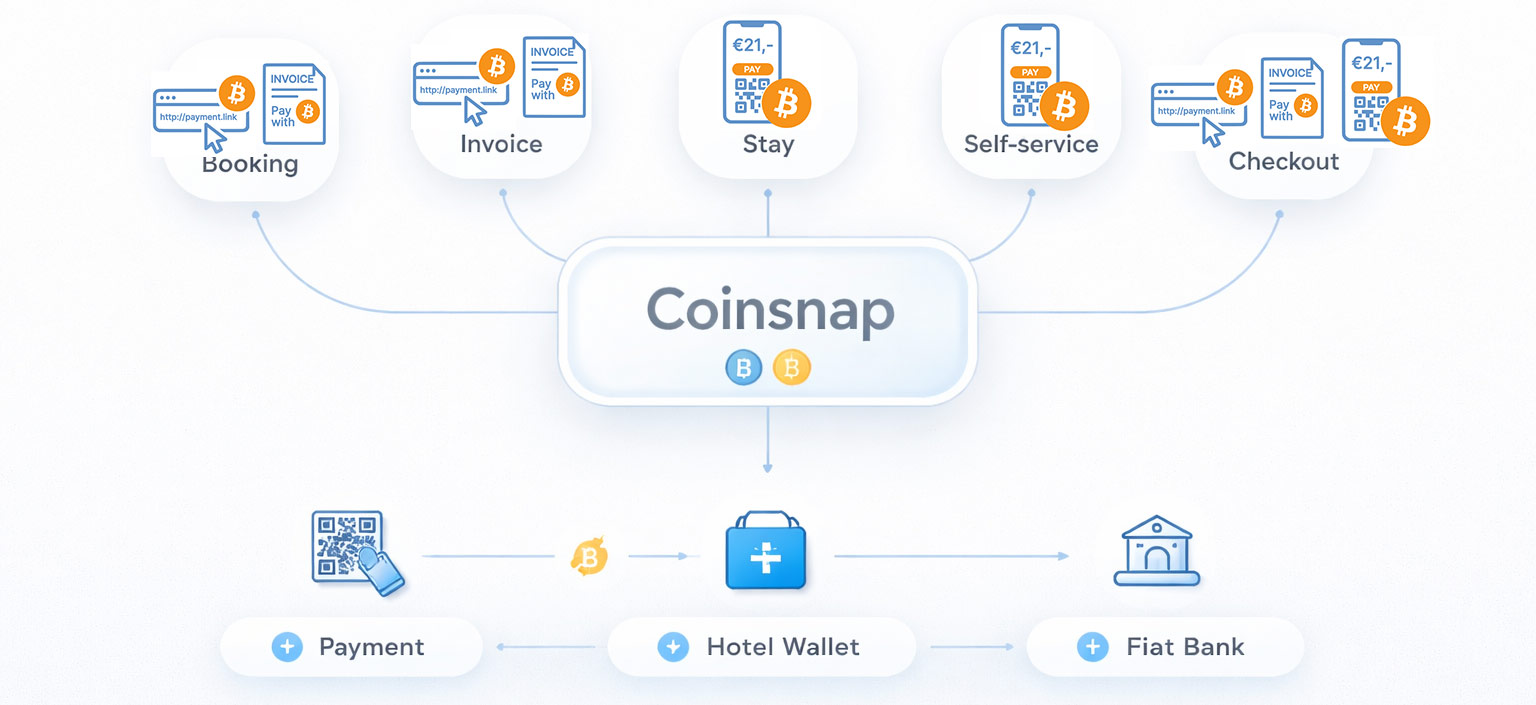
Bitcoin payments are not limited to a single interaction. They can be integrated across the entire lifecycle of a guest’s stay.
Booking and reservation payments
At the booking stage, hotels can request deposits or full prepayments by sending a payment link or invoice. This works both for direct bookings and for reservations made through platforms where payment is not processed immediately.
For international guests or last-minute bookings, this can significantly reduce friction and speed up confirmation.
Bitcoin Payment Link
 The Bitcoin Payment Link is the simplest way to accept Bitcoin payments without relying on a shop system, payment gateway, or dedicated website. It is designed for situations where a hotel—or any business—already communicates payment requests directly, for example via email, messaging, or booking communication.
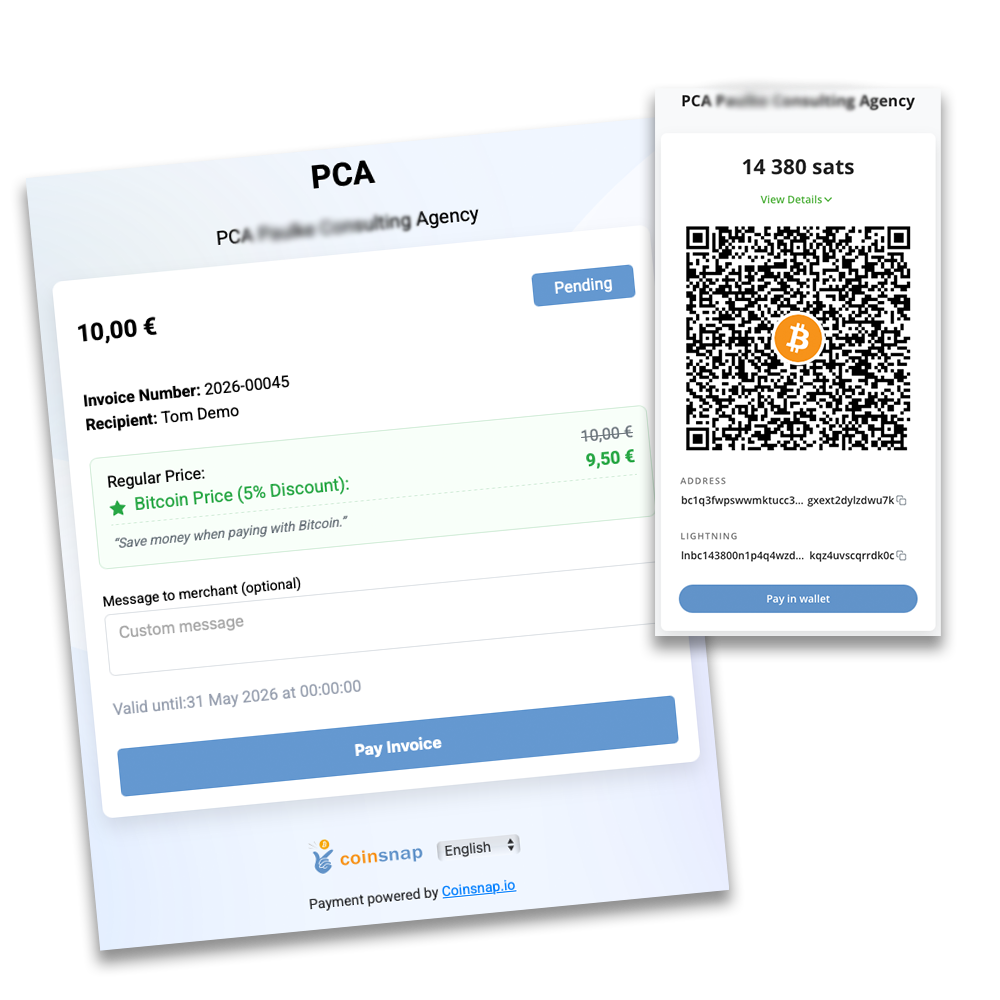
Instead of providing bank details or payment instructions, the hotel includes a payment link. When the guest opens it, they are taken to a Coinsnap-hosted payment page, where they click “Pay with Bitcoin” and complete the payment by scanning a QR code with their wallet.
The Payment Link does not replace invoicing or booking systems. It works alongside them. This makes it particularly useful for reservation deposits, prepayments, and B2B bookings, where invoices are created and sent through existing workflows, but payment itself should be faster and simpler.
Because the payment page is fully browser-based, it works on any device and requires no installation. Payments are processed instantly and forwarded directly to the hotel’s wallet, a connected BTCPay Server, or—if preferred—converted into fiat via Coinsnap partners.
Bitcoin Invoice
 The Bitcoin Invoice pay-tool is designed to let customers settle invoices that have already been issued—without changing how those invoices are created or sent. It does not generate invoices itself. Instead, it provides a dedicated Bitcoin payment form that customers can use to pay an existing invoice.
The process is straightforward. The hotel sends its invoice as usual—via email, booking system, or accounting software—and includes a link to a Bitcoin payment page or embedded form. The guest opens this page, enters the invoice amount and reference, clicks “Pay with Bitcoin,” and completes the payment by scanning a QR code with their wallet.
This makes the Bitcoin Invoice particularly useful for hotels that rely on external invoicing systems or custom workflows. It fits seamlessly into existing processes while adding a global, low-friction payment option—without relying on card networks or bank transfers.
Payments are sent directly to the hotel’s configured destination, whether that is a Lightning wallet, an on-chain wallet, a connected BTCPay Server, or—if preferred—converted into fiat via Coinsnap partners.
👉 Explore the Bitcoin Invoice pay-tool and enable simple, borderless invoice payments with Bitcoin.
B2B bookings and group arrangements
Hotels regularly handle corporate bookings, conferences, and group stays. These arrangements often involve large upfront payments, international clients, and complex invoicing structures.
Bitcoin payments in hotels simplify thes processes by enabling fast, direct payments that are not dependent on banking timelines or regional restrictions.
In these scenarios, both Payment Links and Bitcoin Invoices provide efficient ways to handle large transactions while keeping the process simple for the client.
Payments during the stay
During the stay, guests interact with multiple services. Payments for food, drinks, wellness, or activities can be handled quickly through a simple point-of sale interface.
Web Point of Sale (WebPoS)
 The Web Point of Sale is designed for in-person payments, allowing hotels to accept Bitcoin and Lightning anywhere on-site—at the front desk, in the restaurant, at the bar, in the spa, or at temporary service points. It runs entirely in the browser, so any smartphone, tablet, or computer can be used without installing apps or specialized hardware.
Staff can either select items from a simple product catalog or enter amounts manually, making it suitable for both structured sales and flexible scenarios such as services, tips, or ad-hoc charges. The interface is intuitive and built for everyday use, enabling team members to accept payments quickly and reliably, even in busy environments.
At the same time, the WebPoS is highly versatile. It can also be used in self-service settings—such as minibar stations, rental areas, or unattended service points—where guests complete payments independently by scanning a QR code.
All payments are processed instantly and sent directly to the hotel’s configured wallet or settlement destination, while operational control remains with the business, even when multiple staff members use the system.
Self-service payments
Self-service areas are increasingly common in hotels. Whether it is a minibar, a rental station, or a shared facility, guests expect to be able to pay independently.
The WebPoS can be placed directly at these touchpoints, allowing guests to select an item and complete the payment instantly using their smartphone—without staff involvement.
This reduces operational overhead while improving convenience.
Checkout and final invoice
At checkout, Bitcoin turns the final invoice into a direct payment interaction. Instead of processing a card or waiting for a transfer, the guest scans a QR code and completes the transaction immediately.
Both the Bitcoin Invoice and the WebPoS can be used here, depending on how the hotel structures its checkout process.
Coinsnap Solutions for Every Hotel Payment Scenario
Coinsnap covers every Bitcoin payment use case in the hospitality business. Whether it’s reservation payments, invoicing, in-person transactions, or self-service payments, each scenario is supported by a dedicated solution that integrates seamlessly into existing hotel workflows.
If a specific edge case requires a custom setup, Coinsnap’s open architecture—with APIs, open-source components, and detailed documentation—ensures it can still be implemented with acceptable effort.
Bitcoin Payment Integration (API & Plugins)
For hotels that want to fully integrate Bitcoin payments into their existing systems, Coinsnap offers a flexible integration layer based on APIs, plugins, and open-source components. This allows payment functionality to be embedded directly into hotel management software or custom invoicing systems.
Instead of adding payments externally, Bitcoin becomes part of the native workflow—from booking confirmation to automated invoicing and checkout. This is particularly valuable for hotels with established digital infrastructure or specific operational requirements.
Thanks to detailed documentation and a modular architecture, integration can be implemented efficiently and adapted to individual needs.
👉 Discover how Coinsnap integration brings Bitcoin payments directly into your hotel systems.
Coinsnap Dashboard
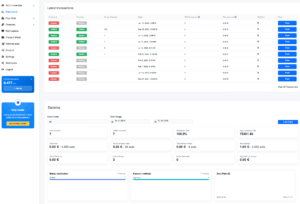 The Coinsnap Dashboard gives hotel management full visibility over all Bitcoin payments in real time. Every transaction—whether from booking deposits, invoices, point-of-sale payments, or self-service—is clearly recorded and accessible in one central interface.
For each payment, all relevant details are available, including timestamps, amounts in Bitcoin and fiat equivalents, transaction status, and references that can be linked to bookings or invoices. This makes it easy to track revenue across different areas of the hotel and maintain a clear overview at all times.
For accounting and tax purposes, transaction data can be exported in structured formats, allowing seamless integration into existing bookkeeping and reporting workflows such as PayinBTC.me or Cointracking. This ensures that Bitcoin payments fit cleanly into standard financial processes without additional complexity.
👉 Explore the Coinsnap Dashboard and keep full control over your Bitcoin payment operations
Which Coinsnap Solution Fits Which Use Case?
Different scenarios require different tools, but they all fit into a coherent system.
For hotels using their own booking software, API integration allows payments to be embedded directly into the booking and invoicing flow. This creates a seamless experience from reservation to payment.
For platform-based bookings where payment happens outside the platform, Payment Links and Bitcoin Invoices provide a simple way to request deposits or full payments. If the guest pays on arrival, the WebPoS offers a flexible option at the front desk.
In B2B scenarios, Payment Links and Invoices are particularly effective, as they simplify large, cross-border transactions and reduce administrative complexity.
For daily operations such as restaurants, wellness services, rentals, or personal services, the Web-PoS is the most practical tool. It enables fast, direct payments and fits naturally into staff workflows.
In self-service environments, the same Web-PoS interface can be used without staff involvement, allowing guests to pay independently.
At checkout, all options come together. The final invoice can be settled via a link, an invoice page, or directly at the point of sale, depending on the setup.
Common Concerns About Bitcoin Payments in Hotels
While Bitcoin payments offer clear advantages, hotels often have practical concerns.
Volatility is one of the most common. However, hotels do not need to hold Bitcoin. Payments can be converted into fiat currency through integrated partners like Wave.space, Bringin or DFX, allowing businesses to receive euros or other currencies directly.
Accounting is another consideration. Coinsnap provides transaction data that can be exported and integrated into existing accounting workflows, ensuring proper documentation and compliance.
Complexity is often overestimated. There is no need to run nodes, manage infrastructure, or develop custom systems. Setup is straightforward and can be completed quickly.
From the guest perspective, usability is simple. Paying with Bitcoin is reduced to scanning a QR code. No technical knowledge is required.
Conclusion – Why Your Hotel Is Ready for Bitcoin Payments
Hotels operate in a demanding payment environment shaped by international guests, multiple revenue streams, and diverse transaction scenarios.
Bitcoin payments in hotels offer a practical way to reduce friction, improve efficiency, and simplify operations across the hotel business while attracting a new generation of crypto-savvy guests.
They enable faster international payments, streamlined invoicing, seamless point-of-sale transactions, and reliable, final settlements without chargeback risk.
With Coinsnap, hotels can integrate these capabilities into their existing systems without disruption, avoiding the need for expensive consultants and leaving core business IT and operations untouched.
For accommodation providers looking to modernize their payment infrastructure and improve the guest experience, Bitcoin is not an experiment. It is a working solution that fits naturally into the way hotels already operate.
FAQ
Why should hotels accept Bitcoin payments?
Bitcoin payments reduce friction in international transactions, lower fees, and eliminate chargebacks while improving the guest payment experience.
Can Bitcoin be used for hotel bookings?
Yes. Hotels can request deposits or full payments using Bitcoin Payment Links or Bitcoin Invoices, even for bookings made via platforms.
How do hotels accept Bitcoin at the front desk?
Hotels can use a Web Point of Sale where staff enter the amount and guests pay by scanning a QR code.
What is the best Bitcoin payment solution for hotels?
A flexible solution like Coinsnap is ideal, as it covers booking, invoicing, point-of-sale, and checkout scenarios.
Do Bitcoin payments work for small transactions in hotels?
Yes. Lightning payments are optimized for fast, low-cost transactions, making them ideal for restaurants, bars, and services.
How are Bitcoin payments handled in hotel accounting?
Transaction data can be exported and integrated into standard accounting systems, including fiat values and timestamps.

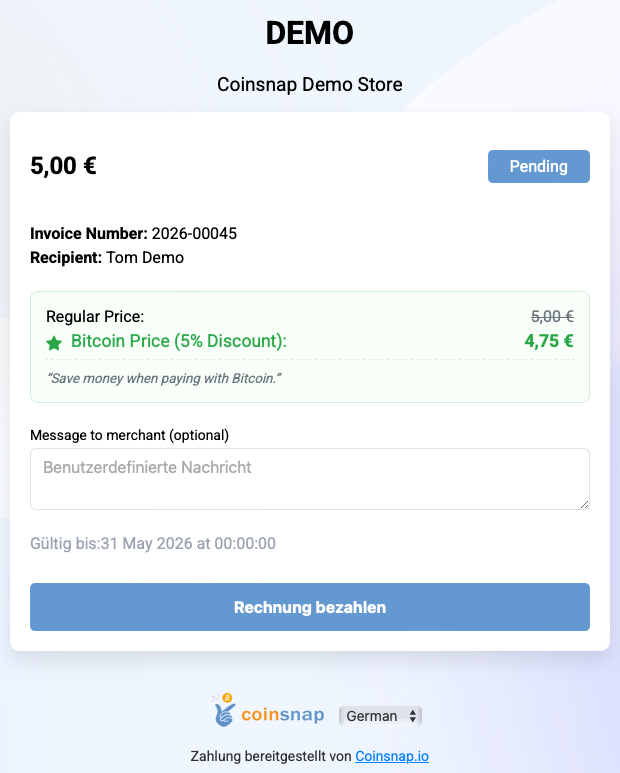
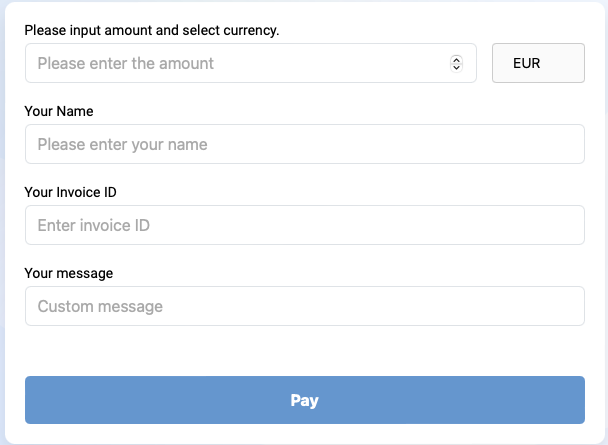
 You issue your invoice as usual (services, IBAN, payment term). Additionally, you offer “Pay bill with Bitcoin” – e.g. at: yourdomain.com/bitcoin. There, your customers will find a form that’s just as intuitive to use as a classic online transfer form:
 The payment button allows you to sell individual products and services on your website.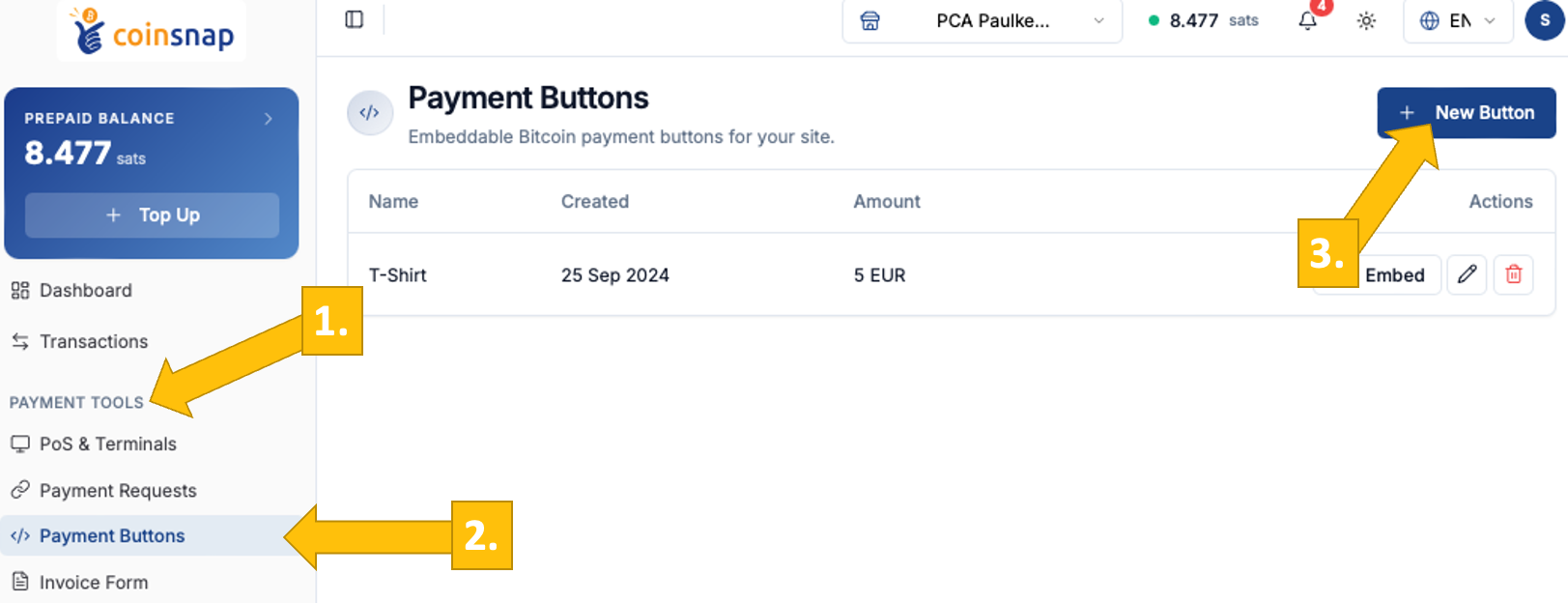
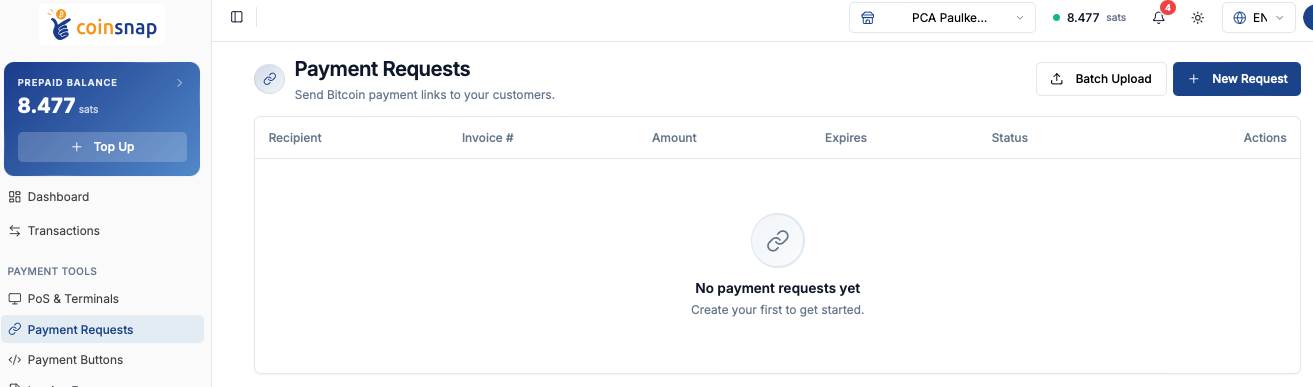
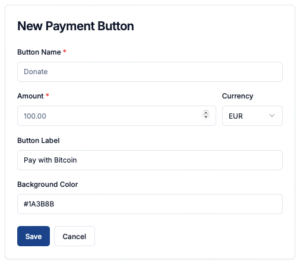 pen your Coinsnap dashboard, navigate to Payment Tools [1] → Payment Buttons [2], and click New Button [3]. You will then be taken to the New Payment Button page, where you can define the basic parameters for your Bitcoin payment button.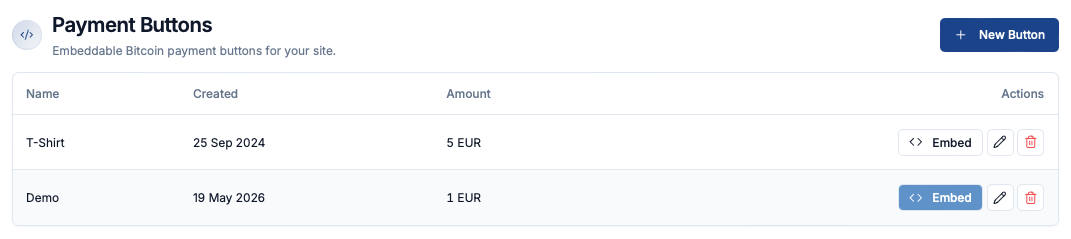
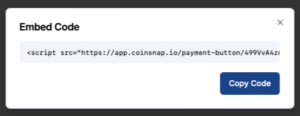 Click the Embed button on the right to open a window with the HTML embed code for your Bitcoin payment button. Click Copy Code and paste the snippet into your website where you want the button to appear.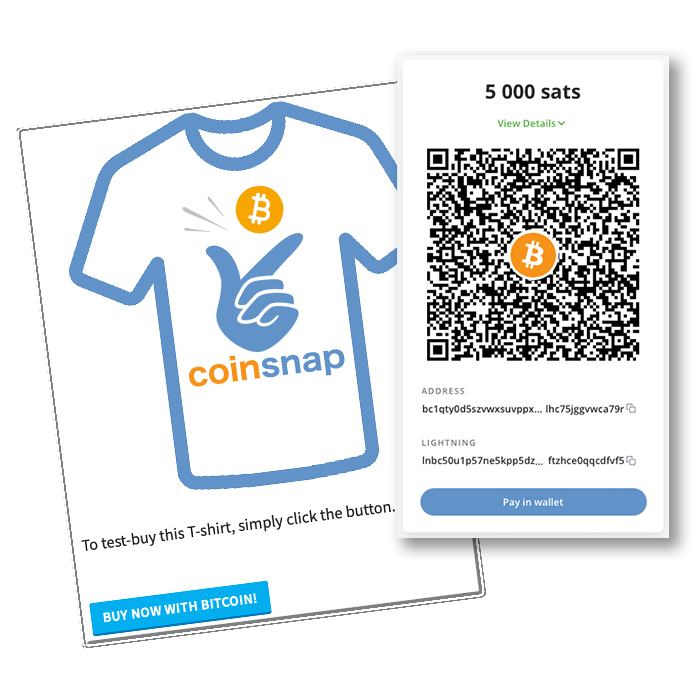

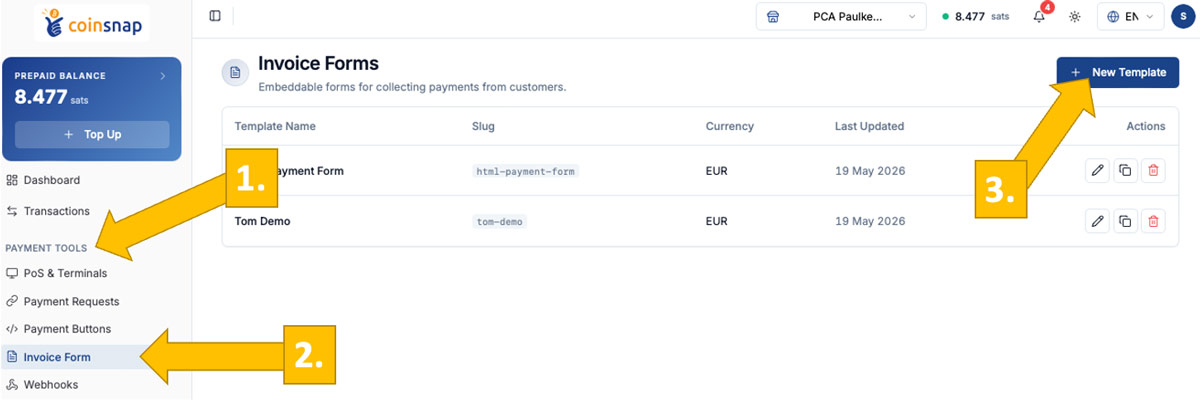
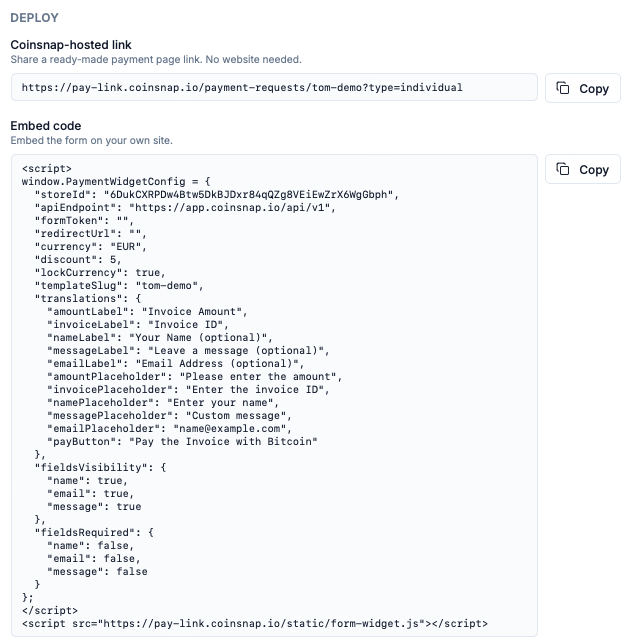
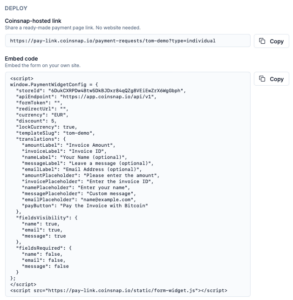 You can deploy the Bitcoin Invoice Form in two ways, depending on how you want to use it.
 The payment process is designed to feel familiar and requires no learning curve.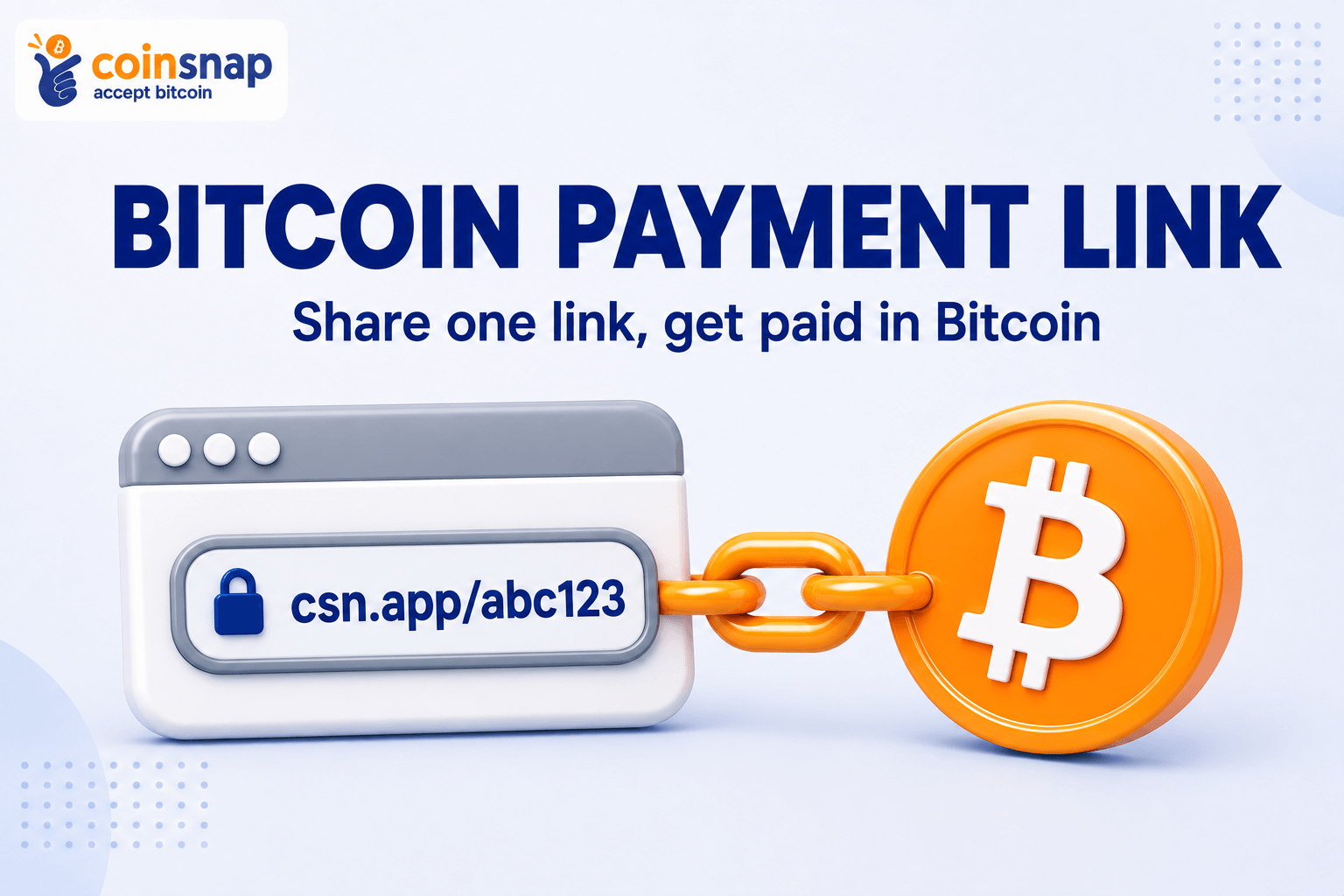

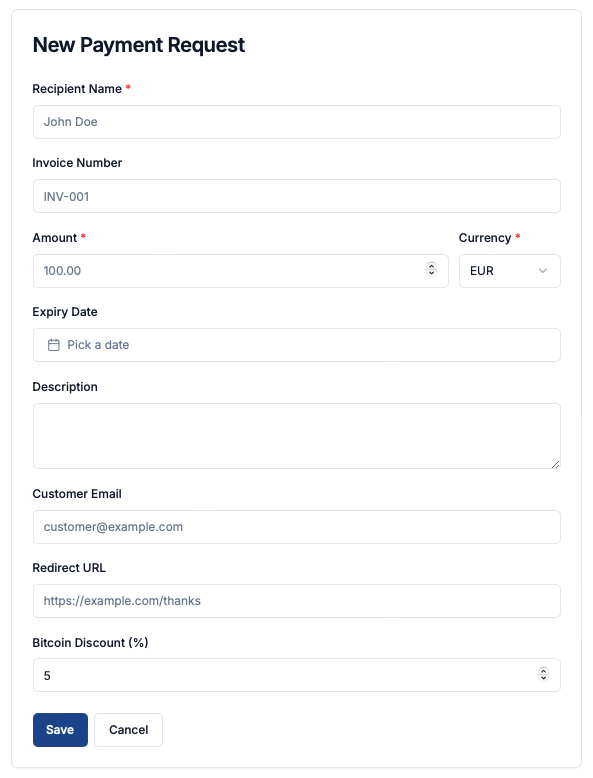

 You can copy the payment link (URL) by clicking the copy icon on the right under Actions.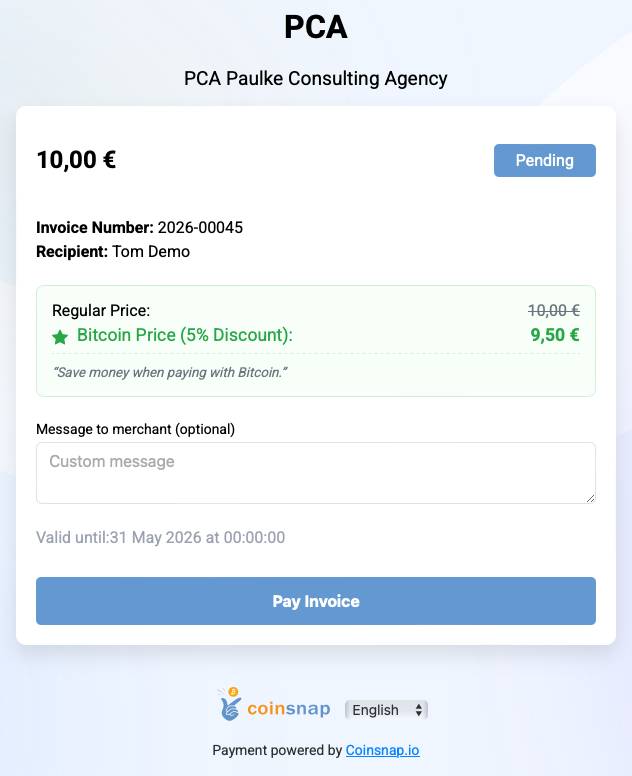
 Coinsnap presents Bitcoin Point of Sale
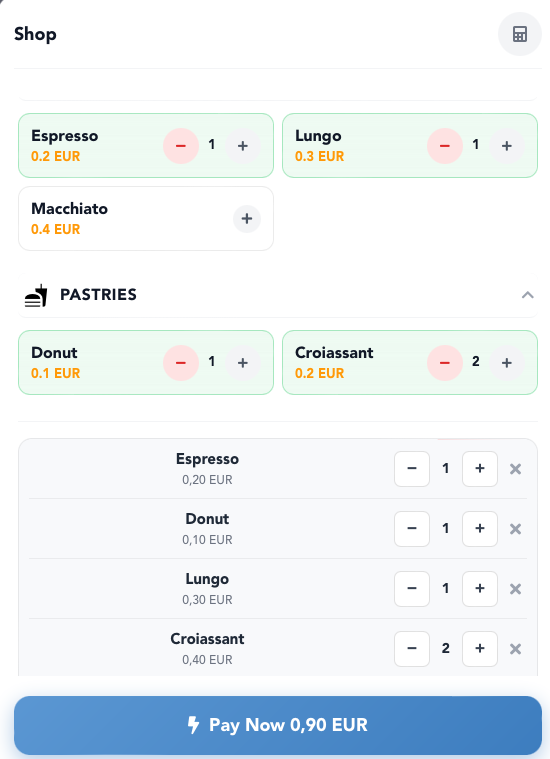 Do you run a store, restaurant, café, or work as a craftsman or service provider and want to accept Bitcoin Lightning payments from your customers? Then the Coinsnap Bitcoin Point of Sale solution is the ideal choice for you.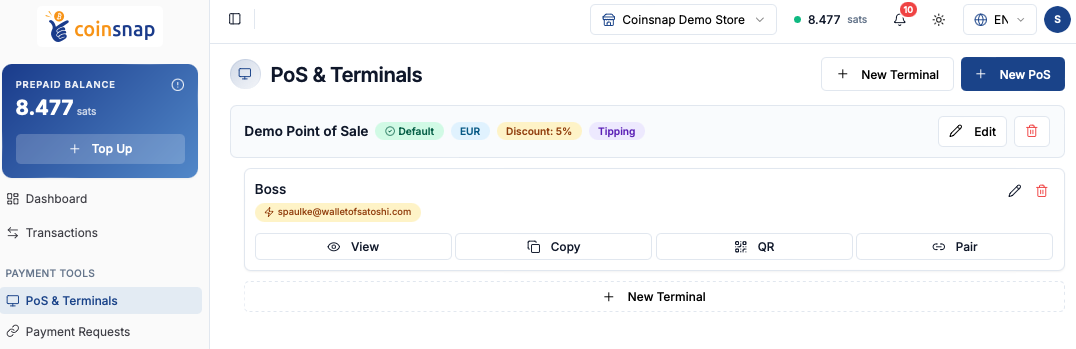
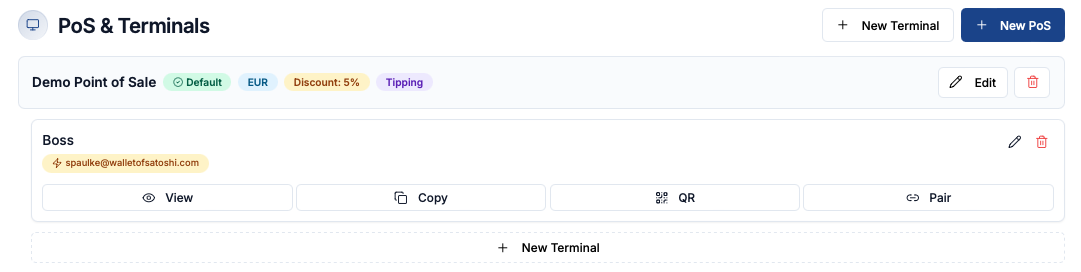
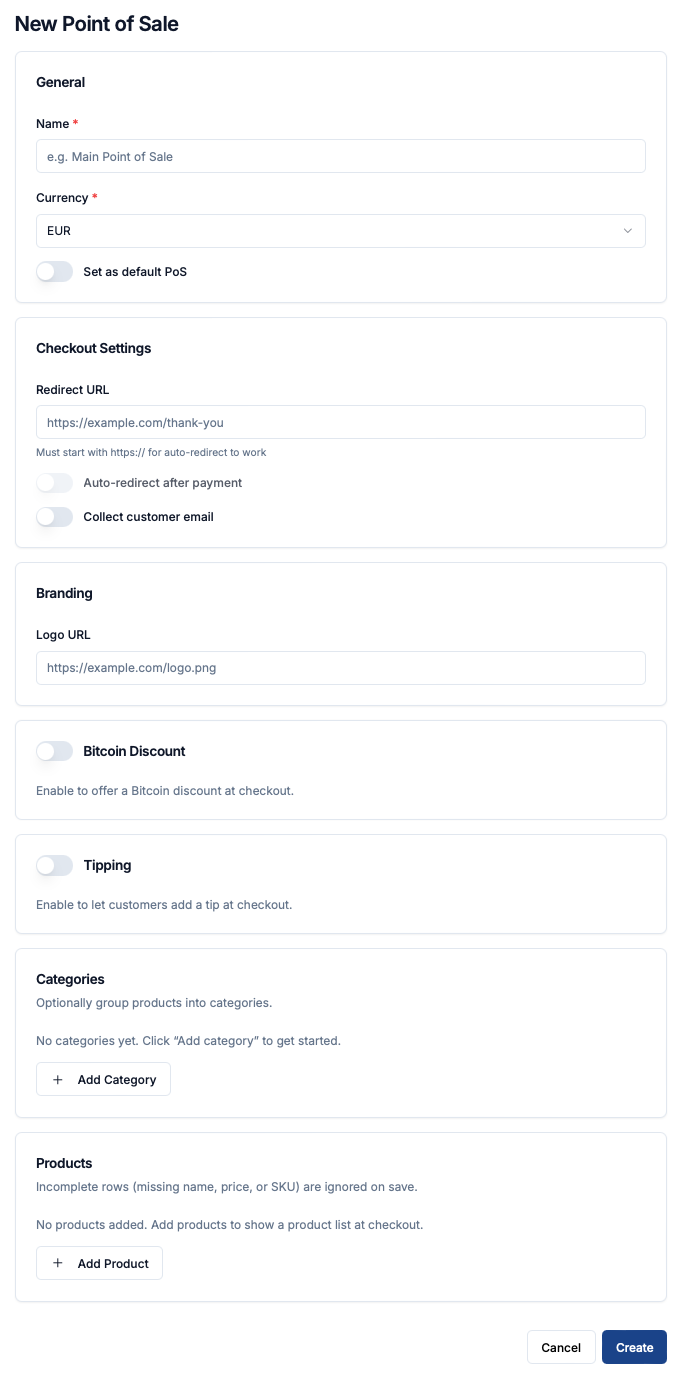 To create a new Bitcoin Point of Sale in Coinsnap, start by entering a name for your PoS and selecting the currency in which prices should be displayed and charged. You can also define this PoS as your default Point of Sale.
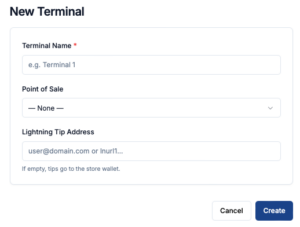 To actually use your PoS, you need at least one terminal—the customer-facing interface used during checkout.