
Add a Bitcoin Payment Button to Any Website

ACCEPT BITCOIN WITH A SIMPLE HTML PAYMENT BUTTON
Embed a Lightning-enabled payment button on any website to accept instant Bitcoin payments.
HOW CAN I ACCEPT BITCOIN ON MY WEBSITE?
Add Bitcoin payments to any website, no matter how it’s built—custom builds, landing pages, blogs, static HTML sites, or web apps.
Simple Button Setup
Generate, copy, and embed—your Bitcoin payment button is live in seconds
Customize Your Payment Button
Define amount, currency, label, redirect, and styling to fit your exact payment flow.
Pay via QR Code
One click opens a QR code for fast, seamless Bitcoin payments.
No Checkout System Needed
Accept Bitcoin payments without building a full checkout—just one button, one click, one payment.
A Simple Solution for Every Website
With the Bitcoin Payment Button you can add Bitcoin payment to every kind of website, landing page, web app, blog…
Click, Scan, and Pay
One click opens a ready-to-pay QR code—customers scan and complete the payment instantly.

Create a Button in Minutes
Fill out a short form, copy the HTML snippet, and paste it into your website—done.
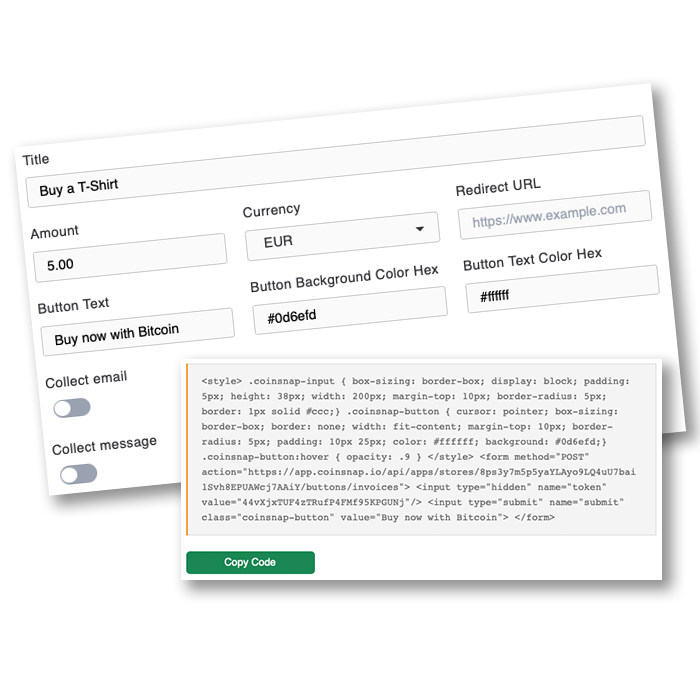

A Fast and Lightweight Bitcoin Payment Method for Any Website
The Coinsnap Payment Button is ideal for anyone who needs a simple, efficient Bitcoin payment option without implementing a full checkout system. Inside your Coinsnap dashboard, you can generate a button by defining the payment amount, the currency, and the button label. Coinsnap then provides an HTML snippet that you can embed on your website.
When visitors click your button, they are instantly redirected to a Bitcoin/Lightning invoice with a QR code. From there, they complete the payment with their preferred Lightning or Bitcoin wallet. Once the payment is processed, the funds are sent directly to the Lightning address you configured in your Coinsnap account.
This approach works perfectly for small businesses, creators, donations, one-time purchases, service fees, booking payments, downloadable content, and any scenario where you need a quick payment option without a full e-commerce system.
Because the button uses pure HTML, it integrates anywhere — static pages, WordPress themes without plugins, custom-built frameworks, or no-code tools. You can embed it inside modals, sidebars, pricing tables, checkout pages, or call-to-action sections.
Coinsnap handles all invoice generation and payment verification. You simply create the button, embed it, and start receiving Bitcoin payments immediately.
Key Benefits
Why Use the Coinsnap Payment Button
One-Click Payment Button Generation
Lightning & On-Chain Bitcoin Support
Works on Every Website
Customizable Design & Amounts
Automatic Invoice Creation
Direct Settlement to Your Wallet
Frequently Asked Questions
Questions About the Payment Button
Do I need a plugin to use the Payment Button?
Can customers pay with Lightning?
Where do payments go?
Can I style the button?
Does the button support different currencies?
