


Accept Bitcoin on-site with Coinsnap Bitcoin Point of Sale
The simple Bitcoin Lightning payment method for stores, restaurants, suppliers, hotels, etc. Works with any device!
Bitcoin Point of Sale
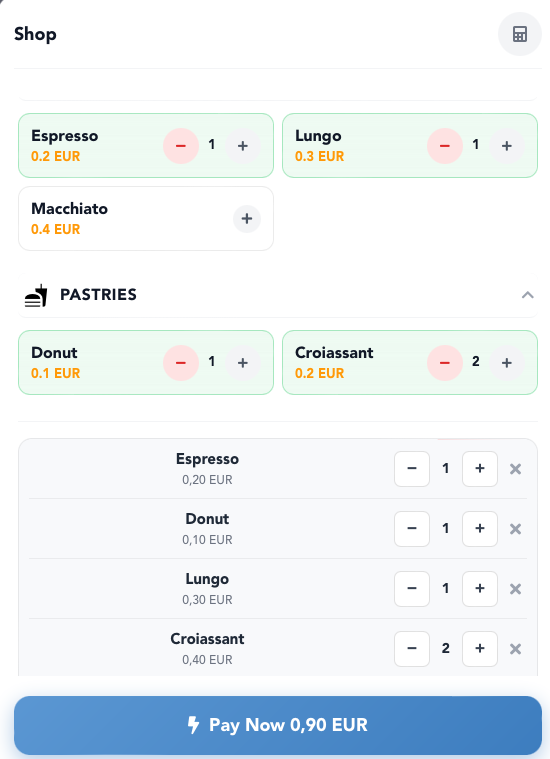 Do you run a store, restaurant, café, or work as a craftsman or service provider and want to accept Bitcoin Lightning payments from your customers? Then the Coinsnap Bitcoin Point of Sale solution is the ideal choice for you.
Simply open your personal Bitcoin Point of Sale page in the browser of your smartphone, tablet, or computer and enter the invoice amount using the keypad input field.
You can also create product categories and products. This makes the checkout process especially easy for employees—they simply tap the purchased items, and the individual prices as well as the total amount automatically appear on the screen (see screenshot).
When you click the Pay Now button, a QR code is generated. Your customer scans it with their Bitcoin Lightning wallet app and confirms the payment.
The payment amount is then credited directly to the owner’s Bitcoin Lightning wallet—or, if desired, automatically settled to the owner’s bank account in euros.
The Coinsnap Bitcoin Point of Sale works as simply as this
After entering the amount and showing the screen to your customer, click Pay Now. Depending on your configuration, either the tipping interface will open or—if tipping is not enabled—a QR code will be displayed for the customer to scan and complete the payment with their Bitcoin Lightning wallet.
If the payment is successful, a confirmation message will be displayed. The Bitcoin revenue is credited instantly to the owner’s Bitcoin Lightning wallet and is immediately available.
All Bitcoin Lightning payments received via Bitcoin Point of Sale are saved in the Coinsnap backend and can be tracked via the transaction view. All payments can be filtered and downloaded as a CSV file to be used for accounting purposes, for example.
Create your Bitcoin Point of Sale
To use a Bitcoin Point of Sale for your business, you first need a Coinsnap account.
After logging into the Coinsnap dashboard, navigate to Dashboard → Payment Tools → PoS & Terminals.
There, you will either see your existing Points of Sale or—if you are just getting started—an empty overview page. In that case, simply click + New PoS in the top-right corner to create your first Point of Sale.
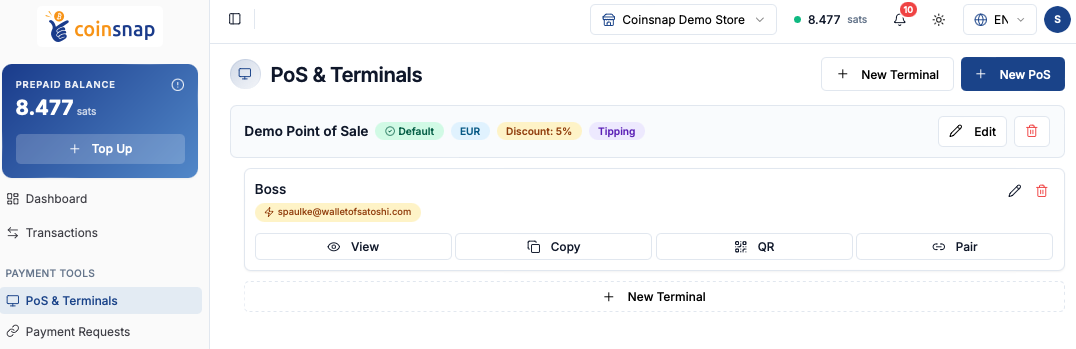
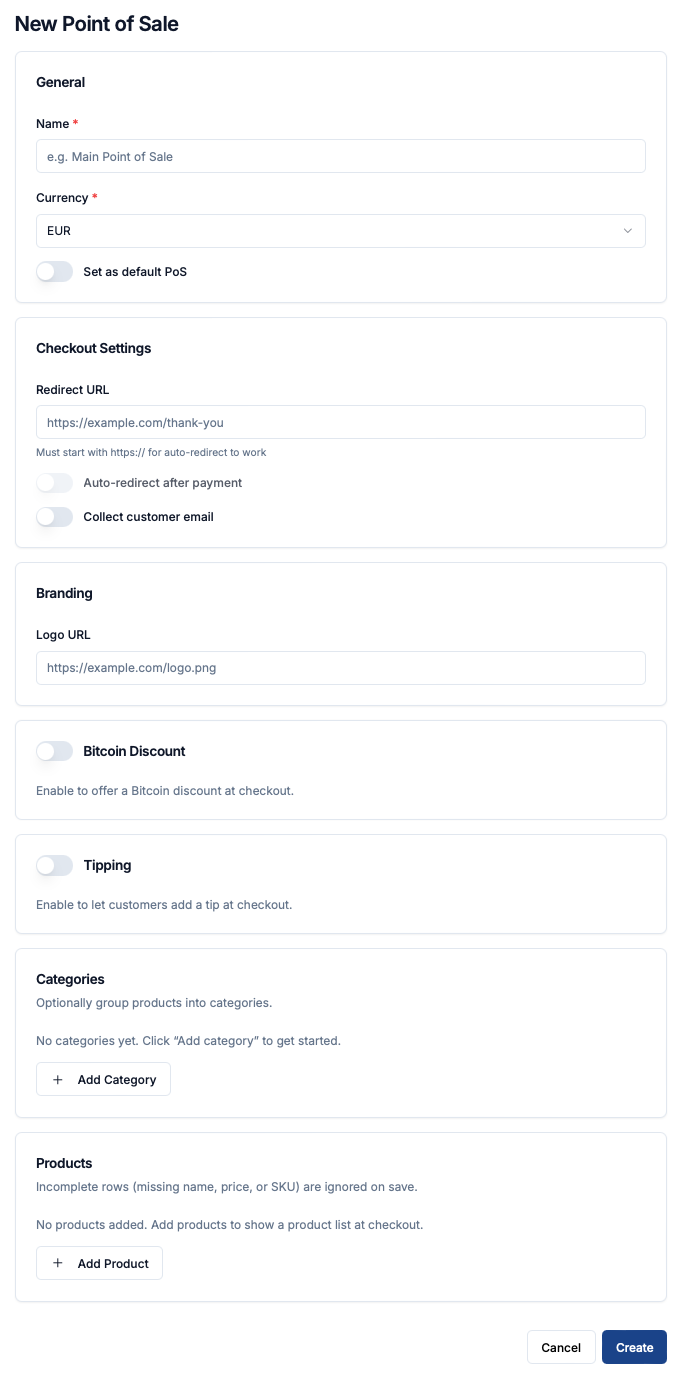 To create a new Bitcoin Point of Sale in Coinsnap, start by entering a name for your PoS and selecting the currency in which prices should be displayed and charged. You can also define this PoS as your default Point of Sale.
In the checkout settings, you can configure a redirect URL that customers are sent to after a successful payment. Optional settings allow automatic redirection after payment and the collection of customer email addresses during checkout.
Under Branding, you can add the URL of your company logo to personalize the payment interface.
Additional optional features include enabling a Bitcoin discount or activating tipping functionality, allowing customers to add a gratuity during payment.
If you want to simplify checkout for employees, you can create product categories and individual products. These products will later appear directly in the PoS interface, allowing staff to simply tap the purchased items instead of manually entering amounts.
Once all settings are configured, click Create to activate the new Point of Sale.
Create a terminal
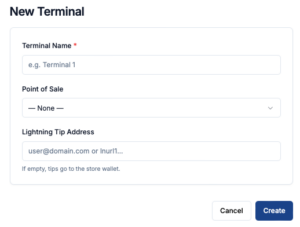 To actually use your PoS, you need at least one terminal—the customer-facing interface used during checkout.
You can create as many terminals for a PoS as you need, for example one for each store location or one for each employee.
If you operate in a tip-based business, you can even assign the personal Lightning address of an employee to their terminal. This allows all tips to be credited directly to the employee’s own wallet and keeps them separate from your business accounting.
To do this, simply click + New Terminal in the top-right corner and complete the configuration form.
Deploying your Point of Sale
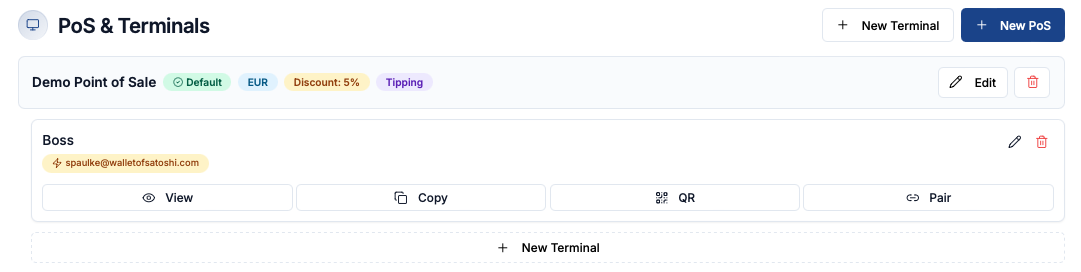
1. Open the terminal directly (“View”)
Clicking View opens the live Point of Sale interface in the browser. This is the actual checkout screen that employees use to enter amounts or select products and accept Bitcoin Lightning payments from customers.
2. Share or reuse the terminal link (“Copy”)
The Copy button copies the direct URL of the terminal. You can paste this link into another browser, bookmark it, send it to another device, or use it to quickly open the PoS interface on smartphones, tablets, or computers.
3. Pair a device quickly via QR code or pairing (“QR” / “Pair”)
The QR function displays a QR code containing the terminal URL, allowing devices to instantly open the PoS interface by scanning it.
The Pair function is intended for quickly connecting and assigning devices to a terminal, making deployment easier for employees or additional checkout stations.
The advantages of Coinsnap Bitcoin Point of Sale at a glance:
- Every employee can accept Bitcoin payments through their own terminal, while all sales revenue is credited instantly to your wallet.
- Bitcoin PoS can be operated on any Internet-enabled device with an Internet browser such as a smartphone, computer or tablet.
- Detailed transaction view with CSV export for accounting documentation
- No app installation required
Register now and get started with your Bitcoin Point of Sale!
Also available as an app!
Coinsnap Wallet combines a self-custodial Bitcoin wallet with a built-in Point of Sale, allowing merchants to accept Bitcoin and Lightning payments directly on their smartphone or tablet. Designed for cafés, shops, restaurants, and service businesses, the app turns any mobile device into a simple Bitcoin payment terminal while giving merchants full control over their own funds. In addition to in-store payments, Coinsnap Wallet can also be used to receive payouts from Coinsnap online payment solutions and as an everyday Bitcoin wallet for sending and receiving payments.
about the Coinsnap app with PoS