


Payout to bank account with DFX
You are using Coinsnap, and your customers can pay with Bitcoin and Lightning. Payments are credited directly to your own Lightning wallet.
If you prefer to receive your Bitcoin revenue in fiat, you can use the Swiss Bitcoin broker DFX for bank payouts. Coinsnap integrates with DFX to convert incoming Bitcoin balances into euros or Swiss francs, enabling direct payouts to your bank account.
Payouts are available to bank accounts across the SEPA area, including all EU member states, EEA countries, Switzerland, and the UK.
Can I Receive Bitcoin Payments Directly in My Bank Account?
Coinsnap allows merchants to convert Bitcoin and Lightning payments into euros or Swiss francs via DFX and receive payouts directly to their bank account. When DFX payout is enabled, payments are routed directly to DFX, converted at the current exchange rate, and transferred to the merchant’s bank account, typically within one business day.
How does a payout to your bank account with DFX work?
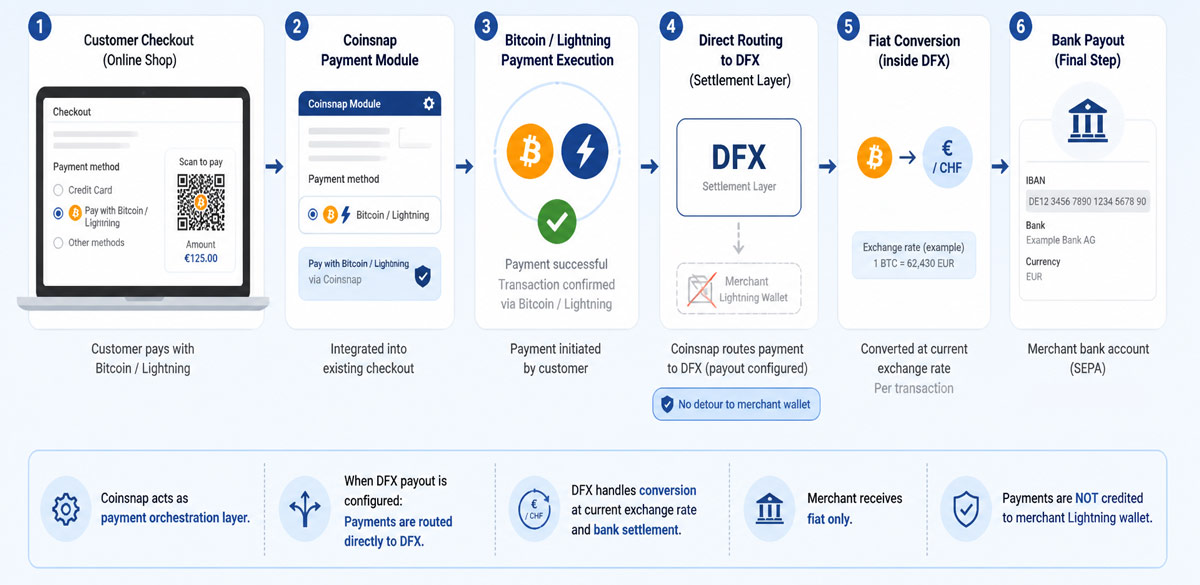
When a customer pays with Bitcoin or Lightning in your online store, the payment is routed directly to DFX.
DFX converts the received amount into euros or Swiss francs at the current exchange rate and transfers the equivalent value to your bank account. Payouts are processed daily (typically at midnight) and are usually credited the next day.
Each transaction is converted and paid out individually by DFX, so every customer payment appears as a separate entry on your bank statement.
The minimum amount for a DFX bank payout for Coinsnap is currently €10. Smaller amounts are credited to your Lightning wallet instead.
Payouts can be made in either euros or CHF. The final amount is credited to your bank account in its local currency—for example, a euro payout to a UK account will be received in pounds.
Prerequisites
To enable payouts to your bank account, you need to provide your company details, as well as the name of the account holder and the IBAN of the target account.
Without full KYC/KYB verification, you can process a total transaction value of up to CHF 1,000 within any rolling 30-day period through DFX. This is not a monthly or daily limit: DFX recalculates the total transaction value for the preceding 30 days continuously. If the limit is exceeded, the payment is accepted, but the bank payout is withheld until the merchant completes the required DFX verification.
If these thresholds are exceeded, an additional identity verification is required in accordance with Swiss regulations.
After identity verification, DFX does not publish a fixed universal maximum. Further limits and possible source-of-funds checks depend on factors such as the customer type, country, payment method and transaction volume. DFX verification information
What fees do I pay for fiat payouts to my bank account?
If you use DFX to receive your Bitcoin sales in fiat directly to your bank account, the total cost to you as a merchant is 1.2%: the 1% Coinsnap transaction fee plus the 0.2% DFX bank payout fee.
DFX also applies a 1% conversion spread, which is included in the Bitcoin amount paid by the customer and is not deducted from your payout.
Example: What Does a €100€ Fiat Payout Cost?
For example, for a €100 invoice, the customer pays approximately €101.01 worth of Bitcoin. This includes the €100 invoice amount plus approximately €1.01 resulting from the DFX conversion spread. The spread is therefore already included in the Bitcoin amount paid by the customer and is not deducted from the merchant’s payout.
DFX then deducts its 0.2% bank payout fee from the €100 invoice amount. The merchant therefore receives €99.80 in their bank account. The €1 Coinsnap transaction fee (1%) is charged separately against the merchant’s prepaid Coinsnap credit and is not deducted from the bank payout.
The Bitcoin is not first sent to the merchant’s wallet. When DFX payout is enabled in Coinsnap, the payment is automatically converted into fiat and settled to the merchant’s bank account.
DFX Limits and Verification
DFX applies a rolling 30-day limit of CHF 1,000 per merchant before extended KYC/KYB verification is required.
If your transaction volume exceeds this threshold within any 30-day period, DFX will continue to accept and convert incoming payments, but the funds above the limit will not be paid out to your bank account.
If you want to process amounts above this limit, verification by DFX is required. Individuals and sole proprietors complete a Know Your Customer (KYC) verification, while companies may also be required to complete a Know Your Business (KYB) verification.
Your current verification status and applicable limit are displayed directly in the Coinsnap dashboard under Finances -> Settings -> Deposit, Verification and limits. If you need to process higher volumes, you can start the required verification from there by clicking Verify with DFX.
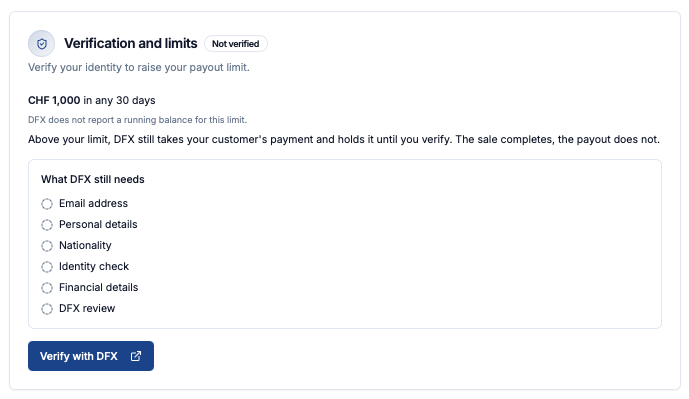
DFX may require additional information or documentation depending on the customer type, transaction volume and other regulatory requirements. DFX performs these checks and determines the applicable limits and approval status.
What does Coinsnap do, and what does DFX do?
Coinsnap provides the Bitcoin and Lightning payment integration and enables merchants to select bank payout as their deposit method.
DFX converts the incoming Bitcoin payments into fiat currency and transfers the corresponding amount to the merchant’s bank account. DFX is responsible for the conversion conditions, payout limits and required KYC/KYB verification.
Coinsnap and DFX charge separate fees for their respective services.
How to set up fiat payouts to your bank account with DFX
First, you navigate to the Settings [1] section in your Coinsnap dashboard.
Next, you open the Deposit [2] menu to choose how you want to receive your funds.
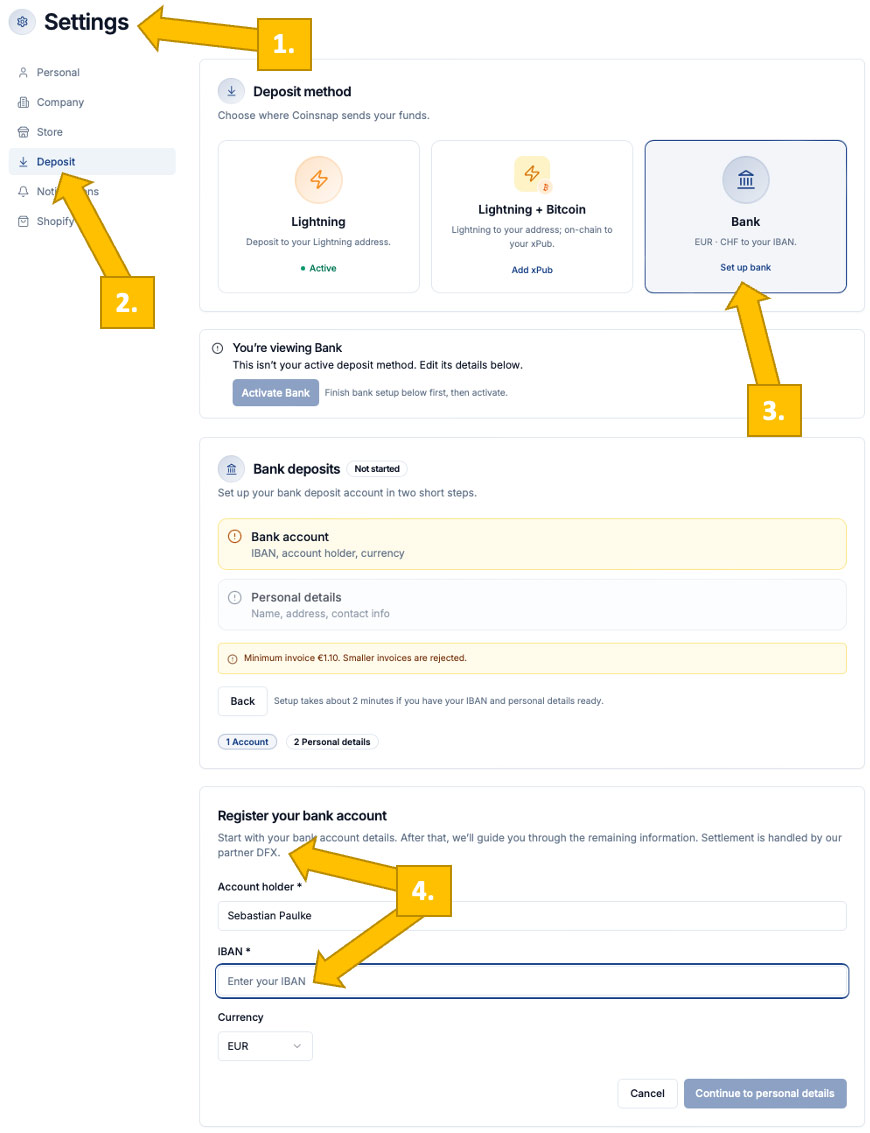
Then, you select Bank [3] as your deposit method and start the setup for bank payouts. Enter your account holder name, IBAN, and currency [4] to register your bank account and enable fiat settlement via DFX.
In the next step, you will also need to provide personal information such as your name, address, and contact details.
See our step-by-step guide on how to connect your Coinsnap account to DFX!
FAQ – what you need to know about DFX payouts
How can I receive Bitcoin payments in my bank account?
By enabling DFX bank payout in Coinsnap, incoming Bitcoin and Lightning payments are routed to DFX. </brDFX converts the payment into the selected fiat currency and settles the payout to the merchant's registered bank account.
Does Coinsnap send Bitcoin to my wallet first?
No. When DFX payout is configured, payments are routed directly to DFX and not credited to your wallet.
How long does a bank payout take?
Payouts are processed daily and usually arrive in your bank account the next day.
Which currencies are supported?
DFX supports payouts in euros (EUR) and Swiss francs (CHF).
Is the payout available in SEPA countries?
Yes. Bank payouts are available across the SEPA area, including the EU, EEA, Switzerland, and the UK.
What Should I Enter as the Registration Number If My Business Is Not Registered in a Commercial Register?
If you operate a business that does not have an official commercial registration number, you can indicate this directly in the Registration Number field of the DFX Assignment Agreement.
For example, a German sole proprietorship without a Handelsregister entry can enter “DE – no commercial register entry”. This allows you to complete and submit the form even though no German Handelsregisternummer or Swiss CHE number exists.