
Why This Guide Needed a 2026 Update
WooCommerce Bitcoin remains a hot topic in 2026 because it addresses three persistent challenges for online merchants: rising card fees, fraud and chargebacks, and cross-border friction.
In last year’s article, we explained what Bitcoin payment technology and the available WooCommerce solutions could offer at the time. But this market moves quickly. Some of the information and recommendations from 2025 now feel decidedly “old school”: providers have changed their products, fees and regional availability; some plugins have disappeared; and support for Bitcoin on-chain and Lightning has continued to evolve. We therefore felt compelled to give you, our readers, a thoroughly updated guide for 2026.
With a Bitcoin—and especially Lightning—checkout, WooCommerce stores can offer near-instant payments at low cost, reach Bitcoin-savvy customers worldwide and reduce their exposure to chargebacks, all without rebuilding their existing shop.
In this complete 2026 guide to WooCommerce Bitcoin, you’ll learn how to add Bitcoin and Lightning to your store without coding, which plugins genuinely support both payment methods, and how Lightning compares with on-chain Bitcoin in terms of speed, fees and suitable transaction sizes. We also cover compliance, accounting and settlement. You’ll get an updated shortlist of the five best plugins, practical decision matrices, and a step-by-step Coinsnap setup—plus FAQs and practical advice to help you go live smoothly.
What’s New With Coinsnap in 2026 at a Glance
Coinsnap has evolved from a Bitcoin payment plugin provider into a broader suite of tools for accepting Bitcoin and Lightning payments—in online shops, at physical locations and through standalone payment pages.
Coinsnap remains fully non-custodial: payments are forwarded directly to the merchant’s configured Bitcoin or Lightning wallet. Coinsnap does not hold or control the merchant’s funds.
The new Coinsnap Wallet gives merchants an easy way to receive and manage Bitcoin and Lightning payments, while the Coinsnap Point of Sale turns a smartphone, tablet or computer into a practical Bitcoin checkout for in-person sales.
Coinsnap has also introduced several new Bitcoin Tools that work beyond the traditional WooCommerce checkout. These include payment links, Bitcoin invoices, donation forms, crowdfunding campaigns, paywalls, voting, shoutouts, browser-based POS solutions, ticketing, events etc. Together, they allow merchants, creators and organizations to accept Bitcoin wherever and however they do business.
Does WooCommerce support Bitcoin?
No. WooCommerce does not support Bitcoin or Lightning natively. Merchants need a third-party plugin or extension to add these payment methods. Setup, fees, custody, verification requirements and settlement options depend on the selected provider.
Which Bitcoin payment plugins are available for WooCommerce?
 The official Woo.com Marketplace includes third-party cryptocurrency payment extensions, but a Marketplace listing does not mean that an extension supports native Bitcoin or the Lightning Network. Marketplace availability also changes over time.
Among the crypto extensions previously presented in this guide, DePay Payments remains available in the Woo.com Marketplace. The former Coinbase Commerce and Helio Pay extensions have been retired by March 26th, 2026, and removed from the Marketplace. OpenNode continues to provide its own WooCommerce integration.
Coinbase Commerce has been replaced by Coinbase Business. Coinbase Business currently processes customer payments in USDC and USDT rather than native Bitcoin or Lightning, and the service is available only to eligible businesses in the United States and Singapore. Customers can pay from compatible external wallets and do not need a Coinbase Wallet.
DePay Payments provides non-custodial, on-site Web3 payments across multiple blockchains, wallets and tokens. Payments are sent directly to the merchant’s configured crypto wallet. However, DePay does not support native Bitcoin or the Lightning Network, making it unsuitable for merchants specifically looking for a WooCommerce Bitcoin and Lightning checkout.
OpenNode is a provider-operated Bitcoin payment processor with a WooCommerce integration. It supports both on-chain Bitcoin and Lightning payments and offers optional conversion and settlement in local currency. Merchants use an OpenNode account, and OpenNode’s processing fees, verification requirements and settlement conditions apply.
WooCommerce can still support native Bitcoin and Lightning
Dedicated WooCommerce plugins such as Coinsnap and BTCPay Server add native Bitcoin and Lightning payments alongside a store’s existing payment methods. Coinsnap provides a plug-and-play connection to the merchant’s configured payment destination.
BTCPay Server gives technically experienced merchants the option of operating their own Bitcoin payment infrastructure.
The right solution depends on whether the merchant prioritizes simple setup, self-hosted control, direct Bitcoin settlement or conversion to fiat currency . The leading WooCommerce Bitcoin and Lightning plugins are compared in detail below.
What does it cost to accept Bitcoin or Lightning payments?
The cost depends on the payment solution used. When a payment is processed through a Coinsnap account, Coinsnap charges the merchant a processing fee equal to 1% of the payment value. The fee is not deducted from the customer’s payment or from the amount forwarded to the merchant’s wallet. Instead, it is charged against the merchant’s prepaid Coinsnap credit in the Coinsnap dashboard.
OpenNode typically charges a 1% processing fee for payments and payouts. Individual pricing may apply depending on transaction volume, transaction value and the merchant’s business profile.
The Coinsnap processing fee does not apply when the plugin is operated with the merchant’s own BTCPay Server. Any Bitcoin network fees, wallet fees or costs charged by external settlement services are separate.
Lightning is generally the preferred option for fast everyday payments. The amount that can be transferred may depend on the limits of the sending and receiving wallets and the available Lightning payment capacity.
Coinsnap also supports on-chain Bitcoin payments for larger orders or whenever the customer or merchant prefers an on-chain transaction.
Why add Bitcoin (and Lightning) to WooCommerce?
Bitcoin opens global checkout without card rails, cuts processing costs, and removes chargebacks. Lightning adds real-time settlement and typically sub-cent fees, which improve margins and customer experience—especially for everyday orders and digital goods.
Your options at a glance:
- Fees: With providers such as Coinsnap, BTCPay Server, OpenNode, CoinGate and Strike, Lightning payments do not require an on-chain miner fee for every transaction. Lightning routing fees and provider processing fees may still apply for the buyer. CoinGate, for example, describes Lightning payments as cheaper than regular on-chain transactions.
- Speed: These providers support Lightning payments that usually settle within seconds. On-chain Bitcoin payments normally require blockchain confirmations and may take approximately 3–20 minutes. (Coinsnap, OpenNode, Strike)
- Checkout experience: With a supported Lightning wallet, customers scan the payment request and authorize the payment. The merchant can receive confirmation almost immediately, without waiting for an on-chain block confirmation. (Coinsnap, Lightning Network, CoinGate)
- When is on-chain preferable? Providers supporting both payment methods allow customers to use on-chain Bitcoin for larger payments, treasury transfers or whenever the customer or merchant prefers it. The appropriate method depends on wallet limits, Lightning liquidity and user preference—there is no general $1,000 threshold. Strike, for example, explicitly distinguishes instant Lightning payments from larger blockchain payments. (Strike)
Tip: Most stores do best with a WooCommerce Bitcoin-Lightning-ready plugin that also offers optional on-chain for high-value carts!
Lightning vs on-chain (quick compare)
There are two types of Bitcoin payment: On-chain and Lightning. On-chain Bitcoin payments are recorded directly on the blockchain; they’re highly secure and auditable but settle more slowly (you usually wait for confirmations) and incur miner fees that rise with network congestion—great for higher-value, lower-frequency orders or final settlements.
Coinsnap, BTCPay Server and OpenNode support both Lightning and on-chain Bitcoin payments. The payment options shown at checkout depend on the merchant’s configuration. (BTCPay Server, OpenNode)
- Network fees: Lightning payments have no individual miner fee, although routing fees and provider processing fees may apply. On-chain payments require a Bitcoin miner fee.
- Speed: Lightning payments typically settle within seconds. On-chain payments require blockchain confirmations and therefore generally take longer.
- Checkout experience: Customers scan or tap the payment request and authorize the payment. With Lightning, the merchant normally receives confirmation almost immediately.
- When should on-chain be used? On-chain Bitcoin is available when Lightning capacity is insufficient, for larger payments or whenever the customer or merchant prefers it. There is no general $1,000 threshold separating Lightning from on-chain payments.
Best plugins for WooCommerce Bitcoin (2026 shortlist)
WooCommerce does not support Bitcoin or Lightning natively. Merchants therefore need a suitable third-party plugin to add fast, secure and cost-effective Bitcoin payments to their checkout.
Our updated guide, “The best WooCommerce Bitcoin payment plugins (2026)”, compares the most relevant solutions for accepting native Bitcoin and Lightning payments in 2026. We examine provider fees, custody, settlement options, KYC/KYB requirements, WooCommerce integration, ease of setup and support.
For the 2026 shortlist, we removed six providers—NOWPayments, Blockonomics, Coinbase Commerce, CryptoPay, Helio Pay and DePay—that no longer offer a current WooCommerce solution supporting both native Bitcoin and Lightning, and added OpenNode because it meets these requirements.
Here is a decision matrix for the 10 best WooCommerce Bitcoin payment plugins:
| WooCommerce Bitcoin and Lightning Provider Matrix 2026 | ||||||||||||
| The 2026 update reassesses the market because several WooCommerce extensions have been retired and current support, fees, custody, verification and settlement conditions have changed. | ||||||||||||
| Information checked: 14 September 2026 | ||||||||||||
| Provider | Status | Custody model | Native Bitcoin | Lightning support | Provider fee | Settlement options | Merchant verification | WooCommerce integration | Support model | Pros | Cons | Best for |
| Coinsnap | Recommended | Non-custodial software. Payments are sent directly to the merchant’s configured Bitcoin or Lightning wallet. | Yes — native on-chain Bitcoin | Yes — native Lightning | 1% per successful payment processed through Coinsnap. The fee is charged against the merchant’s prepaid Coinsnap credit. No monthly fee. | Direct settlement to the configured Lightning or on-chain Bitcoin wallet. Optional fiat settlement is available through external partners. | No Coinsnap KYC for direct wallet settlement. External fiat or off-ramp partners may require KYC or KYB. | WooCommerce plugin, documentation and API. Optional connection to the merchant’s own BTCPay Server. | Coinsnap documentation and merchant support. | Simple setup; native Bitcoin and Lightning; direct wallet settlement; Coinsnap does not hold merchant funds. | Fiat settlement depends on external partners whose fees and verification requirements apply. | Merchants wanting a simple, non-custodial Bitcoin and Lightning checkout with direct wallet settlement. |
| BTCPay Server | Recommended | Non-custodial when self-hosted. Custody and account conditions depend on the selected third-party host, if any. | Yes — native on-chain Bitcoin | Yes — with a configured Lightning node or compatible Lightning service | 0% BTCPay Server processing fee. Hosting, Bitcoin network and Lightning liquidity or service costs may apply. | Direct to merchant-controlled Bitcoin wallets and the configured Lightning node or wallet. | No BTCPay Server KYC when self-hosted. Third-party hosts and connected services may impose verification requirements. | Official WooCommerce plugin with extensive API and configuration options. | Open-source documentation and community support. Commercial hosting and support are available separately. | Maximum control, self-custody, extensibility and no BTCPay Server processing fee. | Self-hosting requires technical maintenance. Lightning may require node and liquidity management. | Technically experienced merchants seeking maximum sovereignty and infrastructure control. |
| CoinGate | Recommended | Custodial, regulated CoinGate merchant account. | Yes — native on-chain Bitcoin | Yes — Bitcoin Lightning is available in the CoinGate checkout | 1% per payment on the Standard plan. Custom volume pricing applies to Enterprise. Payout and conversion fees may apply. | Settlement in cryptocurrency, stablecoins, EUR, GBP or USD. Withdrawals are available to a bank account or crypto wallet. | Merchant account with mandatory KYC/KYB. CoinGate operates as a regulated EU crypto-asset service provider. | WooCommerce plugin, API, sandbox, documentation and GitHub resources. | Commercial support. Email support is provided on Standard and dedicated support on Enterprise. | Native Bitcoin and Lightning with optional fiat or stablecoin settlement. | Custodial account and mandatory verification. Additional payout or conversion fees may apply. | Merchants wanting Bitcoin and Lightning together with regulated custody and fiat settlement. |
| OpenNode | Recommended | Provider-operated custodial merchant account. | Yes — native on-chain Bitcoin | Yes — native Lightning | 1% for payments and payouts. Custom pricing and higher-risk rates may apply. | Bitcoin or supported local currency. Automatic conversion and split settlement are available. | OpenNode merchant account and verification requirements apply. | WooCommerce integration, hosted checkout and Bitcoin payment API. | Commercial documentation and merchant support. | Native Bitcoin and Lightning with optional fiat settlement and automatic conversion. | Custodial account. OpenNode’s verification, processing and settlement conditions apply. | Merchants wanting a managed Bitcoin and Lightning service with optional fiat settlement. |
(click the image to download the Excel decision matrix for the 10 best WooCommerce Bitcoin payment plugins!)
The 5 best WooCommerce Bitcoin payment plugins for WooCommerce
These plugins are all available in the WordPress plugin repository, and support on-chain as well as Lightning.
1) Coinsnap for WooCommerce
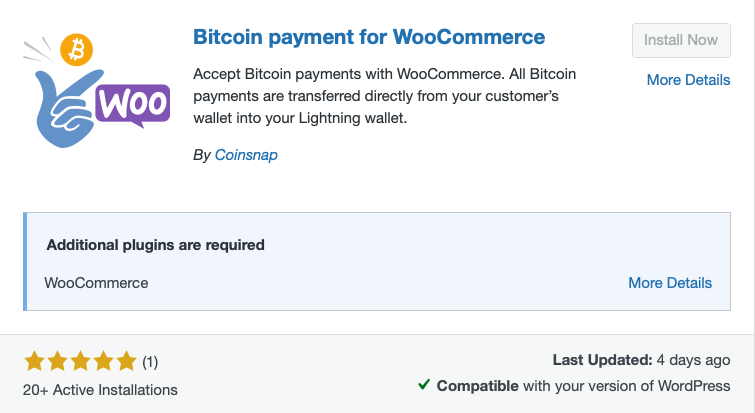 The Coinsnap WooCommerce Bitcoin payment plugin supports both Lightning and on-chain Bitcoin payments. Coinsnap is fully non-custodial: payments are sent directly from the customer to the merchant’s configured wallet, and Coinsnap does not hold the merchant’s funds.
Merchants can connect a compatible external wallet, use the dedicated Coinsnap WOS Wallet for merchants, or connect their own BTCPay Server. The Coinsnap Wallet is fully integrated with the Coinsnap Dashboard, allowing merchants to view incoming payments, manage their balance and transfer funds from the same interface. A setup wizard guides merchants through the WooCommerce as well as the BTCPay Server (if preferred) configuration.
Lightning is recommended for fast everyday payments, while on-chain Bitcoin is available for larger orders or whenever the customer or merchant prefers an on-chain transaction.
When payments are processed through a Coinsnap account, Coinsnap charges an exact 1% processing fee per successful payment, with no monthly fee. The processing fee is charged against the merchant’s prepaid Coinsnap credit rather than deducted from the customer’s payment, allowing the full invoice amount to reach the configured wallet. Coinsnap does not require KYC for direct wallet settlement; external fiat-conversion or bank-payout services may apply their own fees and KYC/KYB requirements.
Coinsnap is best suited to merchants who want a straightforward, non-custodial WooCommerce solution for accepting Bitcoin and Lightning without operating their own payment infrastructure.
| Coinsnap | ||
| Verified wording for the 2026 WooCommerce Bitcoin and Lightning comparison. | ||
| Information checked: 14 September 2026 | ||
| Category | 2026 information | Primary source or basis |
| Status | Recommended | Editorial assessment based on the verified product information above |
| Custody model | Non-custodial software. Payments are sent directly to the merchant’s configured Bitcoin or Lightning wallet. | https://coinsnap.io/ |
| Native Bitcoin | Yes — native on-chain Bitcoin | https://coinsnap.io/ |
| Lightning support | Yes — native Lightning | https://coinsnap.io/ |
| Provider fee | 1% per successful payment processed through Coinsnap. The fee is charged against the merchant’s prepaid Coinsnap credit. No monthly fee. | Coinsnap product information confirmed for this 2026 update |
| Settlement options | Direct settlement to the configured Lightning or on-chain Bitcoin wallet. Optional fiat settlement is available through external partners. | https://coinsnap.io/ |
| Merchant verification | No Coinsnap KYC for direct wallet settlement. External fiat or off-ramp partners may require KYC or KYB. | Coinsnap product information confirmed for this 2026 update |
| WooCommerce integration | WooCommerce plugin, documentation and API. Optional connection to the merchant’s own BTCPay Server. | https://coinsnap.io/ |
| Support model | Coinsnap documentation and merchant support. | https://coinsnap.io/ |
| Pros | Simple setup; native Bitcoin and Lightning; direct wallet settlement; Coinsnap does not hold merchant funds. | Editorial assessment based on the verified product information above |
| Cons | Fiat settlement depends on external partners whose fees and verification requirements apply. | Editorial assessment based on the verified product information above |
| Best for | Merchants wanting a simple, non-custodial Bitcoin and Lightning checkout with direct wallet settlement. | Editorial assessment based on the verified product information above |
2) BTCPay Server
 BTCPay Server is a free, open-source and non-custodial Bitcoin payment processor that supports both on-chain Bitcoin and Lightning payments. Merchants can operate BTCPay Server on their own infrastructure or use an instance hosted by a third party. Payments are sent directly to the wallets connected by the merchant, and private keys are not uploaded to the BTCPay Server instance.
WooCommerce stores connect through the current BTCPay for WooCommerce V2 plugin, which is available through the WordPress plugin directory and GitHub. An API-key wizard connects the WooCommerce store to the selected BTCPay Server instance and automatically configures the required webhook. Merchants can display the BTCPay invoice within the checkout and configure how payment states are mapped to WooCommerce order statuses.
BTCPay Server does not charge a software licence or payment-processing fee. However, 0% provider fees do not mean that operating the system is completely free. Self-hosting can involve server, hardware, maintenance and on-chain network costs. Merchants operating their own Lightning node must also manage channels and inbound liquidity, which may generate additional costs. Third-party hosts, Lightning service providers and other external services may charge their own fees.
A self-hosted BTCPay Server does not require KYC or KYB verification. However, verification requirements may apply if the merchant uses a third-party host, custodial Lightning service, exchange or fiat-settlement provider. The custody model can therefore depend on the services connected to BTCPay Server, even though the BTCPay Server software itself is designed for non-custodial payment processing.
BTCPay Server is best suited to merchants who want maximum control, configurability and independence and who have the technical resources to operate and maintain their own payment infrastructure. A third-party-hosted instance can reduce the technical workload, but its fees, service conditions and verification requirements must be assessed separately.
| BTCPay Server | ||
| Verified wording for the 2026 WooCommerce Bitcoin and Lightning comparison. | ||
| Information checked: 14 September 2026 | ||
| Category | 2026 information | Primary source or basis |
| Status | Recommended | Editorial assessment based on the verified product information above |
| Custody model | Non-custodial when self-hosted. Custody and account conditions depend on the selected third-party host, if any. | https://docs.btcpayserver.org/WooCommerce/ |
| Native Bitcoin | Yes — native on-chain Bitcoin | https://docs.btcpayserver.org/WooCommerce/ |
| Lightning support | Yes — with a configured Lightning node or compatible Lightning service | https://docs.btcpayserver.org/LightningNetwork/ |
| Provider fee | 0% BTCPay Server processing fee. Hosting, Bitcoin network and Lightning liquidity or service costs may apply. | https://btcpayserver.org/ |
| Settlement options | Direct to merchant-controlled Bitcoin wallets and the configured Lightning node or wallet. | https://docs.btcpayserver.org/WooCommerce/ |
| Merchant verification | No BTCPay Server KYC when self-hosted. Third-party hosts and connected services may impose verification requirements. | https://docs.btcpayserver.org/WooCommerce/ |
| WooCommerce integration | Official WooCommerce plugin with extensive API and configuration options. | https://docs.btcpayserver.org/WooCommerce/ |
| Support model | Open-source documentation and community support. Commercial hosting and support are available separately. | https://docs.btcpayserver.org/ |
| Pros | Maximum control, self-custody, extensibility and no BTCPay Server processing fee. | Editorial assessment based on the verified product information above |
| Cons | Self-hosting requires technical maintenance. Lightning may require node and liquidity management. | Editorial assessment based on the verified product information above |
| Best for | Technically experienced merchants seeking maximum sovereignty and infrastructure control. | Editorial assessment based on the verified product information above |
3) CoinGate
CoinGate is a provider-operated cryptocurrency payment gateway that supports both on-chain Bitcoin and Lightning payments. Merchants can keep their settlement in supported cryptocurrencies or receive fiat settlement in EUR, USD or GBP, subject to CoinGate’s availability, account and banking conditions.
The current CoinGate WooCommerce plugin can be installed directly from the WordPress or WooCommerce plugin directory and connected using API credentials. Manual installation from GitHub is no longer required. CoinGate says that the plugin is developed and maintained by its own team and can be configured without coding.
CoinGate’s Standard plan charges a 1% payment-processing fee with no setup or monthly fee. Enterprise customers receive custom, volume-based pricing. Crypto payouts, conversions, refunds, withdrawals and other services may carry separate fees under CoinGate’s current pricing conditions.
CoinGate operates a provider-managed account and custody model. Merchants must create a CoinGate business account and complete the applicable verification process. CoinGate states that it holds an EU MiCA licence, making regulatory compliance and provider-managed fiat settlement central parts of its offering.
A strong choice for merchants who want Bitcoin and Lightning acceptance, optional fiat settlement and a regulated provider—and who are prepared to complete business verification and process payments through a third-party account.
For detailed information about the selection criteria and providers included in this comparison, read The Best WooCommerce Bitcoin Payment Plugins: 2026 Shortlist.
| CoinGate | ||
| Verified wording for the 2026 WooCommerce Bitcoin and Lightning comparison. | ||
| Information checked: 14 September 2026 | ||
| Category | 2026 information | Primary source or basis |
| Status | Recommended | Editorial assessment based on the verified product information above |
| Custody model | Custodial, regulated CoinGate merchant account. | https://coingate.com/accept |
| Native Bitcoin | Yes — native on-chain Bitcoin | https://coingate.com/accept |
| Lightning support | Yes — Bitcoin Lightning is available in the CoinGate checkout | https://coingate.com/accept |
| Provider fee | 1% per payment on the Standard plan. Custom volume pricing applies to Enterprise. Payout and conversion fees may apply. | https://coingate.com/pricing |
| Settlement options | Settlement in cryptocurrency, stablecoins, EUR, GBP or USD. Withdrawals are available to a bank account or crypto wallet. | https://coingate.com/accept |
| Merchant verification | Merchant account with mandatory KYC/KYB. CoinGate operates as a regulated EU crypto-asset service provider. | https://coingate.com/accept |
| WooCommerce integration | WooCommerce plugin, API, sandbox, documentation and GitHub resources. | https://coingate.com/plugins/woocommerce |
| Support model | Commercial support. Email support is provided on Standard and dedicated support on Enterprise. | https://coingate.com/pricing |
| Pros | Native Bitcoin and Lightning with optional fiat or stablecoin settlement. | Editorial assessment based on the verified product information above |
| Cons | Custodial account and mandatory verification. Additional payout or conversion fees may apply. | Editorial assessment based on the verified product information above |
| Best for | Merchants wanting Bitcoin and Lightning together with regulated custody and fiat settlement. | Editorial assessment based on the verified product information above |
4) BitPay
 BitPay is an enterprise-grade, provider-managed payment gateway with a long track record. It supports both on-chain Bitcoin and Lightning payments and provides a current WooCommerce integration, merchant tools, refunds, payouts and optional fiat settlement. Merchants must open a BitPay account and complete the required business verification.
BitPay charges 2% + $0.25 per transaction below $500,000 in monthly volume, 1.5% + $0.25 from $500,000 to $999,999, and 1% + $0.25 from $1 million. Higher fees may apply to high-risk industries.
A strong choice for established merchants seeking a regulated payment provider, fiat settlement and mature business support.
| BitPay | Verified wording for the 2026 WooCommerce Bitcoin and Lightning comparison. Information checked: 14 September 2026 |
|---|---|
| Below $500,000 monthly volume: 2% + $0.25 per transaction. $500,000–$999,999: 1.5% + $0.25. From $1 million: 1% + $0.25. Higher fees may apply to high-risk industries. | |
| Custody | Provider-managed/custodial processing. BitPay processes customer payments and settles the resulting funds according to the merchant’s configuration. |
| Settlement options | Settlement in supported fiat currencies, cryptocurrencies or a combination of both. Fiat can be transferred to the merchant’s bank account. Availability depends on the merchant’s country and account. |
| KYC/KYB requirements | Full business verification required. Merchants must open and obtain approval for a BitPay merchant account. Processing limits and available services depend on the approved account. |
| WooCommerce integration | Yes. BitPay provides an open-source WooCommerce plugin that connects to the merchant account using an API token. It supports BitPay invoices, automatic order updates and refunds. |
| Ease of setup | Moderate. Plugin installation and technical configuration are straightforward, but merchant verification and account approval must be completed before live processing. |
| Support | Commercial provider support, developer documentation, help centre and support-request system. Suitable for businesses requiring established operational and compliance support. |
Current official references: BitPay pricing, WooCommerce integration, BitPay for Business.
5) OpenNode
OpenNode is a Bitcoin-focused, provider-operated payment processor supporting both on-chain Bitcoin and Lightning payments. Unlike multi-coin gateways, OpenNode concentrates primarily on Bitcoin payments, payouts, invoicing and settlement.
OpenNode provides a current WooCommerce integration that allows merchants to add Bitcoin payments through a no-code plugin. Payments are processed through the merchant’s OpenNode account, where they can be held in Bitcoin, converted where available, or transferred to an external Bitcoin or Lightning wallet.
OpenNode uses a custodial account and settlement model. Merchants must create an account and complete the applicable KYC or KYB verification. OpenNode recommends transferring Bitcoin revenue to an external wallet rather than keeping larger balances on the platform. Scheduled weekly on-chain withdrawals to an external Bitcoin wallet are free, while on-demand Lightning withdrawals are free and on-demand on-chain withdrawals incur a 1% fee.
As of September 2026, OpenNode’s typical processing fee is 1% for payments and payouts, with no setup, monthly or annual fee. Custom conditions and volume discounts may be available. OpenNode does not charge an additional conversion fee, although bank-transfer and withdrawal fees may apply. Local-currency settlement depends on the merchant’s country and account eligibility; OpenNode’s current documentation states that automatic USD conversion is limited to eligible US-based businesses with a USD bank account.
A strong choice for merchants who want a relatively simple, Bitcoin-only WooCommerce gateway with on-chain and Lightning support—and who accept provider custody, account verification and provider-controlled settlement conditions.
| OpenNode | ||
| Verified wording for the 2026 WooCommerce Bitcoin and Lightning comparison. | ||
| Information checked: 14 September 2026 | ||
| Category | 2026 information | Primary source or basis |
| Status | Recommended | Editorial assessment based on the verified product information above |
| Custody model | Provider-operated custodial merchant account. | https://opennode.com/pricing/ |
| Native Bitcoin | Yes — native on-chain Bitcoin | https://opennode.com/ |
| Lightning support | Yes — native Lightning | https://opennode.com/ |
| Provider fee | 1% for payments and payouts. Custom pricing and higher-risk rates may apply. | https://opennode.com/pricing/ |
| Settlement options | Bitcoin or supported local currency. Automatic conversion and split settlement are available. | https://opennode.com/pricing/ |
| Merchant verification | OpenNode merchant account and verification requirements apply. | https://opennode.com/ |
| WooCommerce integration | WooCommerce integration, hosted checkout and Bitcoin payment API. | https://opennode.com/integrations/ |
| Support model | Commercial documentation and merchant support. | https://opennode.com/ |
| Pros | Native Bitcoin and Lightning with optional fiat settlement and automatic conversion. | Editorial assessment based on the verified product information above |
| Cons | Custodial account. OpenNode’s verification, processing and settlement conditions apply. | Editorial assessment based on the verified product information above |
| Best for | Merchants wanting a managed Bitcoin and Lightning service with optional fiat settlement. | Editorial assessment based on the verified product information above |
How to accept Bitcoin on WooCommerce (no coding)
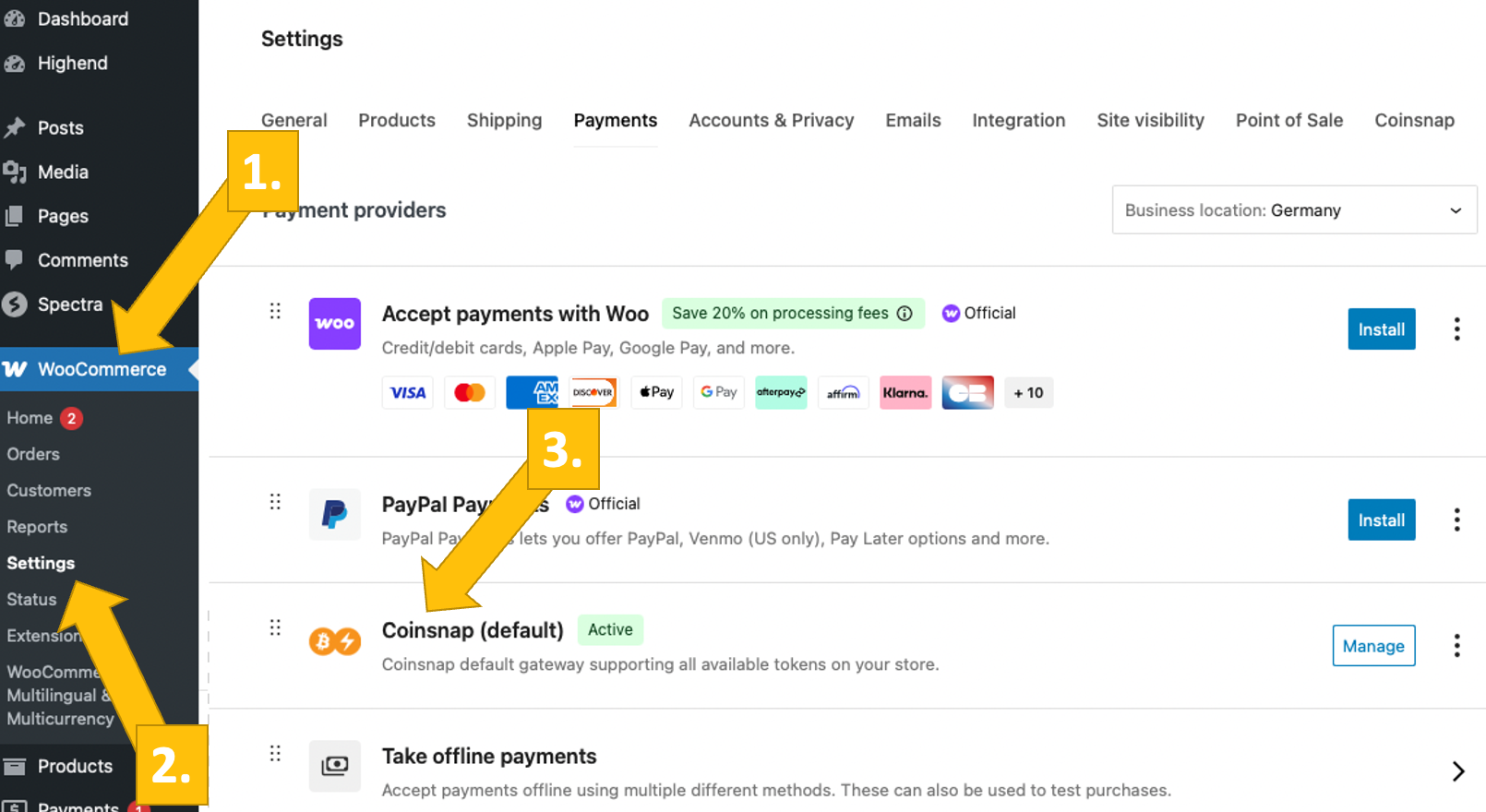
Adding Bitcoin to WooCommerce can be truly no-code when you pick the right plugin: install it directly from your WordPress plugin repository, connect it with your processor, enable it under WooCommerce → Settings → Payments, and you’re live in minutes.
With non-custodial, Lightning-first options (e.g., Coinsnap), there’s no KYB/KYC—you sign up with just an email and add your Lightning address, and payments settle directly to your wallet without a middleman. If you later want fiat settlement via a custodial gateway, KYB will apply; but for pure BTC/Lightning checkout, it’s plug-and-play with zero paperwork.
Here is how it works:
- Install a plugin (e.g., Coinsnap).
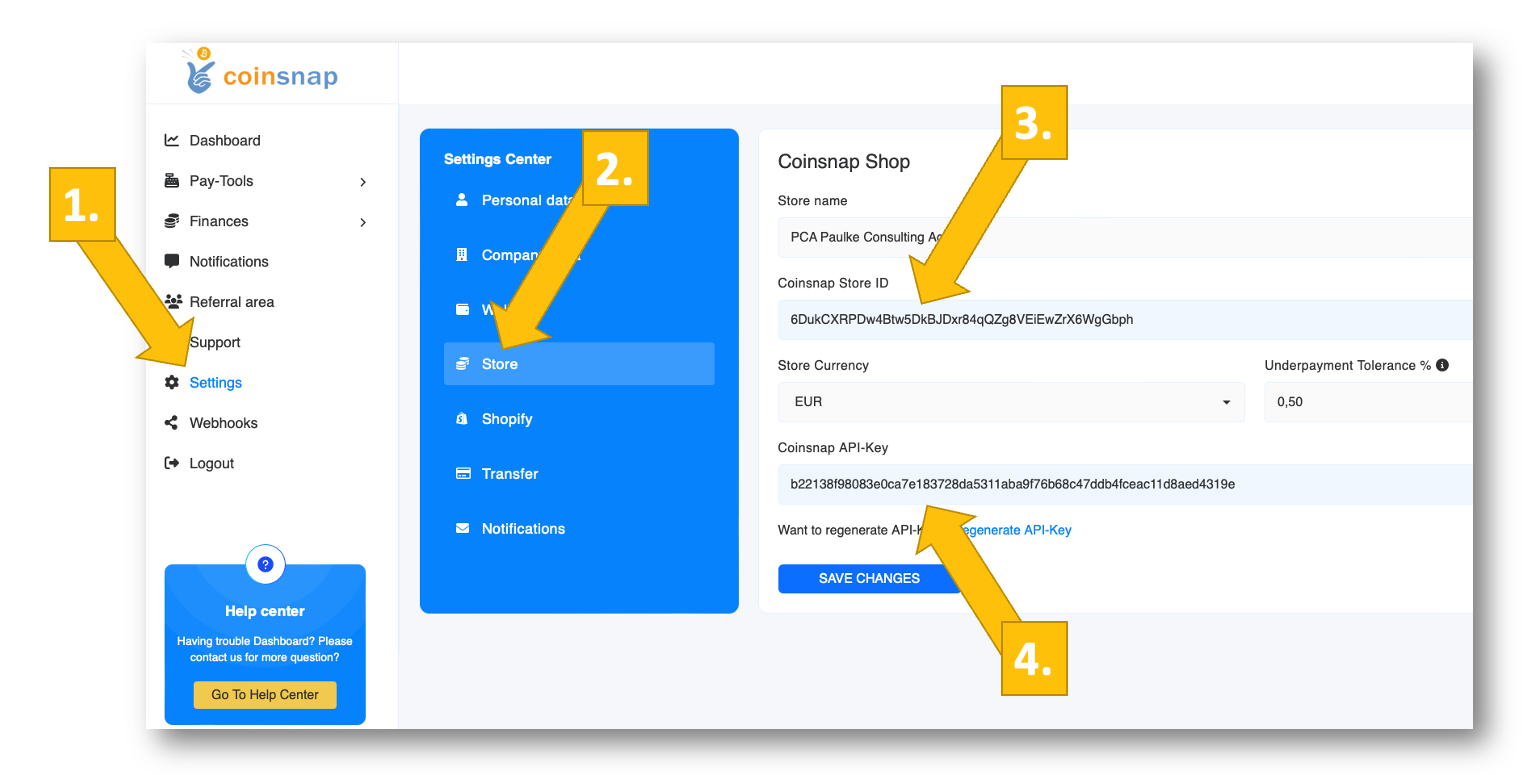
- Connect credentials (Store ID/API key or wallet).
- Enable in WooCommerce → Settings → Payments.
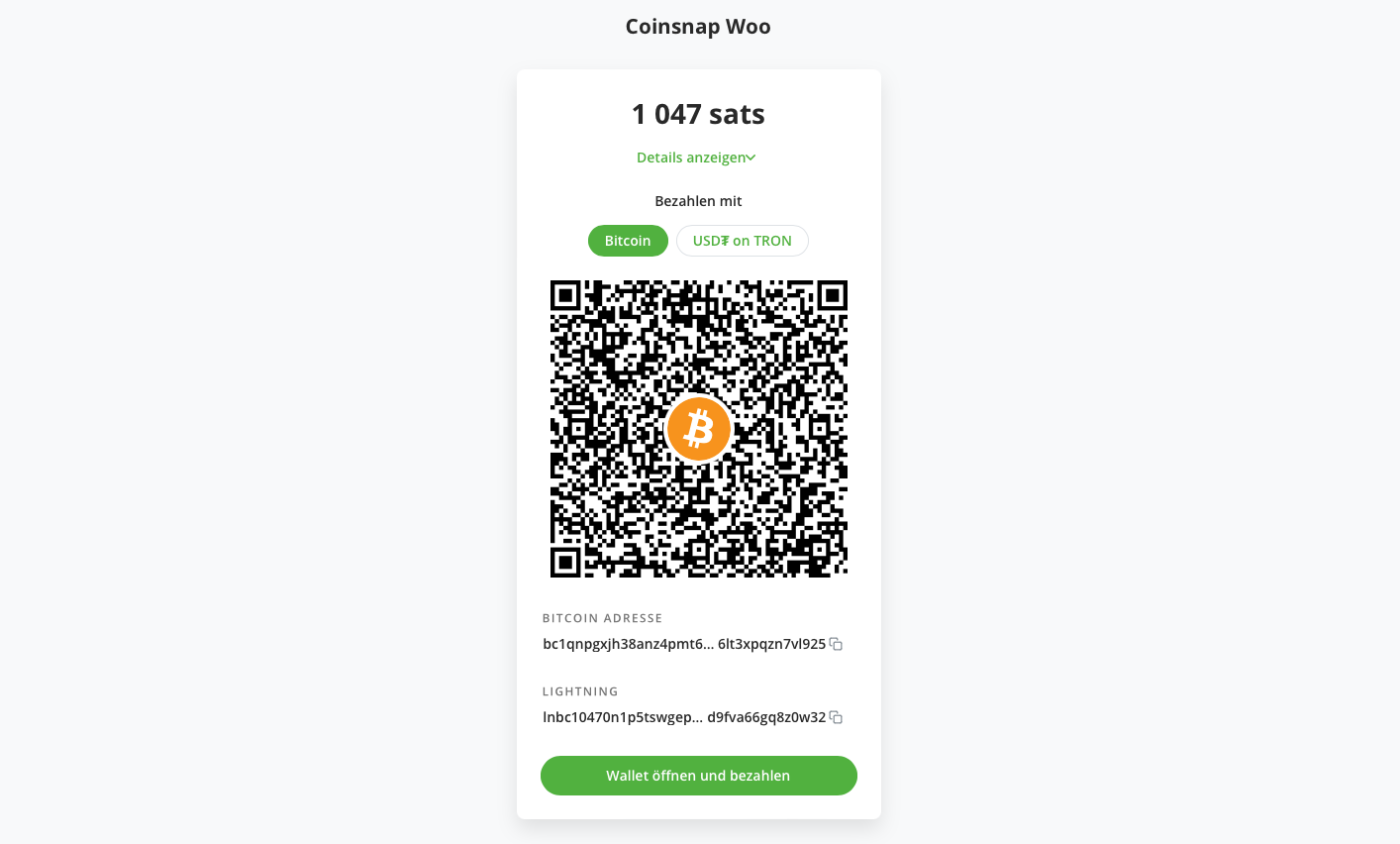
- Test order with a small Lightning payment.
.
1. Install Plugin from WordPress
2. Connect credentials
3. Enable in WooCommerce
4. Buy something in your store!
Click images to enlarge!
That’s as simple as it gets to accept Bitcoin in your Woo store – if you are ready to do it, see the step-by-step installation guide!
Compliance, accounting, and settlement – what to watch
When you add Bitcoin at checkout, compliance needs depend mainly on your custody model. If you use a custodial/fiat-settling gateway, expect KYB/KYC, basic AML/sanctions screening, and provider terms covering refunds and chargebacks; if you go non-custodial (funds straight to your BTC/Lightning wallet), you usually avoid provider onboarding—but you still must meet local rules on consumer protection, invoicing/VAT, and tax reporting. I.e., Coinsnap or BTCPay Server do not require any KYC/KYB – an email address and a Lightning wallet are all that‘s needed. If you choose Coingate, you will have to provide information on your business and your person.
Accurate accounting matters because revenue is recognized at the fair-value fiat price at payment time; so you should log the BTC amount, the exchange rate at checkout, order ID, and TXID/Lightning payment hash, then track any FX gains/losses if/when you convert to fiat, plus mirror refunds with the same data. Plugins like Coinsnap make accounting simple for you: In the dashboard you will find detailed info on any transactions, which you can export in various formats and forward to your accountant. To deal with exchange rates and FX gains/losses, you can easily integrate Coinsnap with CoinTracking, which provides such information in a form that is compliant with all european tax authorities.
For settlement, you can choose direct self-custody (Lightning and/or on-chain), automatic fiat payouts to a bank account via a processor, or a hybrid (e.g., Lightning for everyday orders, on-chain for high-value carts, with periodic manual or automatic conversion). I.e., with Coinsnap you can receive Bitcoin payments directly in your Lightning wallet, your BTCPay Server, or on-chain. If you prefer real time fiat conversion, open a Bringin account and entert he Lightning wallet address in your Coinsnap – and all your payments will be credited to your Fiat account in real time.
- KYC: Custodial gateways require KYB; non-custodial generally don’t.
- Fiat settlement: If you want daily EUR/USD payouts, choose CoinGate or BitPay, or use Coinsnap with a Bringin Lightning wallet.
- Bookkeeping: Export CSVs, tag BTC/LN orders, and reconcile regularly.
FAQs – what you need to know about WooCommerce Bitcoin and Lightning
1) Does WooCommerce support Bitcoin natively?
No. WooCommerce doesn’t include Bitcoin out of the box—you enable BTC (and Lightning) via third-party plugins like Coinsnap or BTCPay Server.
2) What’s the fastest way to get WooCommerce Bitcoin payment without coding?
Install a compatible plugin, enable it in WooCommerce → Settings → Payments, paste the wallet/API details, and run a test order. With plugins like Coinsnap merchants can add Bitcoin checkout to their WooCommerce in minutes.
3) What’s the difference between on-chain WooCommerce Bitcoin payments and WooCommerce Lightning payments?
On-chain payments settle on the blockchain (slower, miner fees, great for high-value orders). Lightning routes off-chain through channels (seconds, tiny fees) and is ideal for everyday commerce.
4) Which is cheaper: on-chain or Lightning?
Lightning is typically far cheaper (fractions of a cent) and faster; on-chain includes miner fees that vary with network congestion.
5) Do I need KYC/KYB to accept Bitcoin?
For non-custodial plugins (funds go straight to your wallet), usually no. For custodial gateways and fiat settlement, expect KYB/KYC as part of AML compliance.
6) Can I settle sales to my bank account in EUR/USD/GBP?
Yes—choose a provider that offers fiat settlement. If you prefer self-custody, you can keep BTC or convert later via your own exchange workflow.
7) How do I handle Bitcoin price volatility at checkout?
Use rate-locking (most plugins do this) to quote a fixed BTC amount for a limited time window, then record the fiat value at the moment of payment for accounting.
8) Are Bitcoin payments subject to chargebacks?
No. Bitcoin/Lightning payments are push-transactions; there are no card-style chargebacks. You can still issue refunds per your policy.
9) How do refunds work with Bitcoin or Lightning?
You send a new payment back to the buyer’s address/invoice. Some gateways streamline this with refund tools; otherwise you handle it manually (record TXIDs/payment hashes).
10) What data should I record for accounting/taxes?
Store the BTC amount, fiat value at payment time, exchange rate, order ID, and TXID/Lightning payment hash. Reconcile exports (CSV) to your wallet/bank monthly.
11) Will offering WooCommerce Bitcoin payment break my existing checkout?
No. It appears as an additional method alongside cards/PayPal. You can keep all other gateways active.
12) Can I accept both Lightning and on-chain in one store?
Yes. Many plugins let you enable both—Lightning as default for speed/costs, on-chain for large tickets or customer preference.
13) Is it secure to offer WooCommerce Bitcoin payment?
Yes—use reputable plugins, HTTPS, and secure wallet practices (hardware wallet, backups, access controls). Payments are final once received.
14) Can I use WooCommerce Bitcoin payment for in-person sales, too?
Yes. Some providers like Coinsnap include Web-PoS/QR flows so you can accept Lightning in store or at events using a phone or tablet.
15) Do Bitcoin payments help conversion rates?
They can—especially for international buyers, privacy-minded customers, or digital goods/micro-payments where Lightning’s speed and fees shine.
16) How can I test Bitcoin checkout safely?
Most plugins support test modes or small live payments. For Lightning, send tiny invoices; for on-chain, use small amounts and confirm order status end-to-end.
Next steps to start accepting WooCommerce Bitcoin payments
Read our analysis of the 10 best WooCommerce Bitcoin payment plugins, and get all the information to make the best choice!
Read the Coinsnap for WooCommerce installation guide and see how easy it is to accept WooCommerce Bitcoin payments in your store – even with your own BTCPay Server!
Start now and register your Coinsnap account with just your email and your Lightning wallet address – and you can get started by just installing the plugin in your WordPress!