

The State of Bitcoin Payments on WooCommerce
 WooCommerce is the open-source ecommerce engine that turns WordPress sites into full online stores, prized for its flexibility, huge extension ecosystem, and global developer community. It powers everything from small boutiques to high-volume catalogs thanks to a modular design where you bolt on payment gateways, shipping, tax, and marketing features as needed. While WooCommerce Payments covers cards and a range of local methods, WooCommerce itself does not ship a native Bitcoin option—crypto payments are added via third-party extensions.
WooCommerce merchants are looking into Bitcoin to reach global buyers without card rails, cut processing costs, and reduce fraud exposure. The cost of accepting Bitcoin with WooCommerce depends on the selected payment provider. Coinsnap, BTCPay Server, CoinGate, BitPay and the other providers compared below use different fee models, which are listed separately in this comparison. However, their payment-processing fees are generally significantly lower than those charged by PayPal or traditional credit card providers. Also, crypto payments aren’t subject to chargebacks, which can materially lower loss rates and support margins.
Beyond cost and risk, there’s also growing demand: an estimated 560+ million people owned crypto in 2024, and merchants often promote payment methods that minimize costs and fraud—two boxes Bitcoin can tick. As for “how many might be interested,” precise figures don’t exist, but WooCommerce powers roughly 4.5–6.2 million live stores [storeleads.app, trends.builtwith.com]; even a conservative 5–10% exploring Bitcoin would mean on the order of ~225,000 to ~616,000 shops evaluating a crypto option in 2025.
Does WooCommerce support Bitcoin?
Not natively. WooCommerce doesn’t include a built-in Bitcoin payment method or a Bitcoin checkout, but you can accept Bitcoin (and Lightning) by adding a third-party plugin. Popular options include Coinsnap (Lightning-first, non-custodial), BTCPay Server (self-hosted), CoinGate and BitPay (custodial with optional fiat settlement).
Woo.com lists a small, curated set of crypto plugins, and many more are available on WordPress.org and GitHub.
Before You Choose your WooCommerce Bitcoin Payment Plugin: Here is what This Guide Covers
First, we’ll map the landscape of Bitcoin payments on WooCommerce and explain why the official WooCommerce Marketplace currently offers only a handful of crypto extensions—and what that means for things like fees, support, and long-term maintenance—before widening the lens to the much bigger ecosystem of WordPress.org and GitHub plugins.
We’ll then introduce the ten options you’re most likely to consider:
- Coinsnap
- BTCPay
- CoinGate
- NOWPayments
- Blockonomics
- BitPay
- CryptoPay
- Coinbase Commerce
- DePay
- Helio Pay
After this overview, we’ll compare these ten plugins side-by-side—covering custody model, Lightning support, fees, payout options, KYC and compliance, developer friendliness, and support—then rank them with clear recommendations by use case (from solo creators to high-volume stores and regulated merchants).
Next, we’ll demonstrate how simple it is to add Bitcoin to WooCommerce with a step-by-step installation guide for the Coinsnap for WooCommerce plugin, including an optional path to integrate your own BTCPay Server.
Finally, we’ll give our recommendation which plugins are most likely the best for you.
The WooCommerce Bitcoin Payment Plugin Landscape: Why the Official List Is Short
Woo’s official Marketplace carries only a small, curated set of crypto extensions—currently including Coinbase Commerce, DePay Payments, Helio Pay, and OpenNode (we’ll cover them below).
These plugins passed security/compatibility checks (the Quality Insights Toolkit tests every new release) and meet WooCommerce support standards, including automated quality checks on new versions—useful for long-term compatibility with new WooCommerce/WordPress releases. For many plugin developers this is a lot of hassle, though – WooCommerce’s requirements cause a lot of work that often cannot be refinanced, given the low fees most plugins take from their users.
However, an important note for merchants: Of the four cryptopayment plugins listed on Woo Marketplace, only Coinbase Commerce offers Bitcoin Lightning payments – the other three plugins only support other cryptocurrencies. Furthermore, Coinbase only works if both the buyer and the merchant have a Coinbase wallet, which significantly limits the customer base.
That does not man, though, that “free market” Bitcoin payment plugins for WooCommerce do not meet Woo’s standards as well. Serious providers like BTCPay Server, Coinsnap, CoinGate, and many others certainly constantly update their plugins as well, and make sure they are always compatible with the latest WordPress and WooCommerce versions. And at least four of them support Bitcoin AND Lightning (see below).
Beyond Woo.com: The WordPress.org & GitHub Ecosystem (and the Plugins That Matter)
Beyond the small, curated list on Woo.com, the WordPress.org + GitHub ecosystem is broad and fast-moving: you’ll find self-hosted, open-source Lightning-first non-custodial options like Coinsnap and BTCPay Server (both are official WooCommerce plugins with additional active GitHub repos), direct-to-wallet gateways like Blockonomics, and established custodial processors including CoinGate and BitPay—all distributed via WordPress.org with public docs, support forums, and release notes.
The key trends:
- Lightning becomes standard—providers increasingly enable LN by default or emphasize it prominently (e.g., BTCPay, Coinsnap, CoinGate)
- Non-custodial/direct-to-wallet growth to reduce custody and chargeback risk (Blockonomics, Coinsnap)
- Custodial multi-coin + fiat settlement remains popular for merchants wanting automatic conversions (CoinGate, BitPay, but also possible i.e. with Coinsnap + Bringin)
- Open development on GitHub and visible update cadence on WordPress signal ongoing maintenance that merchants can verify before adopting.
WooCommerce Bitcoin Payment Plugins: The 2025 Shortlist
While WordPress.org and GitHub host dozens of crypto payment plugins across many chains and tokens, this guide focuses strictly on Bitcoin and Lightning solutions that are as easily installed as possible.
Since many merchants without programming skills might not be familiar with Github, for this apples-to-apples comparison we’ve consequently selected ten plugins that can be installed directly in your WordPress backend under “add new plugin”:
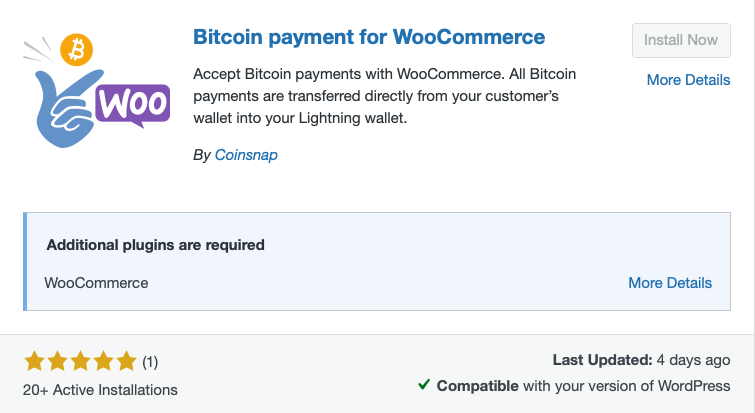
1) Coinsnap for WooCommerce
Why Use Coinsnap for WooCommerce?
Coinsnap lets WooCommerce merchants accept Bitcoin payments via Lightning and on-chain without holding customer funds. The plugin is quick to configure, sends payments directly to the merchant’s own wallet and charges a 1% fee per successful transaction. It is ideal for businesses that want to accept Bitcoin with minimal technical effort.
The Coinsnap WooCommerce Bitcoin payment plugin is Lightning-first and non-custodial: invoices are paid by scanning a QR code and funds are forwarded instantly to your own Lightning wallet. The WooCommerce setup is lightweight (store ID + API key), and even comes with a wizard to connect your own BTCPay Server if you prefer to self-host. Of course, it also enables on-chain payments for larger tickets.
Coinsnap positions itself for speed, privacy, and minimal onboarding friction, typically charging around 1% for processing. Ideal for merchants that want to accept Bitcoin payments with minimum effort, and without having to become serious “Bitcoiners”.
2) BTCPay Server
Who Is BTCPay Server Best For?
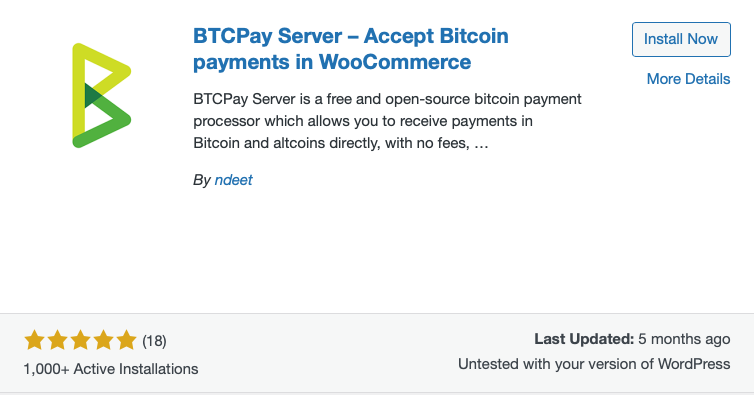
BTCPay Server is best for technically experienced merchants who want maximum control over their Bitcoin payment infrastructure. It supports Lightning and on-chain payments without platform fees, but merchants must manage hosting, updates, security and maintenance themselves.
BTCPay Server was the first open source Lightning payment DIY solution that pioneered and revolutionized the Bitcoin payment landscape. It’s a self-hosted, open-source Lightning payment gateway, thus coming with no platform fees. You run the stack, keep keys, and can accept both on-chain Bitcoin and Lightning. The official “Greenfield” WooCommerce plugin and docs make integration straightforward, but you’ll own hosting, upgrades, and security.
Best for merchants with decent programming and technical skills that value sovereignty, auditability, and deep configurability over convenience.
3) CoinGate
Who Is CoinGate Best For?
CoinGate is well suited to merchants who want to accept Bitcoin via Lightning and on-chain alongside numerous altcoins, with optional settlement in euros, US dollars or British pounds. It charges a flat 1% processing fee, although installing its GitHub-hosted WooCommerce module may require some technical confidence.
A popular gateway that supports Bitcoin (on-chain and Lightning) and a wide set of altcoins; Lightning is enabled by default in its ecommerce plugins. Merchants can settle in crypto or in fiat (EUR/USD/GBP), but the WooCommerce module is maintained on GitHub (which makes it a bit more complicated for non-skilled merchants to integrate). Pricing is a flat 1% per processed payment.
Good blend of features for merchants who want LN + optional fiat settlement and are not afraid of Github.
4) BitPay
Who Is BitPay Best For?
BitPay is best suited to regulated or high-volume merchants that need fiat settlement, compliance support and mature business features such as refunds and payouts. It supports Lightning payments and charges between 1% and 2% plus $0.25 per transaction, depending on monthly processing volume.
An enterprise-grade gateway with long track record, supporting Lightning since 2022. It offers robust business tooling, refunds, payouts, and broad compliance coverage. Pricing is tiered (1–2% + $0.25 per transaction depending on monthly volume).
Strong choice for regulated merchants that want fiat settlement and mature support.
5) NOWPayments
Who Is NOWPayments Best For?
NOWPayments is best suited to merchants who want to accept Bitcoin alongside a wide range of other cryptocurrencies but do not require Lightning payments. Its WooCommerce plugin supports on-chain payments, with fees starting at 0.5% for payments without conversion and 1% when currency conversion is required.
A custody-free Bitcoin payment solution with broad support of other coins, that provides a simple WooCommerce plugin and flexible tools (donations, PoS, APIs). Fees typically start at 0.5% (mono-currency) and 1% with conversion. Note: independent reviews highlight lack of Lightning support, so BTC payments are on-chain.
Suitable if you need multi-asset coverage and don’t require LN.
6) Blockonomics
Who Is Blockonomics Best For?
Blockonomics is well suited to merchants who want Bitcoin payments sent directly to their own wallet without operating a node. The first ten transactions are free, after which a 1% fee applies. It has traditionally focused on on-chain payments, so merchants requiring Lightning should confirm its current support before deployment.
Direct-to-wallet Bitcoin for WooCommerce—no funds are held by the payment provider. First 10 transactions are free, then 1% per transaction fees apply. Historically BTC on-chain (and BCH); Blockonomics’ own 2025 post says Lightning support is being added, but confirm status in the plugin/docs for production.
Interesting for merchants who want non-custodial simplicity without running their own node.
7) CryptoPay
A wallet-to-wallet WooCommerce plugin that’s license-based rather than per-transaction—i.e., 0% commission, funds go directly to your wallet, and no KYC. It supports Bitcoin plus EVM and other chains. There’s no Lightning support and you’ll self-manage keys and any fiat off-ramping
It’s attractive if you want peer-to-peer payments with predictable costs.
8) Helio Pay
Who Is Helio Pay Best For?
Helio Pay is best suited to merchants that expect most crypto payments in currencies other than Bitcoin and need broad multi-chain support. It charges approximately 1% and offers real-time payouts and optional bank settlement, but it is not a Bitcoin-focused solution and does not advertise Lightning support.
A fast-moving Web3 checkout with WooCommerce extension; supports many chains and lists Bitcoin among compatible currencies. Fees are listed at ~1% with real-time payouts and optional on/off-ramp to bank accounts. Lightning isn’t advertised.
Helio is a multi-chain crypto checkout rather than a Bitcoin/LN specialist – so consider it only if most of your sales are being paid with coins other than Bitcoin.
9) DePay
Web3, wallet-to-wallet payments processed on-site (no intermediary), with 1.5% pay-as-you-go fees. Supports EVM and Solana networks and thousands of tokens; Bitcoin is available as wrapped assets (e.g., WBTC/BTCB), not native L1 BTC or Lightning.
Excellent for token-centric stores, but not ideal if you specifically need native Bitcoin/LN.
10) Coinbase Commerce
Important: Coinbase Commerce Has Been Discontinued
Coinbase Commerce was integrated into Coinbase Business and ceased operating as a standalone service on March 31, 2026. Existing merchants had to migrate, and the former Commerce portal can no longer create payment charges.
Coinbase’s merchant product integrates with WooCommerce and charges 1% per crypto payment, with Bitcoin among supported assets. However, Coinbase’s legacy WooCommerce plugin repo notes it’s not actively maintained, so consider using current docs/SDKs and evaluate long-term maintenance before adopting. Commerce benefits from Coinbase onboarding and compliance, but Lightning support for Commerce specifically isn’t documented.
Only recommended for Shops that are already using Coinbase and want quick crypto acceptance and fiat conversion without bothering to install another solution, too.
Decision Matrix: Find the Perfect WooCommerce Bitcoin Payment Plugin for Your Needs at a Glance
To give you as much information on the pro’s and con’s of each of the plugins named above, we will now compare each plugin on the criteria that actually move your checkout, compliance, and margin: custody model (your keys vs. a provider—controls risk and settlement speed), Lightning support (instant, low-fee payments and a smoother UX), fees (processor + network costs that hit margin), payout options (BTC/LN vs. automatic fiat to manage volatility and accounting), KYC & compliance (onboarding friction and suitability for regulated businesses), developer friendliness (setup time, APIs, maintenance burden), and support (docs, update cadence, and response quality).
Each row also includes pros/cons and a “best for” so you can match capabilities to your use case—whether you want one-click simplicity, self-hosted sovereignty, or Lightning with easy fiat rails.

(download decision matrix)
(Fees are from 2025, for updated 2026 fees look below)
Since this table might not be easy to read especially on smaller devices, we will now present the information in one table for each plugin:
#1 Coinsnap
Coinsnap is non-custodial, sending payments directly to the merchant’s own Lightning or Bitcoin wallet, and charges 1% per successful transaction. Its straightforward WooCommerce plugin requires no programming, while an optional wizard supports connection to a self-hosted BTCPay Server. It is best suited to merchants seeking the quickest and simplest way to accept non-custodial Lightning payments.
| KPI | Findings |
| Rank | #1 |
| Custody model | Non-custodial; funds settle to your own Lightning/BTC wallet |
| Lightning support | Yes (Lightning-first) |
| Typical fees | 1% per successful payment |
| Payout options | Direct to LN/BTC; on-chain/fiat possible via partners |
| KYC & compliance | Minimal (no processor custody; basic account info) |
| Developer friendliness | Simple Woo plugin; optional wizard to link your own BTCPay Server |
| Support | Active docs and merchant guidance |
| Pros | Fast LN UX, privacy-friendly, instant settlement to your wallet |
| Cons | LN-centric; on-chain/fiat handled via partners |
| Best for | Stores wanting the quickest non-custodial Lightning setup and privacy by default |
#2 BTCPay Server
BTCPay Server is a self-hosted, non-custodial solution that gives merchants complete control over their keys and payment infrastructure. It charges no platform or transaction fees, although merchants must cover hosting and maintenance costs. Its powerful APIs, extensive configuration options and official WooCommerce integration make it highly developer-friendly, but it is best suited to technically experienced merchants prioritizing sovereignty, auditability and control.
| KPI | Findings |
| Rank | #2 |
| Custody model | Self-hosted, non-custodial (you control keys/infrastructure) |
| Lightning support | Yes |
| Typical fees | $0 (you cover hosting cost) |
| Payout options | Direct to your own wallets/nodes |
| KYC & compliance | None (you operate the stack) |
| Developer friendliness | Powerful APIs; highly configurable; official Woo integration |
| Support | Open-source community + docs |
| Pros | Full control, no middleman fees, extensible |
| Cons | Requires server ops, monitoring, and upgrades |
| Best for | Technical merchants prioritizing sovereignty, cost control, and auditability |
#3 Coingate
CoinGate uses a custodial merchant-account model and charges a standard processing fee of 1% per transaction. Its WooCommerce plugin, GitHub-hosted module and solid documentation provide good integration options, although setup may require some technical confidence. It is best suited to merchants seeking Lightning payments, broad cryptocurrency support and optional fiat settlement within one platform.
| KPI | Findings |
| Rank | #3 |
| Custody model | Custodial merchant account |
| Lightning support | Yes (enabled in ecommerce plugins) |
| Typical fees | 1% standard rate |
| Payout options | Crypto or fiat (EUR/USD/GBP) |
| KYC & compliance | Merchant KYB required |
| Developer friendliness | Woo plugin + GitHub module; solid docs |
| Support | Commercial support |
| Pros | LN + optional fiat settlement; broad coin support |
| Cons | Custodial onboarding and compliance steps |
| Best for | Stores wanting Lightning plus easy fiat settlement under one roof |
#4 BitPay
BitPay is a custodial payment gateway with tiered fees ranging from 2% to 1%, plus $0.25 per transaction, depending on monthly processing volume. Its mature APIs and well-developed refund and payout workflows make it suitable for professional integrations. BitPay is best suited to larger or regulated merchants that need strong compliance support and broad fiat-settlement options.
| KPI | Findings |
| Rank | #4 |
| Custody model | Custodial gateway |
| Lightning support | Yes (enterprise focus) |
| Typical fees |
2% + $0.25 below $500,000 monthly volume; 1.5% + $0.25 from $500,000–$999,999; 1% + $0.25 from $1 million |
| Payout options | Broad fiat settlement options |
| KYC & compliance | Full KYB; strong compliance tooling |
| Developer friendliness | Mature APIs, refunds, payout flows |
| Support | Enterprise-grade |
| Pros | Brand trust, compliance, refunds/payouts |
| Cons | Higher fees vs others; heavier onboarding |
| Best for | Regulated and larger merchants needing robust compliance and fiat rails |
The following WooCommerce Bitcoin payment plugins do not use the Lightning network. Especially for tickets below € 1.000 this is a clear disadvantage, since Lightning payments are much faster and cheaper than on-chain payments.
Nonetheless, to give you a complete picture of the available plugins for WooCommerce Bitcoin payments, we analysed, and ranked, those plugins as well. Depending on your business model, there might still be the perfect one for you amongst the following six Bitcoin payment plugins:
#5 NOWpayments
NOWPayments uses a custody-free payment flow and charges a 1% service fee per transaction. Its simple WooCommerce plugin and APIs make integration accessible without extensive development work. It is best suited to merchants that want to accept Bitcoin alongside many other cryptocurrencies and do not require Lightning payments.
| KPI | Findings |
| Rank | #5 |
| Custody model | Non-custodial/custody-free flow |
| Lightning support | No (BTC on-chain) |
| Typical fees | 1% service fee |
| Payout options | Crypto; fiat via partners |
| KYC & compliance | AML/KYC policies applied as needed |
| Developer friendliness | Simple Woo plugin + APIs |
| Support | Commercial |
| Pros | Low fees, many coins, quick setup |
| Cons | No Lightning; on-chain network fees apply |
| Best for | Multi-asset acceptance where Lightning isn’t required |
#6 Blockonomics
Blockonomics uses a non-custodial model that sends Bitcoin payments directly to the merchant’s wallet. The first ten payments are free, after which a 1% processing fee applies. Its lightweight WooCommerce plugin offers a straightforward setup, making Blockonomics best suited to merchants seeking simple, direct on-chain Bitcoin payments without operating their own server.
| KPI | Findings |
| Rank | #6 |
| Custody model | Non-custodial (direct-to-wallet BTC) |
| Lightning support | On-chain BTC; LN in progress (verify before go-live) |
| Typical fees | First 10 payments free; then 1% |
| Payout options | Direct to BTC wallet |
| KYC & compliance | None |
| Developer friendliness | Lightweight Woo plugin; straightforward setup |
| Support | Email/forum-style support |
| Pros | Direct wallet settlement; simple pricing |
| Cons | Limited fiat options; LN maturity pending |
| Best for | Merchants wanting simple, direct on-chain BTC without running servers |
#7 Cryptopay
CryptoPay uses a non-custodial, wallet-to-wallet model and charges no transaction commission, relying instead on license-based pricing. Its WordPress plugin and API provide flexible integration options. It is best suited to merchants seeking predictable costs and direct peer-to-peer cryptocurrency payments without processor fees.
| KPI | Findings |
| Rank | #7 |
| Custody model | Non-custodial, wallet-to-wallet |
| Lightning support | No |
| Typical fees | 0% (license-based pricing) |
| Payout options | Direct to your wallets |
| KYC & compliance | No KYC |
| Developer friendliness | WordPress plugin + API |
| Support | Vendor docs/support |
| Pros | Zero commission; P2P model; supports multiple chains |
| Cons | No Lightning; no built-in fiat off-ramp |
| Best for | Price-predictable, peer-to-peer checkout without processor fees |
#8 MoonPay Commerce (formerly Helio Pay)
MoonPay Commerce, formerly Helio Pay, provides a wallet-based, multi-chain checkout. Its standard transaction fee is 2%, reduced to 1% with HelioX. A merchant dashboard, APIs and WooCommerce extension support flexible integration, making it best suited to Web3-focused stores that need multi-chain payments and optional bank off-ramps.
| KPI | Findings |
| Rank | #8 |
| Custody model | Wallet-based, multi-chain checkout |
| Lightning support | No (multi-chain focus) |
| Typical fees | 2% standard; 1% with HelioX. |
| Payout options | Direct to wallet; on/off-ramp available |
| KYC & compliance | KYB likely for off-ramp/banking |
| Developer friendliness | Dashboard + APIs; Woo extension |
| Support | Marketplace + vendor support |
| Pros | Fast setup; many chains; bank off-ramps |
| Cons | Not BTC/LN-specialized |
| Best for | Web3-centric stores needing multi-chain support and bank off-ramps |
#9 DePay
DePay processes payments directly from the customer’s wallet to the merchant’s wallet without a custodial intermediary. Its standard fee is 1.5%, with enterprise rates advertised as potentially as low as 0.5%. WooCommerce plugins and developer SDKs provide flexible integration options. DePay is best suited to token-focused EVM and Solana stores that do not require native Bitcoin or Lightning payments.
| KPI | Findings |
| Rank | #9 |
| Custody model | Wallet-to-wallet (on-site) |
| Lightning support | No (wrapped BTC only, e.g., WBTC/BTCB) |
| Typical fees | 1.5% standard fee, enterprise rates are advertised as potentially as low as 0.5%. |
| Payout options | Direct to wallet |
| KYC & compliance | No KYC (Web3 norms) |
| Developer friendliness | Plugin + SDKs |
| Support | Vendor support |
| Pros | P2P UX; token flexibility (EVM/Solana) |
| Cons | No native BTC or Lightning |
| Best for | Token-heavy EVM/Solana shops where native Bitcoin isn’t required |
#10 Coinbase Commerce
Discontinued. Coinbase Business available only in he USA and Singapore.
With the decision matrix for the best WooCommerce Bitcoin payment plugins in hand, you can now match each plugin’s custody model, Lightning support, fees, payout options, compliance, developer effort, and support to your exact use case and choose with confidence.
The market is clearly moving toward Lightning—it’s faster, cheaper, and more resilient than on-chain for everyday commerce—so Lightning-ready plugins are the best fit for most WooCommerce stores.
But if you’re not especially technical, ease of installation matters maybe even more than features!
Therefore, in the next section, we’ll show—step by step—how simple it can be with a well-designed, innovative and state-of-the-art plugin like Coinsnap for WooCommerce to add Bitcoin payment to your WooCommerce store.
Step-by-Step: Install WooCommerce Bitcoin Payment with Coinsnap or your BTCPay Server
To show the fastest path to WooCommerce Bitcoin payment, we’re using Coinsnap as the example—it’s Lightning-first, non-custodial, and designed for a no-hurdles setup: install the WooCommerce plugin, connect your wallet, and you’re ready to accept Bitcoin in minutes.
Below you’ll get a click-by-click Coinsnap install guide; then we’ll show how to pair Coinsnap with your own BTCPay Server for maximum control while keeping the same smooth checkout experience.
Installation Guide: Coinsnap for WooCommerce
If you have already installed WooCommerce, log in to your WordPress account.
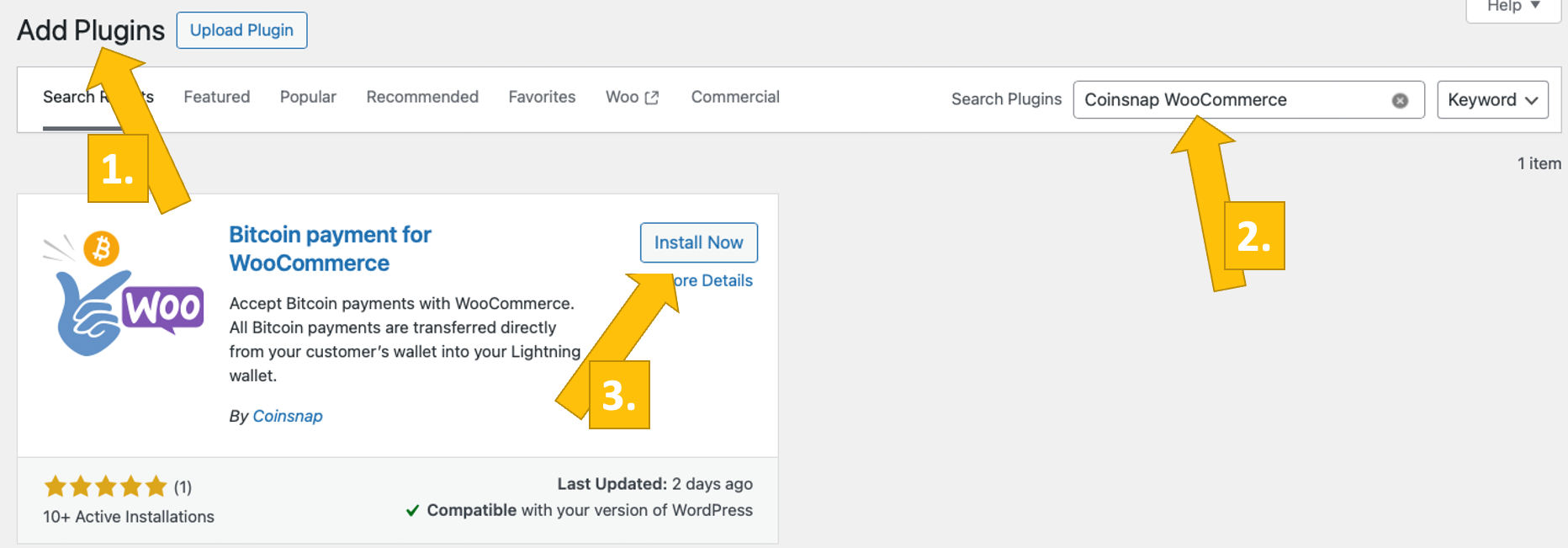
Call up the WordPress backend and go to Plugins > Add New [1].
Enter “Coinsnap” in the search bar [2] and click on “Install” [3].
Then activate the plugin.
The Coinsnap for WooCommerce plugin is now successfully installed and is listed as an additional payment method in the WooCommerce settings under the menu item Payments.
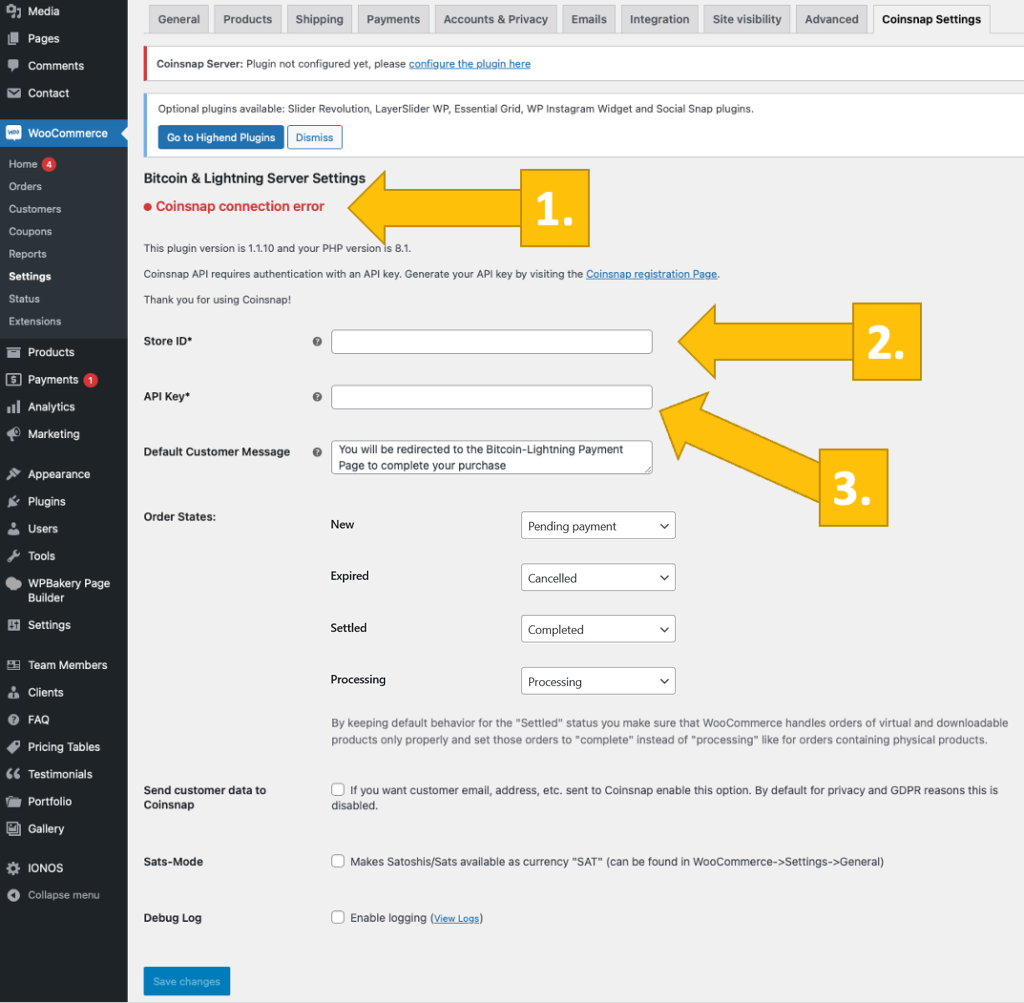
After you have installed and activated the Coinsnap for WooCommerce plugin, you need to make the Coinsnap settings. Go to WooCommerce / Settings in the black sidebar on the left. Open the Coinsnap Settings tab (on the right).
After clicking on the link provided or going to the Coinsnap settings tab, you will first see the message Coinsnap connection error [1] in red. This means that you must now enter your Coinsnap Store ID [2] and your Coinsnap API Key [3] in the two corresponding fields below.
You can find this information in your Coinsnap account in the shop settings section. If you do not yet have a Coinsnap account, you can register using the following link: Coinsnap registration.
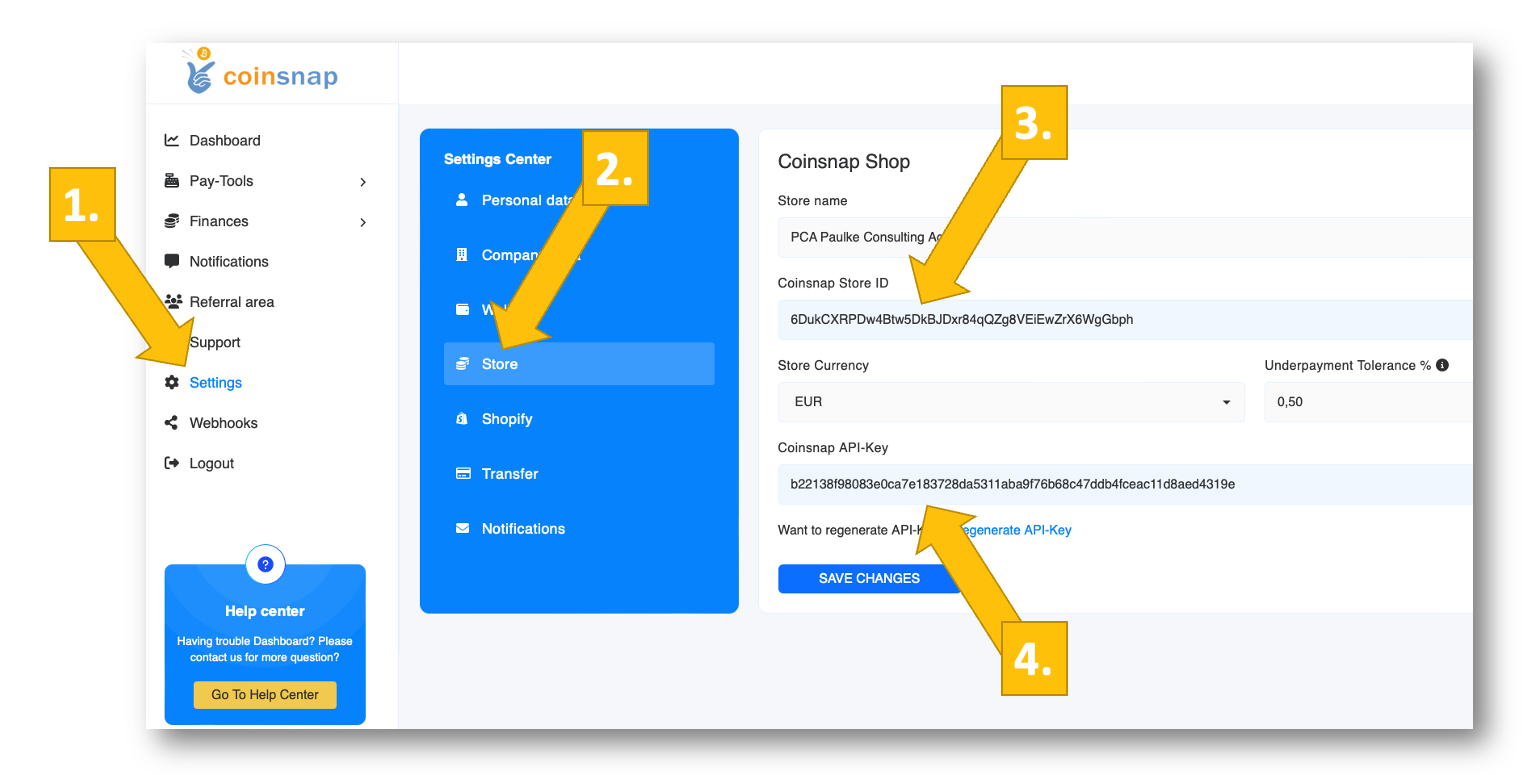
In the Coinsnap backend, go to the Settings menu item, then click on Store in the blue field.
There you will find the Coinsnap Store ID [1] and the Coinsnap API Key [2]. Copy these one after the other into the corresponding fields in the WooCommerce Coinsnap settings (see above).
Then click on the Save Changes button at the bottom of the page to apply and save the settings.
Once you have entered and saved the Coinsnap data in the WooCommerce Coinsnap settings, you will see the green message Coinsnap server is connected at the top of the tab. This means that all the technical conditions are now in place for WooCommerce to display Bitcoin transactions from your customers’ wallet to your wallet. Now just one last step remains and you can sell for Bitcoin!
Installation Guide: BTCPay Server for WooCommerce with Coinsnap
After you have installed and activated the Coinsnap Bitcoin Donation plugin, you need to configure the Coinsnap settings.
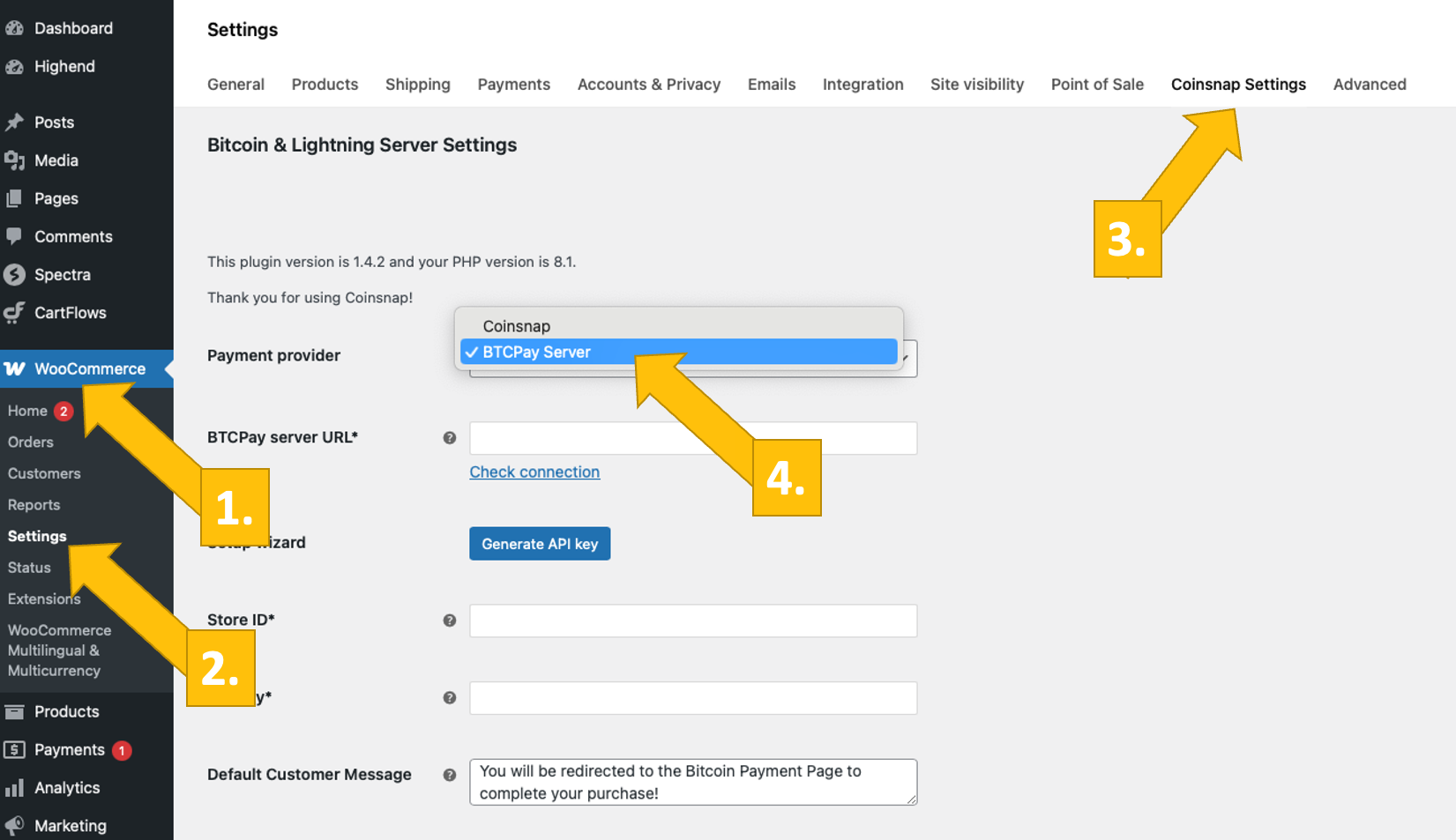
To do this, go to WooCommerce [1] -> Settings [2] in the left sidebar of your WordPress backend.
Then select the Coinsnap Settings [3] tab and select the BTCPay server as your payment provider [4].
Don’t forget to click on the blue Save button at the bottom left!
Now log in to your BTCPay server.
Once you have done this, enter the URL of your BTCPay server in the BTCPay server URL* field [1].
Next, click on the Generate API key button [2].
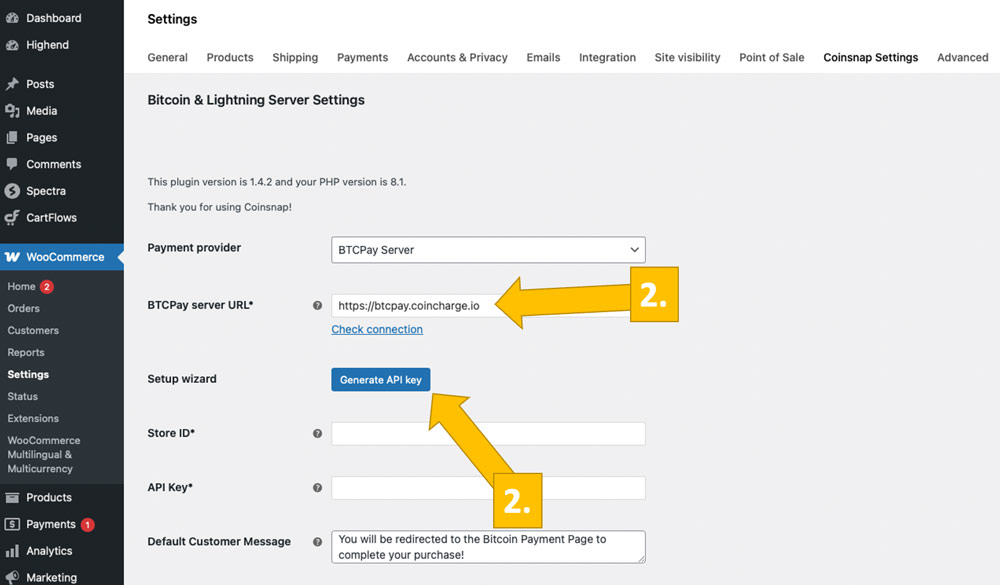
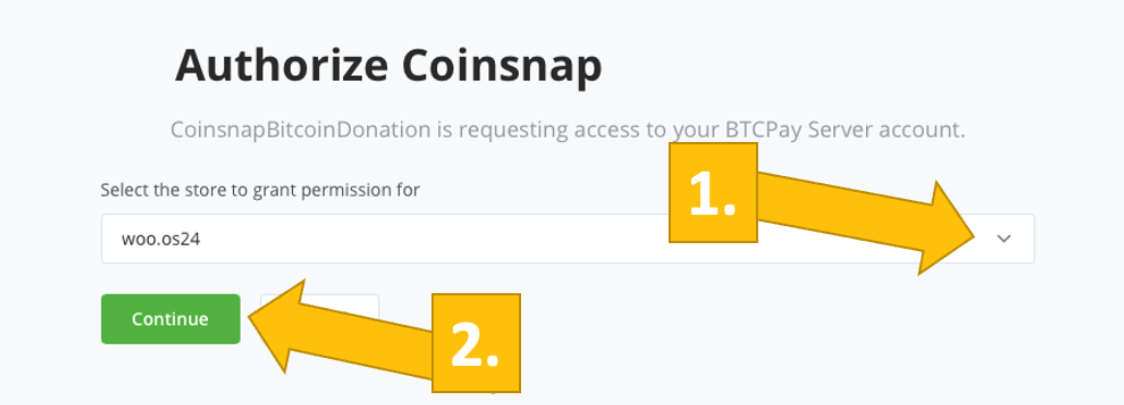
You will then be redirected to your BTCPay server.
Select your store [1] and then click on continue [2].
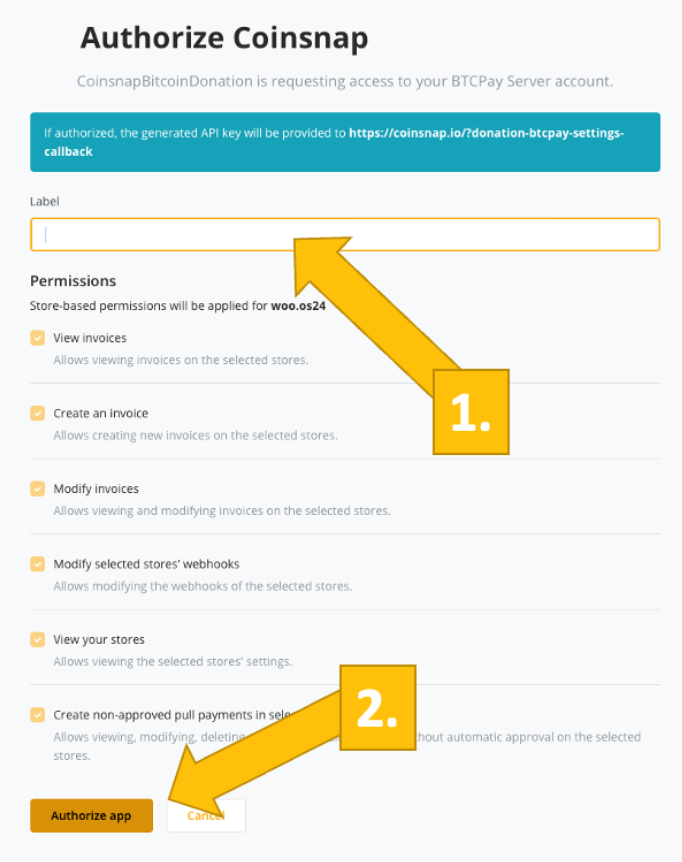
In the next window, enter the name of your store at the top [1] and then click on authorize app [2].
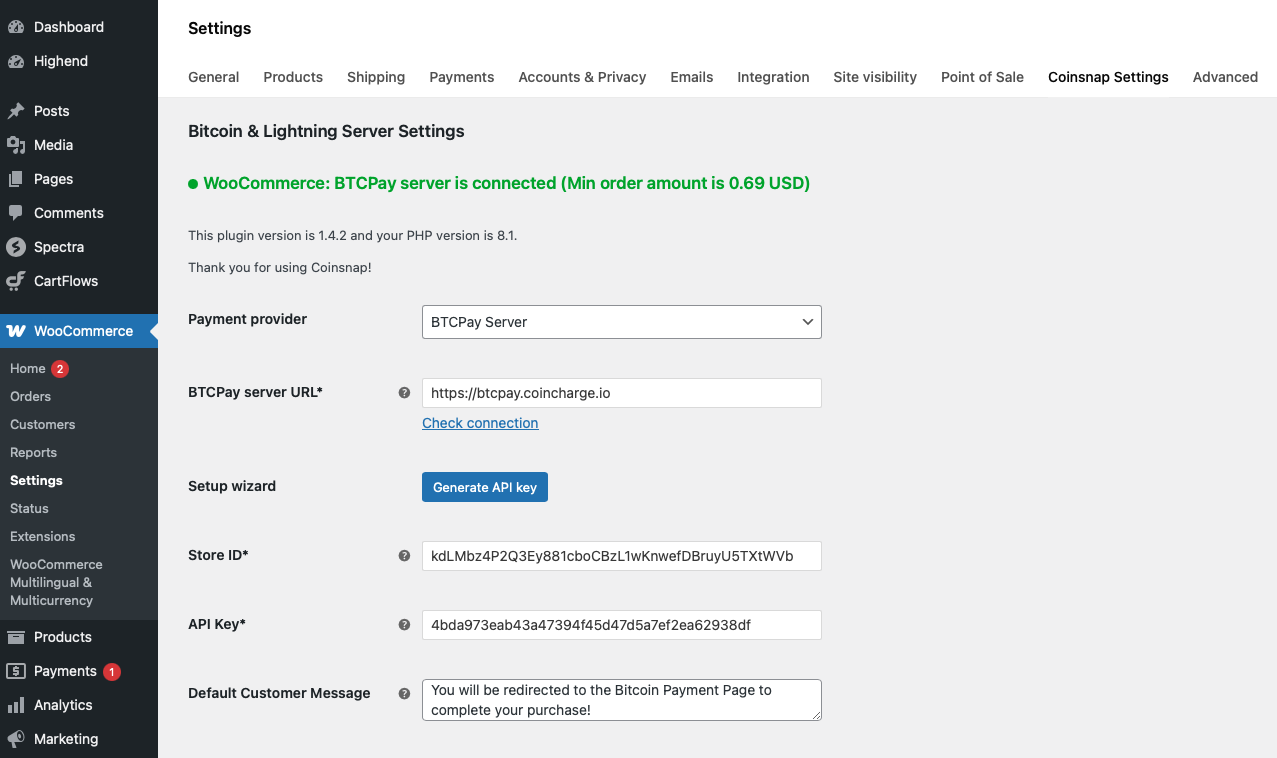
Your BTCPay server is now successfully connected to your online store via the Coinsnap for WooCommerce plugin!
(Look out for the green success indicator above!)
Final Verdict: Go Lightning, Go Live with your WooCommerce Bitcoin Payment Plugin
Bitcoin over Lightning is the standout choice for WooCommerce merchants because it combines the lowest fees, the fastest confirmations, and the strongest merchant-side protection. Lightning transactions typically cost fractions of a cent, settle in seconds, and eliminate chargebacks by design—so you keep more margin and spend less time fighting fraud.
There’s no card data to store or leak, privacy is better by default, and the network is built for real-time, high-volume commerce (from micro-purchases to larger tickets). As wallets, nodes, and gateways continue to standardize around Lightning, it’s the most future-proof way to accept Bitcoin at checkout – provided your average checkout stays below roughly $1,000; but never mind—for larger baskets, all four plugins offer on-chain payment options!
Summary and recommendations
- If you want the simplest path to Bitcoin-Lightning today, Coinsnap is our #1 pick: it’s Lightning-first, non-custodial, and genuinely quick to deploy—ideal for solo founders and SMBs who want instant settlement to their own wallet with minimal friction. For teams that value full sovereignty and zero platform fees (and don’t mind running infrastructure).
- BTCPay Server is a superb #2—self-hosted, open-source, and endlessly configurable. Because it requires programming and Bitcoin/Lightning knowledge, it’s appropriate only for teams that have those skills internally.
- If you need Lightning plus fiat settlement under one roof, CoinGate is the pragmatic choice—turn LN on, get paid, and settle in EUR/USD/GBP when you want.
- And for larger or regulated merchants that prioritize enterprise-grade compliance, refunds, and mature fiat rails, BitPay rounds out our shortlist.
Bottom line: to make sure you use one of the best Bitcoin payment plugins for WooCommerce, choose Coinsnap for speed and simplicity, BTCPay Server for technical independence, CoinGate for Lightning with easy fiat off-ramp, or BitPay when enterprise compliance and operations are paramount.