
What does Strike provide and what does Coinsnap provide?
Strike Business is a service provided by Strike. Strike holds the funds in the Strike Business account and determines Strike’s onboarding, KYC, exchange, wallet and account conditions. Coinsnap does not operate the Strike Business wallet.
Coinsnap merchants can use a Lightning address provided by Strike as a payout destination for Bitcoin and Lightning payments processed through Coinsnap.
About Strike Business
Strike Business is a custody wallet where your funds are held by Strike and you have to go through a KYC process for your business.
In return, you receive a Bitcoin Lightning wallet with a Lightning address and can manage both Bitcoin and Lightning in one account and also receive an account for euros.
You will receive a Lightning address that you can store if you accept Bitcoin payments via Coinsnap in your online store or on your website.
Strike Business is of interest to all companies that receive Bitcoin payments and wish to either keep the Bitcoin received or convert it into euros.
To open a Strike Business account, go to https://strike.me/business The entire process is partly in English, as is the subsequent email communication with the Strike Onboarding Team. After clicking on Get Started, you will be asked to fill out a form.
There you will need to provide your name, your personal e-mail address, the name of the company, the location of the company, the URL of the company’s website and the purpose for which you want to use Strike Business.
If you already have a private Strike account, make sure you use a different email address here. Ideally an email address that is associated with the company.
You will then have to wait until you receive a message from Strike. A few days later you will receive an email to start the registration process:
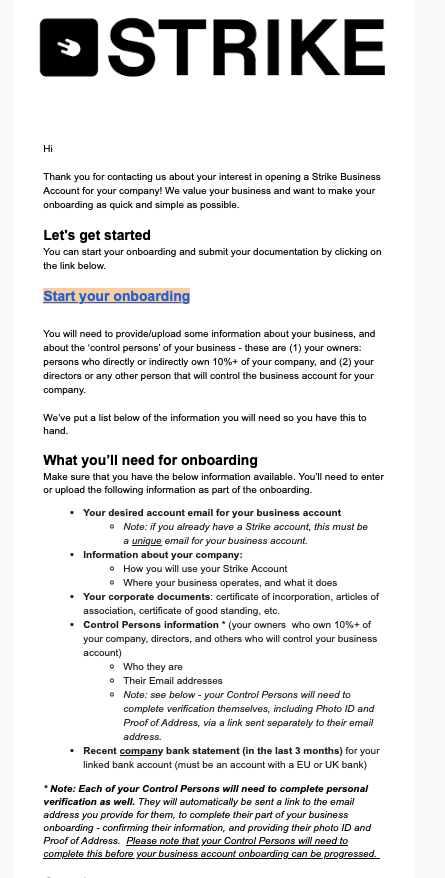
It is an advantage to find out in advance what to expect and it is advisable to compile the relevant documents in advance.
What Does Strike Verify?
| Verification | Information requested |
| Business identity—KYB | Legal business name, business address, tax identification such as an EIN, and incorporation details |
| Business documents | Tax or banking documents and any licences relevant to the company’s activities |
| Owners | Name, address and government-issued photo ID |
| Account operators | Name, address and government-issued photo ID |
| API use case | Businesses using Strike’s API may undergo additional verification based on the intended integration |
Is verification mandatory with Strike?
Strike Business requires full business verification (KYB), including identity verification (KYC) for the company’s owners and account operators.
Strike confirms that the identities of “owners and operators” must be verified. However, its public onboarding documentation does not specify:
- A particular beneficial-ownership threshold, such as 25%
- Whether every shareholder must be verified
- A fixed definition of “operator”
- Which documents prove ownership or control
Consequently, an applicant should expect Strike to determine the relevant owners and controllers during onboarding rather than relying on a publicly stated percentage.
The business must provide its company information and supporting documents, while its owners and account operators must complete individual identity verification (KYC) with a government-issued photo ID. Additional verification may be required for certain business models or when using the Strike API. Strike does not offer a transaction threshold below which businesses can use the service without verification.
For the latest information, visit: Strike Business onboarding
Does completing KYB remove transaction limits?
No. Verification gives the business access to the account, but transaction limits still apply. Strike publishes limits such as up to 0.05 BTC per outgoing Lightning transaction and account-dependent ACH deposit limits. Some limits vary according to account status and transaction activity. Strike Business transaction limits
Strike Business Dashboard
After successful registration, we can log in via the URL https://dashboard.strike.me/login log in to the Strike Business Dashboard. In contrast to the Strike account for private use, which is managed as an app on the smartphone, the Strike Business account is managed via the web. Those who already have a private Strike account will be familiar with the handling of both accounts.
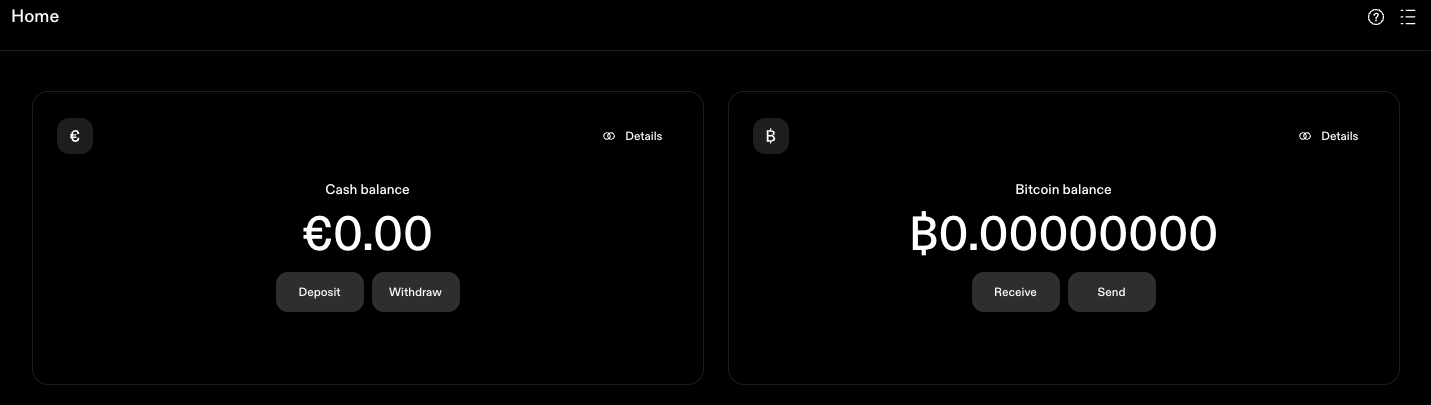
Cash Balance Account
At Strike you have an account in which the euro balance is managed. You can receive bank transfers to the account. You will receive the relevant bank details when you click on Deposit. Deposits can only be made from a bank account in the same name as the Strike account and Strike only supports Euro for European customers. Withdrawals cannot be made yet, as we need to deposit our bank account first.
To do this, go to Accounts and then to Add bank account. You can then enter the IBAN of your own bank. Payouts are only made to the company account.
Bitcoin Balance Account
We also have the Bitcoin Lightning account, which supports both on-chain Bitcoin and Lightning. With on-chain, the Bitcoin address is displayed to receive payments. Once as an on-chain address and additionally as a QR code. To receive payments via Lightning, you must first create a Lightning Invoice. To do this, enter the amount in Bitcoin that you would like to receive.
Please note that the entry is made in Bitcoin, i.e. with decimal places. So if you want to create a Lightning Invoice for 100,000 sats, the entry is 0.00100000 or 0.001.
Lightning Address
You can also receive Lightning via your Lightning address. Your Lightning address is username@strike.me. But how do you get your username? Click on the three dashes at the top right and your username will be displayed, which unfortunately cannot be changed.
If you accept Bitcoin payments with Coinsnap in your online store or on your website, you enter this Lightning address there. The credits are credited directly to your Strike Business account via this Lightning address. However, the Lightning credit is not credited to your Bitcoin account, but converted into euros and credited to your Euro Cash account.
If you do not want to keep the Bitcoin, but prefer to have the Bitcoin turnover credited in euros, then you do not need to do anything. However, if you want to keep the Bitcoin you receive, you must contact Strike Support and request that the conversion is not carried out and that the Bitcoin is credited directly to your Bitcoin wallet. You can reach Strike support at support@strike.me
Send Bitcoin to the hardware wallet
You can use the Send Bitcoin button to send Bitcoin via On-Chain or Lightning. If your Bitcoin balance on the Strike Bitcoin Wallet has become too high, it is advisable to transfer this Bitcoin to a secure Bitcoin hardware wallet, such as the Bitbox02.
It is pleasing to note that Strike does not charge its own fees for Bitcoin withdrawals, as is often the case with other Bitcoin wallets. Only the fees for the Bitcoin blockchain that the miners receive are charged.
Receive Bitcoin – Credit in Euro
If you have deposited the Lightning address you received from Strike with Coinsnap, your customers’ Bitcoin payments will be credited directly to the Strike wallet. The question now arises as to which Strike account the credit should be made to. To the Bitcoin account or to the Euro Cash account?
The default setting for Strike Business is to the Euro Cash account. For traders who are wary of the volatility of the Bitcoin price, we recommend retaining this setting. For example, if the end customer pays €50, this amount will be credited to your Euro Cash account minus the fees. These fees are on the one hand the fees that Coinsnap charges for its own services and on the other hand the exchange fee from Strike. If you would like to offer your customers the option of paying with Bitcoin, but would like to be credited in euros, Strike offers you an immediate conversion at the most favorable fees. The immediate conversion upon receipt of the Bitcoin payment is very advantageous and you are thus protected against the volatility of the Bitcoin exchange rate. Strike Business is particularly recommended for merchants who receive Bitcoin payments from their customers and want an immediate credit in euros.
Receive Bitcoin – Credit in Bitcoin
Currently, incoming Lightning payments are converted directly into euros via the Lightning address and then credited to the Euro Cash Wallet.
However, if you wish to keep the Bitcoin you receive, you must contact Strike Support and request that the conversion is not carried out and that the Bitcoin is credited directly to your Bitcoin wallet.
You can reach Strike support at support@strike.me
Fees
Which fees does Strike Business charge?
Strike Business charges a trading fee when Bitcoin is bought or sold. For European accounts, the fee depends on the account’s trading volume and currently ranges from 0.89% to 0.49%.
The quoted Bitcoin price may also contain an exchange-rate margin or spread. Strike states that its conversion rate is based on rates provided by third-party service providers, with a margin applied by Strike. The trading fee should therefore not automatically be treated as the complete cost of an EUR/BTC conversion.
Additional fees can apply when Bitcoin is sent on-chain or through the Lightning Network. Strike displays the applicable rate and charges before the transaction is confirmed. Strike’s EU Bitcoin trading fees
Does Strike charge for bank deposits and withdrawals?
Strike’s current European documentation does not state that Strike charges a fee for standard bank deposits or withdrawals. Deposits must come from a bank or payment account registered in the same name as the Strike Business account. Strike does not, however, explicitly guarantee on this page that every transfer is free of third-party banking charges. Charges imposed by the sending, receiving or intermediary bank may therefore still be possible. Strike Business bank transfers
Does Strike charge for Bitcoin withdrawals?
It depends on the withdrawal method. For on-chain Bitcoin withdrawals, Strike charges an on-chain send fee when Priority or Standard delivery is selected. Strike does not charge an on-chain send fee for the slower Flexible delivery option. When Bitcoin is sent through the Lightning Network, Strike charges an estimated routing fee to cover the fee paid to the Lightning nodes that route the payment. The applicable fee is displayed before the transaction is confirmed. Strike’s Bitcoin transaction fees
Which Bitcoin network fees can apply?
For an on-chain Bitcoin transaction, Strike may charge an on-chain send fee, depending on the selected delivery speed. Priority and Standard delivery carry a fee, while Flexible delivery has no Strike on-chain send fee. For a Lightning transaction, Strike charges an estimated routing fee. This fee covers the charges paid to the Lightning nodes that route the payment. The exact charges are shown before confirmation.
Which exchange fee does Strike charge for EUR/BTC conversion?
Strike currently applies the following volume-based trading fees to Bitcoin purchases and sales made through European accounts:
| Trading volume used to determine the fee level | Conversion fee |
| Below €50,000 | 0.89% |
| €50,000–€500,000 | 0.79% |
| €500,000–€5 million | 0.69% |
| €5 million–€15 million | 0.59% |
| Above €15 million | 0.49% |
In addition to this trading fee, the executed EUR/BTC price may include a margin or spread. Strike states that conversions use exchange rates supplied by its third-party service providers, with a margin applied by Strike. Because Strike does not publish a fixed numerical spread for European transactions, the transaction quote should be checked before confirmation. Strike’s EU exchange-rate information
The applicable fee tier is determined by the account’s monthly euro-denominated trading volume. Strike also states that cash-to-Bitcoin conversions use exchange rates provided by third-party service providers, with a margin applied by Strike. The final conversion rate and all applicable fees should therefore be reviewed in the transaction quote before confirmation. Strike’s explanation of exchange rates
Important Note: If a payment is processed through Coinsnap and the merchant uses a Strike Lightning address as the payout destination, the Coinsnap service fee and any applicable Strike conversion fee are separate charges from two different providers.
Euro deposits and withdrawals
You can make deposits and withdrawals to the Euro Cash account in our Strike Wallet by bank transfer. Strike does not charge any fees for deposits or withdrawals to another bank account.
Bitcoin deposits and withdrawals
You can send and receive deposits and withdrawals from your Bitcoin wallet via on-chain and Lightning. Strike does not charge any fees for deposits and withdrawals of Bitcoin payments.
Lightning
There are no fees for switching from Lightning to 0n-chain or vice versa. You can therefore receive Lightning credits from your customers, which are credited to the Strike Bitcoin wallet and transferred to your Bitcoin hardware wallet at no additional cost. Other Bitcoin Lightning wallets charge an average fee of 0.5% for forwarding to an on-chain Bitcoin wallet, which Strike does not charge. To be fair, however, it must be pointed out that network fees are incurred when paying via Lightning and on-chain. However, these fees are not charged by Strike, but the actual network costs are passed on. Lightning payments only incur routing fees, which are in the millicent range.
On-chain
When Bitcoin is sent from Strike to an external Bitcoin wallet, Strike offers three delivery options. The estimated delivery time and applicable on-chain send fee are displayed before the transaction is confirmed:
- Priority: estimated delivery within approximately ten minutes; Strike charges an on-chain send fee.
- Standard: estimated delivery within approximately one hour; Strike charges a lower on-chain send fee.
- Flexible: estimated delivery within approximately 24 hours; Strike does not charge an on-chain send fee.
Strike does not publish fixed fees for Priority and Standard because the quoted amount can vary. The applicable fee is displayed before the transaction is confirmed.
If you are transferring Bitcoin to your own wallet and do not require fast delivery, you can select Flexible delivery. Strike then charges no on-chain send fee. Although every on-chain transaction still requires a Bitcoin miner fee at the network level, this is not charged separately to the customer under the Flexible option. Strike delivery times · Strike Bitcoin transaction fees
Exchange fee
But how does Strike earn its money? Strike charges a trading fee whenever Bitcoin is bought or sold. For European accounts, the fee depends on the account’s euro-denominated trading volume and currently ranges from 0.89% to 0.49%:
| Trading volume used to determine the fee level | Trading fee |
|---|---|
| Below €50,000 | 0.89% |
| €50,000–€500,000 | 0.79% |
| €500,000–€5 million | 0.69% |
| €5 million–€15 million | 0.59% |
| Above €15 million | 0.49% |
Summary
Strike Business is the ideal Bitcoin wallet for businesses. Strike is a custody wallet where your Euro balance and your Bitcoin are held by Strike. To open a Strike account, KYC is required for your company and the acting persons. You will receive a wallet with a euro account and a Bitcoin account, which you can use to manage both separately. You will receive your own Lightning address for your company and, if you want to accept Bitcoin Lightning payments in your store or on your website, you can have the sales credited directly to your Bitcoin or euro account. You can receive Bitcoin and Lightning payments from your customers and decide whether you want to keep the Bitcoin or convert it into euros immediately. With Strike Business, you have a clean separation between your private Bitcoin and your company’s Bitcoin. Strike Business also scores highly in terms of fees. Deposits and withdrawals by bank transfer are free of charge. There are also no fees for deposits and withdrawals via Bitcoin on-chain and Lightning, only the routing and network fees are passed on. Fees are only charged when exchanging Bitcoin for euros or vice versa. However, these fees are cheaper than what is usually charged on the market. Strike Business is particularly recommended for businesses that want to accept Bitcoin and Lightning payments in-store or on the Internet or online store with Coinsnap.
Frequently Asked Questions About Strike Business and Coinsnap
No. Strike Business and Coinsnap are independent services. Coinsnap processes the payment in your online shop, while Strike provides the Lightning address and custodial account into which your payments are credited.
Yes. You can enter your Strike Business Lightning address as the payout address in Coinsnap. Bitcoin payments processed through Coinsnap are then forwarded directly to your Strike Business account.
Yes. Strike requires full business verification (KYB) before a Strike Business account can be used. The company must provide its business information and supporting documents, while owners and account operators must complete individual identity verification (KYC). Strike Business verification requirements
Bitcoin credited to a Strike Business account is held in custody by Strike. Strike therefore controls the private keys while the Bitcoin remains in the account. You can withdraw it to your own Bitcoin wallet whenever required. Bitcoin custody at Strike
Strike may charge a fee when incoming Bitcoin is converted into euros. Its business trading fee starts at 0.89% for a monthly trading volume below €50,000 and decreases progressively to 0.49% for volumes above €15 million. Variable on-chain transaction or Lightning routing fees may also apply when Bitcoin is withdrawn. Strike Business trading fees
Coinsnap charges 1% of the transaction value for each successfully completed payment. The customer’s complete payment is credited to your Strike Business account, while Coinsnap’s 1% fee is deducted separately from the prepaid credit in your Coinsnap account.
Yes. You can set the default receiving currency in Strike to cash. Incoming payments sent to your Strike Lightning address are then credited to your euro balance instead of being retained as Bitcoin. Strike’s applicable conversion fee and exchange rate apply. Selecting the receiving currency in Strike
Yes. If you select Bitcoin as the default receiving currency, incoming payments remain Bitcoin in your Strike Business account. You can change the default receiving currency between cash and Bitcoin whenever you want.