
BTCPay Server Lightning Payments Without Running Your Own Node – Coinsnap Plugin Setup Guide
Want to accept Bitcoin Lightning payments with your own BTCPay Server without running a Lightning node? The Coinsnap Wallet plugin makes it possible. Connect your BTCPay Server to a Coinsnap Wallet using a Lightning Address and receive Lightning payments directly in your wallet — without managing Lightning channels or inbound liquidity.
In this step-by-step guide, you’ll learn how to install the Coinsnap plugin for BTCPay Server, connect your Coinsnap Wallet, and start accepting Bitcoin Lightning payments alongside your existing on-chain payments.
Accept Bitcoin and Lightning Payments With Your Own BTCPay Server
BTCPay Server is an open-source, self-hosted Bitcoin payment processing solution that allows merchants to accept Bitcoin payments using their own infrastructure.
Merchants can install BTCPay Server on their own servers, connect their Bitcoin wallets, generate invoices, and process Bitcoin payments independently of traditional payment processors.
BTCPay Server supports both Bitcoin on-chain payments and payments through the Lightning Network.
While accepting Bitcoin on-chain payments is relatively straightforward, setting up Lightning payments often introduces additional technical complexity.
Traditionally, merchants who want to operate their own Lightning infrastructure need to run a Lightning node, manage payment channels, monitor inbound liquidity, and maintain their node’s availability.
For many merchants, these additional responsibilities create an unnecessary technical burden.
The Coinsnap Wallet plugin for BTCPay Server provides a simpler alternative: accept Bitcoin Lightning payments without operating your own Lightning node.
Merchants continue using their own BTCPay Server to manage payments, invoices, and orders, while Lightning payments are received directly in their Coinsnap Wallet.
This combines the flexibility of a self-hosted Bitcoin payment solution with the simplicity of Lightning payments through Coinsnap Wallet.
What Is the Coinsnap Plugin for BTCPay Server?
The Coinsnap for BTCPay Server plugin is an open-source integration that connects a BTCPay Server store to a Coinsnap Wallet Lightning Address.
Instead of connecting BTCPay Server to a self-managed Lightning node, merchants configure their Coinsnap Wallet as the Lightning payment destination.
When customers pay a Lightning invoice generated by BTCPay Server, the payment is received in the merchant’s Coinsnap Wallet.
BTCPay Server continues to handle invoice generation, order management, and payment status tracking.
The integration does not require a Coinsnap Merchant account or API key. A Coinsnap Wallet with a supported Lightning Address is sufficient.
The plugin is designed specifically for merchants who want to operate their own BTCPay Server without the additional complexity of running a Lightning node.
Benefits of Using Coinsnap Wallet With BTCPay Server
1. No Lightning Node Required
You don’t need to install, configure, or maintain your own Lightning node.
The Coinsnap Wallet integration handles Lightning payment reception, eliminating the need to manage Lightning channels and inbound liquidity yourself.
2. Keep Your Self-Hosted BTCPay Server
Your BTCPay Server remains under your control.
You continue operating your own infrastructure, managing your stores, generating invoices, and processing Bitcoin payments through BTCPay Server.
Coinsnap Wallet provides the Lightning receiving functionality without replacing your BTCPay Server.
3. Accept Bitcoin On-Chain and Lightning Payments
The plugin adds Lightning receiving functionality while preserving your existing Bitcoin on-chain wallet configuration.
Your customers can pay using either method, provided both are enabled in your BTCPay Server store.
4. Receive Lightning Payments Directly in Coinsnap Wallet
Incoming Lightning payments are credited to the Coinsnap Wallet associated with your configured Lightning Address.
You can review received payments directly in the Coinsnap Wallet app.
5. Easy Setup Using a Lightning Address
Connecting your Coinsnap Wallet requires only a Lightning Address, such as:
satoshi@coinsnap.app
There is no need to configure Lightning node credentials or provide access to your wallet’s recovery information.
6. No Coinsnap Merchant Account Required
You don’t need to register for a separate Coinsnap Merchant account.
A Coinsnap Wallet with an active Lightning Address is sufficient to use the plugin.
7. Open-Source Integration
The Coinsnap plugin is open-source software released under the MIT License.
Developers can review the source code and build the plugin from the public repository once released.
How Does the Coinsnap BTCPay Server Plugin Work?
The plugin connects BTCPay Server’s Lightning payment functionality to the Lightning Address of a Coinsnap Wallet.
The payment process works as follows:
- A customer starts a checkout or receives an invoice generated by BTCPay Server.
- BTCPay Server uses the Coinsnap plugin to request a Lightning invoice for the merchant’s configured Coinsnap Wallet.
- The customer pays the Lightning invoice using a compatible Lightning wallet.
- The payment is credited to the merchant’s Coinsnap Wallet.
- The plugin checks the cryptographic payment proof returned by Coinsnap.
- BTCPay Server records the verified payment and updates the corresponding invoice status.
The merchant can see the incoming payment in Coinsnap Wallet while continuing to manage invoices and orders through BTCPay Server.
Important: The plugin provides Lightning receiving functionality only. It does not replace BTCPay Server’s Bitcoin on-chain payment processing.
Requirements: What Do You Need?
Before installing the Coinsnap plugin, make sure you have:
- A self-hosted BTCPay Server running version 2.4.5 or a compatible later 2.4.x release.
- Administrator access to install plugins on your BTCPay Server.
- The Coinsnap Wallet installed on your smartphone.
- A Coinsnap Lightning Address ending in @coinsnap.app.
The Coinsnap Wallet is available for iOS and Android.
Learn more: Coinsnap Wallet – Bitcoin and Lightning Wallet
Step 1: Download the Coinsnap Plugin for BTCPay Server
The Coinsnap plugin is currently in beta and has not yet been added to the official BTCPay Server Plugin Directory.
The source code is available in the Coinsnap GitHub repository:
Coinsnap for BTCPay Server – GitHub
To install the plugin manually, you need the compiled plugin package with the .btcpay file extension.
Once a precompiled release package is published on GitHub, you can download it from the repository’s Releases section.
Alternatively, developers can build the package from the source code by following the instructions in the repository. You can also contact Coinsnap Support for a compiled package.
Always obtain plugin packages from trusted sources and verify the provided SHA-256 checksum where available.
Step 2: Install the Coinsnap Plugin in BTCPay Server
Log in to your self-hosted BTCPay Server using an administrator account.
Navigate to:
Plugins → Installed Plugins
This page displays all plugins installed on your BTCPay Server.
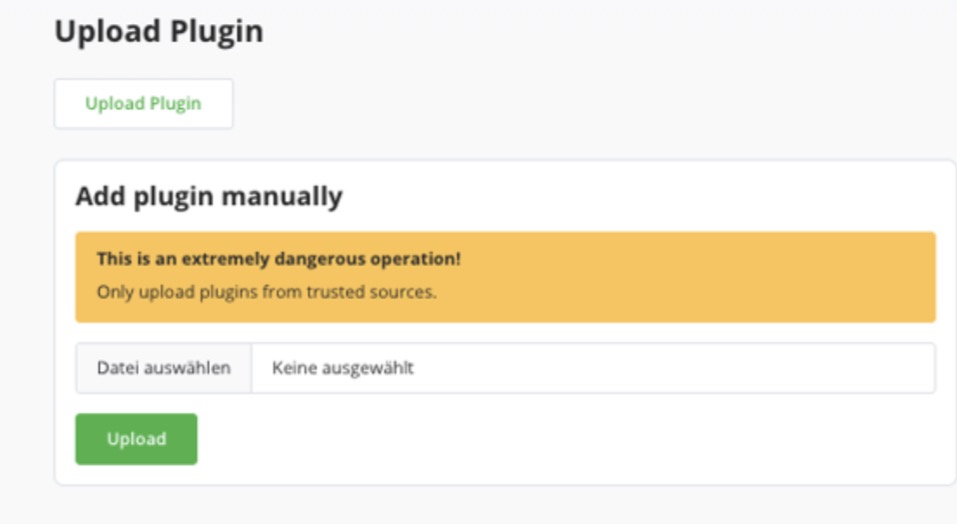
Scroll down to the Upload Plugin section.
Click Upload Plugin to open the manual installation interface.
Then follow these steps:
- Click Choose File.
- Select the downloaded Coinsnap plugin package with the .btcpay extension.
- Click Upload.
- Restart BTCPay Server when prompted.
After the restart, the plugin should appear in your list of installed plugins as Coinsnap Wallet for BTCPay Server.
Screenshot: Install the Coinsnap Plugin in BTCPay Server
The BTCPay Server plugin management page allows administrators to upload and install the Coinsnap Wallet plugin manually.
Step 3: Open the BTCPay Server Lightning Settings
After installing the plugin, you need to connect your Coinsnap Wallet to your BTCPay Server store.
First, select the store where you want to accept Lightning payments.
In the left navigation menu, open:
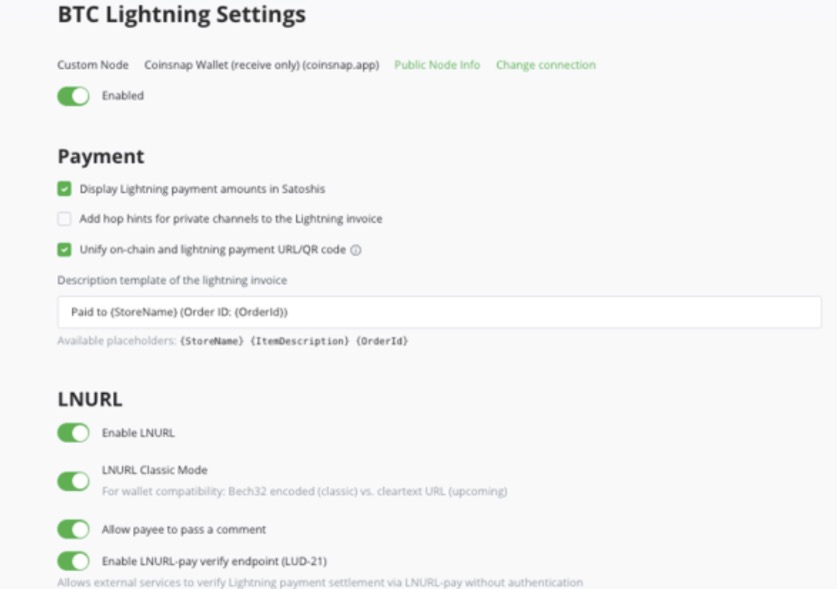
Wallets → Lightning → Settings
This page displays your store’s current Lightning configuration.
If you previously configured a different Lightning connection, it will appear at the top of the page.
Click Change connection to select a different Lightning payment provider.
If your store does not yet have a Lightning connection, BTCPay Server will instead guide you through the initial Lightning setup.
Screenshot: BTCPay Server Lightning Settings
Open the Lightning settings of your BTCPay Server store and select Change connection.
Step 4: Select Coinsnap Wallet as Your Lightning Connection
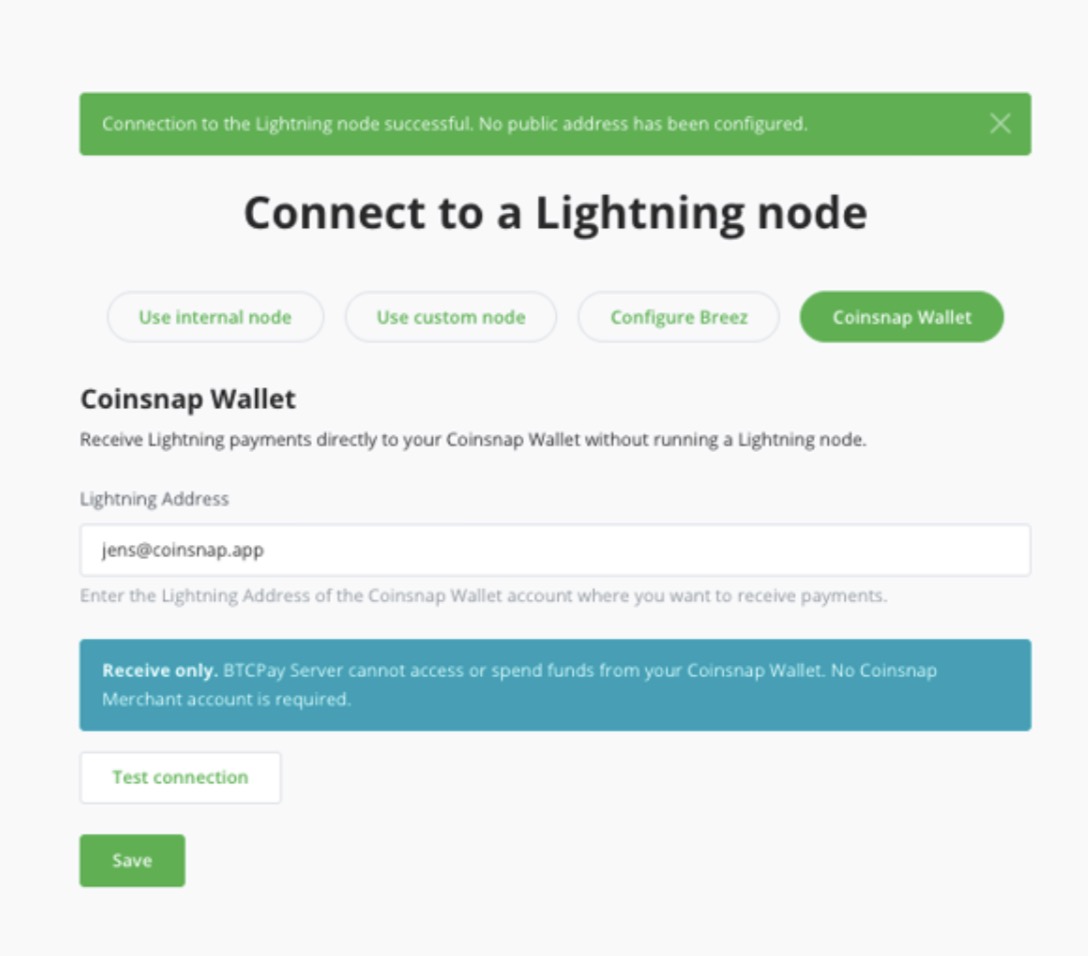
After clicking Change connection, BTCPay Server opens the Connect to a Lightning node page.
This page displays the available Lightning connection methods.
BTCPay Server shows Coinsnap Wallet (receive only) as the configured Lightning connection.
Once the Coinsnap plugin has been installed, an additional option becomes available:
Coinsnap Wallet
Click the Coinsnap Wallet button.
The configuration page will display a field where you can enter your Coinsnap Wallet Lightning Address.
You do not need to configure a Lightning node, provide a macaroon, or enter API credentials.
Step 5: Enter Your Coinsnap Wallet Lightning Address
Open the Coinsnap Wallet app on your smartphone.
Find your Lightning Address and copy it.
A Coinsnap Lightning Address looks like this:
satoshi@coinsnap.app
Return to your BTCPay Server and enter the address in the Lightning Address field.
Then click Test connection.
BTCPay Server checks whether it can establish the Lightning receiving connection.
After a successful test, BTCPay Server may display the following message:
Connection to the Lightning node successful. No public address has been configured.
The second sentence is normal for this integration and does not indicate an error.
Click Save to store your configuration.
Security note: The Coinsnap integration is receive-only. BTCPay Server cannot access your wallet’s private keys or initiate outgoing payments from your Coinsnap Wallet.
Step 6: Verify Your Coinsnap Wallet Connection
After saving the configuration, return to your store’s Lightning settings.
At the top of the page, BTCPay Server should now display:
Custom Node – Coinsnap Wallet (receive only) (coinsnap.app)
This confirms that your BTCPay Server is configured to receive Lightning payments through the Coinsnap Wallet integration.
The description receive only indicates that BTCPay Server can use the connection to receive Lightning payments but cannot send payments from your Coinsnap Wallet.
Step 7: Test Your First Lightning Payment
Once your Coinsnap Wallet is connected, we recommend performing a small Lightning test payment.
Create a new invoice in your BTCPay Server store and select Lightning as the payment method.
Pay the invoice using another Lightning wallet.
After completing the payment, verify the following:
- BTCPay Server payment status: Check whether the invoice is marked as paid or settled.
- Coinsnap Wallet payment receipt: Open your Coinsnap Wallet and confirm that the payment was received.
- Payment reconciliation: Compare the amount and Lightning payment information with the corresponding BTCPay Server invoice.
Successful Lightning payments should normally appear as settled in BTCPay Server within a few seconds.
You can also review the Lightning invoice and payment proof in BTCPay Server under Off-Chain Payments.
Once the test payment has been completed successfully, your BTCPay Server is ready to accept Lightning payments through your Coinsnap Wallet.
Can I Still Accept Bitcoin On-Chain Payments?
Yes.
Installing the Coinsnap Wallet plugin does not change your existing Bitcoin on-chain wallet configuration.
BTCPay Server continues to manage on-chain Bitcoin payments using your previously configured wallet.
The Coinsnap plugin only provides an alternative connection for receiving Lightning payments.
This means you can offer customers both payment methods:
| Payment method | How payments are received |
|---|---|
| Bitcoin On-Chain | Through your existing BTCPay Server on-chain wallet configuration |
| Bitcoin Lightning | Through the Coinsnap Wallet connected to your BTCPay Server |
You can therefore operate your own BTCPay Server and accept both Bitcoin on-chain and Lightning payments without running your own Lightning node.
Security and Limitations
The Coinsnap Wallet plugin is designed as a receive-only Lightning integration.
BTCPay Server cannot use the plugin to send Lightning payments, access your wallet balance, retrieve private keys, manage payment channels, or issue automatic Lightning refunds.
Refunds must be handled separately.
The current beta version supports Bitcoin mainnet and Coinsnap Lightning Addresses ending in @coinsnap.app.
Fixed-amount Lightning invoices must use whole satoshi amounts and remain within the supported minimum and maximum payment limits.
The plugin is currently available for manual installation and should be tested with small amounts before use in a production environment.
Frequently Asked Questions About BTCPay Server and Coinsnap Wallet
Can I accept Lightning payments with BTCPay Server without running a Lightning node?
Yes. The Coinsnap Wallet plugin allows merchants to accept Lightning payments through their own BTCPay Server without operating a Lightning node. Payments are received through the merchant’s Coinsnap Wallet.
Does the Coinsnap plugin replace my BTCPay Server?
No. You continue running your own BTCPay Server and managing invoices, orders, and payment statuses. The Coinsnap plugin only provides a Lightning payment receiving connection.
Do I need a Coinsnap Merchant account?
No. A Coinsnap Wallet with a supported Lightning Address is sufficient. You do not need a separate Coinsnap Merchant account or API key.
Where are Lightning payments received?
Lightning payments are credited to the Coinsnap Wallet associated with the Lightning Address configured in your BTCPay Server store.
Can I accept both Bitcoin on-chain and Lightning payments?
Yes. Your existing Bitcoin on-chain configuration remains unchanged. The Coinsnap plugin adds Lightning receiving functionality through your Coinsnap Wallet.
Can I connect multiple BTCPay Server stores to Coinsnap Wallet?
Yes. Each store can configure a separate Coinsnap Lightning Address. Multiple stores may also use the same address.
Can BTCPay Server send Bitcoin from my Coinsnap Wallet?
No. The integration is receive-only. It cannot initiate outgoing Lightning payments or access your wallet’s private keys.
Can I use any Lightning Address provider?
The current version supports Coinsnap Lightning Addresses ending in @coinsnap.app.
External Lightning Address providers are not supported by this plugin version.
Is the Coinsnap plugin available in the official BTCPay Server Plugin Directory?
Not yet. The plugin is currently in beta testing and requires manual installation.
After successful testing and preparation of a public release, Coinsnap plans to submit the plugin for inclusion in the official BTCPay Server Plugin Directory.
Is the Coinsnap BTCPay Server plugin open source?
Yes. The plugin is developed as open-source software under the MIT License. Its source code is maintained in the Coinsnap GitHub repository.
Conclusion: Accept Lightning Payments With BTCPay Server Without Running a Node
Running your own BTCPay Server gives you control over your Bitcoin payment infrastructure.
With the Coinsnap Wallet plugin, you can extend your self-hosted BTCPay Server to accept Lightning payments without the additional operational complexity of running a Lightning node.
Your existing Bitcoin on-chain payment configuration remains unchanged, while Lightning payments are received directly through your Coinsnap Wallet.
All you need is the Coinsnap plugin and a Lightning Address from your Coinsnap Wallet.
The result: A self-hosted BTCPay Server accepting Bitcoin on-chain and Lightning payments — without running your own Lightning node or managing Lightning channels.
Get started with Coinsnap Wallet and explore the plugin:
Coinsnap for BTCPay Server – GitHub Repository
Coinsnap Wallet – Accept Bitcoin and Lightning Payments
For questions about installation or configuration, contact support@coinsnap.io.