

Accept Bitcoin payments in Shopify – here’s how!
Shopify is one of the world’s leading e-commerce platforms today.
About 4.5 million active online stores in more than 175 countries rely on the Canadian company, which is known for user-friendliness, scalability, and a vast selection of extensions.
From small creative shops to medium-sized brands and international wholesalers – Shopify is the backbone of countless digital business models.
As money and payment flows become increasingly digital, interest in Bitcoin as a means of payment is growing – not only among tech-savvy customers, but also in the mainstream.
For Shopify merchants, integrating Bitcoin payments means:
- Global solvency without currency barriers
- Lower transaction costs compared to traditional payment service providers
- Protection against chargebacks
- Access to a growing, solvent Bitcoin community
- Innovative brand image through openness to modern technologies
Despite these advantages, Shopify does not natively support Bitcoin payments in the checkout – there is no official Shopify Lightning or Bitcoin Payment option.
However, there are now easy solutions that let you accept Bitcoin payments in Shopify without coding.
Providers like Coinsnap make this possible (see below).
In this article, you’ll learn how to integrate Bitcoin payments into your Shopify store, which tools are available, and what to watch out for.
Status quo: Accepting Bitcoin payments in Shopify
Shopify supports a wide range of payment methods, divided into proprietary solutions, integrated providers, and manual payment methods.
Shopify Payments (only available in certain countries)
- Shopify’s own payment platform
- Accepts credit cards (Visa, MasterCard, Amex, etc.)
- Accepts Apple Pay, Google Pay, Klarna, iDEAL, Sofortüberweisung, and more
- No third-party account required
External payment providers
Shopify supports hundreds of external providers depending on your region, for example:
- PayPal
- Amazon Pay
- Stripe
- Mollie
- Adyen
- Skrill
- 2Checkout
Alternative payment providers
- Cryptocurrencies (via third-party providers)
- Bank transfer
- Cash on delivery
- Payment on account
- Custom manual methods
Shopify currently has no native Bitcoin checkout integration.
Merchants must use alternative or custom payment methods.
However, Shopify does not charge transaction fees on sales processed via alternative payment providers like Bitcoin Lightning.
Provider overview: Accept Bitcoin payments in Shopify
Here are some popular providers enabling Bitcoin payments in Shopify:
| Provider | Lightning | On-chain | Shopify-compatible | Special feature |
|---|---|---|---|---|
| Coinsnap | + | + | + (via proxy/app) | No KYC Direct payout to wallet Simple DIY Free Shopify integration service Optional fiat payout |
| BTCPay Server | + | + | + (custom) | Open Source No fees |
| Coinbase Commerce | – | + | + (manual) | KYC required |
| OpenNode | + | + | + (API/Widget) | Payout in fiat possible |
| Flash | + | – | + (manual) | No KYC Setup with Flash support team |
Important selection criteria for merchants
If you’re not technically inclined, choose a provider that simplifies setup and doesn’t require deep coding knowledge. Coinsnap, for instance, offers payment processing and even a free integration service.
Consider also whether you want to avoid lengthy KYC/KYB verification. Coinsnap operates non-custodially and is fast to onboard. You should also review:
- Payout speed (instant, daily, or threshold-based)
- Lightning vs on-chain support
- Ease of accounting exports
How does shopping with Bitcoin in Shopify work?
From a customer’s perspective, paying with Bitcoin is simple. Instead of entering card data, a QR code is shown for payment via Bitcoin or Lightning.
Example: Coinsnap for Shopify
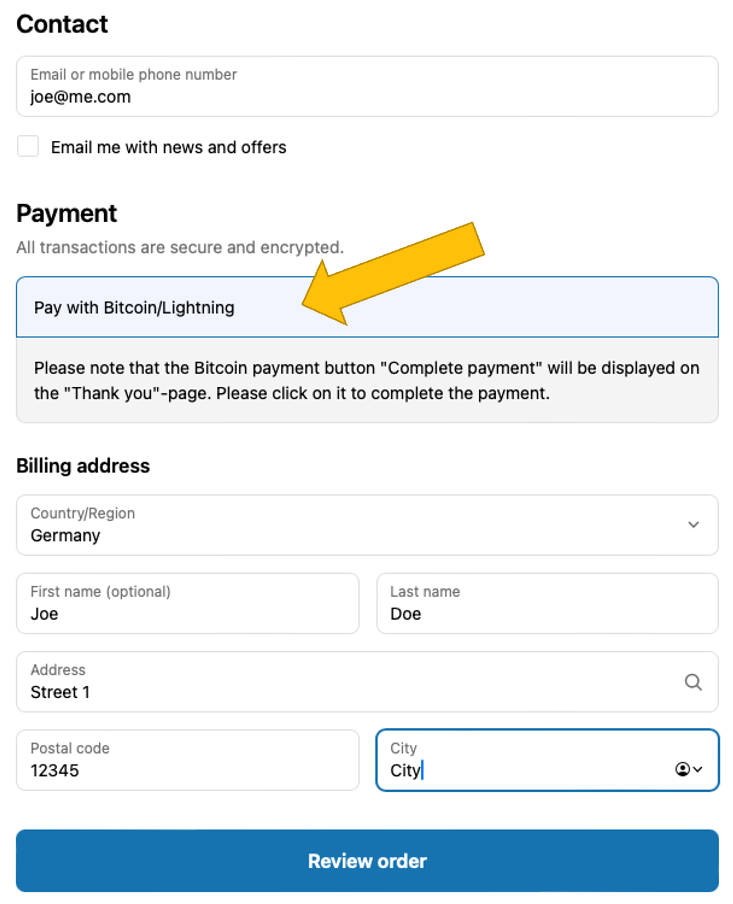
1. Customer proceeds to checkout and selects “Pay with Bitcoin/Lightning”.
2. They review their order and click Complete order.
3. A Bitcoin QR code appears; they scan and confirm payment in their Lightning wallet.
4. Upon successful payment, Shopify marks the order as paid and sends notifications.
Why use a third-party provider for Shopify Bitcoin payments?
The pitfalls of closed systems
Shopify’s checkout is tightly controlled — Bitcoin and Lightning aren’t supported natively. Alternative payments must be integrated using app proxies, custom redirects, or manual payment methods. These workarounds require technical know-how.
The advantages of third-party Bitcoin payment providers
Providers like Coinsnap simplify this with ready-to-use Shopify apps or services, often charging around 1% per transaction. Let’s look at how easy it is with Coinsnap.
Accept Bitcoin payments in Shopify in 3 steps with Coinsnap
Coinsnap is a European provider specializing in Bitcoin Lightning payment solutions. It offers a free Shopify integration service that gets you live in three steps:
1. Set up a Coinsnap account
Register at app.coinsnap.io/login, confirm your email, and add your store and Lightning wallet address.
2. Set up Shopify admin for Coinsnap
Follow this guide to create a Shopify admin for Coinsnap in your backend, allowing their team to connect both systems.
3. Start free Shopify integration
Return to your Coinsnap dashboard and start the installation service. The Coinsnap team completes setup so your store can immediately offer Bitcoin/Lightning checkout with automatic payouts to your wallet.
Conclusion: Accepting Bitcoin payments in Shopify has never been easier
Shopify doesn’t support Bitcoin natively, but third-party solutions like Coinsnap make it effortless. Their integration service lets you go live without coding, and payments are processed securely to your wallet or bank.
Questions & answers about accepting Bitcoin payments in Shopify
❓ Is it legal to offer Bitcoin payments in Shopify?
Yes. Just record and report your revenues as usual.
❓ Does my customer need a Lightning wallet?
No. Coinsnap supports both Lightning and on-chain.
❓ Can I convert Bitcoin payments to EUR/USD automatically?
Yes, if you connect your account to DFX for fiat payout.
❓ How does the customer know the payment succeeded?
They’ll see a confirmation screen and get Shopify email notifications.
❓ What if the payment fails?
The order remains marked as “pending” in Shopify.
❓ How are Bitcoin payments recorded for accounting?
Use tools like CoinTracking integration for compliant bookkeeping.
Mistakes to avoid when accepting Bitcoin in Shopify
- 🚫 Only offering on-chain (Lightning is faster and cheaper)
- 🚫 Not backing up your wallet
- 🚫 Using providers without Shopify experience
- 🚫 Failing to promote Bitcoin as a checkout option
- 🚫 Ignoring local legal/tax requirements
Accept Bitcoin payments in Shopify now
Accepting Bitcoin payments in Shopify is easy with Coinsnap for Shopify. Sign up, create an admin for Coinsnap in Shopify, and start the free installation service — no coding required.