
I am a merchant/businessman – what is the best Bitcoin wallet for me?
Looking for the best Bitcoin wallet for your business? We compared the 10 Best Crypto Wallets for Merchants based on what actually matters to merchants: ease of use, payment experience, business features, security, and scalability.
The best Bitcoin wallet for a private user is not necessarily the best wallet for a business. A private user may only need to send, receive, and store Bitcoin occasionally. A merchant, however, needs a wallet that works reliably during everyday business operations—whether payments are accepted in an online store, at a retail counter, in a restaurant, at an auto repair shop, from consulting clients, at an event, or from customers at a food truck.
For businesses, the practical details matter most. The wallet should be quick to install, and easy enough for employees to use without extensive Bitcoin knowledge. Payments should be created and confirmed with as few steps as possible. Depending on the business, features such as a point-of-sale mode, product management, tips, discounts, transaction overviews, accounting exports, staff access, and fiat conversion options can be just as important as the wallet itself.
For this comparison, we only considered crypto wallets that support Bitcoin Lightning transactions and are available for both Android and iOS. Also, they are all self-custodial, to ensure that the merchant retains control of the Bitcoin instead of depending on a wallet provider to hold and release the funds. This reduces reliance on third parties and gives the business greater control—but it also makes backup and recovery options especially important. A suitable merchant wallet must therefore provide a clear way to restore access if a phone is lost, stolen, damaged, or replaced.
We evaluated ten wallets from a strictly practical merchant perspective: Bitkit, Blitz Wallet, Blixt, Breez, Cake Wallet, Coinsnap POS Wallet, Misty Breez, Phoenix, Wallet of Satoshi, ZEUS.
This is not a comparison of Lightning technology, node infrastructure, or payment architecture. It is a business-focused guide for merchants who want to know one thing: Which Bitcoin Lightning wallet is the easiest, safest, and most useful choice for accepting payments in a real business?
How We Evaluated These Bitcoin Wallets
Not every Bitcoin wallet is designed for business. Many are built primarily for private users who occasionally send or receive Bitcoin. Running a business, however, places very different demands on a wallet. Merchants need a solution that is fast, reliable, easy to learn, and capable of supporting daily operations without adding unnecessary complexity.
For this comparison, we evaluated each wallet from the perspective of a real business owner—not a Bitcoin enthusiast or software developer. We deliberately ignored technical details that have little impact on everyday use and instead focused on the features and user experience that matter most in real-world business environments.
Installation & Setup
How quickly can a new user install the wallet and start accepting Bitcoin payments? We looked at the entire onboarding process, from downloading the app to receiving the first successful Lightning payment.
Ease of Use
A merchant should not need to understand Bitcoin technology to use a wallet effectively. We evaluated how intuitive the interface is, whether common tasks are easy to find, and how quickly staff members could learn to use the wallet with little or no training.
Receiving Payments
The primary purpose of a merchant wallet is accepting payments. We assessed how easy it is to create payment requests, enter amounts, generate QR codes, and complete transactions quickly and reliably during busy business hours.
Business Features
This category covers the tools that make a wallet useful in a commercial environment rather than just for personal use. Depending on the wallet, we looked for features such as:
- Point-of-sale (POS) mode
- Product catalogs
- Custom payment amounts
- Tips and gratuities
- Discounts
- Payment requests
- Transaction history
- Dashboards and reporting
- Accounting or export functions
- Team Readiness & Scalability
Many businesses need more than one person to accept payments. We evaluated whether a wallet can realistically support growing businesses, multiple employees, or different sales locations without becoming difficult to manage.
Fiat Cash-Out Options
While many merchants are happy to receive Bitcoin, others prefer converting some or all payments into their local currency. We therefore considered how easily each wallet supports fiat off-ramp services or integrates with providers that transfer funds directly to a bank account.
Backup & Recovery
A lost or stolen phone should never mean losing access to business funds. We examined how each wallet handles backups, wallet recovery, device replacement, PIN resets, and other security measures that protect merchants from accidental loss.
Overall Merchant Experience
Finally, we considered the complete experience of using each wallet in a real business. Does it save time? Can employees use it confidently? Does it simplify daily payment processing? Most importantly, would we recommend it to a merchant who simply wants to accept Bitcoin payments without becoming a Bitcoin expert?
These evaluation criteria form the basis of our rankings and recommendations throughout this guide.
10 Bitcoin Lightning Wallets Compared for Merchants and Businesses
In the following reviews, we apply the evaluation criteria outlined above to each of the ten selected Bitcoin Lightning wallets. We begin with the Coinsnap POS Wallet because it is our own product—and because, based on the evaluation criteria applied throughout this comparison, it is also the clear overall winner.
Coinsnap POS Wallet
Best for
Merchants and businesses that want to accept Bitcoin regularly—at a physical location, online, through invoices, or with multiple employees and sales terminals.
Pros
- Separate personal and business accounts available within the wallet
- Dedicated Bitcoin Point-of-Sale mode
- Product catalog, categories, and manual keypad
- Integrated tips and Bitcoin discounts
- Separate personal, business, and event wallets
- Multiple staff devices and sales terminals
- Central dashboard with sales statistics
- CSV exports for accounting and tax reporting
- Extensive online-store, WordPress, invoice, and payment-link tools
- Optional automatic fiat settlement to a bank account
- Available for Android and iOS
- Self-custodial and recoverable with a seed phrase
Cons
- Payments processed through the Coinsnap POS infrastructure carry a 1% service fee
- Fiat settlement requires an independent provider and usually KYC or KYB verification
- The wider business platform requires a Coinsnap account
- Merchants remain responsible for securely storing their recovery phrase
Installation
The Coinsnap POS Wallet can be installed on Android and iOS. Users create or import a wallet, secure the recovery phrase, and can begin accepting Bitcoin through the built-in POS without special hardware or technical configuration.
Businesses that also create a Coinsnap account can connect online stores, websites, payment links, invoices, browser-based terminals, and other Bitcoin payment tools.
Daily Use
The merchant either enters an amount with the keypad or selects products from the catalog. Coinsnap generates a QR code, the customer pays, and the payment is confirmed directly in the app.
Employees can accept payments on their own devices. The sale is credited to the merchant wallet, while tips can be sent directly to the employee’s wallet.
Merchant Features
Coinsnap provides the broadest range of dedicated business features in this comparison. These include a POS, product catalog, tips, discounts, multiple terminals, staff use, revenue statistics, product reporting, payment tracking, and CSV exports.
The Coinsnap account extends the wallet with ecommerce modules, WordPress integrations, payment links, invoice tools, browser-based POS terminals, and a central dashboard. This allows the same payment system to support physical stores, online shops, service businesses, freelancers, and companies with several payment channels.
Backup & Recovery
The wallet is protected through local encryption and a recovery phrase. If the phone is lost, stolen, damaged, or replaced, the wallet can be restored on another device using the backup.
Because Coinsnap is self-custodial, the company cannot restore the wallet when the recovery phrase has also been lost.
Fiat Options
Coinsnap can connect merchants with independent settlement providers that automatically convert incoming Bitcoin payments and transfer the resulting fiat currency to a bank account.
The settlement provider may require identity or company verification and charges its own conversion or payout fees in addition to the Coinsnap transaction fee.
Our Verdict
Coinsnap POS Wallet is the only wallet in this comparison that combines an easy-to-use self-custodial wallet with a complete merchant environment.
It supports in-person payments, staff devices, product sales, tips, discounts, reporting, accounting exports, online stores, invoices, payment links, and optional bank settlement. Businesses can begin with a single smartphone and later expand to multiple employees, terminals, stores, and online payment channels.
Coinsnap POS Wallet is therefore the best overall Bitcoin wallet for merchants and businesses in this comparison.
Bitkit
Best for
Private users and self-employed professionals who receive Bitcoin only occasionally.
Pros
- Simple setup and clear interface
- Supports Bitcoin and Lightning payments
- QR-code payment requests
- Transaction tags and contacts
- PIN, biometric protection, and wallet recovery
- Available for Android and iOS
Cons
- No dedicated POS mode
- No product catalog, tips, or discounts
- No staff access or multi-user support
- No merchant dashboard
- No accounting or business reports
- No integrated fiat conversion or bank payouts
- Receiving Lightning payments may involve additional capacity fees
Installation
Bitkit can be installed on Android and iOS without creating an account or completing identity verification. Users create a wallet, secure it with a PIN or biometrics, and record the 12-word recovery phrase.
Daily Use
Receiving a payment is straightforward: enter an amount and show the customer the generated QR code. Transaction tags and contacts can help organize occasional payments.
However, Bitkit separates funds into spending and savings balances, and Lightning receiving may require additional capacity. This can make the wallet less predictable for inexperienced merchants.
Merchant Features
Bitkit offers basic Bitcoin and Lightning payment requests, transaction history, contacts, and tags. It does not provide the tools required for regular business operations.
There is no POS interface, product management, tipping, discounts, staff access, business dashboard, or accounting export. It is therefore unsuitable for retailers, restaurants, hospitality businesses, or companies with employees.
Backup & Recovery
The wallet is protected by a 12-word recovery phrase, PIN, and optional biometric authentication. Bitkit also backs up certain wallet data needed for recovery.
The same wallet should not be operated simultaneously on multiple devices, which limits its usefulness for teams and staff.
Fiat Options
Bitkit has no integrated Bitcoin-to-fiat conversion or direct bank settlement. Merchants must transfer their Bitcoin to an external exchange or off-ramp provider, sell it there, and withdraw the funds separately.
Our Verdict
Bitkit is a personal Bitcoin wallet, not a merchant solution. It can be used by a freelancer or sole trader to receive an occasional payment, but it lacks virtually all relevant business features.
There is no POS, staff management, reporting, accounting support, product management, or integrated fiat settlement. Bitkit is therefore not a good choice for merchants or businesses that plan to accept Bitcoin regularly.
Blitz Wallet
Best for
Small, mobile-first merchants that want a basic POS, payment links, and the option to hold Bitcoin or stablecoins.
Pros
- Available for Android and iOS
- Dedicated Point-of-Sale application
- Supports Bitcoin and stablecoin payments
- Payment links for remote payments
- Tip tracking
- Web wallet available
- Open-source recovery platform
- Can receive payments while the phone is offline
Cons
- No comprehensive merchant dashboard
- No accounting or tax reporting tools
- No documented staff roles or permissions
- No complete product-management system
- No automatic payout to a bank account
- Stablecoin conversion is not the same as fiat settlement
- Wider range of currencies may complicate accounting
Installation
Blitz can be installed on Android and iOS. Users create a self-custodial wallet and can access the same payment environment through the mobile or web application.
Daily Use
The wallet supports QR-code payments, payment links, contact payments, and offline receiving. The interface is designed primarily for fast payments rather than detailed business administration.
Merchant Features
Blitz provides a separate POS product that accepts Bitcoin and stablecoins and tracks tips. Payment links are useful for freelancers, online sellers, and businesses collecting payments remotely.
However, Blitz does not provide the comprehensive dashboard, accounting environment, employee controls, or reporting functions required by larger businesses.
Backup & Recovery
Blitz provides an open-source recovery platform that allows users to restore their wallet independently of the main Blitz application. Merchants remain responsible for securely storing the required recovery information.
Fiat Options
Users can exchange Bitcoin for USDT or USDC within the wallet. This may reduce exposure to Bitcoin price movements, but it does not provide automatic conversion into euros, dollars, or direct bank payouts.
Our Verdict
Blitz offers more merchant functionality than a conventional personal wallet. Its POS, tips, stablecoins, payment links, and offline receiving make it potentially useful for small or mobile businesses.
However, it lacks the reporting, accounting, staff-management, and bank-settlement functions required for professional business use. Blitz is a useful payment wallet, but not a complete merchant solution.
Blixt Wallet
Best for
Technically experienced Bitcoin users rather than ordinary merchants.
Pros
- Supports Bitcoin and Lightning payments
- Lightning Address available
- QR-code payment requests
- PIN and biometric protection
- Detailed payment and wallet controls
- Available for Android and iOS
- Open-source and self-custodial
Cons
- Complicated setup for inexperienced users
- Requires synchronization and technical configuration
- Receiving capacity may require additional management
- Wallet generally needs to be active and connected
- No dedicated POS mode
- No product catalog or staff access
- No business dashboard or accounting reports
- No integrated fiat conversion
Installation
Blixt can be installed on Android and iOS, but setup is more involved than with most consumer wallets. The app must download and synchronize a significant amount of data, and users may encounter settings that require knowledge of Bitcoin and Lightning.
Daily Use
Basic sending and receiving are straightforward once the wallet is fully prepared. However, merchants must pay attention to synchronization, connection status, receiving capacity, and whether the application is ready to accept payments.
This is unsuitable for employees who need a payment application that simply works without technical supervision.
Merchant Features
Blixt provides payment requests, QR codes, transaction history, contacts, and a personal Lightning Address.
It does not offer a merchant POS, product management, tips, discounts, staff access, reporting, accounting exports, or a central business dashboard.
Backup & Recovery
Recovery requires both a 24-word recovery phrase and an additional wallet-state backup. This backup should be updated when important wallet settings change. Forgetting the PIN may also require a complete wallet restoration.
Fiat Options
Blixt can display balances in local currency, but it does not convert Bitcoin into fiat or transfer funds to a bank account.
Our Verdict
Blixt gives experienced users extensive control, but that is precisely what makes it inappropriate for most businesses.
It requires too much technical understanding and provides none of the operational tools merchants need. Blixt is not a good wallet for nontechnical merchants, employees, or regular business use.
Breez
Best for
Individual merchants who need a basic Bitcoin cash register but do not require business administration or team features.
Pros
- Built-in Point-of-Sale mode
- Simple QR-code payment requests
- Supports Bitcoin and Lightning payments
- No registration or KYC required
- Available for Android and iOS
- Self-custodial
Cons
- Merchant functions are limited
- No staff accounts or permissions
- No central merchant dashboard
- No comprehensive reporting
- No accounting integrations
- No automatic fiat settlement
- App-store version has received no visible feature update since January 2025
Installation
Breez can be installed on Android and iOS and used without opening a conventional account. Initial preparation and backup require more attention than with a normal payment application.
Daily Use
Users can switch from the regular wallet into a dedicated Point-of-Sale mode and create a payment request for the customer. This is more practical for face-to-face payments than a standard wallet receive screen.
However, the application remains a single-device wallet rather than a centrally managed business payment system.
Merchant Features
Breez includes a genuine POS mode that turns the phone into a basic Lightning cash register. This makes it more merchant-oriented than Phoenix, Bitkit, Blixt, Cake Wallet, or Misty Breez.
Its limitations become apparent when a business needs multiple employees, detailed reports, accounting exports, online-store integrations, or centralized control. The current App Store listing also shows that the most recent published version dates from January 2025.
Backup & Recovery
Breez uses external cloud backup services such as Google Drive or iCloud for essential recovery data. Merchants must configure and verify their backup before relying on the wallet for business funds.
Fiat Options
Breez can display transaction values in fiat currency, but it does not provide automatic Bitcoin-to-fiat conversion or direct bank settlement.
Our Verdict
Breez is one of the few wallets in this comparison with an actual POS mode. It can therefore work as a simple Bitcoin cash register for an owner-operated business.
However, development of the original mobile application appears limited, and the wallet lacks team management, professional reporting, accounting tools, and fiat settlement. Breez may be adequate for occasional counter payments, but it is not a scalable business solution.
Cake Wallet
Best for
Existing Cake Wallet users who want to manage Bitcoin, Lightning, stablecoins, and other cryptocurrencies in one application.
Pros
- Supports Bitcoin and Lightning payments
- Custom Lightning Address
- Built-in cryptocurrency exchange
- Supports multiple wallets and accounts
- Available for Android and iOS
- Open-source and self-custodial
- Supports several cryptocurrencies and stablecoins
Cons
- No dedicated POS mode
- No product catalog, tips, or discounts
- No staff access
- No merchant dashboard
- No accounting or business reports
- No automatic fiat settlement
- Multi-asset interface may be unnecessary for Bitcoin-only merchants
- Lightning support is comparatively new
Installation
Cake Wallet can be installed on Android and iOS. Users create a new wallet, record the relevant recovery information, and can then create a dedicated Lightning wallet within the application.
Daily Use
Receiving a Lightning payment is straightforward, and users can create a custom @cake.cash Lightning Address. The application also allows users to manage several wallets, cryptocurrencies, and stablecoins in one place.
For a merchant interested only in accepting Bitcoin, however, the broader cryptocurrency interface may add options that are not relevant to daily business.
Merchant Features
Cake Wallet provides Lightning payment requests, a reusable Lightning Address, transaction history, and cryptocurrency swaps.
It does not provide a POS interface, products, discounts, tipping, employee access, merchant reporting, or an accounting dashboard. It is designed as a multi-asset personal wallet rather than a business payment application.
Backup & Recovery
Cake Wallet is self-custodial, meaning recovery depends on the user securely storing the seed phrase or other recovery information for each wallet. Cake cannot restore funds when that information has been lost.
Fiat Options
The built-in exchange can convert Bitcoin into supported cryptocurrencies or stablecoins. It does not automatically convert incoming payments into fiat currency or transfer money to a business bank account.
Our Verdict
Cake Wallet is useful for people who already manage several cryptocurrencies and want Lightning included in the same application.
It offers almost no dedicated merchant functionality. Cake Wallet is not a good choice for businesses that need a POS, staff access, reporting, accounting tools, or fiat settlement.
Misty Breez
Best for
Individuals and sole traders who want to receive occasional Lightning payments with minimal setup.
Pros
- Simple user interface
- Custom Lightning Address
- Can receive payments through mobile notifications
- Supports Bitcoin and Lightning payment requests
- No complicated initial configuration
- Open-source and self-custodial
Cons
- No dedicated POS mode
- No products, tips, or discounts
- No employee or team access
- No merchant dashboard
- No accounting or reporting functions
- No direct bank settlement
- iOS version is distributed through TestFlight rather than the regular App Store
- Presented partly as a demonstration and white-label reference application
Installation
Misty Breez is available through Google Play for Android. As of July 2026, the official Breez website still directs iPhone users to Apple TestFlight rather than a normal public App Store listing.
The wallet itself is quick to set up and does not require registration or identity verification.
Daily Use
Users can create Lightning invoices, display QR codes, and receive payments through a customizable Lightning Address. Notifications allow incoming payments to be processed even when the application is not open.
Merchant Features
Misty Breez offers payment requests, offline receiving, transaction history, and a reusable Lightning Address.
It does not include a merchant POS, product management, tipping, discounts, employee access, business reports, or accounting tools. Breez itself describes the application partly as a reference implementation and white-label solution for developers.
Backup & Recovery
The underlying wallet system supports real-time state backup, but merchants remain responsible for keeping their recovery credentials secure. There is no business recovery administrator or central account that can restore access for employees.
Fiat Options
The application does not provide automatic Bitcoin-to-fiat conversion or direct bank payouts. The broader software platform supports third-party fiat purchase services, but this is not the same as a merchant off-ramp.
Our Verdict
Misty Breez makes receiving Bitcoin relatively simple, but it is still a personal payment wallet and lacks all essential merchant-management features.
Its TestFlight-only iOS distribution is another significant disadvantage for professional deployment. Misty Breez is not suitable for businesses that need a stable, scalable, app-store-ready merchant solution.
Phoenix Wallet
Best for
Private users, freelancers, and sole traders who receive Bitcoin only occasionally.
Pros
- Simple and uncluttered interface
- Supports Bitcoin and Lightning payments
- QR-code payment requests
- Spending PIN available
- Supports multiple wallets
- Available for Android and iOS
- Open-source and self-custodial
Cons
- No dedicated POS mode
- No product catalog, tips, or discounts
- No staff access
- No merchant dashboard
- No accounting reports or exports
- No automatic fiat conversion
- Receiving payments can involve additional service fees
- Designed for personal spending rather than business operations
Installation
Phoenix can be installed on Android and iOS. Users create a wallet, secure the recovery phrase, and can begin sending and receiving Bitcoin without opening an account or completing identity verification.
Daily Use
Receiving payments is simple: the user enters an amount and presents a QR code. The interface hides most complexity and is suitable for people with limited Bitcoin knowledge.
However, Phoenix provides a conventional wallet interface rather than a merchant checkout process.
Merchant Features
Phoenix supports Bitcoin and Lightning payment requests, transaction history, several wallets, and a spending PIN.
There is no POS, product management, tipping, discounts, employee access, merchant reporting, or business dashboard.
Backup & Recovery
The wallet can be restored using its recovery phrase. The spending PIN protects outgoing payments but does not replace the recovery phrase. Merchants must therefore store the backup securely and separately from the phone.
Fiat Options
Phoenix does not provide automatic fiat conversion, direct bank settlement, or an integrated merchant off-ramp.
Our Verdict
Phoenix is a straightforward personal Bitcoin wallet and can be used by a freelancer to receive an occasional payment.
It offers no tools for operating, monitoring, or scaling Bitcoin payments within a business. Phoenix is not a good choice for merchants that intend to accept Bitcoin regularly.
Wallet of Satoshi
Best for
Small retailers, cafés, market stalls, and event vendors that want a very simple Bitcoin POS without extensive business-management features.
Pros
- Very easy to install and use
- Self-custodial mode available worldwide
- Built-in POS in the main wallet
- Separate receive-only POS app
- Product selection and shopping cart
- Can be used on staff devices
- Receipt printing supported
- Optional Square integration
- Transaction-history CSV export
- Compatible with Koinly and CoinTracking
Cons
- Separate wallet and POS applications may be required
- No comprehensive merchant dashboard
- Limited central control over multiple locations
- No detailed employee roles or permissions
- No complete accounting environment
- No automatic Bitcoin-to-fiat bank settlement
- Backup responsibility rests entirely with the merchant in self-custodial mode
Installation
Wallet of Satoshi is available for Android and iOS. Self-custodial mode is available in all regions, while custodial availability depends on location. Wallet creation is simple, but self-custodial users must complete the backup process before accepting meaningful payments.
The separate Wallet of Satoshi POS app can be connected as a receive-only terminal without giving employees access to the funds.
Daily Use
The main wallet is among the easiest applications in this comparison. Merchants can enter an amount, generate a payment QR code, and receive Bitcoin with very little training.
The dedicated POS app adds item selection, a shopping cart, local transaction history, receipt printing, device locking, and optional Square integration.
Merchant Features
Wallet of Satoshi offers a built-in POS as well as a separate receive-only POS application for staff devices. This makes it considerably more useful for merchants than ordinary personal wallets.
Users can also export their complete transaction history as a CSV file and import it into Koinly or CoinTracking. However, there is no full merchant dashboard with consolidated reporting, advanced employee management, online-store tools, or detailed accounting functions.
Backup & Recovery
Self-custodial wallets can be restored using a 12-word recovery phrase or a Google Drive backup. If both the device and backup are lost, Wallet of Satoshi cannot recover the funds.
Fiat Options
Wallet of Satoshi supports buying Bitcoin through regional partners, but it does not provide automatic conversion of incoming merchant payments into fiat or direct business-bank settlement.
Our Verdict
Wallet of Satoshi is one of the better merchant options in this comparison. Its simplicity, dedicated receive-only POS application, products, receipts, Square integration, and CSV export make it suitable for small in-person businesses.
However, it lacks the comprehensive dashboard, reporting, employee management, online-payment tools, and fiat-settlement options required by more established businesses. Wallet of Satoshi is a good basic POS wallet, but not a complete business payment system.
ZEUS Wallet
Best for
Technically experienced owner-operated businesses that want a configurable Bitcoin POS and optional Square integration.
Pros
- Built-in Point-of-Sale mode
- Product and item support
- Tips and individual tax rates
- Optional Square terminal integration
- Supports Bitcoin and Lightning payments
- Lightning Address available
- PIN and biometric protection
- Available for Android and iOS
- Open-source and self-custodial
Cons
- Complicated for nontechnical merchants
- Large number of advanced settings
- Initial preparation and synchronization can take time
- Wallet cannot be operated on several devices simultaneously
- No native staff accounts or permission system
- No central merchant dashboard
- No accounting integrations
- No fiat conversion or bank settlement
- Recovery can be slow and complicated
Installation
ZEUS is available for Android and iOS. Users can create a wallet directly on the phone, but initial synchronization and preparation may take considerably longer than with simpler wallets.
The large number of advanced options can be confusing for merchants without Bitcoin experience.
Daily Use
Once prepared, ZEUS can create normal payment requests or operate in a dedicated POS mode. Recent versions support products, tips, and individual tax rates.
However, technical synchronization or payment problems may require users to work through advanced troubleshooting settings.
Merchant Features
ZEUS includes a genuine Point-of-Sale function and can integrate with Square terminals. It is already used in live retail and hospitality environments.
Nevertheless, it remains a single-wallet application. There are no native staff roles, central reporting dashboard, accounting environment, or simple multi-location administration.
Backup & Recovery
ZEUS uses a 24-word recovery phrase plus additional encrypted recovery data. The same wallet cannot currently be used on multiple devices.
Restoring the wallet can close existing payment connections, incur additional fees, and delay access to some funds for days or even weeks.
Fiat Options
ZEUS does not provide automatic conversion into fiat currency or direct bank payouts. Its official documentation also states that the wallet currently has no integrated swap service.
Our Verdict
ZEUS has considerably more merchant functionality than most wallets in this comparison. Its POS, products, tips, taxes, and Square integration can make it useful for an experienced Bitcoin merchant.
However, setup, operation, troubleshooting, and recovery are too complicated for the nontechnical business owner defined in this article. It also lacks team management, reporting, accounting, and fiat settlement. ZEUS is a capable advanced Bitcoin POS, but not a simple or scalable merchant solution.
Bitcoin Wallet Decision Matrix for Merchants and Businesses
The following decision matrix compares all ten wallets across the merchant-focused criteria defined above and shows how each performs in practical business use.
Rating: 5 = excellent · 4 = good · 3 = adequate · 2 = weak · 1 = unsuitable
The ratings reflect merchant and business use only, not the wallets’ technical capabilities or suitability for private Bitcoin users.
| Evaluation criterion | Coinsnap | Bitkit | Blitz | Blixt | Breez | Cake | Misty Breez | Phoenix | Satoshi | ZEUS |
|---|---|---|---|---|---|---|---|---|---|---|
| Installation & setup | 5 | 5 | 4 | 2 | 3 | 4 | 3 | 5 | 5 | 2 |
| Ease of daily use | 5 | 4 | 4 | 2 | 3 | 3 | 4 | 4 | 5 | 2 |
| Receiving payments | 5 | 4 | 4 | 2 | 4 | 4 | 4 | 4 | 5 | 4 |
| POS functionality | 5 | 1 | 4 | 1 | 3 | 1 | 1 | 1 | 4 | 4 |
| Products, tips & discounts | 5 | 1 | 3 | 1 | 2 | 1 | 1 | 1 | 3 | 4 |
| Dashboard & reporting | 5 | 1 | 2 | 1 | 2 | 1 | 1 | 1 | 3 | 2 |
| Team readiness & scalability | 5 | 1 | 2 | 1 | 1 | 1 | 1 | 1 | 4 | 2 |
| Online payments & invoicing | 5 | 1 | 3 | 1 | 1 | 1 | 1 | 1 | 1 | 1 |
| Accounting support | 5 | 1 | 1 | 1 | 1 | 1 | 1 | 1 | 3 | 1 |
| Fiat conversion & bank payout | 5 | 1 | 2 | 1 | 1 | 2 | 1 | 1 | 1 | 1 |
| Backup & recovery | 5 | 4 | 4 | 2 | 3 | 3 | 3 | 4 | 4 | 2 |
| Overall merchant experience | 5 | 2 | 3 | 1 | 2 | 2 | 2 | 2 | 4 | 3 |
| Total score | 60/60 | 26/60 | 36/60 | 16/60 | 25/60 | 24/60 | 23/60 | 25/60 | 42/60 | 28/60 |
(download decision matrix Excel)
Overall Ranking of the Best Bitcoin Wallets for Merchants
The overall ranking summarizes how each wallet performs across all evaluation criteria and shows which solutions are best suited to practical business use:
| Rank | Wallet | Score | Merchant assessment |
|---|---|---|---|
| 1 | Coinsnap POS Wallet | 60/60 | Complete merchant and business solution |
| 2 | Wallet of Satoshi | 42/60 | Good basic POS wallet for small businesses |
| 3 | Blitz Wallet | 36/60 | Useful payment and POS features, but limited business administration |
| 4 | ZEUS | 28/60 | Capable POS for technically experienced merchants |
| 5 | Bitkit | 26/60 | Personal wallet suitable for occasional business payments |
| 6 | Breez | 25/60 | Basic POS for owner-operated businesses |
| 6 | Phoenix | 25/60 | Personal wallet with no dedicated merchant tools |
| 8 | Cake Wallet | 24/60 | Multi-asset personal wallet with minimal business value |
| 9 | Misty Breez | 23/60 | Simple payment wallet without merchant-management tools |
| 10 | Blixt | 16/60 | Too technical and operationally limited for ordinary merchants |
What Great Merchant Features Look Like—and How They Work
A Bitcoin wallet for personal use only needs to send and receive payments securely. A merchant wallet, however, becomes part of the daily business workflow. It must help staff accept payments quickly, reduce mistakes during checkout, provide an overview of transactions, and simplify accounting. The following features are among the most valuable capabilities a merchant should look for when choosing a Bitcoin wallet or payment platform. For clarity, the examples below are illustrated with screenshots from Coinsnap, the highest-ranked wallet in this comparison.
Point-of-Sale (POS) Mode
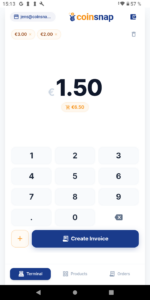 For most physical businesses, a dedicated Point-of-Sale mode is the single most important feature. Instead of using the standard “Receive Bitcoin” screen found in personal wallets, a POS interface guides the checkout process.
Employees can either enter a payment amount manually or select products from a predefined catalogue, after which the wallet automatically generates the appropriate Lightning invoice and QR code. The customer scans the code, the payment is confirmed within seconds, and the merchant can immediately serve the next customer.
A well-designed POS interface reduces training requirements, speeds up checkout and creates a much more professional payment experience.
Product Catalogs
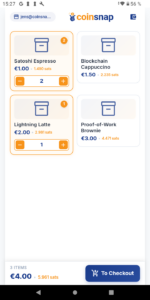 Entering prices manually for every transaction may be sufficient for a freelancer or consultant, but it quickly becomes impractical in retail, hospitality or food service.
A product catalogue allows merchants to define products, categories and prices in advance, so employees simply select the purchased items instead of typing amounts manually.
Besides making checkout significantly faster, predefined products reduce pricing errors and make transactin reporting much more meaningful because sales can later be analysed by product or category rather than by payment amount alone.
Merchant Dashboards
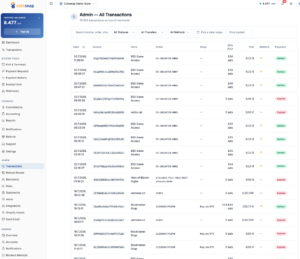 Once a business starts accepting Bitcoin regularly, the wallet itself is only one part of the picture. Owners also need visibility into what happens throughout the day.
A merchant dashboard provides that overview by displaying transaction history, sales statistics, payment statuses and revenue trends in a single place. Instead of checking individual phones, the business owner can immediately see how many payments have been received, how much revenue has been generated and whether any transactions require attention.
For businesses with multiple employees or several sales channels, this central overview quickly becomes indispensable.
Accounting and Reporting
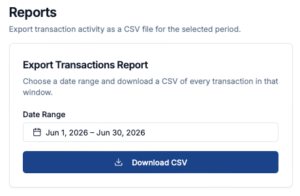 Accepting Bitcoin should not create additional work for accountants. Modern merchant solutions therefore provide reporting tools that allow businesses to export transaction data in formats suitable for bookkeeping and tax documentation.
Downloadable CSV reports, searchable transaction histories and detailed payment records make it considerably easier to reconcile Bitcoin payments with accounting systems and prepare financial reports.
For many businesses, these administrative capabilities are just as valuable as the payment function itself.
Payment Links and Bitcoin Invoices
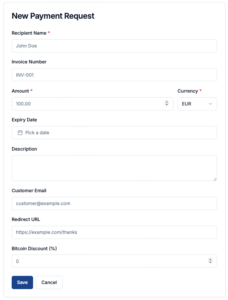 Not every business accepts payments at a physical counter. Consultants, agencies, freelancers and online sellers often need to request payments remotely.
Payment links and Bitcoin invoices solve this problem by allowing merchants to create a payment request that can be shared via email, messaging apps or social media.
The customer opens the link, scans the QR code and completes the payment without requiring a dedicated webshop or specialised payment infrastructure.
This extends Bitcoin acceptance far beyond traditional retail environments.
Multi-Employee Support
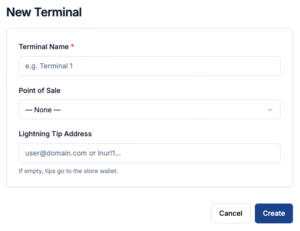 Many businesses require several employees to accept payments throughout the day. A merchant wallet should therefore support multiple devices without making fund management unnecessarily complicated.
Staff members should be able to process payments independently while the business owner retains a complete overview of all transactions.
As a company grows, this ability to expand from a single smartphone to several employees, terminals or locations becomes increasingly important.
Online Shop Integrations
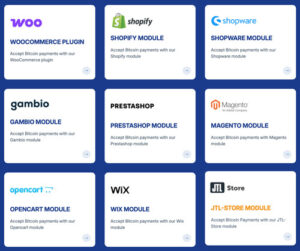 For businesses that operate both physical and online sales channels, consistency is essential. A modern merchant wallet should not exist as a standalone app—it should be part of a complete business payment platform.
Coinsnap POS Wallet integrates seamlessly with the entire Coinsnap ecosystem, including plugins for WooCommerce, Shopify, Magento, Shopware, PrestaShop and many other ecommerce platforms.
This allows merchants to use a single Bitcoin payment solution across online stores, physical locations, invoices, payment links, and browser-based POS terminals, while managing all transactions through one unified reporting and accounting environment.
Conclusion: Why Coinsnap Is the Best Bitcoin Wallet for Merchants

Coinsnap is our own product, so complete neutrality would be impossible to claim. However, the result of this comparison does not depend on branding or technical preferences. Across the practical criteria that matter to merchants—setup, ease of use, payment handling, business features, scalability, reporting, recovery, and fiat options—Coinsnap POS Wallet is clearly the most complete solution.
It offers the core functions found in the strongest competing wallets, including fast Lightning payments, QR-code checkout, product selection, tips, discounts, staff use, and recovery options. The decisive difference is that Coinsnap combines these features in a simpler, more business-oriented interface that is easier to install, configure, and use during everyday operations.
The larger advantage becomes clear when the wallet is connected to a Coinsnap account. Merchants gain access to a central dashboard with detailed transaction overviews, sales reports, and downloadable CSV files for accounting and tax documentation. Instead of managing Bitcoin payments as isolated wallet transactions, the business can monitor and organize them within a professional payment environment.
The Coinsnap account also adds a wide range of practical Bitcoin payment tools, including payment links, invoice forms, online invoices, event bookings, browser-based POS terminals, ecommerce integrations, and WordPress payment tools. This allows the same system to support payments at the counter, online, through invoices, at events, or across several employees and devices.
Most of the other wallets in this comparison are good personal wallets, and a few provide basic POS functionality. Coinsnap goes considerably further. It is not simply a wallet that a merchant can use—it is a complete Bitcoin payment solution designed around the needs of businesses.
For merchants who want the easiest setup, the strongest business features, professional reporting, and the flexibility to expand beyond a single smartphone, Coinsnap POS Wallet is the clear overall winner.