

Bitcoin invoice payment made easy – with the Coinsnap HTML Bitcoin Invoice Form
If you invoice your customers for services and typically get paid via bank transfer, but customers ask to pay with Bitcoin, you can now offer a simple alternative:
With the Coinsnap HTML Bitcoin Invoice Form, your customers can pay any invoice with Bitcoin (On-chain + Lightning) without requiring a full webshop or payment gateway.
The form can be:
- embedded directly on your website (HTML version), or
- shared as a payment link to a ready-to-use Coinsnap-hosted payment form
Both options lead to the same result: fast, direct payment into your Bitcoin wallet.
How can customers pay invoices with Bitcoin using Coinsnap?
Customers open a Bitcoin Invoice Form (via a link or a website page), enter the invoice amount and reference details, and complete the payment by scanning a QR code. Payments are made instantly via Lightning or on-chain and are sent directly to the merchant’s Bitcoin wallet.
How to create your Bitcoin Invoice Form
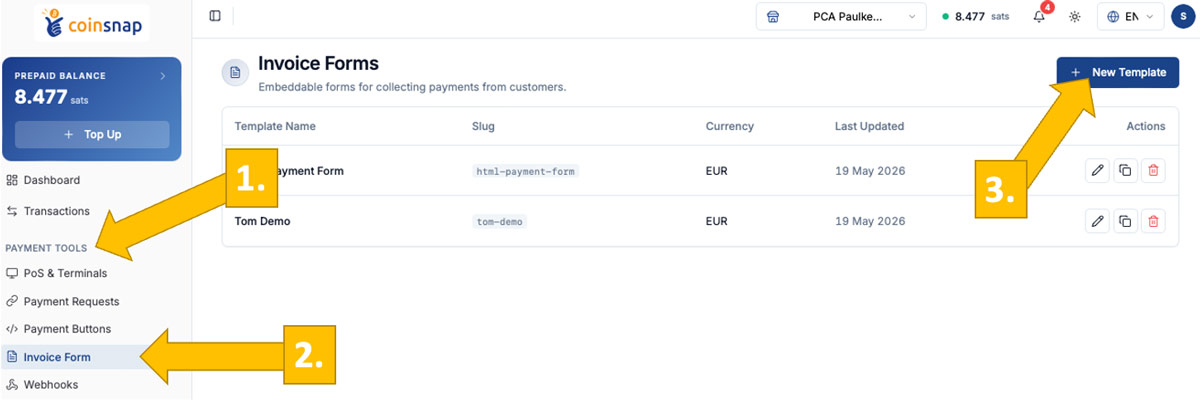
After logging into your Coinsnap dashboard, go to: Payment Tools [1] -> Invoice Form [2], and click New Template [3].
You will then be taken to a configuration page where you can set up your invoice form. (-> step-by-step user guide)
After saving your configuration, you will see both the payment link to the hosted invoice form and the embed code for your website.
Deployment: Use Coinsnap link or embed code on your own website
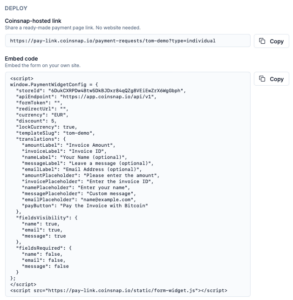 You can deploy the Bitcoin Invoice Form in two ways, depending on how you want to use it.
The simplest option is the Coinsnap-hosted payment link: you generate a universal link in the dashboard, and Coinsnap provides a ready-to-use payment page where your customers enter their invoice details and complete the payment—no website integration required.
Alternatively, you can use the HTML embed code to integrate the form directly into your own website. In this case, the form becomes part of your page, and you simply share the URL of that page (e.g. a dedicated “Pay Invoice” page) with your customers in your invoices.
Simple, straightforward payment experience for your customer
 The payment process is designed to feel familiar and requires no learning curve.
Your customer enters the invoice amount, invoice number, and their name—similar to a standard bank transfer—and can optionally add a reference message.
With one click on “Pay with Bitcoin,” the payment screen opens with a QR code, allowing instant payment via Lightning or, if preferred, on-chain for larger amounts.
The Bitcoin Invoice Form makes invoice payments faster and easier for you and your customers
The Coinsnap Bitcoin Invoice Form gives you a flexible and efficient way to accept Bitcoin payments for invoices—either by embedding the form on your own website or by using a simple, ready-to-share payment link.
For you as the payee, it removes the typical friction of bank transfers: no IBAN errors, no incorrect references, no delays, and no chargebacks. Payments arrive directly in your Bitcoin wallet, with Lightning enabling instant settlement.
For your customers, the process is just as straightforward. They enter the invoice details as they would in online banking and complete the payment instantly via QR code—fast, intuitive, and without the need to manually copy bank details or reference numbers.
Whether you choose the HTML version or the hosted payment link, the result is the same: a simple, reliable, and modern way to handle invoice payments with Bitcoin.
Start accepting Bitcoin invoice payments today
Set up your HTML Bitcoin Invoice Form or payment link in just a few steps and start receiving Bitcoin payments directly in your wallet—without changing your existing invoicing workflow.
- No webshop or payment gateway required
- Works with any invoicing process
- Instant payments via Lightning
- No chargebacks, no intermediaries
👉 Go to the HTML Bitcoin Invoice Form
FAQ – what’s good to know
What is a Bitcoin Invoice Form?
A Bitcoin Invoice Form allows your customers to pay invoices by entering invoice details and completing the payment via Bitcoin or Lightning, without requiring a webshop or payment gateway.
Do I need a website to use the Bitcoin Invoice Form?
No. You can either embed the form on your website using HTML or use a Coinsnap-hosted payment link that works without any website integration.
How do customers pay an invoice with Bitcoin?
Customers enter the invoice amount and reference details, then scan a QR code to pay via Lightning (instant) or on-chain.
What is the difference between the HTML form and the payment link?
The HTML form is embedded on your website, and you share the page URL with your customers.
The payment link is hosted by Coinsnap and can be sent directly via email, invoice, or message.
Do I receive the payment directly?
Yes. Payments are sent directly to your connected Bitcoin or Lightning wallet.
Can I use one form for all invoices?
Yes. The same form or link can be used for all invoices—your customers simply enter their individual invoice details when paying.