
Bitcoin Donation Button - Accept Bitcoin Donations on Any Website
The Coinsnap Donation Button lets nonprofits, associations, creators, and community projects accept Bitcoin donations without an online shop, plugins, or programming.

What Is a Bitcoin Donation Button?
A Bitcoin donation button is a reusable payment form that allows visitors to support a website, organization, or project with Bitcoin.
Why Use the Coinsnap Donation Button?
Everything you need to accept Bitcoin donations.
Accept Bitcoin & Lightning Donations
Let supporters contribute using Bitcoin or the Lightning Network with a simple payment experience.
Embed on Your Website
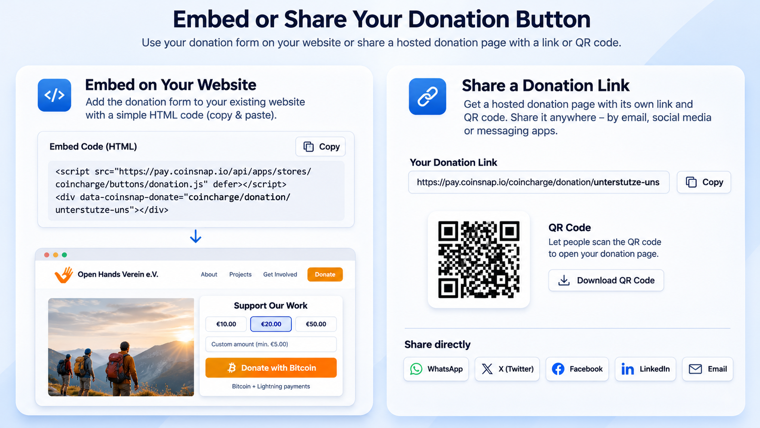
Copy the HTML embed code from Coinsnap and paste it into your website. No shop system or special payment plugin required.
Share a Donation Link Anywhere
Every Donation Button comes with a hosted page. Share its link or QR code through email, social media, newsletters, or messaging apps.
Let Supporters Choose Their Amount
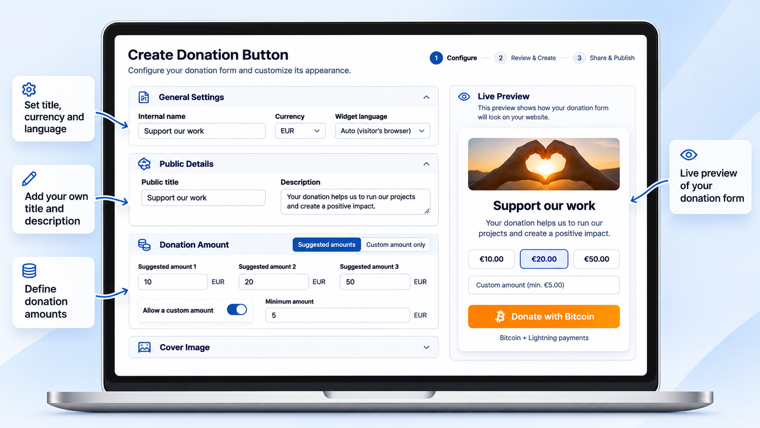
Offer suggested donation amounts or allow donors to enter a custom amount. Set your preferred currency and optional minimum donation.
Customize Your Donation Form
Add your own title, description, cover image, button text, and colors to match your organization or website.
Keep Track of Your Donations
View donation activity in your Coinsnap account. Donors can optionally leave their name, email address, or a personal message.
A Simple Bitcoin Donation Experience
Give supporters an easy way to contribute, whether they are using a smartphone or a computer.
Choose an Amount, Scan, and Donate
Your supporters see a clear donation form with suggested amounts and an optional field to enter their own contribution. They choose how much to give, click the donation button, and complete the payment with their Bitcoin or Lightning wallet.

How to Create a Bitcoin Donation Button
Setting up a Bitcoin donation button with Coinsnap takes just a few steps: 1. Create your donation form – select your Coinsnap Store, currency, public title, and description. 2. Customize the experience – set suggested donation amounts, optional custom amounts, cover image, button text, and colors. 3. Review and publish – check your donation form using the live preview. 4. Embed or share – copy the HTML code to your website or share the hosted donation link with your supporters.
Embed a Bitcoin Donation Button or Share a Donation Link
Already have a website? Copy the HTML embed code generated by Coinsnap and paste it into your website's HTML editor or custom HTML block. The donation form appears directly on your page, allowing visitors to choose a donation amount and continue to the Bitcoin payment process. Don't have a website? Coinsnap provides a hosted donation page with its own public URL and QR code. Share the link through social media, email, newsletters, or messaging apps. Your supporters can open the donation page and make a contribution.
Start Accepting Bitcoin Donations
Give Your Supporters an Easy Way to Contribute
Frequently Asked Questions
What Users Ask About the Donation Button
How can I accept Bitcoin donations on my website?
Do I need a website to accept Bitcoin donations?
Can I accept Lightning donations?
Can I add a Bitcoin donation button to WordPress
Do I need a WordPress plugin?
Can donors choose their donation amount?
Can I accept anonymous Bitcoin donations?
Can I customize my Bitcoin donation form?
Where do my Bitcoin donations go?
Can donors request a donation receipt?