

Accept Bitcoin Lightning payments for your content
The Coinsnap Bitcoin Paywall protects your high-quality content and ensures that you are fairly remunerated for your work.
It allows you to build a sustainable source of income and be less dependent on advertising revenue or sponsors. With your Coinsnap Bitcoin paywall, you can target loyal users who are willing to pay, which leads to a high-quality community in the long term.
The Coinsnap Bitcoin Paywall allows you to accept Bitcoin for exclusive content and clearly differentiate your offer from the competition. This is how you create added value – both for yourself and for the growing target group of Bitcoin customers!
Works with the Coinsnap gateway or your BTCPay server!

- Coinsnap Bitcoin Paywall product page & demo store: btcpaywall.com
- Coinsnap Bitcoin Paywall at WordPress: wordpress.org/plugins/coinsnap-paywall/
- GitHub: github.com/Coinsnap/Bitcoin-Paywall
Coinsnap Bitcoin Paywall Demos
If you want to try out for yourself how you can accept Bitcoin Lightning payments for your content with the Coinnap Bitcoin Paywall, check out our demos:
On our demo store page you will find a text or video that you can download for 1o cents (111 SATS). Select it to test payment with Bitcoin and Lightning right away!
“Pay now” if you want to load the content!
Simply click on the “Pay now” button to start the payment test.

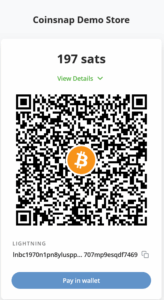
Now hold the camera of your Bitcoin Lightning Wallet on the QR code and click on “pay” or “send”, depending on what your wallet offers you.
At the end you will receive a QR code that you should scan with your wallet to pay with Coinsnap Bitcoin and Lighhtning!
You will then see a short confirmation of your payment and will be redirected back to the now released content!
Installation of the Coinsnap Bitcoin Paywall
Coinsnap Bitcoin Paywall in WordPress
To use the Coinsnap Bitcoin Paywall, the plugin must of course be installed on your WordPress website.
If you have not yet installed the Coinsnap Bitcoin Paywall, it is best to install it directly from the plugin offer in your WordPress.
Of course, you can also download the plugin from Github and install it manually (more on this below).
How to install your Coinsnap Bitcoin Paywall plugin directly in WordPress:
Go to the plugin area and click on “add new plugin”. Then enter “Coinsnap Paywall” in the search field and you will see our plugin in the selection.
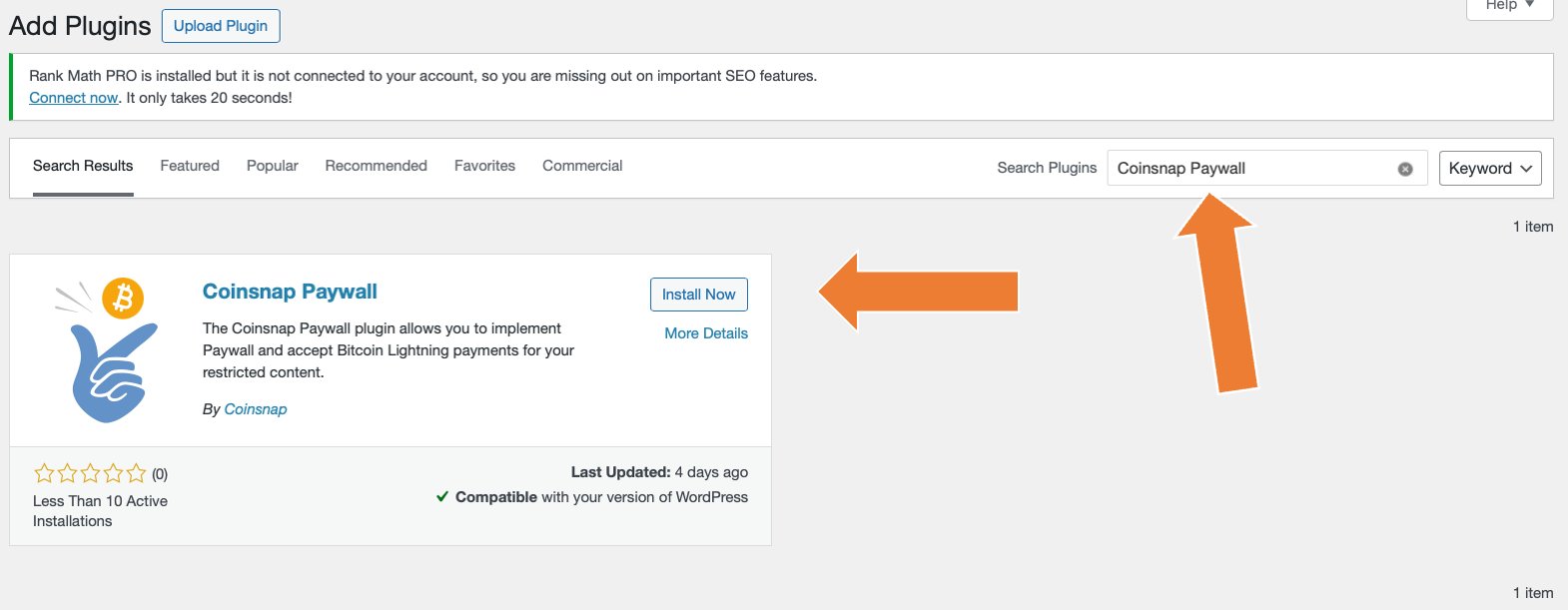
Now click on “Install now”, and when the installation is complete, click on “activate”.
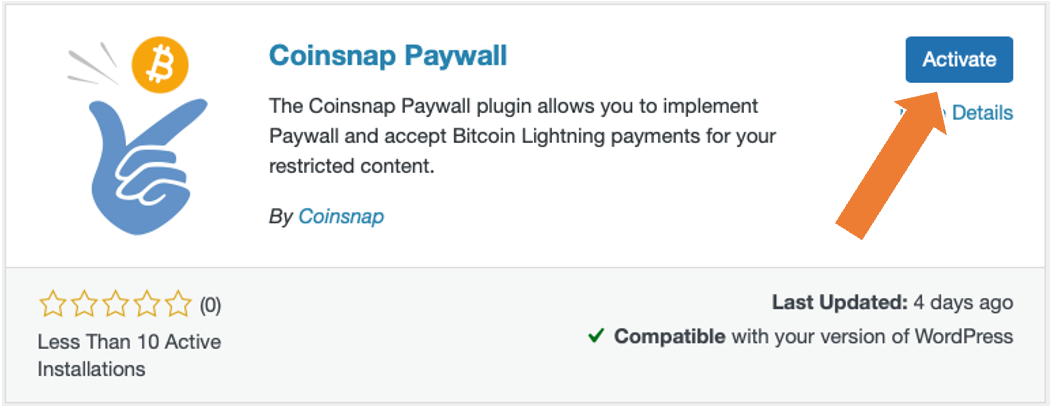
And your Coinsnap Paywall plugin is already installed and activated!
Now all you have to do is configure the plugin settings and you can make content available for Bitcoin on your website!
You can see how to configure the plugin here.
Download Coinsnap Bitcoin Paywall on Github
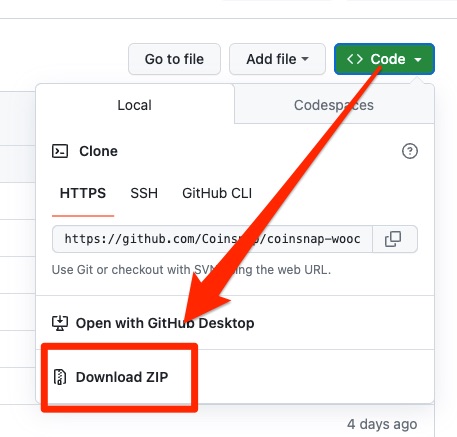
If you want to install the Coinsnap Bitcoin Paywall, you must first download it from the Coinsnap Github page here.
Then look for the green button labeled “Code”. When you click on it, the menu opens and Download ZIP appears.
Here you can download the latest version of the Coinsnap Bitcoin Paywall to your computer.
Download Coinsnap Bitcoin Paywall now
Connect your Coinsnap account with the Bitcoin Paywall
As soon as you are registered with Coinsnap, log in to your modified store and go to the backend.
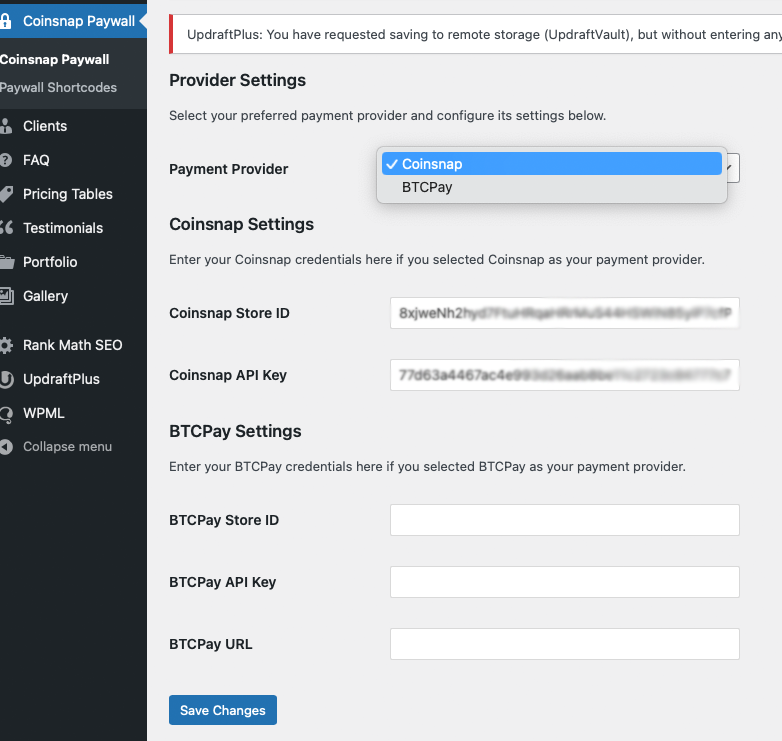
Coinsnap Bitcoin paywall settings
After you have installed and activated the Coinsnap Bitcoin Paywall, you must make the Coinsnap settings. You can find these in the sidebar on the left under “Coinsnap Bitcoin Paywall”.
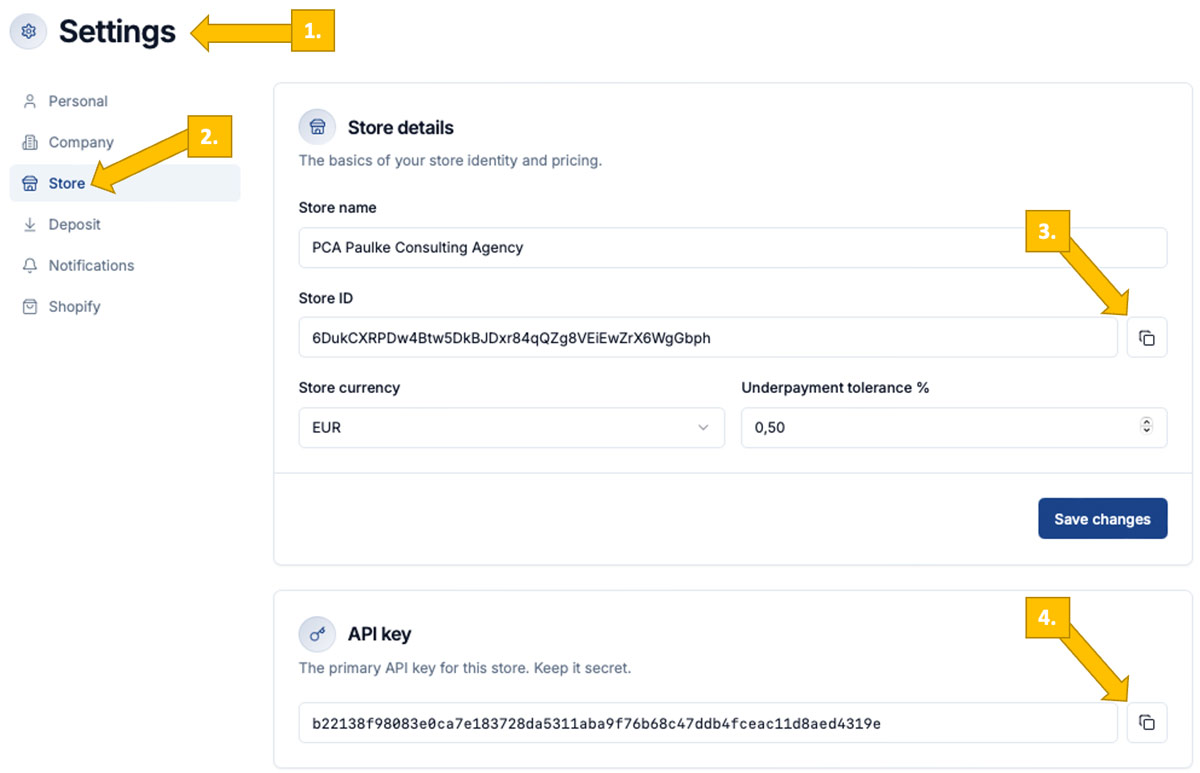
In your Coinsnap dashboard, go to Finances -> Settings [1], then Store [2]. Now you can copy your Store ID[3] and API Key [4].
Here is a step-by-step description of how to connect your plugin with your Coinsnap account.
Connect your BTCPay Server with the Bitcoin Paywall plugin
Bitcoin Paywall BTCPay Server Settings
You can also connect the Bitcoin Paywall plugin to your own BTCPay Server as an alternative. Here is a detailed step-by-step guide explaining how to do this.
Configure your Bitcoin Paywall
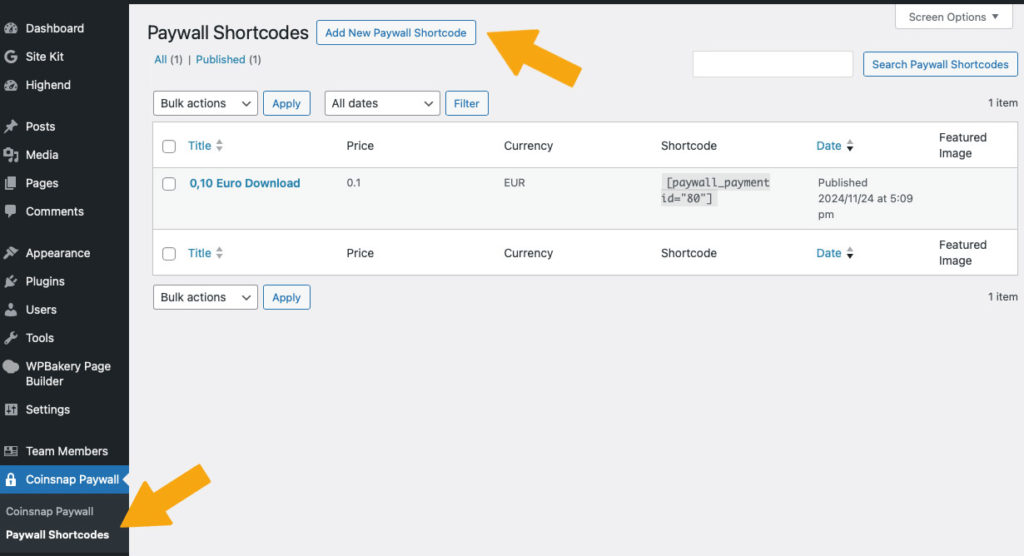
1. Create a paywall shortcode
Go to Coinsnap Bitcoin Paywall in the sideboard on the left in your WordPress and click on Paywall Shortcodes.
Then click on “Add New Paywall Shortcode” at the top.
2. configure your paywall shortcode
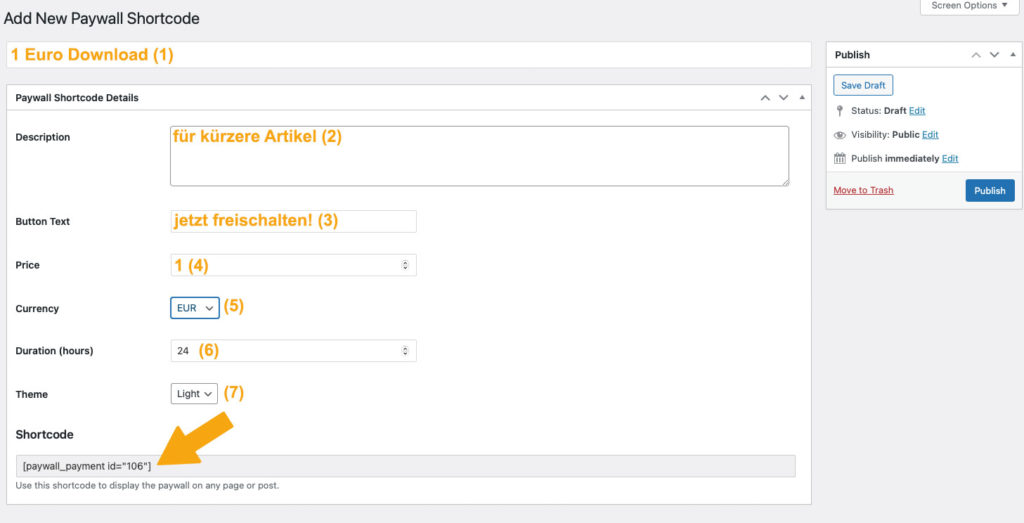
In the window that now appears, make the following settings (see orange entries):
- First you assign a name so that you know later what the short code is intended for.
- Then you can enter a short description as background information for yourself or your editors.
- Then set the text of the payment button.
- Set your price!
- Select the currency in which the price is to be displayed
- Set the duration of the activation and
- select the color scheme of the paywall.
Now you can copy the shortcode at the bottom and use it in your content (see below).
Put content behind the Coinsnap Bitcoin paywall
1. create content
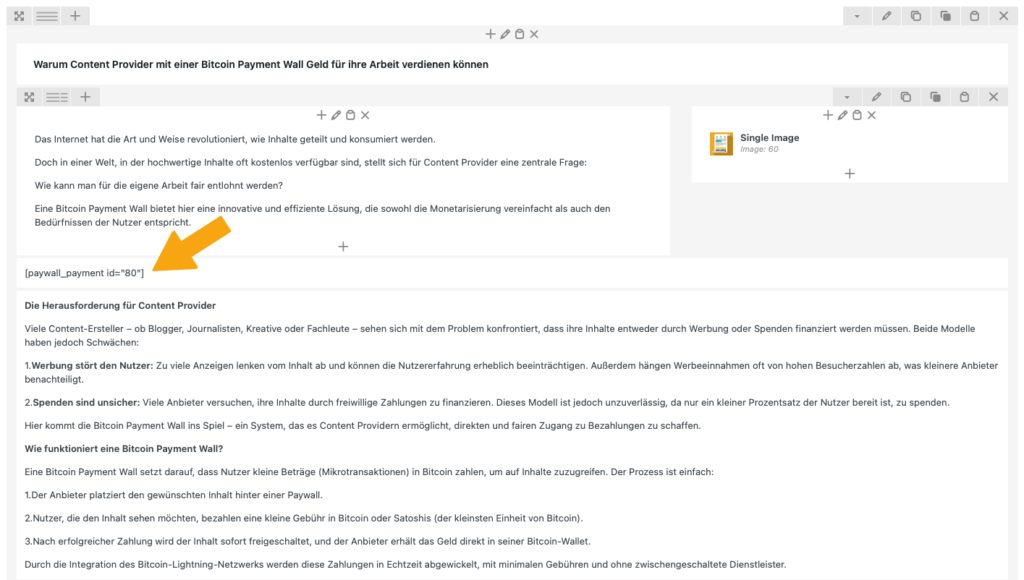
Now create content as usual in your WordPress, for example a text as in this example.
As soon as you have finished the article, you must place the shortcode you have just produced at the point where you expect payment from your reader. You usually do this after the introductory paragraph, see right:
Tip:
If you want to place a paywall before the download of a video, create a short description of the video content as an introduction and place an image of the start screen of the video next to it.
This way, your users can see what they can expect and why they want to pay for the video!