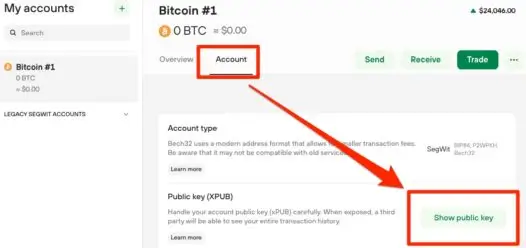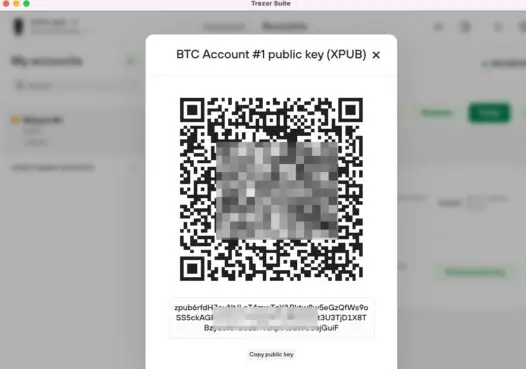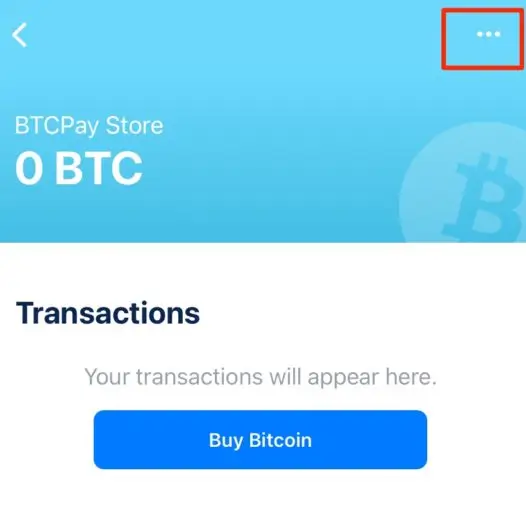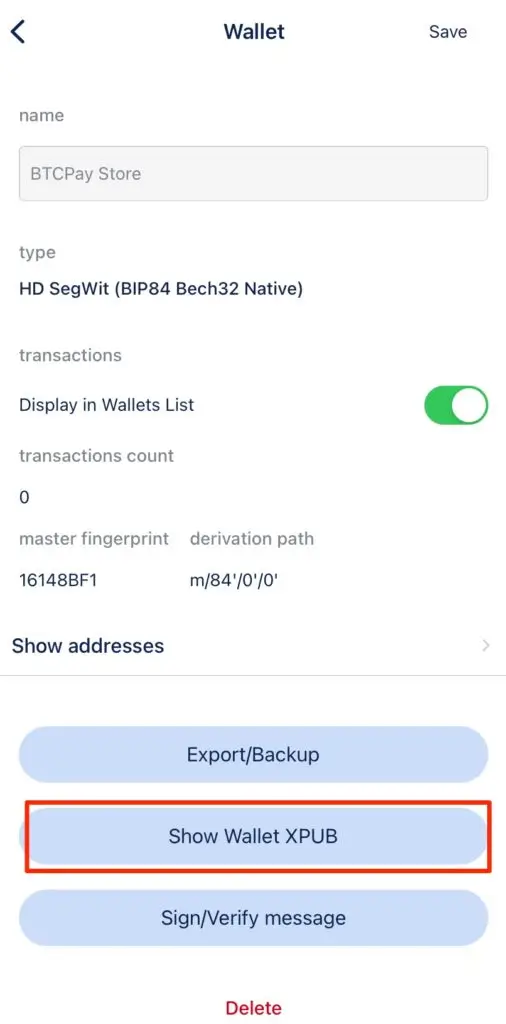
What Is an xPub Key?

Understanding xPub Keys: How Coinsnap Enables Direct Bitcoin Self-Custody for Merchants

What Is an xPub Key – and Why Is It Important for Coinsnap?

A simple introduction for Bitcoin beginners and Coinsnap merchants.

Bitcoin is an open, transparent, and self-sovereign monetary network. Merchants who accept Bitcoin often prefer receiving funds directly into their own wallet — without intermediaries, custodians, or centralized services.
To make this possible, Coinsnap relies on an important Bitcoin concept: the xPub key.

This article explains what an xPub key is, why Coinsnap uses it, and how merchants can set it up in a few minutes.

What Is an xpub Key (Explained Simply)?

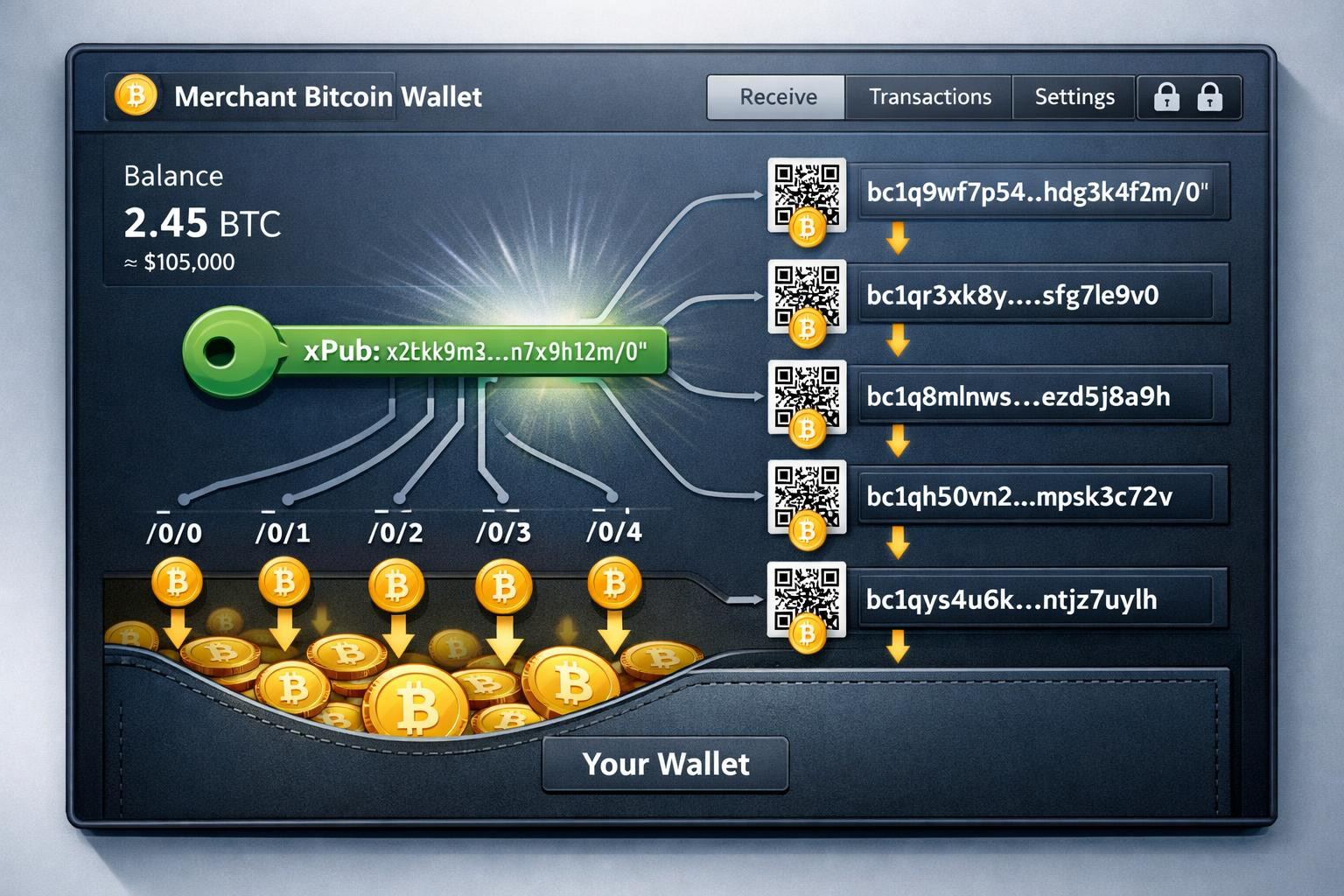
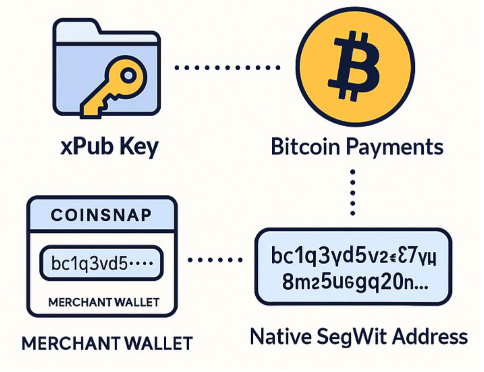
An xpub key (Extended Public Key) is like the master public key of your Bitcoin wallet.
In other words:
  • From a single xpub key, your wallet (or Coinsnap) can generate an unlimited number of receiving Bitcoin addresses.
  • The xpub cannot spend coins — it only allows creating new, unique receiving addresses.
  • You stay in full control of your Bitcoin at all times.
  • You never need to manually create a new on-chain address for every customer payment again — Coinsnap does this automatically.
Think of your xpub key as an “address generator” that:
  • does not expose private keys
  • does not allow spending
  • but does allow generating new Bitcoin receiving addresses forever
xPub Key

Why Coinsnap Recommends Native SegWit (bc1q…)

Bitcoin supports several types of on-chain addresses. The newest and most efficient typestarts with:

bc1q…

These are Native SegWit addresses (BIP84).
Coinsnap recommends them because they offer:
  • lower transaction fees
  • modern and efficient design
  • broad compatibility across all self-custodial wallets
  • excellent future-proofing

If your wallet is using Native SegWit, the master public key will often be called:

  • zpub (or sometimes still xpub, e.g. in Sparrow Wallet)

Coinsnap is able to generate correct bc1q on-chain addresses from either an xpub or a zpub— as long as the wallet uses the BIP84 standard.

How Coinsnap Uses Your xPub Key

Whenever a customer pays an on-chain Bitcoin invoice, Coinsnap automatically generates a new Bitcoin address derived from your xPub key.

The process:

  1. You save your xPub key inside your Coinsnap dashboard.

  2. Coinsnap creates a new address for each incoming order.

  3. The customer pays directly to your self-custody wallet.

  4. Coinsnap never holds or controls your funds.

You enjoy automated address generation while maintaining full control of your Bitcoin.

What Happens With Lightning vs. Bitcoin Payments?

Coinsnap supports both Lightning and On-Chain Bitcoin payments:

1. Lightning Payments

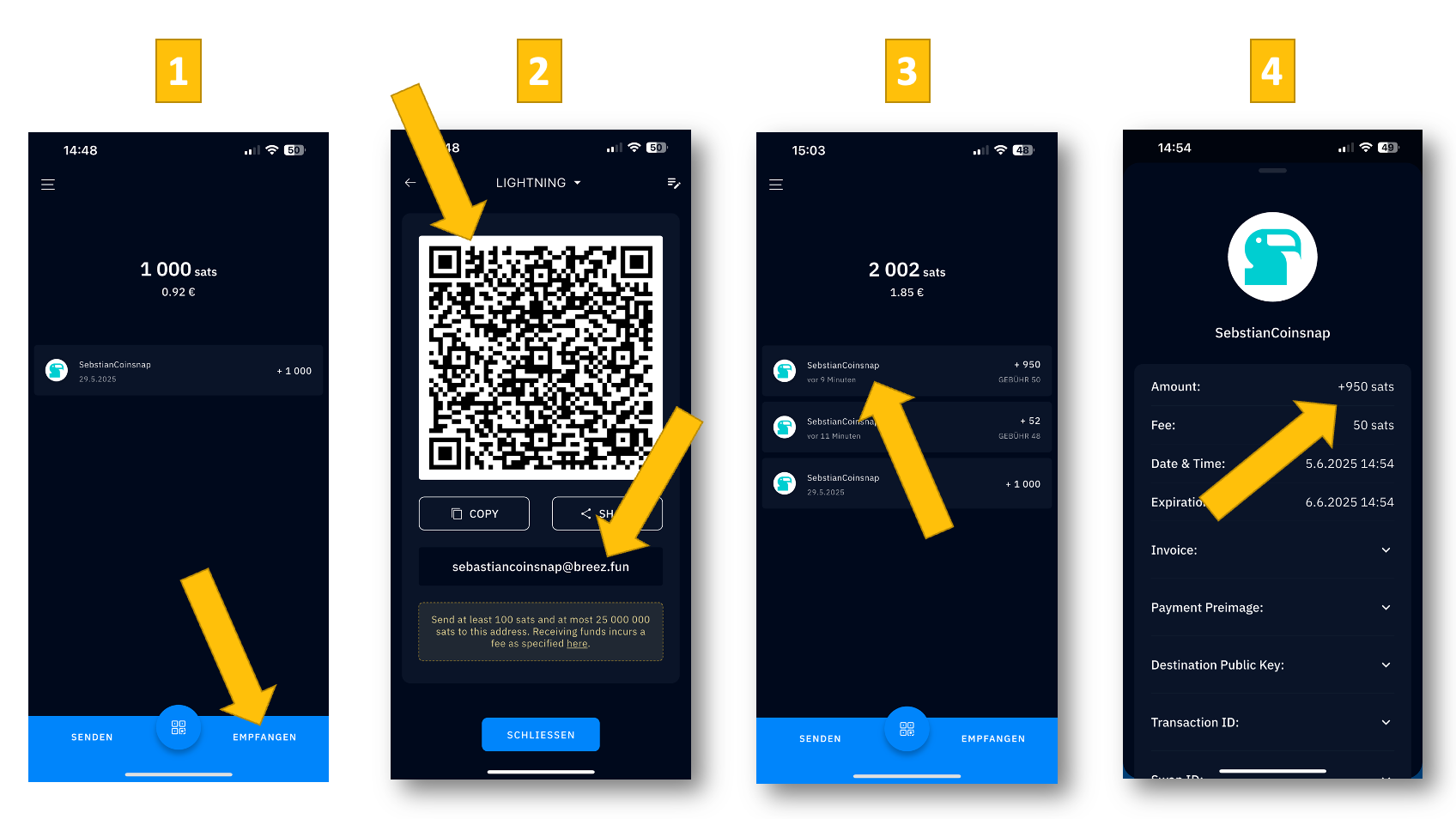
You must provide a Lightning Address when setting up your account.

All Lightning payments go directly to that wallet.
Examples:

2. On-Chain Bitcoin Payments

If you add your xPub key:

  • Lightning payments → go to your Lightning wallet

  • On-chain payments → go directly to your Bitcoin wallet

This cleanly separates your Lightning and On-Chain funds.

How to Add Your xPub Key in the Coinsnap Dashboard

For New Coinsnap Users

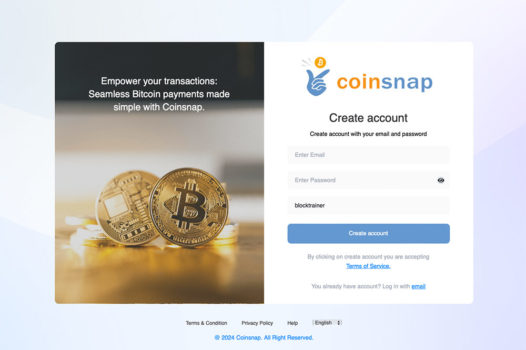
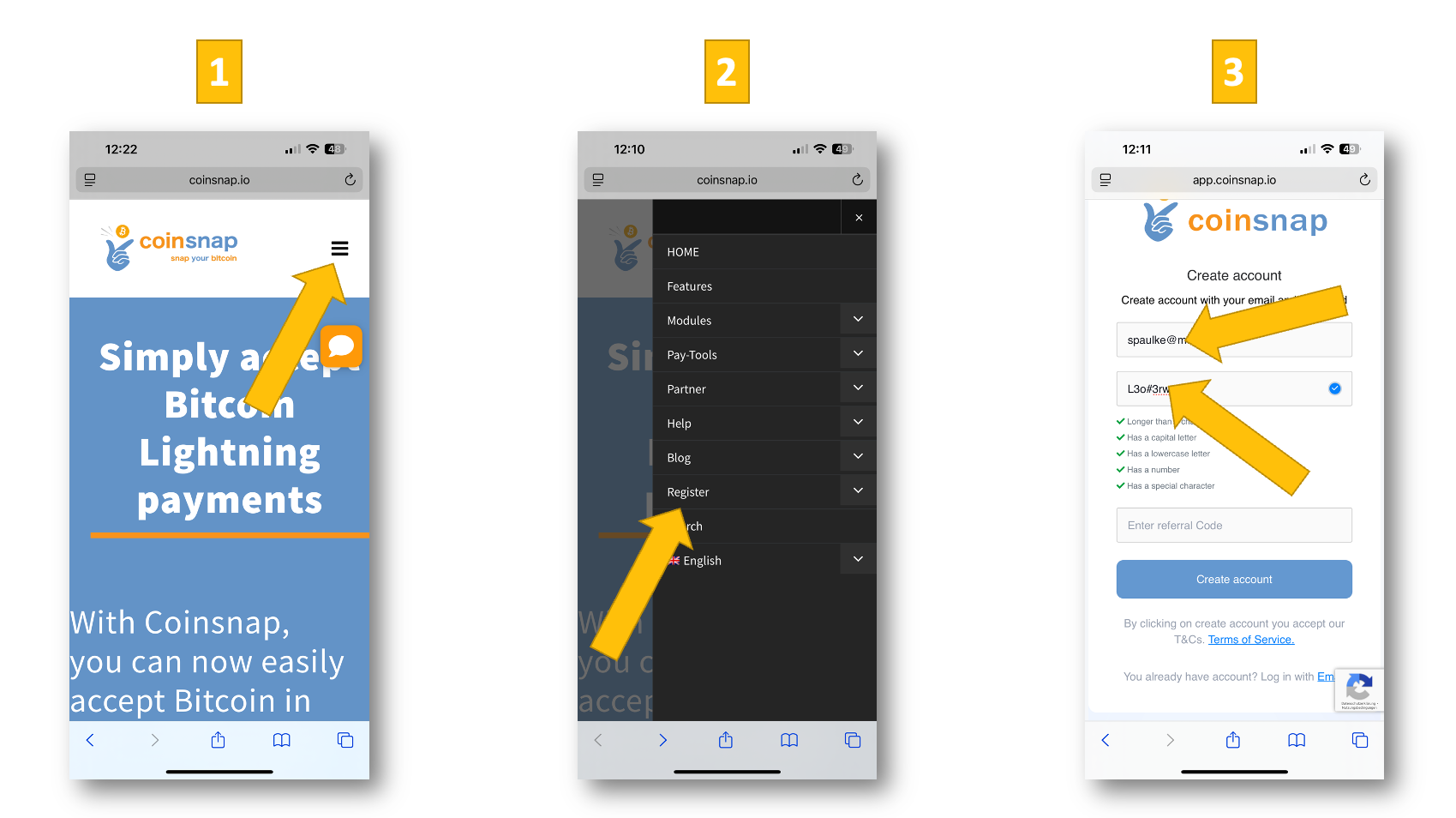
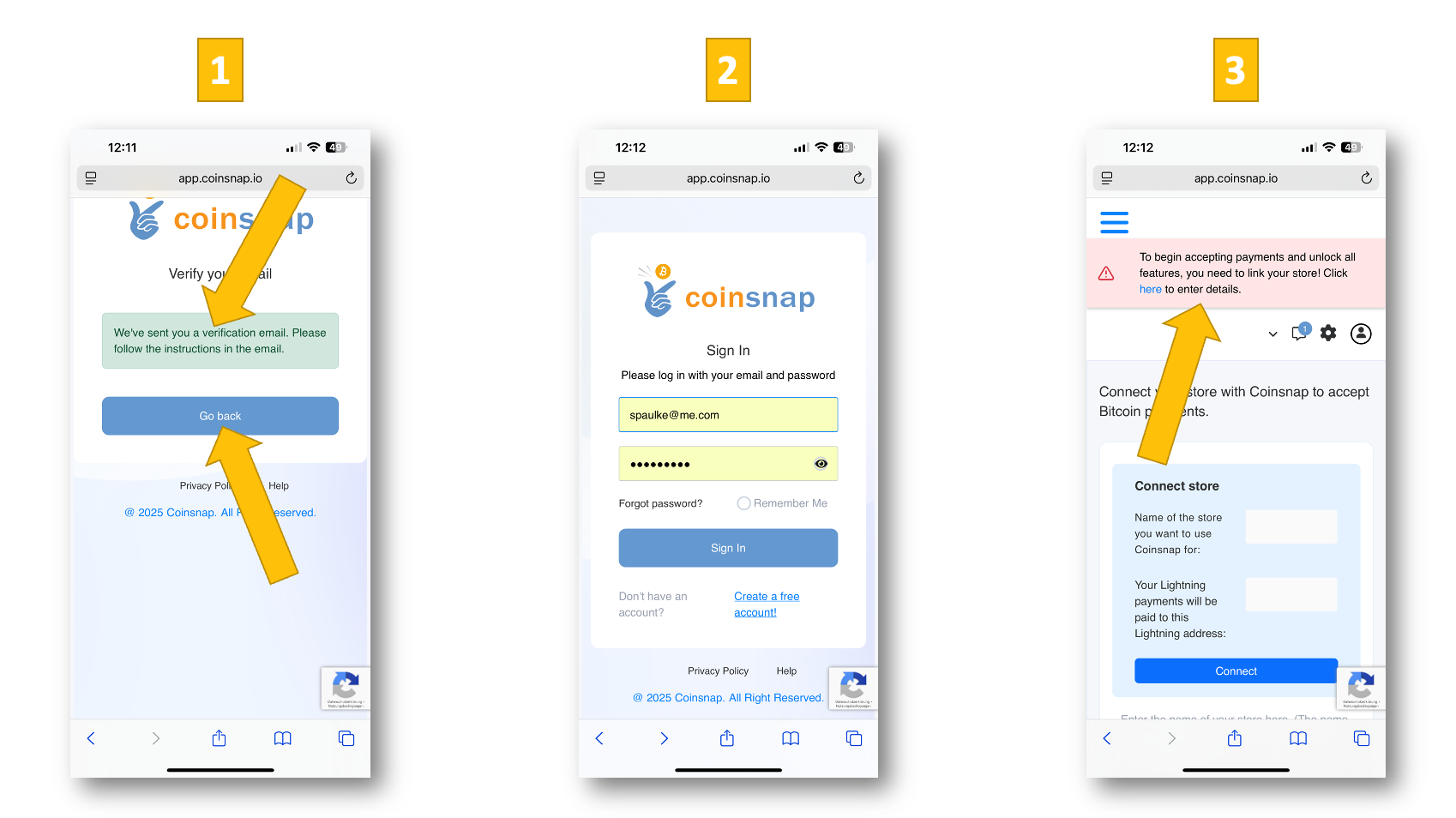
  1. Sign up or log in to Coinsnap.

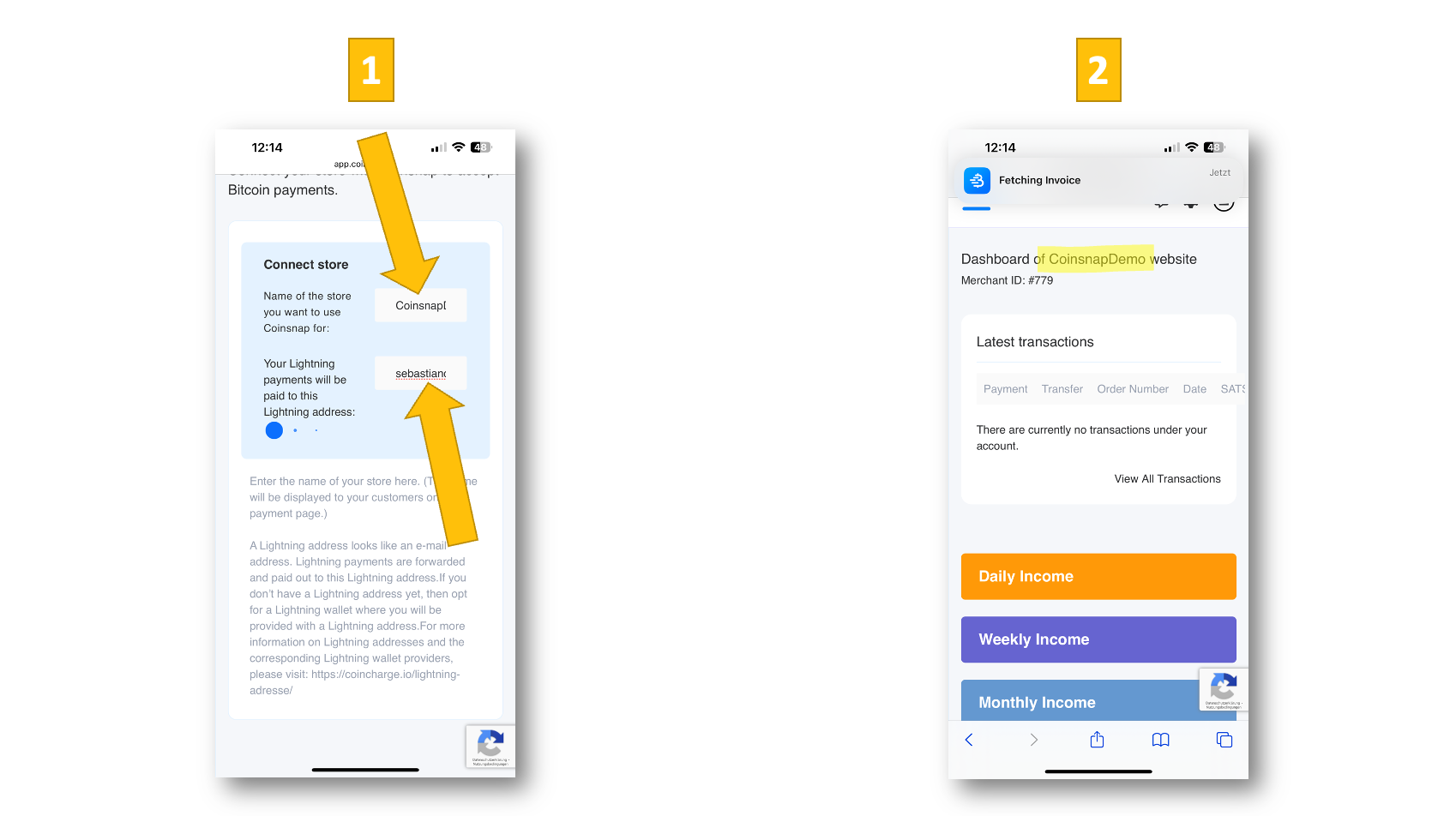
  2. Enter your Lightning Address (required).

  3. Go to Settings → Wallet.

  4. Paste your xPub / zPub key.

  5. Save — done!

For Existing Coinsnap Merchants

Just go to:

Settings → Wallet → Add xPub Key

All future on-chain payments will now be sent directly to your wallet.

Wallets That Provide an xPub Key

Hardware Wallets (Recommended)

  • BitBox02

  • Ledger Nano S / X / Stax

  • Trezor One / Model T

Desktop Wallets

  • Sparrow Wallet

  • Electrum

  • Specter Desktop

Mobile Wallets

  • BlueWallet (vault mode)

  • Nunchuk

  • Zeus (with your own node)

Wallets That Do Not Provide xPub Keys

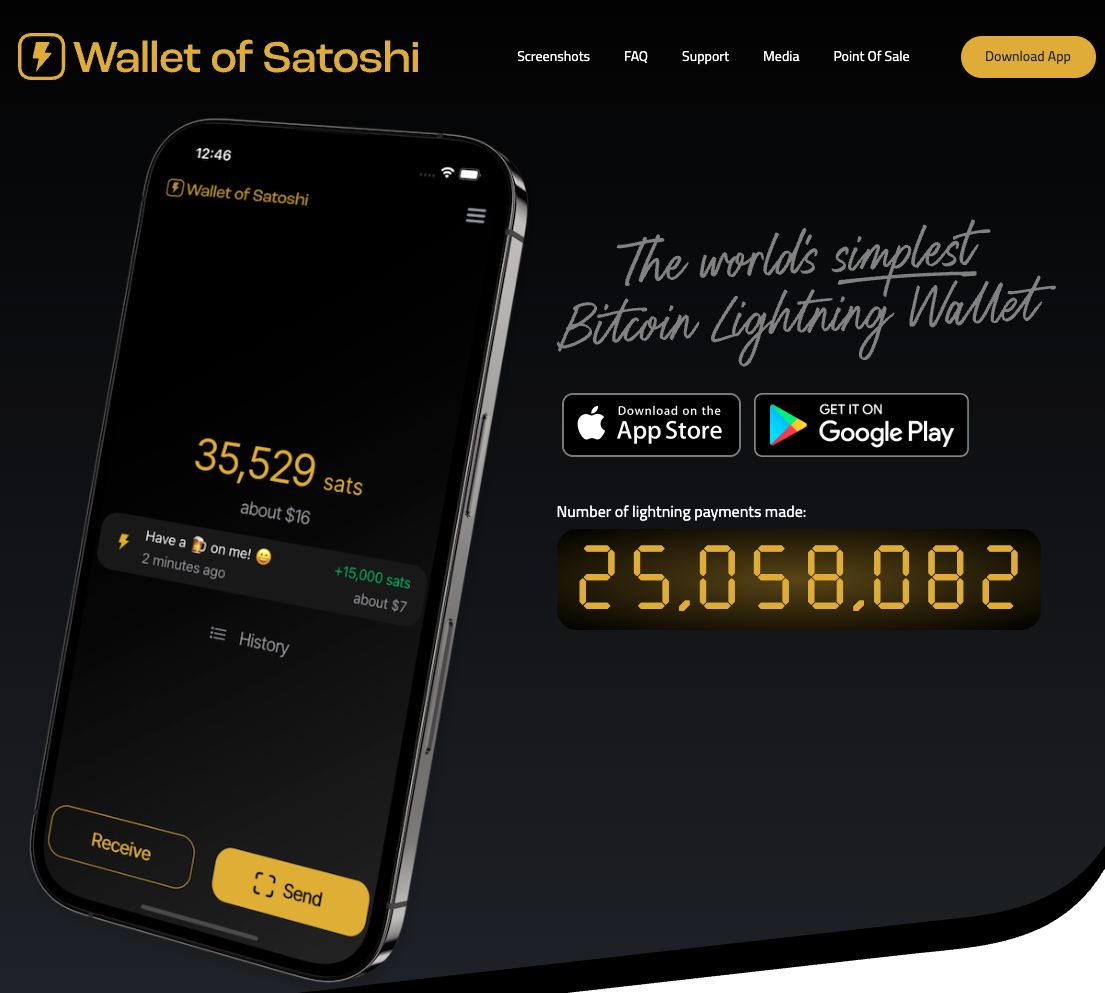
  • Wallet of Satoshi (Lightning only)

  • Exodus

  • Coinbase / Binance (custodial, no self-custody keys)

Conclusion

xPub keys allow merchants to receive Bitcoin on-chain payments directly in their own self-custodial wallet — securely and without intermediaries.

With Coinsnap:

  • Lightning payments go to your Lightning address

  • On-chain payments are derived from your xPub key

This setup gives you complete control, maximum flexibility, and a clean separation between Lightning and Bitcoin funds.
Getting Started Guide: Accept Bitcoin Payments with WooCommerce

Are you running an online store based on WooCommerce and want to accept Bitcoin payments with WooCommerce?
This guide provides a complete step-by-step tutorial with links to detailed articles on our website.

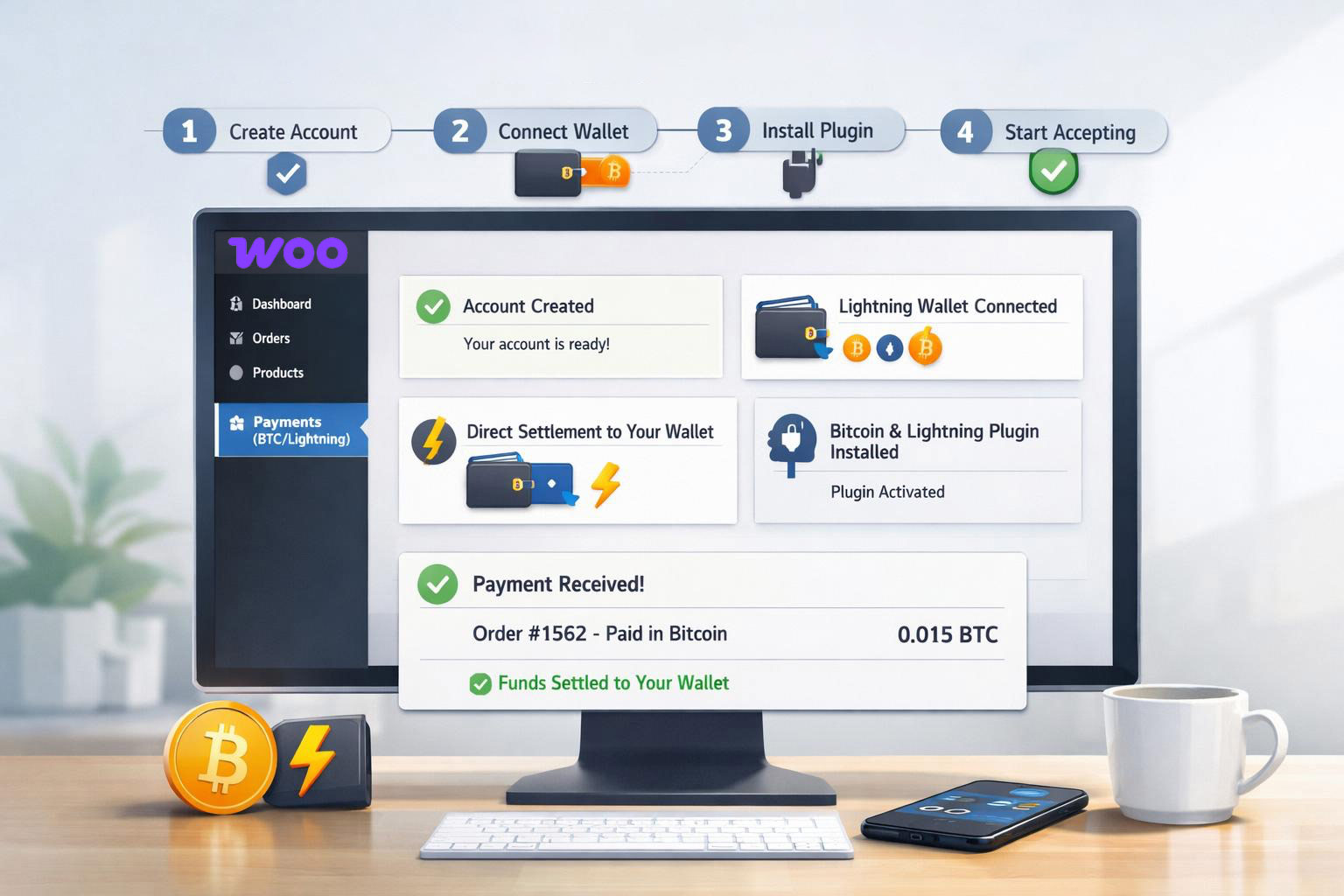
Overview

  1. Create a Coinsnap account
  2. Set up a Lightning Wallet and connect it to Coinsnap
  3. Install the Coinsnap for WooCommerce plugin
  4. Connect the plugin with your Coinsnap account
  5. Customize the plugin settings
  6. Perform test transactions
  7. View transaction data in the Coinsnap dashboard and use it for accounting

1. Create a Coinsnap Account

First, create your merchant account with Coinsnap.
👉 Go to https://app.coinsnap.io/ and register with your email address.
If you have a discount code, you can enter it during registration.
👉 More information: Getting Started with Coinsnap

2. Set Up a Lightning Wallet

Your customers can pay in your WooCommerce store using Bitcoin on-chain or the Lightning Network.
Payments will be credited to you via Lightning, so you need a Lightning Wallet with a Lightning address.

For beginners, we recommend Wallet of Satoshi.
👉 Install the Wallet of Satoshi app from your App Store (iOS or Android).
The app automatically generates a Lightning address for you — it looks similar to an email address but allows you to receive Bitcoin payments.

👉 Example: yourname@walletofsatoshi.com
Your Bitcoin sales will be credited directly to this wallet. You can transfer your Bitcoin at any time to another wallet, e.g. your BitBox02 hardware wallet.
👉 More information:

3. Install the Coinsnap for WooCommerce Plugin

Log in to the admin area of your WordPress website where WooCommerce is installed.

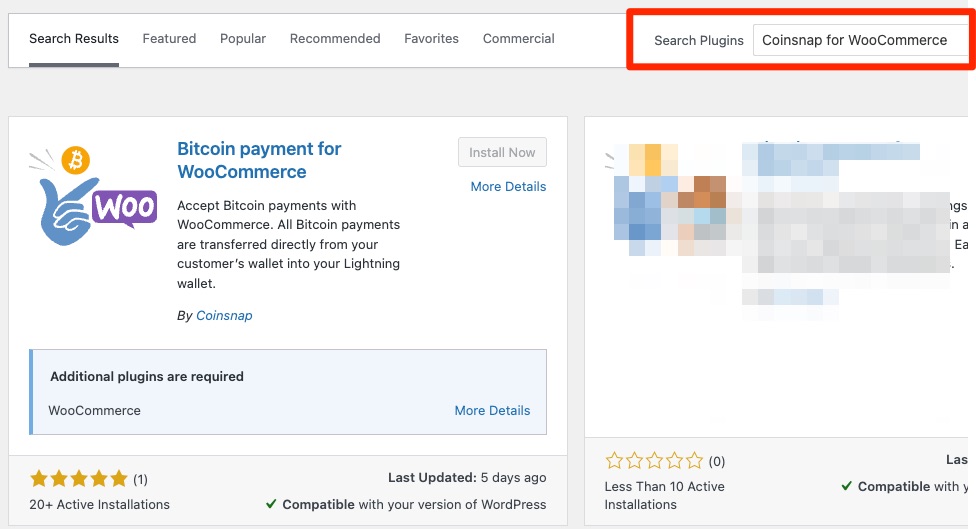
  1. Go to Plugins → Add New
  2. Search for Coinsnap for WooCommerce
  3. Click Install Now, then Activate

👉 Detailed guide:

Coinsnap for WooCommerce Installation Guide

4. Connect the Plugin with Your Coinsnap Account

To enable Bitcoin payments, your WooCommerce store must be connected to your Coinsnap account.

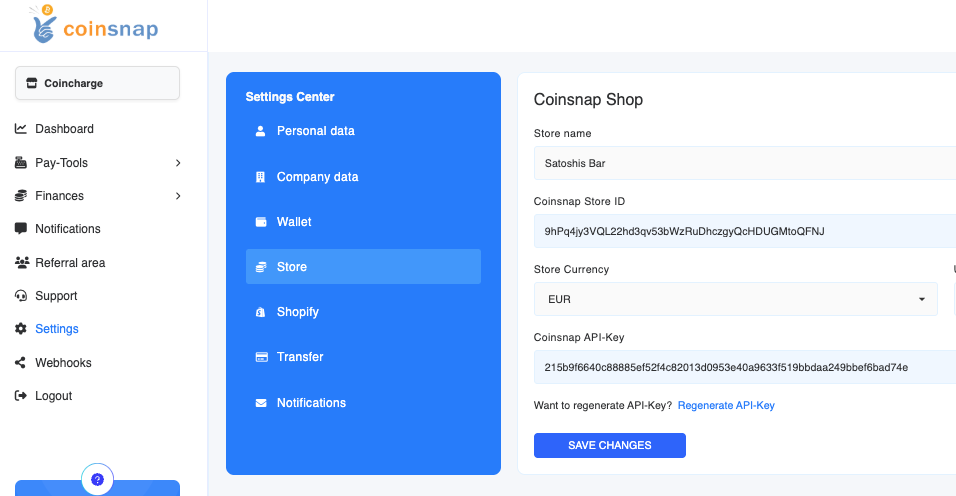
  1. Log in to your Coinsnap Dashboard
  2. Go to Settings → Store
  3. Copy your Store ID and API Key
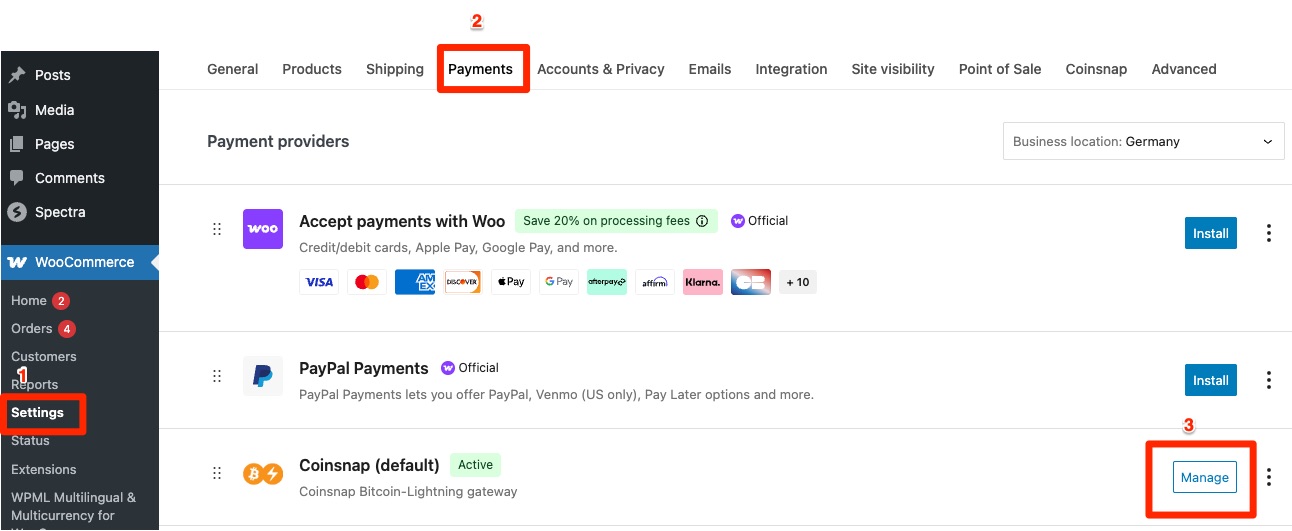
  4. In WooCommerce, go to Settings → Payments → Coinsnap and paste both values into the Coinsnap plugin settings

Once done, your WooCommerce store is successfully linked to Coinsnap.

5. Customize the Coinsnap Plugin Settings

After the connection is established, you can adjust the Coinsnap plugin to match your store’s preferences.
You can, for example:

  • Define how the payment method is displayed to customers (e.g., “Bitcoin + Lightning” or a custom label)
  • Offer a discount for Bitcoin payments
  • Change button text or display labels

You can find these options under WooCommerce → Settings → Payments → Coinsnap.
Click Manage to open the settings panel.

6. Perform Test Transactions

Before you start accepting real payments, we recommend performing two test transactions:

  1. Purchase a product and pay via Lightning
  2. Purchase another product and pay via Bitcoin Onchain

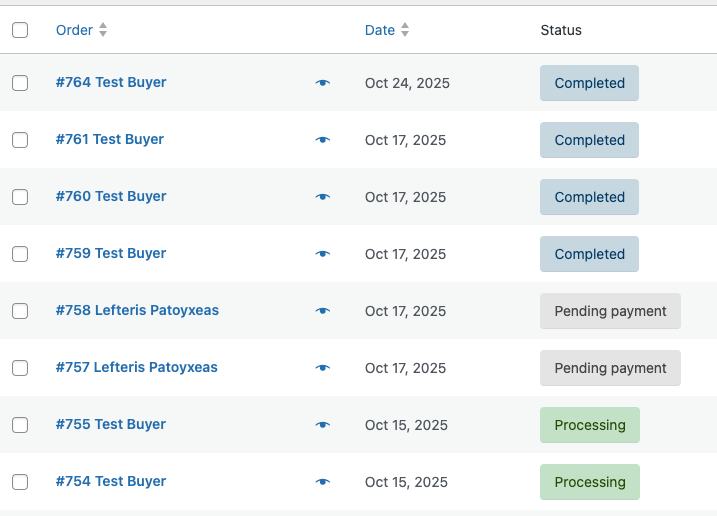
If the payments are successful, the order status in your WooCommerce backend will show as “Completed.”
This ensures your integration works properly.

7. View Transactions in the Coinsnap Dashboard

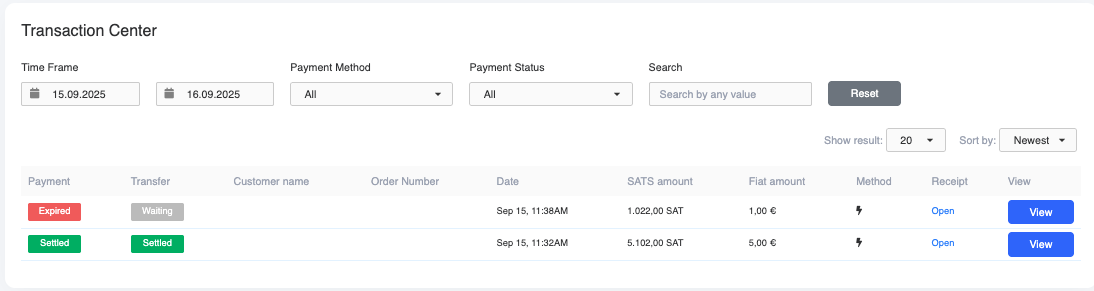
All transactions are listed in your Coinsnap Dashboard under Payments.

  • When the Payment status shows “Settled” in green, your customer has successfully paid.
  • When the Transfer status also shows “Settled,” the payment has been successfully credited to your wallet.

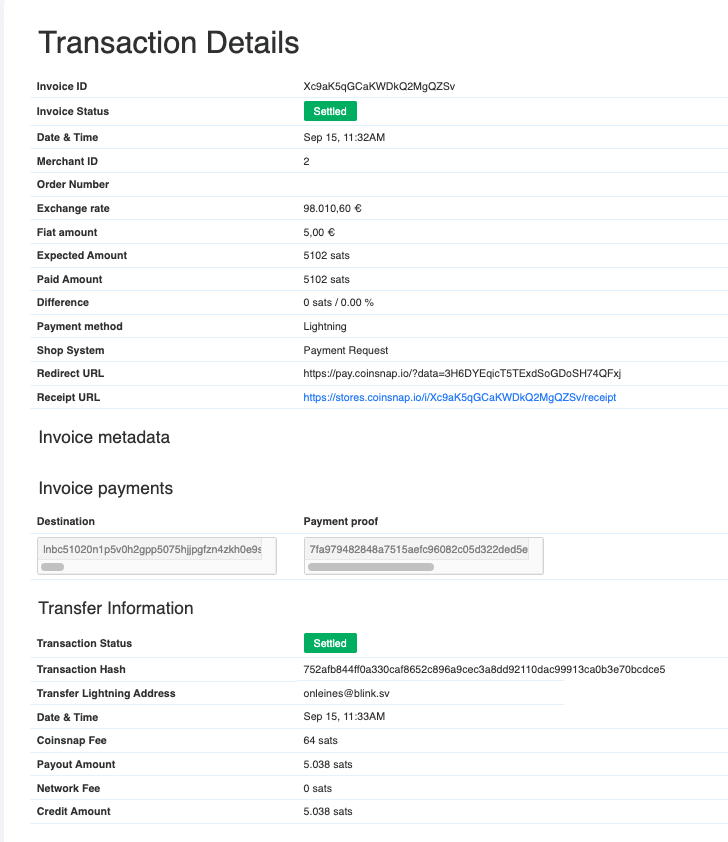
Click View to open detailed transaction information.

👉 Tip: Print out transaction details and attach them to the WooCommerce invoice for accurate accounting.

Conclusion: Why it makes sense to accept Bitcoin payments with WooCommerce

With Coinsnap, you can start accepting Bitcoin payments in your WooCommerce store in just a few simple steps — no intermediaries, no custody by Coinsnap, and direct settlement to your own wallet.

Bitcoin Invoice Form: How to get bills paid with Bitcoin (on-chain & Lightning)

Paying bills with Bitcoin – why it matters now

Imagine you’re a tradesman and you’ve just completed a project. Your customer is satisfied, and you send them the invoice. Normally, you’d expect a traditional bank transfer. But this customer asks, “Can I pay the invoice with Bitcoin?”

Or maybe you run a small online shop. Your customers can currently only pay by bank transfer because integrating other payment methods is complicated. But the question is increasingly coming up: “Does this also work with Bitcoin?”

Coinsnap’s Bitcoin invoice form enables you to do just that: have invoices paid with Bitcoin directly on your website – simple, reliable, and without any media disruption.

Bills as usual – plus Bitcoin option

You issue your invoice as usual (services, IBAN, payment term). Additionally, you offer “Pay bill with Bitcoin” – e.g. at: yourdomain.com/bitcoin. There, your customers will find a form that’s just as intuitive to use as a classic online transfer form:

  • Invoice amount and currency (e.g. Euro)
  • Invoice number for unique assignment
  • Optional name and message

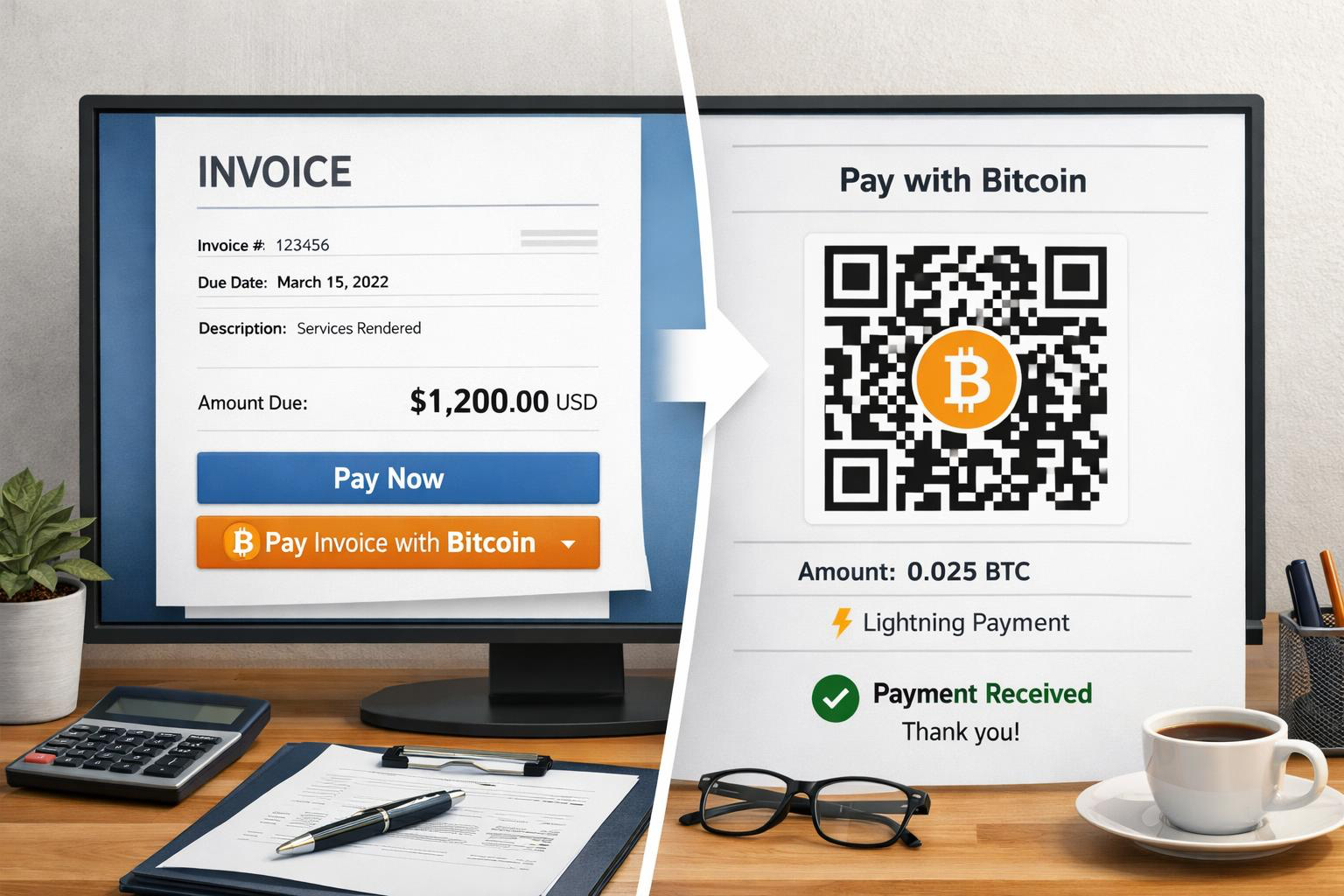
After clicking on “Pay invoice with Bitcoin”, a QR code will be displayed that can be paid with Bitcoin on-chain or with Lightning.

Practical examples – where the Bitcoin invoice form makes sense

The Bitcoin invoice form is suitable not only for traditional service providers, but for a wide range of industries.

Online shops

Not every online store can easily integrate Bitcoin payments. The invoice form offers a simple solution: You continue to offer payment on account – the customer can then freely choose whether to pay the invoice by bank transfer or directly with Bitcoin.

Contractors & service providers

Whether it’s a painter, electrician, or IT consultant, many service providers issue invoices for their services – either as an advance payment or after the job is completed. With the Bitcoin invoice form, your customers can now also pay these invoices with Bitcoin, without you having to change your existing accounting system.

Hotels & Restaurants

Invoicing is also common in the hotel and restaurant industry – whether as a deposit or a final invoice for overnight stays, events, or catering. With the additional Bitcoin option, guests can pay their bill directly in Bitcoin, giving them the peace of mind of using a modern payment method.

Goods seller

Whether you’re a wholesaler, a small shop, or a sole proprietor, the form can be used anywhere that sells goods and issues invoices. Merchants who already work with international customers in particular benefit from the fact that Bitcoin payments are fast, inexpensive, and borderless.

Fair Bitcoin conversion at the time of payment

A major advantage of the Bitcoin invoice form is the dynamic conversion: the euro amount is only converted into Bitcoin at the time of payment – not when the invoice is created.

This means for you and your customers:

  • Regardless of when payment is made within the payment period, the Bitcoin amount is always current.
  • Volatility plays no role in settlement.

The payment will be credited instantly to your Lightning wallet. If you wish, you can automatically convert the amount into euros and have it paid out to your bank account. (see below)

  • Install plugin
  • Connect either to your Coinsnap account or directly to your own BTCPay server
  • Customize the form to your requirements
  • Insert anywhere using a shortcode

Easy integration of the Bitcoin invoice form (HTML & WordPress)

1. HTML version (for each website type)

  • Login to the Coinsnap dashboard
  • Under Payment Tools → Invoice Form configure
  • Generate HTML code
  • Insert on your own website

This is how easy it is to integrate a Bitcoin payment option into any kind of website.

2. WordPress plugin

If you run your site with WordPress, the Coinsnap Bitcoin Invoice Form plugin is available for you.

  • Install plugin
  • Connect either to your Coinsnap account or directly to your own BTCPay server
  • Customize the form to your requirements
  • Insert anywhere using a shortcode

Particularly important: The form is displayed directly on your website. Your customers are not redirected to external sites – a crucial factor for trust and credibility.

Extra feature: Discount when paying invoices via Bitcoin – more conversion, fewer fees

An exciting additional feature is the Bitcoin discount function. If you want to encourage your customers to pay with Bitcoin, you can, for example, offer a 5% discount.

The form automatically calculates the reduced amount and displays it to the payer. This creates a real incentive for payments in Bitcoin!

Optional: Receive Bitcoin payments in euros – this keeps your accounting clean

If you want to accept payments in Bitcoin but do not want to keep Bitcoin in your accounting, you can automatically convert incoming Bitcoin invoice amounts directly into euros (e.g. with Coinsnap + Bringin or DFX) and credit them to your company account.

Further information: Coinsnap + Bringin

FAQ

Does Coinsnap accept bill payments via Bitcoin?

Yes. With Coinsnap Bitcoin invoice form invoices can be On-chain and via Lightning pay directly on your website.

Does the Bitcoin invoice form also work in WordPress?

Yes. Coinsnap Invoice Form Plugin creates a shortcode you can place anywhere on your WordPress website.

How is the Bitcoin amount calculated?

The EUR amount is converted in Bitcoin at the time of payment (rate lock).

Can I receive EUR payouts?

Yes, e.g. with Bringin (immediately in EUR/IBAN) or DFX (periodic).

Conclusion

With Coinsnap’s Bitcoin invoice form, you can accept invoice payments via Bitcoin professionally, transparently, and directly on your website.

  • HTML version: universally applicable, Coinsnap account required
  • WordPress plugin: usable with Coinsnap or your own BTCPay server
  • Practical relevance: from online shops to craftsmen to hotels and retailers – wherever invoices are written, Bitcoin can now be accepted as a payment method.

Combined with the Bitcoin discount feature, this creates an attractive offer that not only builds trust but can also actively motivate customers to pay in Bitcoin.

Try the Coinsnap Bitcoin invoice form yourself here.

Accept Bitcoin & Get Paid to Your Bank Account (No Bitcoin Handling)

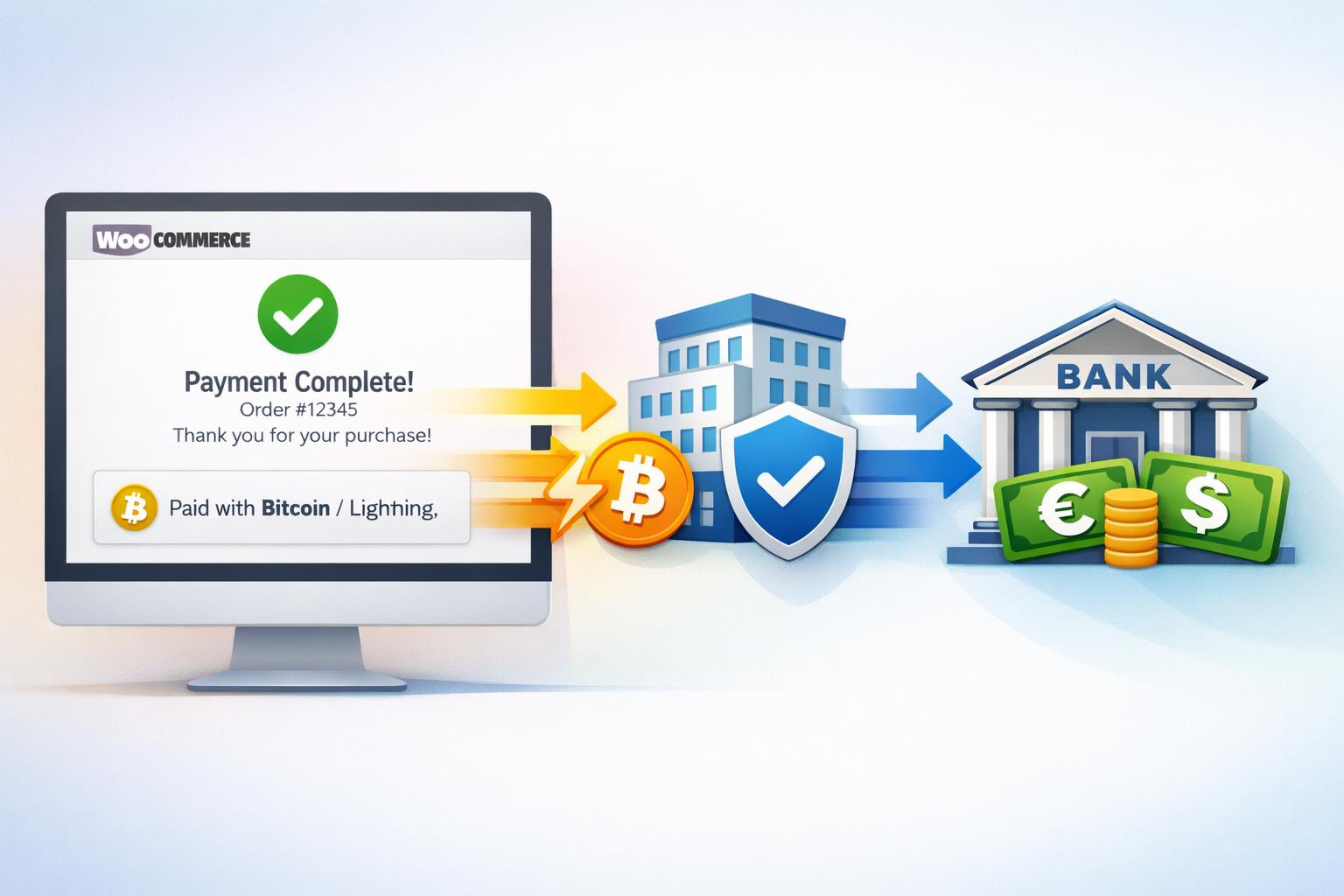
You want to accept Bitcoin, but prfer to get paid to your bank account in euros? If you’re curious about offering Bitcoin at checkout—but have zero interest in managing wallets, volatility, or crypto accounting—this guide is for you.

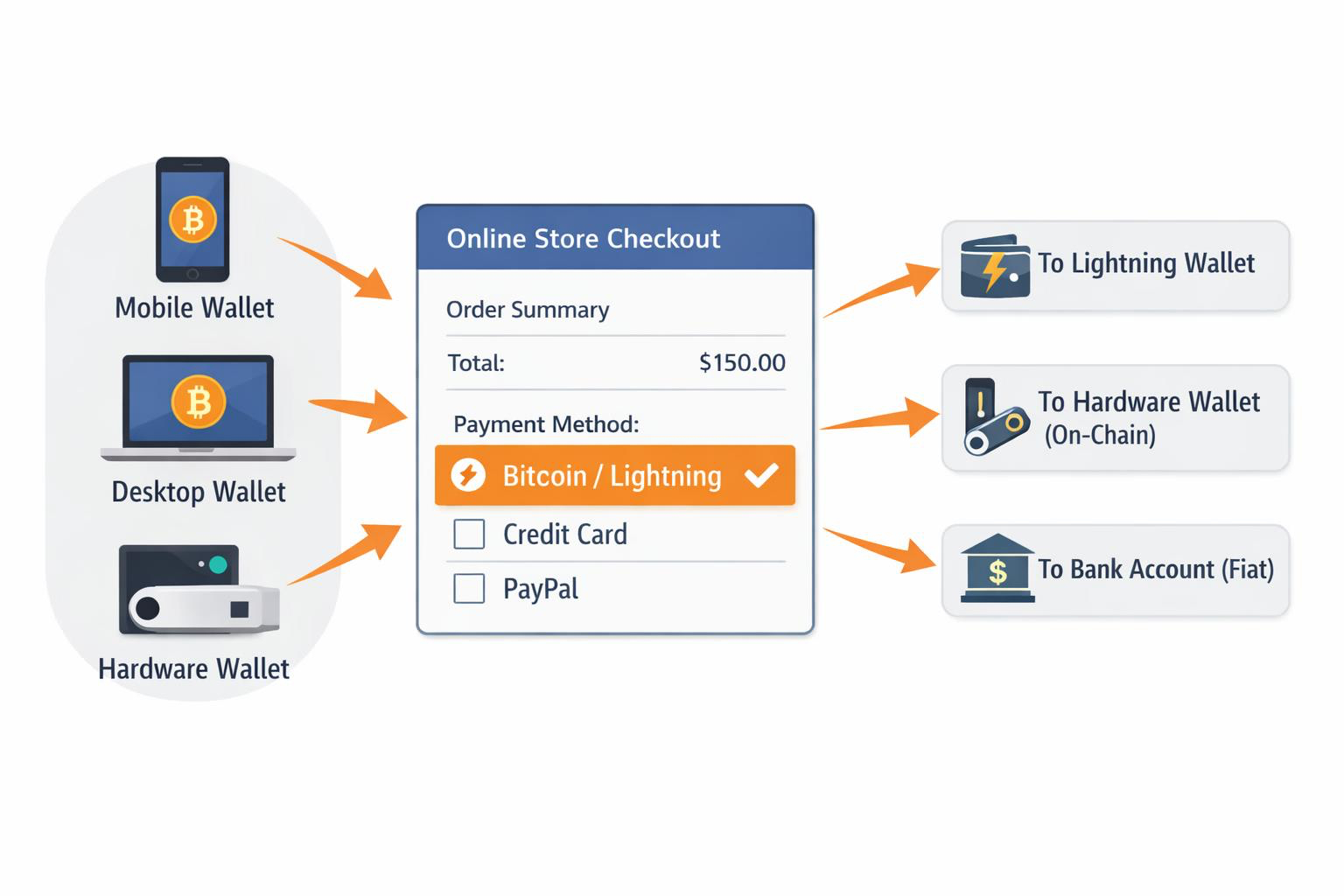
With Coinsnap, your customers can pay in Bitcoin while you choose how you get paid:

  • directly to your bank account in euros or dollars, or
  • to a Lightning or on-chain Bitcoin wallet if you prefer.

In this post, we focus on the simplest path for non‑crypto‑native businesses: accepting Bitcoin while receiving fiat directly to your bank account. You’ll learn why bank settlement is appealing, how it works with Coinsnap, and which payout partner—Bringin, Strike, or DFX—is right for you.

Can Merchants Accept Bitcoin and Get Paid in Euros?

Yes. With Coinsnap, customers pay in Bitcoin while merchants receive EUR or USD directly to their bank account via regulated settlement partners such as Bringin, Strike, or DFX—without holding or managing Bitcoin.

Why Merchants Settle Bitcoin Payments to a Bank Account

Many businesses want access to new customers without changing how finance works day to day. Bank settlement keeps everything familiar:

  • Sales arrive as euros or dollars on your statement
  • No Bitcoin custody or wallet management
  • No exposure to price volatility
  • Easier bookkeeping and reconciliation

When you choose fiat settlement, Coinsnap routes payments through a regulated partner that handles conversion and banking rails. As with any fiat service, KYB/KYC onboarding is required by the partner—not by Coinsnap.

Coinsnap itself never holds your funds. You decide whether payments go to a Lightning wallet, an on‑chain wallet, or a bank account via a settlement partner.

Bitcoin to Bank Account with Coinsnap: How It Works

BITCOIN TO BANK ACCOUNT WITH COINSNAP: HOW IT WORKS

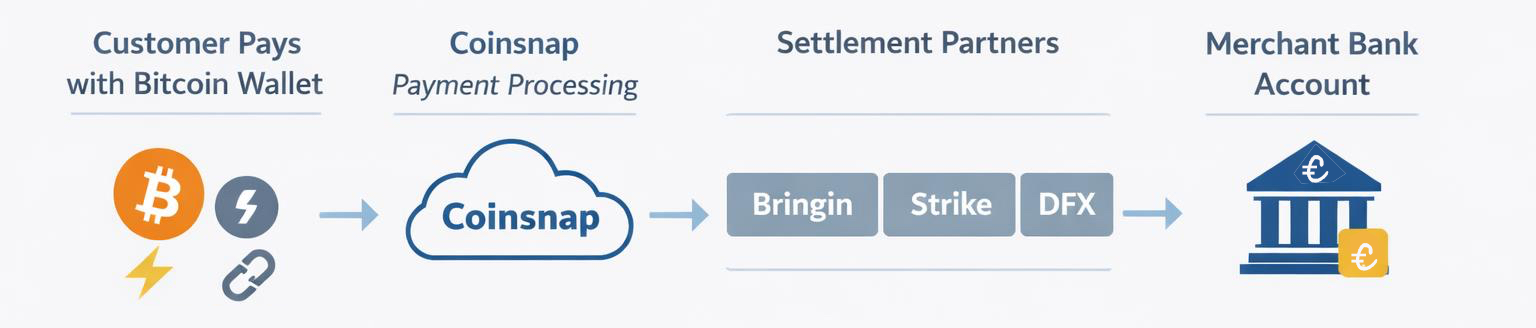
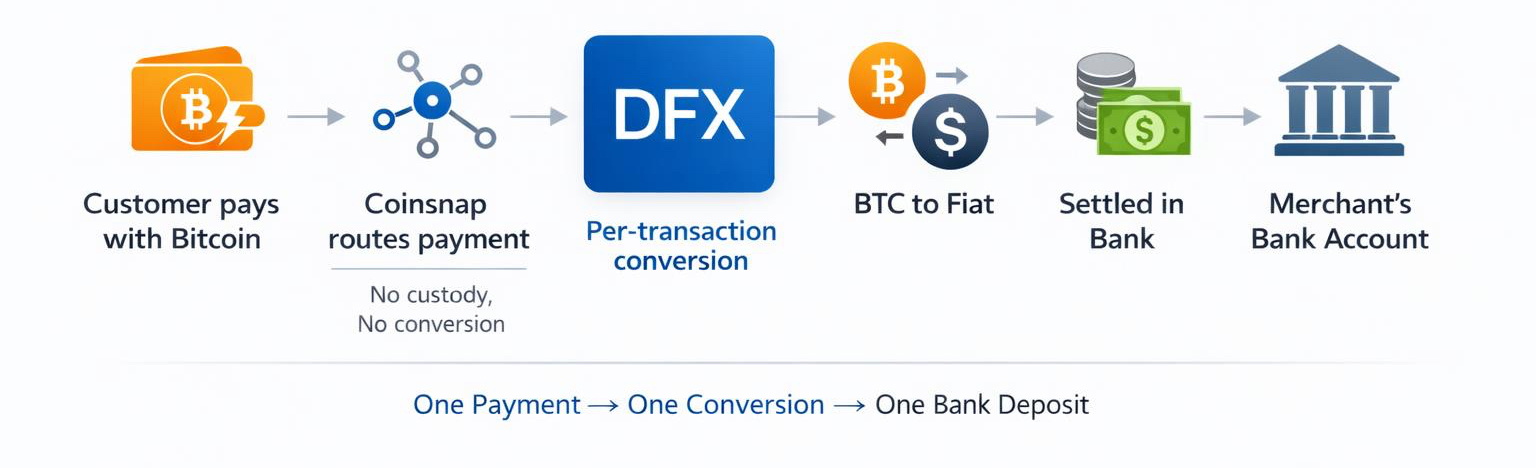
Coinsnap does not perform Bitcoin‑to‑fiat conversion directly. Instead, it integrates with Bringin, Strike, and DFX.

The flow is simple:

  1. Customers pay in Bitcoin (Lightning or on‑chain)
  2. Coinsnap routes the payment to your chosen partner
  3. The partner converts Bitcoin to fiat
  4. Funds are credited to your bank account—often within minutes

You never touch Bitcoin unless you want to.

How to Accept Bitcoin and Receive Fiat to Your Bank

  1. Install Coinsnap in your shop system
  2. Choose a bank settlement partner (Bringin, Strike, or DFX)
  3. Complete KYB/KYC with the partner
  4. Enter your payout details in Coinsnap
  5. Run a test payment and confirm bank credit

Option 1: Bringin — Accept Bitcoin, Receive Euros via SEPA

BRINGIN — ACCEPT BITCOIN, RECEIVE EUROS VIA SEPA

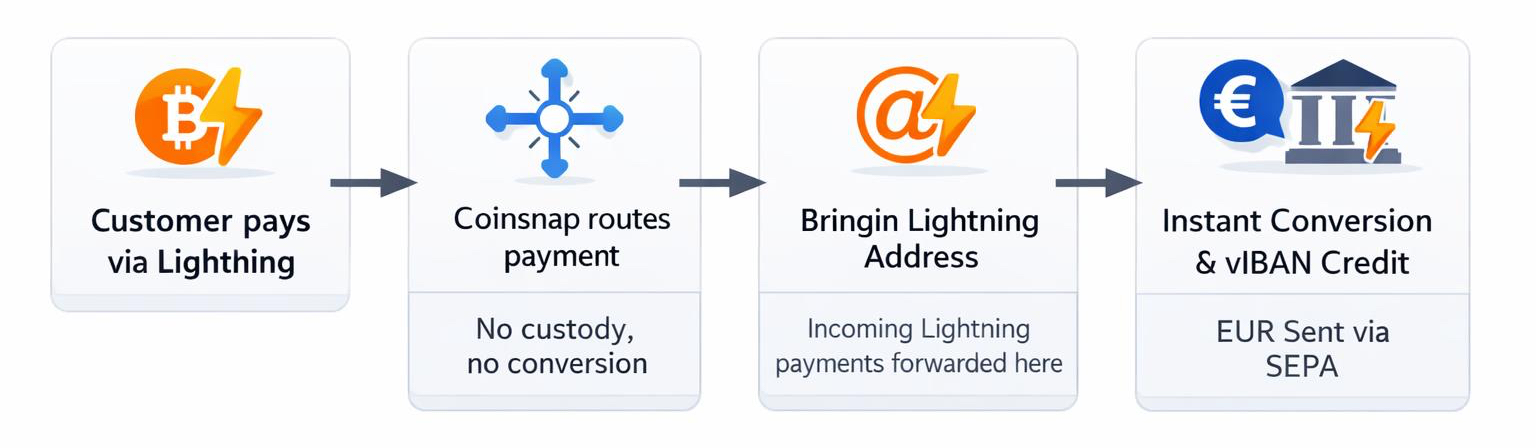
Bringin is ideal for EU merchants who want fast, simple euro payouts.

  • Lightning payments are forwarded to a Bringin-issued Lightning address
  • Funds are converted instantly and credited to a personal IBAN (vIBAN)
  • Withdraw to your bank via SEPA Instant

Key points:

  • ~1% withdrawal fee
  • Starter limit around €10,000/month (expandable)
  • Payouts only to bank accounts in the same legal name

Best for merchants who want a clean “accept Bitcoin, receive euros” setup with minimal moving parts.

Option 2: Strike — Global Reach with Optional BTC Holding

Strike — Global Reach with Optional BTC Holding


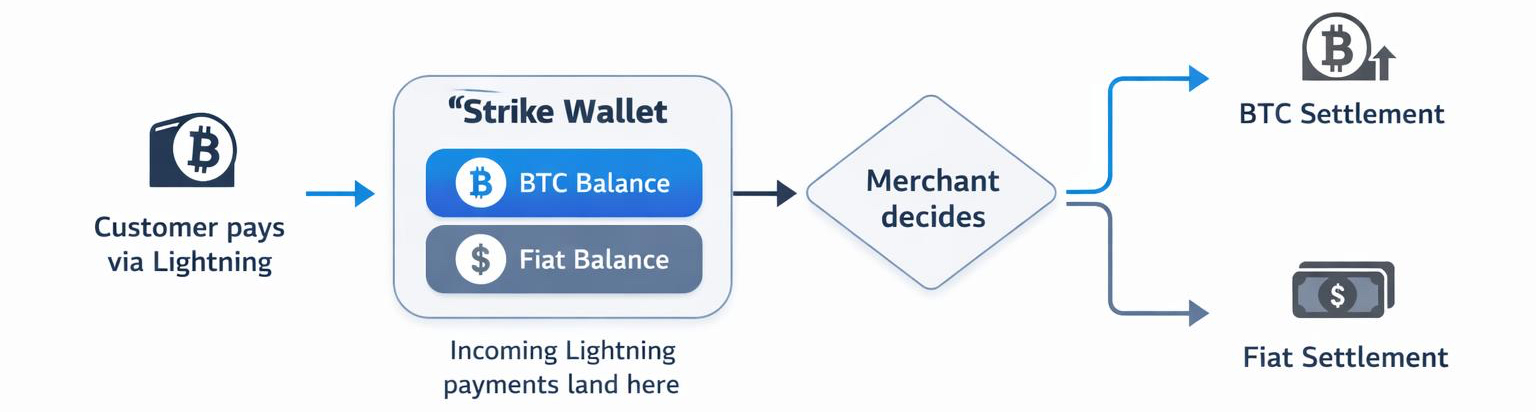
Strike combines a Lightning address with flexible fiat withdrawals.

  • Incoming Lightning payments land in your Strike wallet
  • You decide whether to hold BTC or convert to fiat
  • Withdraw to your bank in supported countries

Why choose Strike:

  • Broad international availability (especially strong in the US)
  • Dual wallet model (BTC + cash)
  • Flexible conversion timing

Ideal for global merchants or businesses that want to keep some Bitcoin while converting the rest.

Option 3: DFX — Per‑Transaction Settlement in EUR or CHF

DFX — Per‑Transaction Settlement in EUR or CHF

DFX converts and settles each transaction individually.

  • Every Bitcoin payment becomes a separate EUR or CHF bank credit
  • Works with SEPA‑reachable accounts across the EU, UK, and Switzerland

Highlights:

  • Clear audit trail for accounting
  • Transparent compliance thresholds
  • Strong choice for Switzerland and Europe

Perfect for finance teams that value one‑to‑one reconciliation.

Bringin vs. Strike vs. DFX

Partner Region Fiat Settlement Style Best For
Bringin EU / SEPA EUR vIBAN → bank Simple euro payouts
Strike Global Local Wallet → bank Flexibility & reach
DFX EU / CH / UK EUR / CHF Per transaction Accounting clarity

How to Choose the Right Bitcoin‑to‑Bank Partner

  • EU merchants: Bringin or DFX
  • US & global businesses: Strike
  • Zero BTC exposure: Bank settlement only
  • Some BTC holding: Strike or wallet payouts

Coinsnap doesn’t lock you in. Many merchants adjust their payout strategy as demand grows.

Key Takeaways

  • Accept Bitcoin without changing your back office
  • Eliminate volatility by settling directly to your bank
  • Choose the partner that fits your region and accounting needs
  • Test once, document the process, and scale confidently

Accepting Bitcoin should expand your market—not complicate your month‑end.

With Coinsnap and the right settlement partner, Bitcoin payments can be as simple as cards or PayPal.

Frequently Asked Questions (FAQ)

Can I accept Bitcoin without holding any Bitcoin?

Yes. With Coinsnap, you can route all payouts directly to your bank account via Bringin, Strike, or DFX. Customers pay in Bitcoin, while you receive euros or dollars—without ever holding BTC.

Do I need KYC or KYB to receive bank payouts?

Yes. While Coinsnap itself does not require KYC for payouts to your own Bitcoin or Lightning wallets, bank payouts require KYB/KYC because Bringin, Strike, and DFX operate on regulated fiat rails.

How fast do Bitcoin payments settle to my bank account?

  • Lightning payments: Near-instant on the Bitcoin side
  • Bank settlement: Same day to a few business days, depending on the partner and your bank (SEPA Instant is often available in the EU)

What fees should merchants expect?

  • Coinsnap: 1% fee per transaction
  • Settlement partners: Each partner publishes its own conversion and payout fees (for example, Bringin charges around 1% on withdrawals)

Always review the exact fee schedule during partner onboarding.

Which countries are supported for Bitcoin-to-bank payouts?

  • Europe / SEPA: Bringin, DFX
  • Switzerland: DFX
  • United States & global regions: Strike (availability varies by country)

Availability depends on your business type and local regulations.

Can I split payouts between Bitcoin and fiat?

Coinsnap does not support an automatic split. However, you can receive payments to a Lightning or on-chain wallet and later convert part of your Bitcoin through a third-party exchange or broker.

Is accepting Bitcoin more complex than cards or PayPal?

No. With Coinsnap, Bitcoin checkout integrates directly into your existing shop system. When using bank settlement, reconciliation looks similar to traditional payment methods—often simpler due to lower fees and fewer chargebacks.

Ready to test Bitcoin checkout without changing your finance setup?

Install Coinsnap, connect a bank payout partner, and run a live test in minutes.

WooCommerce Bitcoin Cash-Out (Simple Introduction)

WooCommerce Bitcoin Cash-Out (Simple Introduction)

Many WooCommerce shops want the reach and tiny fees of Bitcoin and Lightning at checkout, but still need money to land in the bank in euros, dollars or pounds. That keeps cash flow smooth, bookkeeping simple, and avoids price swings.

This guide explains your payout choices in plain English and shows easy ways to set them up in WooCommerce — so you can go live fast.

Why settling to fiat matters

Some stores don’t want to keep Bitcoin on the books because it adds extra accounting work. Others need local currency to pay suppliers, salaries and taxes. And some prefer not to carry price risk if Bitcoin moves after a sale.

Settling to fiat at, or soon after, a Bitcoin payment solves all three problems: clean books, predictable cash flow, and no surprise losses from exchange-rate swings.

Your WooCommerce Bitcoin cash-out options

There are several practical ways to turn WooCommerce Bitcoin sales into euros or other currencies in your bank. Here are the most common ones:

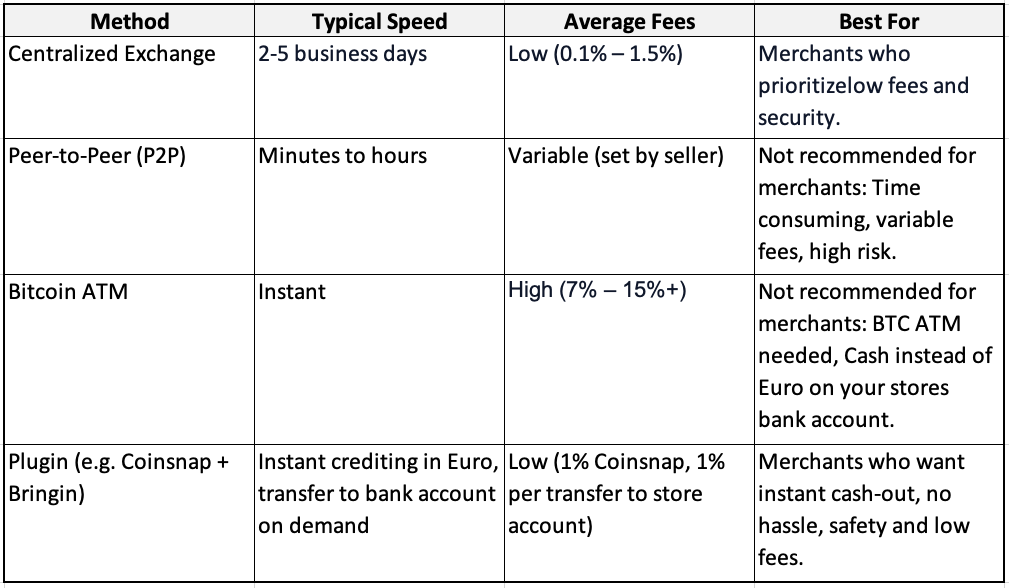
1) Exchange to bank (sell BTC, withdraw to IBAN)

This is the “sell on an exchange, withdraw to your bank” route. You receive Bitcoin, send it to a trusted exchange account, sell it for EUR/USD/GBP, and withdraw to your bank.

It usually has the lowest fees but takes a little time and requires an exchange account with ID checks.

2) Peer-to-peer sales

You sell directly to a buyer on a marketplace and agree a bank transfer or another payment method.

It can be fast and flexible, but you must use platforms with escrow and good reputation systems, and you’ll need to verify you’ve been paid before releasing the Bitcoin.

3) Bitcoin ATMs (instant cash, higher fees)

You send Bitcoin to a Bitcoin ATM and receive banknotes.

It’s the fastest way to get physical cash, but fees are usually much higher than other routes and daily limits may apply.

4) Plugins for Bitcoin Cash-out directly to your IBAN

There’s a very convenient option that feels like option 1 but without moving coins yourself: some plugins connect your checkout to a service that auto-converts Lightning or on-chain payments into euros and credits them to an account in your name.

A popular example is Coinsnap together with Bringin. Customers pay in Bitcoin, you see euros arrive—instantly—without touching an exchange screen.

Peer-to-peer trades and Bitcoin ATMs aren’t really practical for Woo merchants:

P2P deals demand manual vetting, escrow/dispute handling and carry fraud risk—none of which scales or integrates with orders or accounting.

Bitcoin ATMs are scarce, often fee-heavy, have low limits, and only dispense cash—so you still end up with reconciliation headaches and no automated Bitcoin cash out flow.

Bitcoin cash-out methods compared


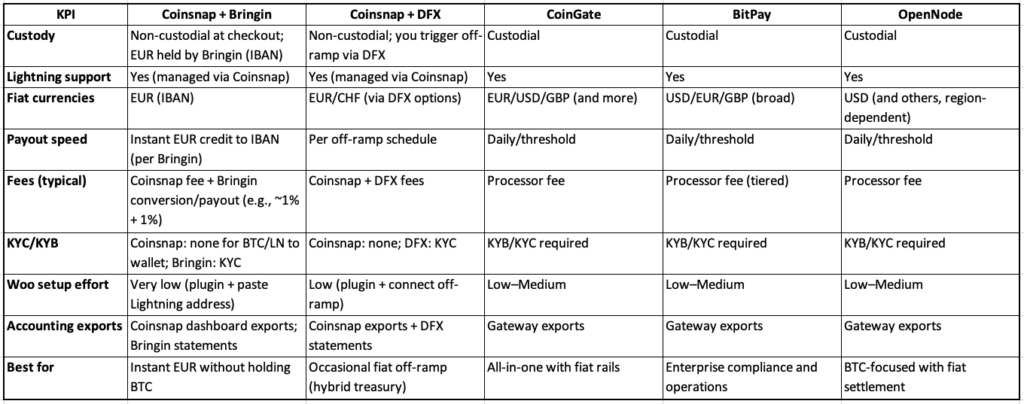
The most popular Bitcoin cash-out options for WooCommerce merchants

(Click here or on spreadsheet image to download Excel)

Which way should you choose for cashing out Bitcoin?

Pick the exchange route if you want low fees and can wait for a bank transfer. If you want the easiest life inside WooCommerce, use a plugin that automates the euro payout for you and keeps the checkout fast—Coinsnap + Bringin is the simplest example.

If you like “set and forget,” Coinsnap with Bringin is hard to beat. Coinsnap handles the Bitcoin and Lightning checkout, Bringin converts Lightning payments into euros and credits an IBAN in your name, in seconds. You can also use Coinsnap with DFX if you prefer to work with a Bitcoin exchange.

If you prefer a single provider that does everything from acceptance to daily bank payouts, look at CoinGate or OpenNode. You’ll open an account, pass standard ID checks for businesses, install their WooCommerce plugin, and choose your payout settings. Both support Bitcoin; CoinGate also offers many payout currencies and extra merchant tools.

Bitcoin cash-out: exchanges vs. WooCommerce plugins—what to know

Bitcoin exchange

Selling on a centralized exchange is the classic route: pick a regulated platform that serves your country, create an account, pass KYC, link your bank, send in your Bitcoin, sell it for EUR/GBP/USD, then withdraw to your account. It’s familiar and flexible, but it’s a separate workflow from your shop.

Know the costs and timing. Exchanges charge a trading fee when you sell and a withdrawal fee when you move money to your bank. Payouts aren’t instant—bank transfers typically take 1–5 business days.

WooCommerce Bitcoin cash-out plugins

If you want less manual work, specialized WooCommerce Bitcoin fiat settlement plugins can handle conversion and payouts on a schedule, so cash flow and reconciliation stay simple.

A good example is the Coinsnap + Bringin combination: Install the Coinsnap for WooCommerce plugin, open a Bringin account, and paste your Bringin Lightning address into Coinsnap. From then on, Lightning payments at checkout are auto-converted to euros and credited instantly to your personal IBAN at Bringin—no extra steps in your shop.

Plan for costs and flow. Typical fees are Coinsnap (1%) plus Bringin (1% when you withdraw to your bank). Funds hit your Bringin IBAN immediately; bank withdrawals use SEPA Instant in most cases.

Coinsnap Bringin setup in a nutshell

The steps are straightforward. Install the plugin in WordPress, switch it on in WooCommerce → Settings → Payments, and paste the keys or address the provider gives you. If you choose Coinsnap with Bringin, you add your Bringin Lightning address in the Coinsnap dashboard and you’re done—run a €1 Lightning test and watch euros hit your account. If you choose an exchange or a different provider, follow their connect flow and do the same €1 test.

If you need a detailed installation guide, read this article!

How to ensure clean accounting?

Record each order at the euro amount shown at payment time. Keep the Bitcoin amount, the exchange rate used, the order number and the transaction ID or Lightning payment hash. If you use automatic euro payouts, your books just show normal bank income and you don’t carry Bitcoin on the balance sheet.

If you keep some Bitcoin and convert later, you’ll track any gain or loss between the day of sale and the day you convert. To make life easy, Coinsnap connects to CoinTracking, which pulls in your transactions and produces tax-ready reports.

This is general information, not tax advice. Check local rules with your accountant.

WooCommerce Bitcoin cash-outs: compliance and refund essentials

Services that pay out to banks will ask for standard ID checks and run routine compliance screening on payouts. If money goes straight to your own wallet first, there are usually no ID checks at checkout, but you still follow local rules for invoices, VAT and data protection.

Bitcoin and Lightning have no chargebacks, so refunds are simply new payments you send back to the customer. Publish a clear refund policy, ask customers for a fresh address or Lightning invoice, and note the details in your records.

Quick answers for your questions

Can WooCommerce settle Bitcoin to my bank?

Yes. Use a plugin that offers bank payouts, or pair Coinsnap with Bringin to auto-convert Bitcoin Lightning payments into euros.

How long does a Bitcoin cash-out take?

On a centralized exchange, the sale goes through right away, but getting the cash to your bank takes 1–5 business days. With Coinsnap + Bringin, Bitcoin Lightning payments are auto-converted to euros and credited to your Bringin IBAN immediately; withdrawals via SEPA Instant typically complete in seconds.

Does Lightning work with bank payouts?

Yes. With Coinsnap and Bringin, Lightning payments can be turned into euros automatically. Other providers can settle daily.

Do I need to verify my identity?

For bank payouts, yes. For pure Bitcoin to your own wallet, usually not. If you later convert to fiat, the off-ramp will require ID.

What is the easiest path to euros from Lightning sales?

Coinsnap with Bringin: add your Bringin Lightning address in Coinsnap and euros show up in your IBAN, instantly.

Bottom line: choose the cash-out flow that matches your shop, not someone else’s

If you only cash out now and then, a reputable exchange is perfectly fine. You’ll likely get competitive rates, full control over when you sell, and a familiar “sell → withdraw to bank” flow. The trade-off is manual work: you move funds yourself and reconcile orders separately.

If you want daily, no-friction operations, plugin-based cash-out wins. Solutions wired into WooCommerce (e.g., Coinsnap + Bringin or gateways like CoinGate/OpenNode) turn each Bitcoin checkout into fiat with minimal effort, giving faster cash flow and cleaner accounting.

Are you ready to install WooCommerce Bitcoin cash-out today?

Learn more about Bitcoin Lightning cash-out

If you want to understand Bitcoin cash-out even better, read this blog:
Read the blog

Why is Coinsnap + Bringin perfect for you?

Coinsnap + Bringin is the easiest way to cash out Bitcoin from your WooCommerce store to your euro bank account. Bringin provides an IBAN in your name that receives your Lightning payments instantly.
How it works


Register your Coinsnap account

To start Bitcoin cash-out from your Woo store, just install the Coinsnap for WooCommerce plugin, enter your Bringin wallet address, and activate the payment method in WooCommerce.

Register now

WooCommerce Bitcoin Fiat Settlement: Deep Dive for Merchants (2025)

WooCommerce Bitcoin Fiat Settlement: Deep Dive for Merchants (2025)

Many WooCommerce stores want the reach and low fees of Bitcoin/Lightning at checkout but still need
bank-ready EUR/USD/GBP for cash flow, simpler accounting, and lower volatility risk.
So they are looking for a practical WooCommerce Bitcoin fiat settlement solution.

In this guide for merchants already familiar with Bitcoin, wallets, and Lightning, we’ll outline
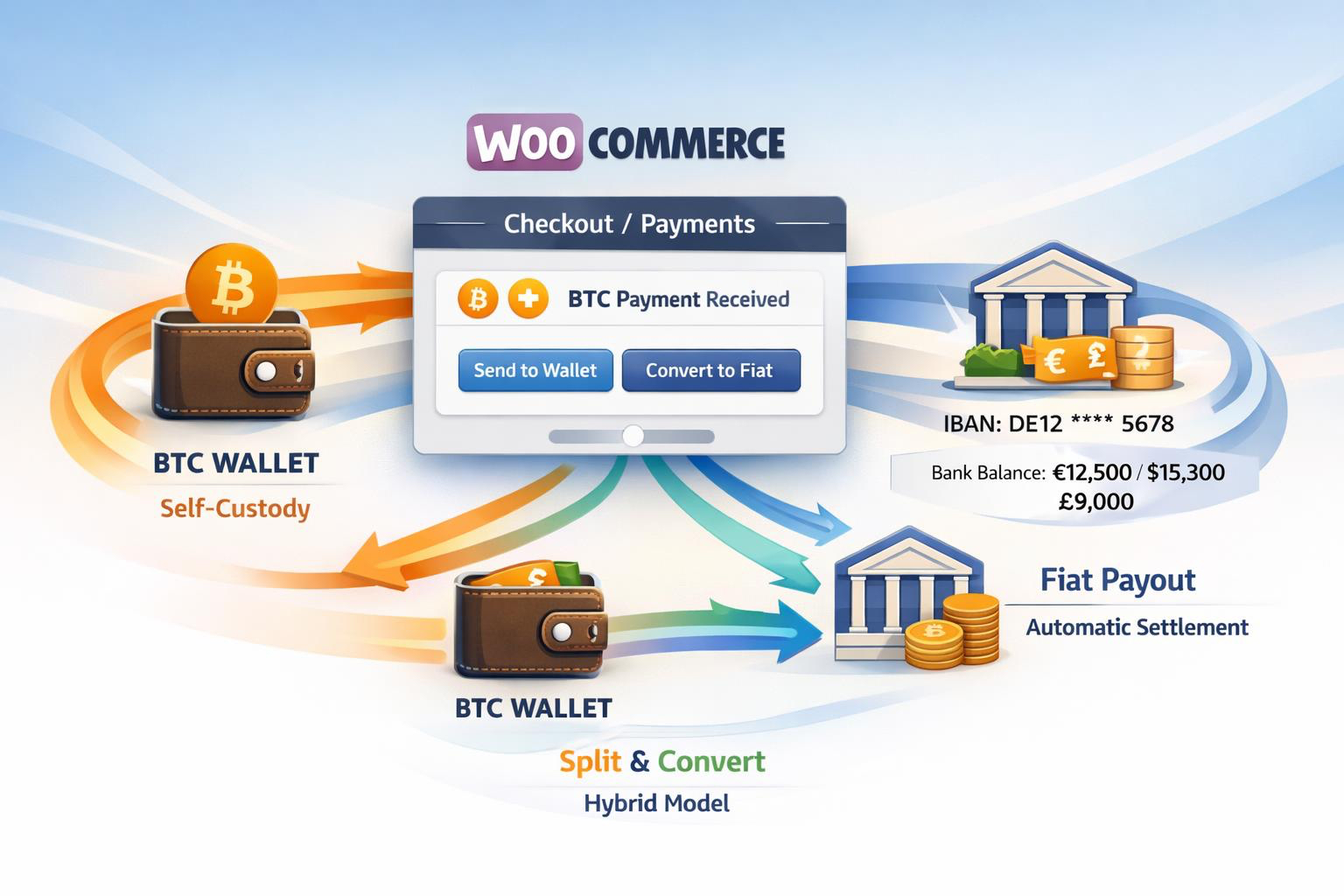
the three practical paths at a glance—self-custody only (keep BTC),
automatic fiat settlement (instant or daily bank payouts),
and a hybrid approach (keep some BTC, settle the rest).

You’ll get clear options, a comparison of fees, payout speed, KYC/KYB,
Lightning support, and setup steps to go live fast.

Why does fiat settlement matter for Woo merchants?

There are three main reasons why merchants prefer fiat settlement:

Accounting / Management

If you keep Bitcoin on your books, you must track cost basis, FX gains/losses,
and reconcile on-chain/Lightning records—a burden most merchants avoid.

Liquidity / Cashflow

Stores often need euros to pay suppliers, payroll, and taxes; automatic settlement
delivers cash flow and liquidity where it’s needed.

Volatility Risk Neutralising

Fiat settlement neutralises price volatility: converting at payment time removes risk.
It simplifies compliance, reduces friction with accountants,
and keeps forecasts predictable.

Fiat settlement 101 (custody models & trade-offs)

Before choosing a payout route, understand the two custody models:
custodial processors and non-custodial + off-ramp setups.

Custodial processors

Platforms like CoinGate, BitPay, OpenNode, and NOWPayments require
KYC/KYB and charge fees but handle payouts and offer broad fiat rails.

Non-custodial + off-ramp setups

Solutions like Coinsnap + Bringin or DFX let you accept Bitcoin
via Lightning or on-chain, auto-converting to EUR or off-ramping later.

When to use which (quick decision aid)

Zero BTC on books

Use Coinsnap + Bringin for Lightning → instant EUR credit to IBAN,
or custodial gateways (BitPay, CoinGate, OpenNode) for daily payouts.

You want choice

Choose a hybrid model: accept Bitcoin via Coinsnap,
keep some BTC, and off-ramp through Bringin or DFX.

Maximum control

Opt for self-custody + periodic OTC/DFX exchange—ideal for merchants
comfortable handling their own wallets and bookkeeping.

The best WooCommerce Bitcoin Fiat Settlement plugins

Here are six proven solutions from our
plugin comparison:

  • Coinsnap + Bringin (Lightning → EUR): Non-custodial checkout, instant EUR IBAN, supports on-chain.
  • Coinsnap + DFX: Keep BTC, off-ramp later; flexible hybrid treasury.
  • CoinGate: Custodial Lightning + on-chain with fiat settlement (EUR/USD/GBP).
  • BitPay: Enterprise-grade BTC gateway; KYB required; multiple currencies.
  • OpenNode: Bitcoin-only, KYB, instant or daily fiat payouts.
  • NOWPayments: Multi-coin, no Lightning; fiat via partners; KYB for fiat.

Detailed comparison of the most important features (decision matrix)


Click here to download the Excel comparison
.

How does it work? Setup guide

1) Coinsnap + Bringin (fastest path to EUR)

  1. Install Coinsnap for WooCommerce and activate it.
  2. Add store and Lightning address in Coinsnap.
  3. Open Bringin account (KYC) and claim your Lightning address.
  4. Paste Bringin address into Coinsnap → Wallet.
  5. Enable Coinsnap under Woo → Settings → Payments; test €1 order.

→ Result: instant EUR credit to IBAN.
Installation guide.

2) Coinsnap + DFX (hybrid treasury)

  1. Install Coinsnap and connect your Lightning wallet.
  2. Create DFX account and connect settlement flow.
  3. Periodically convert BTC to EUR/USD/CHF and withdraw.

→ Result: Keep BTC until you off-ramp.

3) CoinGate / BitPay / OpenNode (custodial)

  1. Create merchant account (KYB/KYC).
  2. Install Woo plugin, paste API credentials.
  3. Select Lightning + on-chain, choose fiat currency, set payout schedule.
  4. Test and verify order mapping.

Clean Books, No Surprises: Practical Steps for Safe Accounting

Revenue recognition

Record each sale at the fiat value at payment time. Keep BTC amount, rate, fiat value, order ID, and TXID/payment hash for full auditability.

If you use fiat settlement

With Coinsnap + Bringin or custodial gateways, your ledger shows EUR/USD/GBP received;
you don’t carry BTC inventory. This simplifies VAT and removes FX tracking.

If you run a hybrid/self-custody model

Record revenue at fiat value, then track FX gains/losses between sale and conversion.
Use a fixed off-ramp policy to keep forecasts clean.

Coinsnap + CoinTracking automation

Connect Coinsnap to CoinTracking
to automate imports, calculate P&L, and generate tax-ready reports.

This is general information, not tax advice—consult your accountant.

Compliance & refunds

Custodial gateways and off-ramps (bank payouts) require KYB/KYC,
AML, and refund policies.
Non-custodial flows (BTC/LN → wallet) have no checkout KYB but still need
VAT, consumer rights, and data compliance.

Remember: Bitcoin/Lightning payments have no chargebacks.
Refunds are new payments—always verify address/invoice and log full details
(order ID, fiat rate, TXIDs).

FAQ

Can WooCommerce settle Bitcoin to my bank?

Yes—use CoinGate, BitPay, OpenNode, or non-custodial Coinsnap with Bringin/DFX.

Is Lightning compatible with fiat settlement?

Yes—Lightning receipts can be auto-converted via Coinsnap + Bringin or settled daily via custodial gateways.

Do I need KYB?

Yes for custodial/fiat providers; no for pure BTC/LN to your wallet (Coinsnap only).

What’s the easiest way to get EUR from Lightning sales?

Coinsnap + Bringin: paste your Lightning address and receive EUR instantly in your IBAN.

What is realised vs unrealised P&L?

Realised P&L: profit/loss on conversion to fiat.
Unrealised P&L: paper gains/losses while holding BTC.

What is AML/sanctions screening?

Processor compliance checks that verify identity and block prohibited transactions.
Required for fiat off-ramps; not typical for non-custodial flows.

Get started with WooCommerce Bitcoin Fiat Settlement

Bitcoin Accounting & Taxes for Bitcoin Payments with Coinsnap

For many online merchants, legal and tax considerations still present a hurdle when accepting Bitcoin payments–Bitcoin accounting seems complicated! One of the main reasons is the tax treatment of Bitcoin and the question of how Bitcoin payments should be recorded in accounting systems.

In this article, we explain:

  • How to record Bitcoin payments in your online store’s accounting
  • How to prove receipt of Bitcoin in your Bitcoin wallet
  • How to document all Bitcoin transactions using Coinsnap
  • How to download all Bitcoin transactions as a CSV file for further processing in other systems
  • How to further process Bitcoin transactions using CoinTracking

Is Bitcoin payment receipt provable for tax purposes?

Yes. Bitcoin payments are provable through wallet transaction records, blockchain data, and payment processor dashboards such as Coinsnap, which document the transaction amount, exchange rate, and order reference.

How Bitcoin Payments Are Booked in an Online Store

Before focusing on Bitcoin-specific accounting details, it is important to understand how orders and payments are processed in an online store in general. From an accounting perspective, Bitcoin payments follow the same workflow as traditional payment methods: an order is placed, an invoice is issued in fiat currency, and the payment is recorded against that invoice. The differences arise only at the payment settlement stage—not in the order or invoicing process itself

How do merchants account for Bitcoin payments?

Merchants account for Bitcoin payments by issuing invoices in fiat currency, recording the Bitcoin amount received at the exchange rate at the time of payment, and documenting the transaction in their accounting system or tax software.

Order Creation and Invoice Issuance

A customer orders a product in your online store for €100, for example, and the store system generates an invoice for this order.

The invoice is issued in the local currency of your country (in Europe, euros), includes VAT, and contains all legally required tax and invoice information.

Payment Processing: Bitcoin vs. Traditional Methods

The customer is prompted to pay the invoice.
It makes no difference whether the payment is made by credit card, PayPal, or Bitcoin.

Once payment has been successfully completed, the store system marks the invoice as paid and the merchant can proceed with shipping the ordered goods.

How Bitcoin Payments Are Credited

If the customer pays by credit card or PayPal, the merchant receives a transaction statement from the payment service provider and a corresponding credit to their bank account.

With Bitcoin, merchants can choose whether the funds are credited to a bank account or retained as Bitcoin in their own wallet.

Bitcoin Settlement to a Bank Account

If you prefer to have your Bitcoin turnover paid out to your bank account, you can activate bank settlement via your selected Coinsnap payout partner.

Incoming Bitcoin payments are automatically forwarded to Bringin, Strike, or DFX and sold there. The fiat equivalent is transferred directly to your bank account, ensuring that each invoice can be clearly assigned to and documented against the corresponding incoming payment.

Bitcoin Settlement to Your Own Lightning Wallet

Most merchants who accept Bitcoin payments prefer to retain the Bitcoin they receive, either privately or within the company.

It is strongly recommended to use separate wallets in order to clearly distinguish business Bitcoin from private holdings.

Coinsnap requires a Bitcoin wallet with a Lightning address to which payments are credited. Supported wallets include Strike, Wallet of Satoshi, Blink, Breez, and others.

The Strike wallet, for example, allows the use of both a private wallet and a dedicated business wallet. If you already use a Lightning wallet privately, it is advisable to use a separate wallet for your company.

Bitcoin Settlement to Your Own Bitcoin Wallet

A Bitcoin Lightning wallet is suitable for receiving Lightning payments, but it is not intended for receiving on-chain payments or for long-term Bitcoin storage. For long-term storage, Bitcoin should be transferred to a secure hardware wallet such as BitBox02, Ledger, or Trezor.

Hardware wallets allow the creation of multiple accounts, enabling a clean separation between private and company Bitcoin holdings. Bitcoin balances can then be transferred from the Lightning wallet to the hardware wallet.

To deposit your Bitcoin directly into your hardware or Bitcoin on-chain wallet, simply enter your xPub key or your personal Bitcoin address in the Coinsnap settings.

The Bitcoin addresses of hardware wallets are publicly verifiable, allowing transparent documentation of how much Bitcoin the company holds at any time.

Documentation of the “Bitcoin Purchase”

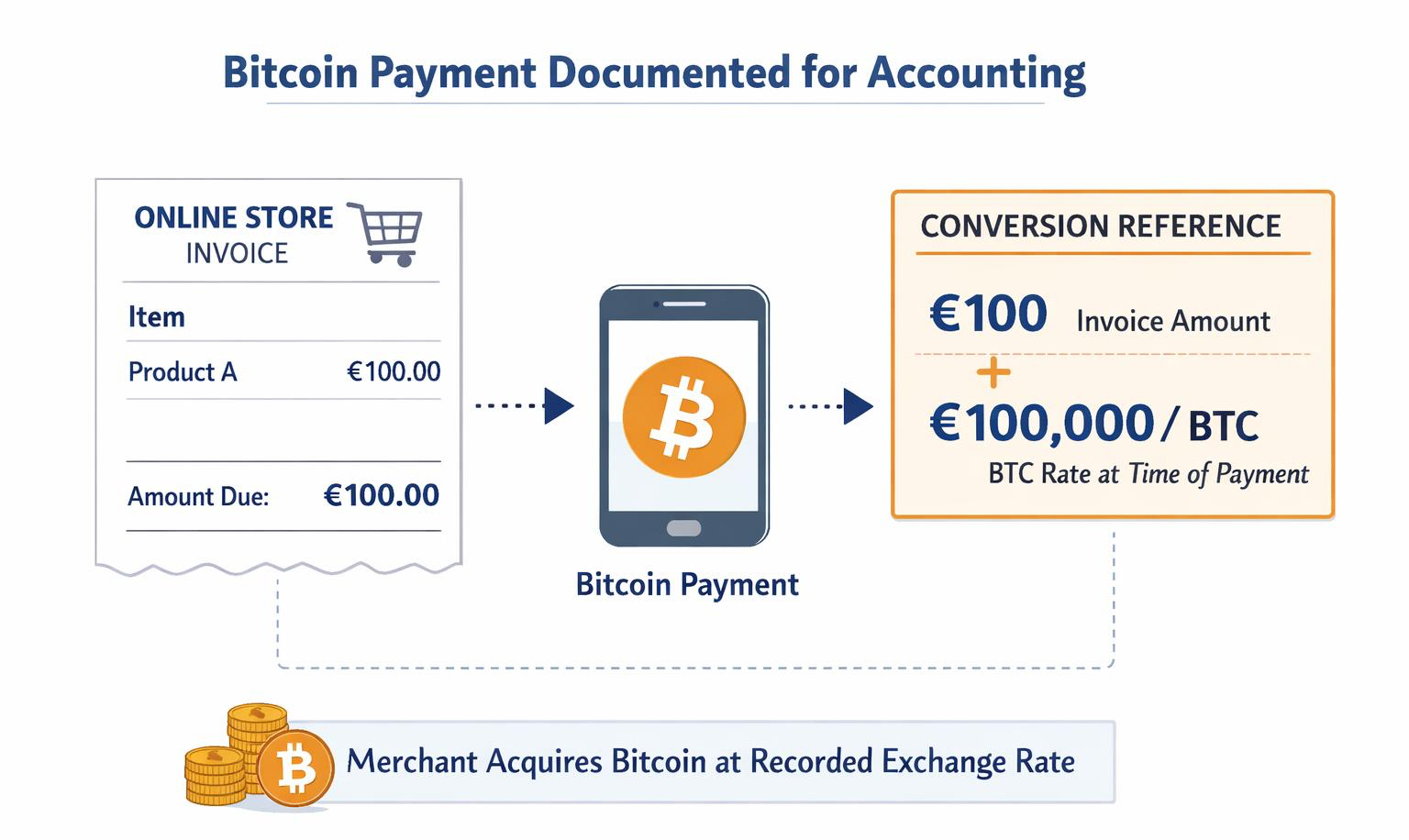
DOCUMENTATION OF THE “BITCOIN PURCHASE”

When a customer pays with Bitcoin, the transaction is economically equivalent to the company purchasing Bitcoin from the customer.

The Bitcoin amount received and the applicable exchange rate at the time of payment must therefore be documented.

For example, if a customer purchases a product for €100 and the Bitcoin price at that time is €100,000, the company receives 0.001 BTC (100,000 satoshis).

Coinsnap displays this information in detail for each individual transaction in the Coinsnap dashboard, including the Bitcoin amount, exchange rate, customer reference, and the corresponding order in the online store.

All transaction data can be downloaded as a CSV file and transferred to other systems.

The data can also be imported into CoinTracking, where it can be evaluated for accounting purposes or provided to a tax advisor. Coinsnap will soon offer an automated data-export feature that forwards all relevant transaction data directly to tax software solutions such as CoinTracking and 3Folio, enabling seamless and compliant tax reporting without manual effort.

Can Bitcoin transactions be exported for accounting software?

Yes. Coinsnap allows merchants to export all Bitcoin transactions as CSV files, which can be imported into accounting tools or tax software such as CoinTracking.

Buying Bitcoin Privately from Your Company

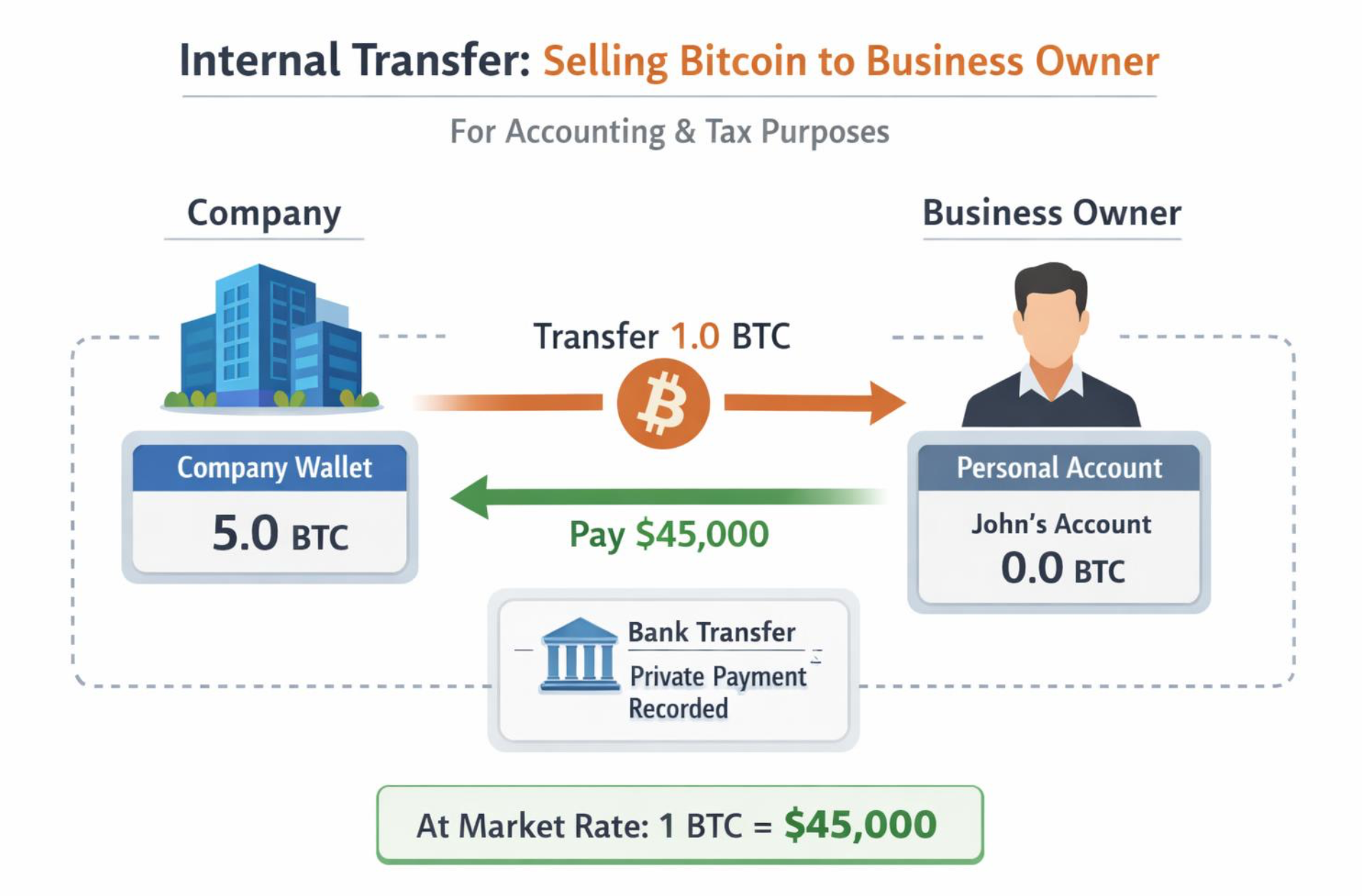
BUYING BITCOIN PRIVATELY FROM YOUR COMPANY

Whether the Bitcoin received remains within the company or is sold immediately—either to a Bitcoin broker or to the business owner privately—depends on individual preferences and circumstances.

In many cases, Bitcoin sales volumes will initially be low, making immediate liquidation unnecessary for covering operating expenses.

However, there may be reasons not to hold Bitcoin on the company balance sheet. For example, a co-shareholder may not wish to hold Bitcoin as an asset due to its volatility, while still appreciating its advantages as a payment method.

Instead of purchasing Bitcoin privately on an exchange, it is also possible to buy Bitcoin directly from your own company. The timing of this transaction and the applicable Bitcoin price can be relevant.

For example, you may conclude an agreement under which you buy the received Bitcoin from the company immediately at the current exchange rate.

Payment for the Bitcoin purchased from the company can be made via bank transfer from your private account to the business account, or alternatively recorded as a private withdrawal.

In all such cases, consultation with a tax advisor is strongly recommended, as the correct treatment depends on the individual legal and tax situation.

Is accepting Bitcoin treated as a Bitcoin purchase?

From an accounting perspective, accepting Bitcoin is equivalent to acquiring Bitcoin at the exchange rate valid at the time of payment.

Summary: Bitcoin Accounting with Coinsnap

Uncertainty around tax and accounting treatment continues to prevent many online merchants from accepting Bitcoin payments.

As with any payment method, accounting requires clear documentation of which invoices have been paid, where the payment was received, and the resulting balance—whether in a bank account or, in the case of Bitcoin, in a wallet.

With Bitcoin payment processing via Coinsnap, these documentation and verification requirements can be fully met. Each Bitcoin payment is recorded at the applicable exchange rate at the time of the transaction, and every wallet transaction is documented individually, similar to a bank statement.

All transaction data can be exported, imported into other systems, and used for accounting and tax purposes. Like an account balance, Bitcoin holdings are precisely recorded and can be independently verified by anyone via the blockchain.

FAQ

Does Coinsnap hold merchant funds?

No. Coinsnap never holds Bitcoin or fiat funds. Payments are credited directly to the merchant’s wallet or settled via an external payout partner.
Can Bitcoin payments be settled in euros?

Yes. Merchants can choose automatic settlement to a bank account via Coinsnap payout partners such as Strike, Bringin, or DFX.

Are Lightning payments suitable for long-term Bitcoin storage?

No. Lightning wallets are intended for payment reception. Long-term storage should be done using a secure hardware wallet.

Is Bitcoin accounting different from card payments?

The invoicing process is identical. The difference lies in documenting the Bitcoin amount and exchange rate instead of a bank transaction.

Why Bitcoin Payments in My Online Store? A Simple Guide for First-Time Merchants

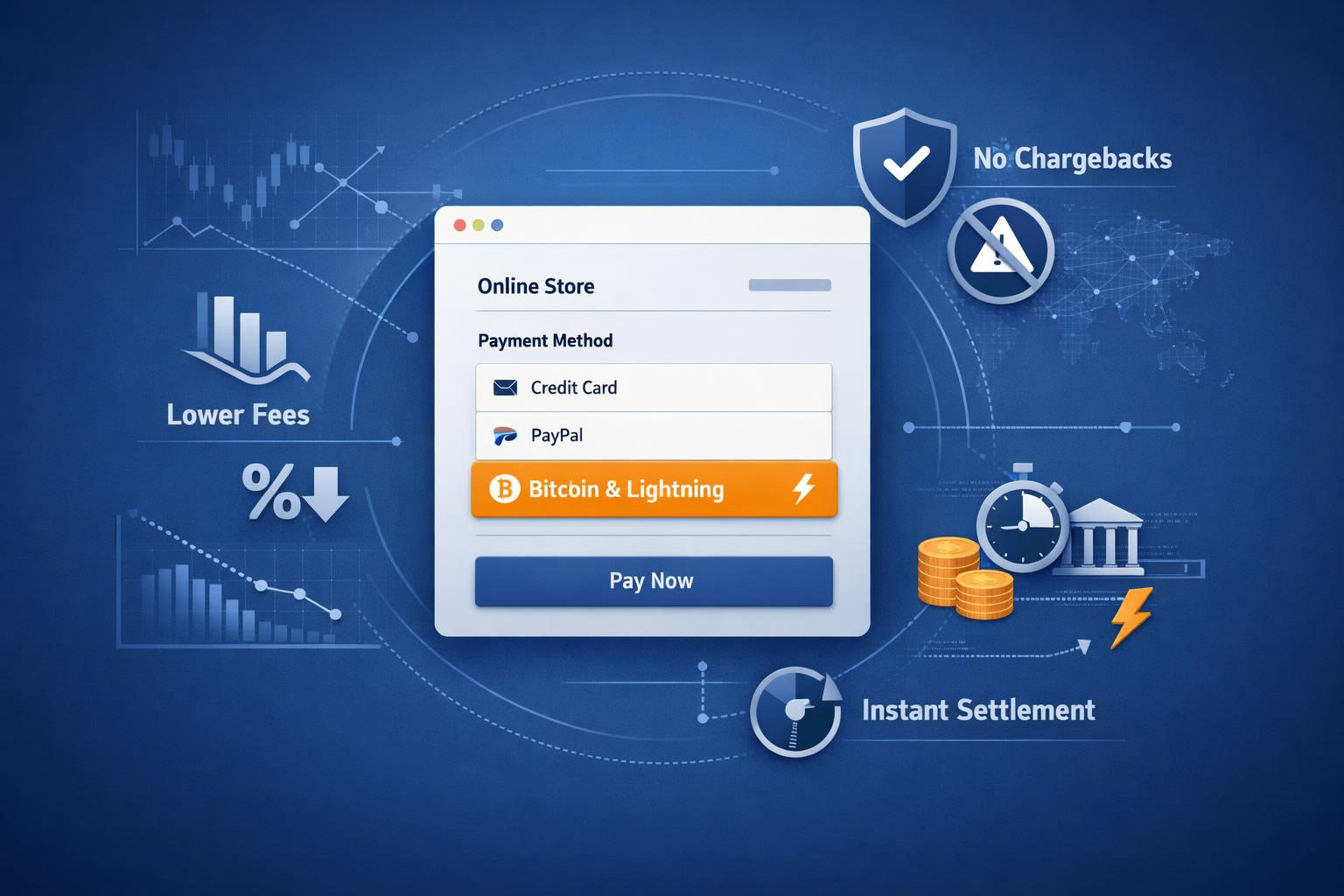
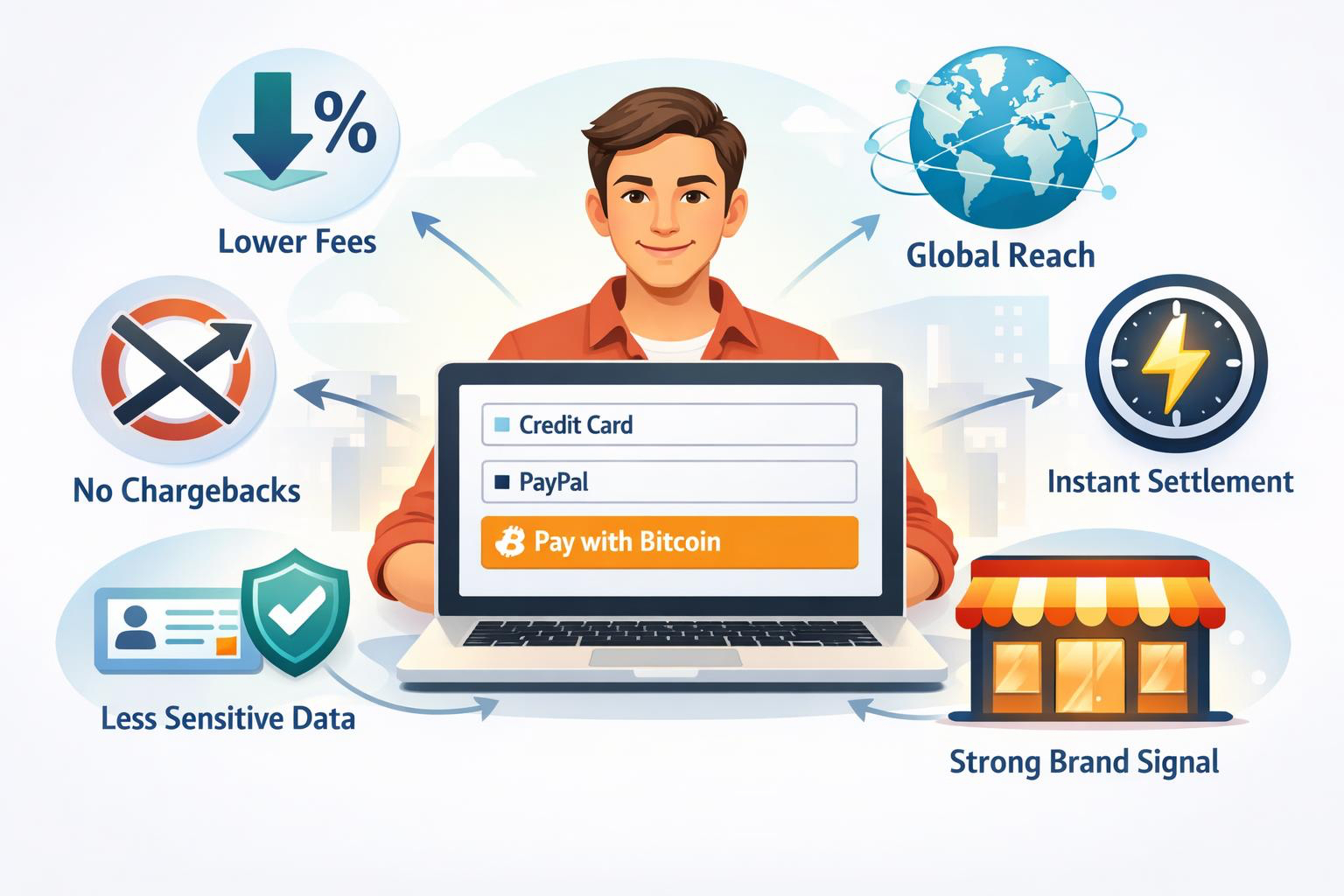
Accepting Bitcoin (including Lightning) can lower fees, end chargebacks, bring global customers, settle instantly to your own wallet, and boost your brand with minimal customer data and 24/7 availability.

Understand Why Bitcoin Payments are Good For Your Business

When you read this post, you’ll understand in a few minutes what Bitcoin payments are in plain language, why they help your business, how they compare to cards and PayPal, what to expect with refunds and volatility, and the easiest way to get started—without jargon.

11 Reasons Why Merchants are Adding Bitcoin Now

If you sell online, you know the pain: high processing fees, surprise chargebacks, international friction, delayed pay-outs, and complicated compliance around sensitive customer data. Bitcoin fixes much of this with a payment rail that is open, global, and built for the internet.

Here are the 11 most important reasons why merchants embracing Bitcoin payment are more likely to improve their bottom line without adding to their workload:

1. Bitcoin Payments are Final

When a customer pays you in Bitcoin—either onchain or over the Lightning Network—the transaction cannot be reversed. That removes the chargeback risk that eats margin and time. You still control your customer service and reputation, but you’re not exposed to arbitrary payment reversals.

2. Fees are Low

Fees are low. Bitcoin payments (On-chain + Lightning) typically cost a fraction of credit card and PayPal fees. Depending on your setup, total processing should be around one percent. For example, Coinsnap charges a flat 1% of the invoice amount instead of 2–4% plus cross‑border and currency fees. Lower costs compound over every order, and they matter most on thin‑margin products and micro‑transactions.

3. It Works Everywhere

Bitcoin is a neutral, internet-native network. You can accept orders from customers in almost any country without opening local merchant accounts, waiting for approvals, or dealing with card incompatibilities. No currency conversion fees, no blocked BINs, fewer cart drops from payment errors.

4. Settlement is Instant and Direct

With Coinsnap Bitcoin payment (on-chain + Lightning), your funds are deposited in your own wallet in seconds—no batch settlements, no rolling reserves. That helps cash flow and reduces operational uncertainty.

5. You can Earn Bitcoin

The simplest way to accumulate Bitcoin is to accept a slice of your sales in it. You don’t have to “buy” it; you earn it from customers. If you’d rather not hold Bitcoin, Coinsnap lets you autoconvert some or all payments to your local currency while still offering Bitcoin at checkout.

6. It’s a Marketing Advantage

Stores that accept Bitcoin often get extra attention on social media, in local communities, and in tech media. Bitcoiners tend to seek out and recommend merchants who support the payment method. Even customers who rarely spend their Bitcoin will follow, share, and talk about your brand.

7. Stronger Loyalty and Fewer Returns

Many merchants notice that Bitcoin customers return products less often and are more intentional buyers. That means fewer fraudulent returns and more stable customer relationships over time.

8. Fits Almost Any Business Model

Physical goods, digital products, subscriptions, services, B2C or B2B, even on-site—Bitcoin works across the board. Lightning also makes true micropayments possible—pay-per-article, pay-per-minute, and in-app purchases that are uneconomical with cards.

9. Better Privacy, Lighter Compliance

Bitcoin payments don’t require you to collect and store sensitive card data. Less data means lower risk and simpler processes for your team. Customers who care about privacy feel safer, which can lift conversion.

10. Always On

Bitcoin settles around the clock, including weekends and holidays. If you sell globally, that reliability matters.

11. Modern Brand Image

Offering Bitcoin signals that your business is innovative, open to customer choice, and internet-native—especially attractive to digital or crypto audiences.

What Bitcoin payments look like in practice

What Bitcoin payments look like in practice

  • Customer pays from any Bitcoin or Lightning wallet. There are no “walled gardens”—your checkout can accept payments from the wallets your customers already use.
  • You choose how you get paid. Receive Bitcoin straight to your Lightning wallet, to a hardware wallet for larger on-chain payments, or through a Coinsnap partner (Bringin or DFX) that can autoconvert part (or all) to fiat.
  • You keep control. No lengthy provider approvals, fewer account freezes, and no rolling reserves. You can still offer refunds as store credit, Bitcoin returns, or fiat refunds according to your policy.

FAQ – Clear answers to common questions about Bitcoin payments

Do I have to hold Bitcoin?

No. With Coinsnap, you can choose to keep your Bitcoin in either your Lightning or on-chain wallet, or automatically convert it into euros and have it paid out to your bank account. In the latter case, you can choose between Coinsnap’s partners BringinStrike and DFX.

If payments are final, how do refunds work?

Exactly how you decide. “Irreversible” means there are no chargebacks. You can still issue refunds—either by sending Bitcoin back to the customer, providing store credit, or refunding in fiat.

Are fees really lower?

Typically, yes—especially on Lightning and for international orders. Exact fees depend on your setup and provider, but, e.g. with Coinsnap you’ll see total costs of one percent instead of 2–4% plus extras.

What about taxes and accounting?

With Coinsnap, you can handle Bitcoin sales just like any other sale—all relevant information is available in your dashboard and can be easily exported for your accountant or tax authorities.

Is it legal?

In most countries it’s legal to accept Bitcoin for goods and services. Follow your local regulations for invoicing, taxes, and consumer protection like you do with other payments.

Quick takeaways

Lower fees and no chargebacks protect your margin; global, 24/7, instant settlement improves cash flow; less customer data reduces risk; Lightning unlocks micropayments and new digital models; offering Bitcoin widens your audience and strengthens your brand.

A simple way to get started with Bitcoin payments

  1. Start small. Add Bitcoin and Lightning as an extra payment option alongside cards and PayPal.
  2. Choose a Bitcoin payment module that supports any customer wallet (like Coinsnap) and, if you prefer, automatic conversion to your local currency.
  3. Place the Bitcoin option in your checkout, add a short “We accept Bitcoin” line on your homepage and product pages, and let your audience know in a brief post or email.

With Coinsnap, you can also offer a Bitcoin discount to encourage your customers to choose Bitcoin payments over conventional payment options.

Measure results for 30–60 days: fees saved, chargebacks avoided, international orders completed, and new customers reached. Keep what works, scale gradually, and consider offering small incentives (for example, a discount or a “Bitcoin-only” perk) to drive adoption.

Conclusion: Bitcoin payments are a practical business tool

Bitcoin payments are a practical business tool

Accepting Bitcoin payments is a practical business move, not a science project. You reduce payment costs, remove chargeback risk, reach global customers, settle funds instantly, and strengthen your brand—all while collecting less sensitive data.

Add it as a lightweight option, measure the impact, and let your customers decide. In a competitive ecommerce market, the merchants who offer faster, cheaper, and more open payment choices will win the order—and the loyalty that follows.

Bottom line: adding Coinsnap to your store is absolutely risk-free—no setup or monthly costs, no costly implementation, and no changes to your existing checkout flow. You simply enable it alongside your current payment methods and start accepting Bitcoin, gaining all the advantages discussed above with zero disruption or downside.

Do you need help? Coinsnap is ready to support you in getting started with Bitcoin payments in your store. Speak with our experts if you’re unsure which module best fits your business goals, or request our free installation service if you prefer professional assistance with setting up Coinsnap in your shop system.

Accounting and tax if you accept Bitcoin payments in your online store

For many online merchants, legal and tax aspects still present a certain hurdle when accepting Bitcoin payments. One of the main reasons is the tax treatment of Bitcoin and the question of how Bitcoin payments should be recorded in the accounts.

In this article we would like to explain to you:

  • How you can record Bitcoin payments in your online store in your accounting.
  • How you can prove receipt of the Bitcoin received in your Bitcoin wallet.
  • How you can document all Bitcoin transactions with the help of Coinsnap.
  • How you can use Coinsnap to download all transactions as a CSV file for further processing in other systems.
  • How you can additionally process your Bitcoin transactions with the help of Cointracking.

Order in the online store

A customer orders a product in your online store for €100, for example, and the store system creates an invoice for this order. This invoice is issued in the currency of your country, i.e. in euros in Europe, with VAT shown and all legal and tax information required for issuing an invoice.

Payment in the online store

The customer is asked to pay the invoice. It does not matter whether the payment is made by credit card, PayPal or Bitcoin.

After successful payment, the invoice is marked as successfully paid by the store system and the store operator can start shipping the ordered goods.

Crediting of the Bitcoin received

If the customer has paid by credit card or PayPal, the merchant receives a statement of all transactions from their payment service provider and a credit of the sales to their bank account.

With Bitcoin, as a merchant you have the option of receiving the credit to your bank account or, if you prefer to keep the Bitcoin, to your Bitcoin wallet.

Bitcoin to your own bank account

If you would like to have your Bitcoin turnover paid out to your bank account, activate the payout to your bank account via the Swiss Bitcoin broker DFX in the Coinsnap backend.

The incoming Bitcoin is then automatically forwarded to DFX and sold there. The equivalent value is transferred directly to your bank account so that each invoice can be clearly assigned and documented to the corresponding incoming payment.

Bitcoin on your own Bitcoin wallet

However, most merchants who accept Bitcoin payments prefer to keep the Bitcoin they receive. Be it privately or within the company.

It is advisable to use separate wallets in order to clearly separate the Bitcoin received from the private Bitcoin.

Coinsnap requires a Bitcoin wallet with a Lightning address to which the Bitcoin is credited, such as the Strike Wallet, the Wallet of Satoshi or the Blink Wallet.

With the Strike Wallet, you can have a private wallet and also a business wallet for your company. If you already use one of the above wallets privately, you must use a different wallet for your company.

A Bitcoin Lightning Wallet is suitable for receiving Bitcoin payments, but not for the long-term storage of Bitcoin. It must be stored on a secure hardware wallet such as Bitbox02, Ledger or Trezor.

You can create different wallets on a hardware wallet and thus create a clean separation between your private Bitcoin and your company’s Bitcoin.

Then transfer your Bitcoin balance from the Lightning Wallet to the wallet on your hardware wallet.

The Bitcoin address of your hardware wallet is publicly visible and you can document how many Bitcoin your company currently owns.

Documentation of the “Bitcoin purchase”

If a customer pays you with Bitcoin, it is theoretically as if you were buying Bitcoin from your customer.

The price at which your company received the Bitcoin should now be documented.

If a customer buys a product from you for e.g. €100 and the Bitcoin price at the time of purchase is e.g. €100,000, you will receive 0.001 Bitcoin (BTC) or 100,000 Satoshi (Sats).

This information on how much Bitcoin you have received and at what rate is displayed in detail for each individual transaction in the Coinsnap Dashboard.

Including assignment to your customer and the corresponding order in your online store. You can also download this data as a CSV file to transfer it to other applications.

You can also import this data into the Cointracking software solution and then receive a corresponding evaluation for your accounting department or your tax advisor.


Coinsnap bietet ausführliche Reports für die Buchhaltung

Buy Bitcoin privately from your company

Whether the Bitcoin received remains in the company or is sold immediately to a Bitcoin broker or to yourself privately depends on your personal preferences.

In the beginning, Bitcoin sales will probably not be so high that the sale of Bitcoin is absolutely necessary to cover the company’s running costs.

Nevertheless, there may be reasons not to hold Bitcoin in the company. Perhaps you have a fellow shareholder who is not convinced of the advantages of Bitcoin as an asset due to its volatility, but appreciates the benefits of Bitcoin as a payment method.

Instead of buying Bitcoin privately on a Bitcoin exchange, you can also buy Bitcoin from your own company.

The time at which you buy back the Bitcoin from your company and the respective Bitcoin price may play a role here.

Perhaps you can conclude a contract with your company to buy back the Bitcoin you receive immediately at the same Bitcoin rate.

Payment for the Bitcoin purchased by the company can be made by bank transfer. To do this, you transfer the purchase amount from your private account to the business account.

Alternatively, the payment is posted as a private withdrawal.

However, you should definitely consult your tax advisor here, as it depends on the individual situation of each person.

Summary

Uncertain tax and accounting issues are still preventing many online merchants from accepting Bitcoin payments.

As with every purchase transaction, the accounting department wants to know which invoices have been paid and where the payment has been received and how much is in the account or, in the case of Bitcoin, in the wallet.

With the help of Bitcoin payment processing via Coinsnap, this documentation and obligation to provide proof can be fulfilled.

Every Bitcoin payment is booked at the current Bitcoin exchange rate. Each Bitcoin transaction in the wallet is documented individually, similar to a bank statement.

These transactions can be exported and imported and used for other applications.

As with an account balance, the stock of Bitcoin is precisely recorded and can be viewed and checked by anyone via the blockchain.


Erstelle korrekte Steuererklärungen für deine Bitcoinumsätze mit Coinsnap

BTCPay Server Plugins made by Coinsnap

Use Coinsnap Payment Modules as BTCPay Server Plugins and Easily Expand the Capabilities of Your BTCPay Server

BTCPay Server is one of the most important open-source initiatives in the Bitcoin ecosystem. It allows merchants to set up their own Bitcoin payment infrastructure — fully self-hosted, without intermediaries, no processing fees, and full control over received funds. And it is quite easy to set up as well. So – no wonder that more than a million BTCPay Servers are run all over the globe, and every day people all over the world add more installations, thus partaking actively in expanding the world’s Lightning network.
But while BTCPay Server provides the technical foundation, many operators face the question:

  • How can I efficiently integrate my BTCPay Server into my online shop or website?
  • How do I connect with this or another shop system, or a specific WordPress Plugin I use a lot?
  • In short: Which BTCPay Server Plugins are there that make it easier for me to use my BTCPay Server to earn Bitcoin online?

That’s where Coinsnap’s payment modules come in. Because all Coinsnap payment modules are practically BTCPay Server plugins as well — they are all pre-configured to allow for a very simple and easy integration with your BTCPay Server that requires no programming skills or in-depth knowledge of the system you want to integrate with.

What is BTCPay Server?

BTCPay Server is a self-hosted, open-source payment processor for Bitcoin and Lightning transactions. Merchants can become their own payment provider and receive payments directly to their wallet — without paying fees to third parties.

You can run it on your own infrastructure — locally, in the cloud, or via specialized hosting solutions. With over 1 million active installations worldwide, BTCPay Server has become the standard for decentralized Bitcoin payment processing.

Part of BTCPay Server’s success is its active promotion of a plugin system. Given the variety of ways businesses can interact with Bitcoin, the developer community has optimised BTCPay Server’s code towards a plugin model. On this basis, more and more plugins have now been created that allow merchants to connect their shop systems and content creators/influencers to connect their websites to their BTCPay Server and have their Bitcoin sales completely under their own control.

Why Do You Need a Payment Module (or BTCPay Server Plugins)?

For many merchants, the technical challenge begins when it comes to connecting their eCommerce platform or website to their BTCPay Server. To enable your shop or WordPress site to communicate with BTCPay Server and accept payments, you need a payment module (plugin or add-on).

These modules handle the technical communication between your platform and the BTCPay Server, ensuring a smooth user experience and seamless payment flow.

Especially when your platform is a proprietary system it can be very challenging to implement the technical communication, but even with open source platforms such as WordPress it still requires programming skills that most merchants do not have.

Payment modules or BTCPay Server plugins takes care of these issues and offer you a kind of an out-of-the-box solution that allows you to easily connect your ecommerce-platform with your BTCPay Server.

Coinsnap BTCPay Server plugins or payment modules

Coinsnap develops specialized Bitcoin payment modules that work with both the Coinsnap Gateway and your own BTCPay Server. This makes Coinsnap a perfect solution for merchants and developers who want to remain fully independent and run their own payment infrastructure.

Supported Shop Systems

Coinsnap offers modules for a wide range of eCommerce platforms:

  • WooCommerce
  • Shopware
  • Gambio
  • PrestaShop
  • Magento
  • OpenCart
  • Wix
  • JTL Store
  • Drupal
  • Modified eCommerce
  • Plentymarkets

Coinsnap’s add-ons for popular WordPress plugins

There are many very popular WordPress plugins that are widely used and for the most part of them already offer some forms of payment options, mostly credit card  payments, Paypal, etc. What none of them so far offers is Bitcoin-Lightning payment. Coinsnap has developed plugins for a variety of them that enable merchants to offer Bitcoin-Lightning payment from within these plugins. Thus, these plugins expand existing WordPress functionality with native Bitcoin support.

Supported plugins include:

  • GiveWP (donations)
  • Contact Form 7WPFormsGravity FormsNinja Forms (contact forms)
  • GetPaid
  • Easy Digital Downloads
  • Paid Memberships Pro

With these Coinsnap’s WordPress plugin add-ons you can now — for Bitcoin or Satoshis — sell  merchandise out of your contact forms, sell memberships or digital downloads and even add Bitcoin-Lightning payment to your currently offered payment methods.
So if you are currently using one of the above WordPress plugins, with these Coinsnap WordPress add-ons you can now easily connect them with your BTCPay Server.

Coinsnap’s own BTCPay Server plugins for WordPress

In addition to enhancing third-party plugins, Coinsnap has developed a range of custom WordPress plugins tailored specifically for Bitcoin and Lightning payments — ideal for donations, micropayments, paywalls, and spam protection.With these custom WordPress BTCPay Server plugins merchants can now harness the full potential of micropayments with Bitcoin-Lightning. This opens a plethora of business models that are perfectly poised to rake in a lot of small Bitcoin payments that eventually may well accumulate to a significant extra Bitcoin income.

Examples of Coinsnap’s BTCPay Server Plugins for WordPress:

  • Bitcoin Donation Button
    Easily accept donations via a Bitcoin button on your site.
  • Bitcoin Shoutout Plugin
    Visitors can donate and leave a message that gets displayed on your site.
  • Bitcoin Crowdfunding Plugin
    Launch your own Bitcoin-based fundraising campaigns.
  • Bitcoin Paywall
    Lock content behind a paywall and grant access after a BTC payment.
  • Voting Plugin
    Let users vote on polls using small Bitcoin payments — secure and transparent.
  • Spam Protection via Bitcoin Micropayments
    Prevent bots by requiring small Bitcoin payments for:
    • Comments (Pay-per-Comment)
    • Registrations (Pay-per-Registration)
    • Contact forms (Pay-per-Contactform)

Increase your Bitcoin income with Coinsnap’s BTCPay Server plugins by strategically playing to your visitors/followers ego, and interests: Let them make their interaction with you valuable by charging a small fee in Satoshis – and at the same time enhance the quality of your user interaction!

Here you can see all our payment plugins at a glance!

It is so simple to connect a Coinsnap payment module with your BTCPay Server

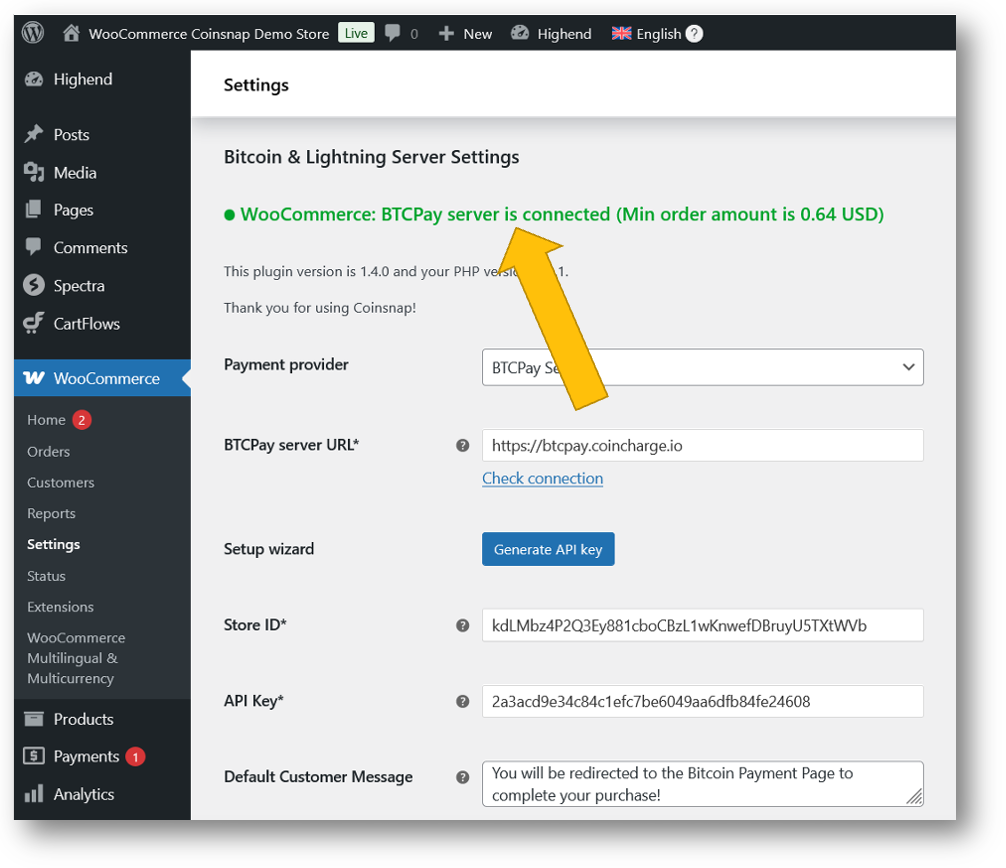
With our specifically for BTCPay Server users developed  BTCPay Server wizzard it is iunceredibly simple to connect your BTCPay Server with your Coinsnap payment module.

Just follow these four simple steps:

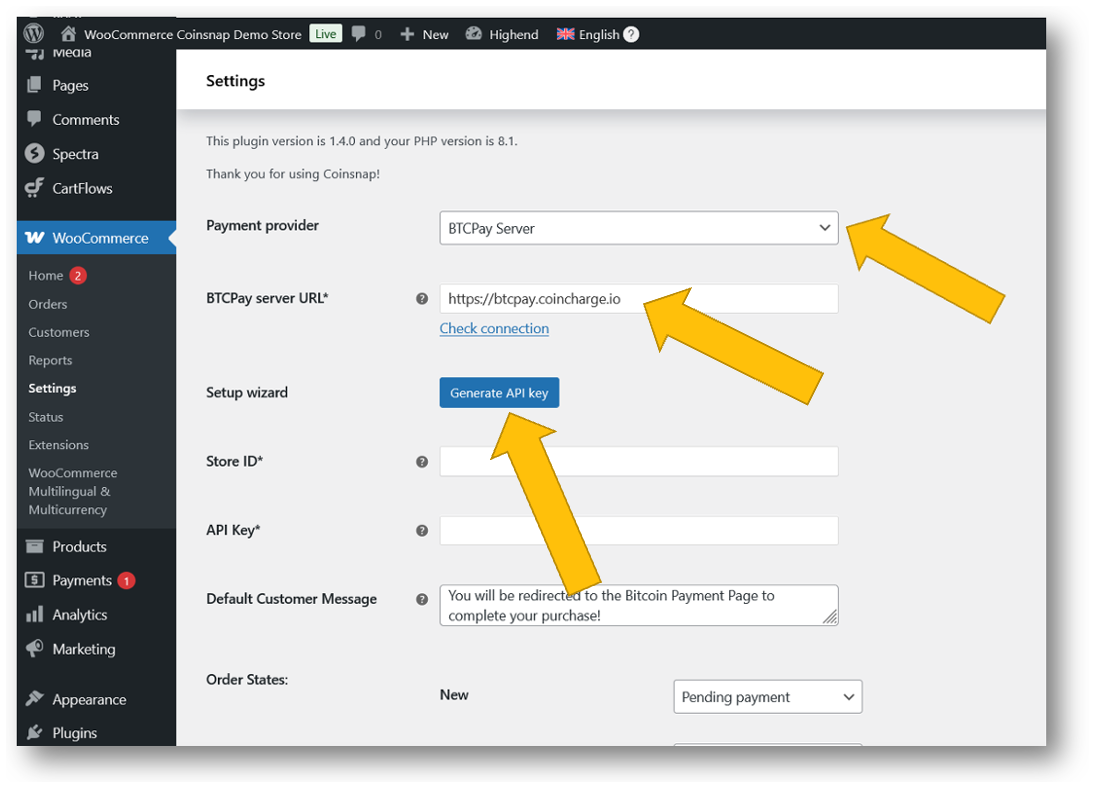
In the settings of your Coinsnap BTCPay server plugin choose BTCPay Server as the payment provider of your choice and add the URL of your BTCPay Server.

Then click Generate API Key.

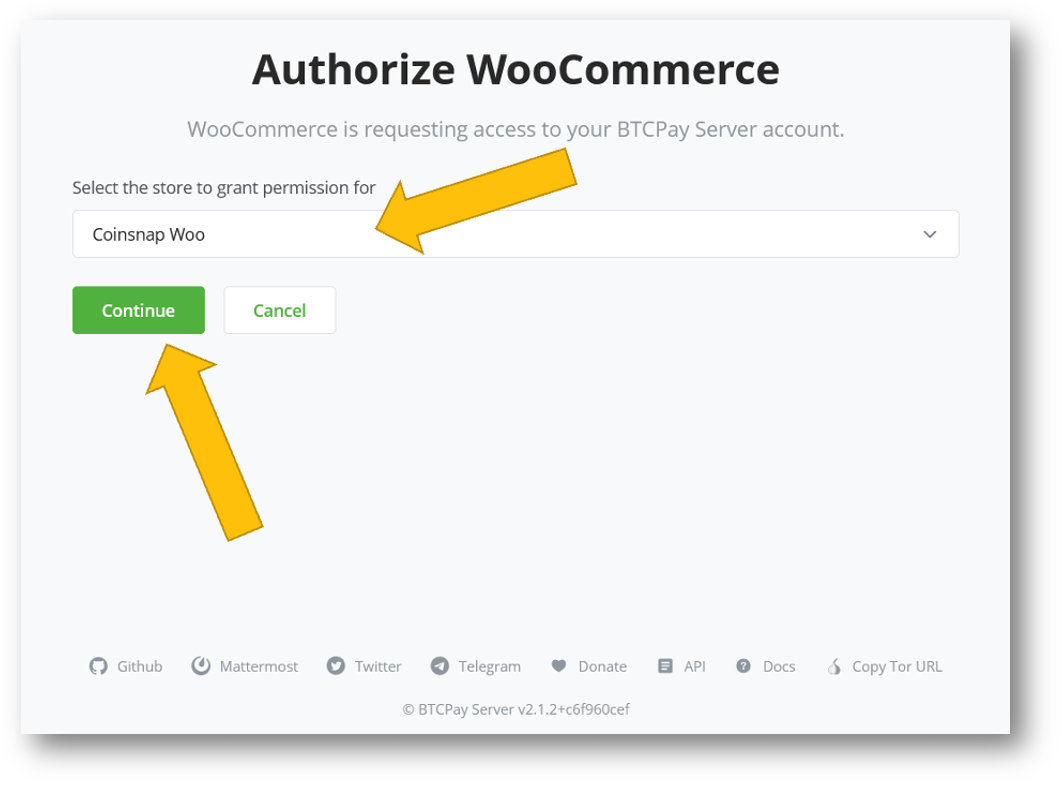
Then, go to your BTCPay Server, choose the store for which you want to create an API key in your BTCPay Server.

Then click on continue!

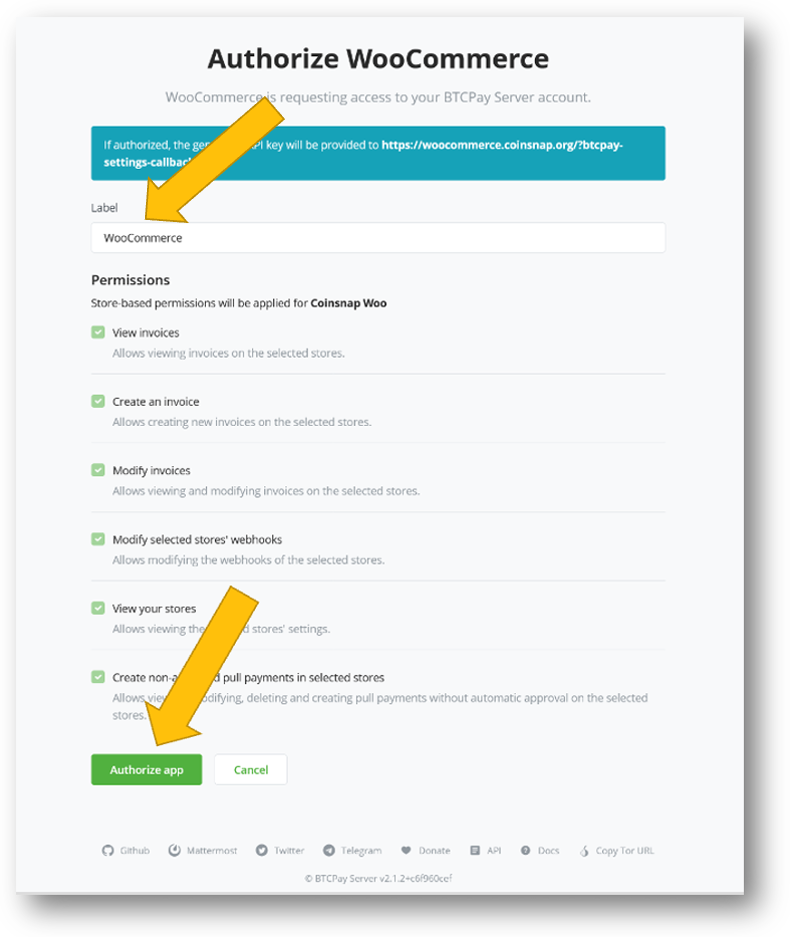
Now, in your BTCPay Server you’ll see the permissions your Coinsnap BTCPay Server plugin is requesting. Please input your store label and click on Authorize app.

And that’s it – you are done!

In the settings of your Coinsnap BTCPay Server plugin you can now see that all settings have been made — like magic 🙂 — by Coinsnap’s unique BTCPay Server wizard!
Coinsnap BTCPay Server plugins are free of cost and registration

All Coinsnap modules are free to use with your own BTCPay Server.

And there is no registration with Coinsnap required –  you don’t have to provide any personal data, you do not need to register. Coinsnap simply doesn’t require any information from you.

Where to get the modules:

Coinsnap GitHub Repository
Open-source and ready to use

Download your plugin on Github

WordPress Plugin Directory
Search for “Coinsnap” directly in the WordPress admin area to install any plugin instantly.

Download your plugin on WordPress

Why does Coinsnap offer these BTCPay server plugins for free?

At Coinsnap, we strongly believe in the philosophy behind BTCPay Server. We use BTCPay Server in many parts of our own infrastructure and have learned a lot from the project and its community.

Since we don’t have large financial resources for donations, we contribute by developing and sharing our modules with the community. It’s our way of giving back and helping expand the use of Bitcoin as a real payment method.

Conclusion: Your Payments. Your Server. Your Freedom.

If you’re already running a BTCPay Server — or planning to — Coinsnap offers the tools to take it to the next level.

With our free, open-source payment modules, you can make your BTCPay Server even more powerful — whether you’re running an online shop, a donation page, or experimenting with innovative use cases like micropayments, crowdfunding, or spam protection.

👉 Try it out — and unlock the full potential of your BTCPay Server.


Misty Breez Bitcoin Lightning wallet – Introduction

How to install this simple and practical Bitcoin Lightning wallet with an individual Lightning address and deposit it with Coinsnap

To accept Bitcoin payments in your store with Coinsnap, you need a Lightning Wallet. One of the best wallets – and our recommendation – is the Misty Breez wallet. It’s easy to install without KYC details, self-managed (so extra secure) and easy to use – making it ideal for merchants to receive and store their business Bitcoin earnings.

In this article, we will show you how to set up the Misty Breez wallet to receive Bitcoin and store your individual Lightning address with Coinsnap.

Inhalte  Verbergen 

What is the Misty Breez Wallet?

The Misty Breez Wallet is a non-custodial wallet based on the Breez “Nodeless” SDK. It uses the Liquid Sidechain to enable simple and cost-effective integration of Lightning payments.

Main features of Misty Breez:

  • Self-custody: Users retain complete control over their private keys, which means they have sole access to their Bitcoin.
  • Easy to use: The wallet requires no setup of Lightning channels or nodes. Users can start sending and receiving payments immediately.
  • Offline payments: Misty Breez supports receiving payments even in offline mode through mobile notifications.
  • Broad protocol support: The wallet is compatible with BOLT 11 and BOLT 12 Invoices, LNURL-Pay, Lightning addresses, on-chain BTC addresses and BIP 353.
  • Open Source: Misty Breez’s source code is publicly available, allowing developers to customize the wallet or integrate it into their own applications.

Difference to other non-custodial wallets:

Misty Breez offers a ready-to-use solution without any additional configuration. This makes it particularly attractive for users looking for a straightforward way to send and receive Bitcoin payments.

In short

Misty Breez is an innovative solution in the field of Bitcoin wallets that combines user-friendliness with the security of self-custody.

By integrating innovative blockchain technology and an extremely easy-to-use user interface, it is a very attractive solution for receiving and storing their Bitcoin earnings, especially for non-tech-savvy merchants who do not want to entrust their Bitcoin to a custodian.

Where can I get the Misty Breez Wallet?

You can download the Misty Breez Wallet on the website or by clicking on the corresponding button for your smartphone:


If you want to have control over your Bitcoin earnings, download the app now and follow the step-by-step installation instructions below:

Step-by-step installation instructions for the Misty Breez Wallet

Since we all use iPhones at Coinsnap, I will guide you through the installation of the Misty Breez wallet using iOS as an example. However, I assume that the process for Android smartphones is similar enough that you can also set up your first non-custodial Bitcoin Lightning wallet and Lightning address as an Android user with this step-by-step guide!

Installing the Misty Breez app on your smartphone

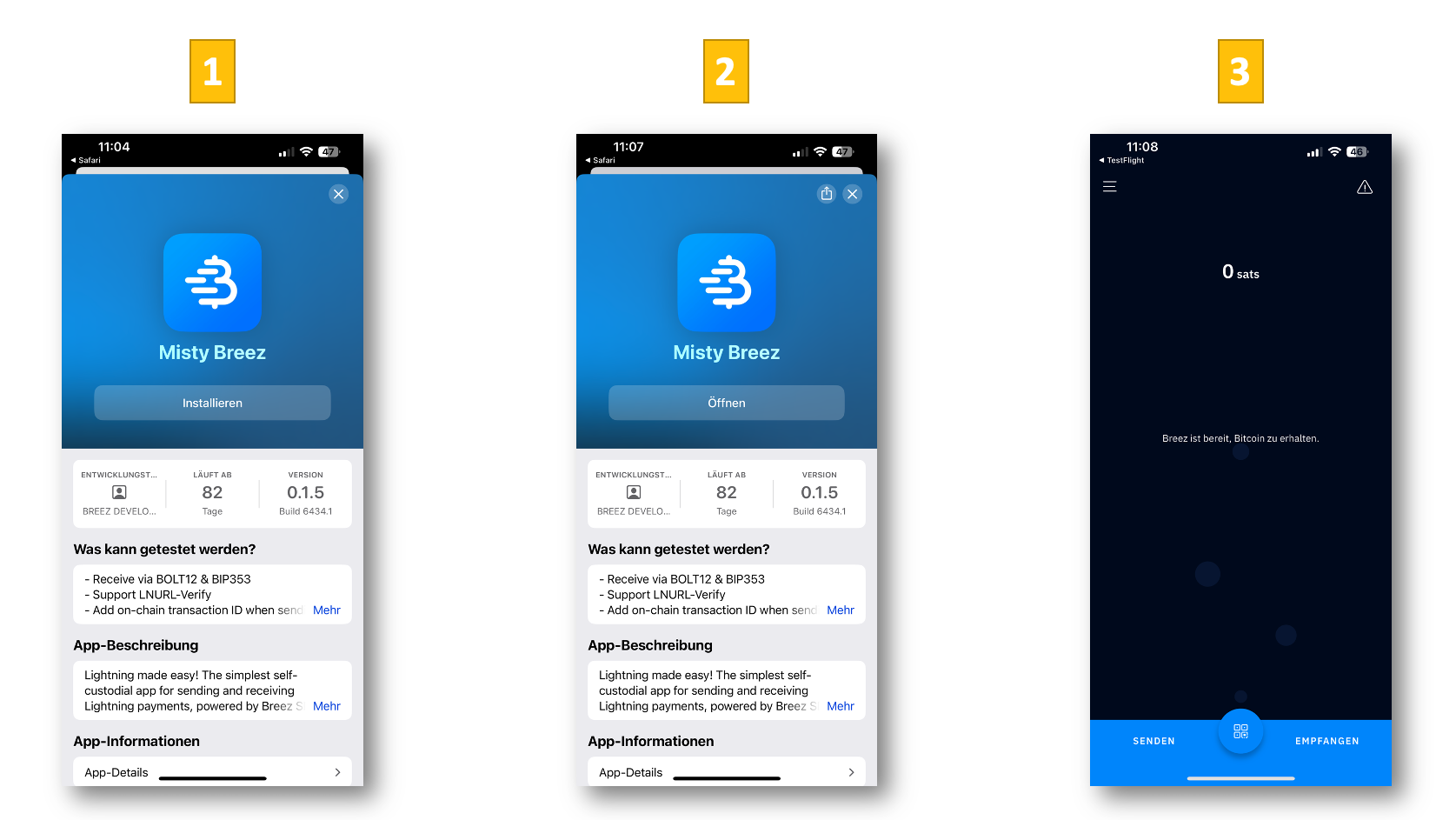
Click the correct button for your phone and download the app to your phone.

Click on Install [1]

Open the app [2]

And you’re in your Misty Breez Wallet! [3]

Personalize your Misty Breez Wallet

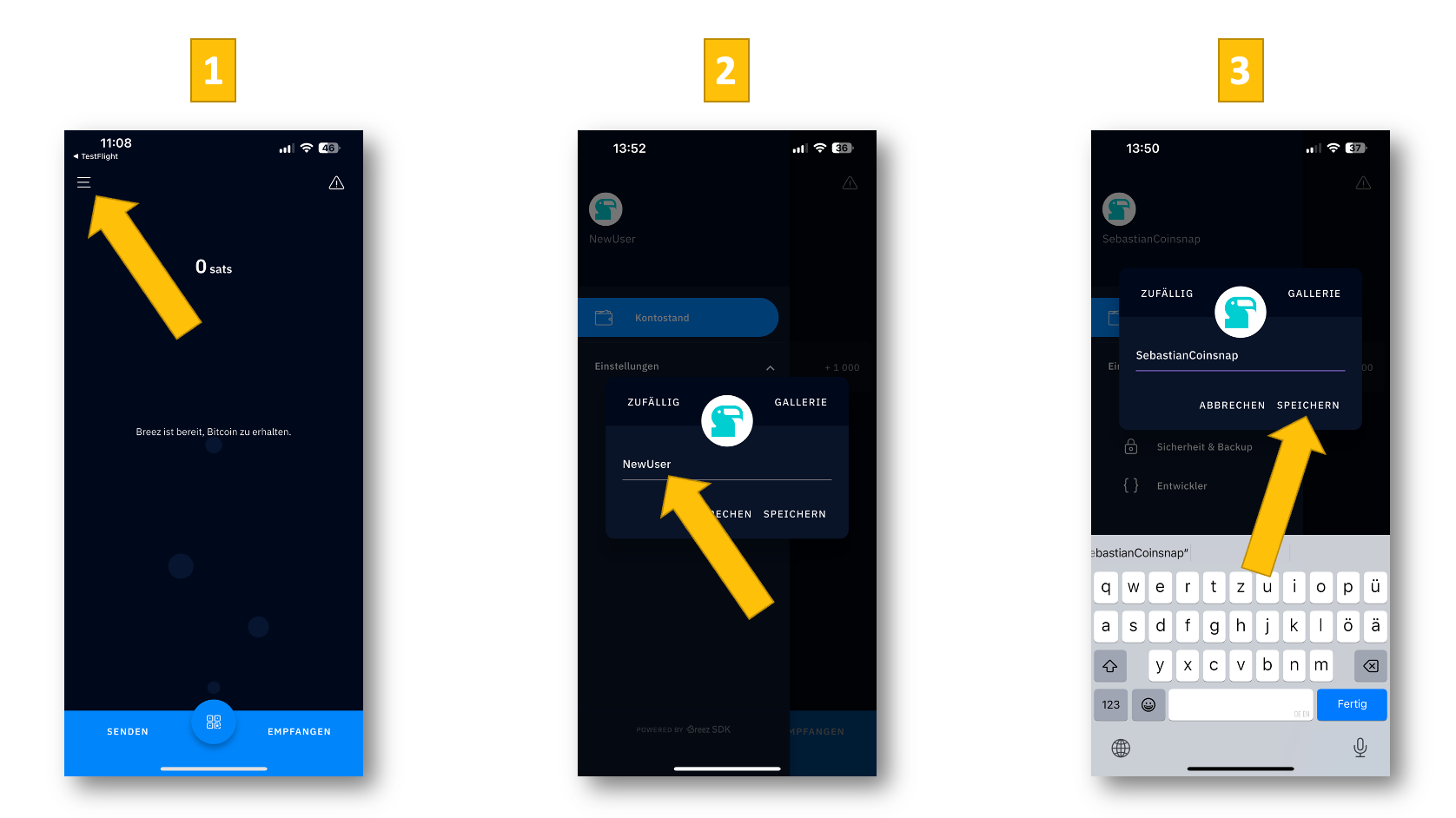
Now you need to personalize the Misty Breez app. This means you have to enter your username and name your Lightning address. Let’s start by setting your username:

Open the menu at the top left [1]

Click on the icon at the top left, then in the name field [2]

Enter desired name and save[3]

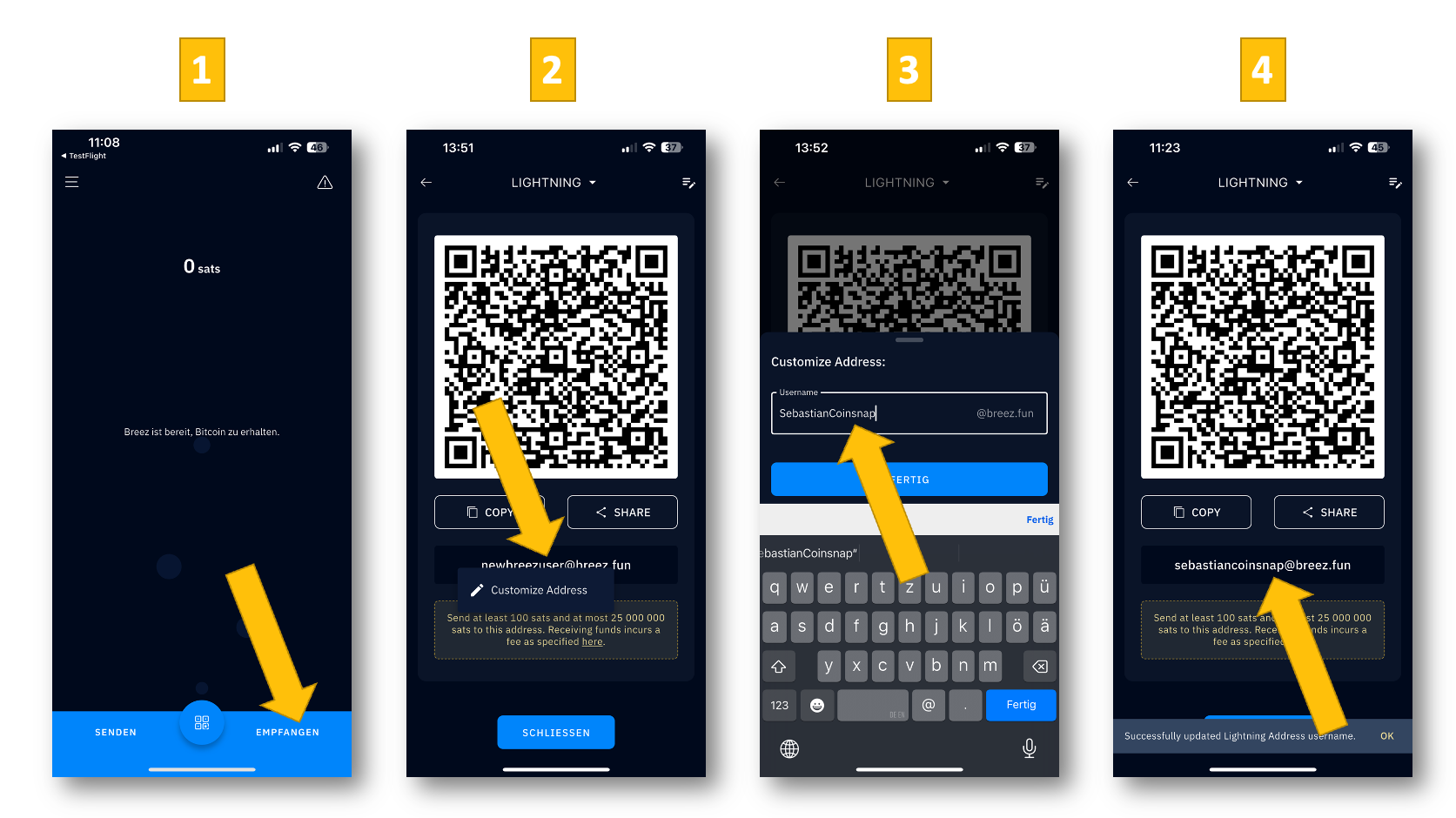
Now all you have to do is give your Lightning address your individual name, and then you have a non-custodial wallet with an individual Lightning address. And you can start accepting Bitcoin on your website right away! And this is how it works:

Click on Receive [1]

Click in the name field and on Customize Address [2]

Enter the desired name, click on Done[3]

Your Lightning address is active![4]

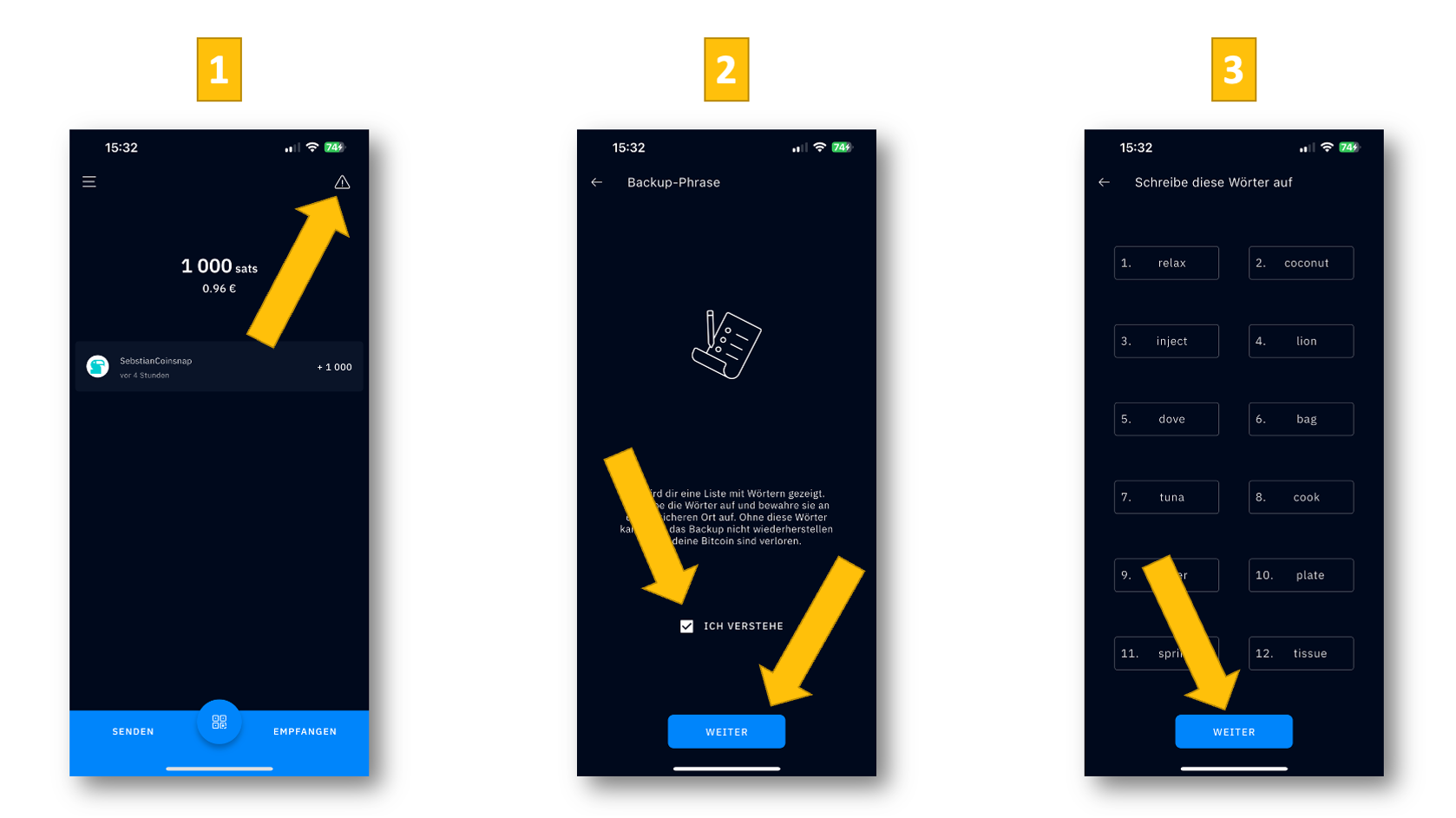
Create seed words to restore your wallet in the event of loss

Every Bitcoin owner’s nightmare is losing their wallet or forgetting their password. Because then (usually) your savings are gone.

Misty Breez – similar to hardware wallets such as Bitbox – takes away this worry: you can generate so-called seed words in the app, which you can use to restore your account at any time and immediately regain access to your Bitcoin assets.

Here we show you how:

Click on the warning sign [1]

Give your consent and click on continue [2]

Note the seed words and click on continue [3]

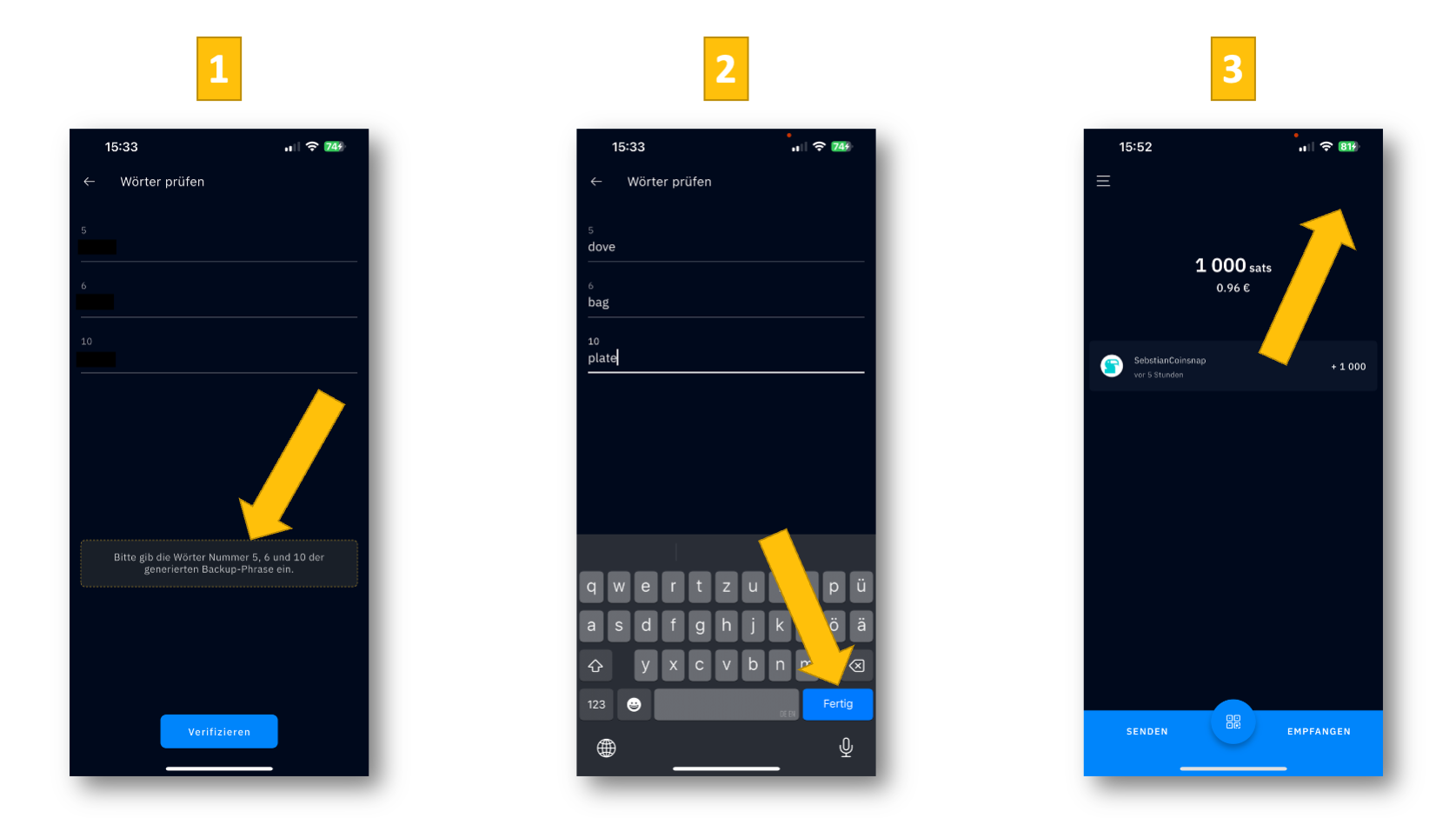
Now enter the required words and click on verify [1]

Now click on finished [2]

Your wallet is now secure (no morewarning sign !) [3]

Congratulations: You now have a highly secure, non-custodial Bitcoin Lightning wallet & Lightning address!

Link Misty Breez Wallet with your Coinsnap account

To accept Bitcoin in your online store, you must have a Coinsnap account linked to your Lightning address and install the desired Coinsnap plugin in your store.

We will now show you how to create a Coinsnap account and store your Misty Breez Lightning address:

Go to coinsnap.io and click on the menu [1]

Now click on Register (or Register) [2]

Enter your e-mail address and a password and click on create account [3]

Now you have to confirm the email and go to the login [1]

Log in to your new Coinsnap account! [2]

In your Coinsnap dashboard , you will now see the message that you need to connect your store and wallet to Coinsnap. [3]

Now you have to confirm the email and go to the login [1]

And now you can see your Coinsnap dashboard linked to your Misty Breez wallet [2]

Accept Bitcoin with the Misty Breez Wallet

Here we show you how easy it is to receive a Bitcoin Lightning payment with the Misty Breez Wallet:

Open the Misty Breez Wallet and click on receive [1] at the bottom right

Send the QR code or your Lightning address to the payer [2]

You will now see the incoming payment (950 sats) [3]

Click on the payment receipt and you will see the transaction details [4]

Accept Bitcoin now with Misty Breez and Coinsnap

To accept Bitcoin in your online store today, you only need to take these three steps:

Set up a Coinsnap account
(only email and Lightning Wallet address required!)

What is a Lightning address?

What is a Lightning Address?

When you register with Coinsnap, you’ll be asked to provide a Lightning Address.
It works similarly to an email address – but instead of sending messages, it’s used to send and receive Bitcoin payments over the Lightning Network.

Example: yourname@walletofsatoshi.com

When your customers pay with Bitcoin on your website or online shop, the payment will be credited to your Lightning wallet via this address.

How to get a Lightning Address

To use a Lightning Address, you need a Lightning wallet that supports it.
If you don’t already have one, check out our guide:
How to get a Lightning wallet with a Lightning Address – it walks you through the setup step by step.

Coinsnap recommends the following wallets that offer you a Lightning Address:

Wallet Example Lightning Address Website
Alby yourname@getalby.com getalby.com
Blink yourname@blink.sv blink.sv
Coinos yourname@coinos.io coinos.io
Misty Breez yourname@breez.fun breez.technology
Mt Pelerin yourname@ln.mtpelerin.com mtpelerin.com
Speed App yourname@speed.app speed.app
Strike yourname@strike.me strike.me
VIPSats yourname@vipsats.app vipsats.app
Wallet of Satoshi yourname@walletofsatoshi.com walletofsatoshi.com
ZBD Wallet yourname@zbd.gg zbd.gg

Running your own Lightning Node?

If you’re running your own Lightning node, you can also use a custom Lightning Address.
Just keep in mind that payment issues can occur if no suitable or low-cost route to your node is available.

Recommendation:

If you’re new to Lightning, we suggest starting with user-friendly wallets like Wallet of SatoshiMisty Breez or Blink.