How Wave.space offers seamless Bitcoin to Euro Conversion

Wave.space & Coinsnap: A Smooth Way to Accept Bitcoin and Receive Euros

Wave.space may be the right solution for many merchants who find Bitcoin payments interesting, but do not necessarily want to hold Bitcoin. A shop owner may want to accept Bitcoin because customers ask for it. A service provider may value the speed of Lightning payments. A business may want to avoid chargebacks or receive international payments more easily.

But at the end of the day, many businesses still pay their rent, suppliers, staff, and taxes in euros. That creates a simple question. Can a customer pay in Bitcoin, while the merchant receives euros?

Coinsnap already offers solutions for this. With partners such as Bringin and DFX, merchants can accept Bitcoin payments through Coinsnap and receive the value in euros instead of keeping Bitcoin on their balance sheet. These options are especially useful for businesses that want to offer Bitcoin at checkout, but still manage their daily operations, accounting, and cash flow in fiat currency.

And now, with Wave.space, Coinsnap merchants have an even simpler, more elegant, and more convenient way to sell for Bitcoin — while receiving euros: With the new Wave.space app, and its new Lightning address feature, Wave.space now makes this process even easier. With just one small addition to that address, incoming Bitcoin payments can be converted into euros automatically.

Can I auto-convert Bitcoin to Euro with Coinsnap?

Yes. With Coinsnap and a wave.space Lightning address like yourname.eur@pay.wave.space, incoming Bitcoin payments can be automatically converted into euros and credited to your personal vIBAN.

A Lightning Wallet for Bitcoin — With a Built-In Euro Option

Wave.space works like a classic Lightning wallet. You can use it to send Bitcoin, receive Bitcoin, and handle everyday Lightning payments in the usual way. But Wave.space adds one feature that makes it especially interesting for merchants: every wallet comes with a personal Lightning address. A normal Wave.space Lightning address looks like this: myname@pay.wave.space

This address works like a reusable Bitcoin payment address. People can send Bitcoin to it, and the payment arrives in your Lightning wallet. The clever part starts when you add “.eur” to the name part of the address. So instead of: myname@pay.wave.space you use:

myname.eur@pay.wave.space
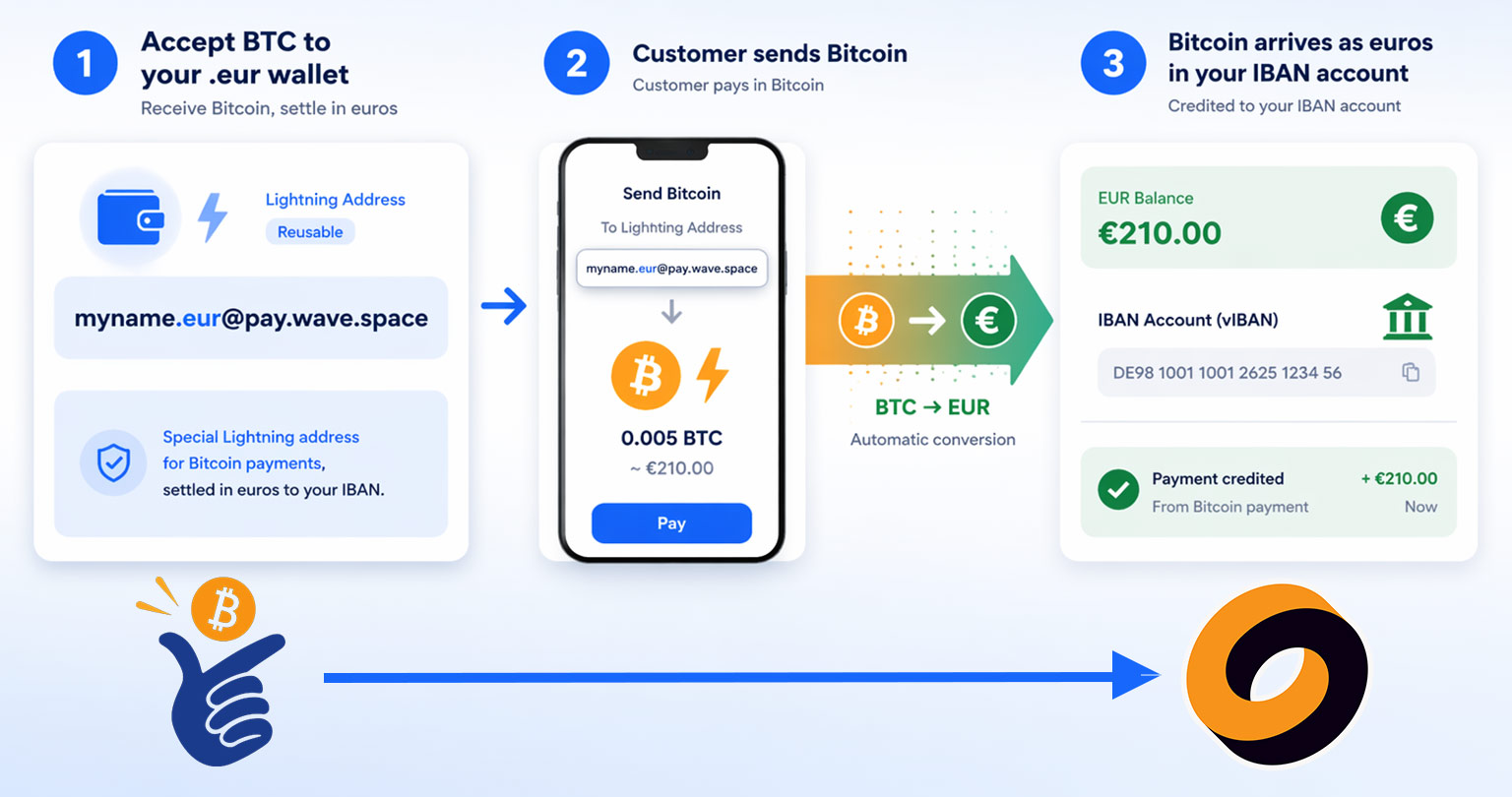
Receive Bitcoin - get Euro with Coinsnap and Wave.space

For the customer, nothing changes. They still pay with Bitcoin. But now the payment flow changes. The sender still pays in Bitcoin, but Wave.space automatically converts the incoming BTC into euros and credits the amount to the user’s personal vIBAN.

For merchants, this is the important point. The same Wave.space wallet can be used as a normal Lightning wallet when you want to receive Bitcoin, or as a simple BTC-to-euro receiving solution when you prefer to settle incoming Bitcoin payments in euros.

That makes it a very practical option for Coinsnap merchants who want to accept Bitcoin payments, but keep their business cash flow in euros.

Why This Matters in Normal Business Life

Many businesses are not trying to become Bitcoin treasury companies. They simply want another payment option. They want customers to be able to pay with Bitcoin, but they also want their accounting to remain simple. They want to know how much money they have in euros. They want to pay invoices from suppliers. They want to avoid extra manual work.

This is where the Wave.space Lightning address can help. The merchant can decide from the beginning what should happen with incoming payments. If they want to keep Bitcoin, they use the normal address. If they want euros, they use the “.eur” address.

That makes the setup easy to explain, easy to remember, and easy to operate.

A Simple Example

Imagine a small online shop that uses Coinsnap to accept Bitcoin payments. The shop owner likes the idea of Bitcoin payments, but does not want to hold Bitcoin every day. The business buys goods in euros, pays rent in euros, and does bookkeeping in euros. So instead of connecting a Bitcoin-only Lightning wallet in his Coinsnap account, the shop owner connects a Wave.space address like:

shopname.eur@pay.wave.space

Now customers can still pay with Bitcoin at checkout. But when the payment reaches the Wave.space address, it is converted into euros automatically. The shop owner does not need to explain Bitcoin to the accountant. The business does not need to manually convert every payment. And the customer still gets the Bitcoin payment option they wanted.

The Normal Bitcoin Address Still Has Its Place

Of course, not every merchant wants automatic conversion. Some merchants want to receive and keep Bitcoin. For them, the normal Wave.space Lightning address is the better option. That would look like this:

shopname@pay.wave.space

In that case, Bitcoin payments remain Bitcoin payments. This gives merchants a clear choice. They can use the normal address when they want Bitcoin, or the “.eur” address when they prefer euros. That is the strength of the setup. It does not force one model on every business.

The “Link” Feature Works in the Other Direction

Wave.space also introduced another feature called Link. This feature should not be confused with the “.eur” Lightning address.

The “.eur” Lightning address is about receiving Bitcoin and converting it into euros. The Link feature works in the other direction. It gives a wallet its own dedicated IBAN. When euros are sent to that IBAN, Wave.space automatically converts the euros into Bitcoin and sends the Bitcoin to the selected wallet.

So Link is mainly useful when someone wants to move euros into Bitcoin automatically. For Coinsnap merchants, the more relevant feature is usually the Lightning address with “.eur”, because it can help turn incoming Bitcoin payments into euros.

A More Practical Way to Use Lightning

The new Wave.space app is interesting because it makes Bitcoin payments easier to handle in normal business situations. The key point is not that every merchant must now use Bitcoin in the same way. The key point is choice.

A merchant who wants to receive Bitcoin can use a standard Lightning address. A merchant who wants to receive euros can use the “.eur” version.

And a Coinsnap merchant can potentially use that “.eur” address directly as the payout wallet in the Coinsnap account, so Bitcoin payments from customers are converted into euros after settlement.

That makes the setup easier to understand for non-technical users. The customer pays in Bitcoin. Coinsnap handles the Bitcoin payment. Wave.space receives the Lightning payout.

And if the merchant uses the “.eur” address, the merchant receives euros. For many businesses, that is exactly the kind of Bitcoin payment setup they need: simple for the customer, practical for the merchant, and easy enough to explain without technical language.
Accept Bitcoin & Get Paid to Your Bank Account (No Bitcoin Handling)

You want to accept Bitcoin, but prfer to get paid to your bank account in euros? If you’re curious about offering Bitcoin at checkout—but have zero interest in managing wallets, volatility, or crypto accounting—this guide is for you.

With Coinsnap, your customers can pay in Bitcoin while you choose how you get paid:

  • directly to your bank account in euros or dollars, or
  • to a Lightning or on-chain Bitcoin wallet if you prefer.

In this post, we focus on the simplest path for non‑crypto‑native businesses: accepting Bitcoin while receiving fiat directly to your bank account. You’ll learn why bank settlement is appealing, how it works with Coinsnap, and which payout partner—Bringin, Strike, or DFX—is right for you.

Can Merchants Accept Bitcoin and Get Paid in Euros?

Yes. With Coinsnap, customers pay in Bitcoin while merchants receive EUR or USD directly to their bank account via regulated settlement partners such as Bringin, Strike, or DFX—without holding or managing Bitcoin.

Why Merchants Settle Bitcoin Payments to a Bank Account

Many businesses want access to new customers without changing how finance works day to day. Bank settlement keeps everything familiar:

  • Sales arrive as euros or dollars on your statement
  • No Bitcoin custody or wallet management
  • No exposure to price volatility
  • Easier bookkeeping and reconciliation

When you choose fiat settlement, Coinsnap routes payments through a regulated partner that handles conversion and banking rails. As with any fiat service, KYB/KYC onboarding is required by the partner—not by Coinsnap.

Coinsnap itself never holds your funds. You decide whether payments go to a Lightning wallet, an on‑chain wallet, or a bank account via a settlement partner.

Bitcoin to Bank Account with Coinsnap: How It Works

BITCOIN TO BANK ACCOUNT WITH COINSNAP: HOW IT WORKS

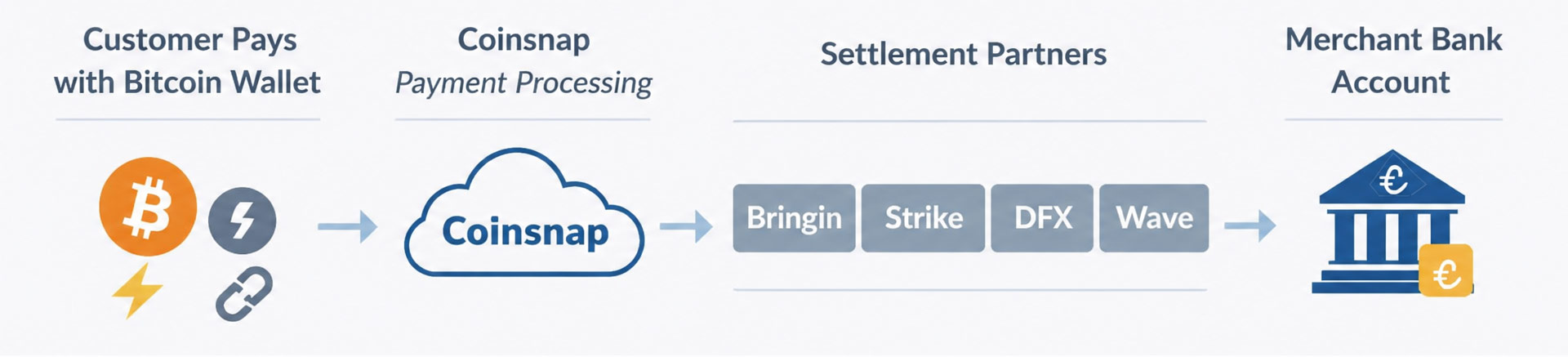
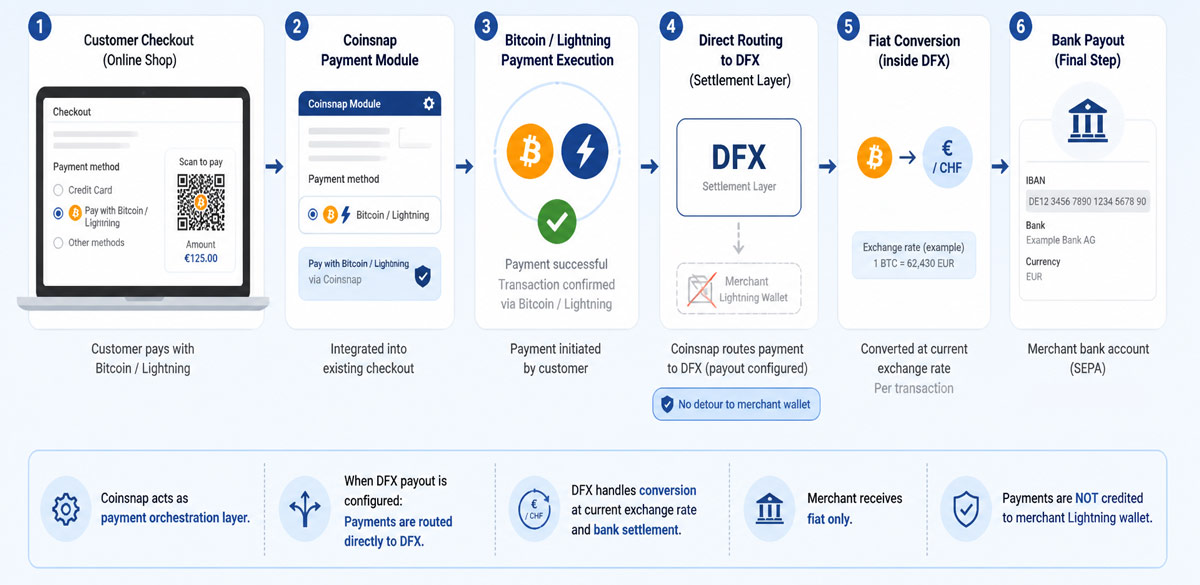
Coinsnap does not perform Bitcoin‑to‑fiat conversion directly. Instead, it integrates with Bringin, Strike, and DFX.

The flow is simple:

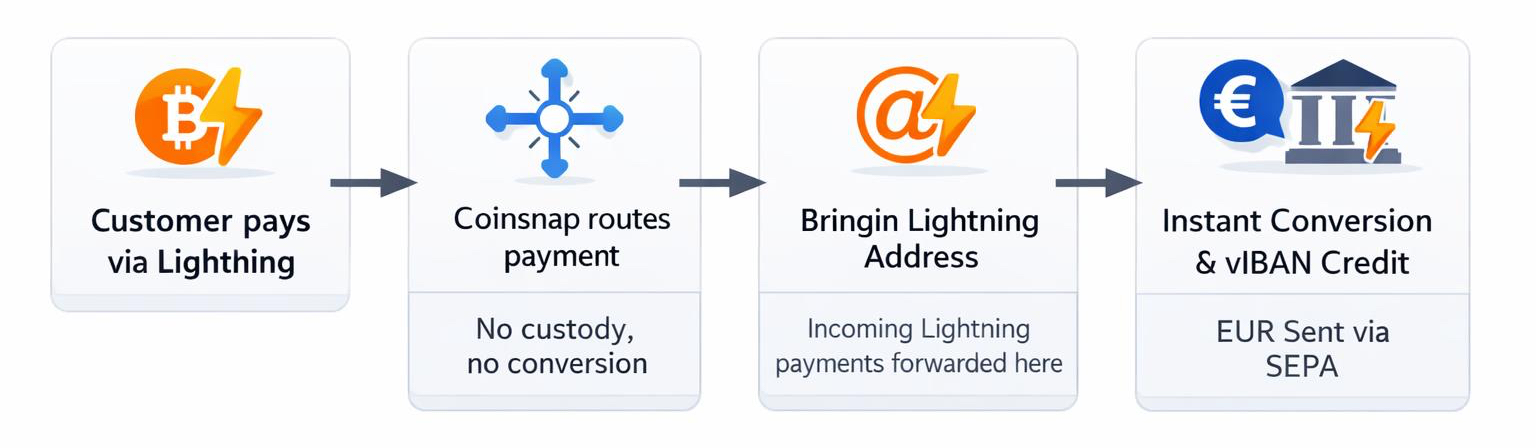
  1. Customers pay in Bitcoin (Lightning or on‑chain)
  2. Coinsnap routes the payment to your chosen partner
  3. The partner converts Bitcoin to fiat
  4. Funds are credited to your bank account—often within minutes

You never touch Bitcoin unless you want to.

How to Accept Bitcoin and Receive Fiat to Your Bank

  1. Install Coinsnap in your shop system
  2. Choose a bank settlement partner (Bringin, Strike, or DFX)
  3. Complete KYB/KYC with the partner
  4. Enter your payout details in Coinsnap
  5. Run a test payment and confirm bank credit

Option 1: Bringin — Accept Bitcoin, Receive Euros via SEPA

BRINGIN — ACCEPT BITCOIN, RECEIVE EUROS VIA SEPA

Bringin is ideal for EU merchants who want fast, simple euro payouts.

  • Lightning payments are forwarded to a Bringin-issued Lightning address
  • Funds are converted instantly and credited to a personal IBAN (vIBAN)
  • Withdraw to your bank via SEPA Instant

Key points:

  • ~1% withdrawal fee
  • Starter limit around €10,000/month (expandable)
  • Payouts only to bank accounts in the same legal name

Best for merchants who want a clean “accept Bitcoin, receive euros” setup with minimal moving parts.

Option 2: Strike — Global Reach with Optional BTC Holding

Strike — Global Reach with Optional BTC Holding


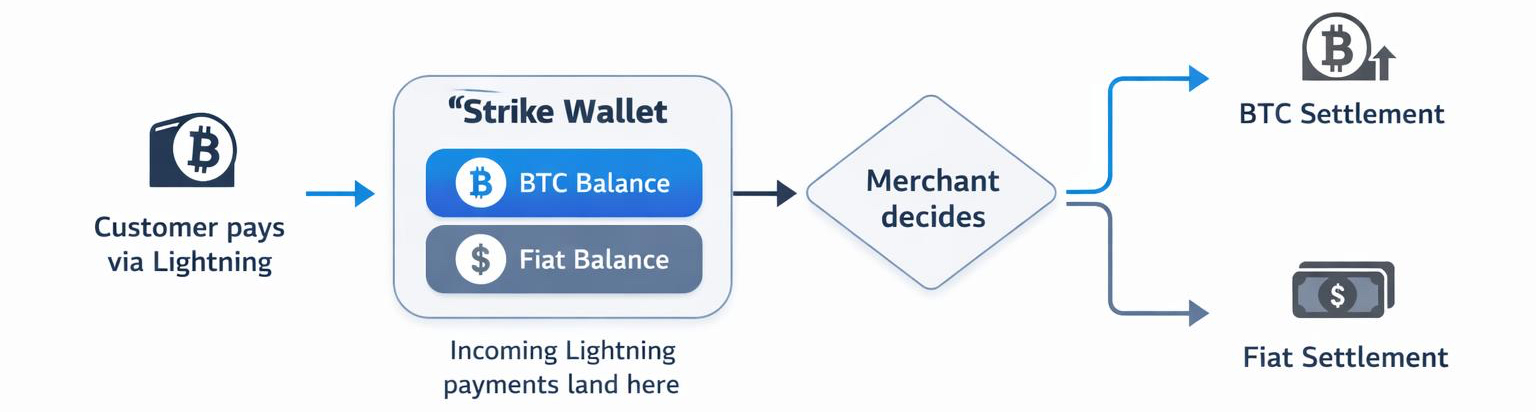
Strike combines a Lightning address with flexible fiat withdrawals.

  • Incoming Lightning payments land in your Strike wallet
  • You decide whether to hold BTC or convert to fiat
  • Withdraw to your bank in supported countries

Why choose Strike:

  • Broad international availability (especially strong in the US)
  • Dual wallet model (BTC + cash)
  • Flexible conversion timing

Ideal for global merchants or businesses that want to keep some Bitcoin while converting the rest.

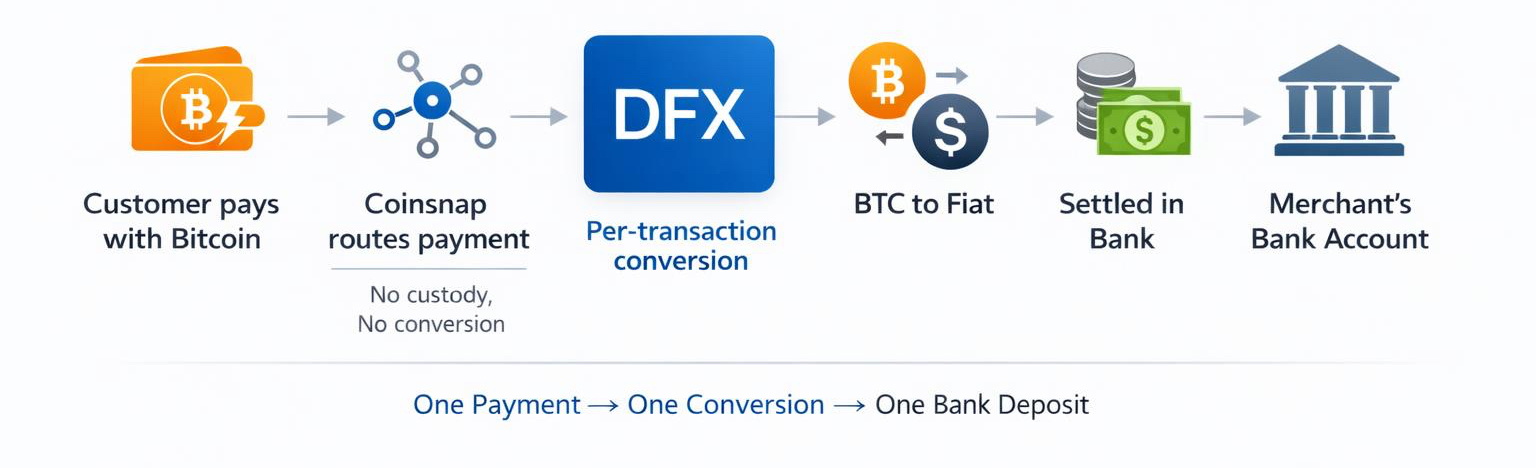
Option 3: DFX — Per‑Transaction Settlement in EUR or CHF

DFX — Per‑Transaction Settlement in EUR or CHF

DFX converts and settles each transaction individually.

  • Every Bitcoin payment becomes a separate EUR or CHF bank credit
  • Works with SEPA‑reachable accounts across the EU, UK, and Switzerland

Highlights:

  • Clear audit trail for accounting
  • Transparent compliance thresholds
  • Strong choice for Switzerland and Europe

Perfect for finance teams that value one‑to‑one reconciliation.

Bringin vs. Strike vs. DFX

Partner Region Fiat Settlement Style Best For
Bringin EU / SEPA EUR vIBAN → bank Simple euro payouts
Strike Global Local Wallet → bank Flexibility & reach
DFX EU / CH / UK EUR / CHF Per transaction Accounting clarity

How to Choose the Right Bitcoin‑to‑Bank Partner

  • EU merchants: Bringin or DFX
  • US & global businesses: Strike
  • Zero BTC exposure: Bank settlement only
  • Some BTC holding: Strike or wallet payouts

Coinsnap doesn’t lock you in. Many merchants adjust their payout strategy as demand grows.

Key Takeaways

  • Accept Bitcoin without changing your back office
  • Eliminate volatility by settling directly to your bank
  • Choose the partner that fits your region and accounting needs
  • Test once, document the process, and scale confidently

Accepting Bitcoin should expand your market—not complicate your month‑end.

With Coinsnap and the right settlement partner, Bitcoin payments can be as simple as cards or PayPal.

Frequently Asked Questions (FAQ)

Can I accept Bitcoin without holding any Bitcoin?

Yes. With Coinsnap, you can route all payouts directly to your bank account via Bringin, Strike, or DFX. Customers pay in Bitcoin, while you receive euros or dollars—without ever holding BTC.

Do I need KYC or KYB to receive bank payouts?

Yes. While Coinsnap itself does not require KYC for payouts to your own Bitcoin or Lightning wallets, bank payouts require KYB/KYC because Bringin, Strike, and DFX operate on regulated fiat rails.

How fast do Bitcoin payments settle to my bank account?

  • Lightning payments: Near-instant on the Bitcoin side
  • Bank settlement: Same day to a few business days, depending on the partner and your bank (SEPA Instant is often available in the EU)

What fees should merchants expect?

  • Coinsnap: 1% fee per transaction
  • Settlement partners: Each partner publishes its own conversion and payout fees (for example, Bringin charges around 1% on withdrawals)

Always review the exact fee schedule during partner onboarding.

Which countries are supported for Bitcoin-to-bank payouts?

  • Europe / SEPA: Bringin, DFX
  • Switzerland: DFX
  • United States & global regions: Strike (availability varies by country)

Availability depends on your business type and local regulations.

Can I split payouts between Bitcoin and fiat?

Coinsnap does not support an automatic split. However, you can receive payments to a Lightning or on-chain wallet and later convert part of your Bitcoin through a third-party exchange or broker.

Is accepting Bitcoin more complex than cards or PayPal?

No. With Coinsnap, Bitcoin checkout integrates directly into your existing shop system. When using bank settlement, reconciliation looks similar to traditional payment methods—often simpler due to lower fees and fewer chargebacks.

Ready to test Bitcoin checkout without changing your finance setup?

Install Coinsnap, connect a bank payout partner, and run a live test in minutes.

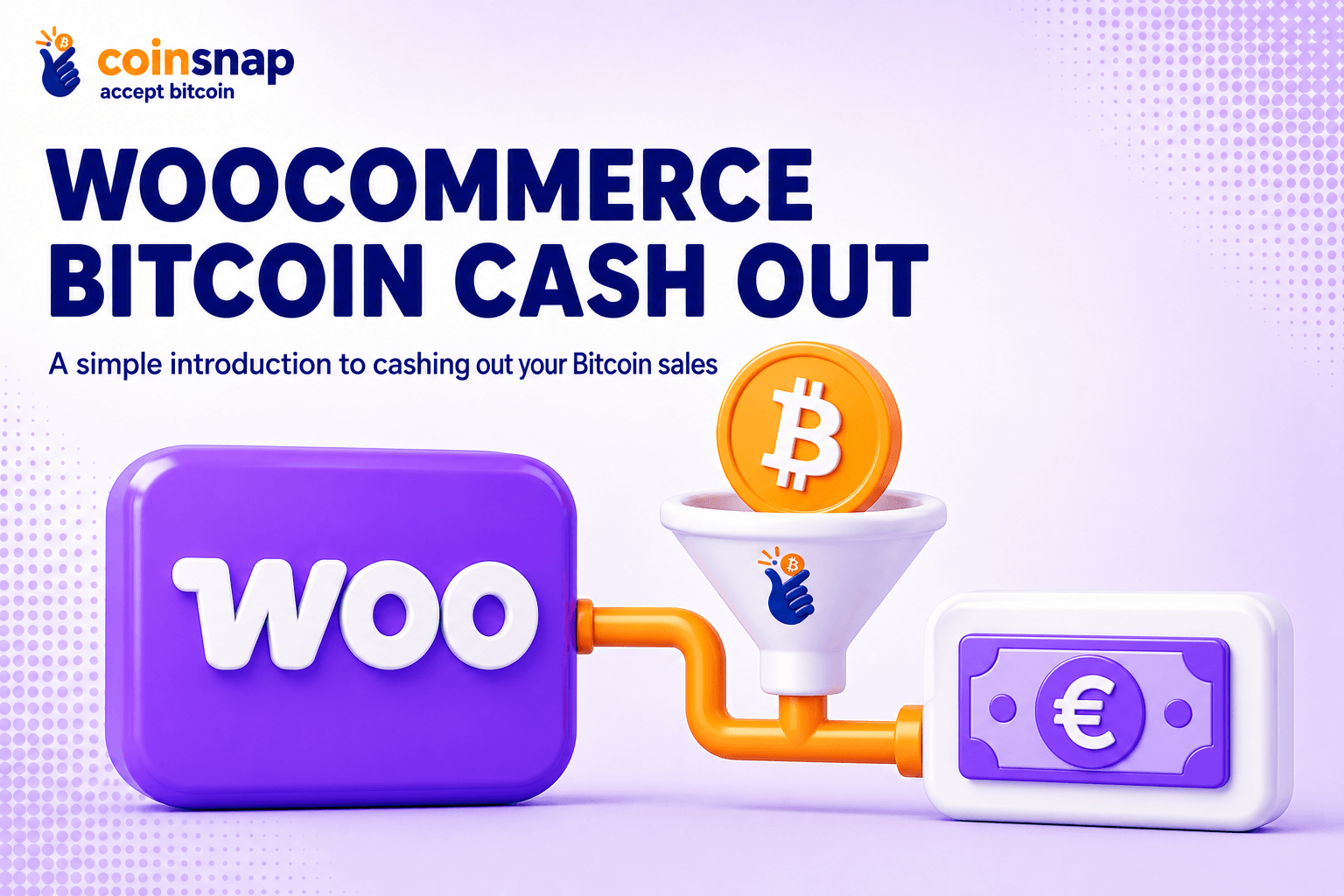
WooCommerce Bitcoin Cash-Out (Simple Introduction)

WooCommerce Bitcoin Cash-Out (Simple Introduction)

Many WooCommerce shops want the reach and tiny fees of Bitcoin and Lightning at checkout, but still need money to land in the bank in euros. That keeps cash flow smooth, bookkeeping simple, and avoids price swings.
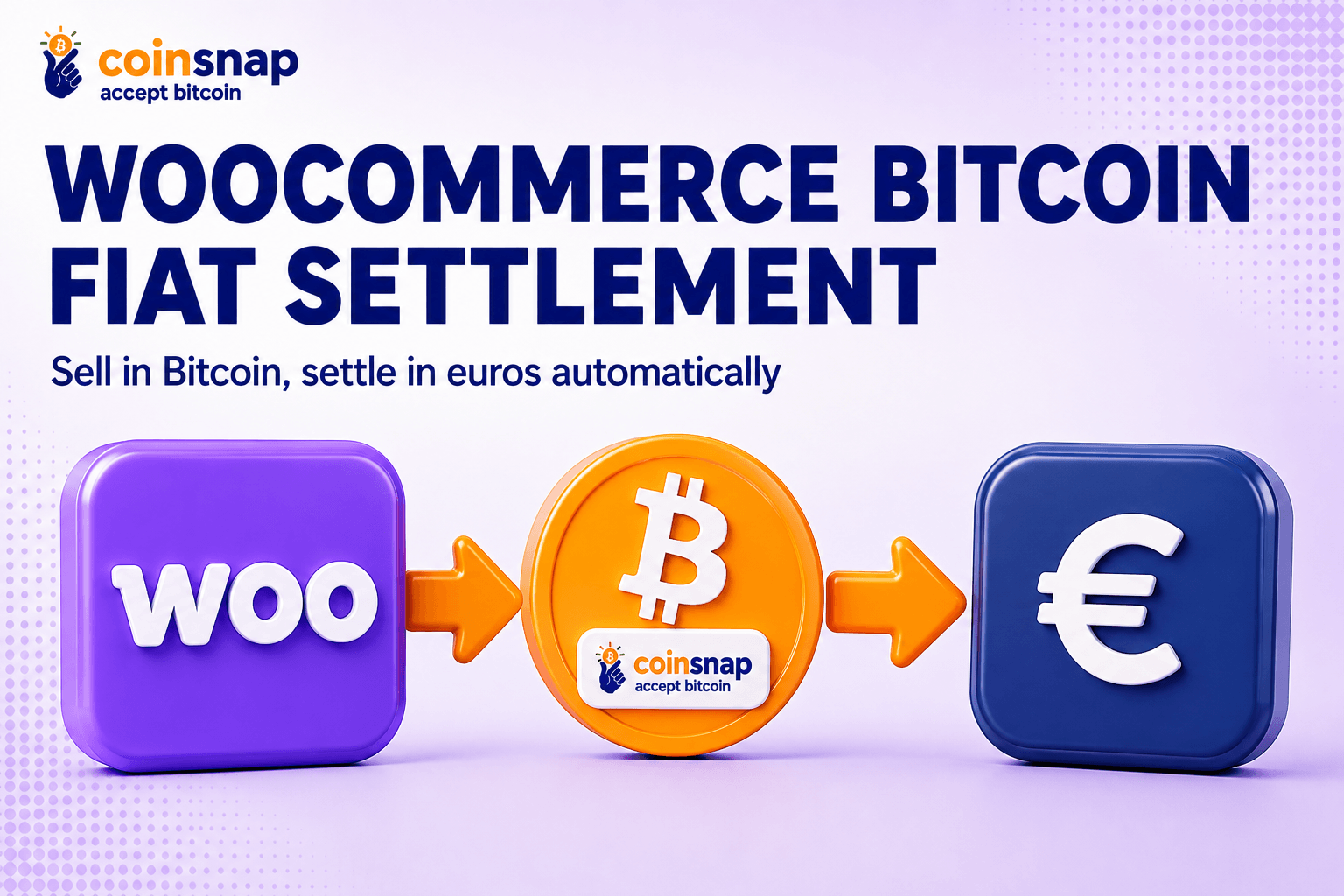
This guide explains your payout choices in plain English and shows easy ways to set them up in WooCommerce — so you can go live fast.

Why settling to fiat matters

Some stores don’t want to keep Bitcoin on the books because it adds extra accounting work. Others need local currency to pay suppliers, salaries and taxes. And some prefer not to carry price risk if Bitcoin moves after a sale.

Settling to fiat at, or soon after, a Bitcoin payment solves all three problems: clean books, predictable cash flow, and no surprise losses from exchange-rate swings.

Your WooCommerce Bitcoin cash-out options

There are several practical ways to turn WooCommerce Bitcoin sales into euros or other currencies in your bank. Here are the most common ones:

1) Exchange to bank (sell BTC, withdraw to IBAN)

This is the “sell on an exchange, withdraw to your bank” route. You receive Bitcoin, send it to a trusted exchange account, sell it for EUR/USD/GBP, and withdraw to your bank.

It usually has the lowest fees but takes a little time and requires an exchange account with ID checks.

2) Peer-to-peer sales

You sell directly to a buyer on a marketplace and agree a bank transfer or another payment method.

It can be fast and flexible, but you must use platforms with escrow and good reputation systems, and you’ll need to verify you’ve been paid before releasing the Bitcoin.

3) Bitcoin ATMs (instant cash, higher fees)

You send Bitcoin to a Bitcoin ATM and receive banknotes.

It’s the fastest way to get physical cash, but fees are usually much higher than other routes and daily limits may apply.

4) Plugins for Bitcoin Cash-out directly to your IBAN

There’s a very convenient option that feels like option 1 but without moving coins yourself: some plugins connect your checkout to a service that auto-converts Lightning or on-chain payments into euros and credits them to an account in your name.

A popular example is Coinsnap together with Bringin. Customers pay in Bitcoin, you see euros arrive—instantly—without touching an exchange screen.

What’s best for you?

Peer-to-peer trades and Bitcoin ATMs aren’t really practical for Woo merchants:

P2P deals demand manual vetting, escrow/dispute handling and carry fraud risk—none of which scales or integrates with orders or accounting.

Bitcoin ATMs are scarce, often fee-heavy, have low limits, and only dispense cash—so you still end up with reconciliation headaches and no automated Bitcoin cash out flow.

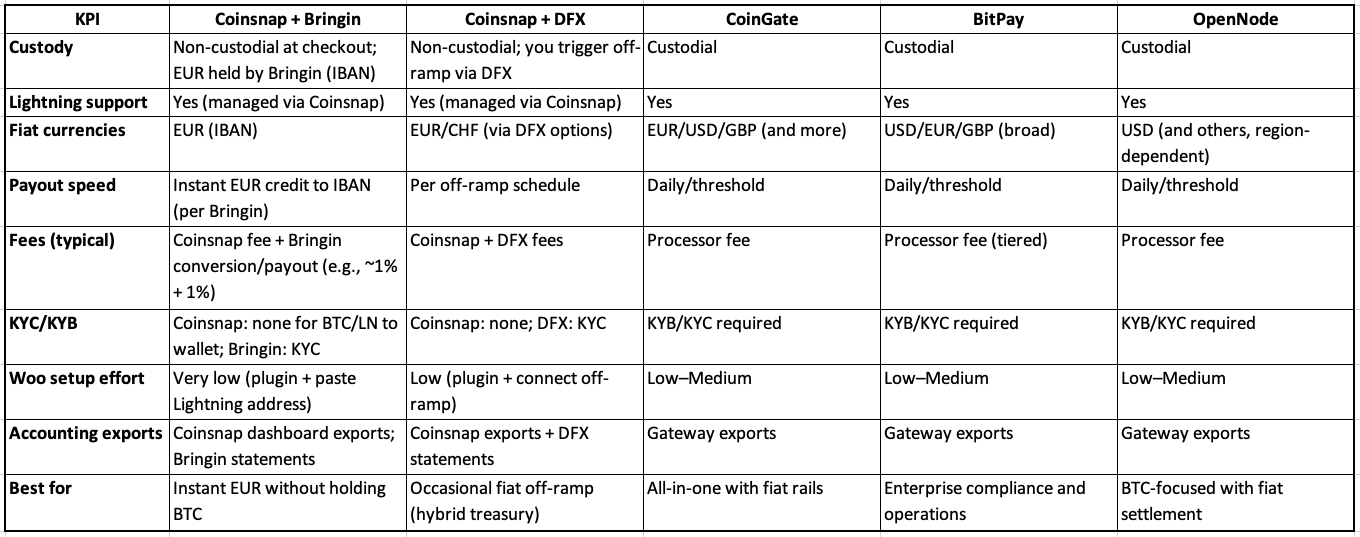
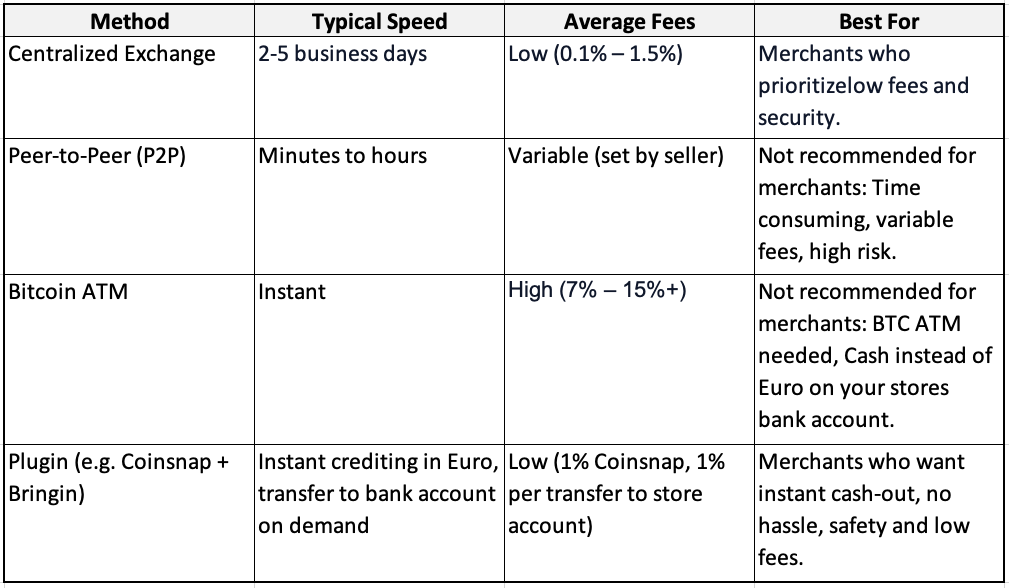
Bitcoin cash-out methods compared

The most popular Bitcoin cash-out options for WooCommerce merchants

(Click here or on spreadsheet image to download Excel)

Which way should you choose for cashing out Bitcoin?

Pick the exchange route if you want low fees and can wait for a bank transfer. If you want the easiest life inside WooCommerce, use a plugin that automates the euro payout for you and keeps the checkout fast—Coinsnap + Bringin is the simplest example.

If you like “set and forget,” Coinsnap with Bringin is hard to beat. Coinsnap handles the Bitcoin and Lightning checkout, Bringin converts Lightning payments into euros and credits an IBAN in your name, in seconds. You can also use Coinsnap with DFX if you prefer to work with a Bitcoin exchange.

If you prefer a single provider that does everything from acceptance to daily bank payouts, look at CoinGate or OpenNode. You’ll open an account, pass standard ID checks for businesses, install their WooCommerce plugin, and choose your payout settings. Both support Bitcoin; CoinGate also offers many payout currencies and extra merchant tools.

Bitcoin cash-out: exchanges vs. WooCommerce plugins—what to know

Bitcoin exchange

Selling on a centralized exchange is the classic route: pick a regulated platform that serves your country, create an account, pass KYC, link your bank, send in your Bitcoin, sell it for EUR/GBP/USD, then withdraw to your account. It’s familiar and flexible, but it’s a separate workflow from your shop.

Know the costs and timing. Exchanges charge a trading fee when you sell and a withdrawal fee when you move money to your bank. Payouts aren’t instant—bank transfers typically take 1–5 business days.

WooCommerce Bitcoin cash-out plugins

If you want less manual work, specialized WooCommerce Bitcoin fiat settlement plugins can handle conversion and payouts on a schedule, so cash flow and reconciliation stay simple.

A good example is the Coinsnap + Bringin combination: Install the Coinsnap for WooCommerce plugin, open a Bringin account, and paste your Bringin Lightning address into Coinsnap. From then on, Lightning payments at checkout are auto-converted to euros and credited instantly to your personal IBAN at Bringin—no extra steps in your shop.

Plan for costs and flow. Typical fees are Coinsnap (1%) plus Bringin (1% when you withdraw to your bank). Funds hit your Bringin IBAN immediately; bank withdrawals use SEPA Instant in most cases.

Coinsnap Bringin setup in a nutshell

The steps are straightforward. Install the plugin in WordPress, switch it on in WooCommerce → Settings → Payments, and paste the keys or address the provider gives you. If you choose Coinsnap with Bringin, you add your Bringin Lightning address in the Coinsnap dashboard and you’re done—run a €1 Lightning test and watch euros hit your account. If you choose an exchange or a different provider, follow their connect flow and do the same €1 test.

If you need a detailed installation guide, read this article!

How to ensure clean accounting?

Record each order at the euro amount shown at payment time. Keep the Bitcoin amount, the exchange rate used, the order number and the transaction ID or Lightning payment hash. If you use automatic euro payouts, your books just show normal bank income and you don’t carry Bitcoin on the balance sheet.

If you keep some Bitcoin and convert later, you’ll track any gain or loss between the day of sale and the day you convert. To make life easy, Coinsnap connects to CoinTracking, which pulls in your transactions and produces tax-ready reports.

This is general information, not tax advice. Check local rules with your accountant!

WooCommerce Bitcoin cash-outs: compliance and refund essentials

Services that pay out to banks will ask for standard ID checks and run routine compliance screening on payouts. If money goes straight to your own wallet first, there are usually no ID checks at checkout, but you still follow local rules for invoices, VAT and data protection.

Bitcoin and Lightning have no chargebacks, so refunds are simply new payments you send back to the customer. Publish a clear refund policy, ask customers for a fresh address or Lightning invoice, and note the details in your records.

Quick answers for your questions

Can WooCommerce settle Bitcoin to my bank?

Yes. Use a plugin that offers bank payouts, or pair Coinsnap with Bringin to auto-convert Bitcoin Lightning payments into euros.

How long does a Bitcoin cash-out take?

On a centralized exchange, the sale goes through right away, but getting the cash to your bank takes 1–5 business days. With Coinsnap + Bringin, Bitcoin Lightning payments are auto-converted to euros and credited to your Bringin IBAN immediately; withdrawals via SEPA Instant typically complete in seconds.

Does Lightning work with bank payouts?

Yes. With Coinsnap and Bringin, Lightning payments can be turned into euros automatically. Other providers can settle daily.

Do I need to verify my identity?

For bank payouts, yes. For pure Bitcoin to your own wallet, usually not. If you later convert to fiat, the off-ramp will require ID.

What is the easiest path to euros from Lightning sales?

Coinsnap with Bringin: add your Bringin Lightning address in Coinsnap and euros show up in your IBAN, instantly.

Bottom line: choose the cash-out flow that matches your shop, not someone else’s

If you only cash out now and then, a reputable exchange is perfectly fine. You’ll likely get competitive rates, full control over when you sell, and a familiar “sell → withdraw to bank” flow. The trade-off is manual work: you move funds yourself and reconcile orders separately.

If you want daily, no-friction operations, plugin-based cash-out wins. Solutions wired into WooCommerce (e.g., Coinsnap + Bringin or gateways like CoinGate/OpenNode) turn each Bitcoin checkout into fiat with minimal effort, giving faster cash flow and cleaner accounting.

Are you ready to install WooCommerce Bitcoin cash-out today?

Learn more about Bitcoin Lightning cash-out

If you want to understand Bitcoin cash-out even better, read this blog:
Read the blog

Why is Coinsnap + Bringin perfect for you?

Coinsnap + Bringin is the easiest way to cash out Bitcoin from your WooCommerce store to your euro bank account. Bringin provides an IBAN in your name that receives your Lightning payments instantly.
How it works

Register your Coinsnap account

To start Bitcoin cash-out from your Woo store, just install the Coinsnap for WooCommerce plugin, enter your Bringin wallet address, and activate the payment method in WooCommerce.

Get a Coinsnap account

Register now

WooCommerce Bitcoin Fiat Settlement: Deep Dive for Merchants (2025)

WooCommerce Bitcoin Fiat Settlement: Deep Dive for Merchants (2025)

Many WooCommerce stores want the reach and low fees of Bitcoin/Lightning at checkout but still need bank-ready EUR/USD/GBP for cash flow, simpler accounting, and lower volatility risk. So they are looking for a practical WooCommerce Bitcoin fiat settlement solution.

In this guide for merchants already familiar with Bitcoin, wallets, and Lightning, we’ll outline the three practical paths at a glance—self-custody only (keep BTC), automatic fiat settlement (instant or daily bank payouts), and a hybrid approach (keep some BTC, settle the rest).

You’ll get clear options, a comparison of fees, payout speed, KYC/KYB, Lightning support, and setup steps to go live fast.

Why does fiat settlement matter for Woo merchants?

There are three main reasons why merchants prefer fiat settlement:

Accounting / Management

If you keep Bitcoin on your books, you must track cost basis, FX gains/losses, and reconcile on-chain/Lightning records—a burden most merchants avoid.

Liquidity / Cashflow

Stores often need euros to pay suppliers, payroll, and taxes; automatic settlement delivers cash flow and liquidity where it’s needed.

Volatility Risk Neutralising

Fiat settlement neutralises price volatility: converting at payment time removes risk.

It simplifies compliance, reduces friction with accountants, and keeps forecasts predictable.

Fiat settlement 101 (custody models & trade-offs)

Before choosing a payout route, understand the two custody models: custodial processors and non-custodial + off-ramp setups.

Custodial processors

Platforms like CoinGate, BitPay, OpenNode, and NOWPayments require KYC/KYB and charge fees but handle payouts and offer broad fiat rails.

Non-custodial + off-ramp setups

Solutions like Coinsnap + Bringin or DFX let you accept Bitcoin via Lightning or on-chain, auto-converting to EUR or off-ramping later.

When to use which (quick decision aid)

Zero BTC on books

Use Coinsnap + Bringin for Lightning → instant EUR credit to IBAN, or custodial gateways (BitPay, CoinGate, OpenNode) for daily payouts.

You want choice

Choose a hybrid model: accept Bitcoin via Coinsnap, keep some BTC, and off-ramp through Bringin or DFX.

Maximum control

Opt for self-custody + periodic OTC/DFX exchange—ideal for merchants comfortable handling their own wallets and bookkeeping.

The best WooCommerce Bitcoin Fiat Settlement plugins

Here are six proven solutions from our plugin comparison:

  • Coinsnap + Bringin (Lightning → EUR): Non-custodial checkout, instant EUR IBAN, supports on-chain.
  • Coinsnap + DFX: Keep BTC, off-ramp later; flexible hybrid treasury.
  • CoinGate: Custodial Lightning + on-chain with fiat settlement (EUR/USD/GBP).
  • BitPay: Enterprise-grade BTC gateway; KYB required; multiple currencies.
  • OpenNode: Bitcoin-only, KYB, instant or daily fiat payouts.
  • NOWPayments: Multi-coin, no Lightning; fiat via partners; KYB for fiat.

Detailed comparison of the most important features (decision matrix)


Click here to download the Excel comparison
.

How does it work? Setup guide

1) Coinsnap + Bringin (fastest path to EUR)

  1. Install Coinsnap for WooCommerce and activate it.
  2. Add store and Lightning address in Coinsnap.
  3. Open Bringin account (KYC) and claim your Lightning address.
  4. Paste Bringin address into Coinsnap → Wallet.
  5. Enable Coinsnap under Woo → Settings → Payments; test €1 order.

→ Result: instant EUR credit to IBAN.

Installation guide.

2) Coinsnap + DFX (hybrid treasury)

  1. Install Coinsnap and connect your Lightning wallet.
  2. Create DFX account and connect settlement flow.
  3. Periodically convert BTC to EUR/USD/CHF and withdraw.

→ Result: Keep BTC until you off-ramp.

3) CoinGate / BitPay / OpenNode (custodial)

  1. Create merchant account (KYB/KYC).
  2. Install Woo plugin, paste API credentials.
  3. Select Lightning + on-chain, choose fiat currency, set payout schedule.
  4. Test and verify order mapping.

Clean Books, No Surprises: Practical Steps for Safe Accounting

Revenue recognition

Record each sale at the fiat value at payment time. Keep BTC amount, rate, fiat value, order ID, and TXID/payment hash for full auditability.

If you use fiat settlement

With Coinsnap + Bringin or custodial gateways, your ledger shows EUR/USD/GBP received; you don’t carry BTC inventory. This simplifies VAT and removes FX tracking.

If you run a hybrid/self-custody model

Record revenue at fiat value, then track FX gains/losses between sale and conversion. Use a fixed off-ramp policy to keep forecasts clean.

Coinsnap + CoinTracking automation

Connect Coinsnap to CoinTracking to automate imports, calculate P&L, and generate tax-ready reports.

This is general information, not tax advice—consult your accountant.

Compliance & refunds

Custodial gateways and off-ramps (bank payouts) require KYB/KYC, AML, and refund policies.
Non-custodial flows (BTC/LN → wallet) have no checkout KYB but still need VAT, consumer rights, and data compliance.

Remember: Bitcoin/Lightning payments have no chargebacks. Refunds are new payments—always verify address/invoice and log full details
(order ID, fiat rate, TXIDs).

FAQ

Can WooCommerce settle Bitcoin to my bank?

Yes—use CoinGate, BitPay, OpenNode, or non-custodial Coinsnap with Bringin/DFX.

Is Lightning compatible with fiat settlement?

Yes—Lightning receipts can be auto-converted via Coinsnap + Bringin or settled daily via custodial gateways.

Do I need KYB?

Yes for custodial/fiat providers; no for pure BTC/LN to your wallet (Coinsnap only).

What’s the easiest way to get EUR from Lightning sales?

Coinsnap + Bringin: paste your Lightning address and receive EUR instantly in your IBAN.

What is realised vs unrealised P&L?

Realised P&L: profit/loss on conversion to fiat.
Unrealised P&L: paper gains/losses while holding BTC.

What is AML/sanctions screening?

Processor compliance checks that verify identity and block prohibited transactions. Required for fiat off-ramps; not typical for non-custodial flows.

Get started with WooCommerce Bitcoin Fiat Settlement

Coinsnap and Bringin form partnership: Receive Bitcoin payments now automatically and instantly in euros

Receive Bitcoin payments now automatically and instantly in euros

Revolution for e-commerce: Bringin+Coinsnap enables real-time euro payouts of Bitcoin revenues – without any technical setup or Bitcoin knowledge.

Belgrade, 24 July 2025 – Coinsnap, the leading provider of modules that enable operators of online stores and websites to receive Bitcoin payments from their customers’ Bitcoin wallets to their own Bitcoin wallets, is now a partner of Bringin. This innovative exchange service now enables merchants to have Bitcoin payments paid out directly and automatically in euros to a personal bank account via Coinsnap.

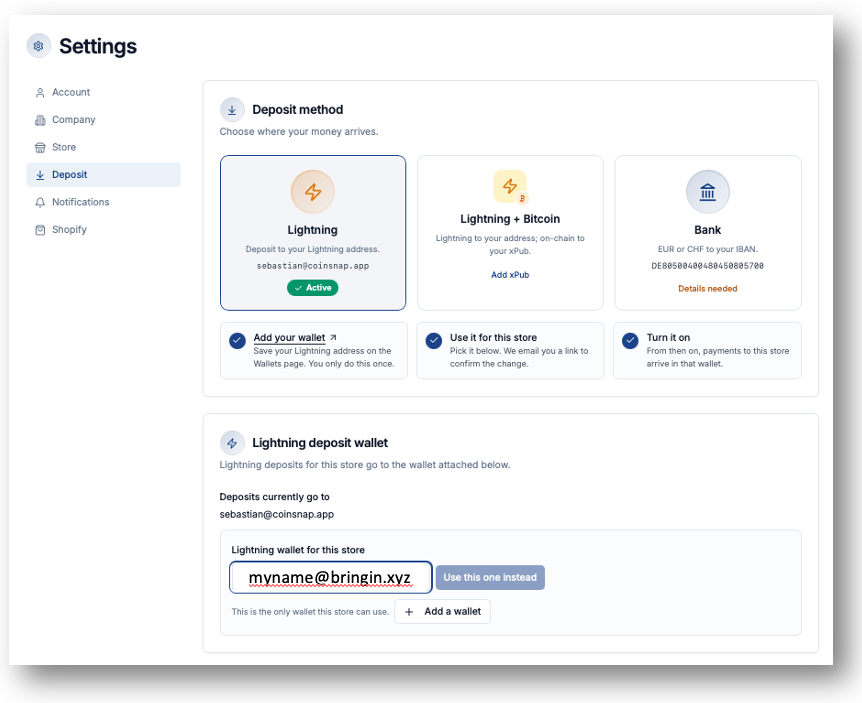
The integration is easier than ever: merchants simply need to enter their personal Lightning address from Bringin in the Coinsnap backend – everything else happens automatically (see step-by-step-guide). Bitcoin payments are converted into euros in real time and credited to a personal IBAN account set up by Bringin on behalf and in the name of the user.

‘Our partnership with Bringin makes Bitcoin payments fully predictable for merchants for the first time – without volatility risks, accounting overhead or technical know-how,’ explains Sebastian Paulke, CEO of Coinsnap: ‘This allows our users to expand their payment options to include Bitcoin Lightning payments, appealing to the new, cross-border and cross-currency customer group of Bitcoin users – but with the security of euro payouts!’

Bringin: Euro payouts at the touch of a button

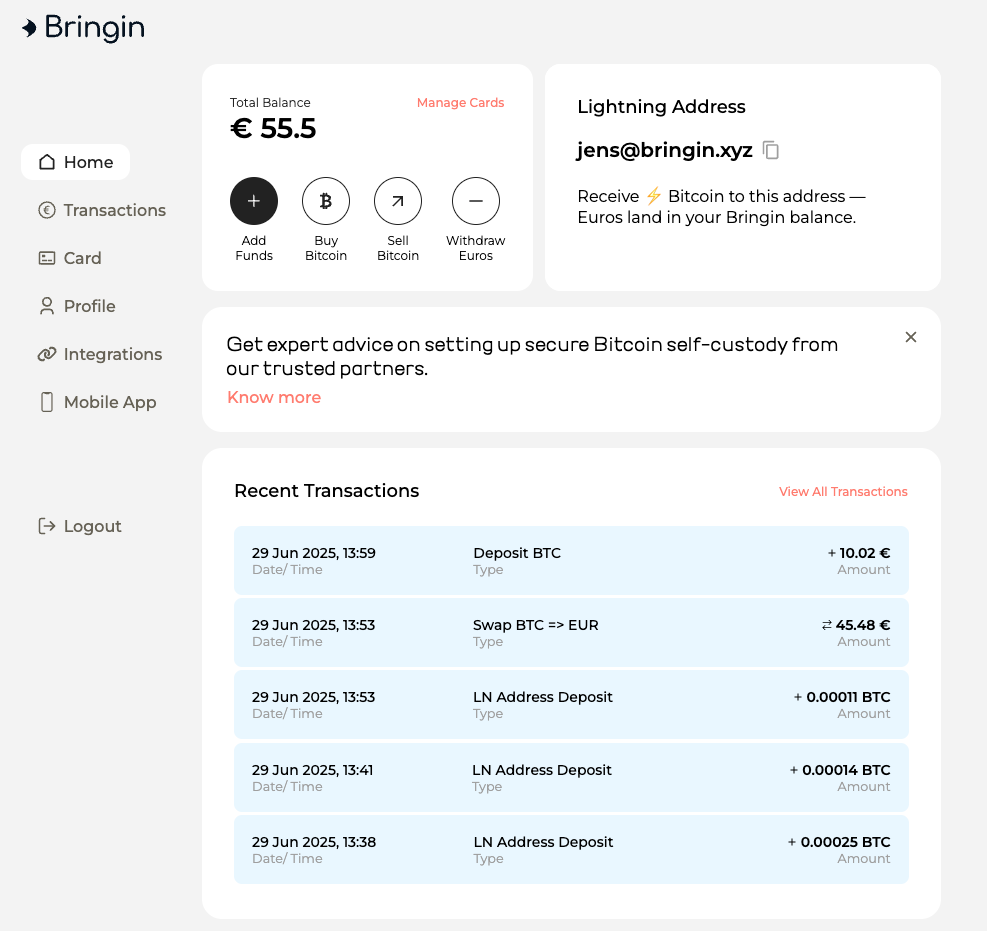
Bringin is a Bitcoin-to-Euro exchange service that offers a personal Lightning address and an individual IBAN account. Merchants receive Lightning payments that are immediately converted and credited. The subsequent SEPA payout to their own bank account is made at the touch of a button – for a small fee of only 1%.

The most important advantages at a glance:

  • Automatic euro payout upon receipt of Bitcoin payment
  • No exchange rate risks, no chargebacks, no transaction fees
  • Low total costs of only 2% (1% Coinsnap + 1% Bringin)
  • Real-time credit to your personal euro account
  • Fully implementable without any technical effort
  • Up to £10,000 per month payable, expandable with KYC documents

Get started in three easy steps:

  1. Open a Bringin account at https://bringin.xyz
  2. Set up a Lightning address, e.g. deinname@bringin.xyz
  3. Connect your Coinsnap account to this address – done!

(step-by-step-guide)

Save 30% on fees now

Register via the partner link https://spend.bringin.xyz/signup?affiliate=COINSNAP and save 30% on Bringin fees for the first three months.

Register with Coinsnap, install the plugin you need, and enter your Bringin-Lightning address.

Coinsnap & Bringin in Action

Accept Bitcoin Payments – Receive Euros

If you accept Bitcoin payments on your website or online shop using Coinsnap’s payment modules, you can now receive payouts directly in euros to your personal bank account – thanks to Bringin. It’s automatic, secure, and requires no technical setup.

Using Coinsnap and Bringin is currently the easiest, safest and quickest solution for all merchants that want to offer their customers Bitcoin payment, but do not care to deal with Bitcoin themselves.

If you use Coinsnap with Bringin, you enlarge your reach to a new, worldwide customer base (Bitcoin owners), and can market your merchandise across borders and currencies, without having to bother with accounting issues that come with Bitcoin, volatility risks or other hurdles that come with accepting Bitcoin in your business.

What is Bringin?

Bringin is a Bitcoin-to-Euro exchange service that provides you with your own Lightning address.
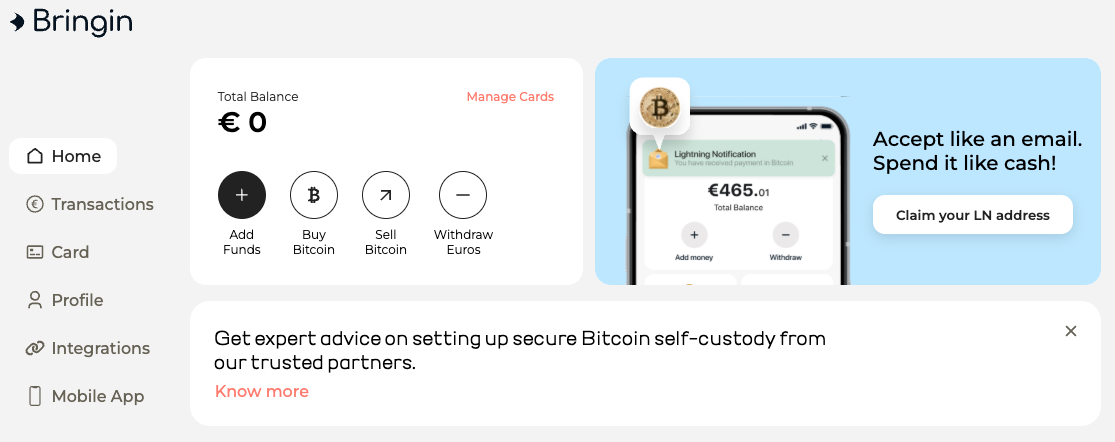
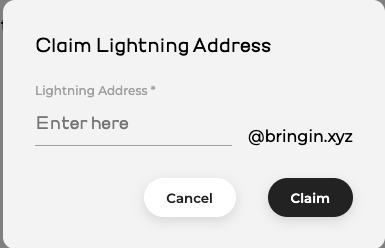
Using this address, you can receive Lightning payments that are automatically converted into euros and credited to your personal, vIBAN account that Bringin automatically sets up for you in your name.

You can then anytime transfer funds from this account to your chosen account (that must be in your name, too) for a small fee of just 1 % per transfer.

This makes Bringin the perfect solution for merchants who want to accept Bitcoin but prefer to receive payouts in euros.

How Coinsnap and Bringin Work Together

Coinsnap offers simple payment modules for Bitcoin and Lightning.

Due to the partnership with Bringin you can now convert your Bitcoin sales in real-time into Euro that will be credited immediately to your vIBAN account. You can then transfer Euros from this vIBAN account to your bank account any time you please for a small fee of 1 % per transaction.

To enable payouts to your bank account with Bringing all you need to do is to enter your Bringin Lightning address as your wallet in the Coinsnap backend.

Step-by-Step Guide

 Create a Bringin Account

Go to https://bringin.xyz/ and sign up.
You’ll need to complete a KYC process (valid ID and a recent utility bill).


 Set Up Your Lightning Address

After registration, you can create your personal Lightning address – e.g., yourname@bringin.xyz (if the name is still available).


 Create or Update Your Coinsnap Account

  • If you don’t have an account yet: https://app.coinsnap.io/register
  • In the Coinsnap backend, go to Settings → Wallet and enter your Bringin Lightning address.

Accept Bitcoin – Receive Euros

When a customer pays in Bitcoin via Coinsnap, the amount is sent directly to your Bringin Lightning address.
There, it is automatically converted into euros and credited to your personal euro account that Bringin established in your name. From then you can anytime transfer funds to your linked bank account.

Key details:

  • Minimum amount: 11,000 sats
  • Maximum amount per payment: €3,000
  • Conversion fee: 1 %
  • Bank payout fee: 1 % per transaction
  • Monthly payout limit: €10,000 (can be increased with additional KYC documents)


Payout Process

If you would now like to have the amount paid out to your bank account, click on “Withdraw Euros”. Then enter the bank details to which the credit should be made if this has not already been done.
Please note that the payout account must be in the same name as the Bringin account. Payouts to another bank account are not possible.

A fee of 1 % is charged for withdrawals to your bank account.
You can withdraw up to €10,000 per month. If you want to transfer more, you can increase the limit by submitting additional KYC documents.

You’ll receive a confirmation code via email and SMS.
After entering the code, the amount is instantly transferred to your bank account via SEPA Instant.


Conclusion: Coinsnap + Bringin = The Perfect Merchant Setup

Want to accept Bitcoin payments but prefer to get paid in euros?
Then the Coinsnap + Bringin combo is your ideal solution:

 Accept Bitcoin without price volatility
 Receive euros directly to your bank account
 No chargebacks like with credit cards or PayPal
 Low total fees: only 2% (1% Coinsnap + 1% Bringin)

Payment Method Fee Chargeback? Crediting Time
Coinsnap + Bringin 2% No Transaction Fee No Immediate
Credit Card 2.5–4% plus Transaction Fee Yes 1–2 days
PayPal 3–4.5% plus Transaction Fee Yes 1–2 days

Start Now and Save 30% on Fees

Open your Bringin account using this affiliate link:
 https://spend.bringin.xyz/signup?affiliate=COINSNAP
Save 30% on fees for the first three months!

Accept Bitcoin-payout into a bank account

You use the service of Coinsnap and your customers can pay with Bitcoin and Lightning?
Then you get the sales of your customers in the form of Lightning credited to your own Lightning Wallet.

However, you may prefer to have this Lightning credit paid out in Euros to your own bank account.
In this case, you can forward your Lightning balance to a Lightning broker and it will be immediately converted into Euros and paid out to your bank account.
Coinsnap itself does not offer exchange of bitcoin into euros, dollars or other currencies, but it works with partners who enable the exchange and withdrawal to a bank account.

By working with various Bitcoin brokers, it is possible to pay out in different currencies and to bank accounts in different countries and regions.

As a Coinsnap merchant, you are free to choose your Bitcoin broker

In addition to the fees, it is important to consider the country of the bank where you have your bank account and the currency in which the payout is to be made.
As a rule, you have to register separately with the relevant Bitcoin brokers and enter your personal data and bank details.
Each Lightning broker has different requirements for the documents and information to be submitted about your company.
With some Lightning Broker, the account opening can also be started directly from Coinsnap.
You will receive your own Lightning address from the Bitcoin or Lightning broker, which you can deposit with Coinsnap.
All incoming Bitcoin and Lightning payments from your customers will be forwarded by Coinsnap to this Lightning address.
The amount is then credited to your Lightning Broker, who converts the incoming amount into euros or another fiat currency and pays it out to your bank account.
Depending on the amount, payment can be made per incoming payment or cumulatively.
Instead of a Lightning address, the Lightning broker can also provide access data in another form, which you can enter in the corresponding fields of the respective provider in the Coinsnap backend.

The fiat invoice amount to be paid by the customer is calculated using the Bitcoin exchange rate provided by Lightning Brokers.
The final conversion takes place at the time the payment is received by the Lightning Broker. When paying by Bitcoin (onchain), the time of crediting depends on the confirmation on the blockchain, which can take an hour or longer. If the end customer pays via Lightning, the Lightning Broker is credited within a few seconds and is virtually risk-free due to price fluctuations. Below is a list of Bitcoin and Lightning brokers to which Coinsnap offers a connection. This list of Lightning Broker connections is constantly being expanded. If your Lightning broker is not yet listed here, please inform them about the possibility of working with Coinsnap and ask them to contact us.

DFX.Swiss

DFX is a Swiss crypto exchange and offers the possibility to buy and sell Lightning.

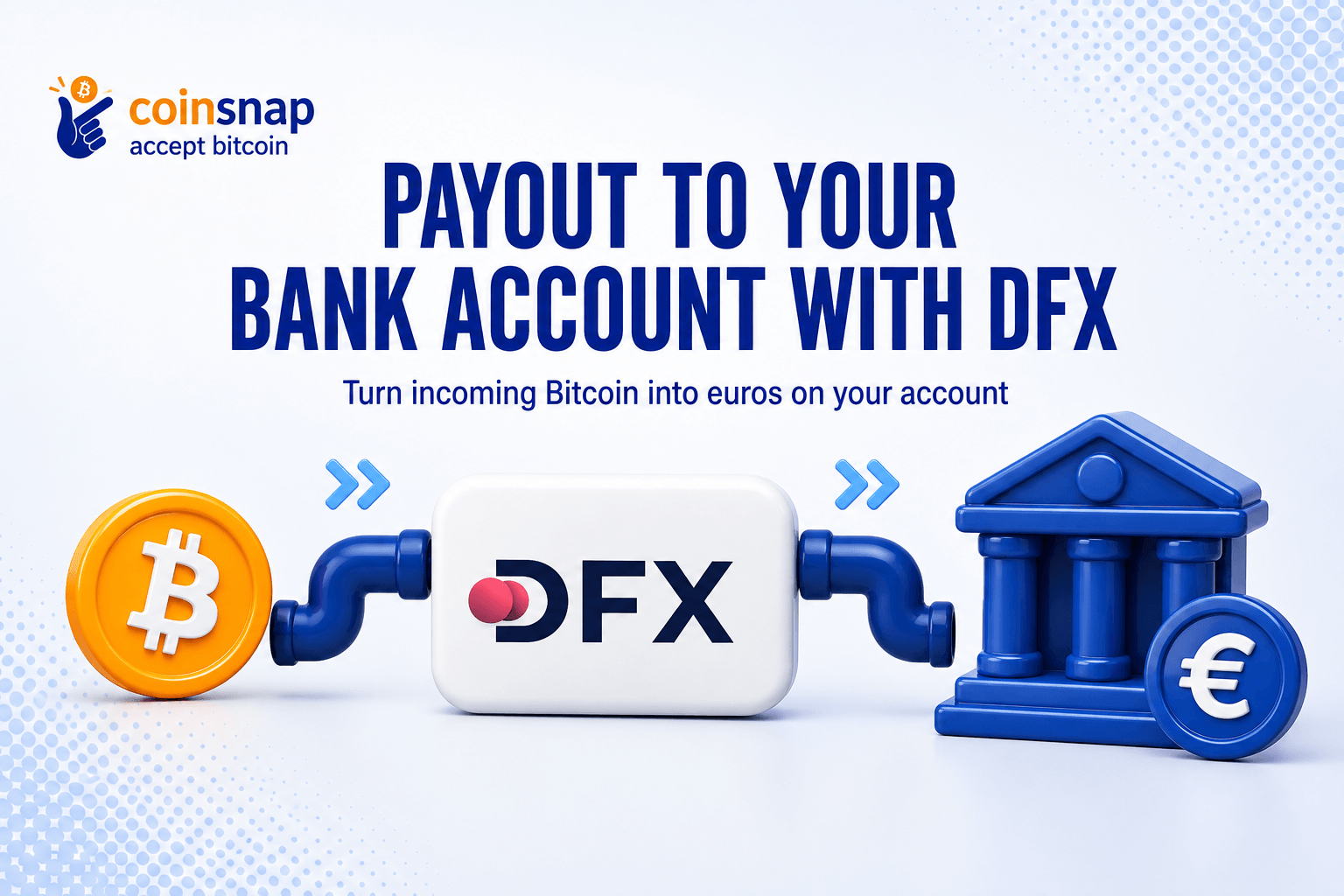
Coinsnap customers have the possibility to automatically convert the incoming Lightning payments of their end customers into Euro or CHF and have them paid out to their own bank account.

Payments can be made to all countries that are members of the SEPA area.

The SEPA countries include the 27 EU member states (Austria, Belgium, Bulgaria, Croatia, Cyprus, the Czech Republic, Denmark, Estonia, Finland, France, Germany, Greece, Hungary, Ireland, Italy, Latvia, Lithuania, Luxembourg, Malta, the Netherlands, Poland, Portugal, Romania, Slovakia, Slovenia, Spain, Sweden and the Czech Republic), the three EEA states Iceland, Norway and Liechtenstein as well as Switzerland, the United Kingdom, San Marino, Vatican City, Andorra, Montenegro and Monaco.


The fee for converting Lightning into euros or Swiss francs is 1.49% of the turnover.
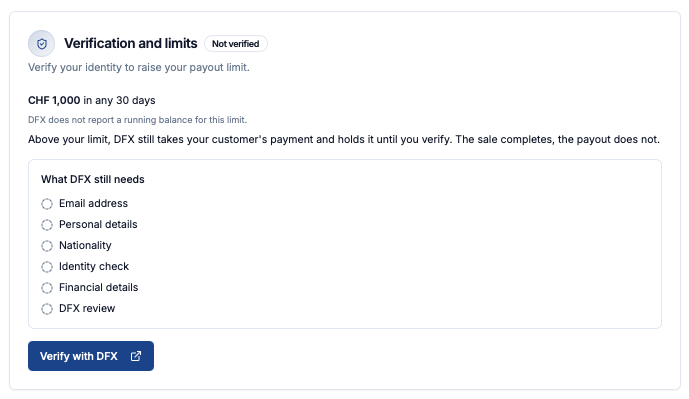
Merchants who wish to have their customers’ turnover paid out to a bank account must select the provider DFX in the backend under Payouts to bank account. The fields Account holder, IBAN bank details and Bank account currency can be entered there. No further details are required as long as the turnover submitted is less than CHF 1,000 / € 950 per day or CHF 100,000 / € 95,000 per year. If the turnover exceeds this limit, an additional identification check is required in accordance with Swiss law. The fee is then 1.99% of the turnover.

Strike

The Strike Wallet is a Bitcoin Lightning Wallet with a bank account.

The Strike Wallet is particularly suitable for store operators who prefer to have sales from their online store paid out to their own bank account instead of in Bitcoin.

In addition to the US and Europe, Strike is available in more than 95 other countries, including Brazil, Argentina, Mexico, El Salvador and Serbia.

Any online merchant in whose country Strike is available can accept payments from their customers via Coinsnap Bitcoin Lightning and receive the credit either in Bitcoin or in their local currency to their bank account.

The Strike Wallet is an ideal addition to the use of Coinsnap.
With the Strike Wallet, a Coinsnap merchant has the option of either having the transactions credited to their Bitcoin wallet or to their own bank account.
Wherever Strike is available, merchants can accept Bitcoin Lightning payments in their online store and receive the payout to their own bank account via Strike.
All you have to do is install the Strike app on your smartphone, verify yourself and enter your bank account.
You then open an account with Coinsnap and deposit the Lightning address provided by Strike.
Once you have installed the Coinsnap payment plugin in your online store, your customers can pay you with Bitcoin Lightning and the equivalent value is credited to the Strike Cash Wallet in your local currency and can be paid out to your own bank account.

Strike fee:

< €1,000 1.29%
€1,000 – €5,000 1.09%
€5,000 – €50,000 0.89%

> €50,000 0.79%
If you turn over less than €1,000 per month with Bitcoin in your online store and want to have the equivalent value paid out to your bank account via Strike, you will pay a fee of 1.29%, for example.

You can find detailed step-by-step instructions on how to install the Strike app on your smartphone and deposit it with Coinsnap in the article: Withdrawal via Strike to your own bank account

Pocket Bitcoin (in implementation)

Pocket Bitcoin is a Swiss Bitcoin broker that is currently testing the purchase and sale of Lightning. The purchase of Lightning credit is already possible during the test phase. The sale of Lightning, i.e. the exchange of Lightning into euros or CHF, is not yet possible.

Coinsnap is currently integrating the sale of Lightning via Pocket Bitcoin. Completion is planned for Q3/2024.


Coinfinity (planned)

Coinfinity is an Austrian Bitcoin broker that is currently testing the purchase and sale of Lightning. The purchase of Lightning credit is already possible during the test phase. The sale of Lightning, i.e. the exchange of Lightning for euros, is not yet possible.

As soon as an API interface for the sale of Lightning is available, Coinsnap will check whether a technical integration into the Coinfinity system is possible.


21Bitcoin (requested)

21Bitcoin is an Austrian Bitcoin broker that is currently testing the purchase and sale of Lightning. The purchase of Lightning credit is already possible during the test phase. The sale of Lightning, i.e. the exchange of Lightning for euros, is not yet possible.

As soon as an API interface for the sale of Lightning is available, Coinsnap will check whether a technical integration into the 21Bitcoin system is possible.


Lightning Broker wanted

Coinsnap is interested in working with Bitcoin brokers that offer Lightning sales and withdrawals to bank accounts.

Coinsnap is looking to partner with other Lightning brokers to offer payouts in other currencies and countries.

Coinsnap is a payment service provider that enables its merchants to accept Bitcoin and Lightning payments in their online stores. Some merchants want to keep the Bitcoin sales, while others prefer to have the Bitcoin Lightning payments they receive paid out to their bank account.

Therefore, we are looking for partners where these merchants can sell the Bitcoin Lightning sales and receive a credit in fiat to their bank account.

This means that the sales process should be automated for the merchant. The merchant should not have to go to the Lightning Broker website and manually enter the data for each sale. The data should be transferred automatically by Coinsnap.

The process could look like this:
The end customer orders something for €50 in the online store.
Coinsnap asks the Lightning Broker for the current exchange rate and receives, for example, 100,000 sats in response.
Coinsnap creates a Lightning invoice.
The end customer pays 100,000 sats and Coinsnap forwards the sats to the Lightning Broker.
The Lightning Broker exchanges the 100,000 sats for €50 and transfers them to the merchant’s bank account.

The implementation scenarios are listed below:

Lightning address:
One solution would be for the Coinsnap customer to open an account with a Lightning broker and receive a Lightning address from them. The merchant saves the Lightning address of the Lightning broker in the Coinsnap backend.
Coinsnap then forwards the merchant’s Bitcoin Lightning earnings to this Lightning address. The Lightning Broker then converts the incoming Lightning payments into fiat and pays them out to the merchant’s bank account.

API connection:
Coinsnap already has some information about the merchant. This data can be transferred to the Lightning Broker when registering a new merchant or a transaction.

1. User registration is required:

The service must allow users to register.
Registration includes receiving a signature message, signing it and registering via an endpoint.
Users can optionally provide additional information such as wallet and transfer/bank details.

2. the requirement for KYC verification

KYC verification is subject to regional regulations and may be optional in some countries and mandatory in others.
The service should offer the possibility of KYC verification based on transaction volume thresholds.
However, in cases where KYC is required, users must undergo identity verification via the API to ensure compliance.

3. transaction requirements:

The service should provide an API through which users can obtain offers for the sale of cryptocurrencies.

Tags:21bitcoin coinfinity dfx Pocket Bitcoin Strike

Strike Wallet Payout to your own bank account or Bitcoin Wallet

Strike Wallet Payout to your own bank account or Bitcoin Wallet

Table of contents  Show 

The Strike Wallet is a Bitcoin Lightning Wallet with a bank account and a Bitcoin wallet. The Strike Wallet is suitable for store operators who want to pay out sales from their online store to their own bank account or forward them to a Bitcoin on-chain wallet. Strike Wallet is available as a smartphone app for private individuals and Strike Business as a web version for companies. On this page we describe for private individuals how to initiate a Strike wallet payout to your own bank account or Bitcoin Wallet. If you are a company and would like to open an account with Strike, we recommend this article: Strike Business Bitcoin Lightning Wallet for businesses

In addition to the US and Europe, Strike is available in more than 95 other countries, including Brazil, Argentina, Mexico, El Salvador and Serbia.

Any online merchant in whose country Strike is available can accept payments from their customers via Coinsnap Bitcoin Lightning and receive the credit either in Bitcoin or in their local currency to their bank account.


We explain how this works in this article.

Use Strike with Coinsnap

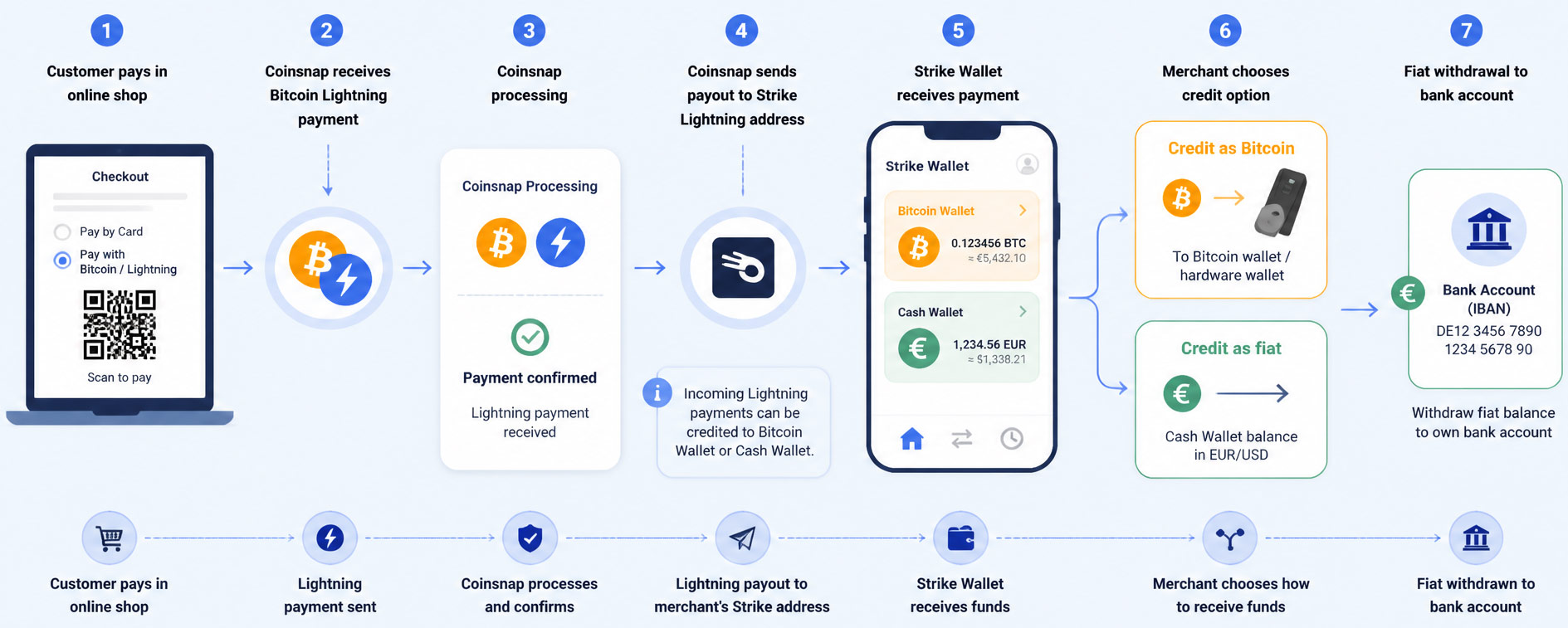
Anyone who accepts Bitcoin Lightning payments with Coinsnap can have their transactions credited to the Strike Wallet and decide whether the credit should be made in Bitcoin on the Bitcoin Wallet or in their local fiat currency on the Cash Wallet.

The Strike Wallet has two wallets, one for the balance in Bitcoin and one for the balance in your own fiat currency such as euros or dollars.
Strike also provides you with a Lightning address that is suitable for receiving Bitcoin Lightning payments from Coinsnap.
You connect your Strike Wallet to Coinsnap and all your Bitcoin sales are credited directly to your Strike Wallet.
In your Strike Wallet, you can choose whether the credit should be made to the Strike Bitcoin Wallet or to the Strike Cash Wallet.

In this article, we explain how to get the Strike Wallet, how to set up a Lightning address with Strike and how to deposit this Lightning address with Coinsnap so that your Bitcoin sales are credited directly to your Strike Wallet. We will then show you how to set up the Strike Wallet so that incoming Satoshi is credited to the Bitcoin Wallet or the Fiat Cash Wallet.

Install and use Strike Wallet

The Strike Wallet is an application for your smartphone.


To install the Strike app on your smartphone, you can either search for the Strike app in the Apple App Store or the Google Play Store and install it, or you can visit the strike.me website and follow the link for your smartphone.

Once you have installed the Strike app on your smartphone, you have to enter your personal details and also provide a photo of an ID document.

Once your personal details have been verified, Strike is available.

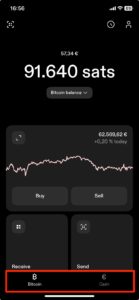
At the bottom of the home screen, we find the selection for the two Strike Wallets already mentioned.

One is the Bitcoin Wallet with our Bitcoin balance and the other is the Cash Wallet with our local fiat balance.
The fiat balance is held in my local currency and is, for example, in USD for users from the USA and in euros or in the currency in which you live for users from Europe.

Strike Lightning Address

To use Coinsnap, we need our Lightning address, which is provided to us by Strike.

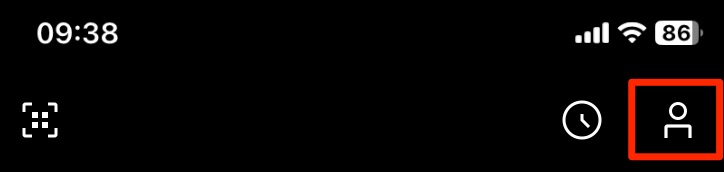
To do this, click on the symbol that looks like a little man in the top right-hand corner.
You will then be taken to your profile page.


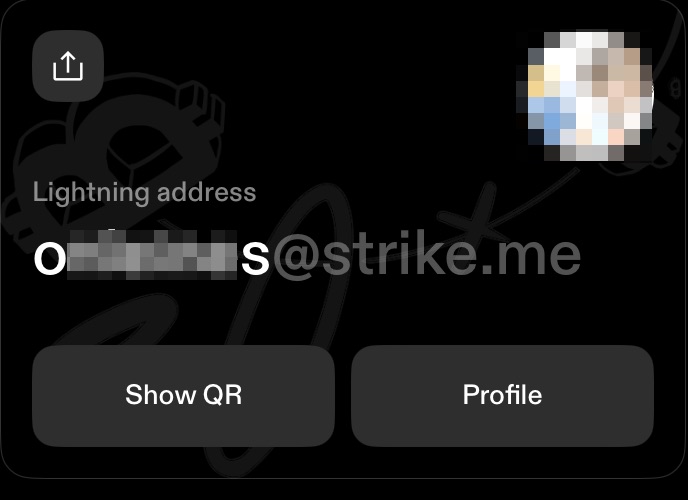
Here you have the option of choosing your desired name.
This name and the suffix @strike.me will then be your Lightning address.
This looks like an e-mail address, but instead of receiving e-mails, you can use the Lightning address to receive Lightning payments.

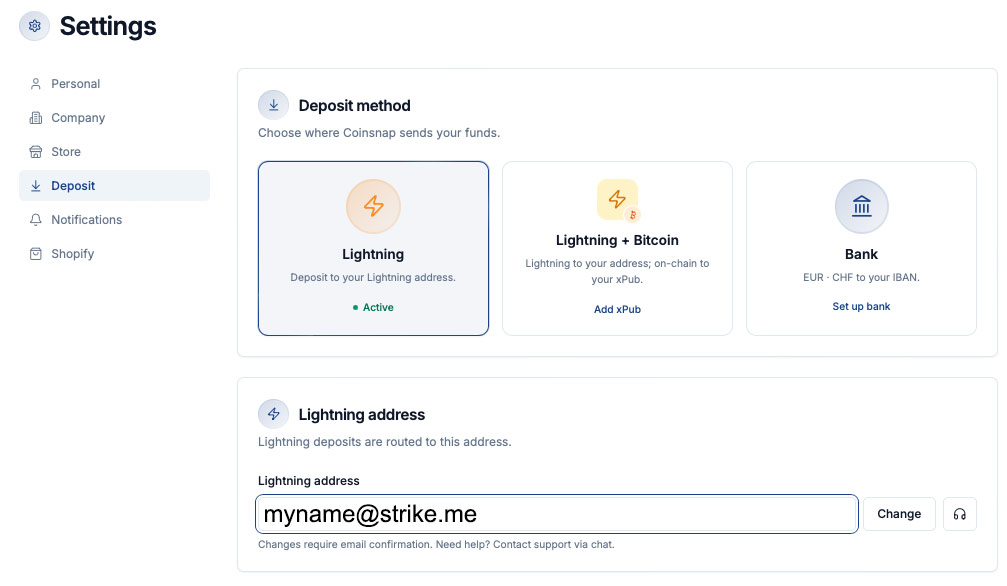
We now store this Lightning address with Coinsnap and log into our Coinsnap account.

There we go to the Settings section and then to Payout.

In the Lightning Payout section, we store the Lightning address from our Strike Wallet in the Lightning address field.

Now our Bitcoin sales that come in for us via Coinsnap are credited directly to our Strike Wallet.
But should the credit be made to the Bitcoin Wallet or the Cash Wallet?

Credit in Bitcoin or fiat?

You can specify in the Strike Wallet how the credit is to be issued.
Either in Bitcoin in the Bitcoin Wallet or in your fiat currency in the Cash Wallet.
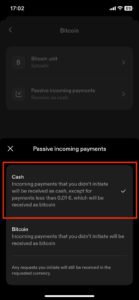
To do this, we scroll all the way down to the Settings section in the Profile area, where our Lightning address is also displayed.

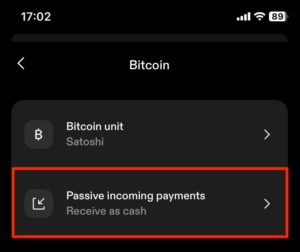
There we find the Bitcoin sub-item and select it, where we find the Passive Incoming Payments selection.

Here we can select how payments that you have not initiated yourself are credited.

Payments to your Lightning address can be sent to you by anyone and are therefore not specifically initiated by you.

Accordingly, you can select whether these are credited to your Cash or Bitcoin Wallet.

If you opt for the Bitcoin variant, you can use the Bitcoin balance to pay with Bitcoin yourself or transfer the Bitcoins to a secure Bitcoin wallet, such as a hardware wallet.

If you want to protect yourself from the price fluctuations of Bitcoin and prefer to receive your transactions in your own currency in your own bank account, you can transfer the balance from the cash wallet to your own bank account.

Credit to your own bank account

Before you can withdraw the balance in your Cash Wallet to your bank account, you must deposit your bank account with Strike.
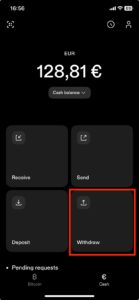
To do this, switch to the Cash Wallet and find the Withdraw menu item there.

Click on “Add bank account”.

Then enter the account number or your IBAN

Click on “Continue”.

Then check the details again and click on “Confirm”.

Please note that withdrawals are only possible to bank accounts with the same name as the Strike account.

If you sell Bitcoin via Strike, you will incur a trading fee, the so-called Strike fee, which is calculated as a percentage of the trading volume.
The strike fee is divided into different levels or “tiers” depending on your monthly trading volume.
The more you buy or sell, the lower the fee.
Monthly trading volume Fee

< €1,000 1.29%
€1,000 – €5,000 1.09%
€5,000 – €50,000 0.89%

> €50,000 0.79%
If you turn over less than €1,000 per month with Bitcoin in your online store and want to have the equivalent value paid out to your bank account via Strike, you will pay a fee of 1.29%, for example.

Credit to Bitcoin (onchain) wallet

If you prefer to keep the Bitcoin you earn, you should not store your Bitcoin balance on the Strike Wallet, but transfer it to a secure Bitcoin hardware wallet from time to time. If you transfer your Bitcoin balance from the Strike wallet to another Bitcoin wallet, Strike does not charge any fees. If you transfer your Bitcoin balance to an on-chain Bitcoin wallet, you only have to pay the mining fee. Most other Lightning wallets charge an exchange fee for switching from Lightning to Onchain, in addition to the mining fee. Strike does not charge any exchange fees and is therefore an interesting solution for traders who want to keep their own Bitcoin and transfer it to a secure Bitcoin hardware wallet (e.g. Bitbox, Ledger or Trezor).

Strike Business

If you want to use Strike Wallet for your business, we recommend Strike Business.

If you are a business and want to open an account with Strike, we recommend this article: Strike Business Bitcoin Lightning Wallet for Businesses


Strike Wallet

The Strike Wallet is an ideal addition to the use of Coinsnap.
With the Strike Wallet, a Coinsnap merchant has the option of either having the transactions credited to their Bitcoin wallet or to their own bank account.
Wherever Strike is available, merchants can accept Bitcoin Lightning payments in their online store and receive the payout to their own bank account via Strike.
All you have to do is install the Strike app on your smartphone, verify yourself and enter your bank account.
You then open an account with Coinsnap and deposit the Lightning address provided by Strike.
Once you have installed the Coinsnap payment plugin in your online store, your customers can pay you with Bitcoin Lightning and the equivalent value is credited to the Strike Cash Wallet in your local currency and can be paid out to your own bank account.

Payout to bank account with DFX

Payout to bank account with DFX

Table of contents  Show 

You use the service of Coinsnap and your customers can pay with Bitcoin and Lightning? Then you get the sales of your customers in the form of Lightning credited to your own Lightning Wallet.

If you prefer to have your Bitcoin turnover paid out directly to your bank account, you can do this via the Swiss Bitcoin broker DFX.

Coinsnap works together with DFX and can thus exchange Bitcoin balances into Euro or CHF, which enables a payout to any bank account within the SEPA area.

The SEPA area comprises the 27 EU member states, the EEA states, Switzerland and the UK.


Deposit of your own bank account

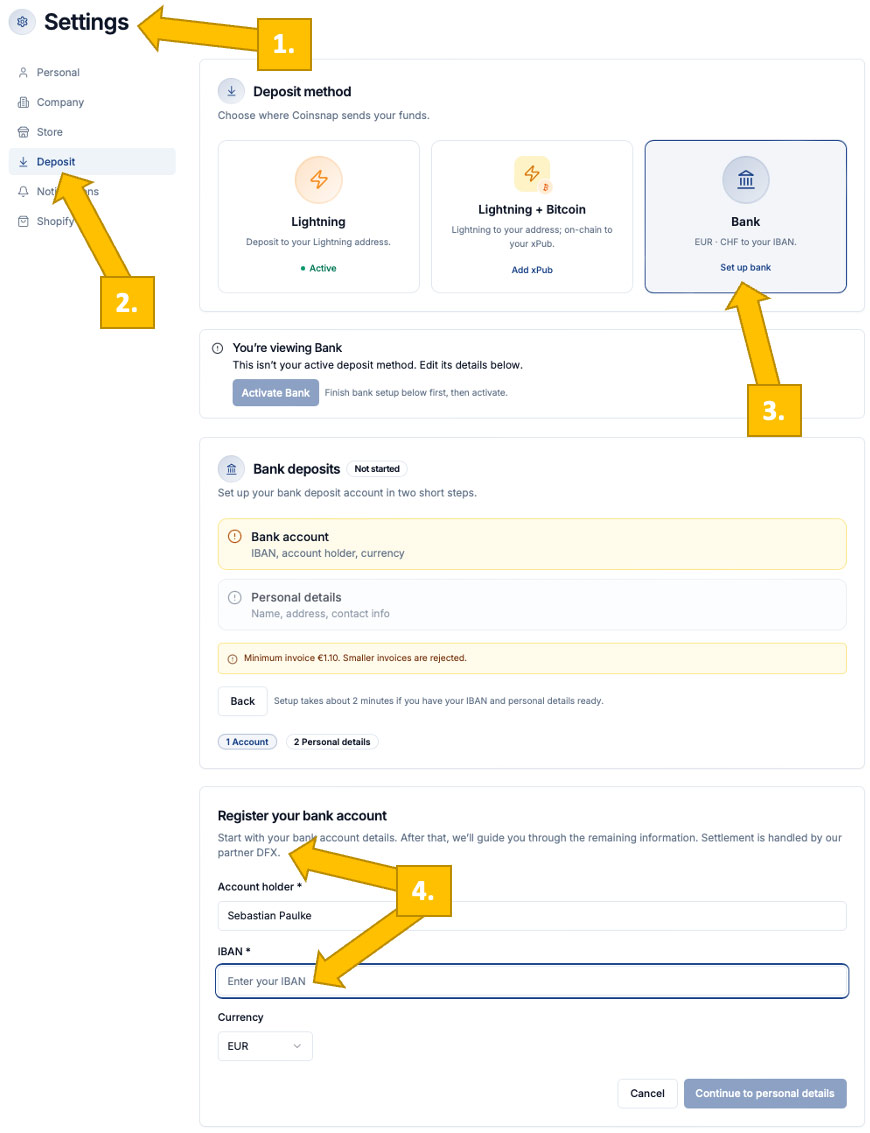
Once you have registered with Coinsnap and entered your Lightning address, you can choose to pay out by bank transfer via the Payout menu item.

If you then select the provider DFX, you will be asked to enter your bank details.
This includes the exact name of the account holder and the IBAN number.

You must also specify the currency in which the payout is to be made. You can choose between Euro and CHF.

If you have not yet entered your personal and company details, you can do so here.


Payout to your own bank account

If a customer pays with Bitcoin or Lightning in your online store, the purchase amount is forwarded to DFX.

DFX converts the sats into euros or CHF at the current exchange rate and transfers the equivalent value to your bank account at midnight, where it is usually credited the next day.

Each payment is changed and paid out individually. This means that you have a separate entry on your bank statement for each of your customers’ purchases.

The minimum amount is € 10. If the amount is smaller, it is paid out to the Lightning Wallet.

The payout can be made in either euros or CHF. Your own bank account will be credited in the corresponding currency of this account. A merchant with a bank account in the UK can make the payout in euros, the credit is then made in pounds to his English bank account.


Bank account payout DFX

Prerequisite

To be able to make a payout to their own bank account, the merchant must provide the company details. In addition, the name of the account holder and the IBAN of the corresponding account.

No further information is required as long as the turnover is less than CHF 1,000 / € 950 per day or CHF 100,000 / € 95,000 per year. If the turnover exceeds this limit, an additional identification check is required under Swiss law.

Fees

The fee for exchanging Lightning into Euros or Swiss Francs is 1.49% on the turnover.

If the turnover of CHF 1,000 / € 950 per day or CHF 100,000 / € 95,000 per year is exceeded and an additional identification check is therefore required, the fee is 1.99 % of the turnover.