
You’ve decided to accept Bitcoin payments? Maybe you’ve already discovered Coinsnap and realized that accepting Bitcoin & Lightning payments is actually much easier than you expected.
But then comes the first practical question: “Wait… what exactly is a Lightning wallet — and how do I get a Lightning address?”
Good news: You do not need to be a Bitcoin expert, run servers, understand cryptography, or become a “crypto trader” to accept Bitcoin payments in your own Lightning wallet. In fact, setting up a Bitcoin Lightning wallet is easier than opening a traditional online banking app.
This guide shows you — step by step — how to:
- get a Bitcoin Lightning wallet
- create your own Lightning address
- receive your first Bitcoin payment
- connect your wallet to Coinsnap
And yes: you can realistically do all of this during your coffee break.
What Is a Bitcoin Lightning Wallet?
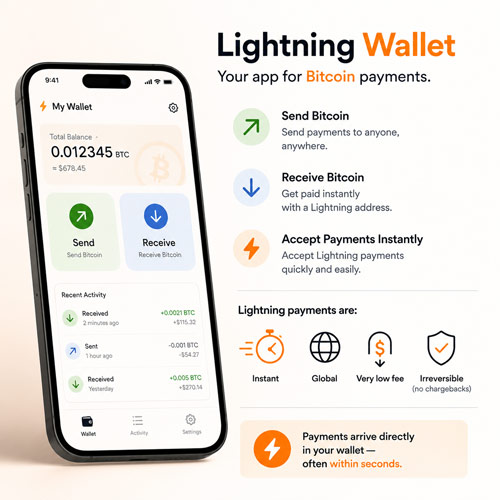 A Bitcoin Lightning wallet is simply an app that allows you to send and receive Bitcoin, as well as accept Lightning payments instantly.
In many ways, it works similarly to familiar digital payment apps: PayPal is used for dollars, Revolut for bank transfers — and a Lightning wallet for Bitcoin payments.
The big difference is that Lightning payments are typically instant, global, extremely low-cost, and irreversible, meaning there are no chargebacks.
For merchants and entrepreneurs, this is particularly attractive because payments are credited directly to their wallet, often within just a few seconds.
What Is a Lightning Address?
A Lightning address works similarly to an email address for Bitcoin payments.
Instead of sending Bitcoin to a long cryptic wallet string like this: bc1qxy2kgdygjrsqtzq2n0yrf2493p83kkfjhx0wlh you can simply receive payments with something much friendlier:
yourshop@wallet.com
That is your Lightning address. It works very similarly to:
- an email address
- a PayPal username
- or a bank alias
Customers can send Bitcoin directly to that address. This makes accepting Bitcoin dramatically easier for normal businesses and customers.
Do You Actually Need a Lightning Wallet?
If you want to:
- accept Bitcoin payments
- receive Lightning payments
- get paid instantly
- receive payments directly into your own wallet
- use Coinsnap
…then yes — you need a Lightning wallet.
The good news: You can install one for free in just a few minutes.
Best Lightning Wallets for Merchants
Here are five beginner-friendly Lightning wallets that are well suited for merchants who want to start accepting Bitcoin payments without unnecessary technical complexity.
Coinsnap POS Wallet
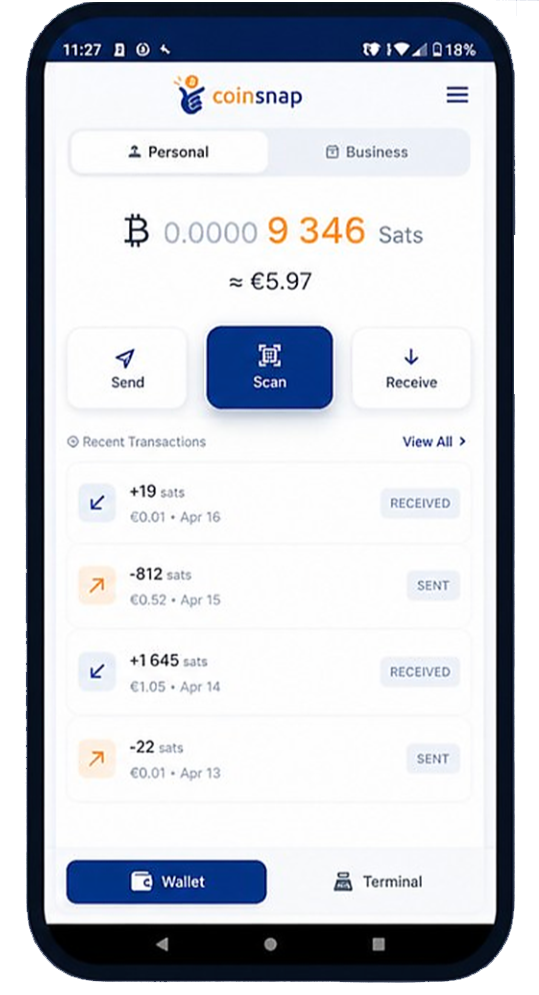 For merchants who want to accept Bitcoin payments in their business, Coinsnap POS Wallet is the most practical choice.
It is a self-custodial Bitcoin and Lightning wallet, which means that you create the wallet locally on your own device and stay in control of your funds from the start. No registration is required to use the wallet itself, and Coinsnap does not hold or control your Bitcoin. You can receive Lightning and on-chain Bitcoin payments directly into your own wallet, send Bitcoin, back up your wallet with a recovery phrase, and restore it whenever needed.
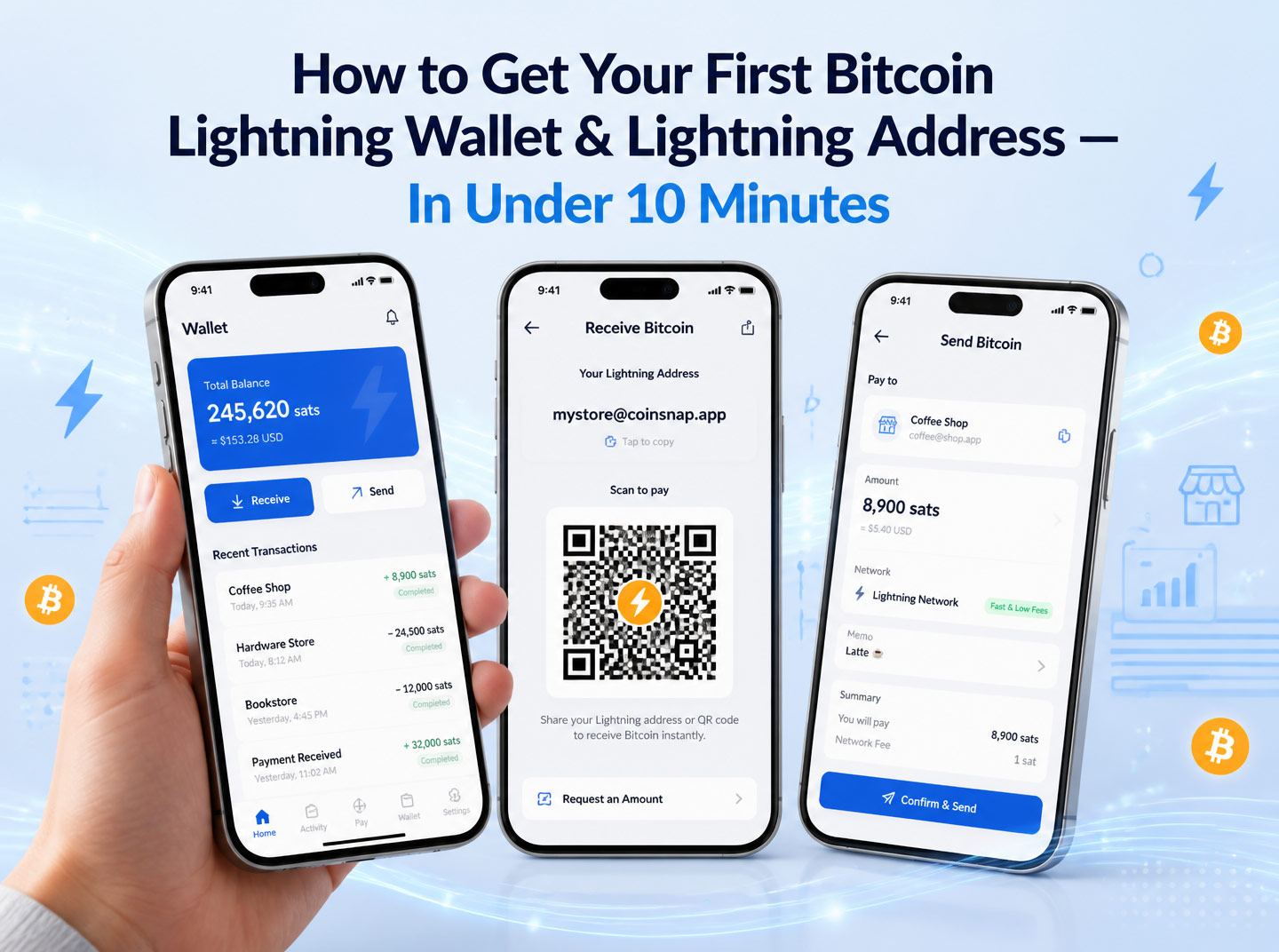
You also get an individualized Lightning address, such as mystore@coinsnap.app, which allows customers or payment systems to send Bitcoin to you as easily as sending money to an email-style address.
This makes Coinsnap POS Wallet especially suitable for business owners who want a simple but professional wallet solution without giving up control over their money.
And if you later want to accept Bitcoin payments in a physical store, the app also includes optional Point-of-Sale functionality for in-person payments, as well as merchant tools such as POS terminals, employee devices, analytics, reporting, accounting exports, and product catalogs.
Wallet of Satoshi
 Wallet of Satoshi is one of the easiest Bitcoin Lightning wallets for beginners. It is designed for people who want to send and receive Bitcoin without dealing with technical setup, channel management, or complicated wallet configuration. When you install the app, you can get an individualized Lightning address, such as
 yourname@walletofsatoshi.com, quickly and start receiving payments almost immediately.
This makes Wallet of Satoshi a very convenient solution for beginners and small merchants who want to test Lightning payments with minimal friction. However, in this setup it should be understood as a custodial wallet solution: the provider manages the wallet infrastructure for you, which makes onboarding extremely simple, but also means that you depend on the provider to hold and operate the wallet service.
Wallet of Satoshi has also introduced a self-custody Lightning experience based on Spark, giving users more control over their funds while keeping the simple user interface that made the wallet popular in the first place. For merchants, this makes it a practical starting point if they want to test Lightning payments quickly and receive their first Bitcoin payments with minimal friction.
Best for: first-time users, small merchants, and anyone who wants a very simple Lightning wallet with a built-in Lightning address and an easy onboarding experience.
Misty Breez Wallet
 Misty Breez is a good choice for users who want a simple but non-custodial Bitcoin Lightning wallet. It is designed to make Lightning payments easy without requiring users to manage Lightning channels, run a node, or deal with technical wallet setup.
Users can send and receive Bitcoin, create a personal Lightning address, and use Lightning payments in a very beginner-friendly mobile app while still keeping control over their own funds. Misty Breez supports Lightning payments, Lightning addresses like myshop@breez.fun, on-chain Bitcoin addresses, and other payment formats, making it a flexible wallet for everyday Bitcoin use.
Misty Breez is therefore especially interesting for merchants who want more independence than a custodial wallet provides, but still want an easy onboarding experience.
Strike Business
 Strike Business is a good option for companies that want to accept Bitcoin and Lightning payments, but prefer a more traditional business account setup with euro conversion and formal onboarding.
Unlike a self-custodial wallet, Strike Business is a custodial solution: your Bitcoin and euro balances are held and managed by Strike, and opening a business account requires a KYC process for the company, its directors, and relevant shareholders. In return, you get a business wallet with both a Bitcoin balance and a euro cash account, plus your own Lightning address, usually in the format username@strike.me.
This makes Strike Business especially useful for merchants who want to receive Bitcoin payments but either keep them as Bitcoin or have them automatically converted into euros. For businesses that want clean separation between private and company Bitcoin payments, euro settlement, and a more account-based setup, Strike Business can be a practical choice.
Cake Wallet
 Cake Wallet is an interesting option for users who want a Bitcoin Lightning wallet with strong privacy features and a simple mobile experience. Cake Wallet is open source and non-custodial, which means that users keep control over their private keys and funds instead of relying on a wallet provider to custody their Bitcoin.
The wallet supports Lightning payments in a way that avoids the usual technical complexity of channel management, liquidity planning, or keeping a Lightning node online manually. Users can create a custom Lightning address from the beginning, for example in the format yourname@cake.cash, and start receiving Lightning payments without having to unlock this feature through minimum balances or usage thresholds.
For merchants Cake Wallet is more of a general-purpose wallet than a dedicated business wallet: it can receive Lightning payments, but it does not provide any advanced merchant-specific functionalities.
Step-by-Step: How to Get a Lightning Address
Let’s make this practical. The exact screens and labels may differ slightly from wallet to wallet, but the basic setup process is usually very similar. In the following example, we use the Coinsnap POS Wallet to show how quickly you can create a Lightning wallet, get your own Lightning address, and prepare your business to receive Bitcoin payments.
Step 1: Install the Wallet App
First, download and install Coinsnap POS Wallet from your app store. The app is available for mobile devices and can be installed like any other wallet or payment app.
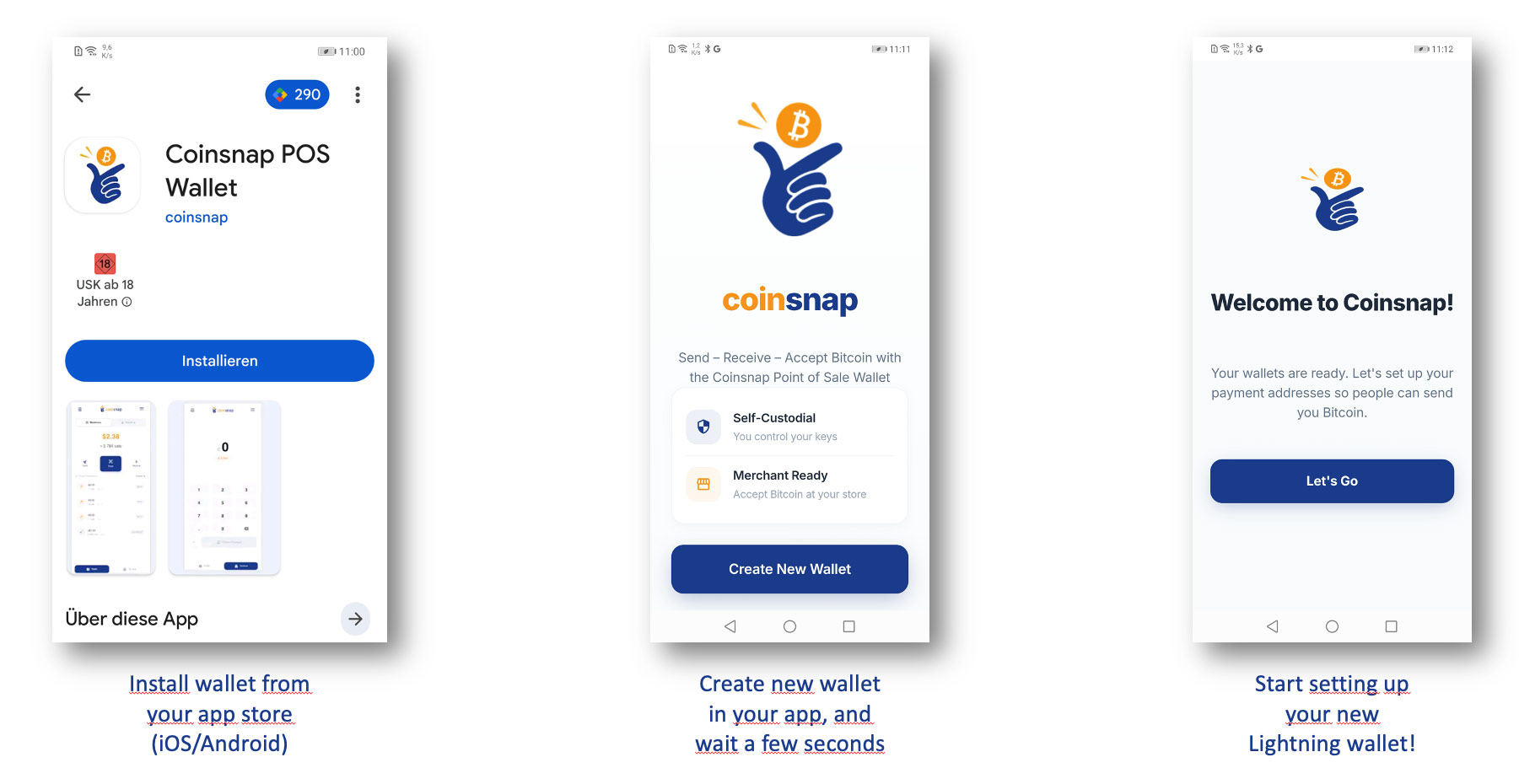
Once the app is installed, open it for the first time. You will see the Coinsnap welcome screen, which explains the basic idea of the wallet: you can send, receive, and accept Bitcoin with a self-custodial wallet. To begin, tap Create New Wallet. The app will then create your new Bitcoin and Lightning wallet directly on your device.
After a few seconds, your wallet is ready. The next screen welcomes you to Coinsnap and starts the setup process for your payment addresses. Tap Let’s Go to continue and set up your new Lightning wallet.
Step 2: Create your Lightning address
Next, set up your personal Lightning address. This is the address people can use to send Bitcoin to your wallet, similar to how they would send an email to an email address.
On the first screen, enter your preferred Lightning address name. This will become your personal address in the format <code>yourname@coinsnap.app</code>. The app also suggests a pre-generated address, which you can use if you prefer to stay more anonymous.
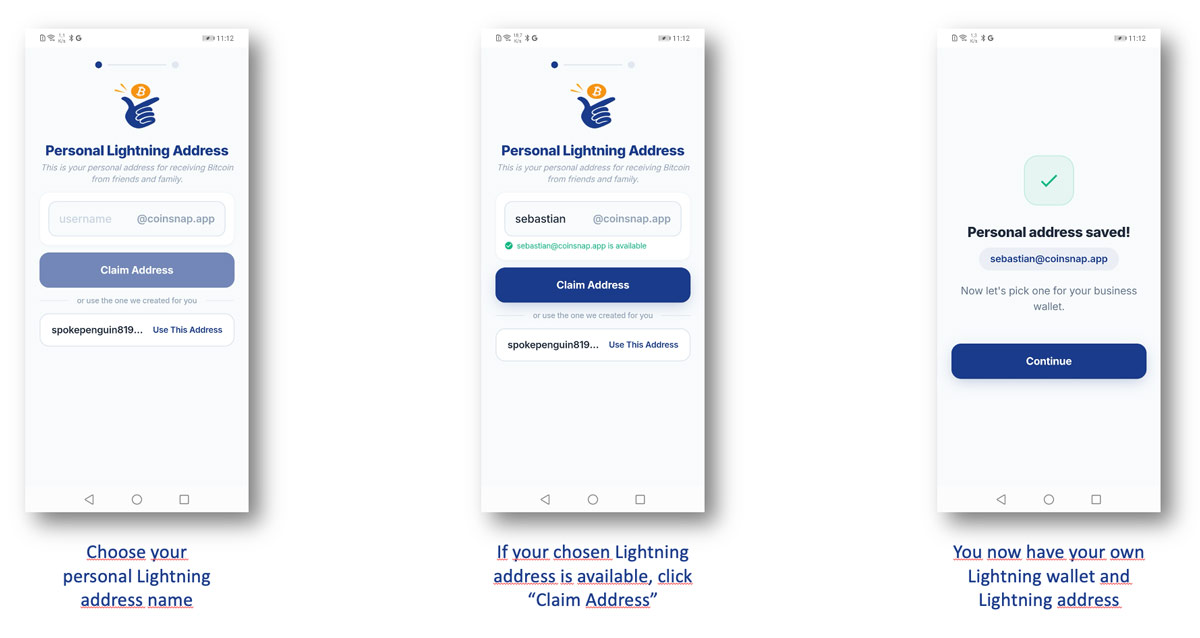
After entering your chosen name, the app checks whether the address is still available. If it is available, tap Claim Address to reserve it for your wallet.
Once the address has been saved, your personal Lightning wallet and Lightning address are ready. You can now receive Bitcoin payments through your new @coinsnap.app Lightning address and continue with the setup of your business wallet.
The app will now ask you to repeat the same process to set up your business Lightning wallet.
If you only want to use the app as a private Bitcoin wallet, you can skip this step. But if you are a merchant, business owner, or plan to use the wallet for business payments, this is a very useful feature. It allows you to keep your private and business payments clearly separated. Simply choose an appropriate business Lightning address, such as myfirm@coinsnap.app, and use this address whenever you want to receive Bitcoin payments for your business.
Step 3: Receive Bitcoin sent to your new Lightning address in your Lightning wallet
To receive your first Bitcoin payment, open the Coinsnap POS Wallet and tap Receive. The app will then display a payment screen with a QR code and your Lightning address, for example sebastian@coinsnap.app. You can show this QR code directly to the customer or share it digitally, so the customer can scan it and send the payment.
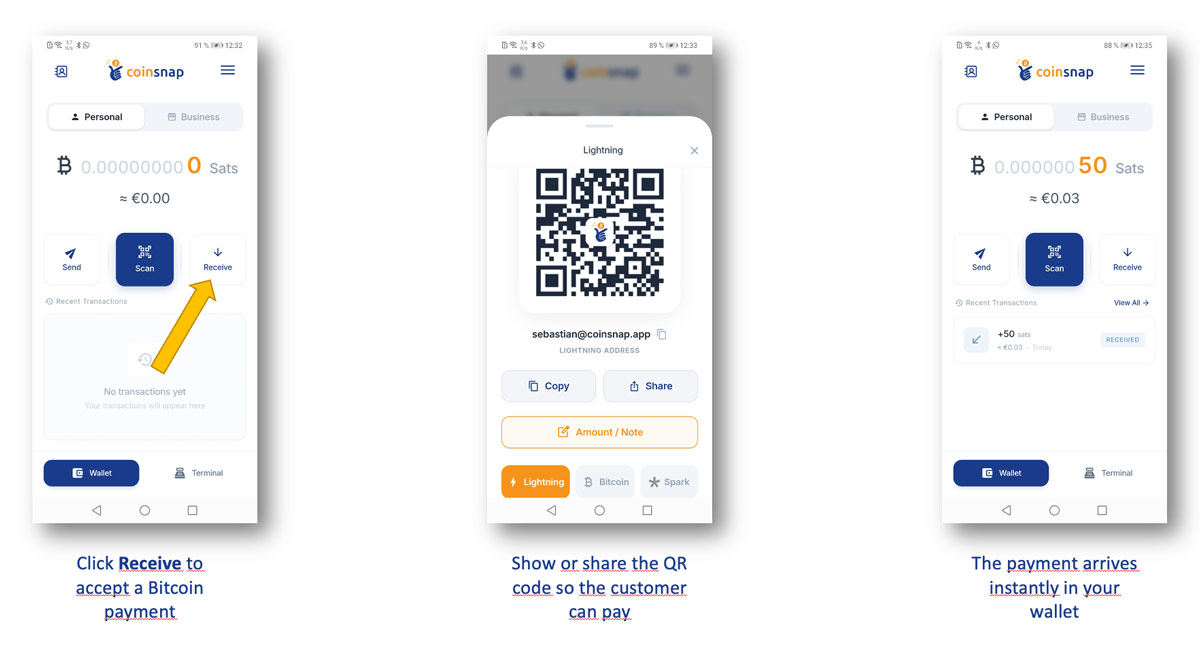
Once the customer has paid, the Bitcoin payment arrives instantly in your wallet. The wallet balance is updated automatically, and the incoming payment appears in your recent transactions as a received payment.
Using Your Business Lightning Address with Coinsnap
If you use Coinsnap for your online store or website, your business Lightning address, for example myfirm@coinsnap.app, is the address where your Bitcoin payments are received. Simply enter your business Lightning address in your Coinsnap account settings.
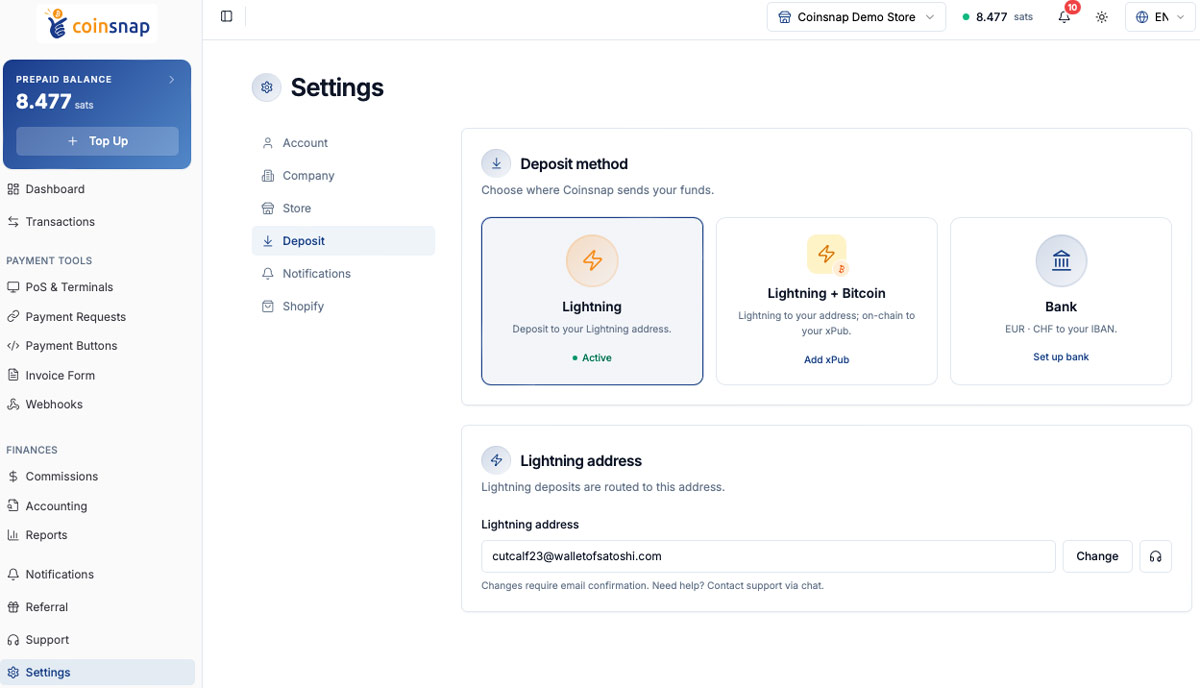
When a customer chooses Bitcoin at checkout, Coinsnap creates the payment request. The customer confirms and authorizes the payment with their own Bitcoin wallet. Once the payment is completed, the amount is credited directly to your business wallet — not to a third-party account.
This means your online Bitcoin payments can flow directly from the customer to your own business Lightning wallet, while Coinsnap handles the payment process in the checkout.
Conclusion — Which Lightning Wallet Should I Install to Get My Lightning Address?
## Conclusion — Which Lightning Wallet Should I Install to Get My Lightning Address?
If you want to get your first Lightning address, my recommendation is simple: choose a wallet that matches what you actually want to do with it.
If you are only curious and want to test Lightning for the first time, almost any simple Lightning wallet will do. You install it, receive a few sats, send a small payment, and get a feeling for how fast and easy Lightning payments can be.
But if you are a merchant, business owner, or entrepreneur, I would not treat your wallet as a toy or temporary experiment. The moment you accept real customer payments, your wallet becomes part of your payment infrastructure. It is where your money arrives. It is where your business payments are received. And it is the address you may connect to your online store, website, payment link, or checkout.
That is why I recommend using a merchant-optimized wallet from the beginning.
There are two strong business options: Strike Business and Coinsnap POS Wallet.
Strike Business is interesting if you want a more account-based setup, including euro conversion. It is a custodial business solution, which means Strike manages the account and holds the funds for you. You also need to go through business onboarding and KYC, including company and shareholder verification. For businesses that want Bitcoin payments but prefer to receive euros, this can be a useful option.
My personal recommendation for most merchants, however, is Coinsnap POS Wallet.
I am, of course, not completely neutral here — I am the CEO of Coinsnap. But I also work with Bitcoin payment solutions every day, and from that perspective I can say clearly: Coinsnap POS Wallet is currently the most advanced Lightning wallet specifically built for merchants.
The reason is not only that you can create your own Lightning address, such as myfirm@coinsnap.app, within minutes. The real advantage is that the wallet is built around the practical needs of businesses. You can receive Bitcoin payments directly into your own self-custodial wallet, without registration, without business KYC just to create the wallet, and without Coinsnap holding your funds. You control the wallet, the recovery phrase, and the Bitcoin you receive.
At the same time, Coinsnap POS Wallet is more than just a wallet. It includes merchant-focused functionality that ordinary Lightning wallets do not offer: Point-of-Sale payments, payment terminals, employee devices, analytics, reporting, accounting exports, and product catalogs. That makes it not only a place to receive Bitcoin, but a practical tool for accepting and managing Bitcoin payments in a real business environment.
So my advice is this: if you mainly want euro settlement and are prepared for business onboarding, Strike Business can be a good choice. But if you want to get started quickly, create your own Lightning address, keep control over your funds, and use a wallet that was designed specifically for merchants, I recommend starting with Coinsnap POS Wallet.
Ready to Accept Bitcoin Payments?
Create your wallet, get your Lightning!
FAQ
A Lightning address is an easy-to-read payment address for receiving Bitcoin over the Lightning Network. It looks similar to an email address, for example mystore@coinsnap.app, and allows others to send Bitcoin to you without using a long technical invoice or wallet string.
You create a Lightning address by installing a Lightning wallet that supports Lightning addresses. During setup, the wallet usually asks you to choose a name, checks whether it is available, and then creates your personal address, for example yourname@walletprovider.com.
Yes. A business Lightning address is ideal for merchants because it gives your business a simple, recognizable payment destination. For example, you can use an address such as myfirm@coinsnap.app and connect it to your Coinsnap account, so Bitcoin payments from your checkout are credited directly to your business wallet.
Yes. Some Lightning wallets like the Coinsnap POS Wallet allow you to create or manage separate wallets and addresses. This is useful if you want to keep private Bitcoin payments and business payments clearly separated.
The address itself is neither custodial nor self-custodial. That depends on the wallet behind it. With a custodial wallet, the provider manages the funds for you. With a self-custodial wallet, you control the wallet and the keys yourself. For merchants, a self-custodial wallet is usually the better long-term setup.
For merchants, the best choice is usually a wallet that offers a Lightning address, supports direct Bitcoin payments, and gives you control over your funds. A self-custodial wallet such as Coinsnap POS Wallet is a strong option because it lets merchants receive Bitcoin directly into their own wallet while still keeping setup simple.