Bitcoin Crowdfunding for WordPress

The complete guide for donations, projects & campaigns

What is crowdfunding?

Crowdfunding refers to the financing of a project by a large number of individual supporters – usually via the Internet. People donate or invest small amounts in order to achieve a larger goal together. There are different types:

  • Donation-Based: pure donations without consideration (e.g. for charitable purposes)
  • Reward-based: Donors receive something in return, e.g. a product
  • Equity-Based: Investors receive company shares
  • Lending-Based: Participation via repayment models

Crowdfunding is a billion-dollar market worldwide. According to data from Statista, the global crowdfunding volume in 2023 was over 12 billion USD – with a continuing upward trend.

What is Bitcoin crowdfunding?

Bitcoin CrowdfundingBitcoin crowdfunding is a modern variant of classic crowdfunding – with the special feature that supporters do not pay in euros or dollars, but in Bitcoin. The advantages are obvious:

  • The amounts are directly sent directly to the wallet of the project initiator
  • It does not need any middlemen or banks
  • Therefore, no KYC process with the payment service provider is required
  • Global reach: Anyone with a Bitcoin wallet can donate
  • Immediate credit via Lightning Network
  • Ideal for micro-payments – unlike FIAT money orders, no amount is too small to be credited in the Lightning Network
  • Large donations (over €1,000) also possible via on-chain

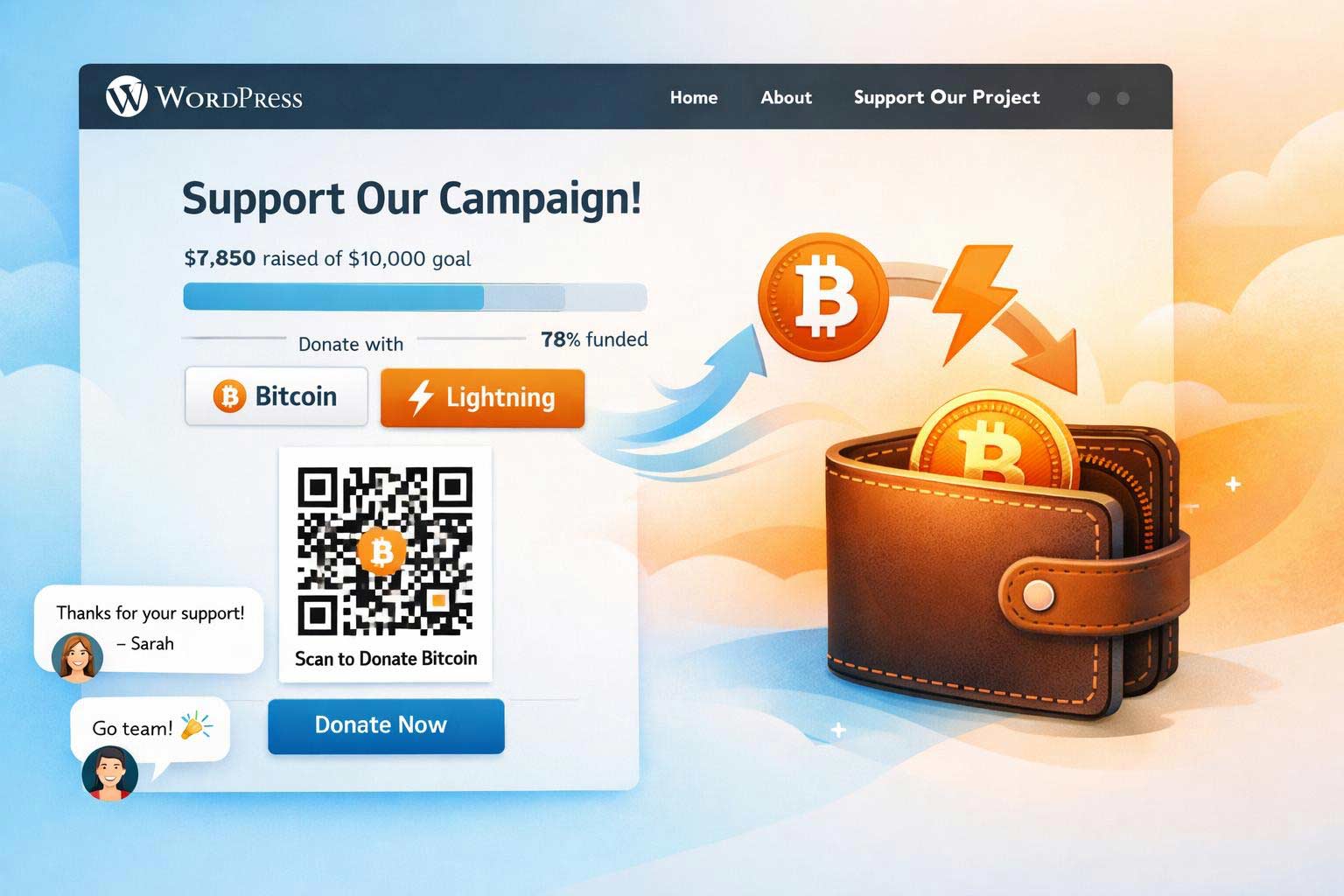
Technically, Bitcoin crowdfunding often runs via plugins or platforms that provide a donation form with a QR code and donation targets.

A live example of Bitcoin crowdfunding:

[coinsnap_bitcoin_crowdfunding id=”38392″]

[coinsnap_bitcoin_crowdfunding_shoutout id=”38392″]

Why is Bitcoin crowdfunding particularly interesting for WordPress?

For website operators

With a market share of over 40%, WordPress is the most widely used CMS in the world. For bloggers, NGOs, creators and small companies, it is the ideal tool for bringing content and projects online quickly and flexibly.

With Bitcoin crowdfunding, your own content or project can be financed directly by readers and fans – without third-party providers and without dependence on payment services.

For beginners & people with specific concerns

If you don’t have a website, you can start a WordPress.com blog for free in just a few minutes and use it, for example, to collect Bitcoin for:

  • medical treatment
  • an anniversary trip
  • celebration (milestone birthday, wedding, christening, etc.)
  • social concern

This also works without prior technical knowledge – e.g. with the Coinsnap pluginwhich can be installed directly in WordPress with just one click.

Bitcoin crowdfunding versus FIAT crowdfunding

Crowdfunding is nothing new – unlike Bitcoin crowdfunding. But why should you go for Bitcoin crowdfunding instead of fiat crowdfunding? In the table below you can see some of the key differences–and advantages–of Bitcoin crowdfunding versus fiat crowdfunding:

Bitcoin crowdfunding Classic crowdfunding (e.g. GoFundMe, Kickstarter)
No fees to banks or payment services Platform fees up to 10%
Immediate crediting to your own wallet Payouts often delayed
Globally accessible – no currency barriers Often country-specific restrictions
No risk of chargebacks Chargebacks possible
No KYC/verification necessary Complex registration and verification
Censorship resistant Projects can be rejected or deleted

In summary, Bitcoin crowdfunding is ideal for small campaigns (target e.g. €200) that would not be possible with a large bureaucratic and cost overhead.

Bitcoin crowdfunding is also ideal for crowdfunding campaigns on topics that fiat payment service providers may not support (issue of censorship).

And of course, Bitcoin crowdfunding is unbeatable if your crowdfunding campaign relies on raising many small amounts (micro-payments) to achieve its goal – raising very small amounts of less than one Euro, for example, is not feasible with conventional fiat crowdfunding solutions!

Cost consideration – what do you get from the donation? Bitcoin versus FIAT

Let’s be honest – crowdfunding is all about one thing: money. And that’s why we now want to look at what percentage of your donors’ money actually goes NET to your crowdfunding fund. To do this, let’s first take a look at the fees:

Overview of fees (typical values)

1. platform fees

  • GoFundMe: 0 % platform fee (but only for fundraising campaigns), “voluntary” service fee proposed instead
  • Kickstarter5 % platform fee
  • Indiegogo5 % platform fee
  • Betterplace (for charitable projects): 0 % directly, but voluntary “tips” are heavily advertised

2. payment service provider fees (PayPal, Stripe)

  • PayPal / Stripe Standardapprox. 2,9 % + 0,30 € per transaction
  • International payments or foreign currency often incur a further 1-2% charge

We will now look at what this means using the example of a donation of €100.

Example of a net payout from a donation of €100

Platform Platform fee Payment fee Total deduction Payout to project
Kickstarter 5 % 3-5 % ~8-10 % 90-92 €
Indiegogo 5 % 3-5 % ~8-10 % 90-92 €
GoFundMe 0 % 2,9 % + 0,30 € ~3,2 % ~96,80 €
Betterplace 0 % 2,5-3 % ~2,5-3 % ~97 €

Note: With PayPal and Stripe there may be additional fees for currency conversion or country limits. For a donation of €10, for example, the fixed costs can account for a disproportionately large share.

In practice, therefore, depending on the platform and payment method, usually only 90% to 92% of the donation amount actually reaches the project or campaign. And especially with smaller donations or international payment transactions, the net percentage can drop even more significantly!

Bitcoin-based solutions such as Coinsnap largely avoid all these deductions – for example, Coinsnap only charges 1% fees, but no payment processing fees and no third-party fees are due.

That means: Up to 99% of the donation ends up directly in your wallet!

For what purposes can Bitcoin crowdfunding be used?

Bitcoin donations can be used in a variety of ways – here are some practical examples:

  • Private occasions
    Birthdays, weddings, surprise gifts
  • Creative projects
    Book publishing, album production, art
  • Social emergencies
    Medical aid, school materials, crisis support
  • Community initiatives
    Playground construction, environmental projects, clubs
  • Content financing
    YouTube series, podcasts, blog articles
  • Charity
    Support good NGOs / activists whose goals you want to promote, such as Bitcoin Zambia (an African education initiative), or a family you know in Ukraine…

Bitcoin crowdfunding has a huge advantage over all fiat crowdfunding platforms – only one percent of the donations are lost on the way from the donor to you – or your beneficiary (infrastructure costs)! Exactly 99% of the donations are credited to your wallet and are available for the purpose of the campaign!

In short, with Bitcoin crowdfunding there are practically no limits to your ideas and creativity: Whatever you want to finance – if you have a good idea and can describe it well to your readers / visitors / followers, then you can use Bitcoin crowdfunding to collect Bitcoin for it.

No matter what it’s about – if other people are interested, you can offer them an easy, fast and secure way to get involved with Bitcoin crowdfunding!

Provider comparison: Bitcoin crowdfunding for WordPress

There is currently only one dedicated Bitcoin crowdfunding for WordPress plugin in the official plugin directory – Coinsnap Bitcoin Crowdfunding. However, there are various providers that offer external solutions, which then have to be integrated manually. Some examples are these:

Solution Provider Payment methods Fees WP integration GDPR-compliant Special features
Coinsnap Bitcoin (Lightning + on-chain), FIAT payout to bank account optional 1 % Official WP plugin Yes Target amount, multi-amount, shout-outs
BTCPay Server Bitcoin (on-chain + Lightning) 0 % Manual integration Yes Open source, high control
Tallycoin Bitcoin (on-chain) 0 % Externally integrated Yes Profile pages, community approach
OpenNode Bitcoin + fiat payout ~1 % Restricted Partially Fiat conversion, centralized

Bitcoin crowdfunding for WordPress in practice using the example of Coinsnap

What does the plugin do?

The Coinsnap Bitcoin Crowdfunding Plugin for WordPress enables website operators to collect Bitcoin donations for projects, campaigns or personal causes directly on their own WordPress site. The special feature: The contributions are transferred in the form of Satoshis (the smallest unit of Bitcoin) directly and without detours to the wallet of the creator of the campaign – either via the Bitcoin Lightning Network or as a classic on-chain transaction. Processing is completely decentralized and without the involvement of third-party providers, banks or payment service providers.

What does the user interface offer?

Users can make their Bitcoin donations conveniently using a QR code and send a public shout-out or a personal message if they wish. These donor messages can optionally be displayed live on the website – a great way to create transparency and community. The donation forms are integrated using shortcodes and can be flexibly placed anywhere within the WordPress website – whether in pages, blog posts or widgets.

What do you need to use Coinsnap Bitcoin Crowdfunding?

All you need to use the plugin – in addition to a WordPress site – is a Coinsnap account or your own BTCPay server. A Lightning wallet or a wallet address is sufficient to receive donations. The plugin is fully GDPR-compliant, as no unnecessary data is stored, and is available free of charge in the official WordPress plugin directory.

How do I install and configure Coinsnap Bitcoin Crowdfunding?

The configuration is particularly beginner-friendly: After installation from the WordPress plugin directory, the connection to Coinsnap or your own BTCPay server can be established(see installation instructions).

All campaign parameters can then be set individually: The desired target amount in Satoshis, three preset donation amounts, the description of the project, a welcome text and an optional thank you message. In addition, fields for entering the name, e-mail address and personal message can be activated. If you wish, you can also use the shoutout function, which displays public donor messages directly on the website.

The form is easily integrated via an automatically generated shortcode that can be inserted anywhere on the website. Visitors then see a compact, modern donation form with a progress bar, countdown (if desired) and donation options. After scanning the QR code and confirming, the donation amount is transferred directly to the connected wallet of the campaign creator – quickly, securely and without detours.

Can I also use the plugin with my BTCPay server?

Coinsnap offers two operating modes: In simple mode, the connection is made via a Coinsnap account, which requires no prior technical knowledge. In advanced mode, tech-savvy users can connect the plugin to their own BTCPay server, giving them maximum independence and control over all aspects of the payment processing.

Excursus: legal framework for crowdfunding in Europe

In most countries of the European Community, collecting money as part of a simple crowdfunding campaign – e.g. for a private gift, a creative idea or a social project – is generally is generally permittedas long as no consideration is promised and there is no intention to make a profit exists. In this case, it is legally a case of gifts which do not require special authorization.

Important legal information:

  • Donations without consideration (donation-based crowdfunding) are unproblematic as long as they are made voluntarily and without any contractual obligation.
  • Who regularly or commercially collects funds (e.g. for a company) could be subject to the Asset Investment Act or other financial market regulations.
  • For charitable donations with a donation receipt you need the status of non-profit status from the tax office – purely private individuals are not allowed to issue tax-deductible donation receipts.
  • For higher individual donations a gift tax may be due – this is the responsibility of the recipient, although allowances apply (e.g. €20,000 for gifts from friends).
  • It is recommended to maintain transparency about the purpose of the crowdfunding and to use the funds for a specific purpose as described.

As long as you are a private individual or initiative without commercial intent Bitcoin donations for a specific cause–for example via WordPress and the Coinsnap plugin–you are operating within a legally permissible framework in most of Europe. However, individual tax or legal advice is advisable in the event of uncertainties or larger amounts.

Conclusion: Bitcoin crowdfunding for WordPress is ideal for collecting Bitcoin quickly, cost-effectively and without any technical or bureaucratic effort

Bitcoin crowdfunding for WordPress is the perfect solution for anyone who wants to raise financial support in the form of Bitcoin quickly and easily without any prior technical knowledge, bureaucratic hurdles or complicated third-party services.

People with a specific cause – be it a private project, a social project or a creative goal – benefit in particular from the simple setup and direct payout to their own wallet.

The Coinsnap plugin makes implementation extremely easy: a campaign is live in just a few minutes, donations can be accepted immediately, and supporters from the immediate environment or the online community can contribute to the success of the project without any barriers.

So if you are looking for a modern, independent and accessible crowdfunding solution, Bitcoin Crowdfunding for WordPress offers a clear path to your goal.

Start your first Bitcoin crowdfunding campaign now

With Coinsnap Bitcoin Crowdfunding you can start today to collect Bitcoin for your projects and causes from your followers and visitors.

You only have to follow three steps and you can launch your first Bitcoin crowdfunding campaign on your WordPress website in half an hour at the latest:

1. set up a Coinsnap account

2. install & link plugin

3. configure & place campaign

Register with Coinsnap, enter your email address, your WordPress URL and your Lightning address and click on the link in the email you receive from Coinsnap. Done.

Search for Coinsnap Bitcoin Crowdfunding in the WordPress backend under Add plugin, click on Install, and then on Activate. Open the plugin settings and enter the store ID and API key that you can find in your Coinsnap account. Done.

Go to Bitcoin Crowdfunding in the WordPress dashboard on the left, click on Crowdfundings and then on New Crowdfunding. Then fill out the form fields, copy the displayed shortcode where you want to run the campaign, and all deposits will be credited directly to your Lightning Wallet.


Set up a Coinsnap account

Introduction to Bitcoin Donations for WordPress

Everything you need to know to receive Bitcoin donations!

Monetization is a key topic for bloggers, influencers and content creators. In addition to advertising, affiliate links or subscriptions, direct donations from the community are becoming increasingly important and Bitcoin donations (also known as Bitcoin donations ) are becoming an exciting alternative.

In this blog article, we shed light on what Bitcoin Donations are, why they are interesting for bloggers and influencers and how to use them easily – especially on WordPress. We compare different providers and introduce the Coinsnap Bitcoin Donation plugin in detail, including its three donation models simplemulti-amount and shoutout. At the end, there is a conclusion with a call to action on how you can integrate Bitcoin donations on your website yourself.

Inhalte  Verbergen 

What are Bitcoin Donations?

Bitcoin donations are voluntary payments in the cryptocurrency Bitcoin that are made to support websites, projects or people. Instead of traditional currencies (fiat) such as euros or dollars, donors use Bitcoin to “reward” a blogger for a helpful article, for example, or to support an influencer for their content.

Technically, this usually works in such a way that the content creator provides a Bitcoin address or a donation button. Interested readers or followers can then send any amount using their Bitcoin wallet – worldwide worldwide, with just one click and directly to the recipient in just a few minutes.

There are two ways to transact Bitcoin: On-chain (classic Bitcoin transaction on the blockchain) and via the Lightning Network. Lightning is a secondary network that enables near real-time Bitcoin payments with minimal fees – ideal for very small amounts (micro-donations). Modern Bitcoin donation solutions often support both variants so that donors can choose whether they want to donate on-chain or via Lightning.

For you as a site operator, this means maximum flexibility: you can receive and store Bitcoin directly without having to rely on a third-party provider.

Why are Bitcoin Donations so interesting for WordPress bloggers and content creators?

Bitcoin Donations for WordPress offer their operators various advantages over the classic monetization method of fiat donations:

  • Global reach
    Bitcoin is available globally – wherever there is internet access. This means that every fan – no matter where in the world – can easily send you something. And without having to deal with bank details, PayPal & Co.
  • Maximum simplicity
    All it takes to make a Bitcoin donation is a scan and a click in the Bitcoin Lightning Wallet, and the support is on its way. This lowers the inhibition threshold for spontaneous “tips” enormously!
  • Low fees & no middleman
    With Bitcoin Donations, there are no typical payment provider fees as with credit cards or PayPal. Many Bitcoin payment solutions work with very low fees or even completely free of charge for the recipient. In addition, there are no middlemen or platforms that make money – the money goes directly to you.
  • No chargebacks or fraudulent payments
    Chargebacks or fraud are excluded in the blockchain and in the Lightning Network. You benefit from this just as much as your donor.
  • Independence & resistance to censorship
    It is particularly important for independent content creators not to be dependent on the mercy of individual payment service providers. Bitcoin is decentralized – no company can freeze your payments or “shut you down”. Even if services like PayPal or Patreon were to block you, loyal readers can continue to support you via Bitcoin. This level of independence and freedom of speech is unique!
  • Data protection for donors
    Many supporters wish to donate anonymously or under a pseudonym. With Bitcoin Donations, supporters do not have to disclose any personal data, names or addresses – just carry out a wallet transaction. This makes even security-conscious or shy supporters feel more comfortable. For you as the recipient, there are also fewer data protection issues, as hardly any personal data is processed (no credit card numbers, emails, etc.), which is in line with GDPR compliance.
  • Micro-donations and new interactions
    Lightning also enables tiny amounts (e.g. a few cents) that would never arrive with fiat due to the fees. This opens up new forms of interaction: readers could send a few Satoshi (the smallest Bitcoin unit) for each article they read as a token of appreciation. Such micro-donations add up and get the community more involved.
  • Reach new user groups
    Cryptocurrencies have long been mainstream. By accepting Bitcoin, you are showing yourself to be innovative and targeting the growing group of crypto enthusiasts. They prefer to support projects that are Bitcoin-friendly. Conversely, there are regions in the world where many people cannot use PayPal but can use Bitcoin. So you are potentially expanding your circle of supporters.

All of the above arguments make Bitcoin Donations highly attractive for bloggers, content creators and influencers, especially if they have a tech-savvy, cross-regional following and are looking for uncomplicated additional sources of income.

What business models and revenue streams are possible with Bitcoin Donations for WordPress?

Bitcoin donations are not only an expression of digital appreciation, but can also be specifically integrated into business-oriented models models. Here are some practical application scenarios for bloggers, influencers and website operators that offer more than just the classic “tip jar”:

  1. Donate in recognition of high-quality content
    A classic with clear benefits: You offer free, high-quality content (e.g. specialist articles, tutorials, explanatory videos) and give your readers or viewers the opportunity to show their appreciation by donating Bitcoin. The call for donations can be placed specifically at the end of each post – e.g.:
    “This post helped you? Support my work with a small Bitcoin donation.
    In this way, donations become conscious recognition for specific achievements.
  2. Project or format financing (collect target amount)
    The aim here is to collect a clearly defined amount for a specific project – similar to traditional crowdfunding. Example:
    “I want to start a new video format and need 0.01 BTC for equipment and editing – help me reach my goal!
    This can be integrated as a Bitcoin donation button on a landing page or in the blog. The transparency of the goal motivates many supporters – and you can display the progress as a total or as a percentage, for example.
  3. Donations to promote a good cause
    Not every donation has to benefit the operator directly. Many bloggers and influencers use their reach to promote a specific cause – e.g. digital education, environmental protection or freedom of expression online.
    You can use a Bitcoin donation form, for example, to say:
    “All Bitcoin donations this month will go to the open source initiative XYZ.
    Thanks to the transparency of the blockchain, it is even possible to publicly verify that the donated money has been forwarded. This creates trust – and a willingness to donate!
  4. Donations for charitable causes (charity campaign)
    If you want to use your reach to do good, Bitcoin is also suitable for temporary charity campaigns. For example, you can start a campaign like:
    “Donate BTC for relief supplies in Ukraine – I will forward everything 1:1 to the NGO.
    It is important here to communicate openly where the money is going, how the recipient will be reached and, if necessary, to provide proof. The use of shoutouts or public thank you lists can help to further increase the willingness to donate.

In short, with a little creativity, you can use Bitcoin Donations to generate Bitcoin income in a variety of ways. The important thing is that you describe the reason why you are asking for donations well and motivate your followers and visitors to donate a few sats.

Bitcoin Donations for WordPress: comparison of providers

If you use WordPress, there are now several providers and pluginsto receive Bitcoin donations. We compare three popular solutions below – CoinsnapBTCPay Server and Coinbase Commerce – based on seven important criteria:

Criterion Coinsnap Plugin) BTCPay Server Coinbase Commerce
Payment methods Bitcoin (On-Chain & Lightning) Bitcoin (On-Chain & Lightning) Bitcoin + Altcoins (BTC, ETH, LTC… no Lightning!)
Fees 1%, no fixed costs 0% platform fee, self-hosting costs possible 1% transaction fee
Complexity Very simple (plugin, no own server) Very high: server hosting, server setup etc. Medium (account + possibly payment system (WooComerce) necessary
Customization Customizable (title, amounts, buton name, fields etc.) Complete control (open source), but DIY/programming skills required Specifications through Coinbase checkout, limited customization
Data protection Very high (only email + Lightning address required) Very high (self-hosted, no external data) Medium (large provider as intermediary)
WP integration Excellent (dedicated WP plugin, shortcodes) OK (WooCommerce plugin for stores; donations via buttons linkable Good for stores (WooCommerce), extra solution required for pure donations
other BTPay server option integrated
no payment system (e.g. WooCommerce required)
can be installed directly from WordPress Pugin directory
ideal for Bitcoin experts with programming knowledge no Lightning!

Coinsnap Bitcoin Donation Plugin in detail

After the overview we now want to take a closer look at the Coinsnap Bitcoin Donation Plugin as it has been specially developed for WordPress and is therefore a very attractive solution.

Functionality and features

The plugin “Coinsnap Bitcoin Donation” allows you to receive Bitcoin donations on your WordPress site with minimal effort. It connects your website to either Coinsnap or to your own BTCPay server – depending on your settings. This gives you the choice between a convenient all-in-one service (Coinsnap hosts everything for you) or maximum control (you use your own infrastructure). In both cases, the following applies: Payments are immediately credited to your Bitcoin wallet (Lightning) without Coinsnap storing them temporarily.

Implementation is deliberately kept simple: You install the plugin from the official directory, activate it and then go to “Bitcoin Donations -> Settings”. There you enter either your Coinsnap API data (if you use Coinsnap) or the access data to your BTCPay server. After this connection you can create donation buttons or forms. The basic settings (e.g. standard amount, texts, color scheme) can be made conveniently in the admin interface. Programming knowledge is not necessary – everything is done with clicks. You can use the shortcode to place the donation button: In the post text or at the desired position, you insert the shortcode displayed to you, which is then automatically replaced by a donation form.

Special functions

The Coinsnap plugin offers some great features out-of-the-box:

  • Free or fixed amounts: You can decide whether the donor enters the amount freely as a number (e.g. 20 sats), or whether you specify fixed buttons for e.g. 5€, 10€, 20€ (converted into sats). Both options are possible – even simultaneously in the multi-amount form(see below).
  • Message from the donor: There is an option to display a message field. The donor can leave a few words there (e.g. “Thank you for your content!”). As the operator, you will see this message in the admin area when the donation is made; for single and multi donations, the message remains private between donor and operatorand the shoutout it becomes public (see next point).
  • Shoutout function: The outstanding unique selling point is the Shoutout option. If you activate this option, the donor can enter a comment that will be displayed publicly on the website after a successful donation. publicly on the website. This creates a kind of guestbook or “wall of fame” for supporters. The plugin offers the option of displaying all shoutouts next to the form or on a separate page – this increases community participation and encourages others to make a shoutout too. Some WordPress operators use the Shoutout Donation to keep their comment pages SPAM-free – no spammer, and certainly no bot, will pay a few sats before leaving their unwanted comments!(further information)
  • Enter donor data (optional): If desired, you can add additional fields to the form, such as the donor’s name or e-mail address. This can be useful if you want to thank them personally or send something to larger supporters, for example. However, these fields are optional and can be omitted to preserve the anonymity character anonymity.
  • Security: The plugin is based on the open source technology BTCPay Server, . All transactions run via secure channels (Coinsnap API with key, BTCPay via URL/key). This means you don’t have to worry about someone redirecting your donations without authorization – as long as you don’t pass on API keys, everything is secure. In addition, the Bitcoin does not remain in WordPress or the plugin, but goes directly to your wallet, which further minimizes the risk.

The three donation models

As already mentioned, the Coinsnap plugin provides three different types of donation forms available:

“Simple” (Bitcoin Donation Button)

This is the classic donate button. In its simplest form, it is a “Donate Bitcoin” button that can have a small input field for the amount. The visitor can usually enter the desired amount here (or there is a preset default) and optionally leave a message for you. After clicking on “Donate”, a QR code or payment link is generated, which the user can pay with their wallet. This model is suitable if you want to keep it as simple as possible ideal for sidebar buttons or at the end of blog posts with the call “If you liked the article, I’d appreciate a Bitcoin donation!”.

“Multi-Amount” (three preset donation amounts)

This is a donation form that three predefined amounts to choose from. For example, you could offer €5, €10, €20 in sats to choose from (you define the exact values in the plugin setting). The user then simply clicks on one of the buttons instead of entering an amount themselves. Of course, a message field can also be included here. Multi-Amount is suitable for giving donors an orientation many then opt for the average value. It lowers the cognitive hurdle (“How much should I give?”). Technically, the plugin generates three buttons next to each other. As soon as the user clicks on one, the payment process runs in exactly the same way as with the simple model. This format is ideal for donation pageswhere you ask for support and provide suggestions straight away.

Test Coinsnap Bitcoin Donation

[coinsnap_bitcoin_donation]

“Shoutout”

This is the special model where the donor receives a public message/comment can leave. The form asks for a nickname and the message (amount too, of course), and after payment this message is displayed on your website – either directly next to the donation form or collected on a special page: you can place the shoutout list via shortcode wherever you want.

This model is great for engaging the community: Donors feel heard because their message is visible. Example: A reader donates 500 sats and writes “Great article, helped me a lot! – Max”. This message may then appear below the article in a list of supporter comments. In this way, new visitors will also see that your work is appreciated and may be motivated to donate and write something as well.

Spam protection is automatically provided – anyone who wants to troll would have to pay at least a few satoshi, which significantly increases the inhibition threshold. Many creators use shoutouts to enable live interactions (e.g. you could read out the latest shoutouts in the stream, etc.). The Coinsnap plugin offers this function out-of-the-box, which sets it apart from other donation solutions.

With its features and user-friendliness, the Coinsnap Bitcoin Donation Plugin is an all-round well thought-out solution for WordPress: It combines user-friendliness user-friendliness, flexibility and security. Whether you simply want to add a small donation button or an interactive donation board with comments – the plugin provides the necessary functions.

In addition, it is free of charge and advertises with strong arguments such as instant credit to your wallet, absolutely beginner-friendly and GDPR-compliant. For bloggers and influencers who want to set foot in the Bitcoin world, trying out this absolutely recommend trying out this plugin!

Conclusion: Bitcoin Donations for WordPress open up new sources of income

Bitcoin Donations for WordPress are more than just hype – they offer WordPress bloggers and content creators a new, future-oriented source of income.

Low fees, global reach and technical simplicity make Bitcoin donations an attractive alternative or supplement to traditional donations via PayPal & Co. WordPress users benefit in particular from special plugins such as Coinsnap, which make integration a breeze. We have seen that anyone can set up a Bitcoin donation function on their site in just a few steps – and thus provide their community with a modern way to donate, say thank you in the form of Bitcoin in the form of Bitcoin.

For you as a blogger/influencer, this means: why not simply test? Set up Bitcoin donations on your website today – for example with the Coinsnap plugin presented here – and convince yourself of the possibilities . Your readers will love having another option to support you. And you’ll open up a source of income that fits perfectly into the digital age.

Get Bitcoin Donations for WordPress now

Accept Bitcoin payments in Shopify

Accept Bitcoin payments in Shopify – here’s how!

Shopify is one of the world’s leading e-commerce platforms today.
About 4.5 million active online stores in more than 175 countries rely on the Canadian company, which is known for user-friendliness, scalability, and a vast selection of extensions.
From small creative shops to medium-sized brands and international wholesalers – Shopify is the backbone of countless digital business models.

As money and payment flows become increasingly digital, interest in Bitcoin as a means of payment is growing – not only among tech-savvy customers, but also in the mainstream.
For Shopify merchants, integrating Bitcoin payments means:

  • Global solvency without currency barriers
  • Lower transaction costs compared to traditional payment service providers
  • Protection against chargebacks
  • Access to a growing, solvent Bitcoin community
  • Innovative brand image through openness to modern technologies

Despite these advantages, Shopify does not natively support Bitcoin payments in the checkout – there is no official Shopify Lightning or Bitcoin Payment option.
However, there are now easy solutions that let you accept Bitcoin payments in Shopify without coding.
Providers like Coinsnap make this possible (see below).

In this article, you’ll learn how to integrate Bitcoin payments into your Shopify store, which tools are available, and what to watch out for.

Status quo: Accepting Bitcoin payments in Shopify

Shopify supports a wide range of payment methods, divided into proprietary solutions, integrated providers, and manual payment methods.

Shopify Payments (only available in certain countries)

  • Shopify’s own payment platform
    • Accepts credit cards (Visa, MasterCard, Amex, etc.)
    • Accepts Apple Pay, Google Pay, Klarna, iDEAL, Sofortüberweisung, and more
    • No third-party account required

External payment providers

Shopify supports hundreds of external providers depending on your region, for example:

  • PayPal
  • Amazon Pay
  • Stripe
  • Mollie
  • Adyen
  • Skrill
  • 2Checkout

Alternative payment providers

  • Cryptocurrencies (via third-party providers)
  • Bank transfer
  • Cash on delivery
  • Payment on account
  • Custom manual methods

Shopify currently has no native Bitcoin checkout integration.
Merchants must use alternative or custom payment methods.
However, Shopify does not charge transaction fees on sales processed via alternative payment providers like Bitcoin Lightning.

Provider overview: Accept Bitcoin payments in Shopify

Here are some popular providers enabling Bitcoin payments in Shopify:

Provider Lightning On-chain Shopify-compatible Special feature
Coinsnap + + + (via proxy/app) No KYC
Direct payout to wallet
Simple DIY
Free Shopify integration service
Optional fiat payout
BTCPay Server + + + (custom) Open Source
No fees
Coinbase Commerce + + (manual) KYC required
OpenNode + + + (API/Widget) Payout in fiat possible
Flash + + (manual) No KYC
Setup with Flash support team

Important selection criteria for merchants

If you’re not technically inclined, choose a provider that simplifies setup and doesn’t require deep coding knowledge.
Coinsnap, for instance, offers payment processing and even a free integration service.

Consider also whether you want to avoid lengthy KYC/KYB verification.
Coinsnap operates non-custodially and is fast to onboard.
You should also review:

  • Payout speed (instant, daily, or threshold-based)
  • Lightning vs on-chain support
  • Ease of accounting exports

How does shopping with Bitcoin in Shopify work?

From a customer’s perspective, paying with Bitcoin is simple. Instead of entering card data, a QR code is shown for payment via Bitcoin or Lightning.

Example: Coinsnap for Shopify

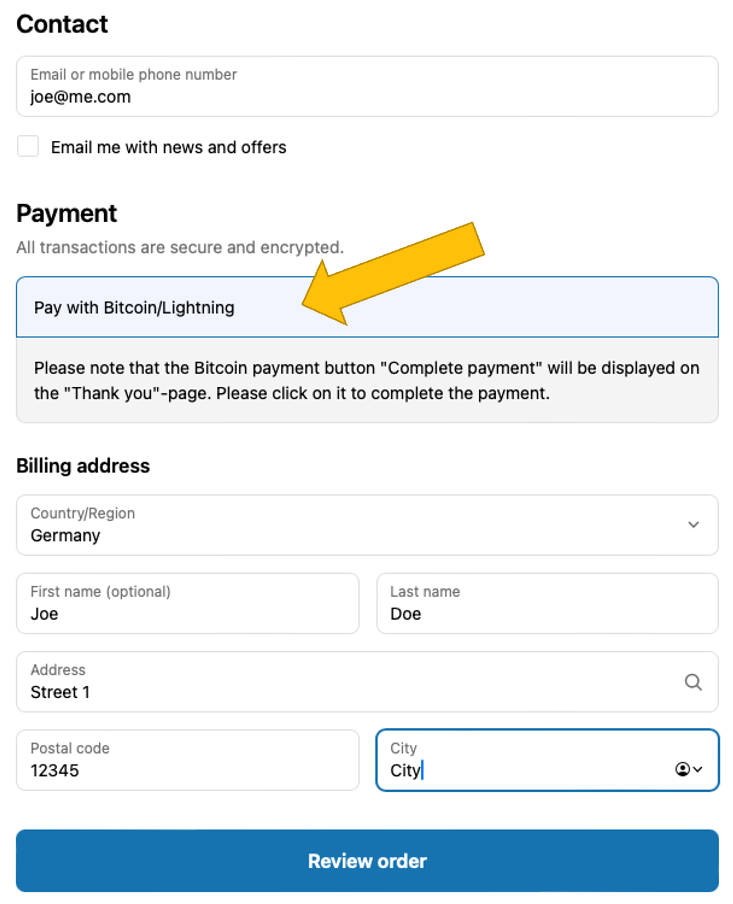
1. Customer proceeds to checkout and selects “Pay with Bitcoin/Lightning”.
2. They review their order and click Complete order.
3. A Bitcoin QR code appears; they scan and confirm payment in their Lightning wallet.
4. Upon successful payment, Shopify marks the order as paid and sends notifications.

Why use a third-party provider for Shopify Bitcoin payments?

The pitfalls of closed systems

Shopify’s checkout is tightly controlled — Bitcoin and Lightning aren’t supported natively.
Alternative payments must be integrated using app proxies, custom redirects, or manual payment methods.
These workarounds require technical know-how.

The advantages of third-party Bitcoin payment providers

Providers like Coinsnap simplify this with ready-to-use Shopify apps or services, often charging around 1% per transaction.
Let’s look at how easy it is with Coinsnap.

Accept Bitcoin payments in Shopify in 3 steps with Coinsnap

Coinsnap is a European provider specializing in Bitcoin Lightning payment solutions.
It offers a free Shopify integration service that gets you live in three steps:

1. Set up a Coinsnap account

Register at app.coinsnap.io/register, confirm your email, and add your store and Lightning wallet address.

2. Set up Shopify admin for Coinsnap

Follow this guide to create a Shopify admin for Coinsnap in your backend, allowing their team to connect both systems.

3. Start free Shopify integration

Return to your Coinsnap dashboard and start the installation service.
The Coinsnap team completes setup so your store can immediately offer Bitcoin/Lightning checkout with automatic payouts to your wallet.

Conclusion: Accepting Bitcoin payments in Shopify has never been easier

Shopify doesn’t support Bitcoin natively, but third-party solutions like Coinsnap make it effortless.
Their integration service lets you go live without coding, and payments are processed securely to your wallet or bank.

Questions & answers about accepting Bitcoin payments in Shopify

❓ Is it legal to offer Bitcoin payments in Shopify?
Yes. Just record and report your revenues as usual.

❓ Does my customer need a Lightning wallet?
No. Coinsnap supports both Lightning and on-chain.

❓ Can I convert Bitcoin payments to EUR/USD automatically?
Yes, if you connect your account to DFX for fiat payout.

❓ How does the customer know the payment succeeded?
They’ll see a confirmation screen and get Shopify email notifications.

❓ What if the payment fails?
The order remains marked as “pending” in Shopify.

❓ How are Bitcoin payments recorded for accounting?
Use tools like CoinTracking integration for compliant bookkeeping.

Mistakes to avoid when accepting Bitcoin in Shopify

  • 🚫 Only offering on-chain (Lightning is faster and cheaper)
  • 🚫 Not backing up your wallet
  • 🚫 Using providers without Shopify experience
  • 🚫 Failing to promote Bitcoin as a checkout option
  • 🚫 Ignoring local legal/tax requirements

Accept Bitcoin payments in Shopify now

Accepting Bitcoin payments in Shopify is easy with Coinsnap for Shopify.
Sign up, create an admin for Coinsnap in Shopify, and start the free installation service — no coding required.

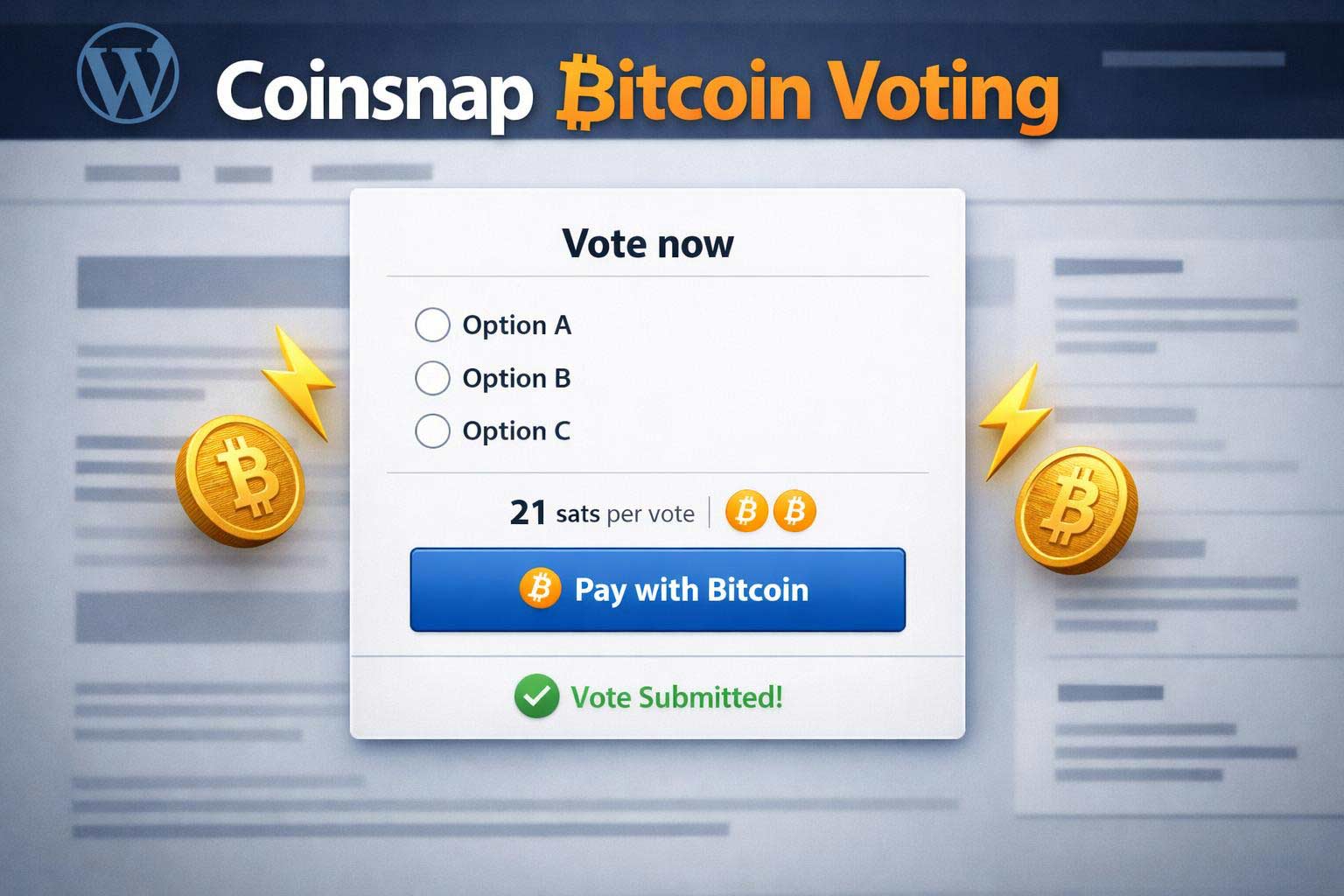
Coinsnap Bitcoin Voting: Create secure, interactive and profitable polls and earn Bitcoin with every vote!

In a digital world full of bots, spam and fake surveys, it is becoming increasingly important to distinguish genuine user interaction from automated distortion. This is exactly where our new, innovative solution comes in: Bitcoin Voting with the Coinsnap plugin for WordPress.

With the Coinsnap Bitcoin Voting plugin, you can not only offer secure, paid voting on your WordPress website, but also earn a few Satoshis – the smallest unit of Bitcoin – along the way.

Find out more in this article:

  • What Bitcoin Voting is
  • What advantages it offers – for you and your visitors
  • How to install and configure the Coinsnap plugin
  • For whom Bitcoin Voting is particularly worthwhile
  • How you can even use the voting plugin as a competition

What is Bitcoin Voting?

Bitcoin Voting is an innovative voting system in which participants make a small Bitcoin payment to take part in a survey or vote.

With the Coinsnap Bitcoin Voting plugin for WordPress, this payment is processed in sats (satoshis) – micropayments that are perfect for interactions on the web.

The idea behind it: Anyone who wants to vote must pay a small amount – e.g. 50 or 100 sats. This makes participation valuable, spam-resistant and bot-proof. At the same time, the site operator receives a small reward – in the form of Bitcoin.

Why paid votes?

In traditional online surveys, it is almost impossible to prevent bots, multiple participation or manipulation.

Coinsnap Bitcoin Voting solves this problem with a simple but effective mechanism: only those who pay are allowed to vote. And of course you can also specify that each visitor can only vote once!

Advantages of Bitcoin Voting:

  • Protection against bots and spam votes
  • Higher quality interactions through real users
  • Small additional income through micropayments
  • Low entry barrier for participants (a few sats)
  • Full control over options, duration and conditions

Be creative and decide:

  • How many possible answers there are (up to four)
  • What choices your voters have
  • How many sats a vote costs
  • Whether multiple votes are allowed
  • How long the voting runs for
  • Whether additional information (name, e-mail, address) is requested – e.g. for competitions

How easy the Coinsnap Bitcoin Voting plugin works


The Coinsnap Bitcoin Voting plugin is specially developed for WordPress and is very easy to set up. It works with the Coinsnap Gateway (for which you don’t need any specialist knowledge) as well as with your BTCPay Server if you are an advanced Bitcoiner.

And, most importantly, with Coinsnap Bitcoin Voting you are completely independent of third-party providers or central payment services – so you don’t have to answer endless questions or provide extensive proof or documents: To bring Bitcoin Voting to your WordPress site with Coinsnap, all you have to do is register with your email address, your website URL and the address of your Bitcoin Lightning wallet.

Ready to go in just three steps

If you want, you can offer Bitcoin Voting on your website in just 10 minutes. It’s very simple:

Install the plugin

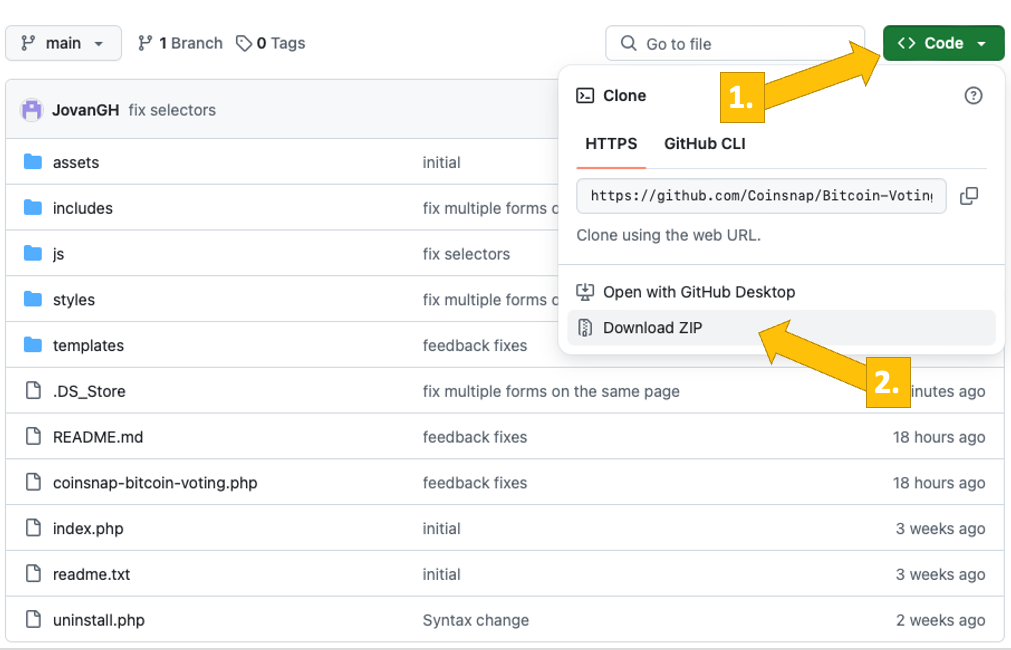
Download the Coinsnap Bitcoin Voting plugin from the WordPress plugin directory or from Github.

Configure a poll

Specify the voting options, define the price per vote and select the desired additional functions (e.g. conditions of participation, duration of poll, requesting information).

Place the poll

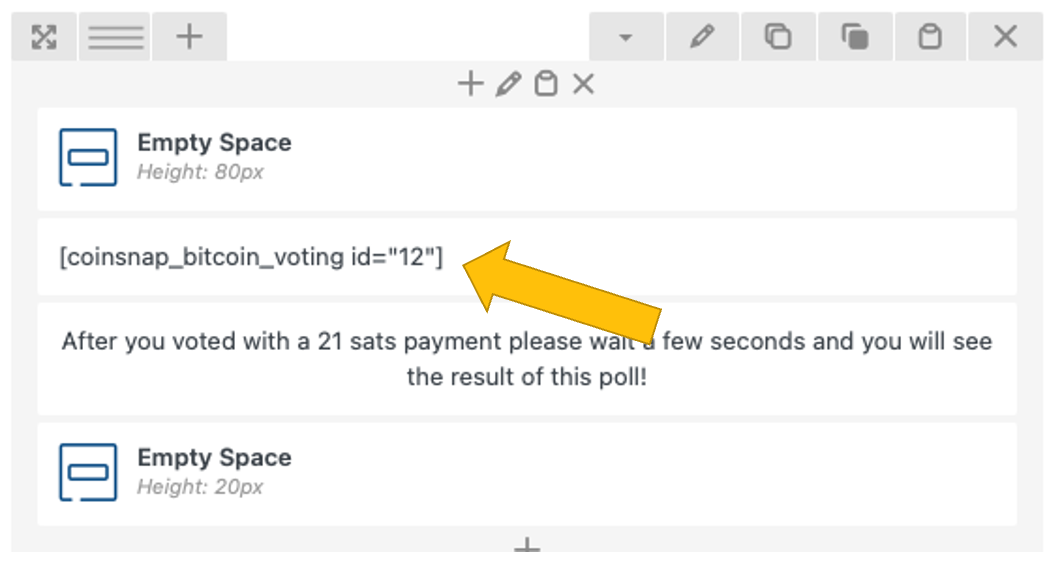
Insert the generated shortcode at the desired position on your website – done!

What are the technical requirements?

The technical requirements for using Coinsnap Bitcoin Voting are minimal. All you need is:

  • an up-to-date WordPress website
  • the Coinsnap Bitcoin Voting plugin
  • Coinsnap account (and if necessary your own BTCPay server)
  • Bitcoin Lightning wallet for receiving the sats

Example: A Bitcoin vote on your website could look like this

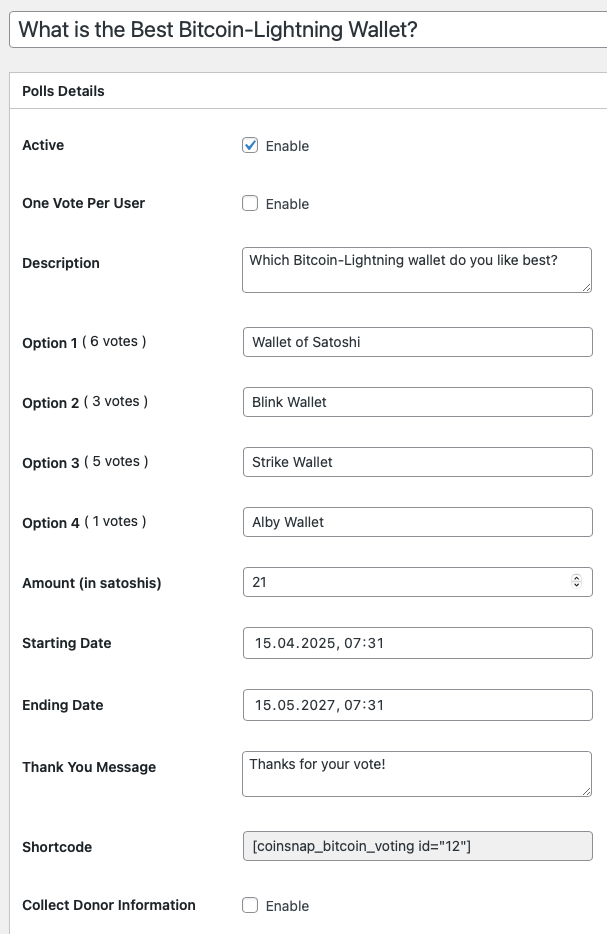
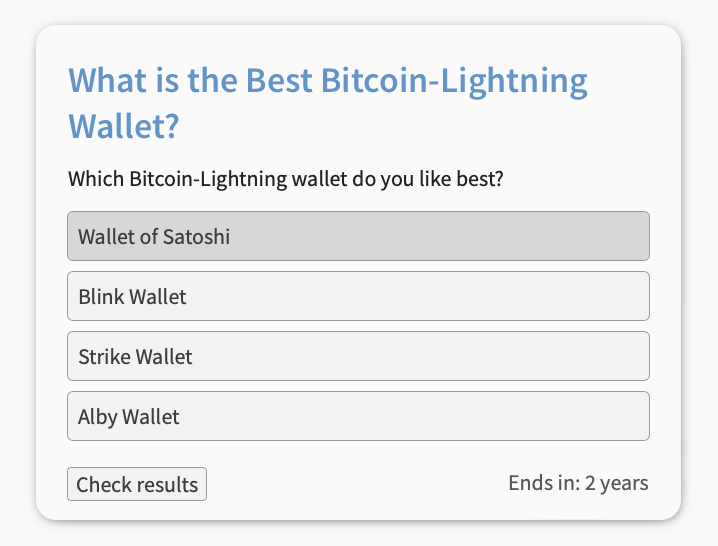
Imagine you run a Bitcoin blog and want your readers to vote on which Bitcoin Lightning wallet is the best. In the config-tab you create a poll with four options:

  • Wallet of Satoshi
  • Blink Wallet
  • Strike Wallet
  • Aby Wallet

You specify that each vote costs 21 sats (less than a cent at the current exchange rate). Your readers choose their favourite wallet, pay the amount via Lightning – and you not only get a real result, but also a small reward!

Bitcoin voting as part of a competition

A particularly exciting feature of the Coinsnap plugin is the option to expand the voting into a competition. You can specify that participants also leave personal details such as their name, email or address so that you can send them the prize if they win.

This makes Bitcoin Voting not only a tool for voting, but also a smart tool for:

  • Customer loyalty
  • Newsletter development
  • Lead generation
  • Community campaigns

In short: Coinsnap Bitcoin Voting is more than just a voting tool. With this plugin you can activate your followers, generate new income and gain interesting insights into the opinions and interests of your crowd!


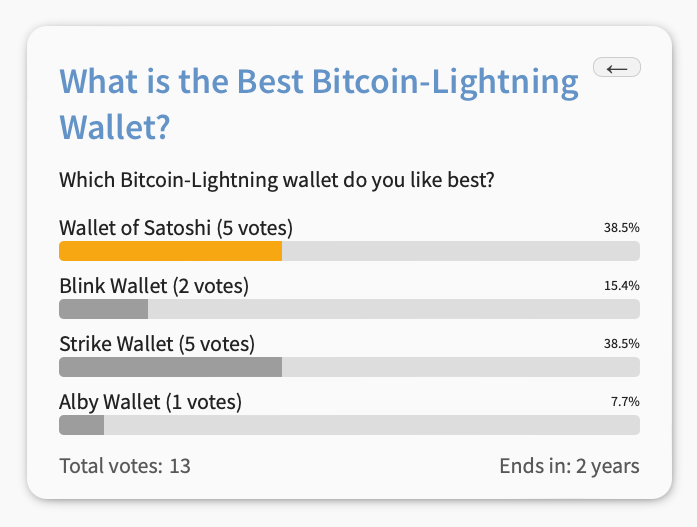
Results of a Coinsnap Bitcoin Voting poll

For which WordPress bloggers or website operators is Bitcoin Voting worthwhile?

Bitcoin Voting is suitable for all WordPress operators who want to encourage genuine user participation and at the same time benefit from a small but steady stream of income.

The plugin is particularly worthwhile for:

Content creators and bloggers
Offer your community the opportunity to co-create content – in return for a small Bitcoin donation.

Shop operators
Let customers vote on new products or designs – and combine the voting with exclusive discounts or giveaways.

Clubs and communities
Organise democratic, tamper-proof votes within your community.

Startups and developers
Test feature ideas with real users – and use the payment principle to filter out only serious opinions.

Conclusion: Bitcoin Voting – the perfect combination of user participation and monetisation

Get more out of your website with the Coinsnap Bitcoin Voting plugin. You activate your visitors, offer them an interesting form of co-determination and protect your surveys from manipulation at the same time. And best of all: you earn a few sats with every vote.

The plugin can be seamlessly integrated into WordPress, is flexibly customisable and even offers the option of running competitions. For anyone who uses Bitcoin – or wants to try it out – this tool is an easy way to combine web interaction and Bitcoin microtransactions.

How to install a Blink wallet and get a Lightning address to accept Bitcoin

In this blog, we explain what the Blink Wallet is and why it is particularly suitable for merchants who sell their offerings for Bitcoin but do not want to hold the Bitcoin for the long term, but need its equivalent value for ongoing operations.

In this article, you will learn how to install and set up a Blink Wallet and create a personal Lightning address. We’ll also explain how to choose the right account type for your business needs and how to set the wallet to your national fiat currency.

With the step-by-step guide, you can create a business-ready Bitcoin Lightning wallet in just a few minutes and start marketing your Bitcoin offering.

Inhalte  Verbergen 

What is the Blink Wallet?

The Blink Wallet is a custodial Bitcoin Lightning Wallet that contains two balance accounts – one for Bitcoin, the other for US dollars (Stablesats). “Custodial” means that your funds are held by Blink. (You should therefore regularly transfer your earnings to your Bitcoin hardware wallet).

The two different balance accounts give you the choice of participating in changes in the price of Bitcoin against the dollar (Bitcoin account) or excluding the volatility risk (dollar account), see below.

And – very important – with the Blink Wallet you will also receive a Lightning address, which you can name yourself (and thus e.g. “brand”), see below. You can use this Lightning address for your Coinsnap account – so that all your incoming payments will be credited there!

Another important feature of the Blink Wallet is that you can receive (and of course make) payments with Lightning or on-chain, depending on your needs and wishes. Lightning payments are ideal for amounts under around €1,000, as Lightning payments are lightning fast and particularly cheap. If you need to receive larger amounts, we recommend the on-chain payment method, which takes a little longer and is slightly more expensive but can also process large amounts for which Lightning is not suitable.

We will show you below how to install the Blink Wallet, set up your Lightning address, select your preferred credit type and your local currency.

Install and set up a Blink Wallet

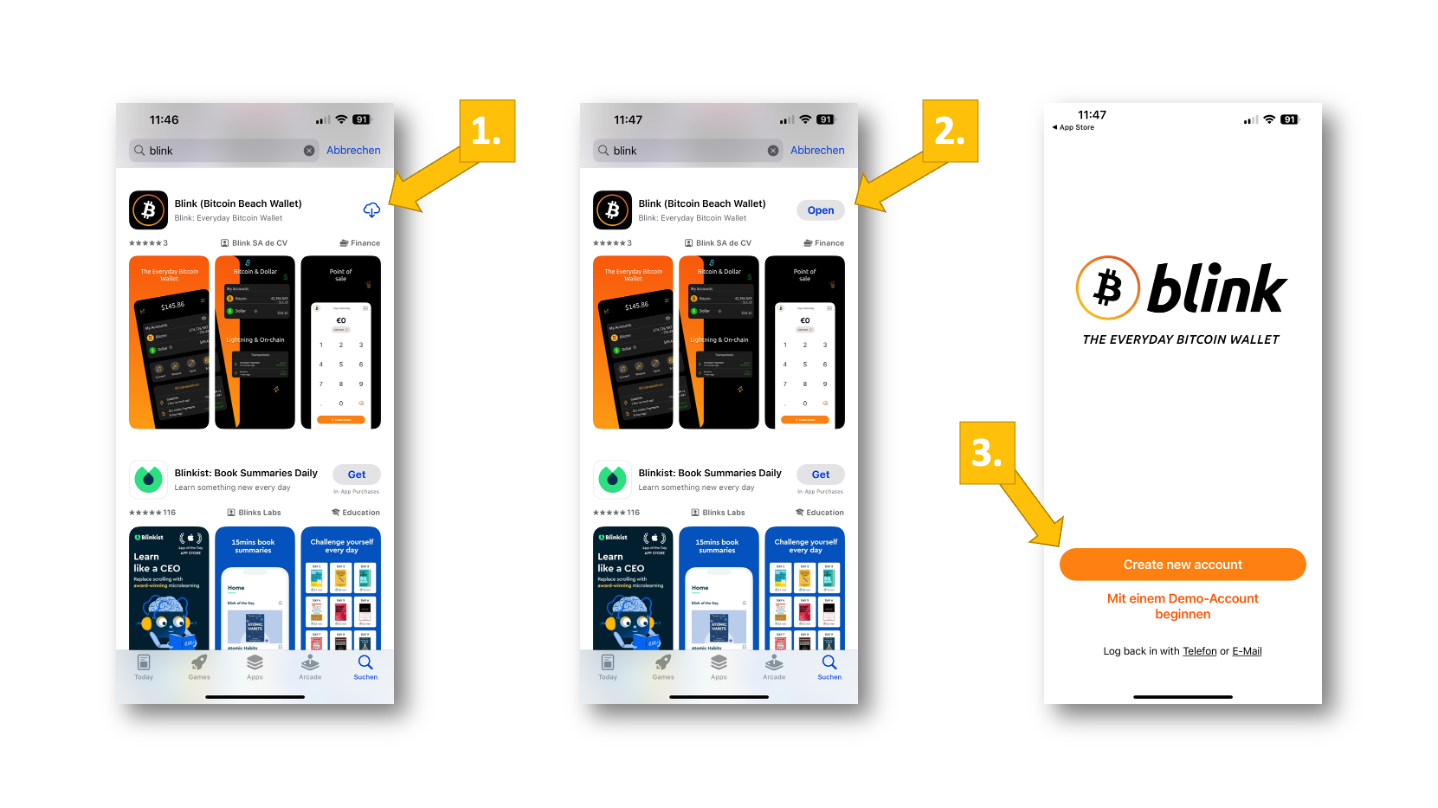
You can find the Blink Wallet in your app store for both Android and iPhones. We will now install Blink for iPhones.

To do that, go to the app store, search for “Blink” and select the “Blink (Bitcoin Beach Wallet)” App [1]. Once she has been downloaded, click on “open” [2] and then on “create new account” [3] on the app’s home screen.

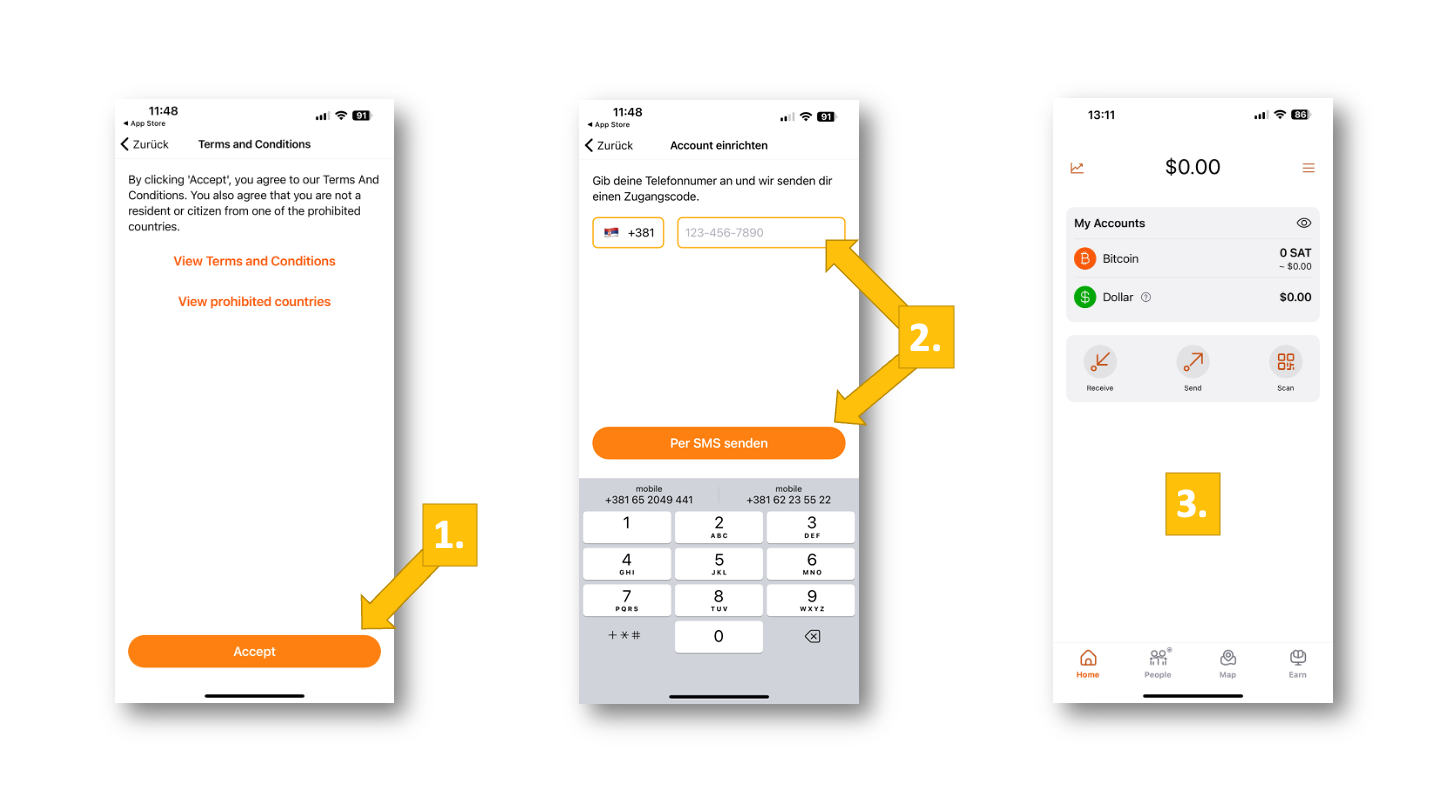
Now you have to accept the terms and conditions [1], enter your phone number and click on “Send by SMS” [2]. You will then receive a code via SMS, which you enter in the next window. You will then be in your Blink Bitcoin Lightning Wallet for the first time [3].

You have now installed Blink and set up an account. To be able to work with Blink – or to use the Blink wallet to register with Coinsnap – you still need to do two things: First, to set up your Lightning address, then to select the default account. We will show you how to do this in the following two paragraphs.

Create your branded Lightning address

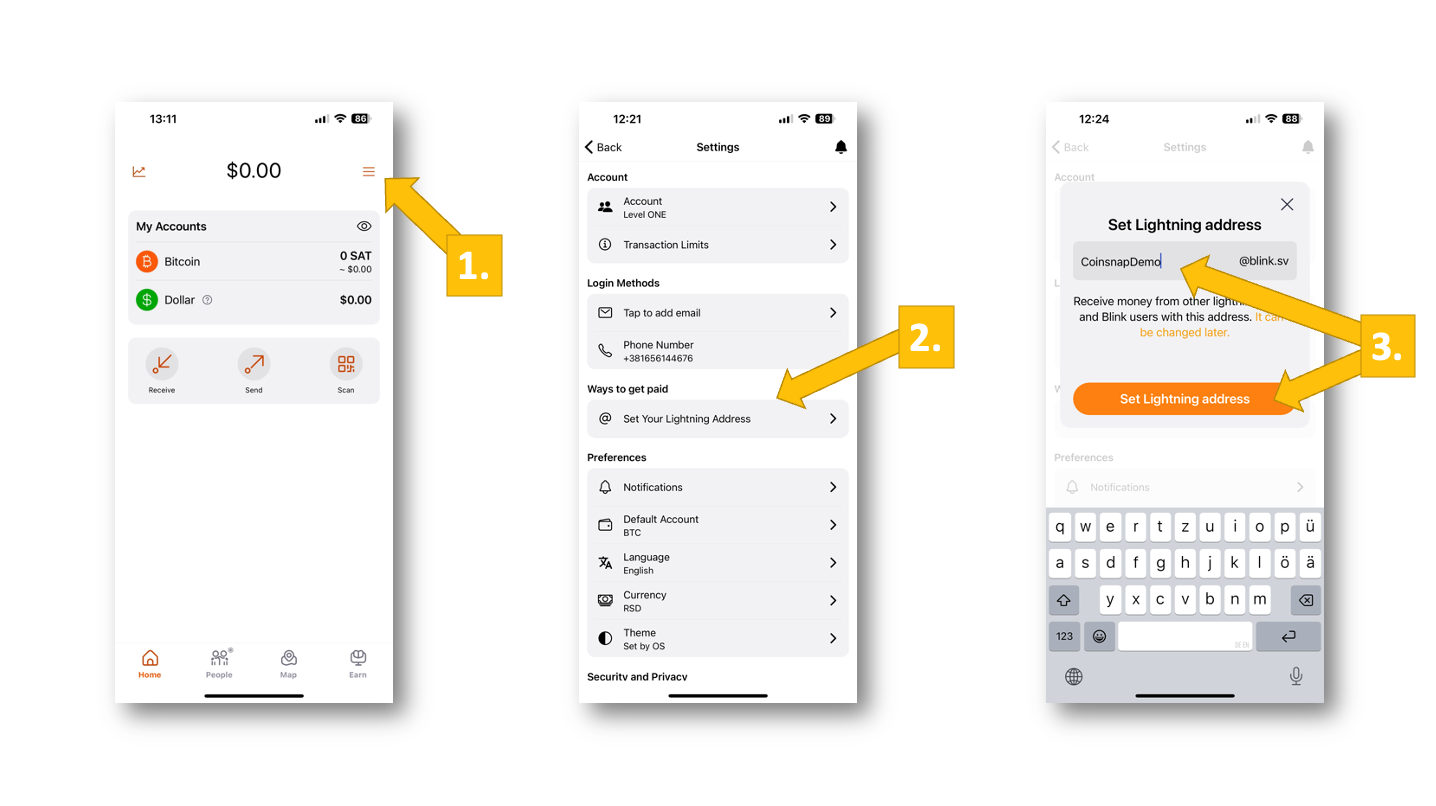
Without your personal Lightning address, you cannot receive or make Bitcoin Lightning payments. In particular, you need your Lightning address so that your customers’ payments can be credited to you. Blink makes it easy for you to create a personalized or branded Lightning address.

To do that, go to the menu [1] and click on “Set Your Lightning Address” [2] under “Ways to get paid” on the next screen. In the pop-up, enter the name of your address, we’ll enter “CoinsnapDemo” here, and then click on “Set Lighting address” [3].

Now you have a fully-fledged, personal Lightning address (in our case “CoinsnapDemo@blink.sv” ) – and you’re ready to accept Bitcoin payments from customers from all over the world!

Select your preferred account type (Bitcoin or Stablesats/USD)

Now all you have to do is select your preferred account type. This is important, as the Bitcoin price is subject to constant fluctuations, which can be quite significant.

If you believe in the long-term growth of the Bitcoin price and do not want to spend your Bitcoin immediately or transfer it to your company bank account in your local currency, you should choose Bitcoin as your default balance type. If you want to play it safe or realize your earnings 1-to-1, you are better off with the dollar account.

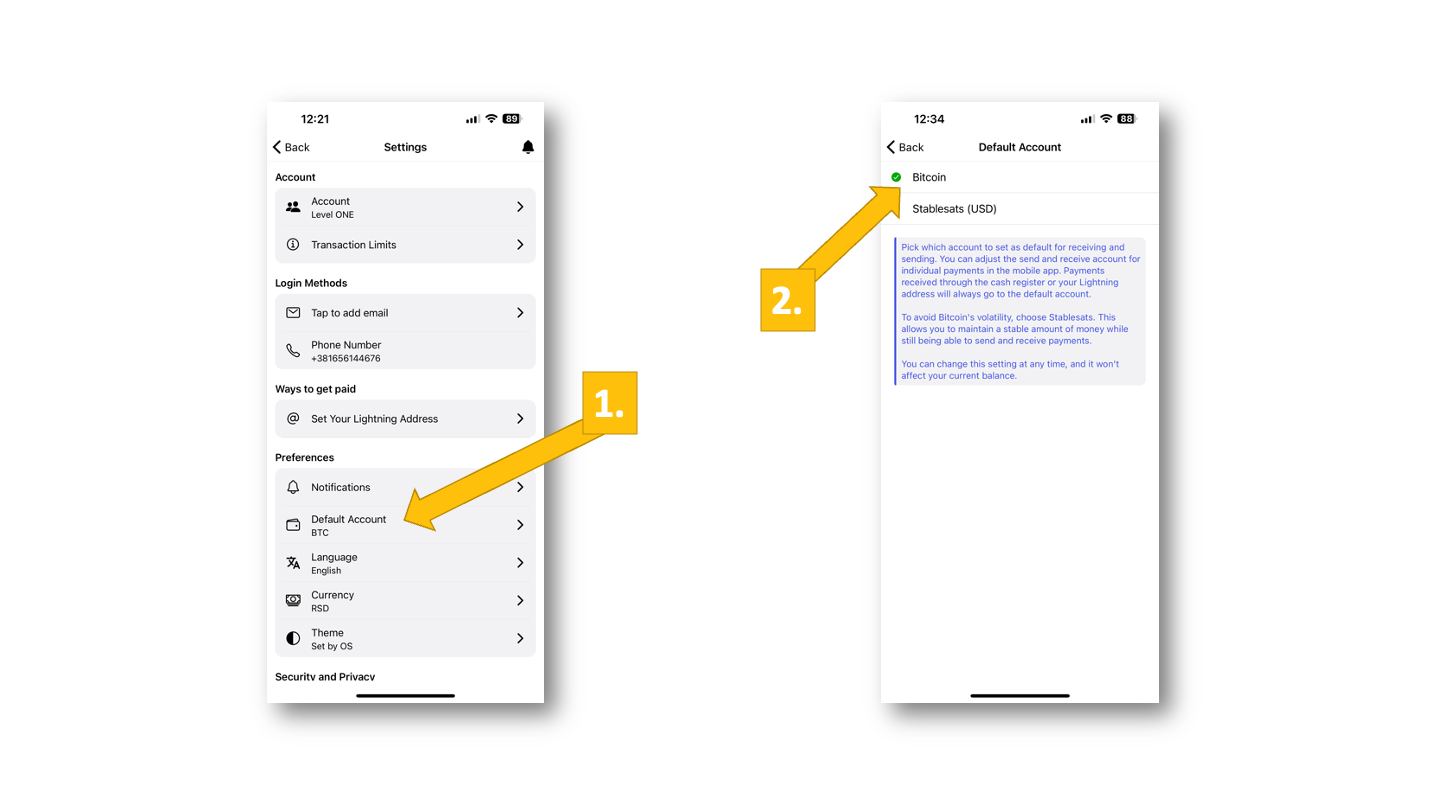
To choose your preferred account type, go to “Default Account” [1] under “Preferences”. On the next screen, you can now select “Bitcoin” or “Stablesats (USD)” [2]. (In our case, we have selected “Bitcoin”.)

Depending on what you have selected, you will now receive your earnings either on the Bitcoin account, where their value can increase (or decrease), or on the dollar account, where – regardless of the Bitcoin exchange rate – your exact sales value will be kept (in US dollars).

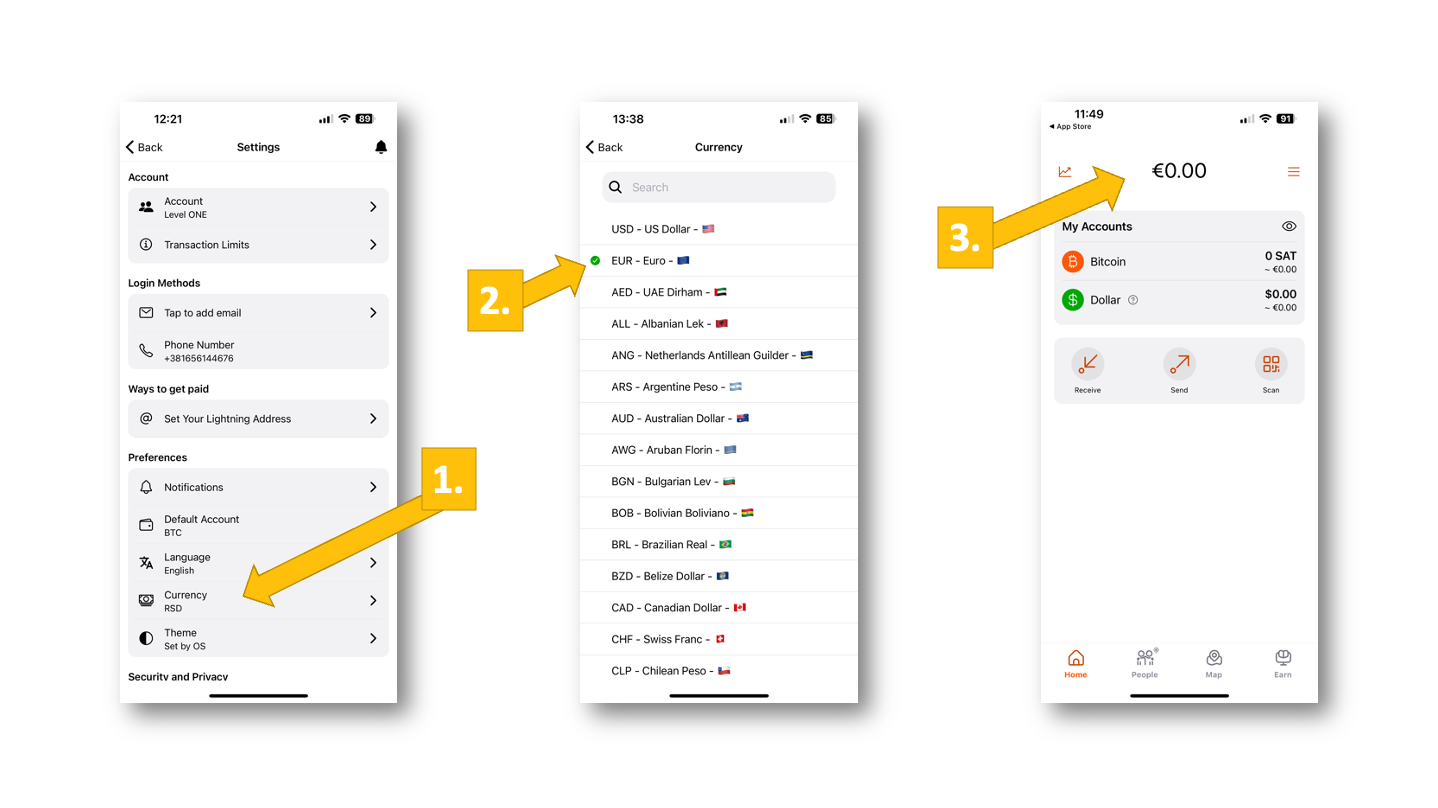
Select local currency

Last but not least, you should select your local currency so that you can see your balances in the currency you are selling your listings for. This is just as easy as selecting the default account.

Simply go to “Currency” [1] in the menu under “Preferences” and select your local currency from the following drop-down menu [2]. Now your home screen is switched to euros [3] and you don’t have to convert your account balances every time to know what you own (in euro-equivalent credit)!

Conclusion

The Blink wallet is quick and easy to install and is characterized by its simple operation.

The offer of a Stablesats dollar account is particularly interesting for merchants who want to act at short notice to pay invoices, for example. With the dollar account, they hedge against short-term fluctuations in the Bitcoin exchange rate and can realize their sales at the actual sales price.

The Blink wallet is therefore ideal for entrepreneurs to be credited with Bitcoin sales from their online store.

If you are unsure whether Blink is the right wallet for you, here are some other wallets that are supported by Coinsnap and that we recommend.

Accept Bitcoin on Wix

Accept Bitcoin on Wix

What is Wix?

Wix is an all-in-one platform that simplifies creating and managing websites.
With its drag-and-drop editor, it empowers millions of merchants to build visually engaging websites
without coding experience. Wix offers a variety of industry-specific templates and tools for branding,
eCommerce, and marketing.

Its built-in eCommerce and marketing capabilities let merchants manage inventory, track orders,
and process payments from a single dashboard. Integrated SEO, email, and social tools help boost traffic and visibility.

Thanks to its affordability, scalability, and mobile optimization, Wix is ideal for small and medium-sized
businesses seeking a professional online presence. The platform’s flexibility, app integrations, and global reach
make it a popular choice for entrepreneurs worldwide.

Why do merchants use Wix?

Wix stands out for its ease of use, robust eCommerce capabilities, and affordability.
Merchants can design professional online stores, manage catalogues, handle shipping, and offer multiple payment options.
Built-in analytics enable data-driven business decisions.

With its wide selection of templates and customization options, even non-technical users can create
unique, branded websites. Wix also bundles hosting, SSL, domains, and SEO tools into affordable plans — eliminating
the need for multiple service providers.

All Wix websites are mobile-friendly and can integrate additional tools from the Wix App Market,
including payment gateways, booking systems, and marketing apps. With multi-language support and
global payment options, Wix is particularly suited for small businesses, creatives, and entrepreneurs
who want scalability and convenience.

In an evolving economy, accepting Bitcoin allows Wix merchants to expand into the digital currency market
while offering secure, borderless payment options to their customers.

Why accept Bitcoin on Wix?

Accepting Bitcoin provides global reach, low fees, and fraud-resistant payments.
It eliminates currency conversion, supports international buyers, and reduces transaction costs compared
to traditional methods like PayPal or credit cards.

Bitcoin payments are irreversible, eliminating chargeback fraud and increasing merchant security.
They also appeal to tech-savvy customers who prefer digital currency, helping businesses stand out as
innovative and future-focused.

As Bitcoin adoption grows globally, enabling Bitcoin payments is a strategic move that helps
future-proof businesses and meet evolving customer expectations.

Overview of the Bitcoin-Lightning Network

The Bitcoin-Lightning Network is a second-layer payment system that enables near-instant,
low-cost Bitcoin transactions. It solves Bitcoin’s scalability limits by handling payments off-chain,
making it ideal for microtransactions and daily use.

Lightning transactions are instant and low-fee, avoiding blockchain congestion
while supporting global scalability. For merchants, this means faster payments, lower fees, and a smooth checkout experience.

Reasons and facts why to accept Bitcoin on Wix

Bitcoin payments provide a competitive edge

Offering Bitcoin payments gives Wix merchants an advantage in reaching global, tech-driven customers.
It’s especially appealing to younger demographics and cross-border buyers.

If merchants accept Bitcoin on Wix, their key benefits include:

  • Lower transaction costs — reduced fees versus traditional processors.
  • Fraud prevention — irreversible payments eliminate chargebacks.
  • Global reach — no currency exchange friction for international buyers.
  • Innovation appeal — projects a forward-thinking brand image.

Can merchants accept Bitcoin on Wix?

Yes. While Wix doesn’t natively support Bitcoin, merchants can integrate third-party
payment processors like Coinsnap to enable Bitcoin payments seamlessly.

What do I need to do to accept Bitcoin on Wix?

Enabling Bitcoin on Wix is straightforward. Choose a Bitcoin payment provider like Coinsnap,
which integrates with the Bitcoin-Lightning Network.
Then set up a Bitcoin-Lightning wallet (e.g. BlueWallet or Wallet of Satoshi) to receive payments.

Install the provider’s plugin — for Coinsnap, download it from
GitHub and follow the
setup guide.

Configure your Coinsnap account and wallet in the plugin settings, then test the integration before
activating it for customers. Once confirmed, your store will accept Bitcoin payments instantly.

Which plugins can I use to accept Bitcoin on Wix?

Coinsnap

Coinsnap provides Bitcoin/Lightning payments for Wix merchants:

  • Easy Lightning wallet integration.
  • Instant, low-fee transactions.
  • No chargebacks or fraud risk.

Coinsnap even offers a free installation service for merchants who prefer hands-off setup.

Learn more

BTCPay Server

An open-source, decentralized Bitcoin processor:

  • Free and self-hosted.
  • Invoices embeddable via HTML in Wix.

Best for advanced users with technical experience.

CoinGate

Supports 70+ cryptocurrencies with optional automatic fiat conversion and embeddable payment buttons.

NOWPayments

Allows merchants to accept Bitcoin and other cryptocurrencies with customizable payment buttons and
crypto-to-fiat conversion.

BitPay

A trusted crypto processor supporting Bitcoin, Bitcoin Cash, and others.
Requires strict KYC verification for merchant onboarding.

Bankful

Accepts Bitcoin, Ethereum, and USDT through Wix checkout.
However, Bankful doesn’t support direct wallet transfers.

Can I implement Bitcoin payment on Wix myself?

Yes — Coinsnap for Wix can be implemented easily.
Create a Coinsnap account,
download the plugin from GitHub,
install it, and configure your wallet in the settings.

After testing, publish your Wix store with Bitcoin payments enabled.
Coinsnap offers 1% transaction fees and no intermediaries or fiat conversions.

Can I get professional help implementing Bitcoin payment on Wix?

Accept Bitcoin on Wix with Coinsnap’s cost-free installation service

Coinsnap provides a free installation service to help merchants integrate Bitcoin payments into Wix.
Their team sets up your Coinsnap account, plugin, and wallet, verifies the setup, and ensures payments
flow directly to your wallet without fiat conversion.

Accept Bitcoin on Wix with Coinsnap’s free installation service

Request free installation

Addressing common concerns about accepting Bitcoin on Wix

Bitcoin payments are secure, transparent, and irreversible, eliminating chargeback fraud.
Solutions like Coinsnap use the Lightning Network for fast, private, off-chain processing.

Setup is simple — Coinsnap’s three-step integration (create account, set wallet, install plugin)
requires no technical expertise.
For merchants concerned about volatility, Bitcoin can be converted automatically to stablecoins or fiat.

Success stories of merchants that accept Bitcoin on Wix

Duftbar, a Swiss online shop for premium fragrances and décor, integrated
Bitcoin-Lightning payments using Coinsnap for Wix.
This allowed instant, low-fee payments directly from customer wallets via the Lightning Network.
The integration was handled free of charge through Coinsnap’s installation service.

Since implementing Coinsnap, Duftbar has positioned itself as an innovative retailer
offering secure, modern payment experiences to a global audience.

Visit their website: https://duftbar.ch/

Conclusion: It’s not complicated to accept Bitcoin on Wix

Accepting Bitcoin lets merchants reach new audiences, cut fees, and prevent chargebacks.
With Coinsnap, integration takes minutes and requires only a wallet and email address.
The Lightning Network ensures instant, low-cost Bitcoin payments suitable for any business size.

Accept Bitcoin on Wix now!

Start accepting Bitcoin payments today with Coinsnap — the fastest, easiest solution
for Bitcoin-Lightning integration on Wix.

Strike Business – Bitcoin-Lightning Wallet for companies

Table of contents  Show 

Strike Business is a custody wallet where your funds are held by Strike and you have to go through a KYC process for your business.

In return, you receive a Bitcoin Lightning wallet with a Lightning address and can manage both Bitcoin and Lightning in one account and also receive an account for euros.

You will receive a Lightning address that you can store if you accept Bitcoin payments via Coinsnap in your online store or on your website.

Strike Business is of interest to all companies that receive Bitcoin payments and wish to either keep the Bitcoin received or convert it into euros.

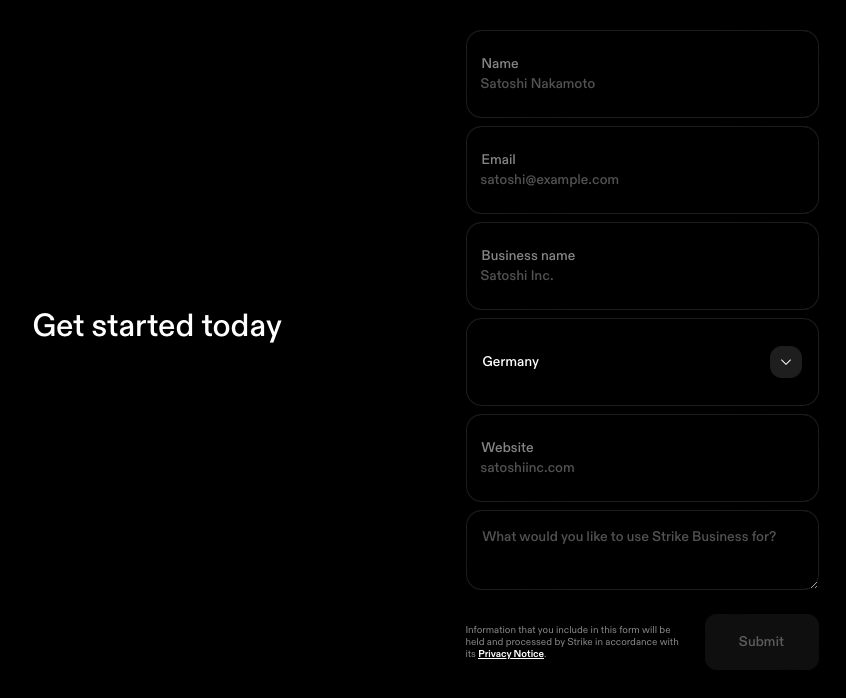
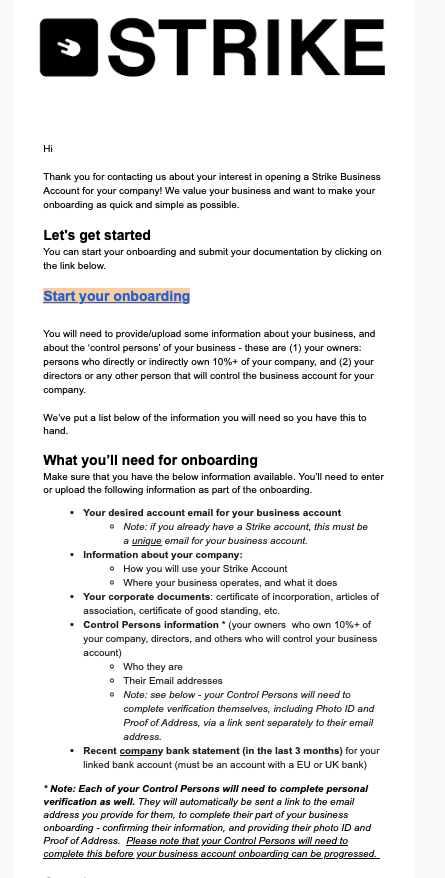
To open a Strike Business account, go to https://strike.me/business The entire process is partly in English, as is the subsequent email communication with the Strike Onboarding Team. After clicking on Get Started, you will be asked to fill out a form. There you will need to fill out a form in which you provide your name, your personal e-mail address, the name of the company, the location of the company, the URL of the company’s website and the purpose for which you want to use Strike Business. If you already have a private Strike account, make sure you use a different email address here. Ideally an email address that is associated with the company. You will then have to wait until you receive a message from Strike. A few days later you will receive an email to start the registration process:


It is an advantage to find out in advance what to expect and it is advisable to compile the relevant documents in advance.

Shareholder audit

An audit includes the KYC audit of the acting persons of this company. These are the directors and managing directors and all shareholders who hold more than 10 percent of the shares in the company. Each of these persons is then asked by e-mail to send a photo of an identification document and to provide proof of their residential address in the form of a bank statement or utility bill.

Company audit

In addition to the persons involved, the company must also be checked. Company documents such as an extract from the commercial register and a current bank statement with the company name and address are requested for this purpose. Once you have prepared everything, click on “Start your onboarding” in the email. You will be redirected to a website where the onboarding process takes place. The link may already have expired. Then simply reply to the email you received. I’ve always gotten the best email support from this later. Once you’re on the website, you’ll go through several steps where you enter the relevant information we just talked about.

Strike Business Dashboard

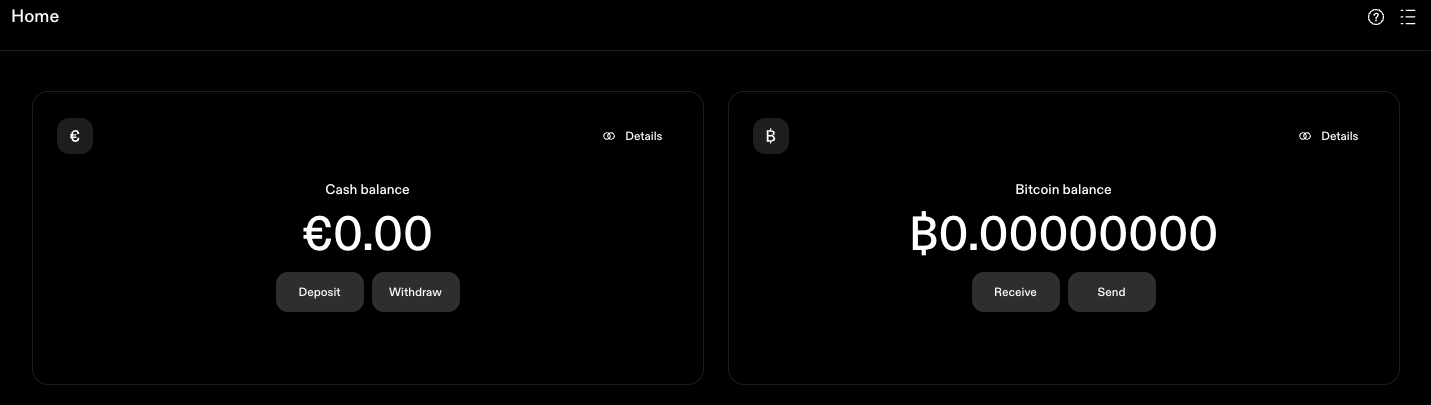
After successful registration, we can log in via the URL https://dashboard.strike.me/login log in to the Strike Business Dashboard. In contrast to the Strike account for private use, which is managed as an app on the smartphone, the Strike Business account is managed via the web. Those who already have a private Strike account will be familiar with the handling of both accounts.

Cash Balance Account

At Strike you have an account in which the euro balance is managed. You can receive bank transfers to the account. You will receive the relevant bank details when you click on Deposit. Deposits can only be made from a bank account in the same name as the Strike account and Strike only supports Euro currencies for European customers. Withdrawals cannot be made yet, as we need to deposit our bank account first. To do this, go to Accounts and then to Add bank account. You can then enter the IBAN of your own bank. Payouts are only made to the company account.

Bitcoin Balance Account

We also have the Bitcoin Lightning account, which supports both Onchain Bitcoin and Lightning. With Onchain, the Bitcoin address is displayed to receive payments. Once as an onchain address and additionally as a QR code. To receive payments via Lightning, you must first create a Lightning Invoice. To do this, enter the amount in Bitcoin that you would like to receive. Please note that the entry is made in Bitcoin, i.e. with decimal places. So if you want to create a Lightning Invoice for 100,000 sats, the entry is 0.00100000 or 0.001.

Lightning Address

You can also receive Lightning via your Lightning address. Your Lightning address is username@strike.me But how do you get your username? Click on the three dashes at the top right and your username will be displayed, which unfortunately cannot be changed. If you accept Bitcoin payments with Coinsnap in your online store or on your website, you enter your Lightning address there. The credits are credited directly to your Strike Business account via this Lightning address. However, the Lightning credit is not credited to your Bitcoin account, but converted into euros and credited to your Euro Cash account. If you do not want to keep the Bitcoin, but prefer to have the Bitcoin turnover credited in euros, then you do not need to do anything. However, if you want to keep the Bitcoin you receive, you must contact Strike Support and request that the conversion is not carried out and that the Bitcoin is credited directly to your Bitcoin wallet. You can reach Strike support at support@strike.me

Send Bitcoin to the hardware wallet

You can use the Send Bitcoin button to send Bitcoin via On-Chain or Lightning. If your Bitcoin balance on the Strike Bitcoin Wallet has become too high, it is advisable to transfer this Bitcoin to a secure Bitcoin hardware wallet, such as the Bitbox02. It is pleasing to note that Strike does not charge its own fees for Bitcoin withdrawals, as is often the case with other Bitcoin wallets. Only the fees for the Bitcoin blockchain that the miners receive are charged.

Receive Bitcoin – Credit in Euro

If you have deposited the Lightning address you received from Strike with Coinsnap, your customers’ Bitcoin payments will be credited directly to the Strike wallet. The question now arises as to which Strike account the credit should be made to. To the Bitcoin account or to the Euro Cash account? The default setting for Strike Business is to the Euro Cash account. For traders who are wary of the volatility of the Bitcoin price, we recommend retaining this setting. For example, if the end customer pays €50, this amount will be credited to your Euro Cash account minus the fees. These fees are on the one hand the fees that Coinsnap charges for its own services and on the other hand the exchange fee from Strike. If you would like to offer your customers the option of paying with Bitcoin, but would like to be credited in euros, Strike offers you an immediate conversion at the most favorable fees. The immediate conversion upon receipt of the Bitcoin payment is very advantageous and you are thus protected against the volatility of the Bitcoin exchange rate. Strike Business is particularly recommended for merchants who receive Bitcoin payments from their customers and want an immediate credit in euros.

Receive Bitcoin – Credit in Bitcoin

Currently, incoming Lightning payments are converted directly into euros via the Lightning address and then credited to the Euro Cash Wallet.

However, if you wish to keep the Bitcoin you receive, you must contact Strike Support and request that the conversion is not carried out and that the Bitcoin is credited directly to your Bitcoin wallet.

You can reach Strike support at support@strike.me

Fees

Strike impresses with its low fees and, unlike other Bitcoin Lightning wallets, does not charge any fees for certain services.

Euro deposits and withdrawals

You can make deposits and withdrawals to the Euro Cash account in our Strike Wallet by bank transfer. Strike does not charge any fees for deposits or withdrawals to another bank account.

Bitcoin deposits and withdrawals

You can send and receive deposits and withdrawals from your Bitcoin wallet via Onchain and Lightning. Strike does not charge any fees for deposits and withdrawals of Bitcoin payments.

Lightning

There are no fees for switching from Lightning to Onchain or vice versa. You can therefore receive Lightning credits from your customers, which are credited to the Strike Bitcoin wallet and transferred to your Bitcoin hardware wallet at no additional cost. Other Bitcoin Lightning wallets charge an average fee of 0.5% for forwarding to an on-chain Bitcoin wallet, which Strike does not charge. To be fair, however, it must be pointed out that network fees are incurred when paying via Lightning and Onchain. However, these fees are not charged by Strike, but the actual network costs are passed on. Lightning payments only incur routing fees, which are in the millicent range.

Onchain

Onchain payments incur fees that depend on how quickly the credit is to be issued. However, these fees are displayed before the payment is executed. Strike breaks this down into three stages:

  • Priority – about 10 minutes – network fee plus strike fee
  • Standard – about one hour – network fee plus strike fee
  • Free – about one day – no fees

Strike here means that a strike fee is incurred, but not how high it is. So please pay attention to this when transferring Bitcoin yourself. But if you transfer the Bitcoin to your own Bitcoin wallet, then you certainly have enough time and then there should be no fees and no network fees.

Exchange fee

But how does Strike earn his money?

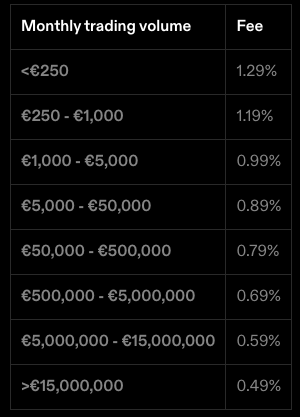
Strike’s business model is based on the exchange between euros and Bitcoin. Every time you buy or sell Bitcoin, i.e. exchange euros for Bitcoin and vice versa, Strike charges a fee. This fee is staggered and depends on the monthly exchange volume. If you exchange less than €250 per month, you pay 1.29%. If you exchange €1,000 per month, the fee is only 1% and is reduced accordingly. Every month it starts all over again. So check for yourself what fees you would incur. The standard market rate is around 1.5%, making Strike one of the cheapest providers.


Summary

Strike Business is the ideal Bitcoin wallet for businesses. Strike is a custody wallet where your Euro balance and your Bitcoin are held by Strike. To open a Strike account, KYC is required for your company and the acting persons. You will receive a wallet with a euro account and a Bitcoin account, which you can use to manage both separately. You will receive your own Lightning address for your company and, if you want to accept Bitcoin Lightning payments in your store or on your website, you can have the sales credited directly to your Bitcoin or euro account. You can receive Bitcoin and Lightning payments from your customers and decide whether you want to keep the Bitcoin or convert it into euros immediately. With Strike Business, you have a clean separation between your private Bitcoin and your company’s Bitcoin. Strike Business also scores highly in terms of fees. Deposits and withdrawals by bank transfer are free of charge. There are also no fees for deposits and withdrawals via Bitcoin Onchain and Lightning, only the routing and network fees are passed on. Fees are only charged when exchanging Bitcoin for euros or vice versa. However, these fees are cheaper than what is usually charged on the market. Strike Business is particularly recommended for businesses that want to accept Bitcoin and Lightning payments in-store or on the Internet or online store with Coinsnap.

Payment Button

Offer Bitcoin payment anywhere with the Coinsnap Payment Button

Sell products, merchandise, or services easily for Bitcoin, anywhere on your WordPress website

What is a Payment Button?

The payment button allows you to sell individual products and services on your website.

You create a description of the product you want to sell on your website.

You add the Coinsnap payment button to this product description.

When the payer clicks on the payment button, the QR code is displayed and they can pay with Bitcoin Lightning.

So that you as the payee also know who the payment is from, the payer can enter their email address. You can then send a message or a digital product to this email address.

There is also a message field. Here the payer can enter a message or other information relevant to the purchase.

The payment button is interesting for websites that want to sell individual products or services and for which a shop software solution is somewhat oversized.

How can I create a payment button?

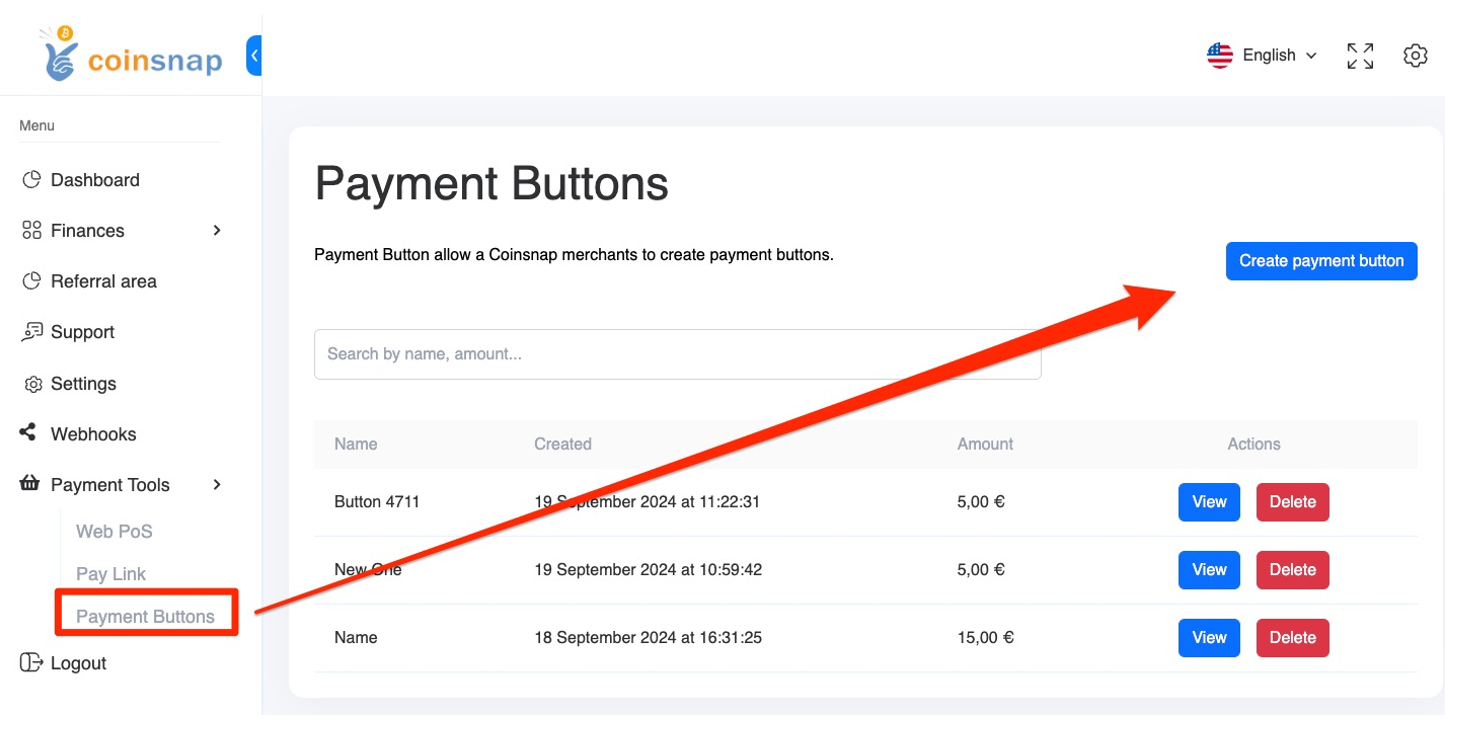
Go to the menu item Pay-Tools in the Coinsnap backend. Here you will find the submenu item Pay button and can create a new payment button (see image on the right).

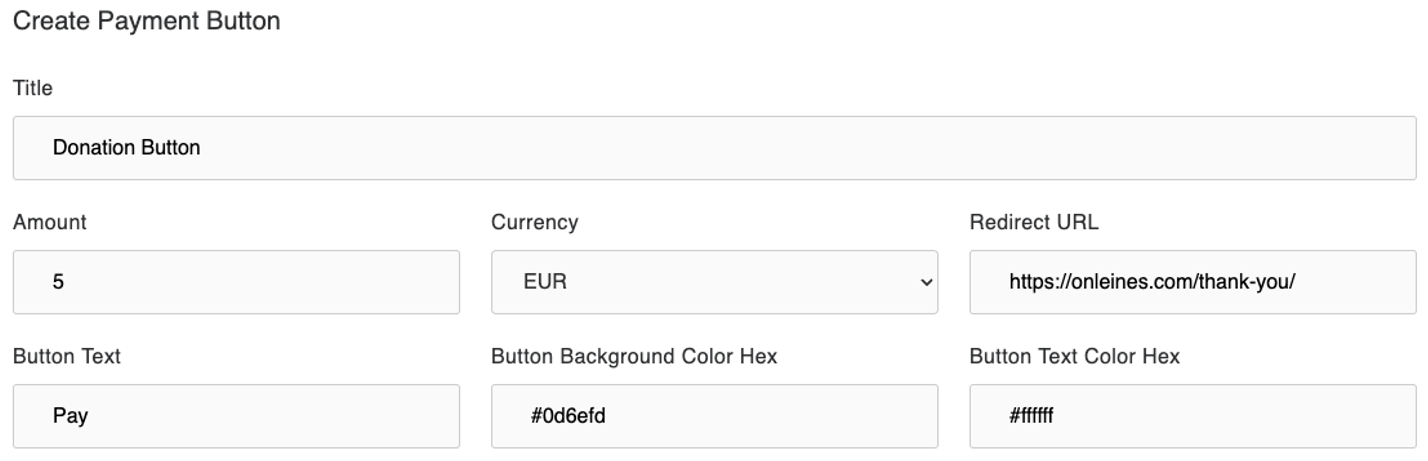
You now have the option of creating the payment button according to your individual requirements.

Enter your own name in the Title field so that you can differentiate between them if you create several payment buttons.

Then enter the amount to be paid and the corresponding currency under Currency. In our example, 5 euros.

In the Redirect Url field, enter the url to which you want to be redirected after successful payment.

This can be a thank you page or a page on which the purchased content is displayed or offered for download.


In the Button Text field, you can specify what should be displayed to the payer on the payment button.

You can specify the colour of the button in the Button Background field and the colour of the text in the Button Text Color field.

If you are using a CSS theme on your website, these settings will be overwritten by the values of the theme.

This ensures that the button matches your website.


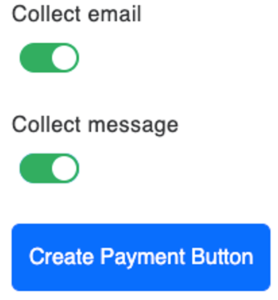
You can then choose whether you want to request the payer’s email address and whether you want to give them the option of sending you a message.

In this case, you activate Collect Email or Collect Message.


Then click on Create Payment Button and you will see a preview of the payment button:


The appearance on your website may look slightly different later, as the payment button can take over the design of your website.

You will then be shown the HTML code for your website.

You can now copy this code and paste it into the desired place on your website.

On our website, the payment button will look like this:


If you would like to integrate such a payment button on your website, open a Coinsnap account now and create your own customised payment button.

Tags:Bitcoin Pay Button Bitcoin Payment Button Pay Button Payment Button

HTML Bitcoin Invoice Form

Bitcoin invoices made easy – with the Coinsnap Invoice Form

Coinsnap Invoice form as HTML version

Do you invoice your customers for your services – previously paid by bank transfer? From now on, your customers can also pay conveniently with Bitcoin – using the Coinsnap Bitcoin Invoice form.

It’s as simple as that:

You integrate the provided HTML code of the Coinsnap form on your website – done! The form appears directly on your page and works very intuitively.

  1. Enter invoice data:
    Your customer simply enters the amount, the invoice number and their name – just like in online banking.
  2. Add message:
    Optionally, the customer can leave a personal message for you as the payee.
  3. Pay with Bitcoin:
    Clicking on the “Pay with Bitcoin” button opens a window with the QR code for payment.

Coinsnap makes Bitcoin payments as easy as online banking.
Integrate now and offer new payment options!

Bitcoin Invoice Form – also available as a practical payment link

In addition to integration as HTML code on your own website, Coinsnap offers you another simple option: the Bitcoin Invoice Form as a link.

How to use the link:

🔗 Simply print on the invoice
Add the link directly to your invoices – exactly where your bank details are currently located.

📧 Send flexibly
You can also easily send the link to your customers by email, messenger or other channels – ideal if a customer asks you to pay by Bitcoin.

🔁 One link for all customers
An example link could look like this: http://pay-in-bitco.in/FHAiOb.
This can be used universally – your customers then enter their billing data themselves.

With the Coinsnap Bitcoin Invoice Link, you can make Bitcoin payments easier than ever for your customers – without any technical hurdles.

coinsnap bitcoin invoice form als Payment Link

How to create your personal Bitcoin invoice form

After logging into the Coinsnap backend, you will find all the options for creating your invoice form under the menu item “Pay Tools” → “Invoice Form”.

You have the choice between two variants:

🔧 Self-hosted form (HTML version):
Ideal for direct integration on your own website. You receive the HTML code, which you simply integrate into your page.

🔗 Link form:
Perfect for invoices in PDF format or for sending by e-mail. The generated link leads directly to the Bitcoin payment form.

How to use your form:

  1. Select the desired variant.
  2. Copy the generated HTML code or payment link.
  3. Add it to your website – or as a link directly in your invoices.


Done! Your customers can now pay easily and securely with Bitcoin – whether via your website or via a link.

Tags:Invoice Form Invoice Form Invoice Form Pay Invoice

Accept Bitcoin-payout into a bank account

You use the service of Coinsnap and your customers can pay with Bitcoin and Lightning?
Then you get the sales of your customers in the form of Lightning credited to your own Lightning Wallet.

However, you may prefer to have this Lightning credit paid out in Euros to your own bank account.
In this case, you can forward your Lightning balance to a Lightning broker and it will be immediately converted into Euros and paid out to your bank account.
Coinsnap itself does not offer exchange of bitcoin into euros, dollars or other currencies, but it works with partners who enable the exchange and withdrawal to a bank account.

By working with various Bitcoin brokers, it is possible to pay out in different currencies and to bank accounts in different countries and regions.

As a Coinsnap merchant, you are free to choose your Bitcoin broker

In addition to the fees, it is important to consider the country of the bank where you have your bank account and the currency in which the payout is to be made.
As a rule, you have to register separately with the relevant Bitcoin brokers and enter your personal data and bank details.
Each Lightning broker has different requirements for the documents and information to be submitted about your company.
With some Lightning Broker, the account opening can also be started directly from Coinsnap.
You will receive your own Lightning address from the Bitcoin or Lightning broker, which you can deposit with Coinsnap.
All incoming Bitcoin and Lightning payments from your customers will be forwarded by Coinsnap to this Lightning address.
The amount is then credited to your Lightning Broker, who converts the incoming amount into euros or another fiat currency and pays it out to your bank account.
Depending on the amount, payment can be made per incoming payment or cumulatively.
Instead of a Lightning address, the Lightning broker can also provide access data in another form, which you can enter in the corresponding fields of the respective provider in the Coinsnap backend.

The fiat invoice amount to be paid by the customer is calculated using the Bitcoin exchange rate provided by Lightning Brokers.
The final conversion takes place at the time the payment is received by the Lightning Broker. When paying by Bitcoin (onchain), the time of crediting depends on the confirmation on the blockchain, which can take an hour or longer. If the end customer pays via Lightning, the Lightning Broker is credited within a few seconds and is virtually risk-free due to price fluctuations. Below is a list of Bitcoin and Lightning brokers to which Coinsnap offers a connection. This list of Lightning Broker connections is constantly being expanded. If your Lightning broker is not yet listed here, please inform them about the possibility of working with Coinsnap and ask them to contact us.

DFX.Swiss

DFX is a Swiss crypto exchange and offers the possibility to buy and sell Lightning.

Coinsnap customers have the possibility to automatically convert the incoming Lightning payments of their end customers into Euro or CHF and have them paid out to their own bank account.

Payments can be made to all countries that are members of the SEPA area.

The SEPA countries include the 27 EU member states (Austria, Belgium, Bulgaria, Croatia, Cyprus, the Czech Republic, Denmark, Estonia, Finland, France, Germany, Greece, Hungary, Ireland, Italy, Latvia, Lithuania, Luxembourg, Malta, the Netherlands, Poland, Portugal, Romania, Slovakia, Slovenia, Spain, Sweden and the Czech Republic), the three EEA states Iceland, Norway and Liechtenstein as well as Switzerland, the United Kingdom, San Marino, Vatican City, Andorra, Montenegro and Monaco.


The fee for converting Lightning into euros or Swiss francs is 1.49% of the turnover.
Merchants who wish to have their customers’ turnover paid out to a bank account must select the provider DFX in the backend under Payouts to bank account. The fields Account holder, IBAN bank details and Bank account currency can be entered there. No further details are required as long as the turnover submitted is less than CHF 1,000 / € 950 per day or CHF 100,000 / € 95,000 per year. If the turnover exceeds this limit, an additional identification check is required in accordance with Swiss law. The fee is then 1.99% of the turnover.

Strike

The Strike Wallet is a Bitcoin Lightning Wallet with a bank account.

The Strike Wallet is particularly suitable for store operators who prefer to have sales from their online store paid out to their own bank account instead of in Bitcoin.

In addition to the US and Europe, Strike is available in more than 95 other countries, including Brazil, Argentina, Mexico, El Salvador and Serbia.

Any online merchant in whose country Strike is available can accept payments from their customers via Coinsnap Bitcoin Lightning and receive the credit either in Bitcoin or in their local currency to their bank account.

The Strike Wallet is an ideal addition to the use of Coinsnap.
With the Strike Wallet, a Coinsnap merchant has the option of either having the transactions credited to their Bitcoin wallet or to their own bank account.
Wherever Strike is available, merchants can accept Bitcoin Lightning payments in their online store and receive the payout to their own bank account via Strike.
All you have to do is install the Strike app on your smartphone, verify yourself and enter your bank account.
You then open an account with Coinsnap and deposit the Lightning address provided by Strike.
Once you have installed the Coinsnap payment plugin in your online store, your customers can pay you with Bitcoin Lightning and the equivalent value is credited to the Strike Cash Wallet in your local currency and can be paid out to your own bank account.

Strike fee:

< €1,000 1.29%
€1,000 – €5,000 1.09%
€5,000 – €50,000 0.89%

> €50,000 0.79%
If you turn over less than €1,000 per month with Bitcoin in your online store and want to have the equivalent value paid out to your bank account via Strike, you will pay a fee of 1.29%, for example.

You can find detailed step-by-step instructions on how to install the Strike app on your smartphone and deposit it with Coinsnap in the article: Withdrawal via Strike to your own bank account

Pocket Bitcoin (in implementation)

Pocket Bitcoin is a Swiss Bitcoin broker that is currently testing the purchase and sale of Lightning. The purchase of Lightning credit is already possible during the test phase. The sale of Lightning, i.e. the exchange of Lightning into euros or CHF, is not yet possible.

Coinsnap is currently integrating the sale of Lightning via Pocket Bitcoin. Completion is planned for Q3/2024.


Coinfinity (planned)

Coinfinity is an Austrian Bitcoin broker that is currently testing the purchase and sale of Lightning. The purchase of Lightning credit is already possible during the test phase. The sale of Lightning, i.e. the exchange of Lightning for euros, is not yet possible.

As soon as an API interface for the sale of Lightning is available, Coinsnap will check whether a technical integration into the Coinfinity system is possible.


21Bitcoin (requested)

21Bitcoin is an Austrian Bitcoin broker that is currently testing the purchase and sale of Lightning. The purchase of Lightning credit is already possible during the test phase. The sale of Lightning, i.e. the exchange of Lightning for euros, is not yet possible.

As soon as an API interface for the sale of Lightning is available, Coinsnap will check whether a technical integration into the 21Bitcoin system is possible.


Lightning Broker wanted

Coinsnap is interested in working with Bitcoin brokers that offer Lightning sales and withdrawals to bank accounts.

Coinsnap is looking to partner with other Lightning brokers to offer payouts in other currencies and countries.

Coinsnap is a payment service provider that enables its merchants to accept Bitcoin and Lightning payments in their online stores. Some merchants want to keep the Bitcoin sales, while others prefer to have the Bitcoin Lightning payments they receive paid out to their bank account.

Therefore, we are looking for partners where these merchants can sell the Bitcoin Lightning sales and receive a credit in fiat to their bank account.

This means that the sales process should be automated for the merchant. The merchant should not have to go to the Lightning Broker website and manually enter the data for each sale. The data should be transferred automatically by Coinsnap.

The process could look like this:
The end customer orders something for €50 in the online store.
Coinsnap asks the Lightning Broker for the current exchange rate and receives, for example, 100,000 sats in response.
Coinsnap creates a Lightning invoice.
The end customer pays 100,000 sats and Coinsnap forwards the sats to the Lightning Broker.
The Lightning Broker exchanges the 100,000 sats for €50 and transfers them to the merchant’s bank account.

The implementation scenarios are listed below:

Lightning address:
One solution would be for the Coinsnap customer to open an account with a Lightning broker and receive a Lightning address from them. The merchant saves the Lightning address of the Lightning broker in the Coinsnap backend.
Coinsnap then forwards the merchant’s Bitcoin Lightning earnings to this Lightning address. The Lightning Broker then converts the incoming Lightning payments into fiat and pays them out to the merchant’s bank account.

API connection:
Coinsnap already has some information about the merchant. This data can be transferred to the Lightning Broker when registering a new merchant or a transaction.

1. User registration is required:

The service must allow users to register.
Registration includes receiving a signature message, signing it and registering via an endpoint.
Users can optionally provide additional information such as wallet and transfer/bank details.

2. the requirement for KYC verification

KYC verification is subject to regional regulations and may be optional in some countries and mandatory in others.
The service should offer the possibility of KYC verification based on transaction volume thresholds.
However, in cases where KYC is required, users must undergo identity verification via the API to ensure compliance.

3. transaction requirements:

The service should provide an API through which users can obtain offers for the sale of cryptocurrencies.

Tags:21bitcoin coinfinity dfx Pocket Bitcoin Strike

Payment Link

Get paid in Bitcoin with the Coinsnap Payment Link

Let your customers or clients pay their bills with Bitcoin

You have written an invoice to your customer and would like this invoice to be paid via Bitcoin Lightning?

With Coinsnap Pay-Link you can send each of your customers a payment link that looks similar to this one:

https://pay-link.coinsnap.io/payment-requests

When your customer clicks on this payment link, a payment page opens with all the relevant information about this invoice (see right).

The customer clicks on Pay Invoice and is shown a QR code with which the invoice can be paid via Bitcoin Lightning.


As the payee, the invoice amount is credited directly to your own Bitcoin wallet.
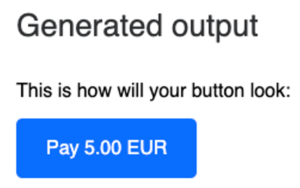
Having your customers pay you with Bitcoin is particularly convenient for you as a payee with Coinsnap Pay-Link.

As a merchant, you enter the invoice amount in euros and if your customer pays a few days after receiving the invoice, the exchange rate at the time of payment is used.

In this way, you protect yourself against the risk of the Bitcoin exchange rate between the time of invoicing and the time when the invoice is actually paid.

How to create a payment link?

To be able to create a payment link, you need a Coinsnap account. After you have logged in to the Coinsnap backend, you will find the menu item “Payment tools” in the left menu bar and the item “Pay link” there.


To create a new payment link, click on Create Payment Link. A name for the payment link can be entered in the Title field. This could be the invoice number, for example. Then enter the invoice amount in the Amount field and the currency in which the invoice is issued in the Currency field.
You can then specify the date by which the invoice should be valid, i.e. the latest date by which the invoice must be paid by your customer. Further information about the invoice can be entered in the Description field.

If you then click on “View”, you will see the invoice as it is displayed to the payer of the invoice.

You can now use the URL from your browser to send it to your customer together with the invoice.


It is not necessary to create a separate payment link for each customer. Your customers can fill out and pay their invoice themselves using the payment form. Just as you already provide your customers with your bank details on your website and on your invoices so that they can pay by bank transfer, you also provide your customers with the payment link to the payment form. You will receive a static payment link that refers to the empty payment form and can therefore be used in the same way for all your customers. You can embed the payment link to the payment form on your website, insert it into your invoices or integrate it into the email form when you send your invoice to your customers.


Tags:Bitcoin Pay-Link Bitcoin Payment Link Pay-Link Payment Link

How does a Lightning payout take place?

How does a Lightning payout take place?

When your customers pay with Bitcoin or Lightning in your webshop, these transactions are credited to your own Lightning wallet.
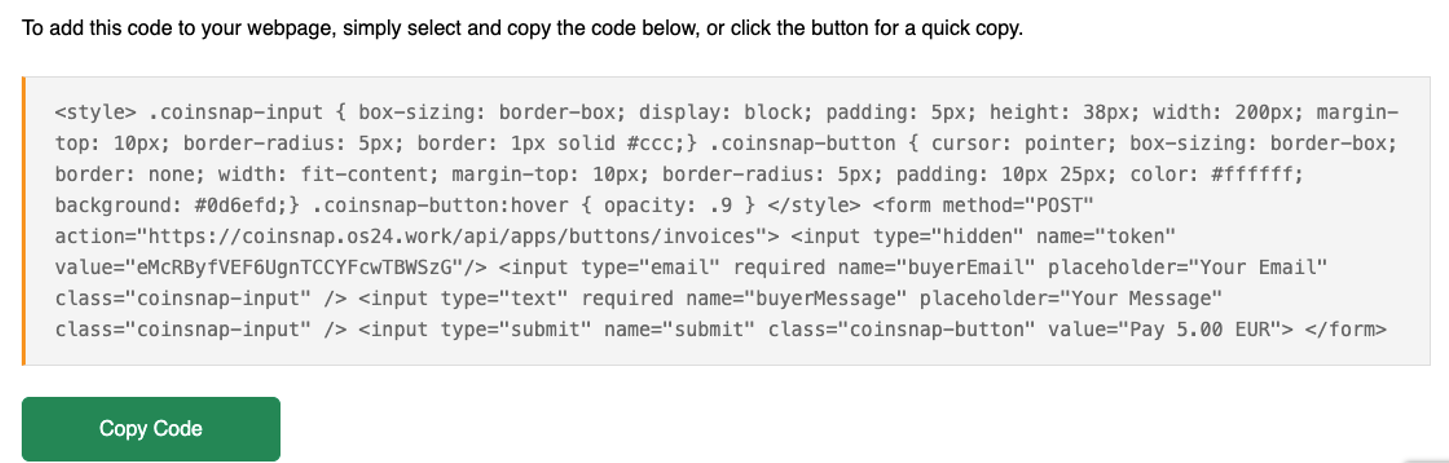
To do this, you need a Lightning wallet with your own Lightning address.

This Lightning address is stored in the Coinsnap backend and all payments are credited to your Lightning wallet via this Lightning address.

A Lightning address looks like an email address, but instead of messages, you can use it to send and receive Bitcoin via Lightning.

Most Lightning wallets are installed as an app on your smartphone.

Using the example of the Wallet of Satoshi, we will show you how to obtain a Lightning wallet with a Lightning address.

We have listed other wallet providers below where you can also obtain your own Lightning address.

Lightning address of Wallet of Satoshi

Using Wallet of Satoshi as an example, we explain how to get your own Lightning address.

The other providers we have listed below work in a similar way.

You have two options for obtaining the Wallet of Satoshi:

Either you go to the website https://www.walletofsatoshi.com/ and there you will find the two download options for the App Store or Google Play.

Or you go directly to the store on your smartphone and search for the Wallet of Satoshi there.


After you have started the Wallet of Satoshi on your smartphone, you will see a Receive button at the bottom left.
Click on it.

The adjacent window opens.
Below the QR code you will find the Lightning address, which looks like an e-mail address. This is your Lightning address, which you can give to anyone you want to receive sats from.
You deposit this Lightning address with Coinsnap and all incoming Bitcoin and Lightning payments are credited directly to your Bitcoin Lightning wallet via the Lightning address.

Provider of a Lightning Wallet with a Lightning address

With the following Lightning Wallet providers, you will receive a Lightning Wallet with a Lightning address to be able to send and receive Lightning payments.

Alby

Lightning Address: username@getalby.com

How to get an Alby Lightning address

Blink

Lightning Address:username@blink.sv

Coinos

Lightning Addess: username@coinos.io

LifPay

Lightning Address: username@lifpay.me

Wallet of Satoshi

Lightning Address:username@walletofsatoshi.com

Strike

Lightning Address: username@strike.me

ZBD/Zebedee

Lightning Address: username@zbd.gg

Zeus

Lightning Address: username@zeuspay.com

If you know of other Lightning wallet providers that offer users a Lightning address for receiving payments, please let us know.
We would like to add them to our list of Lightning Wallet providers.