
Magento Bitcoin User Guide
This Magento Bitcoin User Guide shows you how to accept Bitcoin and Lightning payments in Magento with the Magento Bitcoin module. It explains how to install and connect the Coinsnap payment module, how to configure all relevant settings, and how to enable Bitcoin payments at checkout so customers can pay instantly via Bitcoin (on-chain + Lightning).
Add Bitcoin + Lightning to your Magento checkout — fast setup, no complex integration.



GET STARTED - REQUIREMENTS
To enable Bitcoin payments with Coinsnap in your Magento store, you must meet the following requirements:
- A Magento online shop with administrator access
- An active Coinsnap account
- Download the Coinsnap Bitcoin payment module
Step 1 - installing the module
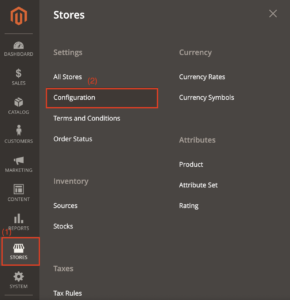
Click Stores on the left-hand side of the Magento login page [1].
In the “Stores” section, click the Configuration subsection [2].
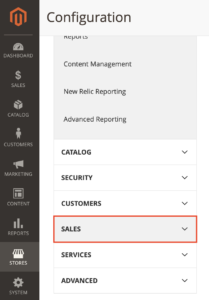
Select Sales in Configuration
Step 2 - connecting the module with the Coinsnap Bitcoin gateway
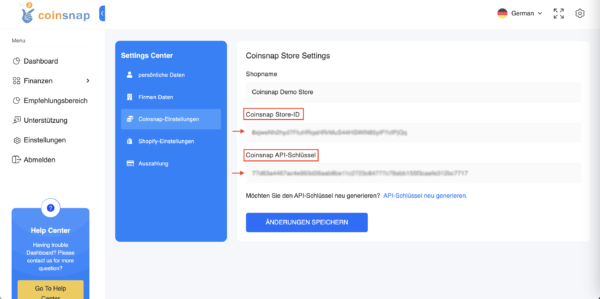
In your Coinsnap account dashboard go to Settings.
There, go to Store settings, where you can copy your Store ID and API Key.
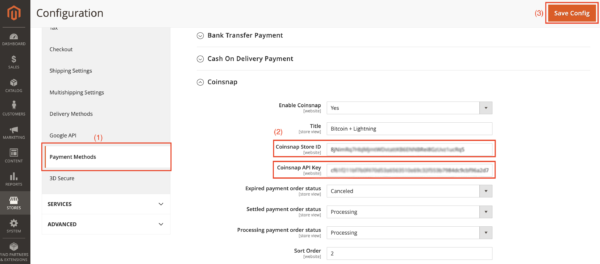
(1) Configuration of the payment methods
Navigate to the “Sales” section and search for the “Payment methods” option.
Click on them.
(2) Integration of the Coinsnap app data
Enter the store ID and API key that you copied from the Coinsnap app into the corresponding fields.
(3) Save changes
Click on the “Save” button to finalise the integration of your Magento plugin with the Coinsnap app.
Now you’re ready to accept Bitcoin+Lightning payments.
Frequently Asked Questions
What Users Ask About This plugin
Which Bitcoin payment methods are supported in Magento with Coinsnap?
Coinsnap supports both Bitcoin on-chain and Lightning payments. Customers can choose their preferred method directly on the payment page via a unified QR code.
Do I need technical or programming skills to install the the Magento Bitcoin module?
No. The installation and configuration process is straightforward and can be completed from the Magento admin interface without writing any code.
Is a Coinsnap account required to use the the Magento Bitcoin module?
Yes. An active Coinsnap account is required to generate payment requests and to receive Bitcoin or Lightning payments.
Where do Bitcoin and Lightning payments get credited?
Payments are credited instantly to the Bitcoin or Lightning wallet you connected in your Coinsnap account settings.
Can I test Bitcoin payments before going live?
Yes. You can create test transactions with small amounts to verify that the Magento checkout and payment flow work correctly before offering Bitcoin payments to customers.
Can I enable or disable Bitcoin payments at any time?
Yes. You can activate or deactivate the Coinsnap payment method at any time in your Magento payment settings.
Are there chargebacks with Bitcoin payments?
No. Bitcoin and Lightning payments are final and cannot be reversed, eliminating chargebacks and payment disputes.
Does Coinsnap automatically convert Bitcoin payments to fiat currency?
Coinsnap can forward payments either directly to your Bitcoin/Lightning wallet or to a configured settlement destination, depending on your account setup.
What should I do if the payment method does not appear at checkout?
Check that the Coinsnap payment method is enabled in Magento, the Store ID and API key are entered correctly, and your Coinsnap account is active.
Where can I get help if I run into problems?
You can contact Coinsnap support directly from your Coinsnap account dashboard. The Coinsnap customer success team will assist you and help with setup at no additional cost.
