
Paying Invoices with Bitcoin

Paying Invoices with Bitcoin

How your customers can easily pay their invoices in Bitcoin

Do you send invoices to your customers that have previously been paid by bank transfer, but now want to accept Bitcoin payments? With Coinsnap, your customers can pay their invoices using Bitcoin. There are two simple ways to do this:

  • Bitcoin Payment Link
  • Bitcoin Invoice Form

Both methods allow your customers to pay your invoices directly in Bitcoin. The main difference lies in how the payment process is initiated — and in the effort required on your side as the merchant.

With a Bitcoin Payment Link, your customer receives an individual payment URL, for example: 👉

https://pay-in-bitco.in/QZJIWg

When the customer clicks the link, a payment page opens showing a “Pay Invoice” button.
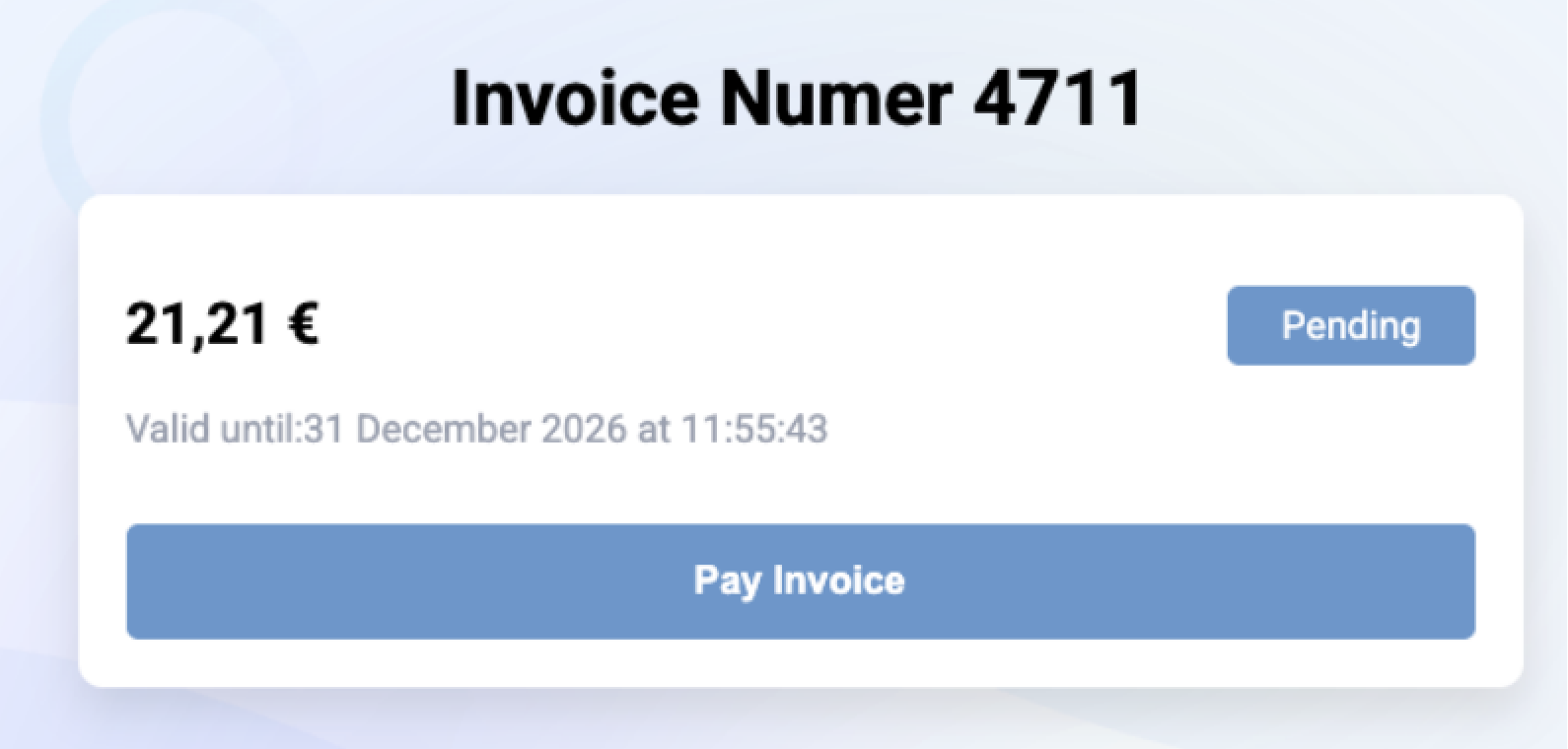
At the moment of payment, the Euro amount is automatically converted into Bitcoin based on the current exchange rate, and a QR code is displayed for the customer to scan with their Bitcoin wallet.

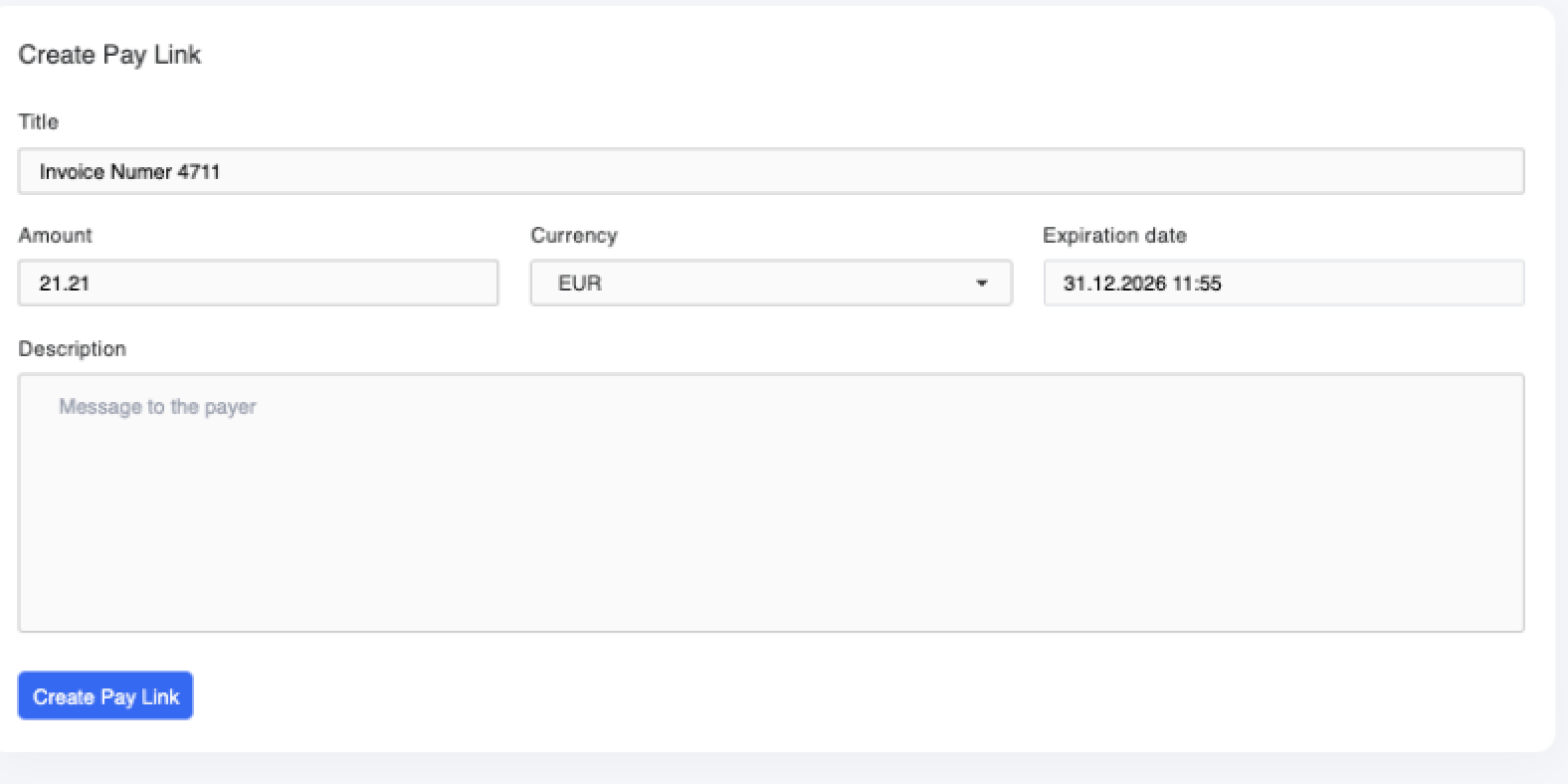
As the merchant, you generate the link directly in the Coinsnap backend under:
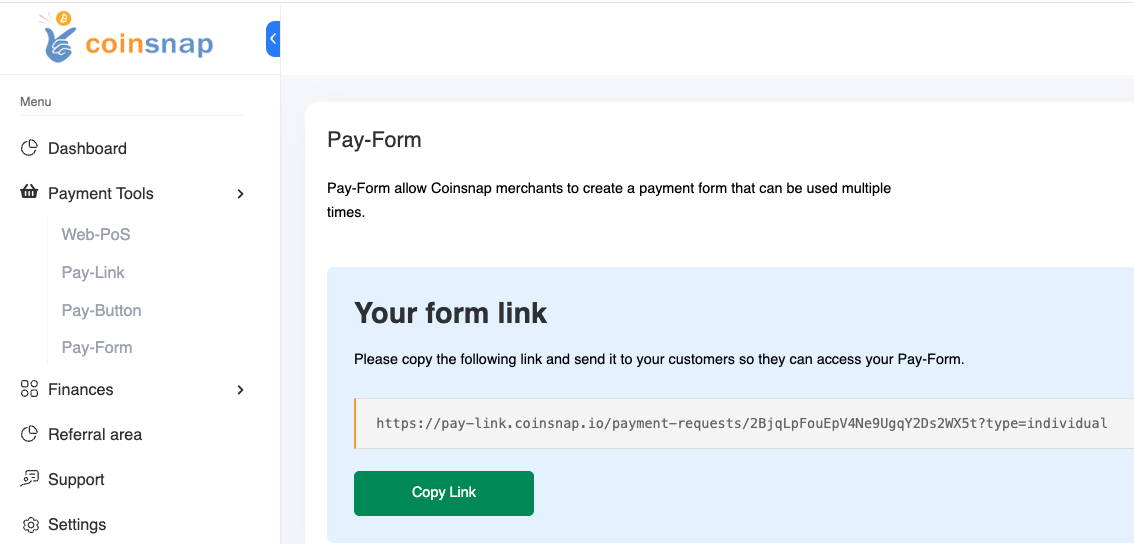
Menu → Pay Tools → Pay Link

You simply enter the invoice number, amount, and description. The system then generates a unique payment link that you can send to your customer.
In an upcoming update, you’ll also be able to upload a CSV file containing multiple invoices. Coinsnap will automatically generate the corresponding payment links — ideal for merchants who issue many invoices at once.

Advantages and disadvantages

Advantages:

  • Very convenient for the payer
  • Each payment is clearly linked to a specific invoice
  • Reduces errors or mismatched payments

Disadvantages:

  • More setup effort for the merchant (one link per invoice)
  • Less suitable for mass invoicing

Further Information: Coinsnap Payment Link

Bitcoin Invoice Form

With the Bitcoin Invoice Form, you provide a fixed link on your own website, for example: 👉
https://my-company.com/bitcoin

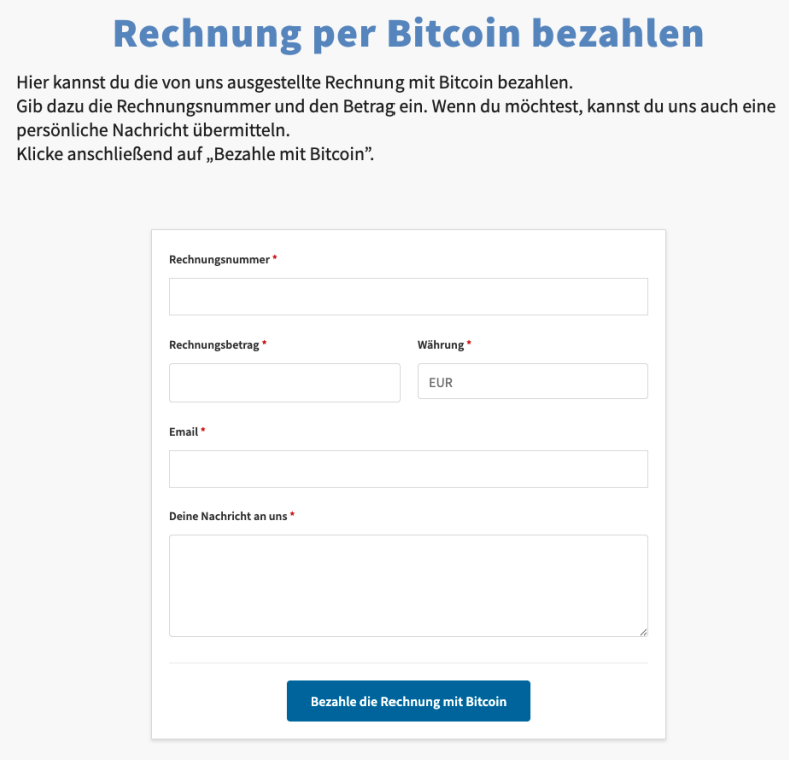
Your customer visits this page and enters the invoice details (invoice number, amount, name, etc.) — just like filling out an online banking form.

After completing the fields, they click “Pay the invoice with Bitcoin”, and the payment process begins automatically.
Benefits for merchants

The biggest advantage: you don’t need to create an individual link for each invoice.
You can simply print the URL of your Bitcoin invoice form directly on every invoice — next to your usual bank details.
That way, every customer has the option to pay you in Bitcoin at any time.

Technical implementation

The Bitcoin Invoice Form is available in two versions:

  • As a WordPress plugin – Coinsnap Bitcoin Invoice Form, compatible with both Coinsnap and BTCPay Server
  • As HTML code – easily embedded into any type of website

In the Coinsnap backend, go to:
Menu → Pay Tools → Invoice Form
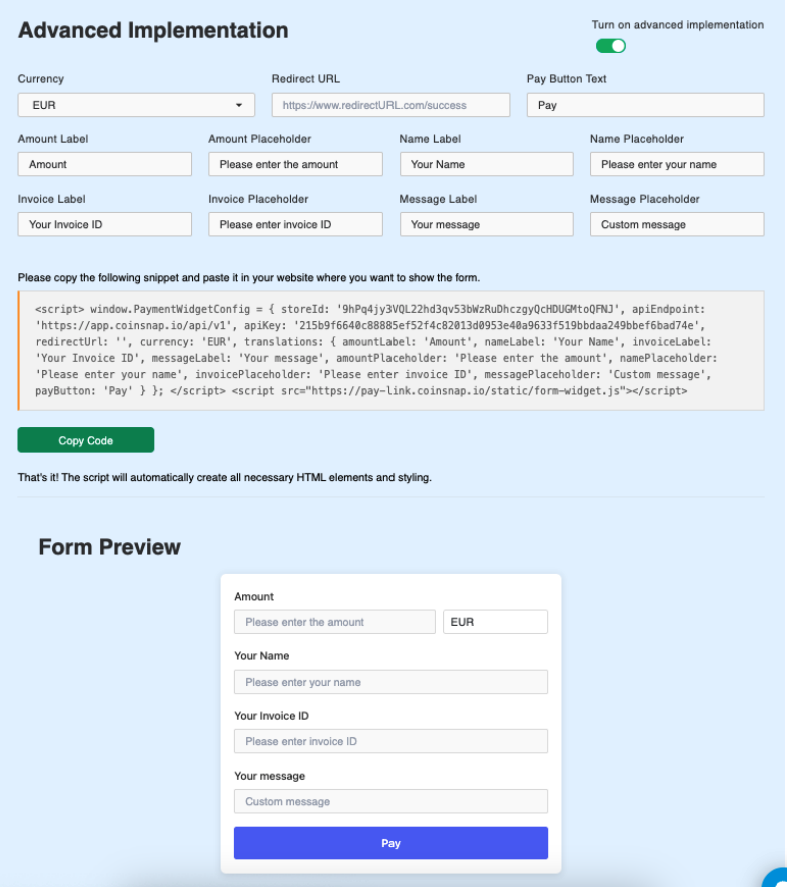
There, you can customize the field names and generate the HTML code to embed on your site.

Once added, your customers can pay invoices directly in Bitcoin — quickly and conveniently.

Advantages and disadvantages

Advantages:

  • No need to create separate links
  • Works for all customers automatically
  • Easy to integrate into existing invoicing processes

Disadvantages:

  • Customer must enter their own data (potential for input errors)
  • Less automatic payment assignment if data is incorrect

Further Information:


Recommendation

  • If you occasionally receive Bitcoin payments and want to send a personalized payment link when a customer requests it, the Bitcoin Payment Link is the best option.
  • If you want to offer Bitcoin as a standard payment option to all your customers without extra effort, choose the Bitcoin Invoice Form.

Both methods are excellent ways to give your customers — who previously paid via traditional bank transfer — a modern, transparent, and seamless way to pay invoices in Bitcoin.
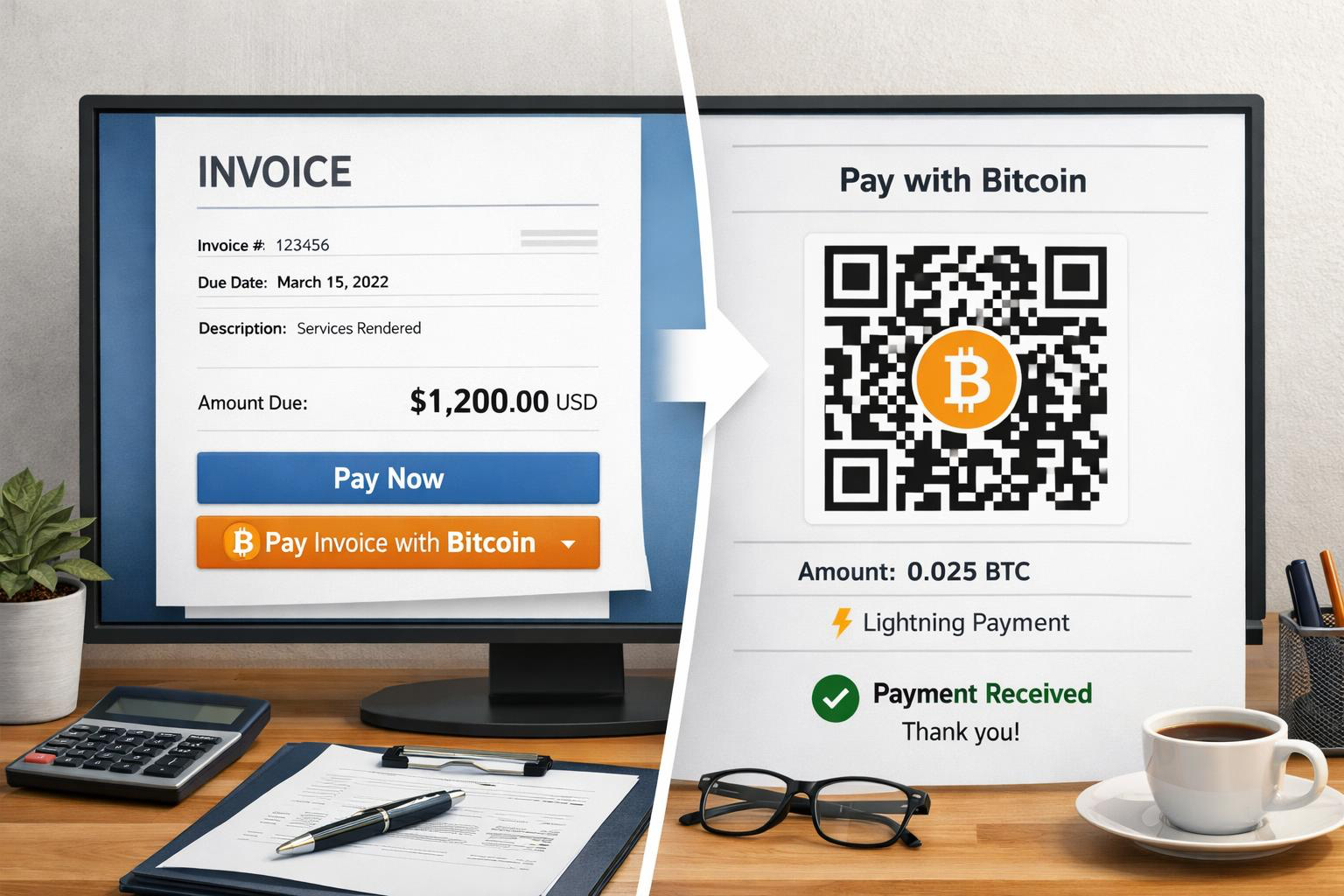

Bitcoin Invoice Form: How to get bills paid with Bitcoin (on-chain & Lightning)

Paying bills with Bitcoin – why it matters now

Imagine you’re a tradesman and you’ve just completed a project. Your customer is satisfied, and you send them the invoice. Normally, you’d expect a traditional bank transfer. But this customer asks, “Can I pay the invoice with Bitcoin?”

Or maybe you run a small online shop. Your customers can currently only pay by bank transfer because integrating other payment methods is complicated. But the question is increasingly coming up: “Does this also work with Bitcoin?”

Coinsnap’s Bitcoin invoice form enables you to do just that: have invoices paid with Bitcoin directly on your website – simple, reliable, and without any media disruption.

Bills as usual – plus Bitcoin option

You issue your invoice as usual (services, IBAN, payment term). Additionally, you offer “Pay bill with Bitcoin” – e.g. at: yourdomain.com/bitcoin. There, your customers will find a form that’s just as intuitive to use as a classic online transfer form:

  • Invoice amount and currency (e.g. Euro)
  • Invoice number for unique assignment
  • Optional name and message

After clicking on “Pay invoice with Bitcoin”, a QR code will be displayed that can be paid with Bitcoin on-chain or with Lightning.

Practical examples – where the Bitcoin invoice form makes sense

The Bitcoin invoice form is suitable not only for traditional service providers, but for a wide range of industries.

Online shops

Not every online store can easily integrate Bitcoin payments. The invoice form offers a simple solution: You continue to offer payment on account – the customer can then freely choose whether to pay the invoice by bank transfer or directly with Bitcoin.

Contractors & service providers

Whether it’s a painter, electrician, or IT consultant, many service providers issue invoices for their services – either as an advance payment or after the job is completed. With the Bitcoin invoice form, your customers can now also pay these invoices with Bitcoin, without you having to change your existing accounting system.

Hotels & Restaurants

Invoicing is also common in the hotel and restaurant industry – whether as a deposit or a final invoice for overnight stays, events, or catering. With the additional Bitcoin option, guests can pay their bill directly in Bitcoin, giving them the peace of mind of using a modern payment method.

Goods seller

Whether you’re a wholesaler, a small shop, or a sole proprietor, the form can be used anywhere that sells goods and issues invoices. Merchants who already work with international customers in particular benefit from the fact that Bitcoin payments are fast, inexpensive, and borderless.

Fair Bitcoin conversion at the time of payment

A major advantage of the Bitcoin invoice form is the dynamic conversion: the euro amount is only converted into Bitcoin at the time of payment – not when the invoice is created.

This means for you and your customers:

  • Regardless of when payment is made within the payment period, the Bitcoin amount is always current.
  • Volatility plays no role in settlement.

The payment will be credited instantly to your Lightning wallet. If you wish, you can automatically convert the amount into euros and have it paid out to your bank account. (see below)

  • Install plugin
  • Connect either to your Coinsnap account or directly to your own BTCPay server
  • Customize the form to your requirements
  • Insert anywhere using a shortcode

Easy integration of the Bitcoin invoice form (HTML & WordPress)

1. HTML version (for each website type)

  • Login to the Coinsnap dashboard
  • Under Payment Tools → Invoice Form configure
  • Generate HTML code
  • Insert on your own website

This is how easy it is to integrate a Bitcoin payment option into any kind of website.

2. WordPress plugin

If you run your site with WordPress, the Coinsnap Bitcoin Invoice Form plugin is available for you.

  • Install plugin
  • Connect either to your Coinsnap account or directly to your own BTCPay server
  • Customize the form to your requirements
  • Insert anywhere using a shortcode

Particularly important: The form is displayed directly on your website. Your customers are not redirected to external sites – a crucial factor for trust and credibility.

Extra feature: Discount when paying invoices via Bitcoin – more conversion, fewer fees

An exciting additional feature is the Bitcoin discount function. If you want to encourage your customers to pay with Bitcoin, you can, for example, offer a 5% discount.

The form automatically calculates the reduced amount and displays it to the payer. This creates a real incentive for payments in Bitcoin!

Optional: Receive Bitcoin payments in euros – this keeps your accounting clean

If you want to accept payments in Bitcoin but do not want to keep Bitcoin in your accounting, you can automatically convert incoming Bitcoin invoice amounts directly into euros (e.g. with Coinsnap + Bringin or DFX) and credit them to your company account.

Further information: Coinsnap + Bringin

FAQ

Does Coinsnap accept bill payments via Bitcoin?

Yes. With Coinsnap Bitcoin invoice form invoices can be On-chain and via Lightning pay directly on your website.

Does the Bitcoin invoice form also work in WordPress?

Yes. Coinsnap Invoice Form Plugin creates a shortcode you can place anywhere on your WordPress website.

How is the Bitcoin amount calculated?

The EUR amount is converted in Bitcoin at the time of payment (rate lock).

Can I receive EUR payouts?

Yes, e.g. with Bringin (immediately in EUR/IBAN) or DFX (periodic).

Conclusion

With Coinsnap’s Bitcoin invoice form, you can accept invoice payments via Bitcoin professionally, transparently, and directly on your website.

  • HTML version: universally applicable, Coinsnap account required
  • WordPress plugin: usable with Coinsnap or your own BTCPay server
  • Practical relevance: from online shops to craftsmen to hotels and retailers – wherever invoices are written, Bitcoin can now be accepted as a payment method.

Combined with the Bitcoin discount feature, this creates an attractive offer that not only builds trust but can also actively motivate customers to pay in Bitcoin.

Try the Coinsnap Bitcoin invoice form yourself here.

Coinsnap Bitcoin Paywall


Accept Bitcoin Lightning payments for your content

The Coinsnap Bitcoin Paywall protects your high-quality content and ensures that you are fairly remunerated for your work.

It allows you to build a sustainable source of income and be less dependent on advertising revenue or sponsors. With your Coinsnap Bitcoin paywall, you can target loyal users who are willing to pay, which leads to a high-quality community in the long term.

The Coinsnap Bitcoin Paywall allows you to accept Bitcoin for exclusive content and clearly differentiate your offer from the competition. This is how you create added value – both for yourself and for the growing target group of Bitcoin customers!

Works with the Coinsnap gateway or your BTCPay server!


Coinsnap Bitcoin Paywall Demos

If you want to try out for yourself how you can accept Bitcoin Lightning payments for your content with the Coinnap Bitcoin Paywall, check out our demos here and here!

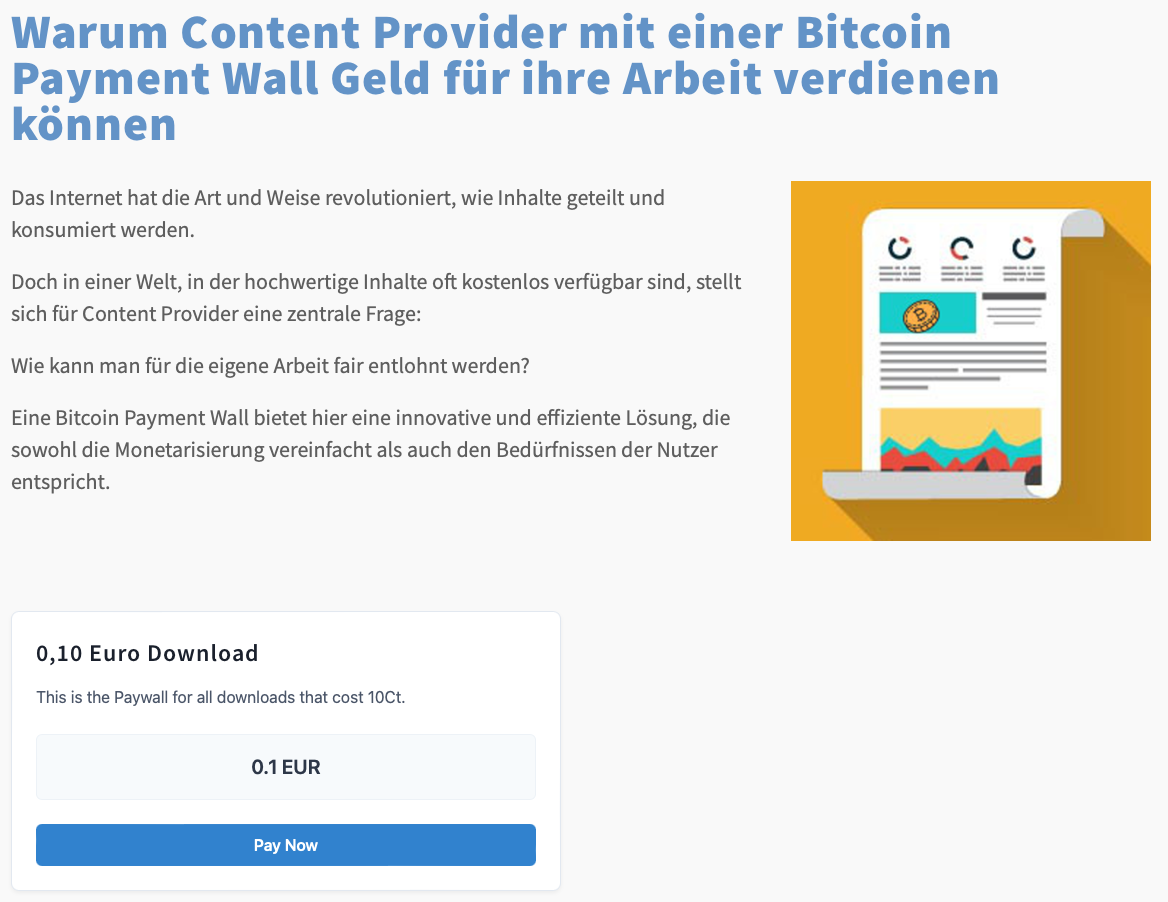
On our demo store page you will find a text or video that you can download for 1o cents (111 SATS). Select it to test payment with Bitcoin and Lightning right away!

“Pay now” if you want to load the content!

Simply click on the “Pay now” button to start the payment test.


Now hold the camera of your Bitcoiiin Lightning Wallet on the QR code and click on “pay” or “send”, depending on what your wallet offers you.

At the end you will receive a QR code that you should scan with your wallet to pay with Coinsnap Bitcoin and Lighhtning!

You will then see a short confirmation of your payment and will be redirected back to the now released content!

Installation of the Coinsnap Bitcoin Paywall

Coinsnap Bitcoin Paywall in WordPress

To use the Coinsnap Bitcoin Paywall, the plugin must of course be installed on your WordPress website.

If you have not yet installed the Coinsnap Bitcoin Paywall, it is best to install it directly from the plugin offer in your WordPress.

Of course, you can also download the plugin from Github and install it manually (more on this below).

How to install your Coinsnap Bitcoin Paywall plugin directly in WordPress:

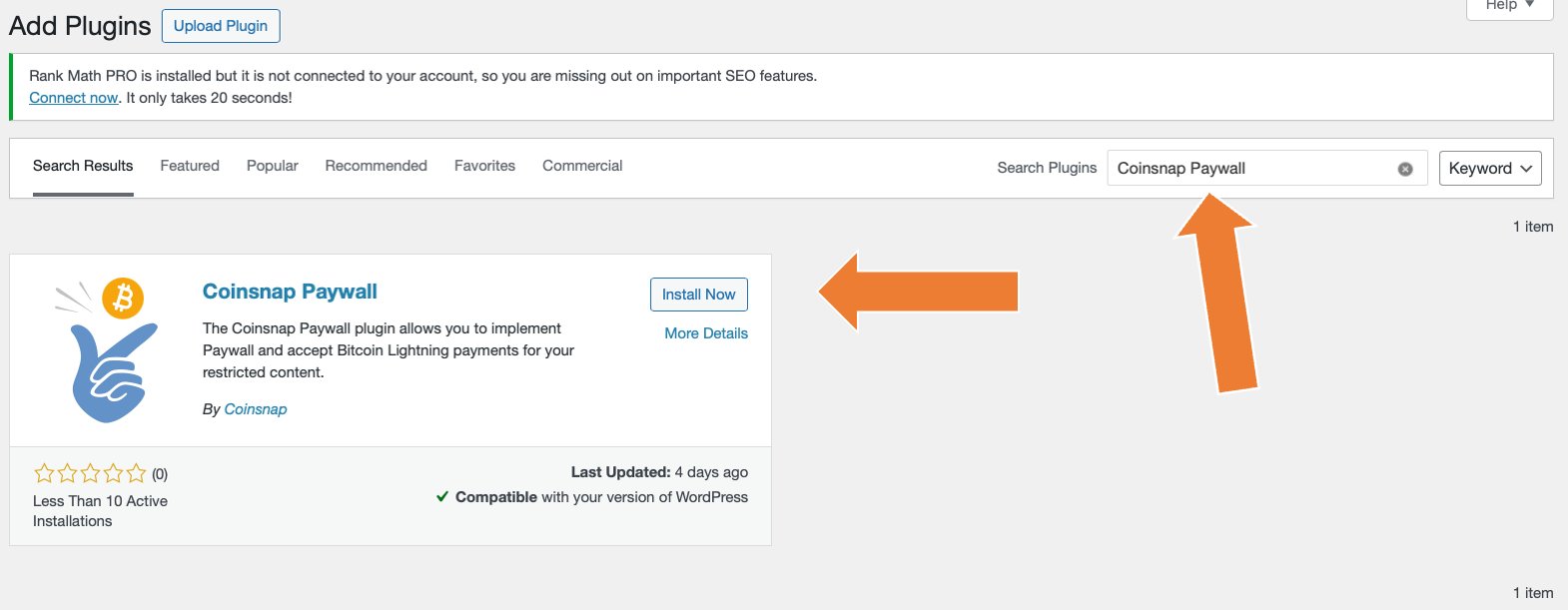
Go to the plugin area and click on “add new plugin”. Then enter “Coinsnap Paywall” in the search field and you will see our plugin in the selection.

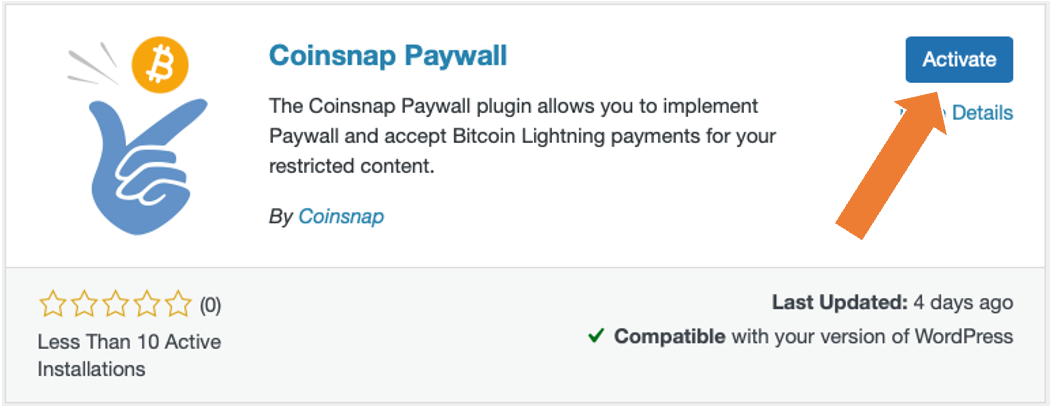
Now click on “Install now”, and when the installation is complete, click on “activate”.

And your Coinsnap Paywall plugin is already installed and activated!

Now all you have to do is configure the plugin settings and you can make content available for Bitcoin on your website!

You can see how to configure the plugin here.

Download Coinsnap Bitcoin Paywall on Github

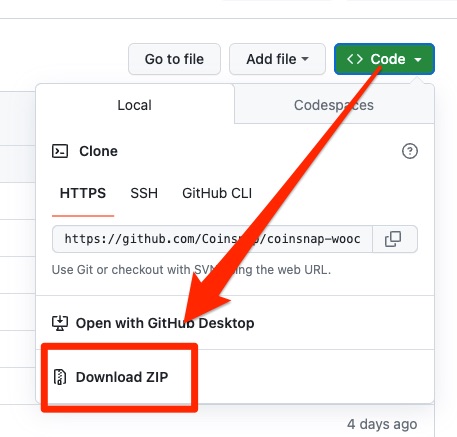
If you want to install the Coinsnap Bitcoin Paywall, you must first download it from the Coinsnap Github page here.

Then look for the green button labeled “Code”. When you click on it, the menu opens and Download ZIP appears.

Here you can download the latest version of the Coinsnap Bitcoin Paywall to your computer.

Download Coinsnap Bitcoin Paywall now


Connect Coinsnap account with Bitcoin Paywall

As soon as you are registered with Coinsnap, log in to your modified store and go to the backend.

Coinsnap Bitcoin paywall settings

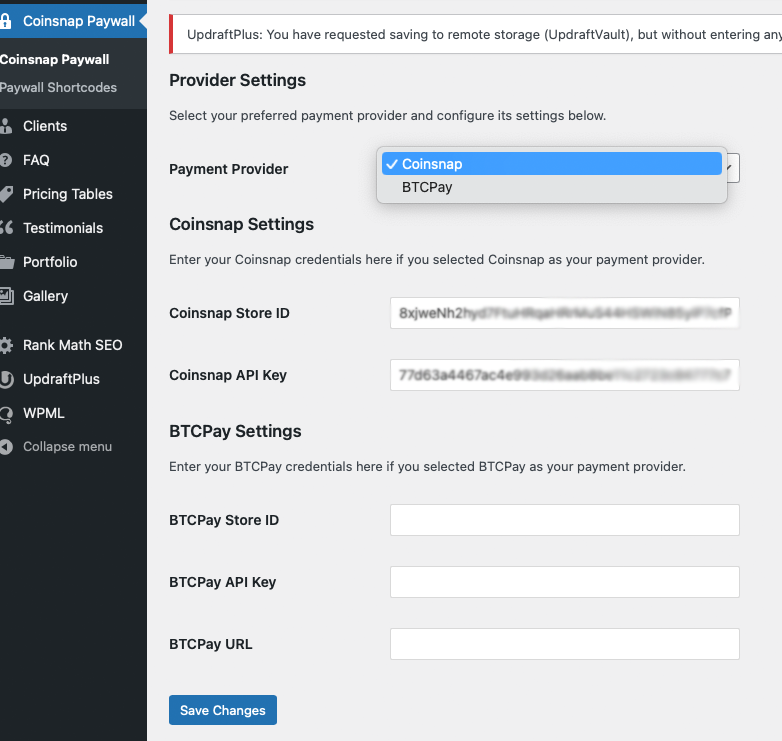
After you have installed and activated the Coinsnap Bitcoin Paywall, you must make the Coinsnap settings. You can find these in the sidebar on the left under “Coinsnap Bitcoin Paywall”.


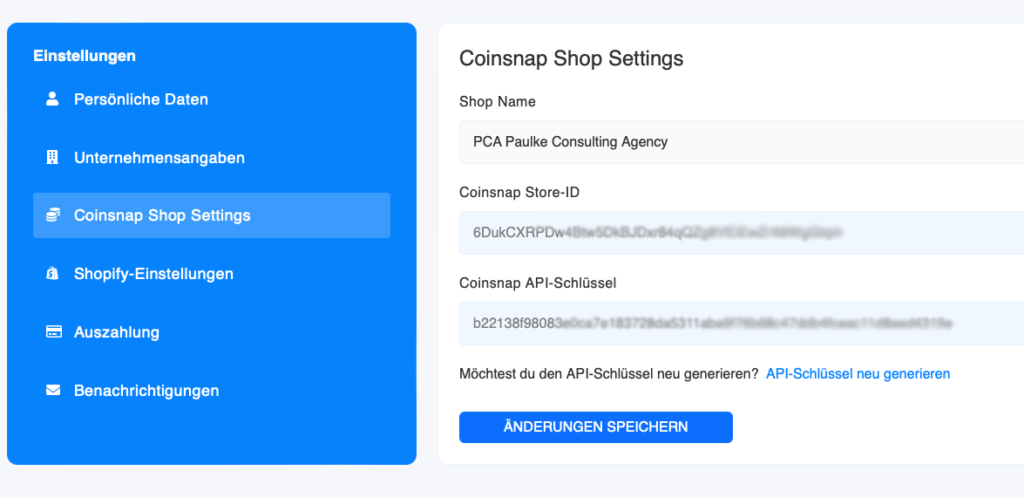
Simply enter your Coinsnap Store ID and your API key there; you can find these in your Coinsnap account under “Settings”, “Coinsnap Shop Settings”.


Connect your BTCPay Server with the Coinsnap Bitcoin Paywall plugin

Bitcoin Paywall BTCPay Server Settings

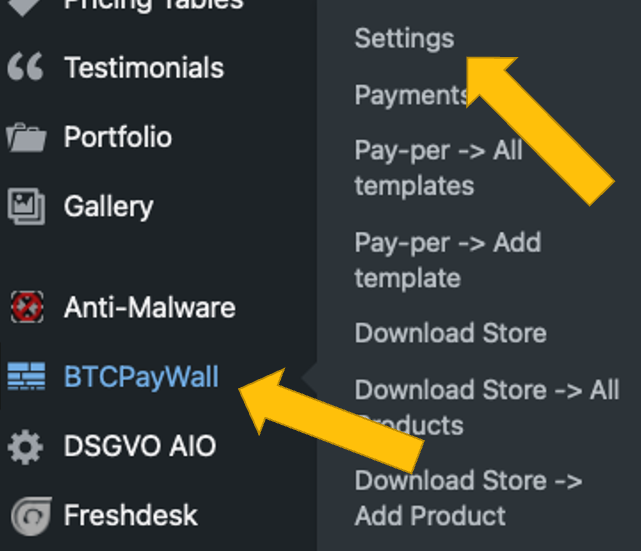
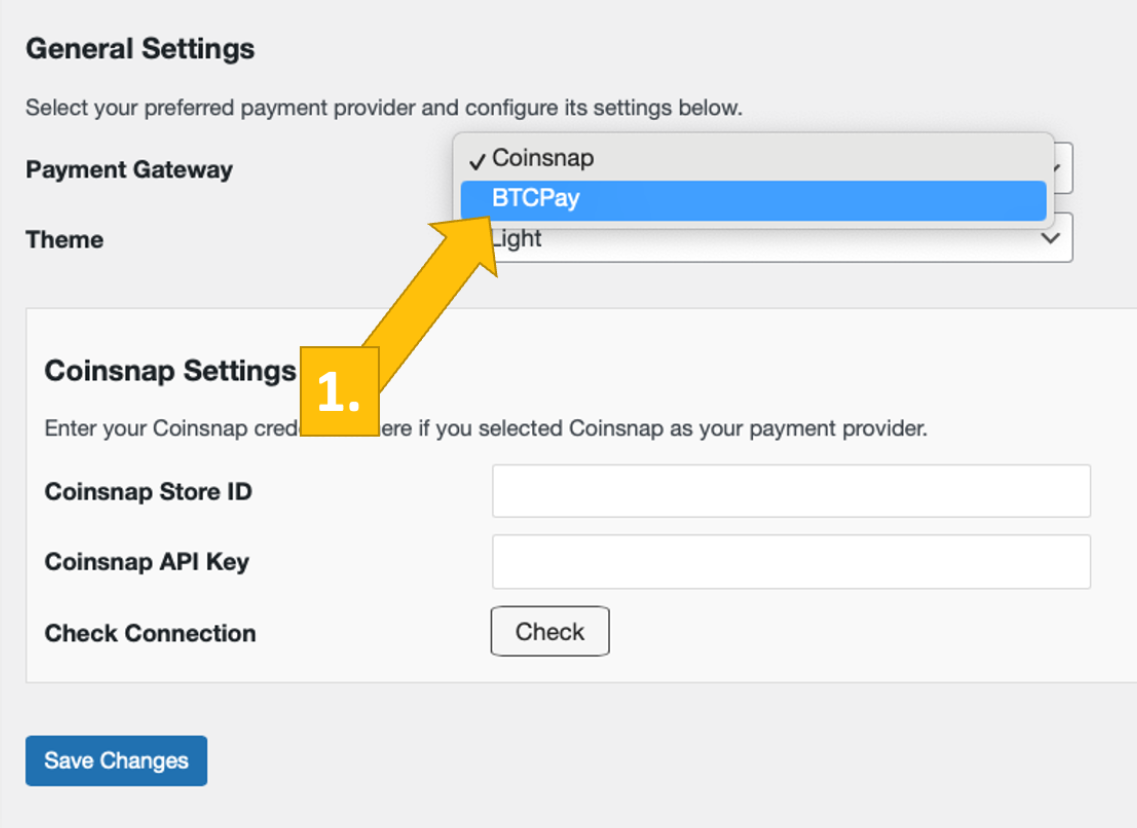
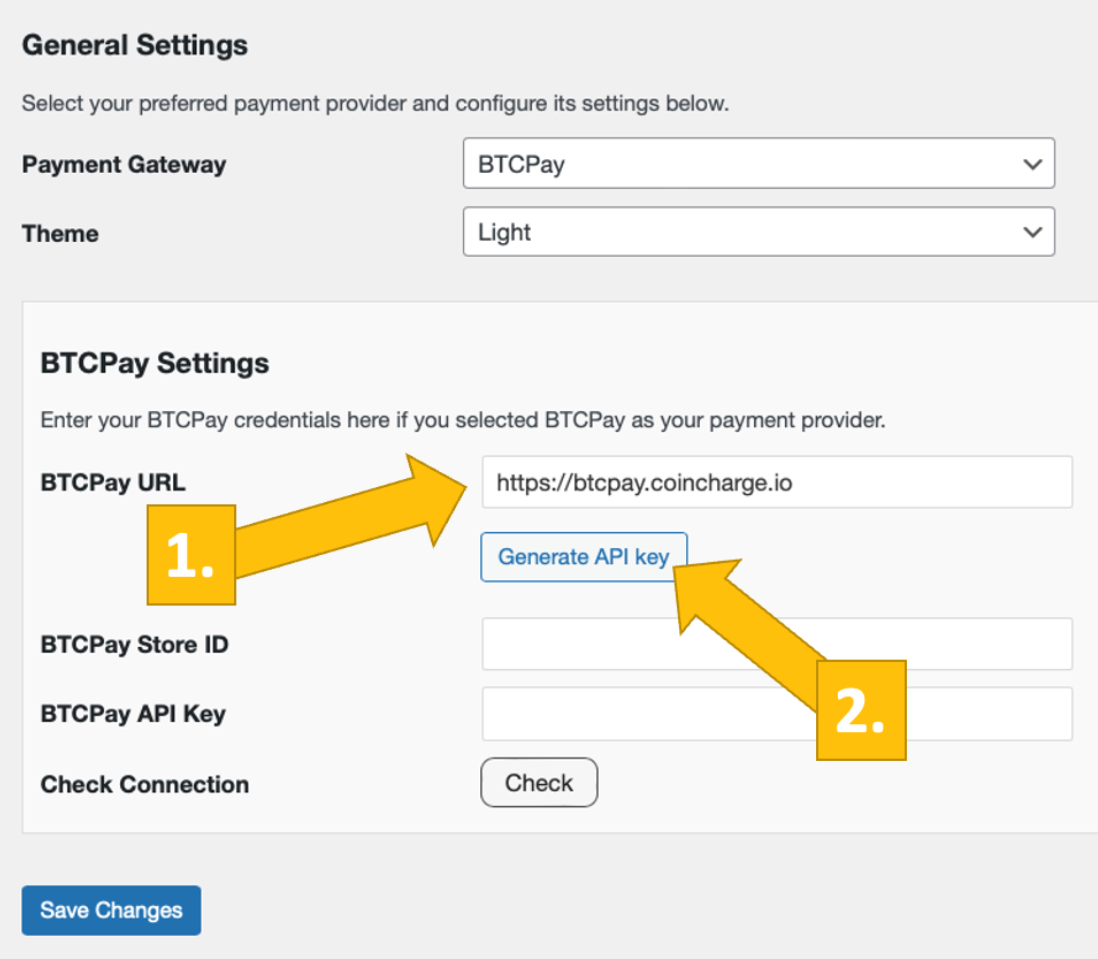
After you have installed and activated the Coinsnap Bitcoin Donation plugin, you need to configure the Coinsnap settings. Go to BTC Paywall -> Settings [1] in the black sidebar on the left.

Now choose your payment gateway BTCPay [1] and click save.

Now, log into your BTCPay Server. If you’ve done that, enter your BTCPay Server URL into the matching field in the Donation Settings tab [1].

Next, you’ll have to click on the Generate API Key button [2].

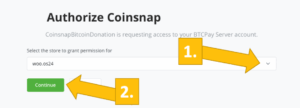
You’ll then be forwarded to your BTCPay Server.

Choose your Shop [1], then click on continue [2].

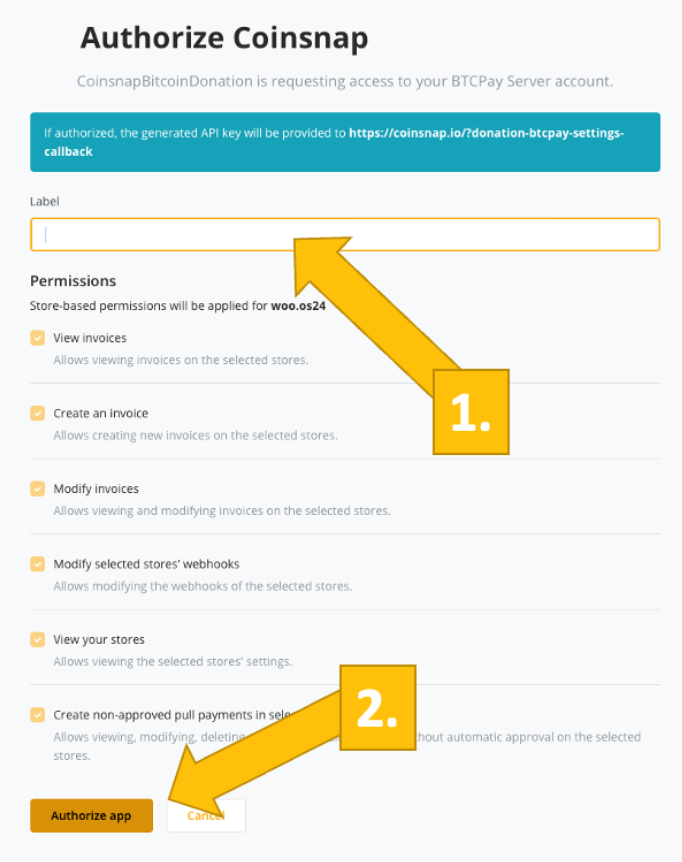
You’ll then be forwarded to this screen. Enter your store’s name on the top [1], and then click on authorize app [2].

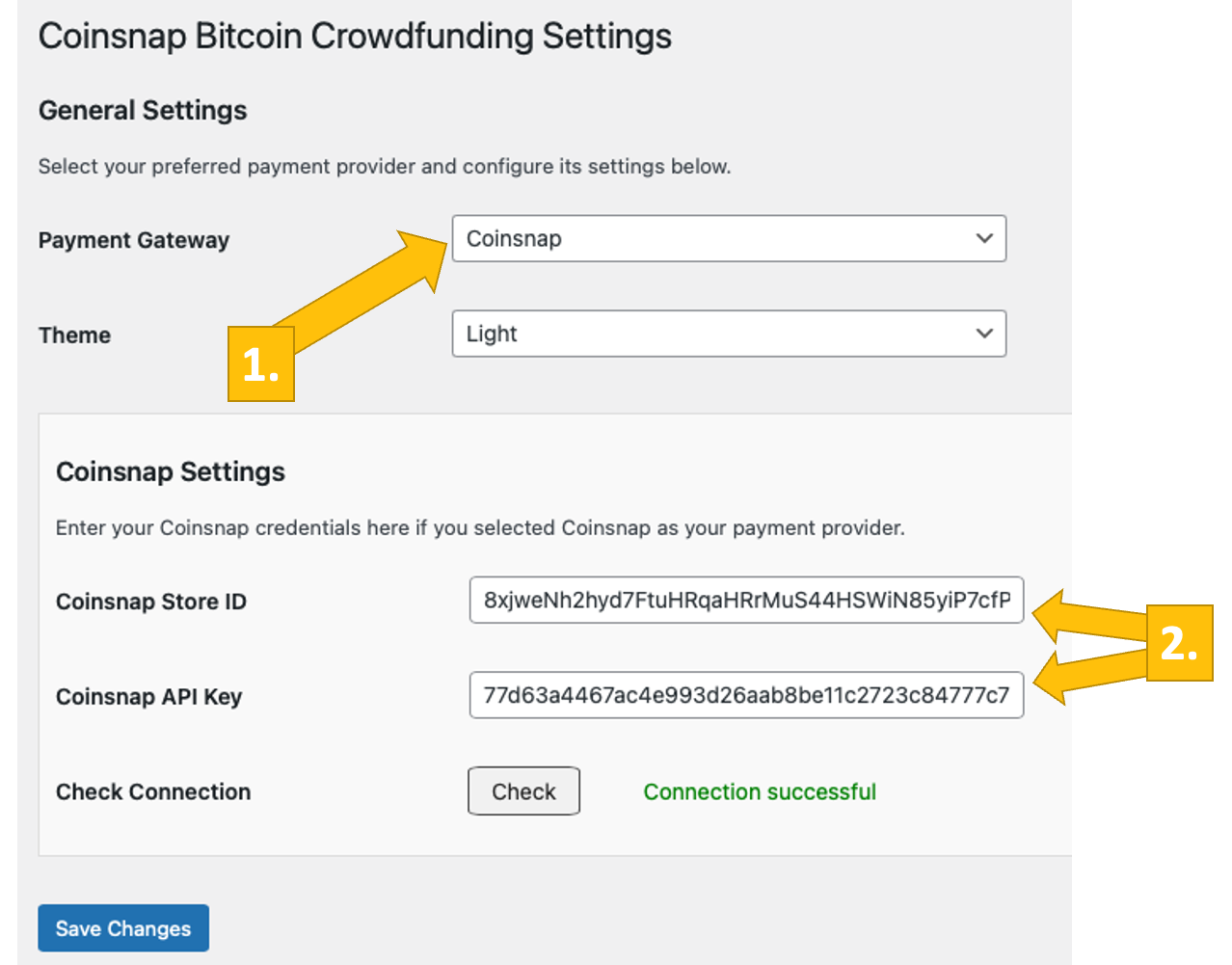
Your BTCPay Server is now successfully connected to your blog or website, via the Coinsnap Bitcoin Paywall plugin!

(If you click on check you will get the success notice (in green)).

You have now successfully activated your Coinsnap Bitcoin Paywall and can now accept Bitcoin Lightning for your content.

Configure Coinsnap Bitcoin Paywall

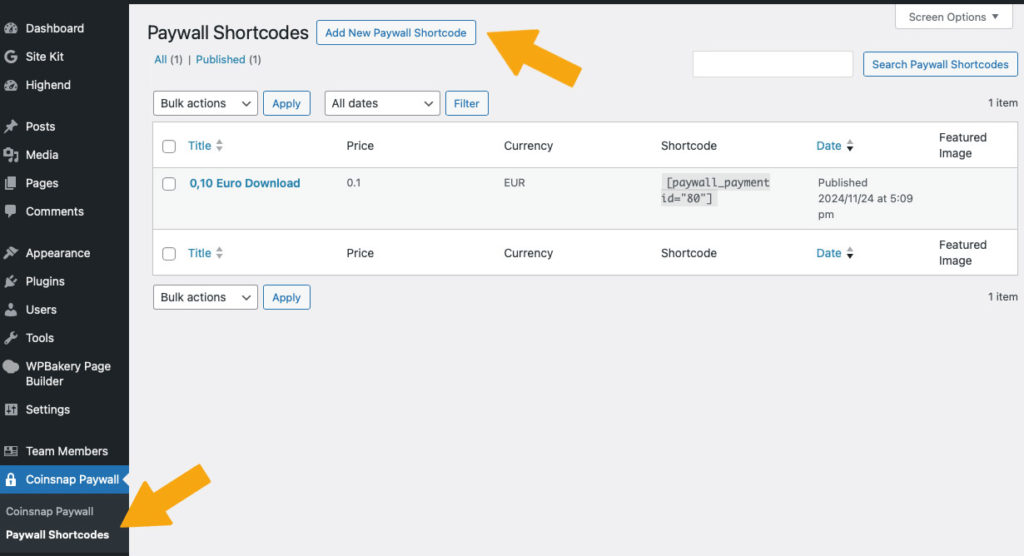
1. create a paywall shortcode

Go to Coinsnap Bitcoin Paywall in the sideboard on the left in your WordPress and click on Paywall Shortcodes.

Then click on “Add New Paywall Shortcode” at the top.

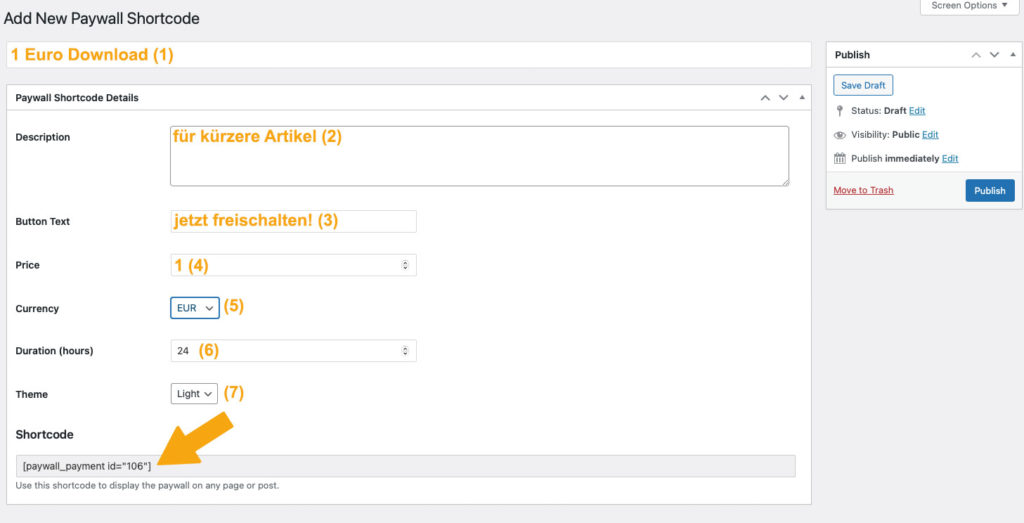
2. configure your paywall shortcode

In the window that now appears, make the following settings (see orange entries):

  1. First you assign a name so that you know later what the short code is intended for.
  2. Then you can enter a short description as background information for yourself or your editors.
  3. Then set the text of the payment button.
  4. Set your price!
  5. Select the currency in which the price is to be displayed
  6. Set the duration of the activation and
  7. select the color scheme of the paywall.

Now you can copy the shortcode at the bottom and use it in your content (see below).

Put content behind the Coinsnap Bitcoin paywall

1. create content

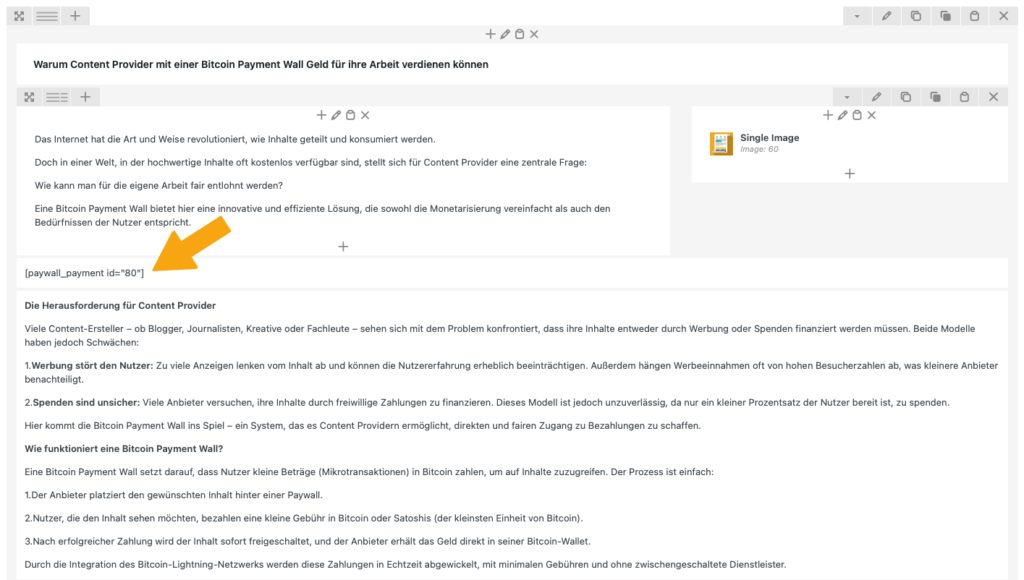
Now create content as usual in your WordPress, for example a text as in this example.

As soon as you have finished the article, you must place the shortcode you have just produced at the point where you expect payment from your reader. You usually do this after the introductory paragraph, see right:

Tip:

If you want to place a paywall before the download of a video, create a short description of the video content as an introduction and place an image of the start screen of the video next to it.

This way, your users can see what they can expect and why they want to pay for the video!

HTML Bitcoin Invoice Form

Bitcoin invoices made easy – with the Coinsnap Invoice Form

Coinsnap Invoice form as HTML version

Do you invoice your customers for your services – previously paid by bank transfer? From now on, your customers can also pay conveniently with Bitcoin – using the Coinsnap Bitcoin Invoice form.

It’s as simple as that:

You integrate the provided HTML code of the Coinsnap form on your website – done! The form appears directly on your page and works very intuitively.

  1. Enter invoice data:
    Your customer simply enters the amount, the invoice number and their name – just like in online banking.
  2. Add message:
    Optionally, the customer can leave a personal message for you as the payee.
  3. Pay with Bitcoin:
    Clicking on the “Pay with Bitcoin” button opens a window with the QR code for payment.

Coinsnap makes Bitcoin payments as easy as online banking.
Integrate now and offer new payment options!

Bitcoin Invoice Form – also available as a practical payment link

In addition to integration as HTML code on your own website, Coinsnap offers you another simple option: the Bitcoin Invoice Form as a link.

How to use the link:

🔗 Simply print on the invoice
Add the link directly to your invoices – exactly where your bank details are currently located.

📧 Send flexibly
You can also easily send the link to your customers by email, messenger or other channels – ideal if a customer asks you to pay by Bitcoin.

🔁 One link for all customers
An example link could look like this: http://pay-in-bitco.in/FHAiOb.
This can be used universally – your customers then enter their billing data themselves.

With the Coinsnap Bitcoin Invoice Link, you can make Bitcoin payments easier than ever for your customers – without any technical hurdles.

coinsnap bitcoin invoice form als Payment Link

How to create your personal Bitcoin invoice form

After logging into the Coinsnap backend, you will find all the options for creating your invoice form under the menu item “Pay Tools” → “Invoice Form”.

You have the choice between two variants:

🔧 Self-hosted form (HTML version):
Ideal for direct integration on your own website. You receive the HTML code, which you simply integrate into your page.

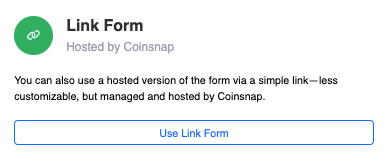
🔗 Link form:
Perfect for invoices in PDF format or for sending by e-mail. The generated link leads directly to the Bitcoin payment form.

How to use your form:

  1. Select the desired variant.
  2. Copy the generated HTML code or payment link.
  3. Add it to your website – or as a link directly in your invoices.


Done! Your customers can now pay easily and securely with Bitcoin – whether via your website or via a link.

Tags:Invoice Form Invoice Form Invoice Form Pay Invoice

CoinTracking integrates Coinsnap

Record your Bitcoin Lightning payments and make them available for accounting purposes

Cointracking, the leading crypto transaction tracking and tax calculator solution, has integrated Coinsnap. CoinTracking is a tool for managing cryptocurrency portfolios and creating tax reports. With CoinTracking, all trading activities with cryptocurrencies can be recorded and thus all tax documentation obligations and the preparation of tax reports can be fulfilled. Traders who receive Bitcoin payments via Coinsnap can import their transactions into CoinTracking and receive a report on their Bitcoin turnover and a corresponding tax report. Merchants who wish to keep the Bitcoin receive an exact statement of the value of the Bitcoin at the time it was added to their wallet. To export the transactions in the Coinsnap backend as a CSV file, go to the Finances section. There you switch to the Reports section. In the Reports Center, select the period for which the transactions are to be exported.


Then click on Download CSV and the CSV file will be downloaded to your computer. You can now upload the downloaded CSV file to CoinTracking.

CoinTracking Konto

To do this, go to the Cointracking website at https://cointracking.info/. If you do not yet have an account, you can create one there free of charge. You can try out CoinTracking and use up to 200 transactions free of charge. If you have more transactions in your online store, you can upgrade to a paid version. With the discount code Coinsnap you get a 10% discount. You will also receive this discount when you decide on a CoinTracking Corporate Account for the first time. Just mention that you are from Coinsnap and have a discount code.

CoinTracking Import

After you have logged in to CoinTracking, you will find the Transactions section and the Add Import option.


You will also find Coinsnap in the alphabetical list of the numerous crypto exchanges:


After selecting Coinsnap, the Coinsnap transaction file can be uploaded in CSV format.


Coinsnap transaction file

You can obtain the Coinsnap transaction file in the Coinsnap backend. To do this, go to Finance in the menu and then to the Reports submenu item. There you select the period you want to export as a CSV file and click on Download CSV.


A CSV file with all transactions is created in the background and automatically downloaded to the computer via the browser. The file is located in the download folder and begins with coinsnap-report-csv, followed by the selected time period. We switch back to the CoinTracking import for Coinsnap files at: https://cointracking.info/import/coinsnap/ Here we select the Coinsnap transaction file and click on Continue to Import.


The import must then be started by clicking on Start import.


When the import is complete, this is indicated by the green Coinsnap Import Done icon.


Coinsnap presents Web Point of Sale

Coinsnap presents Web Point of Sale

5.9.2024 – Coinsnap now offers a new, innovative way for entrepreneurs to accept Bitcoin Lightning payments quickly and easily in the “real” world: With the introduction of the Web-PoS solution, small and medium-sized businesses such as retailers, restaurants, craftsmen and service providers etc. have a simple, secure and efficient way to integrate Bitcoin Lightning payment into their everyday business – without complicated technology or expensive hardware.

How does the Coinsnap Web PoS solution work?

The Coinsnap Web Point of Sale (Web PoS) solution allows vendors and their employees to accept Bitcoin Lightning payments directly from the web browser of their smartphone, tablet or computer. After logging in to their personal Web Point of Sale page, they simply enter the invoice amount via the convenient input field. The payment amount is then either credited to your Bitcoin Lightning wallet or, if desired, automatically converted into a fiat currency such as Euro, USD, GBP or CHF and transferred to the bank account on file.

One of the greatest strengths of this system is its flexibility: sellers do not need to install an app, but simply access their individual Web PoS page provided by Coinsnap via the browser. This URL can also be shared with employees who can accept payments without having access to the wallet or business accounts.

Why should sellers accept Bitcoin Lightning payments?

  1. Simple integration and use: No complicated technical setup is required. The Web PoS solution runs on any internet-enabled device and is ready for immediate use after a simple setup in the Coinsnap backend (5 minutes max.!).
  2. Guaranteed payment: Bitcoin Lightning payments are credited to the merchant’s wallet in real time, a chargeback of the payment is technically not possible.
  3. Security for entrepreneurs: employees can accept payments without having access to the company’s finances. It will soon also be possible, for example, to credit employees’ tips or revenue shares directly to their personal Bitcoin Lightning wallets.
  4. Fast transaction processing: Bitcoin Lightning payments are credited in real time, which prevents long waiting times or delays. Sellers can track the receipt of funds directly on their wallet or bank account.
  5. Detailed transaction overview: Coinsnap offers a comprehensive overview of all transactions with the option of exporting data in CSV format – ideal for accounting purposes and documenting business transactions.
  6. No app installation necessary: The entire process can be handled directly via the browser, saving time and resources.

Who is the Web-PoS solution ideal for?

The Coinsnap Web PoS solution is aimed at a wide range of entrepreneurs – from café owners to retailers and service providers. Especially for businesses that do not have or do not want an extensive technical infrastructure, this solution offers an easy entry into the world of cryptocurrency payments. Thanks to the ability to receive payments in fiat currencies, sellers do not necessarily need to be Bitcoin experts to benefit from the solution.

Conclusion

With the new Web PoS Bitcoin Lightning solution, Coinsnap offers a forward-looking, secure and flexible payment method for companies of all sizes. Anyone who wants to offer their customers a modern and fast payment option should consider the Coinsnap Web-PoS solution. Especially in times when cashless and digital payments are becoming more and more important, this could be the decisive step towards a future-proof business model.

For more information and how you can use the Coinsnap Web PoS solution for your company, please visit:

https://coinsnap.io/pos-bitcoin-payment

Web-Point of Sale

Accept Bitcoin on-site with Coinsnap Web-Point of Sale

The simple Bitcoin Lightning payment method for stores, restaurants, suppliers, hotels, etc. Works with any device!

Web-Point of Sale Keypad

Do you run a store, a restaurant or are you a craftsman and service provider and would like to accept Bitcoin Lightning payments from your customers? Then Coinsnap ‘s Web-Point of Sale solution is the ideal solution for you!

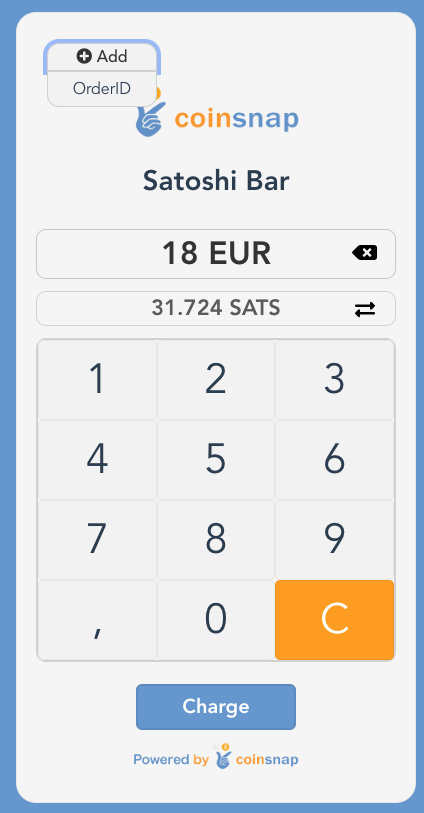
Just open your web-point of sale page on-site on the web browser of your smartphone, computer or tablet and enter the invoice amount via the keypad input field.

Then a QR code will appear, which your customer scans briefly with their Bitcoin Lighning app and then authorizes.

The invoice amount will be credited directly to your Bitcoin Lightning Wallet – or (if desired) deposited directly into your bank account in fiat currency such as euros, USD, GBP or CHF.

The Coinsnap Web-Point of Sale works as simply as this

In addition to the invoice amount, you can also enter an order number so that you can easily allocate the Bitcoin payment later in your accounting system. After you have entered the amount, click on Charge and a QR code will be displayed, which you can show to the payer so that they can make the payment with their Bitcoin Lightning Wallet.

If the payment was successful, you will receive a message and can hand over the paid goods to the customer. The Bitcoin revenue is immediately credited to your own Bitcoin Lightning Wallet and is immediately available to you. You can note in your POS system or on the invoice that the payment was made via Bitcoin Lightning.

All Bitcoin Lightning payments received via the web point of sale are saved in the Coinsnap backend and can be tracked via the transaction view. All payments can be filtered and downloaded as a CSV file to be used for accounting purposes, for example.

Create Web-Point of Sale

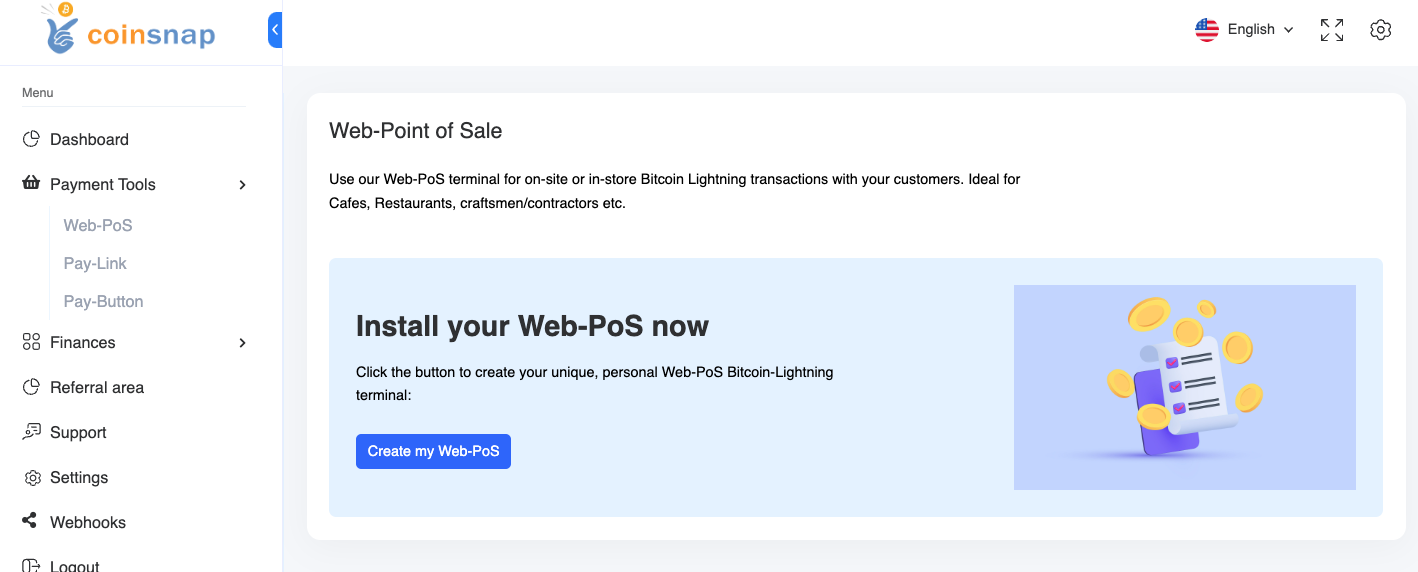
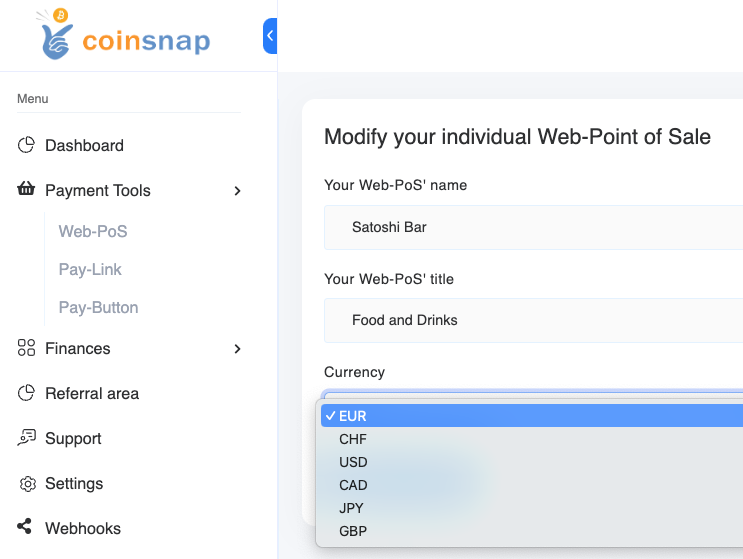
To be able to use the web-point of sale for your business, you need a Coinsnap account. After you have logged in to the Coinsnap backend, you will find the menu item Payment tools in the left menu bar and there the item Web Point of Sale (Web PoS).

Click on Create New PoS to create a new Web-Point of Sale. Then enter the name of your store in the PoS Name field and in the PoS Title line you can specify what your store offers. In the Currency field, select the currency that will be used for payment in your store.

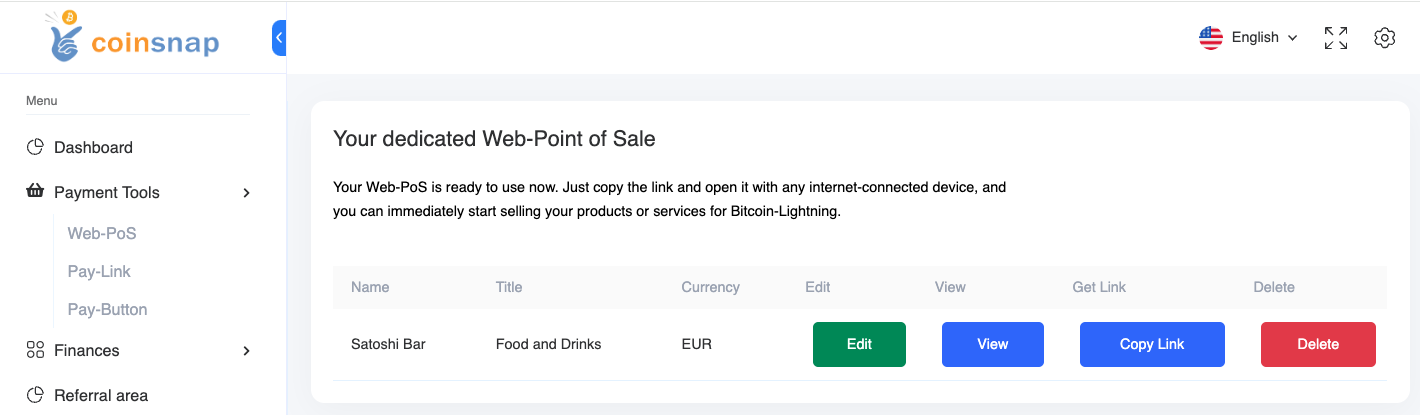
Then click on Create PoS. This view appears:

With Copy Link you receive the URL, which you can access with any internet-enabled device. This URL can also be passed on to employees, so that they can access the site with their own end devices. Only payments can be received via this Web-PoS Url. The credit to the Bitcoin Lightning Wallet is made to the wallet deposited with Coinsnap.

The advantages of Coinsnap Web-Point of Sale at a glance:

  • Every employee can accept Bitcoin payments, but cannot make withdrawals.
  • Web-PoS can be operated on any Internet-enabled device with an Internet browser such as a smartphone, computer or tablet.
  • Separation of business and private Bitcoin Lightning payments
  • Enter your own order and invoice numbers for easy tracking
  • Detailed transaction view with CSV export for accounting documentation
  • No app installation required

Register now and get started with Web PoS!

Tags:Bitcoin Web-Point of Sale Bitcoin Web-PoS Web-Point of Sale Web-PoS