
Coinsnap for Modified Shop Installation Guide
Follow this guide to install and configure the Coinsnap payment module for modified Shop.
Enable Bitcoin/Lightning payments in your modified eCommerce shop.



Step 1
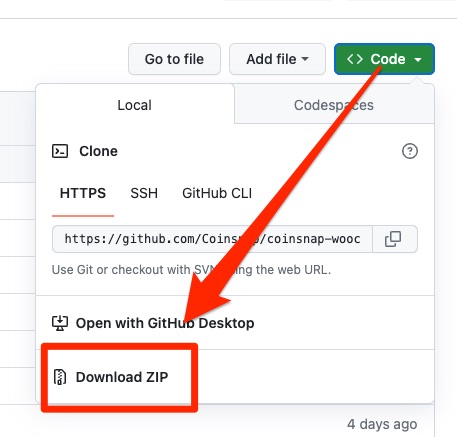
You can download the Coinsnap for Modified Shop plugin from the Coinsnap Github page and install it on your WordPress site. To do this, go to the Coinsnap Github page. There you will find the green button labeled Code at the top right.
When you click on it, the menu opens and Download ZIP appears.
Here you can download the latest version of the Coinsnap plugin to your computer.
Step 2
As soon as you are registered with Coinsnap, log in to your modified store and go to the backend.
If you haven’t set up your Coinsnap account yet, you can create it via this link. Before you start with the Modified Shop backend area, make sure you have downloaded our plugin for the Modified Shop from our GitHub page. Now extract the files and folders from the archive and upload them to the Modified Shop root directory using an FTP client, keeping the entire directory structure:
callback
includes
lang
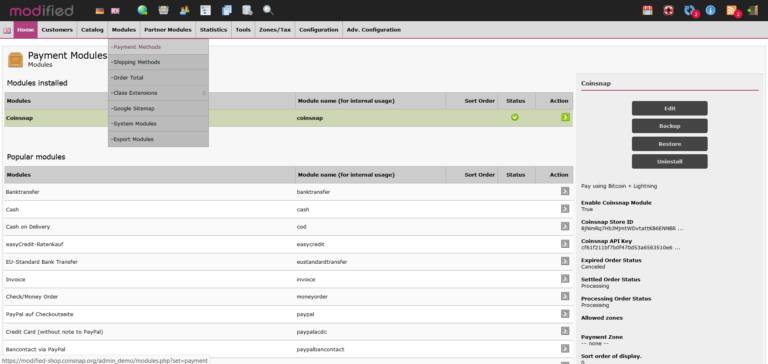
Log in to Modified Shop as an admin. Navigate to Modules – Payment methods, search for Coinsnap and click on Install – after the installation Coinsnap will appear in the list of installed modules Now you can proceed with the setup of your Coinsnap plugin as described below. After the Coinsnap for Modified Shop plugin has been installed and activated, the plugin still needs to be configured. You can learn how to do this here.
Step 3
Connect Coinsnap for Modified Shop with your Coinsnap account
For the whole thing to work, you need to connect your plugin to your Coinsnap account:
Coinsnap for Modified Shop Settings
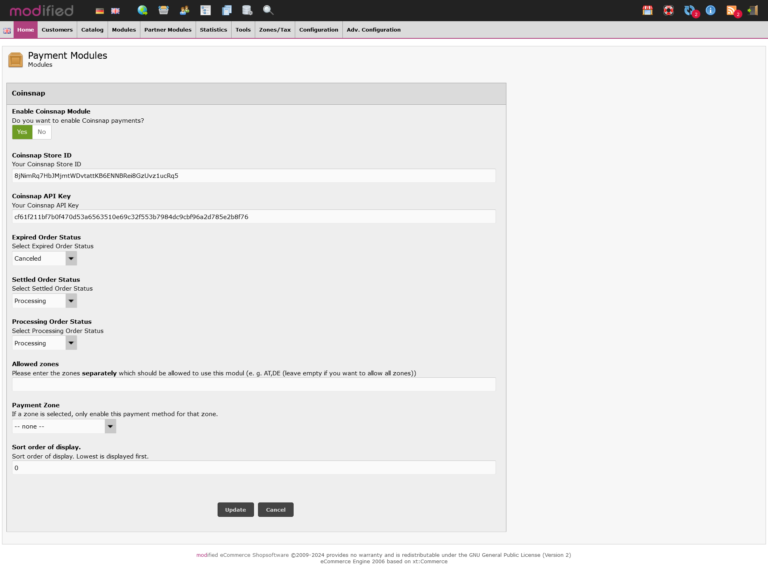
- Go to Modules > Payment methods, search for Coinsnap and click on the icon – the page with the Coinsnap settings will open.
- Activate the Coinsnap module (click on “Yes”).
- Enter the “Coinsnap Store ID” and your “Coinsnap API Key” (you can find these in your Coinsnap account, see here).
- Select the payment status for Coinsnap payment status.
- If you wish, you can enter permitted payment zones and select a payment zone from the list of payment zones.
- Click on “Save”.
Frequently Asked Questions
What Users Ask About This plugin
Does the module support automatic order status updates after payment?
Yes. Coinsnap sends automatic callbacks to update the order status once payment is received.
Do I need coding knowledge to install the module?
No. Installation is done entirely through the admin interface or simple file upload.
