
Accept Bitcoin Payments with WooCommerce

Accept Bitcoin Payments with WooCommerce

How to enable Bitcoin payments in your WooCommerce store – step-by-step guide, best plugins & tips!

Table of contents

Bitcoin has long been more than just an investment – more and more online merchants are offering Bitcoin as a payment method in order to reach new customer groups and stand out from the competition.

WooCommerce is the world’s leading eCommerce plugin for WordPress, making it easy and flexible to create online stores. The open source software offers a wide range of customization options, a large selection of extensions and intuitive operation.

With over 6 million active installations, WooCommerce is one of the most popular e-commerce solutions and is used by everything from small start-ups to large brands. Thanks to its flexibility, it is suitable for selling physical and digital products, subscriptions, services and even cryptocurrencies.

For these 6 million WooCommerce stores, it is now easier than ever to accept Bitcoin payments with WooCommerce — thanks to easy-to-install plugins based on Lightning technology.

But why should you accept Bitcoin payment with WooCommerce? What are the benefits for merchants and customers? And how do you set up the Bitcoin payment option in just a few minutes? Find out in this article.

What are the best WooCommerce Bitcoin payment plugins?

If you want to find out which are the best plugins to accept Bitcoin payments with WooCommerce, read our
2025 Guide: The 10 best WooCommerce Bitcoin Payment Plugins!

Why should you accept Bitcoin payments with WooCommerce?

Bitcoin as a payment method in WooCommerce stores is becoming increasingly relevant, as it offers numerous advantages for both merchants and customers.

Merchants who accept Bitcoin payments with WooCommerce demonstrate innovation as early adopters, stand out from the competition, reach new target groups and, above all, gain valuable experience in dealing with Bitcoin. This also ensures that they are perfectly positioned when Bitcoin payments become mainstream in eCommerce.

Growing acceptance of Bitcoin in online commerce

The acceptance of Bitcoin as a means of payment in e-commerce is steadily increasing. More and more companies, from online stores and service providers to brick-and-mortar stores, are enabling their customers to pay with Bitcoin. According to a survey by Deutsche Bank, around 2% of adults in countries such as Germany, the USA, Australia and Sweden already use cryptocurrencies for their online purchases.

Experts predict that Bitcoin will be established as a global means of payment by 2030. Technological advances such as the Lightning Network are improving the scalability and efficiency of Bitcoin transactions, making its use in eCommerce more attractive. In addition, the increasing acceptance by companies and the growing interest of consumers are contributing to the growing importance of Bitcoin as a payment method.

Advantages for merchants who accept Bitcoin payments with WooCommerce

The integration of Bitcoin into WooCommerce is simple and brings merchants various economic advantages. Transaction costs are significantly lower with the Lightning Network than with traditional payment providers, as no intermediaries such as banks or credit card providers are involved.

Payments are credited immediately to their Lightning Wallets, so merchants do not have to wait for bank approvals or payment confirmations. In addition, Bitcoin transactions are irreversible, which rules out chargebacks and fraud – a decisive advantage, especially for the sale of digital products or high-priced goods.

Another advantage is the worldwide acceptance of Bitcoin, which makes it possible to serve customers independently of banks or currency conversions. This offers enormous flexibility, especially for international WooCommerce stores. The demand for Bitcoin payments is growing steadily, especially among tech-savvy and financially aware shoppers. Data protection also plays a major role, as Bitcoin payments do not require sensitive bank details and therefore offer more privacy.

The most important advantages for retailers at a glance:

  • Low transaction costs (only 1% compared to 2–3% for credit cards)
  • Immediate payment credit thanks to Lightning Network
  • No chargebacks
  • Independence from banks & payment service providers

What are the advantages for customers of paying with Bitcoin in online stores?

One of the most important is the speed of transactions, especially via the Lightning Network, which enables payments to be made practically in real time. Unlike bank transfers or credit card payments, there are no delays caused by banks or payment service providers.

Another key advantage is greater privacy and security. Customers do not have to provide sensitive bank or credit card details when paying with Bitcoin, which minimizes the risk of data leaks or identity theft.

At the same time, Bitcoin transactions are irreversible, so merchants cannot simply reject a payment, which strengthens trust in the purchasing process.

Bitcoin is particularly attractive for international customers, as it enables cross-border payments without currency conversions or banking restrictions. Those who value financial sovereignty also benefit from the fact that Bitcoin is decentralized and independent of banks.

The most important advantages for customers at a glance:

  • Quick and easy payments without a credit card or bank account
  • Data protection: No disclosure of sensitive financial data
  • Lower fees for international customers
  • Independence: Bitcoin payments are also possible for customers without a bank account or credit card

Accept Bitcoin payments with WooCommerce: a step-by-step guide

We will show you how easy it is for merchants with a WordPress/WooCommerce store to offer their customers Bitcoin payments using the popular
Coinsnap for WooCommerce plugin as an example. Every WordPress user can find this plugin in the plugin section under the search term “Coinsnap”.

In addition to the plugin, the merchant also needs a
Coinsnap account and a Bitcoin Lightning Wallet.

Prerequisites

  • WooCommerce store already set up
  • Bitcoin lightning wallet available (e.g. Wallet of Satoshi)
  • Coinsnap account available

Installation and setup of the Coinsnap for WooCommerce plugin

Step 1: Download & install the WooCommerce plugin
Step 2: Connect with Bitcoin Lightning Wallet
Step 3: Activate payment method in WooCommerce
Step 4: Perform test transaction

Coinsnap & Bringin in Action

Accept Bitcoin Payments – Receive Euros

If you accept Bitcoin payments on your website or online shop using Coinsnap’s payment modules, you can now receive payouts directly in euros to your personal bank account – thanks to Bringin. It’s automatic, secure, and requires no technical setup.

Using Coinsnap and Bringin is currently the easiest, safest and quickest solution for all merchants that want to offer their customers Bitcoin payment, but do not care to deal with Bitcoin themselves.

If you use Coinsnap with Bringin, you enlarge your reach to a new, worldwide customer base (Bitcoin owners), and can market your merchandise across borders and currencies, without having to bother with accounting issues that come with Bitcoin, volatility risks or other hurdles that come with accepting Bitcoin in your business.

What is Bringin?

Bringin is a Bitcoin-to-Euro exchange service that provides you with your own Lightning address.

Using this address, you can receive Lightning payments that are automatically converted into euros and credited to your personal, vIBAN account that Bringin automatically sets up for you in your name.

You can then anytime transfer funds from this account to your chosen account (that must be in your name, too) for a small fee of just 1 % per transfer.


This makes Bringin the perfect solution for merchants who want to accept Bitcoin but prefer to receive payouts in euros.

How Coinsnap and Bringin Work Together

Coinsnap offers simple payment modules for Bitcoin and Lightning.

Due to the partnership with Bringin you can now convert your Bitcoin sales in real-time into Euro that will be credited immediately to your vIBAN account. You can then transfer Euros from this vIBAN account to your bank account any time you please for a small fee of 1 % per transaction.

To enable payouts to your bank account with Bringing all you need to do is to enter your Bringin Lightning address as your wallet in the Coinsnap backend.

Step-by-Step Guide

✅ Create a Bringin Account

Go to https://bringin.xyz/ and sign up.
You’ll need to complete a KYC process (valid ID and a recent utility bill).


✅ Set Up Your Lightning Address

After registration, you can create your personal Lightning address – e.g., yourname@bringin.xyz (if the name is still available).


✅ Create or Update Your Coinsnap Account

  • If you don’t have an account yet: https://app.coinsnap.io/register
  • In the Coinsnap backend, go to Settings → Wallet and enter your Bringin Lightning address.

Accept Bitcoin – Receive Euros

When a customer pays in Bitcoin via Coinsnap, the amount is sent directly to your Bringin Lightning address.
There, it is automatically converted into euros and credited to your personal euro account that Bringin established in your name. From then you can anytime transfer funds to your linked bank account.

Key details:

  • Minimum amount: 11,000 sats
  • Maximum amount per payment: €3,000
  • Conversion fee: 1 %
  • Bank payout fee: 1 % per transaction
  • Monthly payout limit: €10,000 (can be increased with additional KYC documents)


Payout Process

If you would now like to have the amount paid out to your bank account, click on “Withdraw Euros”. Then enter the bank details to which the credit should be made if this has not already been done.
Please note that the payout account must be in the same name as the Bringin account. Payouts to another bank account are not possible.

A fee of 1 % is charged for withdrawals to your bank account.
You can withdraw up to €10,000 per month. If you want to transfer more, you can increase the limit by submitting additional KYC documents.

You’ll receive a confirmation code via email and SMS.
After entering the code, the amount is instantly transferred to your bank account via SEPA Instant.


Conclusion: Coinsnap + Bringin = The Perfect Merchant Setup

Want to accept Bitcoin payments but prefer to get paid in euros?
Then the Coinsnap + Bringin combo is your ideal solution:

✅ Accept Bitcoin without price volatility
✅ Receive euros directly to your bank account
✅ No chargebacks like with credit cards or PayPal
✅ Low total fees: only 2% (1% Coinsnap + 1% Bringin)

Payment Method Fee Chargeback? Crediting Time
Coinsnap + Bringin 2% No Transaction Fee No Immediate
Credit Card 2.5–4% plus Transaction Fee Yes 1–2 days
PayPal 3–4.5% plus Transaction Fee Yes 1–2 days

Start Now and Save 30% on Fees

Open your Bringin account using this affiliate link:
👉 https://spend.bringin.xyz/signup?affiliate=COINSNAP
Save 30% on fees for the first three months!

Introduction to Bitcoin Donations for WordPress

Everything you need to know to receive Bitcoin donations!

Monetization is a key topic for bloggers, influencers and content creators. In addition to advertising, affiliate links or subscriptions, direct donations from the community are becoming increasingly important and Bitcoin donations (also known as Bitcoin donations ) are becoming an exciting alternative.

In this blog article, we shed light on what Bitcoin Donations are, why they are interesting for bloggers and influencers and how to use them easily – especially on WordPress. We compare different providers and introduce the Coinsnap Bitcoin Donation plugin in detail, including its three donation models simplemulti-amount and shoutout. At the end, there is a conclusion with a call to action on how you can integrate Bitcoin donations on your website yourself.

Inhalte  Verbergen 

What are Bitcoin Donations?

Bitcoin donations are voluntary payments in the cryptocurrency Bitcoin that are made to support websites, projects or people. Instead of traditional currencies (fiat) such as euros or dollars, donors use Bitcoin to “reward” a blogger for a helpful article, for example, or to support an influencer for their content.

Technically, this usually works in such a way that the content creator provides a Bitcoin address or a donation button. Interested readers or followers can then send any amount using their Bitcoin wallet – worldwide worldwide, with just one click and directly to the recipient in just a few minutes.

There are two ways to transact Bitcoin: On-chain (classic Bitcoin transaction on the blockchain) and via the Lightning Network. Lightning is a secondary network that enables near real-time Bitcoin payments with minimal fees – ideal for very small amounts (micro-donations). Modern Bitcoin donation solutions often support both variants so that donors can choose whether they want to donate on-chain or via Lightning.

For you as a site operator, this means maximum flexibility: you can receive and store Bitcoin directly without having to rely on a third-party provider.

Why are Bitcoin Donations so interesting for WordPress bloggers and content creators?

Bitcoin Donations for WordPress offer their operators various advantages over the classic monetization method of fiat donations:

  • Global reach
    Bitcoin is available globally – wherever there is internet access. This means that every fan – no matter where in the world – can easily send you something. And without having to deal with bank details, PayPal & Co.
  • Maximum simplicity
    All it takes to make a Bitcoin donation is a scan and a click in the Bitcoin Lightning Wallet, and the support is on its way. This lowers the inhibition threshold for spontaneous “tips” enormously!
  • Low fees & no middleman
    With Bitcoin Donations, there are no typical payment provider fees as with credit cards or PayPal. Many Bitcoin payment solutions work with very low fees or even completely free of charge for the recipient. In addition, there are no middlemen or platforms that make money – the money goes directly to you.
  • No chargebacks or fraudulent payments
    Chargebacks or fraud are excluded in the blockchain and in the Lightning Network. You benefit from this just as much as your donor.
  • Independence & resistance to censorship
    It is particularly important for independent content creators not to be dependent on the mercy of individual payment service providers. Bitcoin is decentralized – no company can freeze your payments or “shut you down”. Even if services like PayPal or Patreon were to block you, loyal readers can continue to support you via Bitcoin. This level of independence and freedom of speech is unique!
  • Data protection for donors
    Many supporters wish to donate anonymously or under a pseudonym. With Bitcoin Donations, supporters do not have to disclose any personal data, names or addresses – just carry out a wallet transaction. This makes even security-conscious or shy supporters feel more comfortable. For you as the recipient, there are also fewer data protection issues, as hardly any personal data is processed (no credit card numbers, emails, etc.), which is in line with GDPR compliance.
  • Micro-donations and new interactions
    Lightning also enables tiny amounts (e.g. a few cents) that would never arrive with fiat due to the fees. This opens up new forms of interaction: readers could send a few Satoshi (the smallest Bitcoin unit) for each article they read as a token of appreciation. Such micro-donations add up and get the community more involved.
  • Reach new user groups
    Cryptocurrencies have long been mainstream. By accepting Bitcoin, you are showing yourself to be innovative and targeting the growing group of crypto enthusiasts. They prefer to support projects that are Bitcoin-friendly. Conversely, there are regions in the world where many people cannot use PayPal but can use Bitcoin. So you are potentially expanding your circle of supporters.

All of the above arguments make Bitcoin Donations highly attractive for bloggers, content creators and influencers, especially if they have a tech-savvy, cross-regional following and are looking for uncomplicated additional sources of income.

What business models and revenue streams are possible with Bitcoin Donations for WordPress?

Bitcoin donations are not only an expression of digital appreciation, but can also be specifically integrated into business-oriented models models. Here are some practical application scenarios for bloggers, influencers and website operators that offer more than just the classic “tip jar”:

  1. Donate in recognition of high-quality content
    A classic with clear benefits: You offer free, high-quality content (e.g. specialist articles, tutorials, explanatory videos) and give your readers or viewers the opportunity to show their appreciation by donating Bitcoin. The call for donations can be placed specifically at the end of each post – e.g.:
    “This post helped you? Support my work with a small Bitcoin donation.
    In this way, donations become conscious recognition for specific achievements.
  2. Project or format financing (collect target amount)
    The aim here is to collect a clearly defined amount for a specific project – similar to traditional crowdfunding. Example:
    “I want to start a new video format and need 0.01 BTC for equipment and editing – help me reach my goal!
    This can be integrated as a Bitcoin donation button on a landing page or in the blog. The transparency of the goal motivates many supporters – and you can display the progress as a total or as a percentage, for example.
  3. Donations to promote a good cause
    Not every donation has to benefit the operator directly. Many bloggers and influencers use their reach to promote a specific cause – e.g. digital education, environmental protection or freedom of expression online.
    You can use a Bitcoin donation form, for example, to say:
    “All Bitcoin donations this month will go to the open source initiative XYZ.
    Thanks to the transparency of the blockchain, it is even possible to publicly verify that the donated money has been forwarded. This creates trust – and a willingness to donate!
  4. Donations for charitable causes (charity campaign)
    If you want to use your reach to do good, Bitcoin is also suitable for temporary charity campaigns. For example, you can start a campaign like:
    “Donate BTC for relief supplies in Ukraine – I will forward everything 1:1 to the NGO.
    It is important here to communicate openly where the money is going, how the recipient will be reached and, if necessary, to provide proof. The use of shoutouts or public thank you lists can help to further increase the willingness to donate.

In short, with a little creativity, you can use Bitcoin Donations to generate Bitcoin income in a variety of ways. The important thing is that you describe the reason why you are asking for donations well and motivate your followers and visitors to donate a few sats.

Bitcoin Donations for WordPress: comparison of providers

If you use WordPress, there are now several providers and pluginsto receive Bitcoin donations. We compare three popular solutions below – CoinsnapBTCPay Server and Coinbase Commerce – based on seven important criteria:

Criterion Coinsnap Plugin) BTCPay Server Coinbase Commerce
Payment methods Bitcoin (On-Chain & Lightning) Bitcoin (On-Chain & Lightning) Bitcoin + Altcoins (BTC, ETH, LTC… no Lightning!)
Fees 1%, no fixed costs 0% platform fee, self-hosting costs possible 1% transaction fee
Complexity Very simple (plugin, no own server) Very high: server hosting, server setup etc. Medium (account + possibly payment system (WooComerce) necessary
Customization Customizable (title, amounts, buton name, fields etc.) Complete control (open source), but DIY/programming skills required Specifications through Coinbase checkout, limited customization
Data protection Very high (only email + Lightning address required) Very high (self-hosted, no external data) Medium (large provider as intermediary)
WP integration Excellent (dedicated WP plugin, shortcodes) OK (WooCommerce plugin for stores; donations via buttons linkable Good for stores (WooCommerce), extra solution required for pure donations
other BTPay server option integrated
no payment system (e.g. WooCommerce required)
can be installed directly from WordPress Pugin directory
ideal for Bitcoin experts with programming knowledge no Lightning!

Coinsnap Bitcoin Donation Plugin in detail

After the overview we now want to take a closer look at the Coinsnap Bitcoin Donation Plugin as it has been specially developed for WordPress and is therefore a very attractive solution.

Functionality and features

The plugin “Coinsnap Bitcoin Donation” allows you to receive Bitcoin donations on your WordPress site with minimal effort. It connects your website to either Coinsnap or to your own BTCPay server – depending on your settings. This gives you the choice between a convenient all-in-one service (Coinsnap hosts everything for you) or maximum control (you use your own infrastructure). In both cases, the following applies: Payments are immediately credited to your Bitcoin wallet (Lightning) without Coinsnap storing them temporarily.

Implementation is deliberately kept simple: You install the plugin from the official directory, activate it and then go to “Bitcoin Donations -> Settings”. There you enter either your Coinsnap API data (if you use Coinsnap) or the access data to your BTCPay server. After this connection you can create donation buttons or forms. The basic settings (e.g. standard amount, texts, color scheme) can be made conveniently in the admin interface. Programming knowledge is not necessary – everything is done with clicks. You can use the shortcode to place the donation button: In the post text or at the desired position, you insert the shortcode displayed to you, which is then automatically replaced by a donation form.

Special functions

The Coinsnap plugin offers some great features out-of-the-box:

  • Free or fixed amounts: You can decide whether the donor enters the amount freely as a number (e.g. 20 sats), or whether you specify fixed buttons for e.g. 5€, 10€, 20€ (converted into sats). Both options are possible – even simultaneously in the multi-amount form(see below).
  • Message from the donor: There is an option to display a message field. The donor can leave a few words there (e.g. “Thank you for your content!”). As the operator, you will see this message in the admin area when the donation is made; for single and multi donations, the message remains private between donor and operatorand the shoutout it becomes public (see next point).
  • Shoutout function: The outstanding unique selling point is the Shoutout option. If you activate this option, the donor can enter a comment that will be displayed publicly on the website after a successful donation. publicly on the website. This creates a kind of guestbook or “wall of fame” for supporters. The plugin offers the option of displaying all shoutouts next to the form or on a separate page – this increases community participation and encourages others to make a shoutout too. Some WordPress operators use the Shoutout Donation to keep their comment pages SPAM-free – no spammer, and certainly no bot, will pay a few sats before leaving their unwanted comments!(further information)
  • Enter donor data (optional): If desired, you can add additional fields to the form, such as the donor’s name or e-mail address. This can be useful if you want to thank them personally or send something to larger supporters, for example. However, these fields are optional and can be omitted to preserve the anonymity character anonymity.
  • Security: The plugin is based on the open source technology BTCPay Server, . All transactions run via secure channels (Coinsnap API with key, BTCPay via URL/key). This means you don’t have to worry about someone redirecting your donations without authorization – as long as you don’t pass on API keys, everything is secure. In addition, the Bitcoin does not remain in WordPress or the plugin, but goes directly to your wallet, which further minimizes the risk.

The three donation models

As already mentioned, the Coinsnap plugin provides three different types of donation forms available:

“Simple” (Bitcoin Donation Button)

This is the classic donate button. In its simplest form, it is a “Donate Bitcoin” button that can have a small input field for the amount. The visitor can usually enter the desired amount here (or there is a preset default) and optionally leave a message for you. After clicking on “Donate”, a QR code or payment link is generated, which the user can pay with their wallet. This model is suitable if you want to keep it as simple as possible ideal for sidebar buttons or at the end of blog posts with the call “If you liked the article, I’d appreciate a Bitcoin donation!”.

“Multi-Amount” (three preset donation amounts)

This is a donation form that three predefined amounts to choose from. For example, you could offer €5, €10, €20 in sats to choose from (you define the exact values in the plugin setting). The user then simply clicks on one of the buttons instead of entering an amount themselves. Of course, a message field can also be included here. Multi-Amount is suitable for giving donors an orientation many then opt for the average value. It lowers the cognitive hurdle (“How much should I give?”). Technically, the plugin generates three buttons next to each other. As soon as the user clicks on one, the payment process runs in exactly the same way as with the simple model. This format is ideal for donation pageswhere you ask for support and provide suggestions straight away.

Test Coinsnap Bitcoin Donation

[coinsnap_bitcoin_donation]

“Shoutout”

This is the special model where the donor receives a public message/comment can leave. The form asks for a nickname and the message (amount too, of course), and after payment this message is displayed on your website – either directly next to the donation form or collected on a special page: you can place the shoutout list via shortcode wherever you want.

This model is great for engaging the community: Donors feel heard because their message is visible. Example: A reader donates 500 sats and writes “Great article, helped me a lot! – Max”. This message may then appear below the article in a list of supporter comments. In this way, new visitors will also see that your work is appreciated and may be motivated to donate and write something as well.

Spam protection is automatically provided – anyone who wants to troll would have to pay at least a few satoshi, which significantly increases the inhibition threshold. Many creators use shoutouts to enable live interactions (e.g. you could read out the latest shoutouts in the stream, etc.). The Coinsnap plugin offers this function out-of-the-box, which sets it apart from other donation solutions.

With its features and user-friendliness, the Coinsnap Bitcoin Donation Plugin is an all-round well thought-out solution for WordPress: It combines user-friendliness user-friendliness, flexibility and security. Whether you simply want to add a small donation button or an interactive donation board with comments – the plugin provides the necessary functions.

In addition, it is free of charge and advertises with strong arguments such as instant credit to your wallet, absolutely beginner-friendly and GDPR-compliant. For bloggers and influencers who want to set foot in the Bitcoin world, trying out this absolutely recommend trying out this plugin!

Conclusion: Bitcoin Donations for WordPress open up new sources of income

Bitcoin Donations for WordPress are more than just hype – they offer WordPress bloggers and content creators a new, future-oriented source of income.

Low fees, global reach and technical simplicity make Bitcoin donations an attractive alternative or supplement to traditional donations via PayPal & Co. WordPress users benefit in particular from special plugins such as Coinsnap, which make integration a breeze. We have seen that anyone can set up a Bitcoin donation function on their site in just a few steps – and thus provide their community with a modern way to donate, say thank you in the form of Bitcoin in the form of Bitcoin.

For you as a blogger/influencer, this means: why not simply test? Set up Bitcoin donations on your website today – for example with the Coinsnap plugin presented here – and convince yourself of the possibilities . Your readers will love having another option to support you. And you’ll open up a source of income that fits perfectly into the digital age.

Get Bitcoin Donations for WordPress now

Coinsnap Bitcoin VotingCreate secure, interactive and profitable polls and earn Bitcoin with every vote!

In a digital world full of bots, spam and fake surveys, it is becoming increasingly important to distinguish genuine user interaction from automated distortion. This is exactly where our new, innovative solution comes in: Bitcoin Voting with the Coinsnap plugin for WordPress.

With the Coinsnap Bitcoin Voting plugin, you can not only offer secure, paid voting on your WordPress website, but also earn a few Satoshis – the smallest unit of Bitcoin – along the way.

Find out more in this article:

  • What Bitcoin Voting is
  • What advantages it offers – for you and your visitors
  • How to install and configure the Coinsnap plugin
  • For whom Bitcoin Voting is particularly worthwhile
  • How you can even use the voting plugin as a competition

What is Bitcoin Voting?

Bitcoin Voting is an innovative voting system in which participants make a small Bitcoin payment to take part in a survey or vote.

With the Coinsnap Bitcoin Voting plugin for WordPress, this payment is processed in sats (satoshis) – micropayments that are perfect for interactions on the web.

The idea behind it: Anyone who wants to vote must pay a small amount – e.g. 50 or 100 sats. This makes participation valuable, spam-resistant and bot-proof. At the same time, the site operator receives a small reward – in the form of Bitcoin.

Why paid votes?

In traditional online surveys, it is almost impossible to prevent bots, multiple participation or manipulation.

Coinsnap Bitcoin Voting solves this problem with a simple but effective mechanism: only those who pay are allowed to vote. And of course you can also specify that each visitor can only vote once!

Advantages of Bitcoin Voting:

  • Protection against bots and spam votes
  • Higher quality interactions through real users
  • Small additional income through micropayments
  • Low entry barrier for participants (a few sats)
  • Full control over options, duration and conditions

Be creative and decide:

  • How many possible answers there are (up to four)
  • What choices your voters have
  • How many sats a vote costs
  • Whether multiple votes are allowed
  • How long the voting runs for
  • Whether additional information (name, e-mail, address) is requested – e.g. for competitions

How easy the Coinsnap Bitcoin Voting plugin works


The Coinsnap Bitcoin Voting plugin is specially developed for WordPress and is very easy to set up. It works with the Coinsnap Gateway (for which you don’t need any specialist knowledge) as well as with your BTCPay Server if you are an advanced Bitcoiner.

And, most importantly, with Coinsnap Bitcoin Voting you are completely independent of third-party providers or central payment services – so you don’t have to answer endless questions or provide extensive proof or documents: To bring Bitcoin Voting to your WordPress site with Coinsnap, all you have to do is register with your email address, your website URL and the address of your Bitcoin Lightning wallet.

Ready to go in just three steps

If you want, you can offer Bitcoin Voting on your website in just 10 minutes. It’s very simple:

Install the plugin

Download the Coinsnap Bitcoin Voting plugin from the WordPress plugin directory or from Github.

Configure a poll

Specify the voting options, define the price per vote and select the desired additional functions (e.g. conditions of participation, duration of poll, requesting information).

Place the poll

Insert the generated shortcode at the desired position on your website – done!

What are the technical requirements?

The technical requirements for using Coinsnap Bitcoin Voting are minimal. All you need is:

  • an up-to-date WordPress website
  • the Coinsnap Bitcoin Voting plugin
  • Coinsnap account (and if necessary your own BTCPay server)
  • Bitcoin Lightning wallet for receiving the sats

Example: A Bitcoin vote on your website could look like this

Imagine you run a Bitcoin blog and want your readers to vote on which Bitcoin Lightning wallet is the best. In the config-tab you create a poll with four options:

  • Wallet of Satoshi
  • Blink Wallet
  • Strike Wallet
  • Aby Wallet

You specify that each vote costs 21 sats (less than a cent at the current exchange rate). Your readers choose their favourite wallet, pay the amount via Lightning – and you not only get a real result, but also a small reward!

Bitcoin voting as part of a competition

A particularly exciting feature of the Coinsnap plugin is the option to expand the voting into a competition. You can specify that participants also leave personal details such as their name, email or address so that you can send them the prize if they win.

This makes Bitcoin Voting not only a tool for voting, but also a smart tool for:

  • Customer loyalty
  • Newsletter development
  • Lead generation
  • Community campaigns

In short: Coinsnap Bitcoin Voting is more than just a voting tool. With this plugin you can activate your followers, generate new income and gain interesting insights into the opinions and interests of your crowd!


Results of a Coinsnap Bitcoin Voting poll

For which WordPress bloggers or website operators is Bitcoin Voting worthwhile?

Bitcoin Voting is suitable for all WordPress operators who want to encourage genuine user participation and at the same time benefit from a small but steady stream of income.

The plugin is particularly worthwhile for:

Content creators and bloggers
Offer your community the opportunity to co-create content – in return for a small Bitcoin donation.

Shop operators
Let customers vote on new products or designs – and combine the voting with exclusive discounts or giveaways.

Clubs and communities
Organise democratic, tamper-proof votes within your community.

Startups and developers
Test feature ideas with real users – and use the payment principle to filter out only serious opinions.

Conclusion: Bitcoin Voting – the perfect combination of user participation and monetisation

Get more out of your website with the Coinsnap Bitcoin Voting plugin. You activate your visitors, offer them an interesting form of co-determination and protect your surveys from manipulation at the same time. And best of all: you earn a few sats with every vote.

The plugin can be seamlessly integrated into WordPress, is flexibly customisable and even offers the option of running competitions. For anyone who uses Bitcoin – or wants to try it out – this tool is an easy way to combine web interaction and Bitcoin microtransactions.

Coinsnap Bitcoin Paywall


Accept Bitcoin Lightning payments for your content

The Coinsnap Bitcoin Paywall protects your high-quality content and ensures that you are fairly remunerated for your work.

It allows you to build a sustainable source of income and be less dependent on advertising revenue or sponsors. With your Coinsnap Bitcoin paywall, you can target loyal users who are willing to pay, which leads to a high-quality community in the long term.

The Coinsnap Bitcoin Paywall allows you to accept Bitcoin for exclusive content and clearly differentiate your offer from the competition. This is how you create added value – both for yourself and for the growing target group of Bitcoin customers!

Works with the Coinsnap gateway or your BTCPay server!


Coinsnap Bitcoin Paywall Demos

If you want to try out for yourself how you can accept Bitcoin Lightning payments for your content with the Coinnap Bitcoin Paywall, check out our demos here and here!

On our demo store page you will find a text or video that you can download for 1o cents (111 SATS). Select it to test payment with Bitcoin and Lightning right away!

“Pay now” if you want to load the content!

Simply click on the “Pay now” button to start the payment test.


Now hold the camera of your Bitcoiiin Lightning Wallet on the QR code and click on “pay” or “send”, depending on what your wallet offers you.

At the end you will receive a QR code that you should scan with your wallet to pay with Coinsnap Bitcoin and Lighhtning!

You will then see a short confirmation of your payment and will be redirected back to the now released content!

Installation of the Coinsnap Bitcoin Paywall

Coinsnap Bitcoin Paywall in WordPress

To use the Coinsnap Bitcoin Paywall, the plugin must of course be installed on your WordPress website.

If you have not yet installed the Coinsnap Bitcoin Paywall, it is best to install it directly from the plugin offer in your WordPress.

Of course, you can also download the plugin from Github and install it manually (more on this below).

How to install your Coinsnap Bitcoin Paywall plugin directly in WordPress:

Go to the plugin area and click on “add new plugin”. Then enter “Coinsnap Paywall” in the search field and you will see our plugin in the selection.

Now click on “Install now”, and when the installation is complete, click on “activate”.

And your Coinsnap Paywall plugin is already installed and activated!

Now all you have to do is configure the plugin settings and you can make content available for Bitcoin on your website!

You can see how to configure the plugin here.

Download Coinsnap Bitcoin Paywall on Github

If you want to install the Coinsnap Bitcoin Paywall, you must first download it from the Coinsnap Github page here.

Then look for the green button labeled “Code”. When you click on it, the menu opens and Download ZIP appears.

Here you can download the latest version of the Coinsnap Bitcoin Paywall to your computer.

Download Coinsnap Bitcoin Paywall now


Connect Coinsnap account with Bitcoin Paywall

As soon as you are registered with Coinsnap, log in to your modified store and go to the backend.

Coinsnap Bitcoin paywall settings

After you have installed and activated the Coinsnap Bitcoin Paywall, you must make the Coinsnap settings. You can find these in the sidebar on the left under “Coinsnap Bitcoin Paywall”.


Simply enter your Coinsnap Store ID and your API key there; you can find these in your Coinsnap account under “Settings”, “Coinsnap Shop Settings”.


Connect your BTCPay Server with the Coinsnap Bitcoin Paywall plugin

Bitcoin Paywall BTCPay Server Settings

After you have installed and activated the Coinsnap Bitcoin Donation plugin, you need to configure the Coinsnap settings. Go to BTC Paywall -> Settings [1] in the black sidebar on the left.

Now choose your payment gateway BTCPay [1] and click save.

Now, log into your BTCPay Server. If you’ve done that, enter your BTCPay Server URL into the matching field in the Donation Settings tab [1].

Next, you’ll have to click on the Generate API Key button [2].

You’ll then be forwarded to your BTCPay Server.

Choose your Shop [1], then click on continue [2].

You’ll then be forwarded to this screen. Enter your store’s name on the top [1], and then click on authorize app [2].

Your BTCPay Server is now successfully connected to your blog or website, via the Coinsnap Bitcoin Paywall plugin!

(If you click on check you will get the success notice (in green)).

You have now successfully activated your Coinsnap Bitcoin Paywall and can now accept Bitcoin Lightning for your content.

Configure Coinsnap Bitcoin Paywall

1. create a paywall shortcode

Go to Coinsnap Bitcoin Paywall in the sideboard on the left in your WordPress and click on Paywall Shortcodes.

Then click on “Add New Paywall Shortcode” at the top.

2. configure your paywall shortcode

In the window that now appears, make the following settings (see orange entries):

  1. First you assign a name so that you know later what the short code is intended for.
  2. Then you can enter a short description as background information for yourself or your editors.
  3. Then set the text of the payment button.
  4. Set your price!
  5. Select the currency in which the price is to be displayed
  6. Set the duration of the activation and
  7. select the color scheme of the paywall.

Now you can copy the shortcode at the bottom and use it in your content (see below).

Put content behind the Coinsnap Bitcoin paywall

1. create content

Now create content as usual in your WordPress, for example a text as in this example.

As soon as you have finished the article, you must place the shortcode you have just produced at the point where you expect payment from your reader. You usually do this after the introductory paragraph, see right:

Tip:

If you want to place a paywall before the download of a video, create a short description of the video content as an introduction and place an image of the start screen of the video next to it.

This way, your users can see what they can expect and why they want to pay for the video!

SHOPINBIT.com uses Coinsnap Plugin Shopware for BTCPay Server

SHOPINBIT.com, the renowned online portal where you can buy products and services with Bitcoin, is now also using Coinsnap to optimise its Bitcoin Lightning payment processing.

Warsaw/Belgrade, 14.11.2024 – SHOPINBIT.com, the pioneer among eCommerce merchants in Europe accepting Bitcoin payments, relies on Coinsnap to optimise its Bitcoin payment processes. With the Coinsnap plugin Shopware for BTCPay Server, which the provider of software solutions for Bitcoin acceptance in online and stationary retail has optimised specifically for the needs of SHOPINBIT.com, the Bitcoin eCommerce portal was able to adapt its Bitcoin checkout process to new requirements.

SHOPINBIT founder and CEO Lando Rothbardian emphasises the good cooperation with the Coinsnap development team: ‘Jens Leinert from Coinsnap and his development team gave us TOP support in adapting the plugin to our specific requirements. Together we were able to solve the challenges around our Bitcoin payment processing and adapt our checkout process to current requirements. My thanks go to Jens and his team for their professional and absolutely goal-oriented support.’

Coinsnap Product Manager and Bitcoin evangelist Jens Leinert is also very satisfied with the SHOPINBIT.com project: ‘This collaboration has once again proven that our Bitcoin payment software delivers real added value to eCommerce providers who accept Bitcoin. And of course we are proud that our plugin is being used in a shop of this size and reach, which offers over a million products.’

Leinert emphasises the importance of the Coinsnap integration into the SHOPINBIT.com shop for other online merchants: ‘This integration shows – alongside the other leading Bitcoin outlets on the German-speaking Internet that use our technology – that Coinsnap offers a stable, secure and, above all, simple solution for accepting Bitcoin. If eCommerce powerhouses like SHOPINBIT.com trust Coinsnap, this is also a sign for ‘newcomers’ to Bitcoin payment to also use Coinsnap in their shops.’

Coinsnap offers easy-to-install, easy-to-use plugins for the most popular shop systems, but also for on-site applications. Shop operators as well as shop owners and freelancers can use Coinsnap to accept Bitcoin for their products and services.

Coinsnap offers modules and plugins that even non-experts can integrate into their websites in just a few minutes to accept Bitcoin payments. Coinsnap enables the simple transfer of invoice amounts from the customer’s Lightning wallet to that of the merchant.

Further information:

shopinbit.com

coinsnap.io

Registration with Coinsnap:

coinsnap.io/register

HTML Bitcoin Invoice Form

Bitcoin invoices made easy – with the Coinsnap Invoice Form

Coinsnap Invoice form as HTML version

Do you invoice your customers for your services – previously paid by bank transfer? From now on, your customers can also pay conveniently with Bitcoin – using the Coinsnap Bitcoin Invoice form.

It’s as simple as that:

You integrate the provided HTML code of the Coinsnap form on your website – done! The form appears directly on your page and works very intuitively.

  1. Enter invoice data:
    Your customer simply enters the amount, the invoice number and their name – just like in online banking.
  2. Add message:
    Optionally, the customer can leave a personal message for you as the payee.
  3. Pay with Bitcoin:
    Clicking on the “Pay with Bitcoin” button opens a window with the QR code for payment.

Coinsnap makes Bitcoin payments as easy as online banking.
Integrate now and offer new payment options!

Bitcoin Invoice Form – also available as a practical payment link

In addition to integration as HTML code on your own website, Coinsnap offers you another simple option: the Bitcoin Invoice Form as a link.

How to use the link:

🔗 Simply print on the invoice
Add the link directly to your invoices – exactly where your bank details are currently located.

📧 Send flexibly
You can also easily send the link to your customers by email, messenger or other channels – ideal if a customer asks you to pay by Bitcoin.

🔁 One link for all customers
An example link could look like this: http://pay-in-bitco.in/FHAiOb.
This can be used universally – your customers then enter their billing data themselves.

With the Coinsnap Bitcoin Invoice Link, you can make Bitcoin payments easier than ever for your customers – without any technical hurdles.

coinsnap bitcoin invoice form als Payment Link

How to create your personal Bitcoin invoice form

After logging into the Coinsnap backend, you will find all the options for creating your invoice form under the menu item “Pay Tools” → “Invoice Form”.

You have the choice between two variants:

🔧 Self-hosted form (HTML version):
Ideal for direct integration on your own website. You receive the HTML code, which you simply integrate into your page.

🔗 Link form:
Perfect for invoices in PDF format or for sending by e-mail. The generated link leads directly to the Bitcoin payment form.

How to use your form:

  1. Select the desired variant.
  2. Copy the generated HTML code or payment link.
  3. Add it to your website – or as a link directly in your invoices.


Done! Your customers can now pay easily and securely with Bitcoin – whether via your website or via a link.

Tags:Invoice Form Invoice Form Invoice Form Pay Invoice

CoinTracking integrates Coinsnap

Record your Bitcoin Lightning payments and make them available for accounting purposes

Cointracking, the leading crypto transaction tracking and tax calculator solution, has integrated Coinsnap. CoinTracking is a tool for managing cryptocurrency portfolios and creating tax reports. With CoinTracking, all trading activities with cryptocurrencies can be recorded and thus all tax documentation obligations and the preparation of tax reports can be fulfilled. Traders who receive Bitcoin payments via Coinsnap can import their transactions into CoinTracking and receive a report on their Bitcoin turnover and a corresponding tax report. Merchants who wish to keep the Bitcoin receive an exact statement of the value of the Bitcoin at the time it was added to their wallet. To export the transactions in the Coinsnap backend as a CSV file, go to the Finances section. There you switch to the Reports section. In the Reports Center, select the period for which the transactions are to be exported.


Then click on Download CSV and the CSV file will be downloaded to your computer. You can now upload the downloaded CSV file to CoinTracking.

CoinTracking Konto

To do this, go to the Cointracking website at https://cointracking.info/. If you do not yet have an account, you can create one there free of charge. You can try out CoinTracking and use up to 200 transactions free of charge. If you have more transactions in your online store, you can upgrade to a paid version. With the discount code Coinsnap you get a 10% discount. You will also receive this discount when you decide on a CoinTracking Corporate Account for the first time. Just mention that you are from Coinsnap and have a discount code.

CoinTracking Import

After you have logged in to CoinTracking, you will find the Transactions section and the Add Import option.


You will also find Coinsnap in the alphabetical list of the numerous crypto exchanges:


After selecting Coinsnap, the Coinsnap transaction file can be uploaded in CSV format.


Coinsnap transaction file

You can obtain the Coinsnap transaction file in the Coinsnap backend. To do this, go to Finance in the menu and then to the Reports submenu item. There you select the period you want to export as a CSV file and click on Download CSV.


A CSV file with all transactions is created in the background and automatically downloaded to the computer via the browser. The file is located in the download folder and begins with coinsnap-report-csv, followed by the selected time period. We switch back to the CoinTracking import for Coinsnap files at: https://cointracking.info/import/coinsnap/ Here we select the Coinsnap transaction file and click on Continue to Import.


The import must then be started by clicking on Start import.


When the import is complete, this is indicated by the green Coinsnap Import Done icon.


Payment Link

Get paid in Bitcoin with the Coinsnap Payment Link

Let your customers or clients pay their bills with Bitcoin

You have written an invoice to your customer and would like this invoice to be paid via Bitcoin Lightning?

With Coinsnap Pay-Link you can send each of your customers a payment link that looks similar to this one:

https://pay-link.coinsnap.io/payment-requests

When your customer clicks on this payment link, a payment page opens with all the relevant information about this invoice (see right).

The customer clicks on Pay Invoice and is shown a QR code with which the invoice can be paid via Bitcoin Lightning.


As the payee, the invoice amount is credited directly to your own Bitcoin wallet.

Having your customers pay you with Bitcoin is particularly convenient for you as a payee with Coinsnap Pay-Link.

As a merchant, you enter the invoice amount in euros and if your customer pays a few days after receiving the invoice, the exchange rate at the time of payment is used.

In this way, you protect yourself against the risk of the Bitcoin exchange rate between the time of invoicing and the time when the invoice is actually paid.

How to create a payment link?

To be able to create a payment link, you need a Coinsnap account. After you have logged in to the Coinsnap backend, you will find the menu item “Payment tools” in the left menu bar and the item “Pay link” there.


To create a new payment link, click on Create Payment Link. A name for the payment link can be entered in the Title field. This could be the invoice number, for example. Then enter the invoice amount in the Amount field and the currency in which the invoice is issued in the Currency field.
You can then specify the date by which the invoice should be valid, i.e. the latest date by which the invoice must be paid by your customer. Further information about the invoice can be entered in the Description field.

If you then click on “View”, you will see the invoice as it is displayed to the payer of the invoice.

You can now use the URL from your browser to send it to your customer together with the invoice.


It is not necessary to create a separate payment link for each customer. Your customers can fill out and pay their invoice themselves using the payment form. Just as you already provide your customers with your bank details on your website and on your invoices so that they can pay by bank transfer, you also provide your customers with the payment link to the payment form. You will receive a static payment link that refers to the empty payment form and can therefore be used in the same way for all your customers. You can embed the payment link to the payment form on your website, insert it into your invoices or integrate it into the email form when you send your invoice to your customers.


Tags:Bitcoin Pay-Link Bitcoin Payment Link Pay-Link Payment Link

Coinsnap for Contact Form 7

Enable Bitcoin – Lightning payments in your Contact Form 7 forms

With over 10 million active installations, Contact Form 7 is the most widely used form plugin for WordPress. Contact Form 7 enables its users to create forms of all kinds and integrate them into their website.

This plugin allows users to create forms with various fields such as text fields, drop-down menus, checkboxes and file uploads. It is flexible and customizable, allowing users to adapt the design and functionality of their forms to their needs.

With the Coinsnap for Contact Form 7 plugin, you can now integrate Bitcoin – Lightning payments into your forms!

What does the Coinsnap for Contact Form 7 plugin do?

Coinsnap for Contact Form 7 turns contact forms into payment forms!

With Contact Form 7, website owners can create forms with different fields such as name, email, subject, message, etc. and embed them in their pages or posts.

It is highly customizable and allows users to change the look and feel of their contact forms.

It also supports integration with various other WordPress plugins and services for additional functionality, such as Coinsnap for Contact Form 7 for receiving Bitcoin and Lightning payments.


Coinsnap for Contact Form 7 allows you to accept Bitcoin Lightning payments via the Lightning Network in your Contact Form 7 forms.

With Coinsnap for Contact Form 7 you can now enable sales (for Bitcoin – Lightning) on your website WITHOUT having to set up and operate a complicated store system.

Contact Form 7 Demo Store

If you would like to try out for yourself how you can accept Bitcoin and Lightning with the help of Contact Form 7, visit our Contact Form 7 demo page at this link. You’ll find examples like the one below, and you can do a real test purchase for a few SATs!

Payment form

When you fill out the form, you can try out the ContactForm 7 plugin, which allows you to accept Bitcoin and Lightning payments via Coinsnap in your online shop.

Payment

The customer is taken to the payment page and can pay with Bitcoin or Lightning.

Installation of Coinsnap for Contact Form 7

Contact Form 7 in WordPress

To use the Coinsnap for Contact Form 7 plugin, Contact Form 7 must of course be installed on your WordPress website.

If you have not yet installed Contact Form 7, it is best to install it directly from the plugin offer in your WordPress.

Of course, you can also download the plugin from Github and install it manually (more on this below).

But the easiest way to install your Coinsnap for Contact Form 7 plugin is directly in WordPress. To do this, go to the plugin area and click on “add new plugin”. Then enter “Coinsnap 4 Contact Form 7” in the search field and you will see our plugin in the selection.


Das Coinsnap for Contact Form 7 Plugin bei WordPress


Now click on “Install now”, and when the installation is complete, click on “activate”:


Your Coinsnap for Contact Form 7 plugin is now installed and activated. All you have to do now is configure the plugin settings and you can start accepting Bitcoin in your Contact Form 7 forms! You can see how to configure the plugin here.

Installation of Coinsnap for Contact Form 7 from Github

The Coinsnap for Contact Form 7 plugin can be downloaded from the Coinsnap GitHub page. We have also applied for inclusion in the WordPress directory. Until then, installation is only possible via GitHub.

Visit the Coinsnap Github page. There you will find all the payment modules provided by Coinsnap. Go to Coinsnap for Contact Form 7

There you will find the green button labeled Code. When you click on it, the menu opens and Download ZIP appears. Here you can download the latest version of the Coinsnap plugin to your computer.

Then use the “Upload plugin” function to install it. Click on “Install now” and the Coinsnap for Contact Form 7 plugin will be added to your WordPress website. It can then be connected to the Coinsnap payment gateway. Once the Coinsnap for Contact Form 7 plugin is installed and activated, a message will appear asking you to configure the plugin’s settings

Configuration of Coinsnap in Contact Form 7

After Coinsnap for Contact Form 7 has been installed, the plugin must be activated.

We also need the store ID and the API key from Coinsnap. To do this, we log in to Coinsnap and go to the Setting section. If you don’t have a Coinsnap account yet, you can create one here. All you need is an email address and a Lightning wallet with a Lightning address. You can find out how to create a Coinsnap account under First steps.

Set Coinsnap settings

If you have a Coinsnap account, have installed and activated Contact Form 7 and Coinsnap for Contact Form 7, all you have to do is set the Coinsnap settings in a form and you can immediately carry out transactions for Bitcoin – Lightning from this form.

It works like this:

Open a form in Contact Form 7 (or create a new one).
Then click on the “Coinsnap” tab on the right:

Once you have installed and activated the Coinsnap for Contact Form 7 plugin, you can take care of the Coinsnap settings.
You can find this in the Contact Form 7 form editor – just click on the Coinsnap tab in the top right-hand corner.
As soon as the Coinsnap tab is displayed, activate “Enable Coinsnap on this form”.
Next, enter your Coinsnap Store ID and your Coinsnap API key, which you can find in your Coinsnap account.

Bitcoin – Lightning payments are now possible from the form!


Understanding Coinsnap in Contact Form 7

A description of how to create a payment form with Coinsnap for Contact Form 7 can be found in the Contact Form 7 form editor in the Coinsnap tab (far right). The rules you need to follow are at the bottom (marked in red). We have also provided you with a code example that you can simply copy into the form editor field in the Form tab (far left). Then you can simply insert all the other fields you need in the right places and quickly get the payment form you want.


If you follow the rules and do everything correctly, you should get a result like the following example:

Correctly created code for a payment form:


The corresponding payment form:


If this form is filled out correctly, clicking on “pay” triggers the Bitcoin – Lightning payment process. The system displays a QR code, which the customer scans with their Bitcoin – Lightning wallet, whereupon the payment is made. The payment amount is immediately credited to the seller’s Bitcoin – Lightning wallet. If the seller has also entered the two fields cs_name and cs_email in their form, they will not only see the receipt of payment in their Coinsnap account, but also the name and email address of the buyer.

Tags:Contact Form 7 ContactForm7 Forms

Coinsnap presents Web Point of Sale

Coinsnap presents Web Point of Sale

5.9.2024 – Coinsnap now offers a new, innovative way for entrepreneurs to accept Bitcoin Lightning payments quickly and easily in the “real” world: With the introduction of the Web-PoS solution, small and medium-sized businesses such as retailers, restaurants, craftsmen and service providers etc. have a simple, secure and efficient way to integrate Bitcoin Lightning payment into their everyday business – without complicated technology or expensive hardware.

How does the Coinsnap Web PoS solution work?

The Coinsnap Web Point of Sale (Web PoS) solution allows vendors and their employees to accept Bitcoin Lightning payments directly from the web browser of their smartphone, tablet or computer. After logging in to their personal Web Point of Sale page, they simply enter the invoice amount via the convenient input field. The payment amount is then either credited to your Bitcoin Lightning wallet or, if desired, automatically converted into a fiat currency such as Euro, USD, GBP or CHF and transferred to the bank account on file.

One of the greatest strengths of this system is its flexibility: sellers do not need to install an app, but simply access their individual Web PoS page provided by Coinsnap via the browser. This URL can also be shared with employees who can accept payments without having access to the wallet or business accounts.

Why should sellers accept Bitcoin Lightning payments?

  1. Simple integration and use: No complicated technical setup is required. The Web PoS solution runs on any internet-enabled device and is ready for immediate use after a simple setup in the Coinsnap backend (5 minutes max.!).
  2. Guaranteed payment: Bitcoin Lightning payments are credited to the merchant’s wallet in real time, a chargeback of the payment is technically not possible.
  3. Security for entrepreneurs: employees can accept payments without having access to the company’s finances. It will soon also be possible, for example, to credit employees’ tips or revenue shares directly to their personal Bitcoin Lightning wallets.
  4. Fast transaction processing: Bitcoin Lightning payments are credited in real time, which prevents long waiting times or delays. Sellers can track the receipt of funds directly on their wallet or bank account.
  5. Detailed transaction overview: Coinsnap offers a comprehensive overview of all transactions with the option of exporting data in CSV format – ideal for accounting purposes and documenting business transactions.
  6. No app installation necessary: The entire process can be handled directly via the browser, saving time and resources.

Who is the Web-PoS solution ideal for?

The Coinsnap Web PoS solution is aimed at a wide range of entrepreneurs – from café owners to retailers and service providers. Especially for businesses that do not have or do not want an extensive technical infrastructure, this solution offers an easy entry into the world of cryptocurrency payments. Thanks to the ability to receive payments in fiat currencies, sellers do not necessarily need to be Bitcoin experts to benefit from the solution.

Conclusion

With the new Web PoS Bitcoin Lightning solution, Coinsnap offers a forward-looking, secure and flexible payment method for companies of all sizes. Anyone who wants to offer their customers a modern and fast payment option should consider the Coinsnap Web-PoS solution. Especially in times when cashless and digital payments are becoming more and more important, this could be the decisive step towards a future-proof business model.

For more information and how you can use the Coinsnap Web PoS solution for your company, please visit:

https://coinsnap.io/pos-bitcoin-payment

Web-Point of Sale

Accept Bitcoin on-site with Coinsnap Web-Point of Sale

The simple Bitcoin Lightning payment method for stores, restaurants, suppliers, hotels, etc. Works with any device!

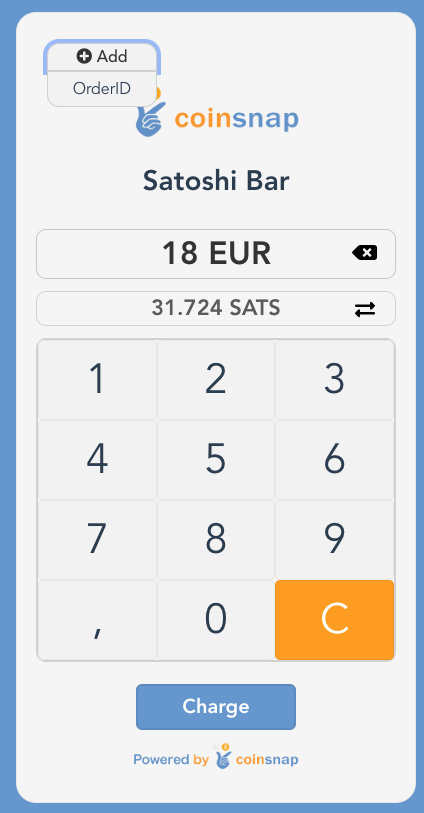
Web-Point of Sale Keypad

Do you run a store, a restaurant or are you a craftsman and service provider and would like to accept Bitcoin Lightning payments from your customers? Then Coinsnap ‘s Web-Point of Sale solution is the ideal solution for you!

Just open your web-point of sale page on-site on the web browser of your smartphone, computer or tablet and enter the invoice amount via the keypad input field.

Then a QR code will appear, which your customer scans briefly with their Bitcoin Lighning app and then authorizes.

The invoice amount will be credited directly to your Bitcoin Lightning Wallet – or (if desired) deposited directly into your bank account in fiat currency such as euros, USD, GBP or CHF.

The Coinsnap Web-Point of Sale works as simply as this

In addition to the invoice amount, you can also enter an order number so that you can easily allocate the Bitcoin payment later in your accounting system. After you have entered the amount, click on Charge and a QR code will be displayed, which you can show to the payer so that they can make the payment with their Bitcoin Lightning Wallet.

If the payment was successful, you will receive a message and can hand over the paid goods to the customer. The Bitcoin revenue is immediately credited to your own Bitcoin Lightning Wallet and is immediately available to you. You can note in your POS system or on the invoice that the payment was made via Bitcoin Lightning.

All Bitcoin Lightning payments received via the web point of sale are saved in the Coinsnap backend and can be tracked via the transaction view. All payments can be filtered and downloaded as a CSV file to be used for accounting purposes, for example.
Create Web-Point of Sale

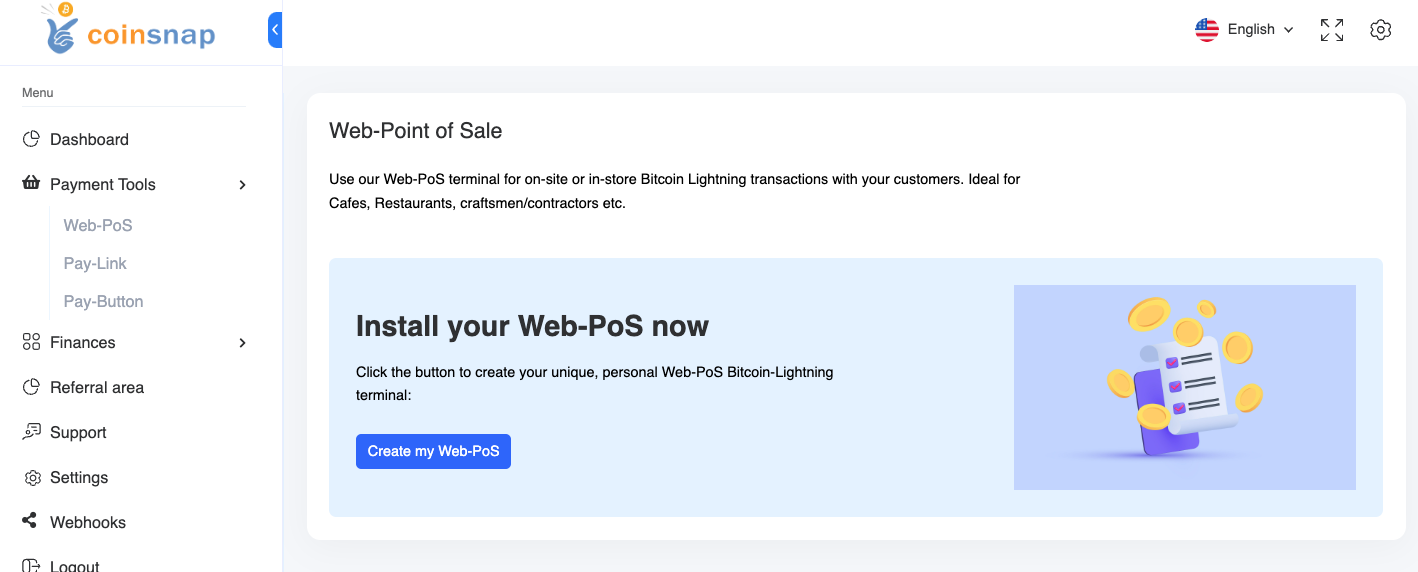
To be able to use the web-point of sale for your business, you need a Coinsnap account. After you have logged in to the Coinsnap backend, you will find the menu item Payment tools in the left menu bar and there the item Web Point of Sale (Web PoS).
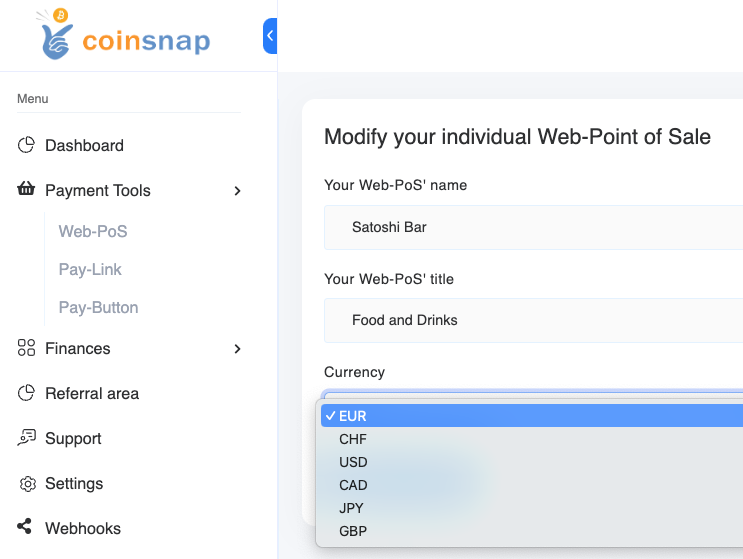
Click on Create New PoS to create a new Web-Point of Sale. Then enter the name of your store in the PoS Name field and in the PoS Title line you can specify what your store offers. In the Currency field, select the currency that will be used for payment in your store.
Then click on Create PoS. This view appears:
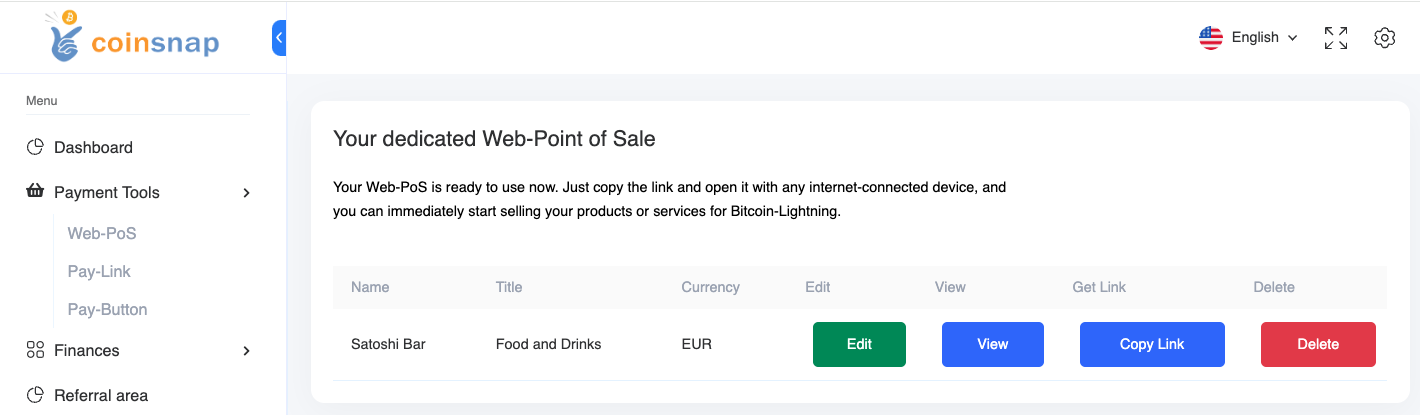
With Copy Link you receive the URL, which you can access with any internet-enabled device. This URL can also be passed on to employees, so that they can access the site with their own end devices. Only payments can be received via this Web-PoS Url. The credit to the Bitcoin Lightning Wallet is made to the wallet deposited with Coinsnap.

The advantages of Coinsnap Web-Point of Sale at a glance:

  • Every employee can accept Bitcoin payments, but cannot make withdrawals.
  • Web-PoS can be operated on any Internet-enabled device with an Internet browser such as a smartphone, computer or tablet.
  • Separation of business and private Bitcoin Lightning payments
  • Enter your own order and invoice numbers for easy tracking
  • Detailed transaction view with CSV export for accounting documentation
  • No app installation required

Register now and get started with Web PoS!

Tags:Bitcoin Web-Point of Sale Bitcoin Web-PoS Web-Point of Sale Web-PoS