Receive Bitcoin payments now automatically and instantly in euros
Revolution for e-commerce: Bringin+Coinsnap enables real-time euro payouts of Bitcoin revenues – without any technical setup or Bitcoin knowledge.
Belgrade, 24 July 2025 – Coinsnap, the leading provider of modules that enable operators of online stores and websites to receive Bitcoin payments from their customers’ Bitcoin wallets to their own Bitcoin wallets, is now a partner of Bringin. This innovative exchange service now enables merchants to have Bitcoin payments paid out directly and automatically in euros to a personal bank account via Coinsnap.
The integration is easier than ever: merchants simply need to enter their personal Lightning address from Bringin in the Coinsnap backend – everything else happens automatically (see step-by-step-guide). Bitcoin payments are converted into euros in real time and credited to a personal IBAN account set up by Bringin on behalf and in the name of the user.
‘Our partnership with Bringin makes Bitcoin payments fully predictable for merchants for the first time – without volatility risks, accounting overhead or technical know-how,’ explains Sebastian Paulke, CEO of Coinsnap: ‘This allows our users to expand their payment options to include Bitcoin Lightning payments, appealing to the new, cross-border and cross-currency customer group of Bitcoin users – but with the security of euro payouts!’
Bringin: Euro payouts at the touch of a button
Bringin is a Bitcoin-to-Euro exchange service that offers a personal Lightning address and an individual IBAN account. Merchants receive Lightning payments that are immediately converted and credited. The subsequent SEPA payout to their own bank account is made at the touch of a button – for a small fee of only 1%.
The most important advantages at a glance:
Automatic euro payout upon receipt of Bitcoin payment
No exchange rate risks, no chargebacks, no transaction fees
Low total costs of only 2% (1% Coinsnap + 1% Bringin)
Real-time credit to your personal euro account
Fully implementable without any technical effort
Up to £10,000 per month payable, expandable with KYC documents
Will we be meeting at the Swiss Bitcoin Conference?
From April 24 to 27, 2025, experts from Switzerland, Liechtenstein, Austria and Germany will come to Kreuzlingen on Lake Constance to teach BITCOIN!
The conference serves to pass on the knowledge of these experts in the hope of inspiring many people from the DACHFL region for this EDUCATION EVENT.
The conference is in German. Live AI translation of our main program will be offered in English and French.
Coinsnap will be represented with a stand, a presentation and a workshop on the topic of Bitcoin as a payment. Jens Leinert will give a presentation on Friday, April 25, 2025 from 09:30 to 10:00 on the topic “Bitcoin as a payment. Why companies should accept Bitcoin payments.” Here you will learn good reasons why you should offer your customers Bitcoin payments and which target group you can reach with them. Anyone who has Bitcoin and is willing to pay with it.
On Saturday, April 26, 2025, a workshop on “How can I accept Bitcoin payments in stores and online?” will take place from 15:30 to 17:00.
In this workshop, Jens will present in detail various ways in which Bitcoin payments can be accepted in brick-and-mortar stores, online stores and on the internet. He will also present numerous practical examples that demonstrate the potential of Bitcoin acceptance and serve as inspiration for your own strategies.
Secure a discount: Use the code “coinsnap” to get a 5% discount on your tickets!
SatoshisBROTHER.com, the Styrian online shop for Bitcoin fashion, now also uses Coinsnap for its Bitcoin Lightning payment processing.
Graz/Belgrade, 19 November 2024 – SatoshisBROTHER.com, the Austrian provider of stylish T-shirts, polo shirts and jumpers for Bitcoin fans, accepts Bitcoin in its shop with the Coinsnap for Shopify plugin. This means that the shop’s customers now finally have the option of paying for their purchases with Bitcoin in addition to the familiar payment methods such as credit card, Klarna, etc.
SatoshisBROTHER.com owner Philipp Pfingstl is delighted with the Coinsnap software: ‘The Coinsnap for Shopify plugin, which we simply downloaded from Github and then installed in our shop system, really makes accepting Bitcoin child’s play. What we also really like is the direct transfer of the purchase price from the customer wallet to our own Lightning wallet. This means you don’t need a bank or other ‘intermediaries’ to interfere in the purchasing process, even though all you really want is a direct relationship between supplier and customer.’
Coinsnap Product Manager Jens Leinert welcomes SatoshisBROTHER.com to the Coinsnap community: ‘We are delighted that SatoshisBROTHER.com now also relies on Coinsnap. This proves once again that our software is needed and accepted in the market. And with our almost 20 payment modules, we now enable the majority of merchants to accept Bitcoin, regardless of their shop software.’
Leinert emphasises the importance of the Coinsnap integration into the SatoshisBROTHER.com shop for other online merchants: ‘This integration shows – alongside the other leading Bitcoin outlets on the German-speaking Internet that use our technology – that Coinsnap offers a stable, secure and, above all, simple solution for accepting Bitcoin.
If Bitcoin eCommerce pioneers like SatoshisBROTHER.com trust Coinsnap, this is also a sign for ‘newcomers’ to Bitcoin payment to also use Coinsnap in their shops.’ Coinsnap offers easy-to-install, easy-to-use plugins for the most popular shop systems, but also for on-site applications. Shop operators as well as shop owners and freelancers can use Coinsnap to accept Bitcoin for their products and services.
Coinsnap’s modules and plugins can be integrated into your website in just a few minutes, allowing even non-experts to accept Bitcoin immediately. Coinsnap enables the simple transfer of invoice amounts from the customer’s Lightning Wallet to that of the merchant.
Accept Bitcoin Lightning payments in the Modified Shop with Coinsnap
Coinsnap for Modified Shop allows you to process Bitcoin Lightning payments via the Lightning Network in your Modified Shop. With the Coinsnap Bitcoin Lightning payment plugin for Modified Shop, all you need is a Lightning wallet with a Lightning address to accept Bitcoin Lightning payments in your store. The Coinsnap payment plugin for Modified Shop makes it amazingly easy for your customers to buy your offers with Bitcoin Lightning: they can complete their payment transactions with just a scan of the QR code generated by the Coinsnap plugin and authorization of the payment. After authorization, the payment is credited to your Lightning wallet in real time.
You can find a test product for 1 cent on our demo store page. Select it to test payment with Bitcoin and Lightning right away!
Add to shopping cart
Click on the “Add to cart” button to start the payment test.
After you have set up your customer account, you can click on Buy now in the shopping cart and you will see the button “Coinsnap / Pay with Bitcoin and Lighting” in the checkout.
After clicking on “Continue” you will see another list of your purchase.
Here you must now click on “Buy”.
At the end you will receive a QR code that you should scan with your wallet to pay with Coinsnap Bitcoin and Lighhtning!
You can download the Coinsnap for Modified Shop plugin from the Coinsnap Github page and install it on your WordPress site. To do this, go to the Coinsnap Github page. There you will find the green button labeled Code at the top right.
When you click on it, the menu opens and Download ZIP appears. Here you can download the latest version of the Coinsnap plugin to your computer.
As soon as you are registered with Coinsnap, log in to your modified store and go to the backend.
If you haven’t set up your Coinsnap account yet, you can create it via this link. Before you start with the Modified Shop backend area, make sure you have downloaded our plugin for the Modified Shop from our GitHub page. Now extract the files and folders from the archive and upload them to the Modified Shop root directory using an FTP client, keeping the entire directory structure:
callback includes lang
Log in to Modified Shop as an admin. Navigate to Modules – Payment methods, search for Coinsnap and click on Install – after the installation Coinsnap will appear in the list of installed modules Now you can proceed with the setup of your Coinsnap plugin as described below. After the Coinsnap for Modified Shop plugin has been installed and activated, the plugin still needs to be configured. You can learn how to do this here.
Connect Coinsnap for Modified Shop with your Coinsnap account
For the whole thing to work, you need to connect your plugin to your Coinsnap account:
Coinsnap for Modified Shop Settings
Go to Modules > Payment methods, search for Coinsnap and click on the icon – the page with the Coinsnap settings will open.
Activate the Coinsnap module (click on “Yes”).
Enter the “Coinsnap Store ID” and your “Coinsnap API Key” (you can find these in your Coinsnap account, see here).
Select the payment status for Coinsnap payment status.
If you wish, you can enter permitted payment zones and select a payment zone from the list of payment zones.
Strike Business is a custody wallet where your funds are held by Strike and you have to go through a KYC process for your business.
In return, you receive a Bitcoin Lightning wallet with a Lightning address and can manage both Bitcoin and Lightning in one account and also receive an account for euros.
You will receive a Lightning address that you can store if you accept Bitcoin payments via Coinsnap in your online store or on your website.
Strike Business is of interest to all companies that receive Bitcoin payments and wish to either keep the Bitcoin received or convert it into euros.
To open a Strike Business account, go to https://strike.me/business The entire process is partly in English, as is the subsequent email communication with the Strike Onboarding Team. After clicking on Get Started, you will be asked to fill out a form. There you will need to fill out a form in which you provide your name, your personal e-mail address, the name of the company, the location of the company, the URL of the company’s website and the purpose for which you want to use Strike Business. If you already have a private Strike account, make sure you use a different email address here. Ideally an email address that is associated with the company. You will then have to wait until you receive a message from Strike. A few days later you will receive an email to start the registration process:
It is an advantage to find out in advance what to expect and it is advisable to compile the relevant documents in advance.
Shareholder audit
An audit includes the KYC audit of the acting persons of this company. These are the directors and managing directors and all shareholders who hold more than 10 percent of the shares in the company. Each of these persons is then asked by e-mail to send a photo of an identification document and to provide proof of their residential address in the form of a bank statement or utility bill.
Company audit
In addition to the persons involved, the company must also be checked. Company documents such as an extract from the commercial register and a current bank statement with the company name and address are requested for this purpose. Once you have prepared everything, click on “Start your onboarding” in the email. You will be redirected to a website where the onboarding process takes place. The link may already have expired. Then simply reply to the email you received. I’ve always gotten the best email support from this later. Once you’re on the website, you’ll go through several steps where you enter the relevant information we just talked about.
Strike Business Dashboard
After successful registration, we can log in via the URL https://dashboard.strike.me/login log in to the Strike Business Dashboard. In contrast to the Strike account for private use, which is managed as an app on the smartphone, the Strike Business account is managed via the web. Those who already have a private Strike account will be familiar with the handling of both accounts.
Cash Balance Account
At Strike you have an account in which the euro balance is managed. You can receive bank transfers to the account. You will receive the relevant bank details when you click on Deposit. Deposits can only be made from a bank account in the same name as the Strike account and Strike only supports Euro currencies for European customers. Withdrawals cannot be made yet, as we need to deposit our bank account first. To do this, go to Accounts and then to Add bank account. You can then enter the IBAN of your own bank. Payouts are only made to the company account.
Bitcoin Balance Account
We also have the Bitcoin Lightning account, which supports both Onchain Bitcoin and Lightning. With Onchain, the Bitcoin address is displayed to receive payments. Once as an onchain address and additionally as a QR code. To receive payments via Lightning, you must first create a Lightning Invoice. To do this, enter the amount in Bitcoin that you would like to receive. Please note that the entry is made in Bitcoin, i.e. with decimal places. So if you want to create a Lightning Invoice for 100,000 sats, the entry is 0.00100000 or 0.001.
Lightning Address
You can also receive Lightning via your Lightning address. Your Lightning address is username@strike.me But how do you get your username? Click on the three dashes at the top right and your username will be displayed, which unfortunately cannot be changed. If you accept Bitcoin payments with Coinsnap in your online store or on your website, you enter your Lightning address there. The credits are credited directly to your Strike Business account via this Lightning address. However, the Lightning credit is not credited to your Bitcoin account, but converted into euros and credited to your Euro Cash account. If you do not want to keep the Bitcoin, but prefer to have the Bitcoin turnover credited in euros, then you do not need to do anything. However, if you want to keep the Bitcoin you receive, you must contact Strike Support and request that the conversion is not carried out and that the Bitcoin is credited directly to your Bitcoin wallet. You can reach Strike support at support@strike.me
Send Bitcoin to the hardware wallet
You can use the Send Bitcoin button to send Bitcoin via On-Chain or Lightning. If your Bitcoin balance on the Strike Bitcoin Wallet has become too high, it is advisable to transfer this Bitcoin to a secure Bitcoin hardware wallet, such as the Bitbox02. It is pleasing to note that Strike does not charge its own fees for Bitcoin withdrawals, as is often the case with other Bitcoin wallets. Only the fees for the Bitcoin blockchain that the miners receive are charged.
Receive Bitcoin – Credit in Euro
If you have deposited the Lightning address you received from Strike with Coinsnap, your customers’ Bitcoin payments will be credited directly to the Strike wallet. The question now arises as to which Strike account the credit should be made to. To the Bitcoin account or to the Euro Cash account? The default setting for Strike Business is to the Euro Cash account. For traders who are wary of the volatility of the Bitcoin price, we recommend retaining this setting. For example, if the end customer pays €50, this amount will be credited to your Euro Cash account minus the fees. These fees are on the one hand the fees that Coinsnap charges for its own services and on the other hand the exchange fee from Strike. If you would like to offer your customers the option of paying with Bitcoin, but would like to be credited in euros, Strike offers you an immediate conversion at the most favorable fees. The immediate conversion upon receipt of the Bitcoin payment is very advantageous and you are thus protected against the volatility of the Bitcoin exchange rate. Strike Business is particularly recommended for merchants who receive Bitcoin payments from their customers and want an immediate credit in euros.
Receive Bitcoin – Credit in Bitcoin
Currently, incoming Lightning payments are converted directly into euros via the Lightning address and then credited to the Euro Cash Wallet.
However, if you wish to keep the Bitcoin you receive, you must contact Strike Support and request that the conversion is not carried out and that the Bitcoin is credited directly to your Bitcoin wallet.
Strike impresses with its low fees and, unlike other Bitcoin Lightning wallets, does not charge any fees for certain services.
Euro deposits and withdrawals
You can make deposits and withdrawals to the Euro Cash account in our Strike Wallet by bank transfer. Strike does not charge any fees for deposits or withdrawals to another bank account.
Bitcoin deposits and withdrawals
You can send and receive deposits and withdrawals from your Bitcoin wallet via Onchain and Lightning. Strike does not charge any fees for deposits and withdrawals of Bitcoin payments.
Lightning
There are no fees for switching from Lightning to Onchain or vice versa. You can therefore receive Lightning credits from your customers, which are credited to the Strike Bitcoin wallet and transferred to your Bitcoin hardware wallet at no additional cost. Other Bitcoin Lightning wallets charge an average fee of 0.5% for forwarding to an on-chain Bitcoin wallet, which Strike does not charge. To be fair, however, it must be pointed out that network fees are incurred when paying via Lightning and Onchain. However, these fees are not charged by Strike, but the actual network costs are passed on. Lightning payments only incur routing fees, which are in the millicent range.
Onchain
Onchain payments incur fees that depend on how quickly the credit is to be issued. However, these fees are displayed before the payment is executed. Strike breaks this down into three stages:
Priority – about 10 minutes – network fee plus strike fee
Standard – about one hour – network fee plus strike fee
Free – about one day – no fees
Strike here means that a strike fee is incurred, but not how high it is. So please pay attention to this when transferring Bitcoin yourself. But if you transfer the Bitcoin to your own Bitcoin wallet, then you certainly have enough time and then there should be no fees and no network fees.
Exchange fee
But how does Strike earn his money?
Strike’s business model is based on the exchange between euros and Bitcoin. Every time you buy or sell Bitcoin, i.e. exchange euros for Bitcoin and vice versa, Strike charges a fee. This fee is staggered and depends on the monthly exchange volume. If you exchange less than €250 per month, you pay 1.29%. If you exchange €1,000 per month, the fee is only 1% and is reduced accordingly. Every month it starts all over again. So check for yourself what fees you would incur. The standard market rate is around 1.5%, making Strike one of the cheapest providers.
Summary
Strike Business is the ideal Bitcoin wallet for businesses. Strike is a custody wallet where your Euro balance and your Bitcoin are held by Strike. To open a Strike account, KYC is required for your company and the acting persons. You will receive a wallet with a euro account and a Bitcoin account, which you can use to manage both separately. You will receive your own Lightning address for your company and, if you want to accept Bitcoin Lightning payments in your store or on your website, you can have the sales credited directly to your Bitcoin or euro account. You can receive Bitcoin and Lightning payments from your customers and decide whether you want to keep the Bitcoin or convert it into euros immediately. With Strike Business, you have a clean separation between your private Bitcoin and your company’s Bitcoin. Strike Business also scores highly in terms of fees. Deposits and withdrawals by bank transfer are free of charge. There are also no fees for deposits and withdrawals via Bitcoin Onchain and Lightning, only the routing and network fees are passed on. Fees are only charged when exchanging Bitcoin for euros or vice versa. However, these fees are cheaper than what is usually charged on the market. Strike Business is particularly recommended for businesses that want to accept Bitcoin and Lightning payments in-store or on the Internet or online store with Coinsnap.
Frankfurt/Main, August 4, 2024 – Contact Form 7, the most popular form generator in the WordPress world with over 10 million downloads, can now also be used for simple payment transactions in Bitcoin Lightning with Coinsnap.
The Bitcoin Lightning payment provider Coinsnap has released a free plugin that allows WordPress website operators to offer Bitcoin Lightning payments in their Contact Form 7 forms in just a few minutes. All they have to do is create an account with Coinsnap, enter their Lightning Wallet address and install the plugin. Apart from their email and Lightning Wallet address, no further details are required to receive Lightning credits in their own Lightning Wallet immediately.
Jens Leinert, Head of Business Development at Coinsnap, is convinced that WordPress website and blog operators can use Coinsnap for Content Form 7 to generate additional revenue in the growing Bitcoin-affine target groups: “With our plugin, influencers, blog operators and online experts of all kinds can, for example, accept donations for their videos or podcasts, offer fan merchandise such as coffee mugs or T-shirts for sale or offer personal online meetings for a participation fee.” And all this without having to integrate more complex technologies such as Woocommerce into their WordPress websites or apply for acceptance contracts with credit card or payment service providers such as Stripe or Paypal.
According to Leinert, there is currently no payment method that allows WordPress users to offer simple payment processes with Bitcoin Lightning in a simpler, less complicated and faster way than Coinsnap. “All our customers need is an email address to set up their Coinsnap account and install a Bitcoin lending wallet on their smartphone,” emphasizes Leinert. After that, all they have to do is download and install the Coinsnap for Contact Form 7 and enter some data from their account and wallet. “From then on, all proceeds are credited to your Bitcoin Lightning wallet in real time, guaranteed and irrevocable,” explains Leinert. Creating a form in Contact Form 7 to collect donations or sell a fan article, for example, is extremely simple and is explained directly in Contact Form 7 once the plugin has been installed. Sample code is also available there, which the Contact Form 7 user only has to copy into a new form and then adapt to their needs.
“Turning a form into a mini-shop is really child’s play and can be done in just a few minutes,” promises Leinert. The Coinsnap for Contact Form 7 can currently be downloaded from Github, a listing in the WordPress plugin directory will follow shortly. Coinsnap also supports WordPress operators with a demo page on which interested parties can carefully test Bitcoin Lightning Payment with Contact Form 7. There is also a detailed step-by-step guide for implementation.
Blocktrainer now offers the Coinsnap Bitcoin-Lighting payment method in its store. Blocktrainer is the best-known YouTube channel in the German-speaking world with almost 200,000 subscribers. Coinsnap is the only provider of a Bitcoin Lightning payment method for online stores that can only be provided with an email and a Lightnig wallet in your store.
Products for the Bitcoiner can be purchased in the Blocktrainer Shop, which is based on Shopyfy software. The offer ranges from Bitcoin books and Bitcoin wallets to cool Bitcoin stuff and Bitcoin merch. In addition to credit card, PayPal and Klarna, you can now also use Bitcoin Lightning payment.
Anyone who educates people about Bitcoin on an almost daily basis sets a good example and supports the option of paying with Bitcoin Lightning at Blocktrainer.
Products for the Bitcoiner can be purchased in the Blocktrainer store, which is based on Shopify’s store software. The offer ranges from Bitcoin books and Bitcoin wallets to cool Bitcoin stuff and Bitcoin merchandise.
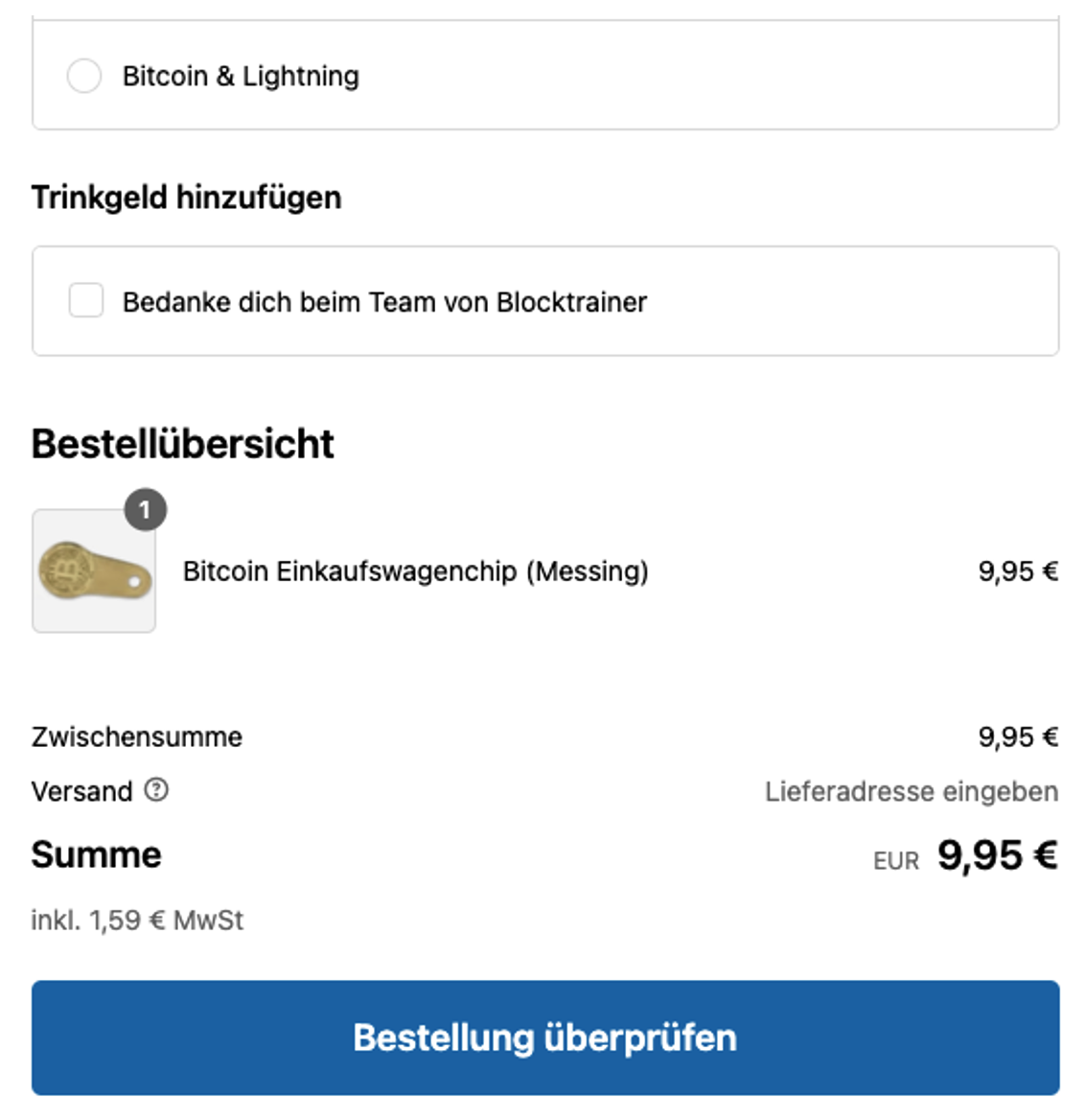
In addition to the payment methods credit card, PayPal and Klarna, the checkout also offers Bitcoin Lightning payment.
The customer is then shown a QR code that they can scan with their Bitcoin wallet and pay quickly and easily.
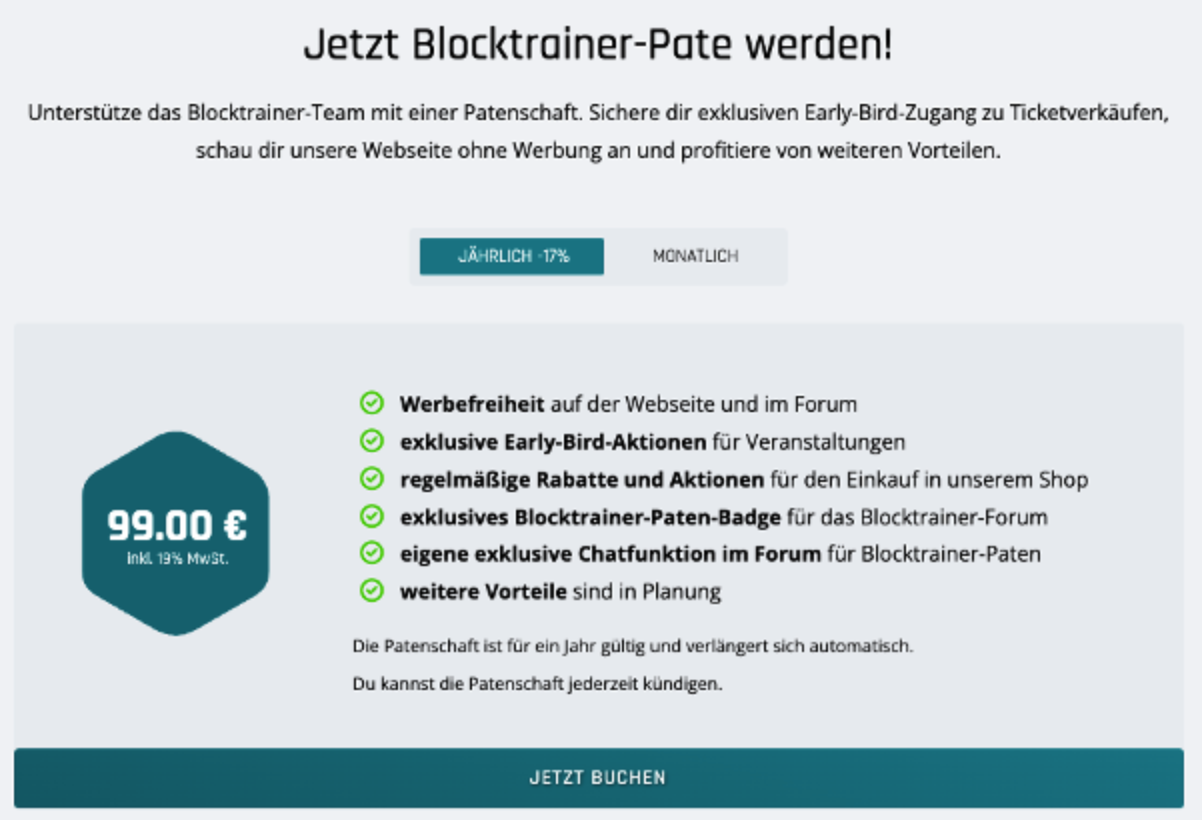
However, you can not only pay with Bitcoin in the online store at Blocktrainer, but also for events and donations. If you would like to purchase one of the coveted tickets for a Blocktrainer event, such as the Blocktrainer Meetup in Prague or the Blocktrainer Event, you can conveniently pay for your ticket with Bitcoin Lightning. Would you like to become a blocktrainer sponsor and support the work of the blocktrainer team? As a Blocktrainer sponsor, you get exclusive early bird access to ticket sales and can view the Blocktrainer website without advertising.
Become a block trainer donor
But you can also send a donation with a message to the Blocktrainer team.
Simply enter the amount, write a message and click on Send.
Blocktrainer is a partner of Coinsnap and if you also want to accept Bitcoin and Lightning payments in your online store, then use the discount code blocktrainer and save 20% on the fees.
Since July 1, the Bitcoiner store Copiaro has also been offering its customers payment via Bitcoin Lightning.
Copiaro offers products for Bitcoiners in its online store. From the hardware wallet to Bitcoin books, Bitcoin art and Bitcoin merchandise. As befits an online store that mainly sells its products to Bitcoiners, it must of course also offer payment via Bitcoin and Lightning. As Copiaro reveals on his X-account, the processing of Bitcoin Lightning payments is handled by Coinsnap.
The Coinsnap WooCommerce plugin was installed in the Copiaro online store and the Lipa Wallet was stored for the payment of sales Copiaro is a partner of Coinsnap and if you also want to accept Bitcoin and Lightning payments in your online store, then use the discount code copiaro and save 20% on the fees.