
Coinsnap & Bringin in Action

Accept Bitcoin Payments – Receive Euros

If you accept Bitcoin payments on your website or online shop using Coinsnap’s payment modules, you can now receive payouts directly in euros to your personal bank account – thanks to Bringin. It’s automatic, secure, and requires no technical setup.

Using Coinsnap and Bringin is currently the easiest, safest and quickest solution for all merchants that want to offer their customers Bitcoin payment, but do not care to deal with Bitcoin themselves.

If you use Coinsnap with Bringin, you enlarge your reach to a new, worldwide customer base (Bitcoin owners), and can market your merchandise across borders and currencies, without having to bother with accounting issues that come with Bitcoin, volatility risks or other hurdles that come with accepting Bitcoin in your business.

What is Bringin?

Bringin is a Bitcoin-to-Euro exchange service that provides you with your own Lightning address.

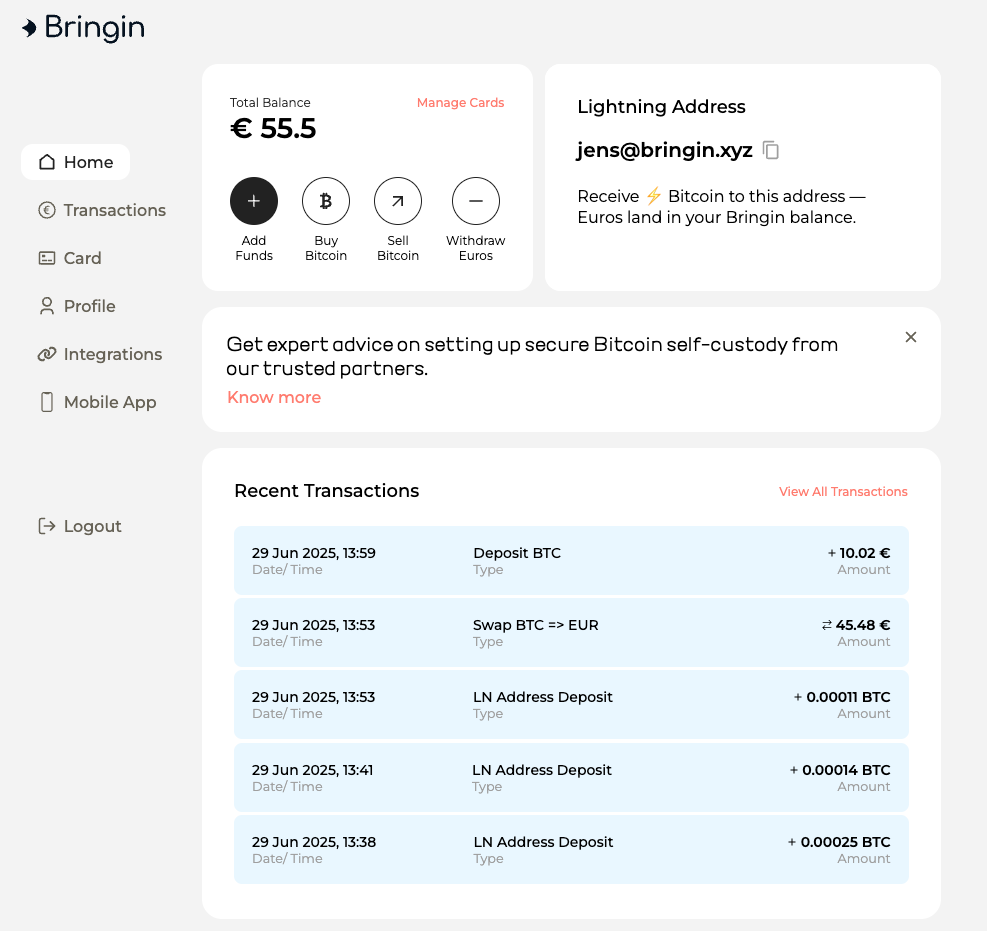
Using this address, you can receive Lightning payments that are automatically converted into euros and credited to your personal, vIBAN account that Bringin automatically sets up for you in your name.

You can then anytime transfer funds from this account to your chosen account (that must be in your name, too) for a small fee of just 1 % per transfer.

 

This makes Bringin the perfect solution for merchants who want to accept Bitcoin but prefer to receive payouts in euros.

How Coinsnap and Bringin Work Together

Coinsnap offers simple payment modules for Bitcoin and Lightning.

Due to the partnership with Bringin you can now convert your Bitcoin sales in real-time into Euro that will be credited immediately to your vIBAN account. You can then transfer Euros from this vIBAN account to your bank account any time you please for a small fee of 1 % per transaction.

To enable payouts to your bank account with Bringing all you need to do is to enter your Bringin Lightning address as your wallet in the Coinsnap backend.

Step-by-Step Guide

✅ Create a Bringin Account

Go to https://bringin.xyz/ and sign up.
You’ll need to complete a KYC process (valid ID and a recent utility bill).
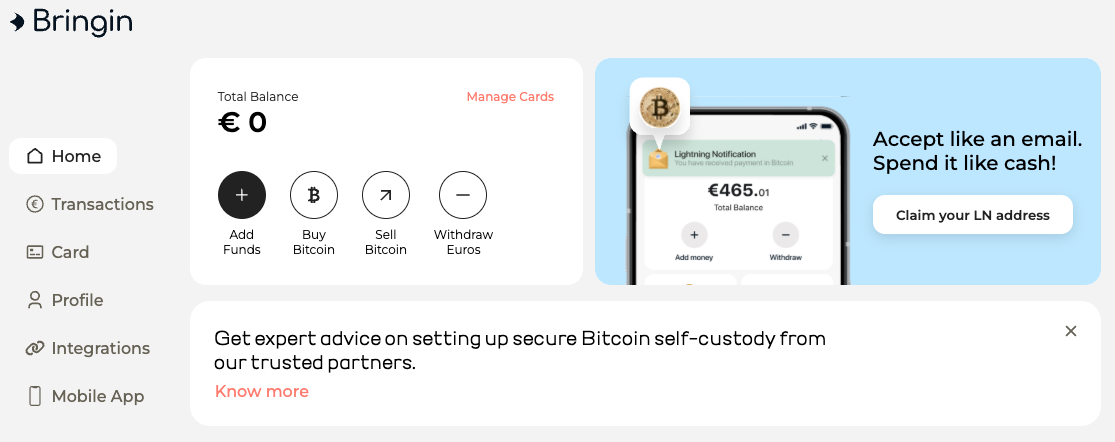
 

✅ Set Up Your Lightning Address

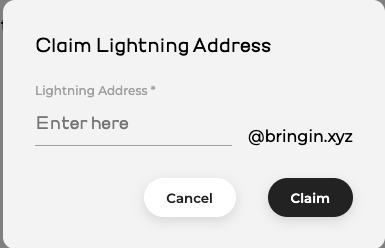
After registration, you can create your personal Lightning address – e.g., yourname@bringin.xyz (if the name is still available).
 

✅ Create or Update Your Coinsnap Account

  • If you don’t have an account yet: https://app.coinsnap.io/register
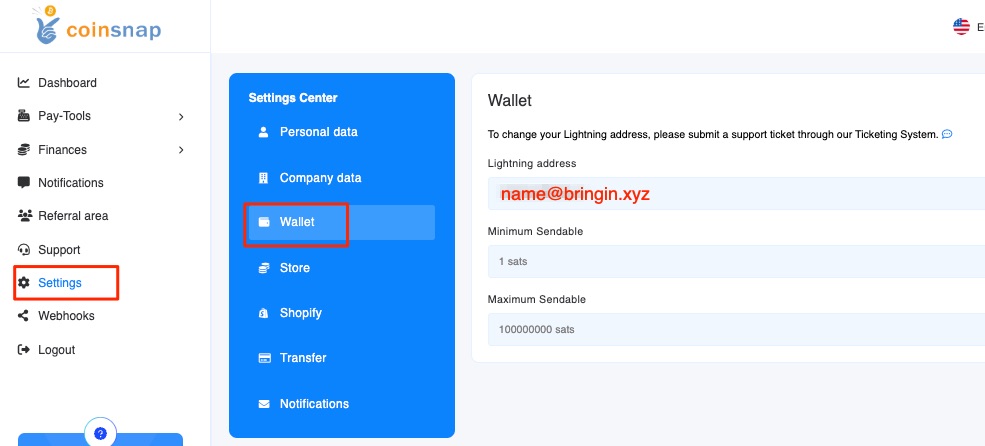
  • In the Coinsnap backend, go to Settings → Wallet and enter your Bringin Lightning address.
Accept Bitcoin – Receive Euros

When a customer pays in Bitcoin via Coinsnap, the amount is sent directly to your Bringin Lightning address.
There, it is automatically converted into euros and credited to your personal euro account that Bringin established in your name. From then you can anytime transfer funds to your linked bank account.

Key details:

  • Minimum amount: 11,000 sats
  • Maximum amount per payment: €3,000
  • Conversion fee: 1 %
  • Bank payout fee: 1 % per transaction
  • Monthly payout limit: €10,000 (can be increased with additional KYC documents)
 

Payout Process

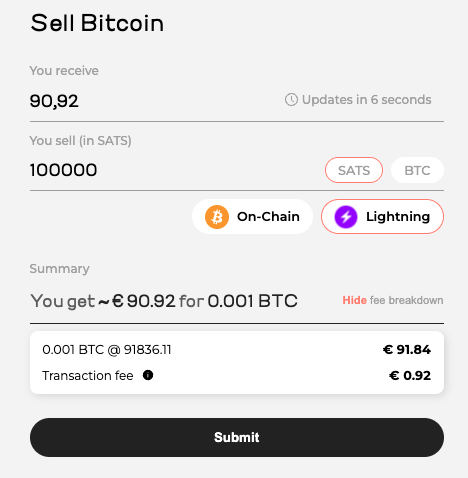
If you would now like to have the amount paid out to your bank account, click on “Withdraw Euros”. Then enter the bank details to which the credit should be made if this has not already been done.
Please note that the payout account must be in the same name as the Bringin account. Payouts to another bank account are not possible.

A fee of 1 % is charged for withdrawals to your bank account.
You can withdraw up to €10,000 per month. If you want to transfer more, you can increase the limit by submitting additional KYC documents.

You’ll receive a confirmation code via email and SMS.
After entering the code, the amount is instantly transferred to your bank account via SEPA Instant.
 

Conclusion: Coinsnap + Bringin = The Perfect Merchant Setup

Want to accept Bitcoin payments but prefer to get paid in euros?
Then the Coinsnap + Bringin combo is your ideal solution:

✅ Accept Bitcoin without price volatility
✅ Receive euros directly to your bank account
✅ No chargebacks like with credit cards or PayPal
✅ Low total fees: only 2% (1% Coinsnap + 1% Bringin)

Payment Method Fee Chargeback? Crediting Time
Coinsnap + Bringin 2% No Transaction Fee No Immediate
Credit Card 2.5–4% plus Transaction Fee Yes 1–2 days
PayPal 3–4.5% plus Transaction Fee Yes 1–2 days

Start Now and Save 30% on Fees

Open your Bringin account using this affiliate link:
👉 https://spend.bringin.xyz/signup?affiliate=COINSNAP
Save 30% on fees for the first three months!

Bitcoin crowdfunding for WordPress

The complete guide for donations, projects & campaigns

What is crowdfunding?

Crowdfunding refers to the financing of a project by a large number of individual supporters – usually via the Internet. People donate or invest small amounts in order to achieve a larger goal together. There are different types:

  • Donation-Based: pure donations without consideration (e.g. for charitable purposes)
  • Reward-based: Donors receive something in return, e.g. a product
  • Equity-Based: Investors receive company shares
  • Lending-Based: Participation via repayment models

Crowdfunding is a billion-dollar market worldwide. According to data from Statista, the global crowdfunding volume in 2023 was over 12 billion USD – with a continuing upward trend.

Inhalte  Verbergen 

What is Bitcoin crowdfunding?

Bitcoin crowdfunding is a modern variant of classic crowdfunding – with the special feature that supporters do not pay in euros or dollars, but in Bitcoin. The advantages are obvious:

  • The amounts are directly sent directly to the wallet of the project initiator
  • It does not need any middlemen or banks
  • Therefore, no KYC process with the payment service provider is required
  • Global reach: Anyone with a Bitcoin wallet can donate
  • Immediate credit via Lightning Network
  • Ideal for micro-payments – unlike FIAT money orders, no amount is too small to be credited in the Lightning Network
  • Large donations (over €1,000) also possible via on-chain

Technically, Bitcoin crowdfunding often runs via plugins or platforms that provide a donation form with a QR code and donation targets.

A live example of Bitcoin crowdfunding:

[coinsnap_bitcoin_crowdfunding id=”38392″]

[coinsnap_bitcoin_crowdfunding_shoutout id=”38392″]

Why is Bitcoin crowdfunding particularly interesting for WordPress?

For website operators

With a market share of over 40%, WordPress is the most widely used CMS in the world. For bloggers, NGOs, creators and small companies, it is the ideal tool for bringing content and projects online quickly and flexibly.

With Bitcoin crowdfunding, your own content or project can be financed directly by readers and fans – without third-party providers and without dependence on payment services.

For beginners & people with specific concerns

If you don’t have a website, you can start a WordPress.com blog for free in just a few minutes and use it, for example, to collect Bitcoin for:

  • medical treatment
  • an anniversary trip
  • celebration (milestone birthday, wedding, christening, etc.)
  • social concern

This also works without prior technical knowledge – e.g. with the Coinsnap pluginwhich can be installed directly in WordPress with just one click.

Bitcoin crowdfunding versus FIAT crowdfunding

Crowdfunding is nothing new – unlike Bitcoin crowdfunding. But why should you go for Bitcoin crowdfunding instead of fiat crowdfunding? In the table below you can see some of the key differences–and advantages–of Bitcoin crowdfunding versus fiat crowdfunding:

Bitcoin crowdfunding Classic crowdfunding (e.g. GoFundMe, Kickstarter)
No fees to banks or payment services Platform fees up to 10%
Immediate crediting to your own wallet Payouts often delayed
Globally accessible – no currency barriers Often country-specific restrictions
No risk of chargebacks Chargebacks possible
No KYC/verification necessary Complex registration and verification
Censorship resistant Projects can be rejected or deleted

In summary, Bitcoin crowdfunding is ideal for small campaigns (target e.g. €200) that would not be possible with a large bureaucratic and cost overhead.

Bitcoin crowdfunding is also ideal for crowdfunding campaigns on topics that fiat payment service providers may not support (issue of censorship).

And of course, Bitcoin crowdfunding is unbeatable if your crowdfunding campaign relies on raising many small amounts (micro-payments) to achieve its goal – raising very small amounts of less than one Euro, for example, is not feasible with conventional fiat crowdfunding solutions!

Cost consideration – what do you get from the donation? Bitcoin versus FIAT

Let’s be honest – crowdfunding is all about one thing: money. And that’s why we now want to look at what percentage of your donors’ money actually goes NET to your crowdfunding fund. To do this, let’s first take a look at the fees:

Overview of fees (typical values)

1. platform fees

  • GoFundMe: 0 % platform fee (but only for fundraising campaigns), “voluntary” service fee proposed instead
  • Kickstarter5 % platform fee
  • Indiegogo5 % platform fee
  • Betterplace (for charitable projects): 0 % directly, but voluntary “tips” are heavily advertised

2. payment service provider fees (PayPal, Stripe)

  • PayPal / Stripe Standardapprox. 2,9 % + 0,30 € per transaction
  • International payments or foreign currency often incur a further 1-2% charge

We will now look at what this means using the example of a donation of €100.

Example of a net payout from a donation of €100

Platform Platform fee Payment fee Total deduction Payout to project
Kickstarter 5 % 3-5 % ~8-10 % 90-92 €
Indiegogo 5 % 3-5 % ~8-10 % 90-92 €
GoFundMe 0 % 2,9 % + 0,30 € ~3,2 % ~96,80 €
Betterplace 0 % 2,5-3 % ~2,5-3 % ~97 €

Note: With PayPal and Stripe there may be additional fees for currency conversion or country limits. For a donation of €10, for example, the fixed costs can account for a disproportionately large share.

In practice, therefore, depending on the platform and payment method, usually only 90% to 92% of the donation amount actually reaches the project or campaign. And especially with smaller donations or international payment transactions, the net percentage can drop even more significantly!

Bitcoin-based solutions such as Coinsnap largely avoid all these deductions – for example, Coinsnap only charges 1% fees, but no payment processing fees and no third-party fees are due.

That means: Up to 99% of the donation ends up directly in your wallet!

For what purposes can Bitcoin crowdfunding be used?

Bitcoin donations can be used in a variety of ways – here are some practical examples:

  • Private occasions
    Birthdays, weddings, surprise gifts
  • Creative projects
    Book publishing, album production, art
  • Social emergencies
    Medical aid, school materials, crisis support
  • Community initiatives
    Playground construction, environmental projects, clubs
  • Content financing
    YouTube series, podcasts, blog articles
  • Charity
    Support good NGOs / activists whose goals you want to promote, such as Bitcoin Zambia (an African education initiative), or a family you know in Ukraine…

Bitcoin crowdfunding has a huge advantage over all fiat crowdfunding platforms – only one percent of the donations are lost on the way from the donor to you – or your beneficiary (infrastructure costs)! Exactly 99% of the donations are credited to your wallet and are available for the purpose of the campaign!

In short, with Bitcoin crowdfunding there are practically no limits to your ideas and creativity: Whatever you want to finance – if you have a good idea and can describe it well to your readers / visitors / followers, then you can use Bitcoin crowdfunding to collect Bitcoin for it.

No matter what it’s about – if other people are interested, you can offer them an easy, fast and secure way to get involved with Bitcoin crowdfunding!

Provider comparison: Bitcoin crowdfunding for WordPress

There is currently only one dedicated Bitcoin crowdfunding for WordPress plugin in the official plugin directory – Coinsnap Bitcoin Crowdfunding. However, there are various providers that offer external solutions, which then have to be integrated manually. Some examples are these:

Solution Provider Payment methods Fees WP integration GDPR-compliant Special features
Coinsnap Bitcoin (Lightning + on-chain), FIAT payout to bank account optional 1 % Official WP plugin Yes Target amount, multi-amount, shout-outs
BTCPay Server Bitcoin (on-chain + Lightning) 0 % Manual integration Yes Open source, high control
Tallycoin Bitcoin (on-chain) 0 % Externally integrated Yes Profile pages, community approach
OpenNode Bitcoin + fiat payout ~1 % Restricted Partially Fiat conversion, centralized

Bitcoin crowdfunding for WordPress in practice using the example of Coinsnap

What does the plugin do?

The Coinsnap Bitcoin Crowdfunding Plugin for WordPress enables website operators to collect Bitcoin donations for projects, campaigns or personal causes directly on their own WordPress site. The special feature: The contributions are transferred in the form of Satoshis (the smallest unit of Bitcoin) directly and without detours to the wallet of the creator of the campaign – either via the Bitcoin Lightning Network or as a classic on-chain transaction. Processing is completely decentralized and without the involvement of third-party providers, banks or payment service providers.

What does the user interface offer?

Users can make their Bitcoin donations conveniently using a QR code and send a public shout-out or a personal message if they wish. These donor messages can optionally be displayed live on the website – a great way to create transparency and community. The donation forms are integrated using shortcodes and can be flexibly placed anywhere within the WordPress website – whether in pages, blog posts or widgets.

What do you need to use Coinsnap Bitcoin Crowdfunding?

All you need to use the plugin – in addition to a WordPress site – is a Coinsnap account or your own BTCPay server. A Lightning wallet or a wallet address is sufficient to receive donations. The plugin is fully GDPR-compliant, as no unnecessary data is stored, and is available free of charge in the official WordPress plugin directory.

How do I install and configure Coinsnap Bitcoin Crowdfunding?

The configuration is particularly beginner-friendly: After installation from the WordPress plugin directory, the connection to Coinsnap or your own BTCPay server can be established(see installation instructions).

All campaign parameters can then be set individually: The desired target amount in Satoshis, three preset donation amounts, the description of the project, a welcome text and an optional thank you message. In addition, fields for entering the name, e-mail address and personal message can be activated. If you wish, you can also use the shoutout function, which displays public donor messages directly on the website.

The form is easily integrated via an automatically generated shortcode that can be inserted anywhere on the website. Visitors then see a compact, modern donation form with a progress bar, countdown (if desired) and donation options. After scanning the QR code and confirming, the donation amount is transferred directly to the connected wallet of the campaign creator – quickly, securely and without detours.

Can I also use the plugin with my BTCPay server?

Coinsnap offers two operating modes: In simple mode, the connection is made via a Coinsnap account, which requires no prior technical knowledge. In advanced mode, tech-savvy users can connect the plugin to their own BTCPay server, giving them maximum independence and control over all aspects of the payment processing.

Excursus: legal framework for crowdfunding in Europe

In most countries of the European Community, collecting money as part of a simple crowdfunding campaign – e.g. for a private gift, a creative idea or a social project – is generally is generally permittedas long as no consideration is promised and there is no intention to make a profit exists. In this case, it is legally a case of gifts which do not require special authorization.

Important legal information:

  • Donations without consideration (donation-based crowdfunding) are unproblematic as long as they are made voluntarily and without any contractual obligation.
  • Who regularly or commercially collects funds (e.g. for a company) could be subject to the Asset Investment Act or other financial market regulations.
  • For charitable donations with a donation receipt you need the status of non-profit status from the tax office – purely private individuals are not allowed to issue tax-deductible donation receipts.
  • For higher individual donations a gift tax may be due – this is the responsibility of the recipient, although allowances apply (e.g. €20,000 for gifts from friends).
  • It is recommended to maintain transparency about the purpose of the crowdfunding and to use the funds for a specific purpose as described.

As long as you are a private individual or initiative without commercial intent Bitcoin donations for a specific cause–for example via WordPress and the Coinsnap plugin–you are operating within a legally permissible framework in most of Europe. However, individual tax or legal advice is advisable in the event of uncertainties or larger amounts.

Conclusion: Bitcoin crowdfunding for WordPress is ideal for collecting Bitcoin quickly, cost-effectively and without any technical or bureaucratic effort

Bitcoin crowdfunding for WordPress is the perfect solution for anyone who wants to raise financial support in the form of Bitcoin quickly and easily without any prior technical knowledge, bureaucratic hurdles or complicated third-party services.

People with a specific cause – be it a private project, a social project or a creative goal – benefit in particular from the simple setup and direct payout to their own wallet.

The Coinsnap plugin makes implementation extremely easy: a campaign is live in just a few minutes, donations can be accepted immediately, and supporters from the immediate environment or the online community can contribute to the success of the project without any barriers.

So if you are looking for a modern, independent and accessible crowdfunding solution, Bitcoin Crowdfunding for WordPress offers a clear path to your goal.

Start your first Bitcoin crowdfunding campaign now

With Coinsnap Bitcoin Crowdfunding you can start today to collect Bitcoin for your projects and causes from your followers and visitors.

You only have to follow three steps and you can launch your first Bitcoin crowdfunding campaign on your WordPress website in half an hour at the latest:

1. set up a Coinsnap account

2. install & link plugin

3. configure & place campaign

Register with Coinsnap, enter your email address, your WordPress URL and your Lightning address and click on the link in the email you receive from Coinsnap. Done.

Search for Coinsnap Bitcoin Crowdfunding in the WordPress backend under Add plugin, click on Install, and then on Activate. Open the plugin settings and enter the store ID and API key that you can find in your Coinsnap account. Done.

Go to Bitcoin Crowdfunding in the WordPress dashboard on the left, click on Crowdfundings and then on New Crowdfunding. Then fill out the form fields, copy the displayed shortcode where you want to run the campaign, and all deposits will be credited directly to your Lightning Wallet.

Set up a Coinsnap account

How to accept Bitcoin and Lightning payments on Shopify?

How to accept Bitcoin and Lightning payments on Shopify?

Offer Bitcoin Lightning payment in your Shopify store

Online merchants who offer their products on the internet via Shopify can now easily offer their customers Bitcoin Lightning payment: Coinsnap provides a Shopify payment module that connects the Shopify online store to Coinsnap, thus enabling Bitcoin-Lightning payment processing.

Coinsnap for Shopify is connected to your Shopify store, it is seamlessly integrated with your Shopify checkout: Making a purchase with Bitcoin Lightning is as easy as any other payment method!


How does Bitcoin Lightning payment work with Coinsnap for Shopify?


After your customer made his selection, and clicked on Checkout, he will see the checkout form. Here he adds is personal and shipping information, and selects Pay with Bitcoin/Lightning. Next, he must click on Review order (see image on the right).

In the Review and pay screen, the customer has to click on Complete order, if everything is correct:

On the Confirmation page that now appears, your customer will start the actual Bitcoin Lightning payment by clicking on Pay with Bitcoin.

Now the actual Bitcoin payment window opens and the customer can pay with Bitcoin Lightning by scanning the QR code and authorizing the transaction in his Bitcoin Lightning wallet

After successful payment, the customer will receive a notification that the payment has been successfully completed.

During the ordering and payment process, the customer is informed by e-mail about the respective status of his order.

The customer will receive the first notification by e-mail after the order is successfully placed and another notification after the payment is successfully completed.

It is important to note that with Shopify, the order is placed first and only then is payment made. Both the customer and the store operator receive a message that the payment was successful. However, this does not mean that the payment has been successfully completed at the same time. Care must be taken to ensure that the customer has also paid successfully.

After successful payment, the status of the order is changed from Unpaid to Paid on the Shopify order page. The merchant can now start shipping the goods. At the same time, the deposited amount will be credited to the Lightning Wallet.

Shopify Manual Payment Methods

Shopify offers its own payment processing with Shopify Payments for various payment methods such as credit card, Google Pay and Apple Pay. These payment methods are prominently placed by Shopify to encourage their use.

In order to offer payers additional payment methods besides those offered by Shopify Payments, there are manual payment methods.

These manual payment methods are, for example, payments by cash on delivery or bank transfer.

A payment via Bitcoin and Lightning Payments is considered a manual payment by Shopify and Shopify does not charge any additional fees for this.


Shopify also does not offer the option to set a custom order of the payment methods offered, for example, to position Bitcoin and Lightning payments higher up. Changing the order can be done via paid apps.

On the listed payment methods page, Bitcoin and Lightning payments via Coinsnap are displayed as Bitcoin + Lightning. This setting can be changed. Just make sure to use the word Bitcoin.

Displaying a Bitcoin or Lightning icon is not supported by Shopify.

What do you need to offer Bitcoin Lightning payment in your Shopify store with Coinsnap?

It is actually very simple to add Bitcoin Lightning payment to your Shopify store. All you need is a Coinsnap account, a Bitcoin Lightning wallet, and to connect Coinsnap with your Shopify store.

Open an account with Coinsnap

To open an account with Coinsnap, click here or on the menu item REGISTER in the top menu.

You will then be asked to provide your email address, choose a password and enter a Coinsnap discount code. (If you do not have one, you can always add it later.) Then click Create account.

You will then receive an email that you must confirm.

When you sign up for the first time, you will be asked for the name of your business. This name will later be displayed to your customers so they know which store they are paying at.

After that, you will be prompted to enter a Lightning address.

Then enter the Lightning address, which is similar to an e-mail address. Your customers’ Bitcoin and Lightning payments are forwarded to this Lightning address and credited to your Lightning wallet.

How you can quickly get a Bitcoin Lightning wallet and your Lightning address we’ll describe below.

Get a Lightning Address

A Lightning address looks like an email address, but instead of sending and receiving messages, you can use it to send and receive Bitcoin and Lightning payments. If you don’t have a Lightning address yet, choose a Lightning wallet that provides you with a Lightning address.

We have created an overview that lists all Lightning wallets where you can get a Lightning address.

As an example, we show you next how to set up a Wallet of Satoshi and how to find your Lightning address. (It’s a very similar process with other Lightning wallets.)

You have two options for obtaining the Wallet of Satoshi.

Either you go to the website https://www.walletofsatoshi.com/ and there you will find the two download options for the App Store or Google Play.

Or you can go directly to the store on your smartphone and search for the Wallet of Satoshi.


After you have started the Wallet of Satoshi on your smartphone, you will see a Receive button at the bottom left. Click on it.

The adjacent window opens. Below the QR code you will find the Lightning address, which looks like an e-mail address. This is your Lightning address, which you can give to anyone you want to receive sats from.

You deposit this Lightning address with Coinsnap and all incoming Bitcoin and Lightning payments are credited directly to your Bitcoin Lightning wallet via the Lightning address.

How to integrate Coinsnap Bitcoin payment in your Shopify store

To accept Bitcoin and Lightning payments in your Shopify store, the Shopify store must be connected to Coinsnap. There are two ways to do this: You can integrate Coinsnap into your Shopify store yourself or let us do the integration for you.

Do It Yourself

If you are comfortable with Shopify, you can certainly connect your Shopify store with Coinsnap by yourself. Just follow our step-by-step installation guide, and you should be done in about an hour.

Free Integration Service

If you don’t want to go to the trouble of connecting Coinsnap for Shopify with your Shopify store, we’ll be happy to do it for you – free of charge and reliably.

Tags:shopify