

WooCommerce Bitcoin Fiat Settlement: Deep Dive for Merchants (2025)
Many WooCommerce stores want the reach and low fees of Bitcoin/Lightning at checkout but still need
bank-ready EUR/USD/GBP for cash flow, simpler accounting, and lower volatility risk.
So they are looking for a practical WooCommerce Bitcoin fiat settlement solution.
In this guide for merchants already familiar with Bitcoin, wallets, and Lightning, we’ll outline
the three practical paths at a glance—self-custody only (keep BTC),
automatic fiat settlement (instant or daily bank payouts),
and a hybrid approach (keep some BTC, settle the rest).
You’ll get clear options, a comparison of fees, payout speed, KYC/KYB,
Lightning support, and setup steps to go live fast.

Why does fiat settlement matter for Woo merchants?
There are three main reasons why merchants prefer fiat settlement:
Accounting / Management
If you keep Bitcoin on your books, you must track cost basis, FX gains/losses,
and reconcile on-chain/Lightning records—a burden most merchants avoid.
Liquidity / Cashflow
Stores often need euros to pay suppliers, payroll, and taxes; automatic settlement
delivers cash flow and liquidity where it’s needed.
Volatility Risk Neutralising
Fiat settlement neutralises price volatility: converting at payment time removes risk.
It simplifies compliance, reduces friction with accountants,
and keeps forecasts predictable.
Fiat settlement 101 (custody models & trade-offs)
Before choosing a payout route, understand the two custody models:
custodial processors and non-custodial + off-ramp setups.
Custodial processors
Platforms like CoinGate, BitPay, OpenNode, and NOWPayments require
KYC/KYB and charge fees but handle payouts and offer broad fiat rails.
Non-custodial + off-ramp setups
Solutions like Coinsnap + Bringin or DFX let you accept Bitcoin
via Lightning or on-chain, auto-converting to EUR or off-ramping later.
When to use which (quick decision aid)
Zero BTC on books
Use Coinsnap + Bringin for Lightning → instant EUR credit to IBAN,
or custodial gateways (BitPay, CoinGate, OpenNode) for daily payouts.
You want choice
Choose a hybrid model: accept Bitcoin via Coinsnap,
keep some BTC, and off-ramp through Bringin or DFX.
Maximum control
Opt for self-custody + periodic OTC/DFX exchange—ideal for merchants
comfortable handling their own wallets and bookkeeping.
The best WooCommerce Bitcoin Fiat Settlement plugins
Here are six proven solutions from our
plugin comparison:
- Coinsnap + Bringin (Lightning → EUR): Non-custodial checkout, instant EUR IBAN, supports on-chain.
- Coinsnap + DFX: Keep BTC, off-ramp later; flexible hybrid treasury.
- CoinGate: Custodial Lightning + on-chain with fiat settlement (EUR/USD/GBP).
- BitPay: Enterprise-grade BTC gateway; KYB required; multiple currencies.
- OpenNode: Bitcoin-only, KYB, instant or daily fiat payouts.
- NOWPayments: Multi-coin, no Lightning; fiat via partners; KYB for fiat.
Detailed comparison of the most important features (decision matrix)
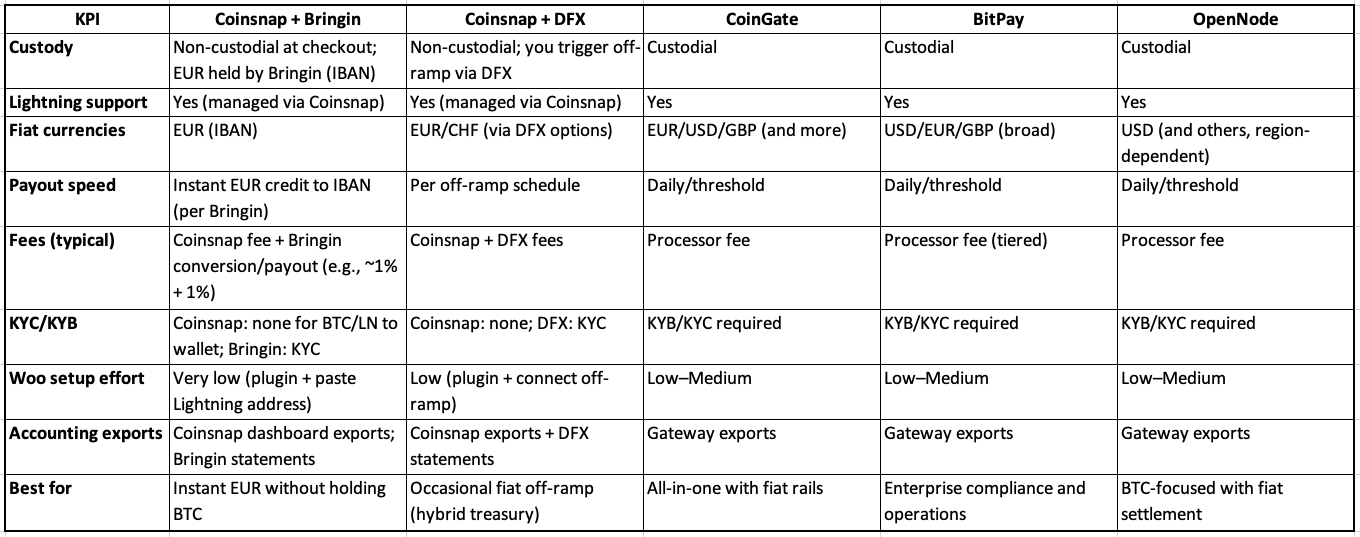
Click here to download the Excel comparison.
How does it work? Setup guide
1) Coinsnap + Bringin (fastest path to EUR)
- Install Coinsnap for WooCommerce and activate it.
- Add store and Lightning address in Coinsnap.
- Open Bringin account (KYC) and claim your Lightning address.
- Paste Bringin address into Coinsnap → Wallet.
- Enable Coinsnap under Woo → Settings → Payments; test €1 order.
→ Result: instant EUR credit to IBAN.
Installation guide.
2) Coinsnap + DFX (hybrid treasury)
- Install Coinsnap and connect your Lightning wallet.
- Create DFX account and connect settlement flow.
- Periodically convert BTC to EUR/USD/CHF and withdraw.
→ Result: Keep BTC until you off-ramp.
3) CoinGate / BitPay / OpenNode (custodial)
- Create merchant account (KYB/KYC).
- Install Woo plugin, paste API credentials.
- Select Lightning + on-chain, choose fiat currency, set payout schedule.
- Test and verify order mapping.
Clean Books, No Surprises: Practical Steps for Safe Accounting
Revenue recognition
Record each sale at the fiat value at payment time. Keep BTC amount, rate, fiat value, order ID, and TXID/payment hash for full auditability.
If you use fiat settlement
With Coinsnap + Bringin or custodial gateways, your ledger shows EUR/USD/GBP received;
you don’t carry BTC inventory. This simplifies VAT and removes FX tracking.
If you run a hybrid/self-custody model
Record revenue at fiat value, then track FX gains/losses between sale and conversion.
Use a fixed off-ramp policy to keep forecasts clean.
Coinsnap + CoinTracking automation
Connect Coinsnap to CoinTracking
to automate imports, calculate P&L, and generate tax-ready reports.
This is general information, not tax advice—consult your accountant.
Compliance & refunds
Custodial gateways and off-ramps (bank payouts) require KYB/KYC,
AML, and refund policies.
Non-custodial flows (BTC/LN → wallet) have no checkout KYB but still need
VAT, consumer rights, and data compliance.
Refunds are new payments—always verify address/invoice and log full details
(order ID, fiat rate, TXIDs).
FAQ
Can WooCommerce settle Bitcoin to my bank?
Yes—use CoinGate, BitPay, OpenNode, or non-custodial Coinsnap with Bringin/DFX.
Is Lightning compatible with fiat settlement?
Yes—Lightning receipts can be auto-converted via Coinsnap + Bringin or settled daily via custodial gateways.
Do I need KYB?
Yes for custodial/fiat providers; no for pure BTC/LN to your wallet (Coinsnap only).
What’s the easiest way to get EUR from Lightning sales?
Coinsnap + Bringin: paste your Lightning address and receive EUR instantly in your IBAN.
What is realised vs unrealised P&L?
Realised P&L: profit/loss on conversion to fiat.
Unrealised P&L: paper gains/losses while holding BTC.
What is AML/sanctions screening?
Processor compliance checks that verify identity and block prohibited transactions.
Required for fiat off-ramps; not typical for non-custodial flows.